Quotes (<blockquote>, <q>)
Introduction
Quotations are common in web content. Articles quote experts, documentation quotes specifications, blogs quote books or interviews, review pages quote customers, and educational pages quote definitions or examples. In normal writing, a reader can usually recognize a quotation because it is surrounded by quotation marks, separated from the paragraph, or introduced with words such as said, wrote, or stated. In HTML, however, the browser and assistive technologies need more than visual clues. They need semantic structure that explains what the text actually represents.
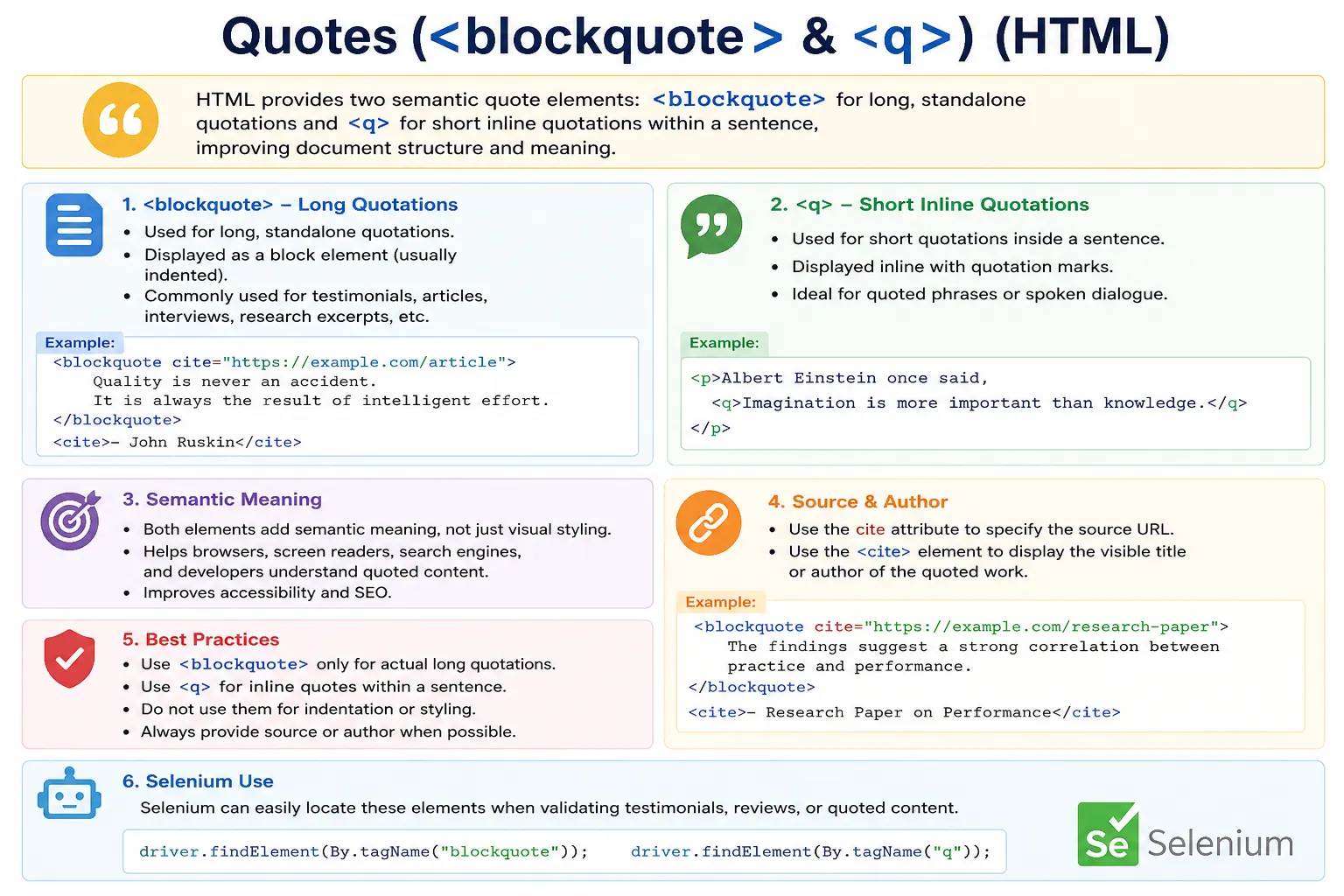
HTML provides two semantic elements for representing quotations: <blockquote> and <q>. Both elements are used for quoted content, but they are not interchangeable. The <blockquote> element is used for long quotations that stand apart from the surrounding paragraph. The <q> element is used for short inline quotations that remain inside a sentence or paragraph. Choosing the correct element improves readability, accessibility, search engine understanding, and the overall structure of the document.
For beginners, quote elements may look like simple formatting tags because browsers often indent <blockquote> and automatically add quotation marks around <q>. But their real value is semantic. They tell the browser, screen readers, search engines, and future developers that a specific piece of text is quoted from another speaker, source, or context. This is the same principle that makes semantic HTML important across the entire language: use elements for meaning first, and use CSS for appearance.
Why Use Quote Elements?
Without quote elements, quoted text is just ordinary text. Consider a paragraph that says, "Success is not final, failure is not fatal." A human reader may understand that it is a quote, especially if punctuation is used correctly. But the browser sees only a paragraph. The text has no special structural meaning. If the quote is important content, this is a missed opportunity to make the document clearer.
<p>
Success is not final,
failure is not fatal.
</p>
The browser can display this text, but it cannot know that the sentence is a quotation. Now compare that with the same content placed inside a quotation element.
<blockquote>
Success is not final,
failure is not fatal.
</blockquote>
In this second version, the quoted content is identified as a quotation. This is more meaningful, more maintainable, and more accessible. It also gives the developer a clean CSS hook for styling quotations consistently across a website without misusing generic containers such as <div> or <span>.
Types of HTML Quotes
HTML separates quotations into two broad types: long quotations and short inline quotations. A long quotation is usually a separate block of content. It may contain one sentence, several lines, or multiple paragraphs. It often appears in articles, testimonials, research pages, documentation, case studies, and blog posts. For this type of content, HTML provides <blockquote>.
A short inline quotation is usually part of a normal sentence. It may be a quoted phrase, a short statement, a spoken sentence, or a small expression embedded within a paragraph. For this type of content, HTML provides <q>. The difference is not only visual. It is structural. One quote is a separate block; the other belongs inside running text.
| Element | Purpose |
|---|---|
<blockquote> | Long quotation |
<q> | Short inline quotation |
The <blockquote> Element
The <blockquote> element represents a quotation that is set apart from the main text. It is commonly used when the quoted content is long enough to deserve its own block or when the quotation should visually stand out from the surrounding paragraphs. Browsers usually render blockquotes on a new line and indent them from the surrounding content, although the exact appearance can vary by browser and CSS.
<blockquote>
The future belongs to those
who believe in the beauty
of their dreams.
</blockquote>
When a browser renders this markup, the quote usually appears as a separate block. It may be indented from the left and right, depending on the browser's default stylesheet. This default indentation is useful for readability, but developers should not use <blockquote> merely to indent text. The element should be used only when the content is actually a quotation.
Syntax of <blockquote>
The syntax of <blockquote> is simple. Place the quoted content between the opening and closing tags. The content can be plain text, but in many real-world pages it is better to wrap longer quoted paragraphs inside <p> elements.
<blockquote>
Quoted Content
</blockquote>
A basic example can quote a short statement as a separate block.
<blockquote>
HTML is the standard markup language for creating webpages.
</blockquote>
For a quotation containing multiple paragraphs, each paragraph can be placed inside the blockquote. This is valid HTML and makes the internal structure of the quote clearer.
<blockquote>
  <p>Paragraph One</p>
  <p>Paragraph Two</p>
</blockquote>
This structure is especially useful for quoting passages from books, speeches, documentation, legal text, research material, or long testimonials. It keeps the quote semantically grouped while preserving paragraph-level readability inside the quoted content.
Use Cases for <blockquote>
The <blockquote> element is useful whenever a quotation should stand apart from the surrounding text. In an educational article, it may be used to highlight a definition or an important statement from an authority. In a product page, it may be used for a customer testimonial. In a blog post, it may be used to quote a section from another article. In documentation, it may be used to show an excerpt from a standard or specification.
<blockquote>
Learning never exhausts the mind.
</blockquote>
Testimonials are another common use case. A testimonial is often a short block of quoted feedback, so <blockquote> communicates that the words belong to a customer or user.
<blockquote>
SoftwareTips4U helped me learn web development with clear examples.
</blockquote>
Article citations also benefit from blockquotes. When a page discusses a source, standard, or external statement, placing the quoted portion inside <blockquote> separates the original author's words from the writer's explanation.
<blockquote>
A well-structured webpage improves accessibility and readability.
</blockquote>
The cite Attribute
The <blockquote> element supports the cite attribute. This attribute provides a URL that identifies the source of the quotation. The important point is that the cite attribute is metadata. Browsers do not automatically display it to users. It exists in the markup to identify the source in a machine-readable way.
<blockquote cite="https://www.w3.org">
HTML is the foundation of the Web.
</blockquote>
In this example, the URL in cite points to the source of the quoted statement. A user will not normally see that URL on the page unless the developer also displays it separately. If the source should be visible to readers, use visible text, a link, or the <cite> element near the quotation.
<blockquote cite="https://example.com/article">
  <p>The future depends on what you do today.</p>
</blockquote>

<p><cite>Example Article</cite></p>
This pattern is clear because the quote itself is marked with <blockquote>, the source URL is available as metadata through the cite attribute, and the visible citation is shown to users with <cite>.
The <q> Element
The <q> element represents a short inline quotation. It is designed for quoted text that belongs inside a sentence or paragraph rather than as a separate block. The most noticeable browser behavior is that browsers automatically insert quotation marks around the text in many languages and locales.
<p>
He said, <q>Hello World</q>.
</p>
The output is normally displayed as a sentence with quotation marks around the inline quote: He said, "Hello World." The quotation remains part of the paragraph, which is exactly what makes <q> different from <blockquote>.
Syntax of <q>
The syntax of <q> is also simple. Place the short quoted phrase or sentence between the opening and closing tags.
<q>Short Quote</q>In practical writing, <q> usually appears inside a paragraph.
<p>
The teacher said, <q>Practice every day.</q>
</p>
This tells the browser that only the phrase "Practice every day" is quoted, while the rest of the sentence is normal paragraph content. The result is clean, readable, and semantically accurate.
Use Cases for <q>
The <q> element is useful for short statements, dialogs, embedded quotations, and quoted phrases inside a paragraph. For example, a tutorial might say that a beginner described HTML as <q>easy to start but important to practice</q>. The quote is short and inline, so <q> is the correct element.
<p>
John said, <q>I am learning HTML.</q>
</p>
Inline quotes are also common in article writing. A paragraph might describe a new tool as a practical solution for everyday developers
. In that case, using <q> distinguishes the quoted phrase from the author's own words without breaking the flow of the paragraph.
<p>
The article described it as
<q>a revolutionary technology</q>.
</p>
<blockquote> vs <q>
The easiest way to decide between <blockquote> and <q> is to ask whether the quotation should stand alone or stay inside a sentence. If the quote is a separate section, use <blockquote>. If the quote is a short phrase inside a paragraph, use <q>.
<blockquote>
Long quotation here.
</blockquote>
A blockquote is a block-level quotation. It starts on a new line, is usually displayed as an indented block, and is best suited for longer quoted material.
<p>
Leonardo said, <q>Learning never exhausts the mind.</q>
</p>
The <q> element is an inline quotation. It stays in the same line flow as surrounding text and is best suited for short quoted phrases or sentences.
| Feature | <blockquote> | <q> |
|---|---|---|
| Quote Type | Long | Short |
| Element Type | Block-Level | Inline |
| Starts New Line | Yes | No |
| Auto Quotes | Usually No | Yes |
| Supports cite Attribute | Yes | Yes |
| Common Usage | Articles, testimonials, long references | Dialogs, short phrases, inline references |
Browser Rendering
Browsers apply default styling to quote elements. A <blockquote> is usually displayed as a block with margins, often giving it an indented appearance. A <q> is usually displayed inline with automatically generated quotation marks. These defaults are useful, but they should not be treated as the main reason for using the elements.
The browser's default rendering can be changed with CSS. You can style blockquotes with borders, padding, background colors, typography, or spacing. You can also adjust how inline quotes look. But the semantic meaning remains the same: <blockquote> means a block quotation, and <q> means an inline quotation.
Semantic Meaning
Quote elements are semantic elements. That means they describe the role of the content, not merely its appearance. A paragraph can look like a quote if you manually add quotation marks or indentation, but it is still just a paragraph. A <blockquote> or <q> tells the document structure that the content is quoted material.
This distinction matters in professional HTML. Semantic markup makes code easier to understand and maintain. A developer reading the page later can immediately recognize quoted content. Search engines can better interpret the content structure. Assistive technologies may communicate quotation boundaries more clearly. CSS can target quote elements directly without adding unnecessary classes to generic elements.
Accessibility Benefits
Accessibility is one of the strongest reasons to use the correct quote elements. Screen readers and other assistive technologies rely on semantic markup to explain content to users. When quotation elements are used properly, assistive technology can identify quoted material more meaningfully than it could if the quote were only styled visually.
Depending on the screen reader and settings, a user may hear cues such as quote, begin quote, end quote, or a change in reading behavior when encountering quoted text. This helps users understand where the author's words end and quoted words begin. In long articles, research pages, educational content, legal pages, and documentation, this distinction can be important for comprehension.
Good accessibility is not only about adding ARIA attributes. In many cases, the best accessibility improvement is simply choosing the correct HTML element. For quotations, that means using <blockquote> for long quotes and <q> for short inline quotes.
SEO and Content Structure
Search engines analyze HTML structure to understand page content. Quote elements can help search engines identify quoted material more accurately. This does not mean that using <blockquote> or <q> will automatically improve ranking, but it does make the document more meaningful and better structured.
In articles, tutorials, research content, documentation, and review pages, quotes often represent important supporting material. Proper quote markup helps separate original writing from referenced or quoted content. When combined with visible citations and clear source links, it also improves trust and readability for human readers.
Combining Quotes With <cite>
The <cite> element is commonly used near quotations to identify the title of a cited work or the source reference. It should not be confused with the cite attribute. The cite attribute stores a source URL as metadata, while the <cite> element displays citation text as part of the page content.
<blockquote>
  <p>The future depends on what you do today.</p>
</blockquote>

<p><cite>Mahatma Gandhi</cite></p>
This structure makes the quoted content visible and separates the source label from the quote itself. Many websites style the citation with a dash, smaller font size, or muted color. The exact presentation should be handled with CSS, while the HTML provides the semantic structure.
Real-World Example
A common real-world use case is a customer review section. The review text can be placed in a <blockquote>, and the customer's name can be placed near it as a citation or attribution.
<article>
  <h2>Customer Review</h2>

  <blockquote>
    <p>This course completely changed my understanding of HTML.</p>
  </blockquote>

  <p><cite>John Smith</cite></p>
</article>
In a normal article paragraph, an inline quote is more appropriate.
<p>
Albert Einstein said,
<q>Imagination is more important than knowledge.</q>
</p>
The first example uses <blockquote> because the testimonial is a separate quoted block. The second uses <q> because the quote is part of the paragraph's sentence flow.
Styling Quotes With CSS
Quote elements can be styled with CSS like any other HTML element. A common blockquote design uses a left border, padding, and a slightly different text color to visually separate the quote from normal paragraphs.
blockquote {
  border-left: 4px solid gray;
  padding-left: 15px;
  margin: 20px 0;
}
This CSS changes the appearance without changing the meaning. The content remains a block quotation. This is the correct relationship between HTML and CSS: HTML describes what the content is, and CSS controls how it looks.
For inline quotes, developers usually rely on browser-generated quotation marks. If a design requires custom quotation behavior, CSS can adjust quotation styles, but be careful not to remove clarity. Inline quotes should remain easy to recognize in the text.
Common Mistakes
A common mistake is using <q> for long quotes. This creates poor structure because long quoted material should not remain inline. If the quote spans multiple sentences or paragraphs, use <blockquote> instead.
<!-- Avoid this for long quotes -->
<q>
Several paragraphs of content...
</q>
Another mistake is using <blockquote> for a very short inline phrase. If the quote belongs inside a sentence, use <q>.
<!-- Better as an inline quote -->
<blockquote>Hello</blockquote>
Developers also sometimes manually add quotation marks around <q>. This can produce double quotation marks because browsers usually add quotation marks automatically.
<!-- Avoid this -->
"<q>Hello</q>"
Another mistake is assuming that the cite attribute will be displayed automatically. It will not. If readers need to see the source, add visible citation text or a link near the quotation.
Finally, some developers use <blockquote> merely to indent text. This is incorrect because indentation is presentation, not meaning. Use CSS margins, padding, or layout rules for indentation. Use <blockquote> only when the content is actually quoted.
Selenium Perspective
From a Selenium automation perspective, quote elements are easy to locate because they have clear tag names. If a page contains testimonials, reviews, article quotes, or scientific references, automated tests may verify that the correct quote elements exist and contain expected text.
driver.findElement(By.tagName("blockquote"));This locator can be useful when validating a testimonial or a long quoted passage. For inline quotes, Selenium can locate <q> elements in the same way.
driver.findElement(By.tagName("q"));In real projects, tests usually use more specific locators, such as CSS selectors within a review card or article section. Still, understanding semantic tags helps automation engineers write better validations. If the expected content is a quotation, checking for the correct quote element can validate both content and structure.
Common Interview Questions
A common interview question is: what is the purpose of <blockquote>? The answer is that it represents a long quotation that appears as a separate block of content.
Another common question is: what is the purpose of <q>? The answer is that it represents a short inline quotation inside a sentence or paragraph.
Interviewers may also ask which element automatically adds quotation marks. The answer is <q>. Browsers commonly render the content of <q> with quotation marks, while <blockquote> is usually rendered as a separate indented block.
Another useful question is whether <blockquote> is a block-level element. Yes, it behaves as a block-level quotation. The <q> element is inline. Both support the cite attribute, which can provide a source URL as metadata.
Interview-Ready Answer
The <blockquote> element is used for long quotations that appear as separate content blocks, while the <q> element is used for short inline quotations within a sentence or paragraph. Both elements provide semantic meaning, improve accessibility, and help browsers and search engines identify quoted content. The cite attribute can be used with both elements to provide a source URL, but that URL is not automatically displayed to users.
Key Takeaway
Use <blockquote> when the quoted content should stand alone as a separate block. Use <q> when the quoted content is short and belongs inside a normal sentence. Use the cite attribute when you want to provide a source URL as metadata, and use visible citation text when readers need to see the source.
The most important idea is that quote elements are semantic. They are not just shortcuts for indentation or quotation marks. They identify quoted material in a way that improves document structure, accessibility, maintainability, and readability.
One-Line Insight
Use <blockquote> for long quoted sections and <q> for short quoted phrases within a sentence.