Preformatted Text (<pre>)
Introduction
The <pre> element, short for preformatted text, is an HTML element used to display text exactly as it is written in the source code. In normal HTML, browsers collapse extra whitespace. Multiple spaces become a single space, line breaks are treated as ordinary whitespace, and indentation in the source file does not automatically appear in the browser. This behavior is useful for normal paragraphs because it allows developers to format source code neatly without changing the visual output. However, some content depends on whitespace, line breaks, tabs, and indentation. For that kind of content, HTML provides the <pre> element.
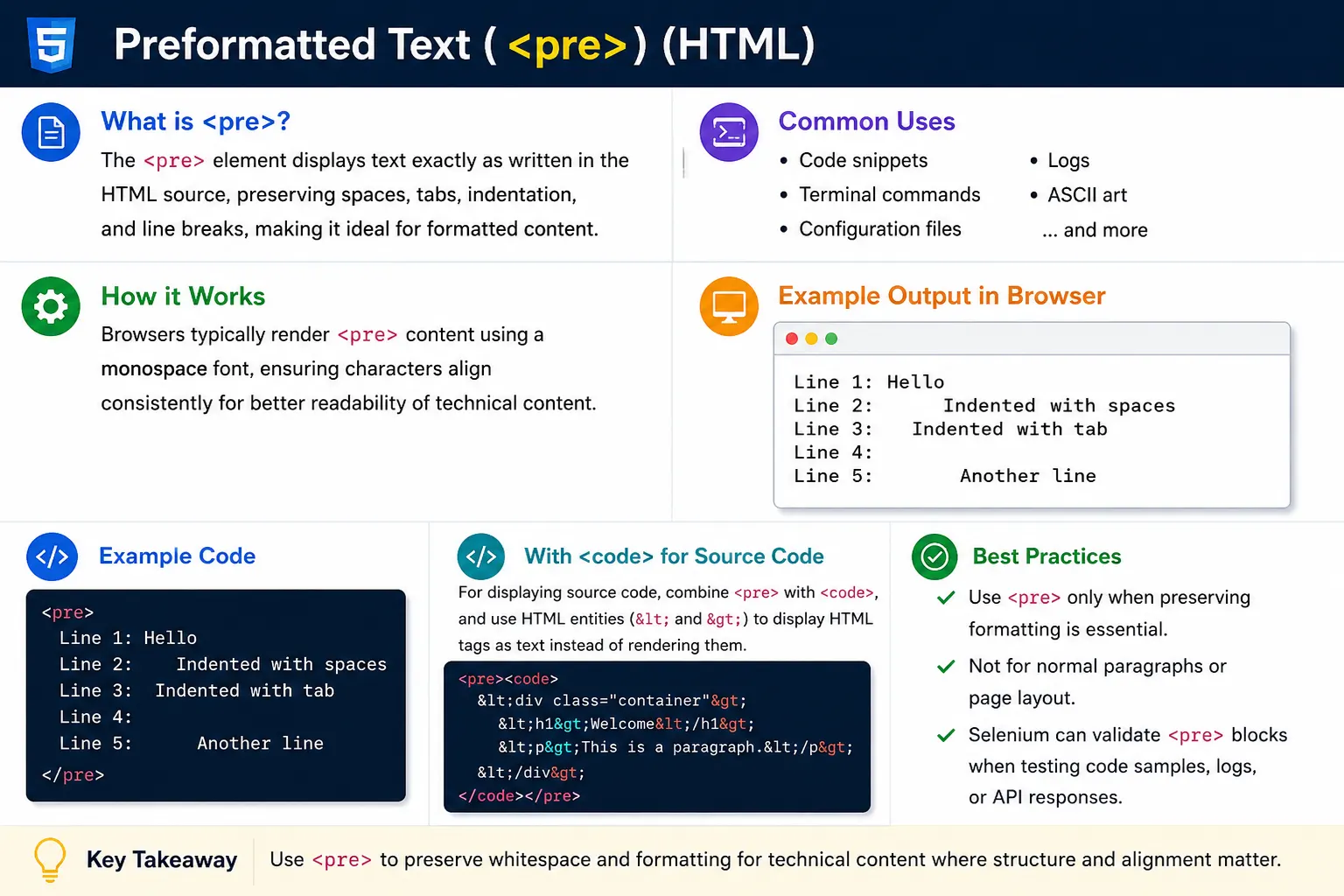
Preformatted text is especially useful when the formatting itself is part of the meaning. Code examples need indentation to show blocks and nesting. Command-line output needs line breaks to show terminal flow. Configuration files often depend on line structure. ASCII art depends entirely on spaces and line alignment. In these cases, ordinary paragraph text is not enough because the browser would collapse the formatting and change how the content appears.
The <pre> element tells the browser to preserve spaces, tabs, line breaks, and indentation. It is one of the simplest HTML tags, but it plays an important role in tutorials, documentation, developer guides, API references, programming lessons, technical blogs, and educational websites. Whenever the exact layout of text matters, <pre> is the correct HTML element to consider.
Understanding <pre> also helps beginners understand a larger HTML concept: not all text behaves the same way in the browser. Normal HTML text is optimized for flexible reading and wrapping. Preformatted text is optimized for exact preservation. Knowing when to use each approach leads to cleaner, more meaningful, and more maintainable HTML.
What Is the <pre> Tag?
The <pre> tag tells the browser to display its content exactly as written. If the source code contains a line break, the browser shows a line break. If the source code contains multiple spaces, the browser preserves those spaces. If the source code contains indentation, the indentation appears in the rendered page.
<pre>
Hello
World
</pre>
The output appears as two separate lines:
Hello
World
The line break between Hello and World is preserved. If the same content were written inside a normal paragraph, the browser would display it as a single line because normal text collapses whitespace. The <pre> element changes that behavior and treats the original formatting as meaningful.
This makes <pre> different from ordinary text containers. A paragraph is meant for flowing prose. A preformatted block is meant for content where the layout must remain stable. That difference is important because the element should be chosen based on the meaning and behavior of the content, not simply because a developer wants text to look different.
Why Do We Need <pre>?
To understand why <pre> exists, consider how normal HTML handles whitespace. If a developer writes several blank lines inside a paragraph, the browser does not show those blank lines. If a developer writes many spaces between two words, the browser usually displays only one space. This is called whitespace collapsing.
<p>
Hello


World
</p>
The browser displays this as:
Hello WorldThis behavior is correct for normal paragraphs because paragraphs are meant to flow naturally. The browser decides how to wrap text based on the available width. Extra source formatting does not affect the final output.
However, if the same text is placed inside a <pre> element, the blank lines are preserved:
<pre>
Hello


World
</pre>
The output remains:
Hello


World
This is why <pre> is needed. It protects formatting from being collapsed. When whitespace is part of the content, the browser should not simplify it. The <pre> element gives developers that control.
Basic Syntax
The syntax of <pre> is simple. The content that must preserve formatting is placed between the opening and closing tags.
<pre>
Content
</pre>
For example:
<pre>
SoftwareTips4U
HTML Tutorial
CSS Tutorial
</pre>
The browser displays each line separately:
SoftwareTips4U
HTML Tutorial
CSS Tutorial
The line breaks are not ignored. The content appears in the same basic structure as the source. This makes <pre> ideal for examples where the exact arrangement of text matters.
Preserving Multiple Spaces
One of the most visible differences between normal HTML and preformatted text is how spaces are handled. In a normal paragraph, multiple spaces are collapsed into a single space.
<p>
HTML     CSS     JavaScript
</p>
The browser displays:
HTML CSS JavaScriptThe extra spacing disappears. This is normal browser behavior. But when the same text is placed inside <pre>, the spaces remain intact.
<pre>
HTML     CSS     JavaScript
</pre>
The output preserves the spacing:
HTML CSS JavaScriptThis is useful when spacing is being used to align columns, show command output, demonstrate text formatting, or explain data layouts. Developers should still avoid using spaces for full webpage layout, but for technical text examples, preserved spacing is valuable.
Preserving Indentation
Indentation is another major reason to use <pre>. In programming and structured technical content, indentation helps readers understand hierarchy. Code blocks often rely on indentation to show nested blocks. Configuration examples may use indentation to show parent-child relationships. Simple outlines may use indentation to show structure.
<pre>
Course
    HTML
    CSS
    JavaScript
</pre>
The output keeps the indentation:
Course
    HTML
    CSS
    JavaScript
If this content were placed in a normal paragraph, the indentation would be lost. The browser would collapse the spaces and show the content as ordinary inline text. By using <pre>, the structure remains visible to the reader.
Browser Default Styling
Browsers typically display <pre> content using a monospace font. A monospace font is a font where each character occupies the same width. Common monospace fonts include Courier New, Consolas, Monaco, and similar code-friendly fonts. This default styling helps preserve alignment because every character takes up equal horizontal space.
For example, letters and numbers inside a preformatted block often line up more predictably than they would in a proportional font. This is important for code, tables made from plain text, terminal output, and ASCII diagrams.
<pre>
ABC
123
XYZ
</pre>
The browser usually displays this in a monospace style. Developers can customize the appearance with CSS, but the default behavior already supports technical readability. Most websites style <pre> blocks with a background color, padding, borders, rounded corners, and horizontal scrolling for long lines.
Common Uses of <pre>
The most common use of <pre> is displaying code samples. Code depends heavily on line breaks and indentation. If code were placed in a normal paragraph, the browser would collapse formatting and make the code difficult to read. Inside <pre>, the code retains its original structure.
<pre>
public class Test {
    public static void main(String[] args) {
        System.out.println("Hello");
    }
}
</pre>
Another common use is command-line examples. Terminal commands and output often need to appear exactly as a user would see them in a command prompt or shell.
<pre>
C:\Users\Suresh>

dir
</pre>
Configuration files are also well suited to <pre>. Many configuration formats are line-based, and preserving each line helps readers copy and understand the example.
<pre>
server.port=8080
db.username=admin
db.password=test
</pre>
ASCII art is another classic example. ASCII art depends almost entirely on spaces and line breaks. Without preserved formatting, the image or shape would break.
<pre>
   *
  ***
 *****
*******
</pre>
The output keeps the shape:
   *
  ***
 *****
*******
Displaying HTML Code
When displaying HTML code inside a webpage, developers must be careful. If raw HTML tags are written directly in the document, the browser may interpret them as real elements instead of showing them as text. For example, writing <h1>Hello</h1> directly in the page source creates a heading unless the angle brackets are escaped.
To display HTML code as text, use HTML entities such as < for the less-than sign and > for the greater-than sign.
<pre>
<h1>Hello</h1>
</pre>The browser displays:
<h1>Hello</h1>This pattern is common in tutorials because learners need to see the actual code. The <pre> element preserves formatting, while HTML entities prevent the browser from interpreting the code as real markup.
<pre> and HTML Entities
The <pre> element preserves whitespace, but it does not automatically escape HTML syntax. This is an important distinction. Preformatted text controls spacing and line breaks. It does not turn markup into plain text by itself. If the content includes characters such as < and >, developers should use entities when they want those characters displayed literally.
<pre>
<p>Hello</p>
</pre>The output appears as:
<p>Hello</p>This combination is one of the most common patterns in documentation: <pre> preserves formatting, and entities preserve literal code characters.
<pre> vs Normal Paragraph
A paragraph and a preformatted block serve different purposes. A paragraph is meant for normal readable prose. It flows naturally, wraps based on available width, and collapses extra whitespace. A preformatted block is meant for content whose whitespace must be preserved.
<p>
Line 1
Line 2
</p>
The paragraph output becomes:
Line 1 Line 2In contrast:
<pre>
Line 1
Line 2
</pre>
The preformatted output stays:
Line 1
Line 2
This difference should guide the choice. Use <p> for ordinary explanation. Use <pre> when the line breaks, spaces, or indentation are part of the content itself.
<pre> vs <code>
Many beginners confuse <pre> and <code>, but they have different roles. The <pre> element preserves formatting. The <code> element indicates that the content is computer code. A <code> element by itself does not necessarily preserve multiple lines or indentation the same way a <pre> block does.
<pre>
Code Here
</pre>
This preserves formatting. On the other hand:
<code>
System.out.println();
</code>
This identifies the content as code. The best practice for multi-line code blocks is usually to combine both elements:
<pre><code>
System.out.println("Hello");
</code></pre>
This gives both benefits. The <pre> element preserves formatting, and the <code> element communicates that the content is code. This pattern is common in programming documentation websites.
Example: Code Block
A realistic code block often uses <pre> and <code> together. The outer <pre> element preserves the layout, and the inner <code> element gives semantic meaning to the code content.
<pre><code>
public class Demo {
    public static void main(String[] args) {
        System.out.println("Hello");
    }
}
</code></pre>
This is how many programming tutorials, API guides, and technical references present examples. The indentation remains intact, and the markup clearly communicates that the block contains code. If a syntax highlighting library is added later, it can target these code blocks more easily.
Browser Processing
Normal text and preformatted text are processed differently by the browser. Normal text collapses spaces and line breaks. Preformatted text preserves spaces, tabs, and line breaks. This difference affects how content is displayed and how developers should structure examples.
For ordinary paragraphs, whitespace collapsing is helpful. It allows source code to be formatted neatly without creating unexpected gaps in the page. For code, logs, terminal output, and configuration files, whitespace collapsing would damage the content. The <pre> element prevents that damage by preserving the original layout.
Accessibility Considerations
Screen readers generally read preformatted content literally. This can be useful when the content is code, commands, logs, or technical documentation. However, large blocks of preformatted text can be harder to navigate if they are not introduced clearly. Developers should provide context before a <pre> block so users understand what they are about to read.
It is also important not to place large amounts of ordinary article content inside <pre>. Normal prose should use paragraphs, headings, lists, and other semantic elements. A preformatted block should be reserved for content where preserved formatting matters. This improves both readability and accessibility.
When code blocks are used, combining <pre> with <code> gives assistive technologies better semantic information. The page should also avoid relying only on visual alignment when the meaning is important. Explanatory text should support complex examples.
SEO Considerations
Search engines can read content inside <pre>, but preformatted text is not a replacement for proper page structure. A code block does not replace a heading, a paragraph, or a section. If a page contains important topics, those topics should still be introduced with meaningful headings and explained with normal text.
For example, a tutorial may include a heading, a paragraph explaining the concept, and then a <pre><code> block showing the example. This gives search engines and users both structure and detail. The preformatted block supports the content, but it should not be the only structure on the page.
Styling <pre> with CSS
Although browsers provide default styling for <pre>, most websites customize it. A styled preformatted block is easier to distinguish from normal text and more comfortable to read. Common styles include a light background, padding, a border, rounded corners, a readable monospace font, and horizontal scrolling for long lines.
pre {
    background: #f4f4f4;
    padding: 10px;
    border: 1px solid #ccc;
}
Good styling improves usability without changing the semantic purpose. The content is still preformatted text, but the design makes it easier to scan. For long code blocks, developers often add overflow-x: auto; so the block scrolls horizontally instead of breaking the page layout on smaller screens.
Real-World Example
A programming tutorial often combines headings, paragraphs, and preformatted code blocks. The heading introduces the topic, the paragraph explains the concept, and the code block shows the exact implementation.
<h2>Java Example</h2>

<pre><code>
public class Test {
    public static void main(String[] args) {
        System.out.println("Hello");
    }
}
</code></pre>
This structure is clear and professional. The heading provides structure, the code block preserves formatting, and the <code> element gives semantic meaning. This is the standard approach used by many technical learning websites.
Common Mistakes
One common mistake is using <pre> for page layout. For example, a beginner might try to align columns using spaces inside a preformatted block:
<pre>
Menu     Content     Footer
</pre>
This is poor practice. Layout should be handled with CSS layout techniques such as flexbox, grid, margins, and spacing utilities. The <pre> element is for preserving text formatting, not building page structure.
Another mistake is using <pre> for normal paragraphs. A sentence such as "HTML is a markup language" should be written as a paragraph, not as preformatted text.
Bad:
<pre>
HTML is a markup language.
</pre>

Better:
<p>
HTML is a markup language.
</p>
A third common mistake is forgetting HTML entities when displaying HTML code. If the goal is to show <h1>Hello</h1> as text, the angle brackets should be escaped. Otherwise, the browser may interpret the markup instead of displaying it as code.
<h1>Hello</h1>Selenium Perspective
From a Selenium testing perspective, <pre> elements are sometimes useful for validating technical output. A webpage may display logs, API responses, generated code snippets, command output, or configuration examples inside preformatted blocks. Selenium can locate those blocks and verify their text.
WebElement codeBlock =
driver.findElement(
By.tagName("pre")
);
This may be useful for log validation, code snippet validation, API response verification, and documentation testing. For example, if a page displays a formatted JSON response or a generated command, a test may confirm that the preformatted block contains the expected text.
However, tests should focus on meaningful validation rather than styling alone. The important question is whether the right content appears in the right structure. If the exact whitespace matters, <pre> makes that validation more predictable.
Comparison Table
| Feature | <p> | <pre> |
|---|---|---|
| Preserves Spaces | No | Yes |
| Preserves Line Breaks | No | Yes |
| Default Font | Normal | Monospace |
| Used for Paragraphs | Yes | No |
| Used for Code Blocks | Rarely | Commonly |
Common Interview Questions
A common interview question is: what is the purpose of the <pre> tag? The answer is that it displays preformatted text while preserving spaces, tabs, indentation, and line breaks exactly as written in the HTML source.
Another common question is whether <pre> preserves indentation. Yes, it preserves indentation, which makes it useful for code samples, command output, configuration files, and ASCII art. Interviewers may also ask what font <pre> usually uses. Browsers commonly display it in a monospace font, where each character has equal width.
It is also common to ask whether <pre> can be used with <code>. Yes, and this is often the best practice for code blocks. The <pre> element preserves formatting, while <code> indicates that the content is computer code.
Interview-Ready Answer
The <pre> element displays preformatted text exactly as written in the HTML source, preserving spaces, tabs, indentation, and line breaks. It is commonly used for code samples, command-line output, configuration files, logs, ASCII art, and other content where formatting must remain unchanged. For code blocks, it is commonly combined with <code> to provide both formatting preservation and semantic meaning.
Key Takeaway
The <pre> element is the correct choice when whitespace and formatting are part of the content itself. It preserves spaces, line breaks, tabs, and indentation, making it valuable for code examples, terminal output, configuration files, formatted data, and ASCII art. It is not meant for normal paragraphs or page layout.
Use paragraphs for regular written content. Use CSS for layout and spacing. Use <pre> when the exact text layout must remain unchanged. When displaying code, combine <pre> with <code> for a clean, semantic, and professional structure.
One-Line Insight
Use <pre> when whitespace and formatting are part of the content itself.