Paragraphs (<p>)
Introduction
The <p> element is one of the most commonly used and most fundamental tags in HTML. It is used to represent a paragraph of text, which means a self-contained block of written content focused on a particular idea, explanation, topic, or message. Almost every webpage uses paragraphs in some form, whether it is a blog post, tutorial, product description, news article, documentation page, landing page, or course content.
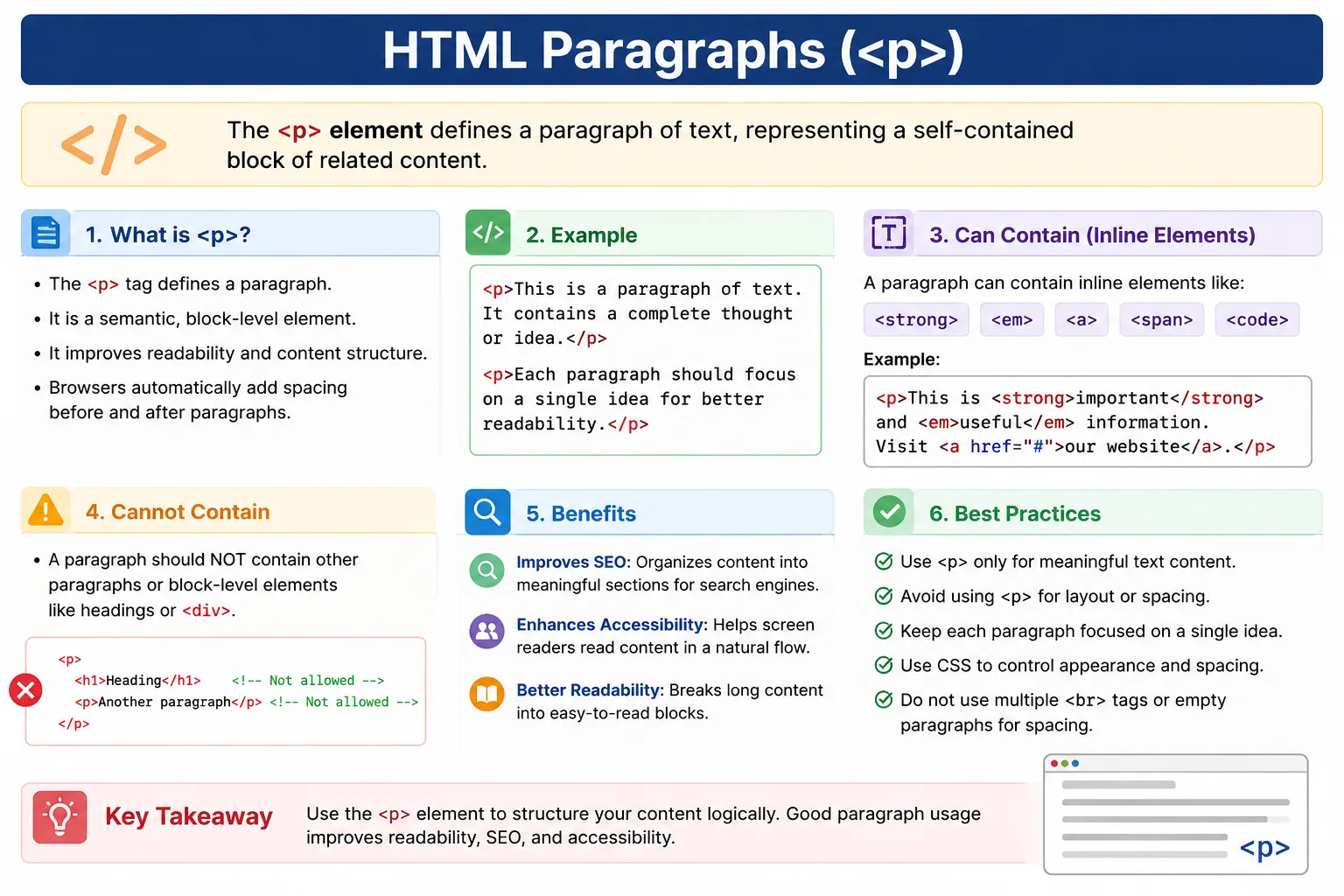
When people read content online, they do not want one long block of continuous text. Long unbroken text is difficult to scan, difficult to understand, and visually tiring. Paragraphs solve this problem by dividing content into meaningful sections. Each paragraph usually contains one idea or closely related group of ideas. This makes the page easier to read and more professional.
In HTML, paragraphs are created using the <p> tag.
Example:
<p>Welcome to SoftwareTips4U.</p>The browser displays the text as a separate block of content. By default, browsers also add space before and after paragraphs, which creates visual separation between text blocks.
Although the <p> tag looks simple, it is important to understand its behavior, semantic meaning, browser handling, whitespace rules, relationship with inline elements, SEO impact, accessibility value, and common mistakes. Using paragraphs correctly improves readability, document structure, search engine understanding, and user experience.
What Is a Paragraph Element?
The <p> element defines a paragraph in HTML.
A paragraph is a block of text that expresses one complete idea or topic.
Example:
<p>Welcome to SoftwareTips4U.</p>Browser output:
Welcome to SoftwareTips4U.The opening <p> tag tells the browser where the paragraph begins. The closing </p> tag tells the browser where the paragraph ends.
A paragraph can contain plain text and inline elements such as <strong>, <em>, <a>, and <span>. However, it should not contain another paragraph or block-level section elements.
The <p> element is semantic. This means it does not only affect appearance; it also communicates meaning. It tells the browser, search engines, screen readers, and developers that the enclosed content is paragraph text.
Why Paragraphs Are Important
Paragraphs are important because they organize text into readable blocks.
Without paragraphs, content becomes hard to read.
Example without proper paragraph structure:
Welcome to SoftwareTips4U. Learn HTML from basics. Master web development.This text may still be understandable, but it lacks clear separation. As content grows longer, the problem becomes worse.
With paragraphs:
<p>Welcome to SoftwareTips4U.</p>

<p>Learn HTML from basics.</p>

<p>Master web development.</p>
Now each idea is separated clearly.
This improves readability and gives the page better structure.
Paragraphs are especially important in articles, tutorials, documentation, blogs, lessons, product descriptions, and educational content.
Basic Syntax of the <p> Tag
The basic syntax is simple:
<p>
    Paragraph Content
</p>
Example:
<p>
    HTML is the foundation of web development.
</p>
This creates a paragraph containing the sentence “HTML is the foundation of web development.”
The content between <p> and </p> is treated as paragraph text.
Although browsers may sometimes auto-close paragraph tags, developers should always write both opening and closing tags for clarity and clean code.
Browser Default Behavior
Browsers apply default styling to paragraphs.
Example:
<p>First Paragraph</p>

<p>Second Paragraph</p>
The browser displays them with spacing between them:
First Paragraph

Second Paragraph
This spacing comes from default browser CSS. Most browsers apply margin before and after paragraph elements.
This is why paragraphs naturally appear separated from each other.
Developers can change the spacing using CSS.
Example:
p {
    margin-bottom: 16px;
}
Default behavior is useful, but CSS gives full control over final design.
Paragraphs Are Block-Level Elements
The <p> element is a block-level element.
This means it starts on a new line and occupies the full available width by default.
Example:
<p>Paragraph One</p>
<p>Paragraph Two</p>
Each paragraph appears on its own line.
A block-level element does not sit inline with neighboring content by default. It creates a new block in the document flow.
This behavior makes paragraphs suitable for body text and structured written content.
Example of Multiple Paragraphs
Consider:
<p>HTML is a markup language.</p>

<p>CSS styles web pages.</p>

<p>JavaScript adds interactivity.</p>
The browser displays:
HTML is a markup language.

CSS styles web pages.

JavaScript adds interactivity.
Each paragraph becomes a separate block.
This type of structure is common in tutorials and articles.
Paragraphs and Text Content
Paragraphs are designed for regular text content.
Common use cases include:
Articles, tutorials, blog posts, documentation, product descriptions, course pages, landing page text, user instructions, help messages, and general explanations.
For example:
<p>
    HTML is used to structure content on the web. It works together
    with CSS for styling and JavaScript for interactivity.
</p>
This is a proper use of a paragraph because the content expresses a complete idea.
Multi-Line Source Code Behavior
HTML ignores most line breaks and extra spaces inside paragraph content.
Example:
<p>
HTML is the
foundation of
web development.
</p>
Browser output:
HTML is the foundation of web development.Even though the source code contains multiple lines, the browser collapses the whitespace and displays the text as a normal sentence.
This is an important rule in HTML.
Line breaks in source code do not automatically create line breaks in browser output.
Whitespace Collapsing
HTML collapses multiple spaces into a single space.
Example:
<p>
Hello     World
</p>
Browser output:
Hello WorldEven though there are several spaces between “Hello” and “World” in the source code, the browser displays only one space.
This behavior is called whitespace collapsing.
Whitespace collapsing helps browsers handle HTML formatting consistently, but beginners often find it surprising.
Line Breaks Inside Paragraphs
If you write:
<p>
Line 1
Line 2
Line 3
</p>
The browser displays:
Line 1 Line 2 Line 3This happens because normal line breaks inside HTML source are treated as whitespace.
If you want visible line breaks, you must use the <br> tag or separate paragraphs.
Using <br> Inside Paragraphs
The <br> tag creates a line break.
Example:
<p>
Line 1<br>
Line 2<br>
Line 3
</p>
Browser output:
Line 1
Line 2
Line 3
This is useful for addresses, poems, song lines, or short formatted text where line breaks are meaningful.
However, <br> should not be used repeatedly to create paragraph spacing. For separate ideas, use separate <p> elements.
Poor practice:
Text 1<br><br><br>
Text 2
Better:
<p>Text 1</p>

<p>Text 2</p>
Use HTML for structure and CSS for spacing.
Paragraphs and Inline Elements
Paragraphs can contain inline elements.
Example:
<p>
Welcome to <strong>SoftwareTips4U</strong>.
</p>
The output shows the paragraph text, with “SoftwareTips4U” emphasized in bold.
Common inline elements used inside paragraphs include:
<strong>
<em>
<a>
<span>
<code>
<img>
Example:
<p>
Learn <strong>HTML</strong>, practice with
<em>real examples</em>, and visit
<a href="#">SoftwareTips4U</a>.
</p>
This is valid because these elements do not break the paragraph structure.
Invalid Nested Paragraphs
Paragraphs cannot contain other paragraphs.
Bad:
<p>
    First

    <p>Second</p>
</p>
This is invalid HTML.
Correct:
<p>First</p>

<p>Second</p>
Each paragraph should be separate.
Browsers may automatically correct invalid nested paragraphs, but the resulting DOM may not be what the developer expects. This can create layout issues, CSS problems, or automation confusion.
Paragraphs and Semantic Meaning
The <p> tag has semantic meaning.
It tells the browser that the content is a paragraph—a complete block of text expressing a thought or idea.
This semantic meaning helps:
Browsers, search engines, accessibility tools, screen readers, developers, and automation tools.
A paragraph is not just a visual container. It represents meaningful text content.
This is why using <p> for actual paragraph text is better than using a generic <div>.
Paragraphs and SEO
Search engines analyze paragraph content to understand page meaning.
Example:
<p>
HTML is used to structure webpages.
</p>
This paragraph contributes to the search engine’s understanding of the page topic.
Well-written paragraphs help search engines identify relevant keywords, context, and topic depth.
However, paragraphs should be written for users first, not stuffed with keywords. Search engines are designed to reward useful and natural content.
Good paragraph structure improves content readability, which indirectly supports SEO performance.
Paragraphs and Accessibility
Paragraphs improve accessibility because they divide content into logical reading blocks.
Screen readers read paragraph content in a natural flow.
Example:
<p>Introduction</p>

<p>Main Content</p>
The user can understand that these are separate text sections.
Without paragraph structure, content may sound like one long continuous block.
Clear paragraph usage improves listening experience for screen reader users.
Paragraphs and CSS
Paragraphs can be styled with CSS.
HTML:
<p>
Learning HTML is fun.
</p>
CSS:
p {
    color: blue;
    font-size: 18px;
}
This changes the appearance of all paragraph elements.
CSS can control:
Font size, color, line height, margin, padding, width, alignment, background color, spacing, and typography.
Example:
p {
    line-height: 1.6;
    margin-bottom: 20px;
}
Good paragraph styling improves readability significantly.
Paragraphs vs Headings
Paragraphs and headings serve different purposes.
A heading represents a title or section label.
Example:
<h1>HTML Tutorial</h1>A paragraph represents content under that heading.
Example:
<p>
HTML is a markup language used to structure webpages.
</p>
Together:
<h1>HTML Tutorial</h1>

<p>
HTML is the foundation of web development.
</p>
The heading introduces the topic. The paragraph explains it.
Do not use headings for normal paragraph text, and do not use paragraphs as section titles when a heading is more appropriate.
Paragraphs vs Div
A <div> is a generic container. It does not provide specific semantic meaning.
Example:
<div>Hello</div>A paragraph provides semantic meaning.
Example:
<p>Hello</p>If the content is paragraph text, use <p>.
If you only need a layout container, use <div> or a semantic element such as <section>, <article>, or <main> when appropriate.
Using the correct element improves accessibility, SEO, and code clarity.
Real-World Example
A typical article structure may look like this:
<article>

<h1>What Is HTML?</h1>

<p>
HTML stands for HyperText Markup Language.
</p>

<p>
It is used to structure webpages.
</p>

<p>
HTML works together with CSS and JavaScript.
</p>

</article>
This is clean, readable, and semantic.
The article has a main heading and multiple paragraphs that explain the topic step by step.
This structure is common in blogs, tutorials, and documentation pages.
Common Mistake: Using Paragraphs for Layout
Paragraphs should not be used as layout containers.
Bad:
<p>
Navigation Menu
</p>
If the content is navigation, use:
<nav>
    Navigation Menu
</nav>
HTML has semantic elements for different content types. Use the correct one.
Common Mistake: Nesting Paragraphs
Bad:
<p>
    <p>Text</p>
</p>
This is invalid.
Correct:
<p>Text</p>Each paragraph must stand independently.
Common Mistake: Using Multiple <br> Tags Instead of Paragraphs
Bad:
Text 1<br><br><br>
Text 2
Better:
<p>Text 1</p>

<p>Text 2</p>
Use paragraphs for text blocks. Use CSS margins for spacing.
Common Mistake: Empty Paragraphs for Spacing
Bad:
<p></p>
<p></p>
This is not proper structure.
Use CSS instead:
.section {
    margin-top: 30px;
}
Empty paragraphs create meaningless markup and may confuse accessibility tools.
Paragraphs and Selenium
Selenium can locate paragraph elements when validating content.
Example:
WebElement paragraph =
driver.findElement(
By.tagName("p")
);
Paragraphs are often used to validate:
Messages, descriptions, instructions, error content, success text, product descriptions, and article content.
For example, a test may verify that a confirmation message appears inside a paragraph after submitting a form.
Semantic paragraph structure makes automation easier because content is organized predictably.
Comparison Table
| Feature | <p> |
|---|---|
| Purpose | Paragraph text |
| Type | Block-level element |
| Semantic Meaning | Text content |
| Can Contain Inline Elements | Yes |
Can Contain Another <p> | No |
| SEO Friendly | Yes |
| Accessibility Friendly | Yes |
Common Interview Questions
A common question is: What is the purpose of the <p> tag?
The <p> tag defines a paragraph of text.
Is <p> a block-level element?
Yes. It starts on a new line and occupies full available width by default.
Can paragraphs contain headings?
No. Headings should not be placed inside paragraphs.
Can paragraphs contain inline elements?
Yes. Paragraphs can contain inline elements such as <strong>, <em>, <a>, and <span>.
Can paragraphs be nested?
No. Nested paragraphs are invalid HTML.
Interview-Ready Answer
The <p> element represents a paragraph of text in HTML. It is a block-level semantic element used to group related text into readable sections. Paragraphs improve document structure, readability, accessibility, and SEO. They can contain inline elements but should not contain other paragraphs or block-level structural elements.
Key Takeaway
The <p> element is one of the basic building blocks of HTML. It is used whenever content represents a complete block of text or a single idea. Paragraphs improve readability, provide semantic meaning, support accessibility, and help search engines understand written content.
Use <p> for real paragraph text, not for layout or spacing. Use CSS to control appearance and spacing, and use semantic elements when the content has a more specific purpose.
One-Line Insight
Use <p> whenever you have a complete block of text representing a single idea or thought.