Ordered Lists (<ol>)
Introduction
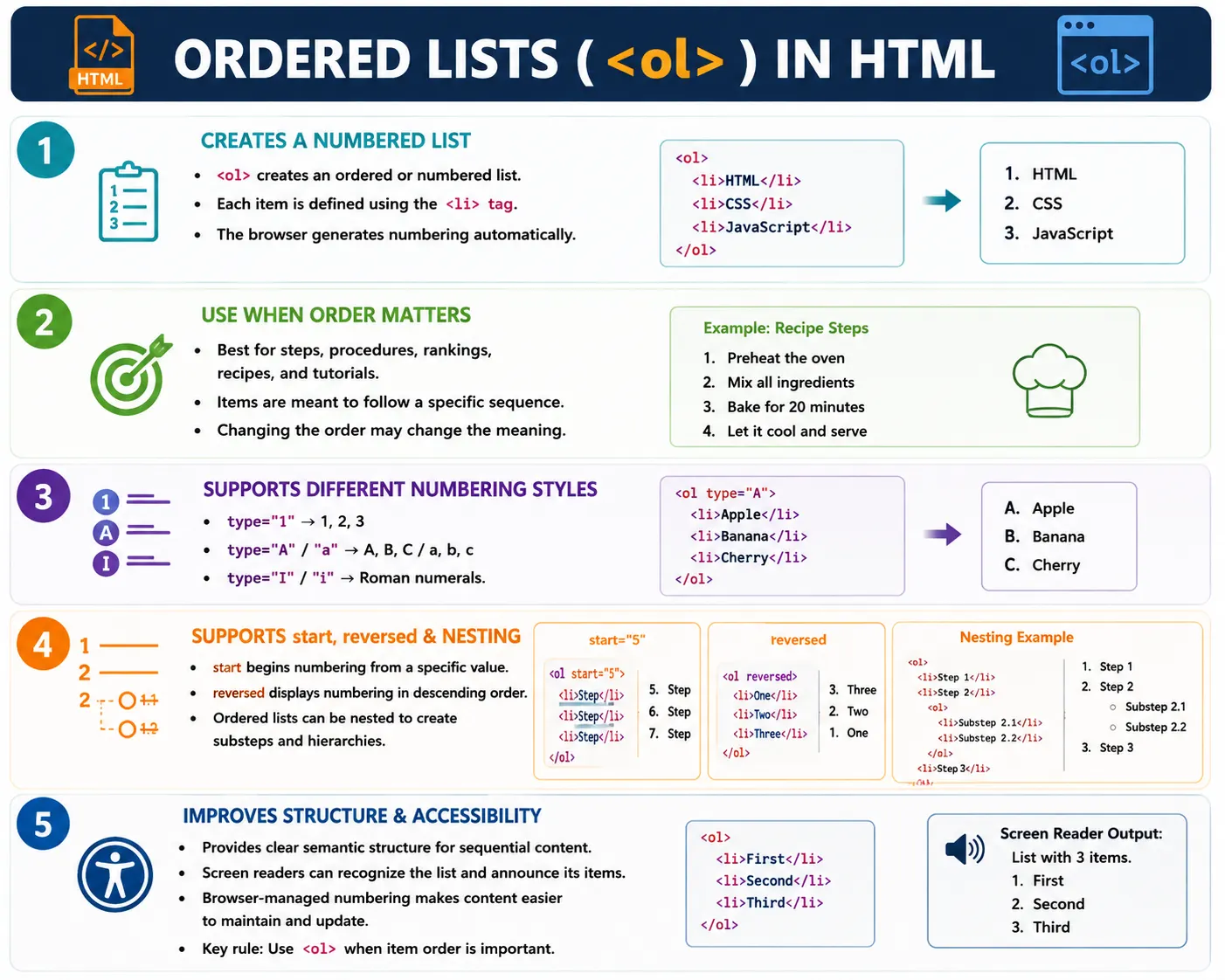
An ordered list is an HTML element used to display a collection of items in a specific sequence or order. Each item is automatically numbered or labeled by the browser. Ordered lists are useful when the position of each item matters and when changing the order would change the meaning of the content.
The ordered list element is <ol>, and each list item is represented using <li>. Together, these two elements create a structured sequence. The browser handles the numbering automatically, so developers do not need to type 1, 2, 3 manually before each item.
Ordered lists appear simple, but they are important in real websites. They are used for tutorials, installation guides, recipes, ranking tables, workflow steps, documentation pages, learning paths, algorithms, and process explanations. When a user needs to complete actions in the correct order, an ordered list communicates that order more clearly than plain paragraphs.
What Is an Ordered List?
An ordered list displays items where order matters. For example, if a beginner is learning how to test an HTML file, the sequence matters.
1. Install Browser
2. Create HTML File
3. Open in Browser
4. Verify Output
If these steps are rearranged, the process becomes confusing. A user cannot verify output before opening the file in a browser. A user cannot open a file before creating it. Because the sequence is meaningful, an ordered list is the correct HTML structure.
Ordered lists give both visual and semantic meaning. Visually, users see numbers or labels. Semantically, browsers and assistive technologies understand that the content is a sequence of list items.
Why Use Ordered Lists?
Ordered lists are useful when steps must be followed in sequence, rankings are displayed, instructions are presented, procedures are documented, algorithms are explained, or recipes are written. In all these cases, the order gives meaning to the content.
Step 1
Step 2
Step 3
The order is meaningful because each step depends on the previous one. When a tutorial tells users how to install Java, configure environment variables, and verify installation, the order matters. If the same information is written as a plain paragraph, users may miss the sequence. If it is written as an unordered bullet list, users may assume the items can be completed in any order.
Using the correct list type is part of writing semantic HTML. Semantic HTML is not only about how content looks. It is about using the element that matches the meaning of the content.
Basic Syntax
The basic syntax of an ordered list starts with <ol>. Each item inside the list is written using <li>.
<ol>
  <li>Item 1</li>
  <li>Item 2</li>
  <li>Item 3</li>
</ol>
A real example might list the learning order for front-end development.
<ol>
  <li>Learn HTML</li>
  <li>Learn CSS</li>
  <li>Learn JavaScript</li>
</ol>
The browser renders this as a numbered list.
1. Learn HTML
2. Learn CSS
3. Learn JavaScript
The developer writes the structure, and the browser generates the numbering. This is cleaner and easier to maintain than typing numbers directly into the content.
Structure of an Ordered List
The structure of an ordered list is simple. The <ol> element is the parent container, and each <li> element is a child item.
ol
 │
 ├── li
 ├── li
 └── li
In HTML, the structure looks like this:
<ol>
  <li>HTML</li>
  <li>CSS</li>
  <li>JavaScript</li>
</ol>
This parent-child relationship matters. List items should be placed inside the list. Text should not be placed directly inside <ol> without an <li> wrapper. Proper structure helps browsers, screen readers, validators, and CSS styling.
Browser Rendering
Browsers automatically render ordered lists with numbering. For example:
<ol>
  <li>Apple</li>
  <li>Mango</li>
  <li>Orange</li>
</ol>
The output appears as:
1. Apple
2. Mango
3. Orange
The browser generates the numbers automatically. If a new item is added between Apple and Mango, the numbering updates without manual correction. This reduces maintenance errors and keeps the HTML clean.
Ordered List vs Unordered List
Ordered lists and unordered lists both group related items, but they communicate different meanings. An ordered list communicates sequence. An unordered list communicates collection.
<ol>
  <li>Step 1</li>
  <li>Step 2</li>
</ol>
The output is numbered because the order matters.
1. Step 1
2. Step 2
An unordered list uses bullets and is better when sequence does not matter.
<ul>
  <li>Apple</li>
  <li>Mango</li>
</ul>
• Apple
• MangoIf the items are fruits, their order usually does not change the meaning. If the items are installation steps, order is critical. Choosing between <ol> and <ul> should be based on meaning, not only visual preference.
When to Use Ordered Lists
Use ordered lists when order matters. Common examples include installation instructions, exam rankings, recipe steps, tutorials, workflow processes, troubleshooting procedures, legal clauses, and algorithm explanations.
A tutorial is a strong example because each step builds on the previous one.
<ol>
  <li>Open VS Code</li>
  <li>Create index.html</li>
  <li>Save File</li>
  <li>Open Browser</li>
</ol>
The rendered result is easy to follow.
1. Open VS Code
2. Create index.html
3. Save File
4. Open Browser
This format is easier to scan than a long paragraph. It reduces cognitive load because the user can complete one step at a time.
Nested Ordered Lists
Lists can contain other lists. This is called nesting. Nested ordered lists are useful when a step contains substeps or when content has multiple levels of hierarchy.
<ol>
  <li>Frontend
    <ol>
      <li>HTML</li>
      <li>CSS</li>
    </ol>
  </li>
  <li>Backend</li>
</ol>
The output is conceptually:
1. Frontend
    1. HTML
    2. CSS
2. Backend
The nested list belongs inside the parent <li>. This is important. The sublist is part of the Frontend item, so it should be written inside that item rather than after it as a separate sibling.
Multi-Level Ordered Lists
Multi-level ordered lists extend the nesting idea to more than two levels. They are useful for documentation, course outlines, policy documents, and structured learning paths.
<ol>
  <li>Web Development
    <ol>
      <li>Frontend
        <ol>
          <li>HTML</li>
          <li>CSS</li>
        </ol>
      </li>
    </ol>
  </li>
</ol>
Multi-level lists should be used carefully. They are powerful when hierarchy matters, but too many levels can make a page difficult to read. If a list becomes deeply nested, consider splitting the content into headings and separate sections.
The type Attribute
The type attribute changes the numbering style of an ordered list. The syntax is:
<ol type="value">The default type is 1, which produces normal numbers.
<ol type="1">
  <li>HTML</li>
  <li>CSS</li>
</ol>
1. HTML
2. CSSUppercase letters can be used with type="A".
<ol type="A">
  <li>HTML</li>
  <li>CSS</li>
</ol>
A. HTML
B. CSSLowercase letters can be used with type="a".
<ol type="a">
  <li>HTML</li>
  <li>CSS</li>
</ol>
a. HTML
b. CSSUppercase Roman numerals use type="I", and lowercase Roman numerals use type="i".
<ol type="I">
  <li>HTML</li>
  <li>CSS</li>
</ol>
I. HTML
II. CSS<ol type="i">
<li>HTML</li>
<li>CSS</li>
</ol>i. HTML
ii. CSSOrdered List Types Summary
| Value | Output Example |
|---|---|
| 1 | 1, 2, 3 |
| A | A, B, C |
| a | a, b, c |
| I | I, II, III |
| i | i, ii, iii |
The start Attribute
The start attribute starts numbering from a specified value. This is useful when a list continues from an earlier section or when a document is split into multiple parts.
<ol start="5">
  <li>HTML</li>
  <li>CSS</li>
</ol>
The output starts at 5.
5. HTML
6. CSS
Another example starts at 10.
<ol start="10">
  <li>Chapter</li>
  <li>Summary</li>
</ol>
10. Chapter
11. SummaryThe start attribute changes the numbering without requiring manual numbers in the content.
The reversed Attribute
The reversed attribute displays numbering in reverse order. It is a boolean attribute, so it does not require a value.
<ol reversed>
  <li>Bronze</li>
  <li>Silver</li>
  <li>Gold</li>
</ol>
The output counts backward.
3. Bronze
2. Silver
1. Gold
This can be useful for countdowns, rankings, release notes, or lists where the visual numbering should decrease.
Combining Attributes
Ordered list attributes can be combined. For example, a list can use uppercase letters and start from the third value.
<ol type="A" start="3">
  <li>HTML</li>
  <li>CSS</li>
</ol>
The output begins with C.
C. HTML
D. CSS
This is useful in formal documents where sections continue across pages or where sublists need a specific numbering style.
Real-World Example: Installation Guide
Installation guides are one of the best examples of ordered lists because users must follow the steps in sequence.
<h2>Installation Steps</h2>

<ol>
  <li>Download Software</li>
  <li>Install Package</li>
  <li>Restart System</li>
  <li>Launch Application</li>
</ol>
The output is:
1. Download Software
2. Install Package
3. Restart System
4. Launch Application
This is easier to follow than a paragraph because each action is separated and numbered. Users can pause, complete one step, and continue with the next.
Real-World Example: Ranking
Rankings also require ordered lists because position matters. First place is different from second place.
<ol>
  <li>India</li>
  <li>USA</li>
  <li>Japan</li>
</ol>
1. India
2. USA
3. JapanIf the same items were shown as bullets, the ranking meaning would be lost. Ordered lists preserve that meaning.
Accessibility Benefits
Ordered lists are accessibility friendly because screen readers can identify them as lists. For example:
<ol>
  <li>HTML</li>
  <li>CSS</li>
</ol>
A screen reader may announce that this is a list with two items, then announce each item in sequence.
List with 2 items
1 HTML
2 CSS
This helps users understand structure. A visually styled group of paragraphs may look like a list to sighted users, but assistive technologies may not recognize it as a list unless proper HTML elements are used.
SEO Benefits
Ordered lists provide structured content that search engines can understand more effectively. They are especially useful for steps, processes, rankings, instructions, and how-to content. Search engines often look for clearly structured content when evaluating whether a page answers a user's question.
For example, a page explaining how to configure Maven can use an ordered list for the setup process. A page explaining how to create an HTML file can use an ordered list for the workflow. This structure makes the content easier to read and easier to interpret.
Ordered Lists in Documentation
Documentation websites use ordered lists frequently. Common uses include installation steps, setup guides, tutorials, checklists, troubleshooting procedures, and release instructions.
<ol>
  <li>Install Java</li>
  <li>Install Maven</li>
  <li>Configure Environment Variables</li>
</ol>
This communicates the correct order clearly. If Maven is installed before Java, the setup may fail. If environment variables are configured before the required tools are installed, the process may be confusing. Ordered lists prevent that ambiguity.
Common Mistakes
A common mistake is using an ordered list when order does not matter. For example, fruits normally do not require sequence.
<ol>
  <li>Apple</li>
  <li>Mango</li>
</ol>
A better choice is an unordered list.
<ul>
  <li>Apple</li>
  <li>Mango</li>
</ul>
Another mistake is forgetting the <li> element.
<ol>
HTML
CSS
</ol>
The correct version wraps each item in <li>.
<ol>
  <li>HTML</li>
  <li>CSS</li>
</ol>
Incorrect nesting is another common issue.
<ol>
  <li>HTML</li>
  <ol>
    <li>CSS</li>
  </ol>
</ol>
The nested list should be inside the parent list item.
<ol>
  <li>
    HTML
    <ol>
      <li>CSS</li>
    </ol>
  </li>
</ol>
Selenium Perspective
From a Selenium automation perspective, ordered lists can be located by tag name.
WebElement list =
driver.findElement(
  By.tagName("ol")
);
List items can also be collected using the li tag.
List<WebElement> items =
driver.findElements(
  By.tagName("li")
);
A test can print all items.
for(WebElement item : items)
{
    System.out.println(
        item.getText()
    );
}
Automation can verify that a tutorial displays the correct sequence, that the expected number of steps is present, and that the first or last item contains the expected text. For documentation and learning pages, list structure can be part of content validation.
Comparison Table
| Feature | <ol> |
|---|---|
| Numbered Items | Yes |
| Supports Nested Lists | Yes |
| Supports Start Value | Yes |
| Supports Reverse Order | Yes |
| Supports Different Numbering Styles | Yes |
| Accessibility Friendly | Yes |
Common Interview Questions
A common interview question is: what is the purpose of <ol>? The answer is that it creates an ordered or numbered list where item sequence matters.
Another common question is which tag represents a list item. The answer is <li>. Interviewers may also ask the default numbering style. The default style is normal numeric numbering: 1, 2, 3.
They may ask which attribute changes numbering style. The answer is type. They may ask which attribute changes the starting number. The answer is start. They may ask which attribute reverses numbering. The answer is reversed.
Interview-Ready Answer
The <ol> element creates an ordered list where item sequence matters. Each item is defined using <li>, and the browser automatically generates numbering. The element supports attributes such as type, start, and reversed to customize numbering styles and order.
Key Takeaway
Ordered lists should be used when sequence is meaningful. They are ideal for steps, procedures, rankings, recipes, tutorials, algorithms, and structured documentation. They improve readability because users can process one item at a time. They improve accessibility because assistive technologies can announce list structure. They improve maintainability because browsers handle numbering automatically.
The most important rule is simple: use <ol> when changing the item order would change the meaning. Use <ul> when the items are related but the order does not matter.
One-Line Insight
Use <ol> whenever the order of items is important and changing the sequence would change the meaning.