Nested Lists
Introduction
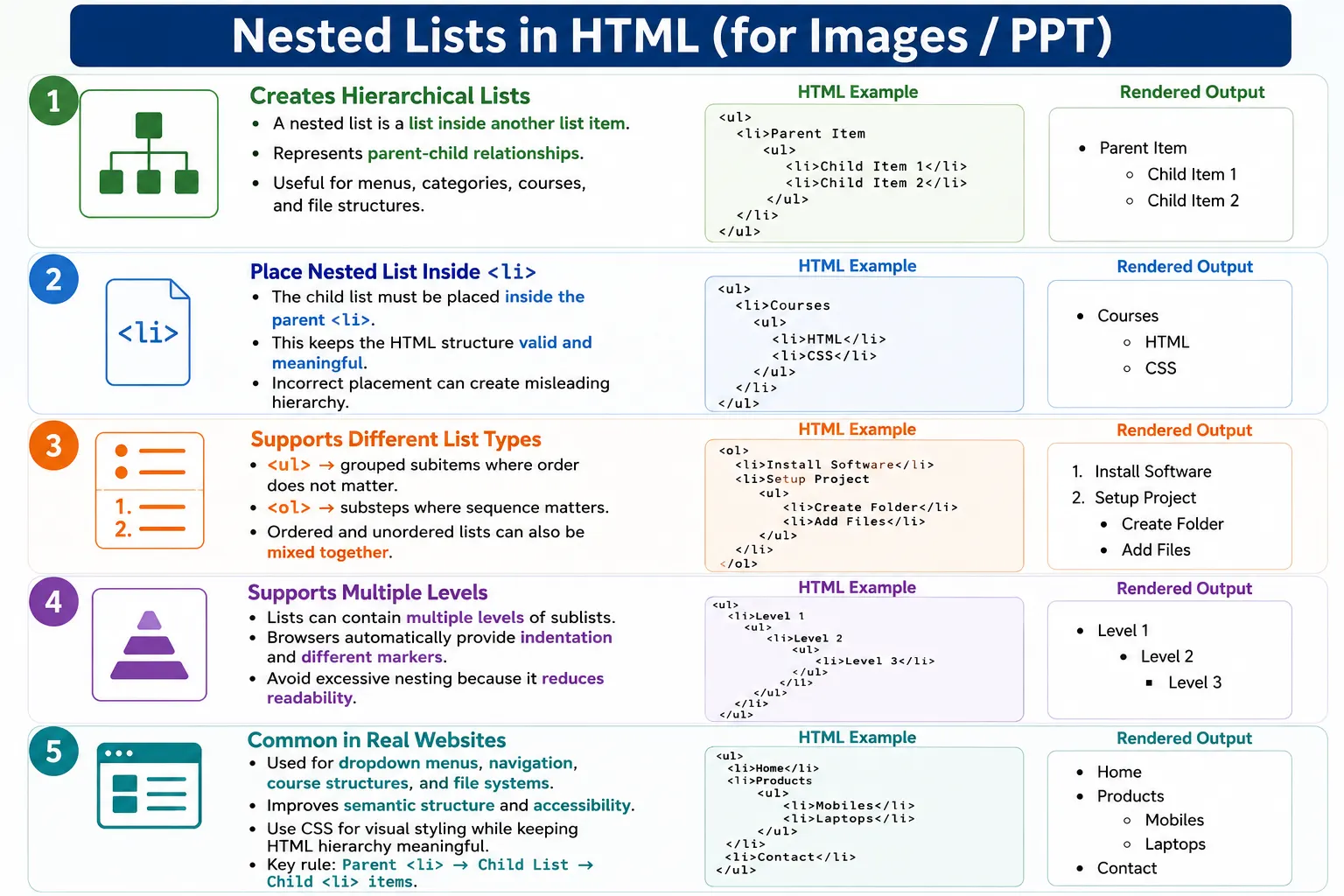
A nested list is a list placed inside another list item. HTML allows lists to contain other lists, creating a hierarchical structure. This is useful when content has parent-child relationships, such as categories and subcategories, navigation menus, multi-level menus, documentation outlines, product hierarchies, organization charts, and course structures.
Nested lists are important because many real websites do not present information as a flat list. A course may contain modules, and each module may contain lessons. A website menu may contain a Courses item, and that item may contain HTML, CSS, and JavaScript links. A file system may contain folders, and each folder may contain files. Nested lists represent these relationships naturally.
A simple hierarchy can be visualized like this:
Frontend
 ├─ HTML
 ├─ CSS
 └─ JavaScript

Backend
 ├─ Java
 └─ Python
This hierarchy is represented using lists inside list items. The outer list represents the main categories, and the inner lists represent the subitems that belong to those categories.
What Is a Nested List?
A nested list is simply a list that contains another list. More precisely, the nested list should be placed inside a parent <li> element.
List
  ↓
Contains Another List
A basic example uses an unordered list inside another unordered list.
<ul>
  <li>
    Frontend
    <ul>
      <li>HTML</li>
      <li>CSS</li>
    </ul>
  </li>
</ul>
In this example, HTML and CSS are not separate top-level items. They belong under Frontend. The HTML structure communicates that relationship clearly.
Why Use Nested Lists?
Nested lists help represent parent-child relationships. These relationships appear in many types of content: categories and subcategories, chapters and topics, departments and employees, menu and submenu items, folders and files, and course sections and lessons.
Without nested lists, developers may try to show hierarchy using indentation, spaces, or line breaks. That may look acceptable visually, but it does not create semantic structure. A screen reader, browser, crawler, or automated test cannot reliably understand that one item belongs inside another unless the HTML structure communicates it.
Nested lists make hierarchy explicit. The parent item contains the child list. The child list contains child items. This structure improves readability, accessibility, maintainability, and styling flexibility.
Basic Nested List Structure
The basic structure of a nested list is:
Parent Item
   └── Child Items
In HTML, the nested list is written inside the parent list item.
<ul>
  <li>
    Frontend
    <ul>
      <li>HTML</li>
      <li>CSS</li>
    </ul>
  </li>
</ul>
The output appears like this:
• Frontend
   ○ HTML
   ○ CSS
The indentation and marker changes are generated by the browser. The visual result helps users understand that HTML and CSS are child items under Frontend.
Important Rule
The most important rule is that the nested list must be placed inside the parent <li>. This rule keeps the hierarchy valid and meaningful.
The correct structure is:
<ul>
  <li>
    Frontend
    <ul>
      <li>HTML</li>
      <li>CSS</li>
    </ul>
  </li>
</ul>
The incorrect structure places the nested list after the parent item has already closed.
<ul>
  <li>Frontend</li>
  <ul>
    <li>HTML</li>
  </ul>
</ul>
This creates invalid or misleading structure. Visually, a browser may still try to display it, but the HTML no longer accurately says that HTML belongs inside Frontend.
Nested Unordered Lists
Nested unordered lists are used when the child items belong to the parent but do not need a strict sequence. For example, programming languages under a Programming category do not need to be numbered.
<ul>
  <li>
    Programming
    <ul>
      <li>Java</li>
      <li>Python</li>
    </ul>
  </li>
</ul>
The output appears as:
• Programming
   ○ Java
   ○ Python
This is a common pattern for categories, feature groups, side navigation, and product groups.
Multi-Level Nested Unordered Lists
Nested lists can have multiple levels. A web development category can contain Frontend, and Frontend can contain HTML and CSS.
<ul>
  <li>
    Web Development
    <ul>
      <li>
        Frontend
        <ul>
          <li>HTML</li>
          <li>CSS</li>
        </ul>
      </li>
    </ul>
  </li>
</ul>
The output is conceptually:
• Web Development
   ○ Frontend
      ▪ HTML
      ▪ CSS
This type of structure is useful, but it should be used carefully. Too many levels can become hard to read. If a hierarchy grows very deep, headings and separate pages may be better.
Nested Ordered Lists
Nested ordered lists are useful when both the parent and child items are sequential. Installation instructions often use this pattern because a main step can contain substeps.
<ol>
  <li>
    Install Software
    <ol>
      <li>Download Installer</li>
      <li>Run Setup</li>
    </ol>
  </li>
</ol>
The output appears as:
1. Install Software
   1. Download Installer
   2. Run Setup
The ordered sublist makes it clear that the child steps must be followed in sequence.
Multi-Level Ordered Lists
Multi-level ordered lists can be used for course outlines, legal clauses, structured documents, and procedures with substeps.
<ol>
  <li>
    HTML
    <ol>
      <li>
        Forms
        <ol>
          <li>Text Field</li>
          <li>Password Field</li>
        </ol>
      </li>
    </ol>
  </li>
</ol>
The output is:
1. HTML
   1. Forms
      1. Text Field
      2. Password Field
When using ordered nesting, make sure the numbering reflects real sequence. If the child items are just related topics rather than steps, an unordered sublist may be more accurate.
Mixing Ordered and Unordered Lists
HTML allows different list types to be combined. This is useful when a parent item is part of a sequence, but its child items are not sequential.
<ol>
  <li>
    Frontend
    <ul>
      <li>HTML</li>
      <li>CSS</li>
    </ul>
  </li>
</ol>
The output appears as:
1. Frontend
   • HTML
   • CSS
The reverse is also possible. A parent category can contain an ordered list of learning steps.
<ul>
  <li>
    Courses
    <ol>
      <li>HTML</li>
      <li>CSS</li>
      <li>JavaScript</li>
    </ol>
  </li>
</ul>
The output is:
• Courses
   1. HTML
   2. CSS
   3. JavaScript
Mix list types based on meaning. Use ordered lists where sequence matters and unordered lists where items are simply grouped.
Nested Description Lists
Description lists can also be nested, although this is less common. A description can contain another description list when one concept has subterms.
<dl>
  <dt>HTML</dt>
  <dd>
    Markup Language
    <dl>
      <dt>Forms</dt>
      <dd>User Input Controls</dd>
    </dl>
  </dd>
</dl>
This is valid when the nested details truly belong inside the parent description. However, because deeply nested description lists can become difficult to read, use them only when the relationship is clear.
Real-World Example: Website Menu
Website menus commonly use nested lists. A Courses menu item can contain several course links.
<ul>
  <li>
    Courses
    <ul>
      <li>HTML</li>
      <li>CSS</li>
      <li>JavaScript</li>
    </ul>
  </li>
  <li>Blog</li>
  <li>Contact</li>
</ul>
The output is:
• Courses
   ○ HTML
   ○ CSS
   ○ JavaScript

• Blog
• Contact
With CSS, this structure can become a dropdown menu or side navigation. The HTML still preserves the menu hierarchy.
Real-World Example: File System
File systems naturally fit nested lists because folders contain files.
<ul>
  <li>
    Documents
    <ul>
      <li>Resume.docx</li>
      <li>Notes.pdf</li>
    </ul>
  </li>
  <li>
    Images
    <ul>
      <li>logo.png</li>
      <li>banner.jpg</li>
    </ul>
  </li>
</ul>
This structure clearly shows that Resume.docx and Notes.pdf belong inside Documents, while logo.png and banner.jpg belong inside Images.
Real-World Example: Course Curriculum
Course curriculums often use nested ordered lists because topics may follow a learning sequence.
<ol>
  <li>
    HTML
    <ol>
      <li>Introduction</li>
      <li>Elements</li>
      <li>Forms</li>
    </ol>
  </li>
  <li>
    CSS
    <ol>
      <li>Selectors</li>
      <li>Box Model</li>
    </ol>
  </li>
</ol>
The output is:
1. HTML
   1. Introduction
   2. Elements
   3. Forms

2. CSS
   1. Selectors
   2. Box Model
This is useful when students should learn topics in a planned order.
Browser Rendering
Browsers automatically indent nested lists, change bullet styles, and adjust numbering levels. For unordered lists, the first level often uses a filled disc, the second level uses a circle, and the third level uses a square.
Level 1 → •
Level 2 → ○
Level 3 → ▪
For ordered lists, browsers continue numbering inside each nested level. Developers can customize list markers with CSS, but the default behavior is already useful for basic hierarchy.
Styling Nested Lists
Nested lists are usually styled with CSS after the HTML structure is correct. The HTML should first communicate the hierarchy, and CSS should then control spacing, markers, indentation, colors, and menu behavior. This separation keeps the document meaningful even if the visual design changes later.
ul ul {
    margin-top: 6px;
    margin-left: 20px;
}
This CSS targets unordered lists inside unordered lists and adds spacing for child levels. A navigation menu may remove bullets and use spacing instead.
nav ul {
    list-style-type: none;
    padding-left: 0;
}
Removing bullets does not remove the list meaning. The list is still a list in the HTML. Only the visual marker changes. This is important for menus because a professional website may not show bullets, but the navigation links are still a grouped list of related items.
Best Practices for Nested Lists
The first best practice is to keep nesting meaningful. Do not nest a list only because you want more indentation. Nest only when child items genuinely belong to a parent item. The second best practice is to keep the number of levels reasonable. One or two nested levels are usually easy to understand. Four or five levels can become difficult for users to scan.
The third best practice is to choose the correct list type at each level. If child items are steps, use an ordered list. If child items are related topics, use an unordered list. If child items are definitions, consider a description list. The fourth best practice is to test the rendered page on mobile screens. Deeply nested lists can become cramped on small devices, so spacing and wrapping should be checked carefully.
Finally, write clean indentation in the source code. Browsers do not require perfect indentation, but developers do. Well-indented nested lists are easier to maintain, easier to debug, and less likely to contain misplaced closing tags.
Accessibility Benefits
Nested lists provide accessibility benefits because screen readers can understand list hierarchy. A nested list communicates structure instead of relying only on visual indentation.
<ul>
  <li>
    Frontend
    <ul>
      <li>HTML</li>
    </ul>
  </li>
</ul>
A screen reader may communicate that there is a list, then announce Frontend, then announce a nested list with HTML. This helps users understand that HTML belongs under Frontend.
SEO Benefits
Nested lists help search engines understand hierarchy, relationships, and content organization. For example:
Programming
   HTML
   CSS
This shows topic grouping. Search engines can better understand that HTML and CSS are connected to Programming or Web Development when the HTML structure represents that relationship. Nested lists are not a ranking trick, but they make structured content clearer and easier to interpret.
Common Mistakes
The most common mistake is placing the nested list outside the parent <li>.
<ul>
  <li>Frontend</li>
  <ul>
    <li>HTML</li>
  </ul>
</ul>
The correct structure keeps the nested list inside the parent item.
<ul>
  <li>
    Frontend
    <ul>
      <li>HTML</li>
    </ul>
  </li>
</ul>
Another mistake is excessive nesting.
Level 1
  Level 2
    Level 3
      Level 4
        Level 5
Too many levels reduce readability. If users must understand five or six levels of hierarchy, the content may need a different layout.
Using lists only for layout is also a mistake. Lists should represent related content, not just spacing. Another common issue is forgetting closing tags when writing complex nested structures. Always keep each parent item and child list properly closed.
Selenium Perspective
From a Selenium automation perspective, nested lists can be located by their parent list element.
WebElement list =
driver.findElement(
  By.tagName("ul")
);
Nested list items can be collected using the li tag.
List<WebElement> items =
driver.findElements(
  By.tagName("li")
);
A simple loop can print list text.
for(WebElement item : items)
{
    System.out.println(
        item.getText()
    );
}
For real test automation, it is usually better to locate a specific parent item first, then search inside it for child items. This avoids confusing top-level and nested items when multiple lists exist on the same page.
Comparison Table
| Feature | Nested Lists |
|---|---|
| Supports Hierarchy | Yes |
| Supports Multiple Levels | Yes |
| Supports Mixed List Types | Yes |
| Accessibility Friendly | Yes |
| SEO Friendly | Yes |
| Common in Navigation Menus | Yes |
Common Interview Questions
A common interview question is: what is a nested list? The answer is that it is a list placed inside another list item.
Another question is whether ordered and unordered lists can be mixed. Yes, HTML allows ordered lists, unordered lists, and description lists to be nested or combined when the content meaning requires it.
Interviewers may also ask where a nested list should be placed. The answer is inside the parent <li> element. They may ask whether nested lists can have multiple levels. Yes, but excessive nesting should be avoided for readability. They may also ask why nested lists are useful. They represent hierarchical relationships.
Interview-Ready Answer
A nested list is a list contained within a list item of another list. HTML supports nesting ordered lists, unordered lists, and even mixing different list types. Nested lists are used to represent hierarchical relationships such as categories, menus, course structures, file systems, and multi-level navigation systems.
Key Takeaway
Nested lists transform simple lists into hierarchical structures. They are useful when content has parent-child relationships and when a flat list would lose important meaning. The main technical rule is that the nested list must be placed inside the parent <li>.
Use unordered nested lists for grouped subitems, ordered nested lists for sequential substeps, and mixed lists when parent and child levels have different meanings. Keep nesting readable, avoid using lists only for layout, and rely on CSS for visual presentation while keeping HTML semantic.
One-Line Insight
Nested lists transform simple lists into hierarchical structures that accurately represent parent-child relationships.