Naming Conventions
Introduction
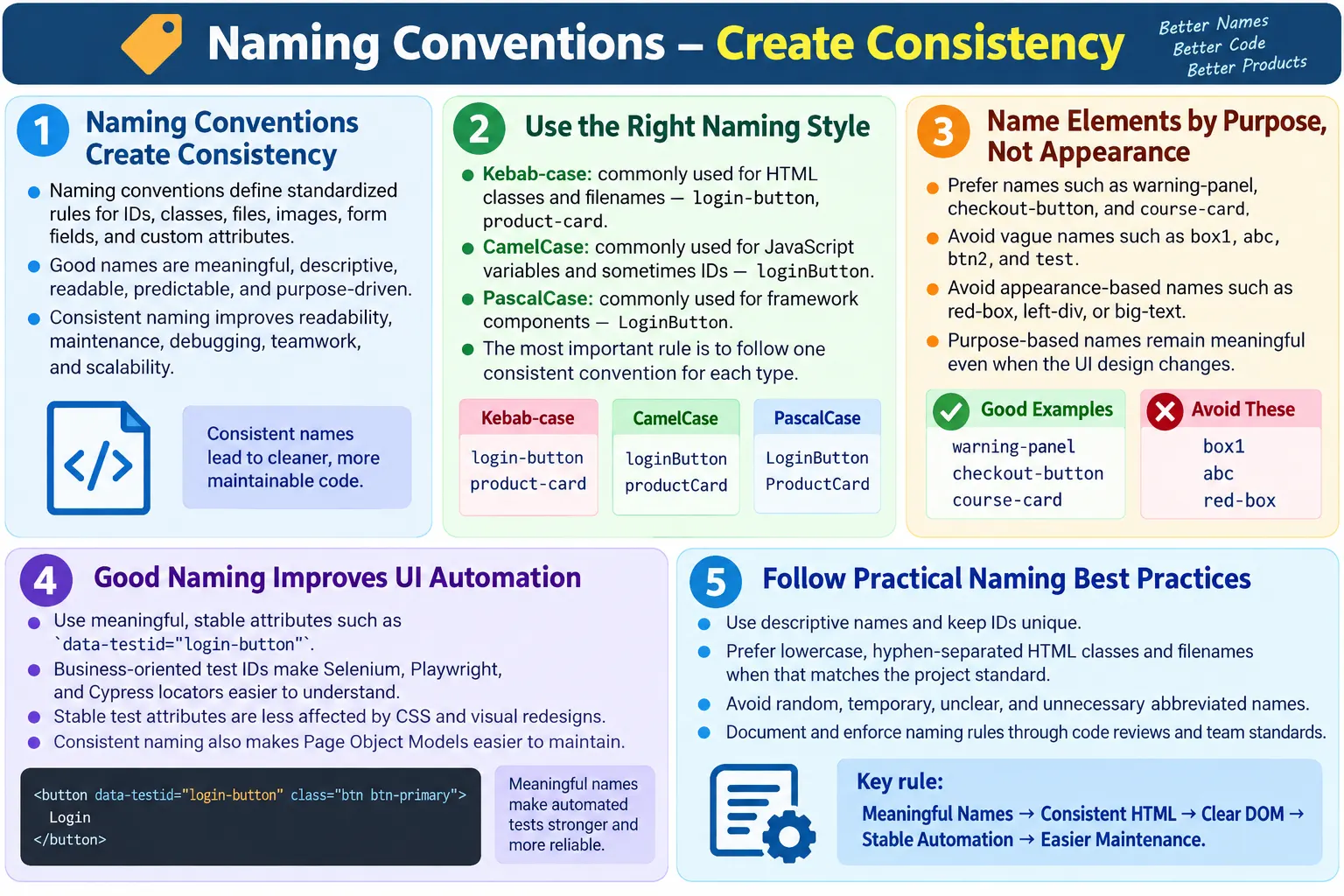
Naming conventions are standardized rules for naming HTML elements, IDs, classes, files, custom attributes, images, form fields, and related resources. They may look like a small detail, but they strongly influence how easy a website is to read, maintain, debug, test, and scale. A name is not only a label. In a real project, a name communicates intent to developers, designers, testers, automation engineers, and future maintainers.
Good naming conventions make HTML easier to understand at a glance. When a developer sees a class such as product-card, login-button, or navigation-menu, the purpose is clear without reading the entire surrounding code. When a tester sees data-testid="checkout-button", the locator communicates the business action directly. When a file is named html-course-structure-diagram.png, the file name itself gives useful context.
Poor naming does the opposite. Names such as box1, abc, btn2, test, and x123 force people to inspect more code than necessary. They also make automation brittle, CSS harder to organize, JavaScript harder to maintain, and onboarding slower. Naming conventions are therefore not cosmetic rules. They are part of engineering discipline.
What Are Naming Conventions?
Naming conventions provide a consistent way to name things throughout a project. They define how names should be written, what style should be used, what words should be preferred, and what types of names should be avoided. A convention may say that HTML class names use kebab-case, JavaScript variables use camelCase, component names use PascalCase, and file names use lowercase words separated by hyphens.
Create Element
  ↓
Apply Naming Rules
  ↓
Consistent HTML
  ↓
Easy Maintenance
The purpose is simple: everyone on the team follows the same naming approach. When the rules are consistent, the codebase feels predictable. A developer does not need to wonder whether a class should be named login-button, loginButton, login_button, or LoginButton. The project standard answers that question before the developer starts writing code.
This consistency becomes more important as the project grows. A five-page website may tolerate inconsistent names for a short time. A large learning platform, ecommerce application, admin dashboard, or enterprise system cannot. Without naming rules, every new page adds its own style, and the codebase slowly becomes harder to reason about.
Why Naming Conventions Matter
Without conventions, names often become temporary, random, or overly generic. A developer may create box1 today because it seems quick. Another developer may add btn2 tomorrow. A third developer may create test during debugging and forget to rename it. These names may work technically, but they do not communicate purpose.
Without conventions:

box1
abc
btn2
test
x123
The problems appear later. The team cannot understand the code quickly. CSS selectors become unclear. JavaScript behavior attaches to confusing elements. Automation engineers struggle to create meaningful locators. New developers hesitate before changing code because they do not know what the names represent.
With conventions:

login-button
product-card
navigation-menu
search-box
Good names clearly describe each element's purpose. They reduce mental effort. They also reduce mistakes because the code explains itself. If a class is called error-message, its role is obvious. If a test locator is called submit-order, the automation intent is readable. Clear naming improves communication across the entire team.
General Naming Principles
Good names should be meaningful, descriptive, consistent, readable, predictable, and purpose-driven. These qualities matter more than personal preference. A name should help someone understand why the element exists and how it is used. It should not depend on private knowledge from the original developer.
- Meaningful
- Descriptive
- Consistent
- Readable
- Predictable
- Purpose-driven
A meaningful name explains the element's role. A descriptive name gives enough detail without becoming too long. A consistent name follows the same style as the rest of the project. A readable name can be understood quickly. A predictable name helps other team members guess how similar elements are named. A purpose-driven name focuses on what the element represents rather than how it happens to look today.
For example, red-box may seem descriptive, but it is based on visual appearance. If the design changes and the box becomes blue, the name becomes misleading. A name like warning-panel or discount-card is better because it describes purpose. The visual style can change while the meaning remains valid.
Naming IDs
HTML IDs identify unique elements on a page. Because an ID must be unique within the document, it should be used carefully. IDs are often used for form labels, anchor navigation, JavaScript hooks, and specific page landmarks. A good ID describes the element's purpose clearly.
<input id="username">Better examples include loginForm, emailInput, submitButton, and searchBox. These names tell the reader what the element is for. Poor examples include a1, test, temp, and input123. These names do not explain purpose and can easily become confusing.
Teams often use camelCase for IDs, especially when JavaScript interacts with those IDs. This is not mandatory, but it must be consistent. If a project chooses kebab-case for IDs, that is also acceptable. The larger issue is consistency. Avoid mixing styles randomly across the same project.
Naming Classes
Classes are commonly used for styling, reusable patterns, and component structures. A class name should describe the role of the element or the component it belongs to. For example, product-card describes a card that represents a product. navigation-menu describes a navigation menu. login-form describes a form used for login.
<div class="product-card">
  ...
</div>
Other useful examples include course-card, footer-links, error-message, search-input, and profile-summary. These names are based on meaning. Avoid names based only on appearance, such as red-box, left-div, or big-text. Appearance-based names become inaccurate when the design changes.
Class names are also important because they often appear in CSS, browser developer tools, documentation, and automated tests. A clear class name makes debugging faster. A confusing class name makes every investigation slower.
Kebab Case
Kebab-case is one of the most common naming styles for HTML class names and file names. It uses lowercase letters with words separated by hyphens. Examples include product-card, login-button, course-list, and main-header.
product-card
login-button
course-list
main-header
Kebab-case is popular in HTML and CSS because it is readable and works naturally in selectors. It also avoids case-sensitivity confusion. A class called login-button is easier to scan than loginbutton, and it avoids the mixed-case style often reserved for JavaScript variables or framework component names.
For many HTML projects, a practical rule is simple: use kebab-case for classes, file names, image names, and URL slugs. This keeps front-end naming readable and search-friendly.
Camel Case
CamelCase starts with a lowercase word and capitalizes each following word. Examples include loginButton, submitOrder, userProfile, and emailInput. This style is common in JavaScript variables, object properties, function names, and sometimes HTML IDs.
loginButton
submitOrder
userProfile
emailInput
Camel case can be useful when a name is expected to be used directly in JavaScript. For example, an ID such as emailInput may align with a JavaScript variable of the same name. However, teams should avoid mixing camelCase and kebab-case for the same type of thing unless there is a clear rule.
A common convention is to use kebab-case for classes and filenames, camelCase for JavaScript variables and sometimes IDs, and PascalCase for framework components. The exact rule can vary, but the important part is that the team follows one standard.
Snake Case and Pascal Case
Snake_case uses lowercase words separated by underscores, such as login_button and submit_order. It is less common for HTML classes, but it appears in some projects, databases, APIs, and backend systems. If a project already uses snake_case consistently, it may be acceptable, but new HTML projects usually prefer kebab-case for classes.
PascalCase capitalizes each word, such as LoginButton and UserProfile. This style is more common for component names in frameworks such as React, Angular, and Vue. For example, a React component may be named LoginButton, while the rendered HTML class may be login-button.
The main mistake is not choosing one style. Mixing login-button, loginButton, login_button, and LoginButton for similar elements makes the code feel disorganized. Naming styles should be intentional.
File Naming
HTML file names should be lowercase, descriptive, and easy to read. Good examples include index.html, contact.html, about-us.html, and html-course.html. These names are clear and URL-friendly.
index.html
contact.html
about-us.html
html-course.html
Avoid names such as Page1.html, Test.HTML, and New File.html. Capital letters, spaces, and vague words can cause confusion. Some servers and systems treat file names case-sensitively, so inconsistent capitalization can create broken links between development and production environments.
Hyphen-separated file names are especially useful for readable URLs. A URL such as html-naming-conventions.html is more understandable than page165.html. It also helps users and search engines understand the page topic.
Image Naming
Image names should describe the image content. Good examples include company-logo.png, html-course-banner.webp, and user-profile.jpg. Poor examples include img1.png, photo123.jpg, and new.png.
Meaningful image names improve organization because developers can identify assets without opening every file. They can also support image SEO when the image is part of page content. For example, selenium-webdriver-flow.png gives more context than diagram.png.
Image file names should usually be lowercase and hyphen-separated. Avoid spaces because they become encoded in URLs and can make paths harder to read. Also avoid unnecessary dates or temporary names unless they have real meaning.
Form Field Naming
Form field names affect accessibility, data submission, backend processing, testing, and maintainability. A field should have a meaningful id and name. The id connects the field to its label, while the name is often submitted with form data.
<label for="email">Email</label>
<input
  id="email"
  name="email"
  type="email">
Good form field names include firstName, lastName, phoneNumber, postalCode, email, and password. These names clearly represent the data being collected. Vague names like field1, inputA, or value make form handling and debugging harder.
Consistency matters between front end and back end. If a backend expects postalCode, the front-end form should not randomly use zip unless there is a mapping layer. Clear naming reduces data-processing errors.
Data-Test Attribute Naming
Data-test attributes are custom attributes used to support automation. Common variations include data-testid, data-test, and data-qa. These attributes create stable locators that are less likely to break when styling changes.
<button data-testid="login-button">
  Login
</button>
Good values include submit-order, search-button, product-card, and checkout-button. Poor values include button1, test, and abc. A data-test value should describe the business purpose of the element, not its visual position or temporary implementation.
Business-oriented data-test names are easier to understand in automation code. A locator such as [data-testid='checkout-button'] clearly communicates what the test is interacting with. A locator such as [data-testid='btn1'] forces the reader to inspect the page to understand the test.
HTML Section Naming
Semantic HTML naturally reduces the need for extra naming. Elements such as <header>, <nav>, <main>, <section>, <article>, <aside>, and <footer> already describe their purpose. When these elements are used correctly, the markup becomes clearer without extra classes.
<header>
<nav>
<main>
<section>
<footer>
That does not mean classes are unnecessary. A page may still need classes such as main-header, course-section, or site-footer for styling and layout. However, semantic elements give a strong foundation. A <nav> is clearer than a generic <div class="nav"> because the element itself carries meaning.
CSS Naming Methodologies
Large projects often adopt CSS naming methodologies to keep class names organized. Common methodologies include BEM, SMACSS, and OOCSS. These systems are especially useful when many developers work on the same interface or when the project has a design system.
- BEM: Block Element Modifier
- SMACSS: Scalable and Modular Architecture for CSS
- OOCSS: Object-Oriented CSS
BEM is one of the most widely discussed approaches. It uses a block, element, and modifier structure. For example, a card component may use card, card__title, card__image, and card--featured.
card
card__title
card__image
card--featured
The benefit is clarity. The name tells you what component the element belongs to and whether it represents a variation. BEM can look verbose, but it is useful in large systems because it reduces accidental class conflicts and makes relationships explicit.
Browser Workflow
Meaningful naming improves the entire browser and development workflow. HTML is parsed into the DOM. Developers inspect that DOM in browser tools. CSS selectors target elements. JavaScript finds and manipulates elements. Automation scripts locate elements. Clear naming helps every step.
Meaningful HTML
  ↓
DOM
  ↓
Automation
  ↓
Easy Maintenance
The browser does not care whether a class is named abc or checkout-button. Both can work technically. Humans and tools care. Developer tools become more useful when names explain purpose. Automation failures are easier to debug when locators are readable. Maintenance becomes easier because the DOM tells a clearer story.
Automation Perspective
For automation testers, naming conventions directly affect test reliability. Selenium, Playwright, Cypress, and other tools interact with HTML through locators. If the application uses stable, meaningful attributes, tests are easier to write and maintain.
<button data-testid="login-button">
  Login
</button>
driver.findElement(
By.cssSelector("[data-testid='login-button']"));This locator is clear because the attribute describes the action. It is also more stable than locating the button by CSS class if the class is mainly for styling. Styling classes can change during redesigns. A business-oriented test attribute can remain stable even when the UI appearance changes.
Naming conventions also improve Page Object Models. A page object with methods such as clickLoginButton, enterEmail, and submitOrder reads naturally when the underlying HTML uses similar names. Consistency between UI names and automation names reduces translation effort.
Accessibility Perspective
Naming conventions help maintain accessibility, but they do not replace semantic HTML or accessible attributes. A class name like submit-button does not automatically make a button accessible. Accessibility depends on correct elements, labels, roles, names, focus behavior, and keyboard support.
Still, meaningful names support accessibility work indirectly. They make it easier to find related labels, inputs, messages, and landmarks. They help teams debug accessibility issues. They also encourage consistent labeling patterns. For example, if every error message uses a predictable class such as field-error-message, it becomes easier to review whether those messages are connected to form controls correctly.
- Easier maintenance
- Better debugging
- Consistent labeling
- Improved collaboration
The key point is that naming supports accessibility quality, while semantic HTML and proper accessible names deliver accessibility behavior. Both matter.
SEO and Content Naming
Naming conventions also matter for content-oriented websites. Page file names, image names, URL slugs, and anchor IDs can help users and search engines understand content. A file called html-naming-conventions.html is more meaningful than page165.html. An image called html-form-validation-example.png gives more context than img3.png.
This does not mean names should be stuffed with keywords. The goal is clarity. A natural, descriptive name is enough. Keyword stuffing in file names, alt text, or IDs makes content look artificial and may reduce quality. Good naming should help people first.
For tutorial sites, consistent URL and file naming also improves internal organization. Related pages can follow predictable patterns such as html-..., css-..., java-..., or st-.... This makes the site easier to manage and audit.
Best Practices
Good naming conventions are practical. They should be easy to remember and easy to apply. A team should not create rules so complex that nobody follows them. The best conventions are simple, documented, and enforced through review.
- Use descriptive names.
- Follow one naming convention across the project.
- Keep names lowercase where appropriate.
- Use hyphens for HTML classes and filenames unless your project standard differs.
- Keep IDs unique.
- Use meaningful
data-*attribute values. - Avoid abbreviations unless widely understood.
- Avoid random or temporary names.
Names should also be reviewed during code review. If a name is unclear, it should be improved before the code is merged. Renaming early is cheap. Renaming after many CSS rules, JavaScript references, and automation tests depend on the name becomes more expensive.
Common Mistakes
A common mistake is using random names such as abc, x1, temp, and box. These names may have been quick during development, but they create confusion later. Temporary names often become permanent because nobody goes back to fix them.
Another mistake is using styling-based names such as red-box and blue-button. These names describe current appearance rather than purpose. If the design changes, the name becomes misleading. Purpose-based names such as alert-box, primary-button, or checkout-button are more durable.
Inconsistent styles are also a frequent issue. A project should avoid mixing login-button, loginButton, and login_button for the same type of name. Inconsistency makes searching, refactoring, and onboarding harder.
Generic data-test names are especially harmful for automation. Names like button1, test, and submit1 do not explain what the test is doing. Business-oriented names such as checkout-button or save-profile-button are much better.
Duplicate IDs are another serious mistake. IDs must be unique within a document. Duplicate IDs can break label associations, JavaScript behavior, anchor navigation, CSS targeting, and automation locators.
Good vs Poor Naming
| Good Names | Poor Names |
|---|---|
| login-button | btn1 |
| product-card | box |
| search-input | abc |
| checkout-button | button2 |
| navigation-menu | menu123 |
| company-logo.png | img1.png |
The difference is not just visual. Good names reveal purpose. Poor names hide purpose. Good names support teamwork. Poor names force repeated investigation. Good names scale. Poor names create technical debt.
Naming and Refactoring
Refactoring is easier when names are meaningful and consistent. If all course cards use the class course-card, a developer can search for that class and understand where the pattern appears. If similar cards use many unrelated names, refactoring becomes risky.
Consistent naming also helps identify duplication. When developers see similar names across components, they can recognize reusable patterns. When names are random, duplication remains hidden. This is why naming conventions and reusable HTML patterns are closely connected.
Before renaming widely used classes or data attributes, teams should check CSS, JavaScript, tests, documentation, and analytics dependencies. A name may be referenced in more places than expected. Careful naming at the start reduces the need for disruptive renames later.
Naming in Team Projects
In team projects, naming conventions should be documented. The documentation does not need to be long, but it should answer common questions. What style do we use for HTML classes? What style do we use for IDs? What data-test attribute name do we use? How should files be named? Are abbreviations allowed? How should components be named?
Code review should enforce the convention. Without review, conventions become suggestions and eventually drift. Teams can also use linters, formatters, naming rules, and design system documentation to keep names consistent. The goal is not to police style for its own sake. The goal is to keep the project understandable.
New team members benefit strongly from naming consistency. When names follow patterns, they can learn the codebase faster. When every page has a different naming style, onboarding becomes slower and more error-prone.
Naming and Design Systems
Design systems depend heavily on naming conventions. A design system is not only a collection of colors, typography, spacing, and reusable components. It is also a shared language. When a team agrees that a component is called a card, banner, alert, modal, tab, accordion, breadcrumb, or navigation menu, that language should appear consistently in design files, HTML, CSS, documentation, and test automation.
If designers call something a notification, developers call it an alert, testers call it a message, and automation calls it a popup, confusion appears even when everyone is discussing the same feature. Consistent naming creates a shared vocabulary. A class such as alert-message, a component named AlertMessage, documentation titled Alert Message, and a test ID such as alert-message all point to the same concept.
This does not mean every layer must use identical syntax. A React component may use PascalCase, CSS may use kebab-case, and JavaScript variables may use camelCase. The concept should remain aligned even if the naming style changes by layer. For example, ProductCard, product-card, and productCard can represent the same component in different contexts when the project has a clear convention.
Naming and JavaScript Behavior
HTML names often become hooks for JavaScript behavior. A script may read a form field, open a menu, close a modal, validate an input, update a cart, or toggle a class. If the names are vague, the JavaScript becomes harder to understand. If the names are clear, the behavior becomes easier to follow.
However, teams should be careful about using styling classes as JavaScript hooks. A class such as primary-button may be intended for styling. If JavaScript behavior depends on it, a future style refactor can accidentally break functionality. Many projects avoid this by using separate attributes such as data-action, data-role, or specific JavaScript hook classes. The exact approach depends on the project, but the principle is the same: name hooks according to their purpose.
<button
  class="primary-button"
  data-action="submit-order"
  data-testid="submit-order-button">
  Submit Order
</button>
In this example, the class handles styling, data-action can describe behavior, and data-testid can support automation. Separating these responsibilities prevents one type of change from accidentally breaking another.
Naming and Long-Term Maintenance
Names should be chosen for long-term meaning, not only for today's implementation. A page section may start as a blue box, but later become a white panel. A small popup may later become a full modal. A button may move from the top of the page to the bottom. If the name is based on temporary appearance or position, it becomes wrong as soon as the design changes.
Durable names describe business purpose, content purpose, or component role. Names such as checkout-summary, course-card, profile-form, error-message, and main-navigation can survive design changes. Names such as right-box, green-area, top-button, and big-div are fragile because they describe implementation details.
Long-term maintenance also requires avoiding unnecessary abbreviations. A short name may save a few characters but cost more time later. For example, usr-prf is shorter than user-profile, but it is less readable. Abbreviations are acceptable only when the whole team understands them, such as HTML, API, URL, ID, or CTA in teams where those terms are common.
Naming Checklist for Real Projects
A practical naming checklist can prevent many common mistakes before code is merged. Before adding a new name, ask whether it describes purpose, follows the project style, avoids temporary wording, avoids visual-only wording, and remains understandable to someone new to the project.
- Does the name describe what the element is for?
- Does it follow the same case style as similar names?
- Is it free from temporary words such as test, temp, and new?
- Does it avoid appearance-only words such as red, left, or big unless they are truly meaningful?
- Is it understandable without reading a long explanation?
- Will it still make sense if the visual design changes?
- Is the ID unique on the page?
- Is the data-test value stable enough for automation?
This checklist is simple, but it catches most naming problems. Naming conventions work best when they become a normal part of everyday development rather than a document that nobody reads.
Naming for Learning and Documentation
For educational websites, naming conventions are also part of teaching quality. Learners often copy examples from tutorials. If the examples use weak names such as box1, btn2, and myDiv, learners may assume those names are acceptable in real projects. If examples use meaningful names such as login-form, email-input, course-card, and submit-button, learners develop better habits.
Documentation should explain not only what code does, but why names were chosen. A tutorial that shows product-card can briefly explain that the class is based on component purpose. A testing tutorial that shows data-testid="checkout-button" can explain that test IDs should be stable and business-oriented. These small explanations help learners connect naming to maintainability.
Good names make examples more readable. When a beginner sees search-form, search-input, and search-button, the relationship between elements is clear. Naming becomes part of the learning path.
Common Interview Questions
What are naming conventions? Naming conventions are standardized rules for naming HTML elements, IDs, classes, files, and custom attributes.
Why are naming conventions important? They improve readability, maintainability, teamwork, scalability, and automation stability.
Which naming style is common for HTML classes? Kebab-case is commonly used for HTML classes, such as login-button and product-card.
Why should random names be avoided? Random names make code difficult to understand, maintain, debug, and automate.
Why use meaningful data-testid values? They make automation scripts easier to read and more stable because the locator describes the business purpose of the element.
What is BEM? BEM stands for Block, Element, Modifier. It is a CSS naming methodology that helps organize class names in large projects.
Interview-Ready Answer
Naming conventions are standardized rules for naming HTML elements, IDs, classes, files, images, form fields, and custom attributes consistently across a project. Good naming conventions use meaningful, descriptive, and predictable names that improve readability, maintainability, collaboration, accessibility review, and UI automation. Common practices include using kebab-case for HTML classes and filenames, meaningful IDs, descriptive image names, clear form field names, business-oriented data-* attributes such as data-testid="login-button", and CSS methodologies like BEM for large applications.
Consistent naming helps developers, testers, and automation tools work with the code more efficiently. It reduces confusion, prevents technical debt, and makes the HTML structure easier to understand as the project grows.
One-Line Insight
Good names explain the purpose of an element, and clear naming today prevents confusion tomorrow.