Minification Concept
Introduction
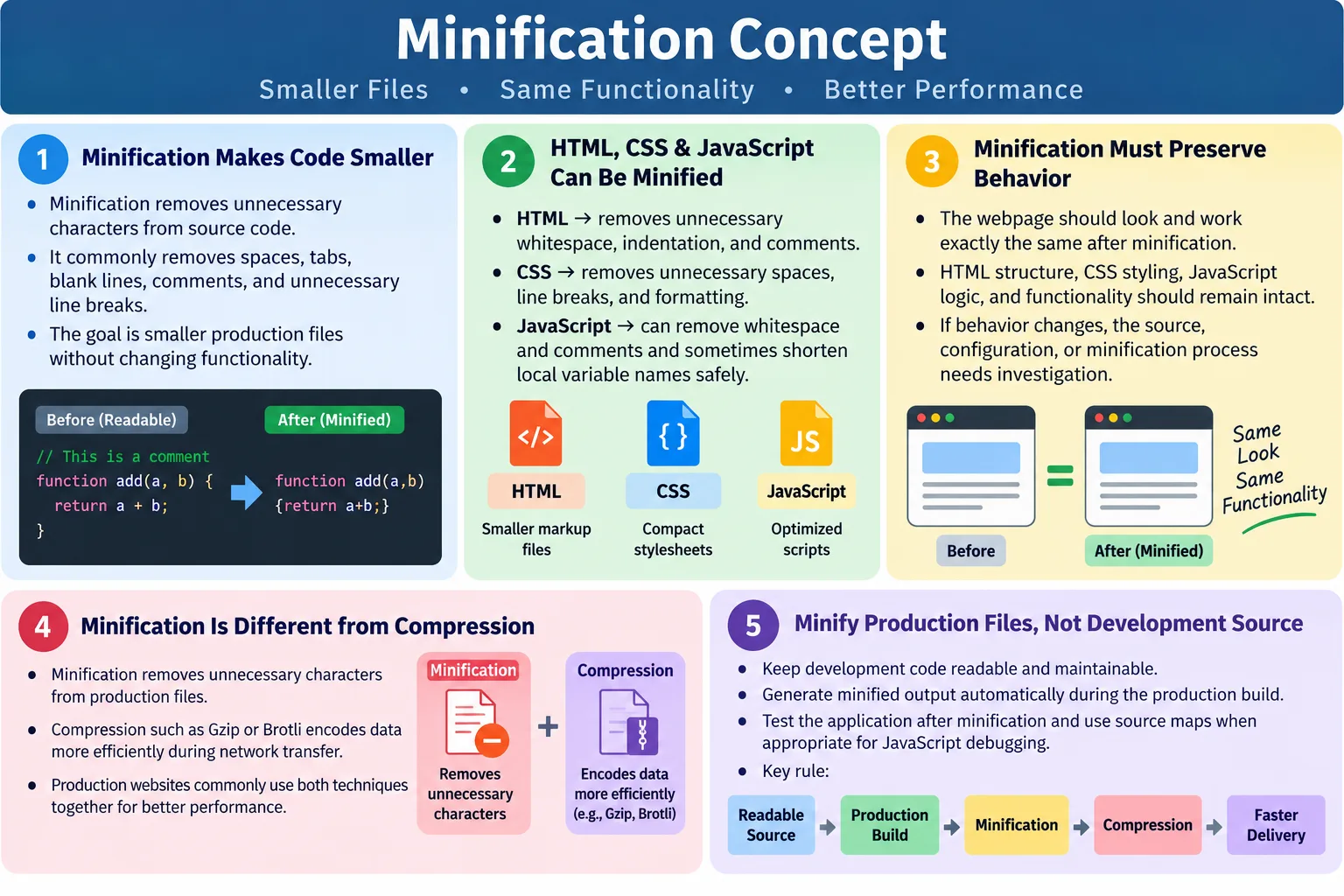
Minification is the process of removing unnecessary characters from HTML, CSS, and JavaScript files without changing their functionality. These unnecessary characters usually include extra spaces, tabs, blank lines, comments, and formatting line breaks that help humans read the source code but are not required by the browser to execute or render the page. The goal is simple: make files smaller for production while keeping the user experience exactly the same.
When developers write code, readability matters. Good indentation, line breaks, comments, and spacing help teams understand and maintain the project. A readable HTML file clearly shows the document structure. A readable CSS file separates selectors and declarations cleanly. A readable JavaScript file makes logic easier to follow. However, browsers do not need most of that formatting. Once the code is ready for deployment, the readable version can be transformed into a compact version that is faster to transfer over the network.
Minification is a standard optimization step performed before deploying websites to production. It helps webpages download faster, use less bandwidth, and render more quickly. It is usually combined with other performance techniques such as compression, caching, image optimization, code splitting, and resource prioritization. Minification alone will not solve every performance problem, but it is one of the basic practices expected in modern web development.
What Is Minification?
Minification makes source code smaller while keeping its behavior exactly the same. The original code may be easy for humans to read, but it often contains characters that are not necessary for the browser. A minifier removes those unnecessary characters and produces a compact output file. The browser then downloads and executes or parses that compact version just like the original.
Original Code
  ↓
Minification
  ↓
Smaller Code
  ↓
Faster Download
The key idea is that minification should not change meaning. If an HTML page displays a heading before minification, the minified page should display the same heading. If a CSS rule makes text blue before minification, the minified CSS should still make the text blue. If a JavaScript function prints a message before minification, the minified function should produce the same result.
Minification is different from rewriting code manually. A tool performs safe transformations according to the rules of the language. In HTML, it may remove optional whitespace and comments. In CSS, it may remove spaces around braces, colons, and semicolons. In JavaScript, it may remove whitespace and sometimes shorten local variable names when safe. The output is less readable, but it is smaller and more efficient for production delivery.
Why Minification Is Important
Large files take longer to download, parse, and render. The larger a resource is, the more data must travel from the server to the browser. On a fast wired connection this may seem minor, but on mobile networks, slow connections, congested networks, or high-latency environments, every unnecessary byte adds friction. Users expect pages to respond quickly, and performance problems can directly affect engagement.
- Website speed
- Core Web Vitals
- Mobile performance
- User experience
- Bandwidth usage
- Production readiness
Minification helps because smaller files reach the browser faster. It can also reduce parsing work slightly because the browser processes fewer characters. The biggest gains are usually seen in CSS and JavaScript bundles, but HTML minification also matters, especially for large static pages, generated pages, documentation, learning websites, and pages with repeated templates.
For high-traffic websites, minification can reduce bandwidth costs. Even if one page saves only a few kilobytes, that saving becomes meaningful across thousands or millions of requests. The performance benefit also compounds when multiple files are minified: HTML, CSS, JavaScript, inline snippets, and generated templates can all become smaller.
HTML Minification
HTML minification removes unnecessary whitespace, indentation, comments, and line breaks from HTML documents while preserving the page structure. Developers often format HTML with blank lines and indentation so nested elements are easy to understand. That is useful in source files, but the browser can parse a compact version just as well.
Original HTML:

<!DOCTYPE html>

<html>

<head>
    <title>HTML Tutorial</title>
</head>

<body>
    <h1>
        Welcome
    </h1>
</body>

</html>

Minified HTML:

<!DOCTYPE html><html><head><title>HTML Tutorial</title></head><body><h1>Welcome</h1></body></html>
The webpage looks the same because the removed characters were not meaningful for rendering. Blank lines, indentation, and extra spacing between tags are mostly for developer readability. The browser only needs the actual elements, attributes, text, and structure. When a minifier removes safe whitespace, the document becomes smaller.
HTML minification must still be careful. Whitespace can be meaningful inside certain elements such as <pre>, <textarea>, and some inline text situations. A reliable minifier understands these cases or provides configuration options. This is why production minification should be handled by proven tools rather than careless manual find-and-replace operations.
CSS Minification
CSS minification removes unnecessary spaces, tabs, line breaks, and comments from stylesheets. CSS syntax allows many formatting choices that help humans read the file. The browser does not need those spaces around braces, colons, and semicolons. A minifier can compact the stylesheet while preserving the same styling rules.
Original CSS:

body {
    background: white;
    color: black;
}

h1 {
    font-size: 32px;
}

Minified CSS:

body{background:white;color:black}h1{font-size:32px}
The minified CSS is harder for a person to read, but it is smaller for the browser to download. For large stylesheets, the saving can be significant. CSS files often contain many selectors, declarations, comments, blank lines, and repeated formatting patterns. Minification removes the formatting overhead.
Some CSS optimization tools go beyond basic minification. They may merge duplicate rules, remove redundant declarations, shorten color values, remove unnecessary units, or reorder safe declarations. These optimizations can reduce size further, but they require caution. The more advanced the transformation, the more important testing becomes.
JavaScript Minification
JavaScript minification removes unnecessary whitespace, comments, and line breaks from JavaScript code. Many JavaScript minifiers can also shorten local variable names and simplify expressions when safe. The result is compact code that behaves like the original code but is much less readable.
Original JavaScript:

function greet() {
    console.log("Hello");
}

Minified JavaScript:

function greet(){console.log("Hello")}
The function behaves exactly the same. It still defines greet and still prints Hello. The difference is that unnecessary formatting has been removed. In larger JavaScript applications, minification can save a large amount of data because JavaScript files often contain many functions, variables, imports, comments, and formatting characters.
JavaScript minification is more sensitive than HTML or CSS minification because JavaScript is a programming language with complex syntax and runtime behavior. Reliable tools such as Terser, esbuild, SWC, and similar production build tools understand JavaScript syntax and perform safe transformations. Manual minification is not appropriate for real applications.
What Gets Removed?
Minification removes characters and formatting that do not affect the final behavior of the file. Common removals include extra whitespace, tabs, blank lines, comments, unnecessary line breaks, redundant formatting, and sometimes semicolons where the language rules allow safe removal. The exact behavior depends on the file type and the tool.
- Extra whitespace
- Tabs
- Blank lines
- Comments
- Unnecessary line breaks
- Unnecessary semicolons where safe
- Redundant formatting
Original:

<!-- Website Header -->

<header>

</header>

Minified:

<header></header>
Comments are a common source of removable content. Development comments can be useful in source files, but they usually do not need to be sent to users. Removing comments reduces size and can also avoid exposing internal notes. However, not every comment should be removed blindly. Some comments may be required by specific frameworks, old browser patterns, license rules, or build systems. A production tool should be configured according to the project.
What Does Not Change?
Minification does not change functionality, output, logic, HTML structure, CSS styling, or JavaScript behavior. That is the main promise of minification. The page should look and behave the same after minification as it did before. If minification changes behavior, something is wrong: either the source code relied on unsafe formatting, the minifier was misconfigured, or a tool bug exists.
- Functionality
- Output
- Logic
- HTML structure
- CSS styling
- JavaScript behavior
This distinction matters in interviews and real projects. Minification is not supposed to redesign the page, remove features, change text, alter business logic, or change the visual layout. It only reduces file size by removing unnecessary characters. If a page fails after minification, the team must investigate the build output, source code assumptions, and tool configuration.
Browser Workflow
When a browser loads a webpage, it downloads the HTML, parses it, builds the DOM, discovers linked resources, downloads CSS and JavaScript, and renders the page. Minification helps by reducing the size of the resources that travel across the network. Smaller files generally arrive faster, especially when combined with compression.
Original HTML
  ↓
Minified HTML
  ↓
Browser Downloads
  ↓
Parse HTML
  ↓
Render Page
The browser does not care whether the source file was beautifully formatted for developers. It cares whether the syntax is valid and whether the required content and resources are present. A minified file can be parsed normally because it still follows the same language rules. The compact formatting is less pleasant for humans, but completely acceptable for browsers.
In a production workflow, the user usually receives minified files, while the development team keeps readable source files. This separation allows developers to work comfortably and users to receive optimized assets.
Minification vs Compression
Minification and compression are related to performance, but they are different concepts. Minification changes the source file by removing unnecessary characters. Compression reduces data during network transfer, usually on the server or CDN, and the browser decompresses it before using it. Many production websites use both because they solve different parts of the delivery problem.
| Minification | Compression |
|---|---|
| Removes unnecessary characters | Compresses data during network transfer |
| Changes the source output file | Leaves the original source file unchanged |
| Happens during build or deployment | Happens on the web server or CDN |
| Produces permanently smaller production files | Data is decompressed in the browser |
HTML
  ↓
Minification
  ↓
Smaller HTML
  ↓
Gzip or Brotli Compression
  ↓
Browser
A simple way to remember the difference is this: minification removes text that is not needed, while compression encodes the remaining data more efficiently for transfer. Minification happens before delivery. Compression happens during delivery. Together, they produce a smaller network payload than either technique alone.
Minification vs Beautification
Beautification is the opposite of minification. Beautification takes compact or messy code and formats it with indentation, line breaks, and spacing so humans can read it more easily. Developers use beautification during debugging, review, or learning. Minification is used for production delivery.
| Minification | Beautification |
|---|---|
| Makes code compact | Makes code readable |
| Used in production | Used during development or debugging |
| Removes formatting | Adds indentation and spacing |
Beautified:

<div>
    <p>Hello</p>
</div>

Minified:

<div><p>Hello</p></div>
Both forms can represent the same code. The difference is the target audience. Beautified code is for people. Minified code is for browsers and networks. A professional workflow keeps source code readable and generates minified output automatically.
Advantages of Minification
The main advantage of minification is faster downloads. Smaller files move across the network more quickly, especially for users on mobile or slow connections. Minification also reduces bandwidth usage, which can lower hosting and CDN costs for high-traffic websites. It can contribute to faster parsing because the browser reads fewer characters, although parsing improvements depend on the file type and size.
- Faster downloads
- Reduced bandwidth usage
- Faster parsing
- Better page performance
- Improved Core Web Vitals support
- Better mobile experience
- Reduced hosting costs for high-traffic websites
Minification also encourages a cleaner production pipeline. When files are minified automatically, teams usually maintain a clear separation between source code and deployment output. Developers edit readable files, build tools produce optimized assets, and deployment sends production-ready files to users. This workflow is more scalable than manually editing production files.
Disadvantages of Minification
The main disadvantage is readability. Minified files are difficult to read and hard to debug directly. Error messages can also be less understandable because line numbers and column positions may refer to a compact file where many statements appear on one line. This is why developers should not manually edit minified files. They should edit the original source files and regenerate the minified output.
- Difficult to read
- Harder to debug directly
- Error messages can be less understandable
- Not suitable for manual editing
JavaScript projects often use source maps to solve this problem. A source map connects the minified production code back to the original source code. When configured correctly, browser developer tools can show the original readable files while the browser runs the minified files. Source maps are especially useful for debugging production issues.
Real-World Workflow
In a real project, developers work with readable files. They write HTML with indentation, CSS with clear selectors and declarations, and JavaScript with meaningful names and formatting. Before deployment, a build process runs. That process may bundle files, minify assets, generate source maps, optimize images, hash file names, and prepare the final production output.
Development:

Developer
  ↓
Readable HTML
  ↓
Readable CSS
  ↓
Readable JavaScript

Production:

Build Process
  ↓
Minified HTML
  ↓
Minified CSS
  ↓
Minified JavaScript
  ↓
Deploy
This workflow protects maintainability. The readable source remains available for editing, review, and version control. The minified output is treated as generated production code. If a change is needed, developers update the source and rebuild. They do not edit the minified output directly because manual changes can be lost during the next build and are difficult to review.
Common Minification Tools
Different tools are used for different file types. For HTML, common options include HTMLMinifier and html-minifier-terser. For CSS, tools such as CSSNano and CleanCSS are widely used. For JavaScript, common tools include Terser, UglifyJS, esbuild, and SWC. Many modern build tools include minification as part of production builds.
- HTML: HTMLMinifier and html-minifier-terser
- CSS: CSSNano and CleanCSS
- JavaScript: Terser, UglifyJS, esbuild, and SWC
- Build tools: Vite, Webpack, Parcel, and Rollup
Modern build tools often hide much of the complexity. For example, a production build command may automatically minify JavaScript and CSS. Static site generators may minify HTML during output generation. The exact tool is less important than the principle: production files should be optimized by a reliable, repeatable process.
Best Practices
The first best practice is to keep source files readable. Do not write minified code by hand. Developers need readable code for understanding, debugging, review, and long-term maintenance. The second best practice is to minify only for production. Development builds should remain easy to inspect unless there is a specific reason to test production-like output.
- Keep source files readable
- Minify files only for production
- Combine minification with Gzip or Brotli compression
- Test the application after minification
- Keep source maps for debugging JavaScript in production
Testing after minification is important. Even though minification should preserve behavior, production builds can introduce issues through tool configuration, bundling order, environment variables, missing files, or unsupported syntax. A quick smoke test, regression test, or deployment check helps confirm that the minified output still works correctly.
Where Minification Fits in a Project
Minification usually belongs near the end of the build pipeline. During daily development, the project should favor readable output, helpful warnings, clear stack traces, and fast rebuilds. When the team prepares a production release, the build changes priorities. It creates optimized output that is smaller, more cache-friendly, and ready for real users. At that stage, minification becomes part of the release process along with bundling, file hashing, compression setup, and deployment checks.
For small static websites, minification may be handled by a simple tool that processes HTML, CSS, and JavaScript files before upload. For modern applications, minification is often built into commands such as a production build. The developer may not run a separate minifier directly; the framework or bundler handles it automatically. What matters is that the output is predictable and repeatable. A manual one-time minification step is easy to forget. A build script or deployment pipeline makes it consistent.
Teams should also decide which files should be minified. Public HTML pages, stylesheets, and JavaScript bundles are common candidates. Source files, documentation files, test files, and development-only assets should normally remain readable. The final deployed directory may contain minified production assets, while the repository preserves clean source files. This separation prevents confusion and avoids the common mistake of editing generated output.
How to Measure Minification Results
Minification should be measured, not assumed. Browser developer tools can show the transferred size and resource size of HTML, CSS, and JavaScript files. The resource size is the actual file size before network compression, while transferred size shows how much data moved over the network after compression and caching behavior. Both numbers are useful. Minification reduces the resource size. Gzip or Brotli reduces the transferred size.
Performance tools such as Lighthouse and PageSpeed Insights can highlight opportunities to reduce unused code, reduce JavaScript execution cost, and improve page loading. These tools may not simply say "minify this file" if the project already uses minification, but they help reveal whether files are still too large. A minified file can still be oversized if it contains unused libraries, duplicated code, or unnecessary features. Minification is one layer of optimization, not a replacement for thoughtful code organization.
A practical review compares development output, production output, compressed transfer size, and real page behavior. If the production bundle is smaller and the page still works correctly, minification is doing its job. If the page breaks, the build process needs investigation. If the minified file is still extremely large, the team should look beyond minification and consider code splitting, removing unused dependencies, optimizing images, lazy loading, and caching strategies.
Common Mistakes
A common mistake is editing minified files. This should be avoided. Always edit the original source files and regenerate the minified output. Another mistake is assuming minification compresses images. Minification applies to text-based files such as HTML, CSS, and JavaScript. Images require image optimization techniques such as resizing, compression, modern formats, responsive images, and lazy loading.
Skipping testing is another frequent problem. Teams may assume that a build output works because the source worked. That assumption is risky. Production builds can differ from development builds. Always verify that the minified output behaves correctly after deployment or build generation.
Another mistake is confusing minification with compression. Minification removes unnecessary characters. Compression reduces the size of data during transmission. They complement each other but are different processes. A well-optimized site often uses both.
SEO Benefits
Minification is not a direct search ranking factor by itself. Search engines do not rank a page higher simply because the CSS or JavaScript is minified. However, minification can indirectly support SEO because it improves performance-related signals and user experience. Faster pages are easier for users to access, especially on mobile devices.
- Faster page loading
- Better Core Web Vitals support
- Improved mobile performance
- Better user experience
- Lower bandwidth usage
Performance improvements can help users stay on the page, reduce frustration, and support crawl efficiency. Minification should therefore be seen as part of a larger technical SEO and performance strategy. It works best when combined with clean HTML, optimized images, good caching, compression, semantic structure, and careful resource loading.
Selenium Perspective
Selenium typically tests the application's functionality rather than whether files are minified. A Selenium test usually does not inspect whether a CSS file has spaces or whether JavaScript variables were shortened. That is better handled by build checks, performance tools, or network inspections. However, automation testers still care about minification because production deployment must continue to behave correctly after minification.
Automation testers may verify that the application behaves correctly after production deployment, that page load performance is acceptable, and that no JavaScript errors were introduced during the build process. They may also use browser logs, smoke tests, and regression tests to confirm that the minified production bundle works as expected.
Performance analysis is more commonly done with tools such as Lighthouse, Chrome DevTools, and PageSpeed Insights. These tools can show transfer sizes, compression status, unused code, render-blocking resources, and other performance details. Selenium can support the validation workflow, but it is not the primary minification measurement tool.
Common Interview Questions
What is minification? Minification is the process of removing unnecessary characters from HTML, CSS, and JavaScript files without changing their functionality.
Why is minification used? It is used to reduce file size, improve download speed, lower bandwidth usage, and enhance website performance.
What does minification remove? It removes extra spaces, tabs, blank lines, comments, unnecessary line breaks, and redundant formatting. In JavaScript, some tools may also shorten variable names where safe.
Does minification change how the webpage works? No. Proper minification reduces file size but preserves the original functionality, styling, structure, and behavior.
What is the difference between minification and compression? Minification permanently reduces the production file by removing unnecessary characters, while compression such as Gzip or Brotli reduces the amount of data transferred over the network and is reversed by the browser during loading.
When should minification be applied? It is typically applied during the production build before deploying the website. Developers usually work with readable source files and deploy minified output.
Comparison Table
| Original Code | Minified Code |
|---|---|
| Readable | Compact |
| Includes whitespace | Removes unnecessary whitespace |
| Contains comments | Comments usually removed |
| Easy to edit | Difficult to edit |
| Larger file size | Smaller file size |
| Used during development | Used in production |
Interview-Ready Answer
Minification is the process of removing unnecessary characters such as whitespace, comments, tabs, blank lines, and line breaks from HTML, CSS, and JavaScript files without changing their functionality. Its primary purpose is to reduce file size, resulting in faster downloads, quicker parsing, lower bandwidth usage, and improved website performance. Minification is usually performed automatically during the production build process and is often combined with Gzip or Brotli compression for maximum performance.
A strong answer should also explain that minification is different from compression. Minification changes the production output by removing unnecessary characters, while compression reduces data during transfer and is reversed by the browser. Developers usually edit readable source files, not minified files, and use source maps when debugging minified JavaScript in production.
One-Line Insight
Minification makes your code smaller for the browser, not different for the user.