Meta Tags - Purpose
Introduction
Meta tags are among the most important yet least visible components of an HTML document. Unlike headings, paragraphs, images, and buttons, meta tags do not produce content that users can directly see on a webpage. Instead, they work behind the scenes, providing critical information about the webpage to browsers, search engines, social media platforms, accessibility tools, and other web services.
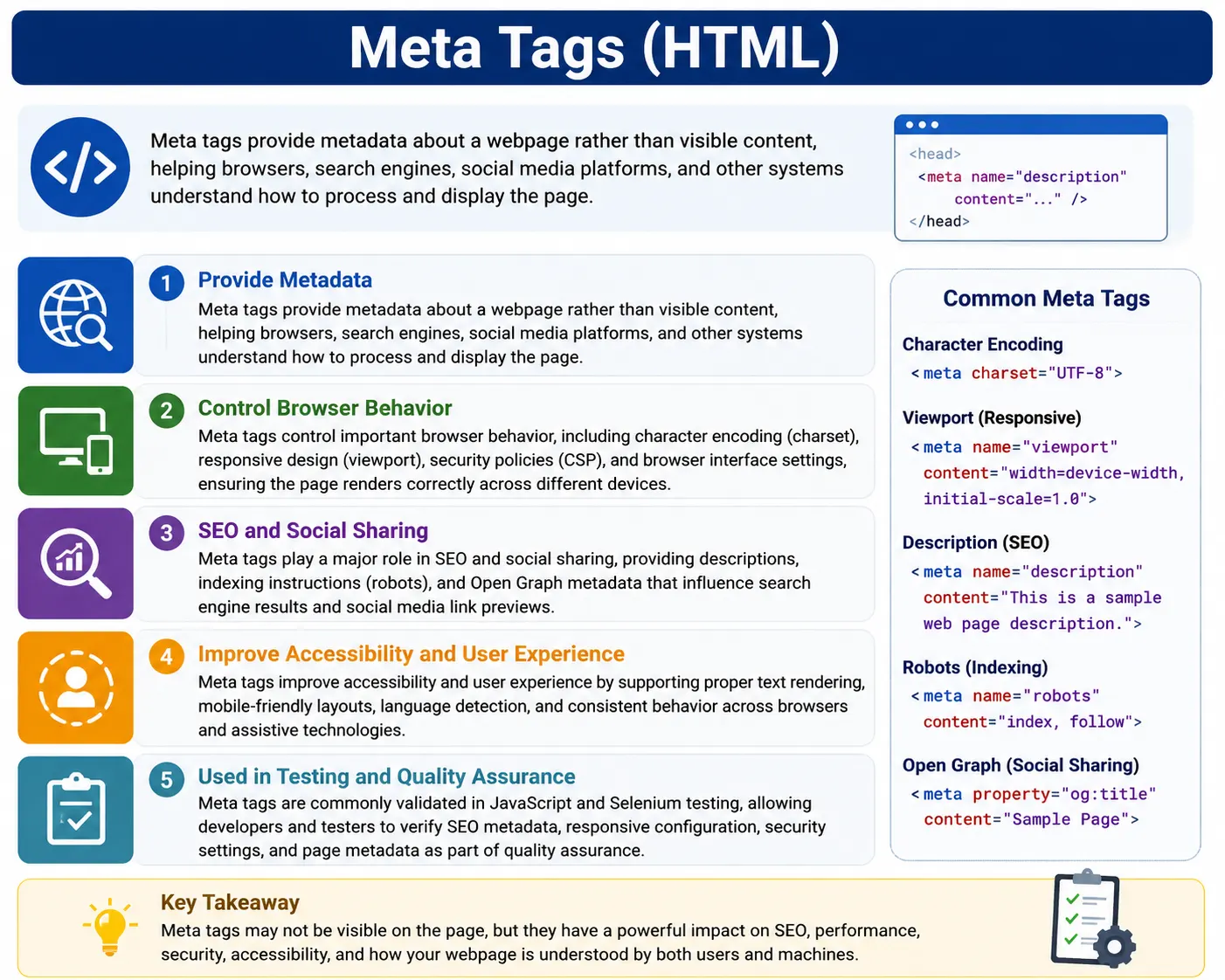
In modern web development, meta tags play a crucial role in how a webpage is interpreted, displayed, indexed, shared, and secured. They influence search engine optimization (SEO), mobile responsiveness, browser behavior, social media previews, accessibility, and even website security. Although visitors may never notice meta tags directly, these tags significantly affect the overall user experience and discoverability of a website.
Consider a modern webpage. When a user visits it, the browser must determine how to display text, which character set to use, how to adapt the page for mobile devices, whether search engines should index it, and how social media platforms should present it when shared. Much of this information comes from meta tags.
A typical HTML document contains several meta tags inside the <head> section:
<head>
    <meta charset="UTF-8">

    <meta name="viewport"
          content="width=device-width, initial-scale=1.0">

    <meta name="description"
          content="Learn HTML from beginner to advanced.">

    <title>HTML Tutorial</title>
</head>
Although these tags are invisible to users, they provide essential instructions that help browsers and other systems understand the webpage correctly.
Understanding meta tags is fundamental for HTML developers, SEO specialists, frontend engineers, accessibility experts, automation testers, and anyone involved in modern web development.
What Are Meta Tags?
The word "meta" means information about information.
Meta tags provide information about an HTML document rather than displaying content within the document itself.
For example:
<meta charset="UTF-8">This tag tells the browser:
"Use UTF-8 character encoding when interpreting this page."The meta tag itself does not display anything on the webpage. Instead, it provides instructions that influence how the browser processes the document.
Think of meta tags as labels attached to a webpage. These labels help various systems understand the content without displaying additional information to users.
Just as a book contains information such as title, author, publisher, and ISBN number, a webpage contains metadata that describes how it should be processed and interpreted.
Where Are Meta Tags Placed?
Meta tags belong inside the <head> section of an HTML document.
Example:
<head>
    <meta charset="UTF-8">
    <title>SoftwareTips4U</title>
</head>
Because meta tags contain information about the page rather than page content, they are stored in the head section alongside other document-level information such as the title, CSS files, and JavaScript resources.
A meta tag should never be placed inside the body section.
Correct:
<head>
    <meta charset="UTF-8">
</head>
Incorrect:
<body>
    <meta charset="UTF-8">
</body>
Browsers expect meta tags to appear within the head because they often need this information before rendering the page.
General Syntax of Meta Tags
Most meta tags follow a simple syntax:
<meta attribute="value">Examples:
<meta charset="UTF-8">

<meta name="description"
      content="HTML Tutorial">

<meta name="author"
      content="SoftwareTips4U">
Different attributes serve different purposes, but the goal remains the same: providing information about the document.
Why Meta Tags Are Important
Meta tags serve as communication tools between a webpage and the systems that process it.
Different systems use meta tags in different ways.
Browsers use meta tags to determine:
- Character encoding
- Mobile rendering behavior
- Security policies
- Browser interface settings
Search engines use meta tags to determine:
- Page descriptions
- Indexing rules
- Crawling behavior
- Search result snippets
Social media platforms use meta tags to determine:
- Preview titles
- Preview descriptions
- Preview images
Accessibility tools use meta-related information to improve user experience.
Because of these responsibilities, meta tags influence nearly every aspect of modern web applications.
Character Encoding Meta Tag
One of the most important meta tags is the character encoding declaration.
Example:
<meta charset="UTF-8">This tells the browser which character set should be used when interpreting text.
UTF-8 is the most common character encoding used today.
It supports:
- English
- Tamil
- Hindi
- Chinese
- Japanese
- Arabic
- Russian
- Emojis
Without proper encoding, characters may appear incorrectly.
For example, Tamil text could appear as:
???????instead of displaying correctly.
Character encoding is processed very early during page loading because the browser must know how to interpret the document's text.
For this reason, the charset meta tag should appear near the top of the head section.
Viewport Meta Tag
The viewport meta tag is essential for responsive web design.
Example:
<meta name="viewport"
content="width=device-width, initial-scale=1.0">
This tag tells mobile browsers how the webpage should be displayed.
Before responsive design became common, many websites were designed only for desktop screens.
Without the viewport tag, mobile browsers often shrink desktop layouts to fit smaller screens, making content difficult to read.
Without viewport:
Desktop Layout
     ↓
Shrunk on Mobile
With viewport:
Responsive Layout
     ↓
Mobile Friendly
Modern websites almost always include this meta tag because mobile traffic now represents a significant portion of internet usage.
Description Meta Tag
The description meta tag provides a summary of the webpage.
Example:
<meta name="description"
content="Learn HTML from basics to advanced.">
This description helps search engines understand the page content.
Search engines often display this description beneath the page title in search results.
Example:
HTML Tutorial

Learn HTML from basics to advanced.
A good description helps users determine whether the page is relevant to their search.
Although the description tag does not directly improve rankings, it can improve click-through rates because users are more likely to click informative search results.
Keywords Meta Tag
Historically, websites used keywords meta tags for SEO.
Example:
<meta name="keywords"
content="HTML, CSS, JavaScript">
Years ago, search engines used these keywords to understand page content.
However, because this tag was frequently abused through keyword stuffing, major search engines such as Google largely ignore it today.
Although still technically valid, the keywords meta tag has little SEO value in modern web development.
Author Meta Tag
The author meta tag identifies the creator of the content.
Example:
<meta name="author"
content="SoftwareTips4U">
This tag can be useful for:
- Documentation
- Educational content
- Corporate websites
- Content management systems
Although browsers rarely display author information directly, it provides additional metadata about the document.
Robots Meta Tag
The robots meta tag controls how search engines interact with a page.
Example:
<meta name="robots"
content="index, follow">
This instructs search engines to:
- Index the page
- Follow links on the page
Another example:
<meta name="robots"
content="noindex">
This tells search engines:
"Do not include this page in search results."Robots tags are commonly used for:
- Admin pages
- Internal dashboards
- Test environments
- Duplicate content pages
They provide fine-grained control over search engine behavior.
Refresh Meta Tag
The refresh meta tag automatically refreshes or redirects a page.
Example:
<meta http-equiv="refresh"
content="5">
This refreshes the page every five seconds.
A redirect can also be performed:
<meta http-equiv="refresh"
content="5;url=home.html">
This redirects users to another page after five seconds.
Although modern applications usually use JavaScript or server-side redirects instead, refresh tags still appear in some scenarios.
Open Graph Meta Tags
Social media platforms use Open Graph metadata to generate rich link previews.
Example:
<meta property="og:title"
content="HTML Tutorial">
Additional Open Graph tags may include:
<meta property="og:description"
content="Learn HTML step by step">

<meta property="og:image"
content="html-course.jpg">
When a webpage is shared on:
- Messenger
these tags control how the preview appears.
Without Open Graph tags:
Basic PreviewWith Open Graph tags:
Custom Title
Custom Description
Custom Image
This improves branding and social sharing effectiveness.
Theme Color Meta Tag
Modern mobile browsers allow websites to customize browser interface colors.
Example:
<meta name="theme-color"
content="#2196f3">
This can influence:
- Address bar color
- Browser UI accents
- Mobile application appearance
Many progressive web applications use this tag to create a more integrated experience.
Content Security Policy (CSP) Meta Tag
Security is another important use of meta tags.
Example:
<meta http-equiv="Content-Security-Policy"
content="default-src 'self'">
This creates security rules that restrict which resources the page can load.
CSP helps protect against attacks such as:
- Cross-Site Scripting (XSS)
- Malicious script injection
- Unauthorized resource loading
Security-focused applications frequently use CSP to strengthen browser-side defenses.
How Browsers Process Meta Tags
When a browser receives an HTML document, it processes the head section before rendering the page.
The flow typically looks like this:
Receive HTML
      ↓
Parse Head
      ↓
Read Meta Tags
      ↓
Apply Settings
      ↓
Continue Rendering
Because many meta tags affect browser behavior, they must be processed early in the page lifecycle.
For example:
- Charset affects text interpretation.
- Viewport affects layout calculations.
- CSP affects resource loading.
This is why meta tags are placed in the head section.
Meta Tags and SEO
Meta tags play an important role in search engine optimization.
Important SEO-related tags include:
<meta name="description">

<meta name="robots">

<meta property="og:title">

<meta property="og:description">
Search engines use this metadata to better understand page content and determine how pages should appear in search results.
Although content quality remains the most important SEO factor, properly configured metadata helps search engines process pages more effectively.
Meta Tags and Accessibility
Meta tags also contribute to accessibility.
Examples include:
- Character encoding support
- Mobile responsiveness
- Language detection
- Proper rendering across devices
Combined with:
<html lang="en">meta tags help assistive technologies provide a better user experience.
For users relying on screen readers, proper metadata can significantly improve navigation and comprehension.
Meta Tags and Selenium Testing
Automation testers sometimes validate metadata using Selenium.
Example:
driver.findElement(
By.cssSelector(
"meta[name='description']")
);
This allows testers to verify:
- SEO metadata
- Social media metadata
- Security policies
- Responsive design configuration
Metadata validation is common in SEO testing and website auditing projects.
Common Mistakes
Several mistakes frequently occur when working with meta tags.
One common mistake is omitting the viewport tag:
<meta name="viewport"
content="width=device-width, initial-scale=1.0">
Without it, mobile rendering may suffer.
Another mistake is missing description metadata.
Without a description, search engines may generate less useful snippets.
Duplicate descriptions across multiple pages can also reduce SEO effectiveness.
Incorrect character encoding can cause multilingual content to display incorrectly.
Careful configuration of meta tags helps avoid these issues.
Common Interview Questions
What Are Meta Tags?
Meta tags are HTML elements that provide metadata about a webpage to browsers, search engines, and other systems.
Where Are Meta Tags Placed?
Inside the <head> section.
Which Meta Tag Supports Responsive Design?
<meta name="viewport">Which Meta Tag Defines Character Encoding?
<meta charset="UTF-8">Are Meta Tags Visible on the Webpage?
No. They are processed by browsers and other systems rather than displayed as page content.
Which Meta Tag Controls Search Engine Indexing?
<meta name="robots">Conclusion
Meta tags are invisible but extremely powerful components of modern HTML documents. They provide information about a webpage to browsers, search engines, social media platforms, accessibility tools, and security systems. From defining character encoding and responsive design settings to controlling search engine indexing and social media previews, meta tags influence how a webpage is interpreted, displayed, discovered, and protected.
Although users rarely see meta tags directly, their impact is visible everywhere—from mobile-friendly layouts and search engine results to browser behavior and social media sharing. Understanding meta tags is therefore essential for anyone involved in web development, SEO, accessibility, automation testing, or website optimization.
One-Line Insight
Meta tags do not display content—they tell browsers, search engines, and web services how to understand, process, and present the content.