Meta Description Best Practices
Introduction
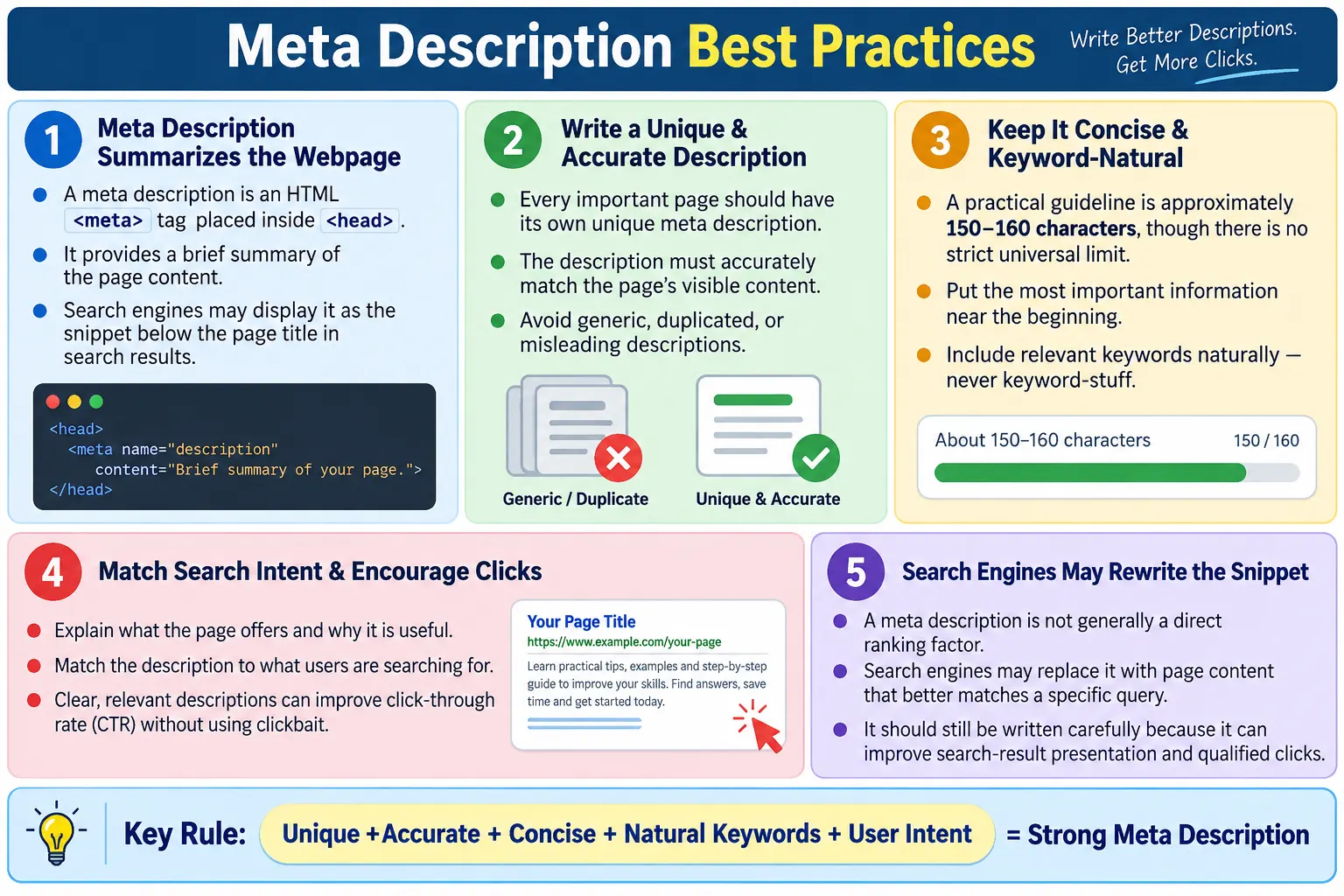
The meta description is an HTML <meta> tag that provides a brief summary of a webpage. It is placed inside the <head> section of an HTML document and helps search engines understand what the page is about. It is metadata, which means it describes the page rather than appearing as visible body content. A normal visitor usually does not see it on the page itself, but search engines may use it when presenting the page in search results.
Although the meta description is not generally treated as a direct ranking factor by most search engines, it can strongly influence whether users click your page in search results. A clear and compelling description can improve click-through rate, often called CTR. If two results appear for the same search query, users are more likely to click the result whose title and description clearly match what they are looking for. In that sense, the meta description is a communication tool. It helps the page make a promise before the user visits.
A well-written meta description should accurately summarize the page, encourage users to visit it, and match the page content. It should not mislead users, repeat keywords unnaturally, or use the same generic sentence across many pages. The best descriptions are short enough to read quickly, specific enough to explain the value of the page, and natural enough to feel written for humans rather than search engines alone.
What Is a Meta Description?
A meta description is an HTML tag that describes the content of a webpage. It is written with the name attribute set to description and the content attribute containing the summary text. The browser does not display this text as normal page content. Instead, it lives in the head section where metadata such as title, charset, viewport, canonical URL, and social preview tags are usually placed.
<meta
    name="description"
    content="Learn HTML from beginner to advanced with simple explanations and practical examples.">
The meta description should describe the visible content of the page. If the page is an HTML tutorial, the description should mention HTML learning, examples, tags, forms, tables, or other topics actually covered by the page. If the page is a product page, the description should summarize the product and its value. If the page is a news article, the description should summarize the story. The description should be written after understanding the purpose of the page.
A meta description is different from the visible introduction paragraph. The introduction welcomes the user after they arrive. The meta description helps the user decide whether to arrive. Sometimes the first paragraph and meta description can be similar in meaning, but they should not be blindly duplicated. The meta description should be concise and search-result friendly.
HTML Structure
The meta description appears inside the <head> section. A basic HTML document has a doctype, an <html> element, a head section, and a body section. The title and description belong in the head because they describe the document. The visible page content belongs in the body.
<!DOCTYPE html>

<html lang="en">

<head>

<title>HTML Tutorial</title>

<meta
name="description"
content="Learn HTML with examples.">

</head>

<body>

...

</body>

</html>
This structure is simple, but it matters. Search engines crawl the HTML document and read the metadata as part of their understanding process. A missing description does not prevent a page from being indexed, but it reduces your control over how the page may appear in search results. When the description is present and useful, it gives search engines a clear candidate snippet.
The meta description should usually appear only once per page. Multiple description tags can create ambiguity. If different systems or plugins inject separate descriptions, review the final HTML output and remove duplicates. A clean document head is easier to maintain and less likely to produce unpredictable search snippets.
Why the Meta Description Is Important
The meta description helps summarize the page, improve search result appearance, encourage users to click, improve user experience, and set expectations before users visit the page. It acts like a short advertisement for the page, but it should still be accurate and honest. A misleading description may bring clicks temporarily, but users will leave if the content does not match the promise.
HTML
  ↓
Meta Description
  ↓
Search Engine
  ↓
Search Results
  ↓
User Clicks
This workflow shows how the description connects the HTML page to the search experience. The user may see the title first, then the URL or site name, and then a short snippet. If the snippet answers the user's question or explains the page clearly, the user is more likely to click. If the snippet is vague, duplicated, or irrelevant, the user may choose another result.
The meta description also supports qualified traffic. Qualified traffic means users who actually want the content you provide. A description that clearly says the page teaches HTML forms will attract people looking for HTML forms. A vague description such as Learn more here may attract fewer relevant users. Good descriptions reduce mismatch between search intent and page content.
Where It Is Displayed
Search engines may display the meta description beneath the page title in search results. For example, a result may show the page title HTML Tutorial for Beginners, the website URL, and a description such as Learn HTML from beginner to advanced with practical examples, tutorials, and exercises. This snippet helps users evaluate the page before clicking.
However, search engines may choose to display a different snippet from the page if they believe it better matches the user's search query. This is important. Writing a meta description does not guarantee that exact text will always appear in search results. If a user searches for a very specific phrase that appears in the body content, the search engine may generate a snippet around that phrase instead. This is normal behavior.
Because search engines can rewrite snippets, the meta description should be treated as a strong suggestion rather than a fixed display guarantee. Still, it is worth writing carefully. A good description gives search engines a useful summary and often appears when it matches the query well. It also helps other systems, previews, audits, and crawlers understand the page summary.
Basic Example
A basic meta description should be concise, accurate, and useful. It should identify the topic and the benefit of the page. The following example works for a broad HTML tutorial page because it summarizes major content areas without trying to list every detail.
<meta
name="description"
content="Complete HTML tutorial covering tags, forms, tables, semantic HTML, and modern web development concepts.">
This description tells the user that the page is a complete HTML tutorial. It mentions tags, forms, tables, semantic HTML, and modern web development concepts. It is specific enough to be useful but not so long that it becomes difficult to scan. It also uses keywords naturally. The description reads like a sentence written for people, not a list stuffed with repeated terms.
When writing your own descriptions, start by asking: What is this page about? Who is it for? What will the user gain by clicking? The answer to those questions should shape the description. If you cannot summarize the page clearly, the page content itself may need a clearer focus.
Best Practice 1: Write a Unique Description
Every important page should have its own description. A unique description helps users and search engines understand the specific purpose of that page. If an HTML tutorial page and a CSS tutorial page both use the same description, the search result snippets become less helpful. Users cannot easily tell the difference between pages.
HTML Tutorial
  ↓
Learn HTML from beginner to advanced.

CSS Tutorial
  ↓
Learn CSS layouts, Flexbox, Grid, and responsive design.
Unique descriptions are especially important on large learning websites. Each tutorial may belong to the same course, but each page has a different purpose. A page about headings should mention headings. A page about meta descriptions should mention metadata, search snippets, CTR, and best practices. A page about tables should mention rows, columns, captions, and accessibility. This specificity helps the right users find the right page.
Duplicate descriptions are often caused by templates. A site may use one default description for every page. This is better than having nothing only in a very limited sense, but it is not good SEO practice. Templates should allow each page to provide its own summary. If a page is important enough to publish, it is important enough to describe accurately.
Best Practice 2: Accurately Describe the Page
The description should match the actual content. If the page teaches HTML forms, validation, labels, and accessibility, the description should say that. If the description talks about smartphones, job offers, movie downloads, or unrelated topics, users will be misled. Search engines may also ignore descriptions that do not match the page.
Good:
Learn HTML forms, validation, labels, and accessibility.

Bad:
Best smartphones for sale.
Accuracy builds trust. When users click a result and find exactly what the description promised, the experience feels reliable. When users click and find unrelated content, they leave quickly and may avoid the site in the future. For tutorial websites, trust matters because learners return to sources that explain topics honestly and consistently.
Accurate descriptions also help maintain editorial discipline. If you cannot write a description that matches the page, the page may be unfocused. A page that tries to cover too many unrelated subjects is harder to summarize and harder to rank for a clear intent. Writing the meta description can reveal whether the page has a clear purpose.
Best Practice 3: Keep It Concise
There is no strict character limit that applies everywhere. Search engines may truncate descriptions based on device, layout, query, and available space. A practical guideline is to keep descriptions clear, concise, and typically around 150 to 160 characters. This is not a rigid rule, but it helps writers stay focused.
Learn HTML from beginner to advanced with practical examples, exercises, semantic HTML, forms, tables, and modern web development concepts.The example above is useful, but if a description becomes too long, search results may show only part of it. Truncation is not always harmful, but important information should appear early. The first words should identify the topic clearly. Do not bury the main point at the end of a long sentence.
Concise writing is harder than long writing. A good description must summarize the page without becoming vague. Avoid filler phrases such as This page is about when a stronger direct phrase is available. For example, Learn HTML forms with examples is cleaner than This page is about learning HTML forms with examples.
Best Practice 4: Use Natural Keywords
Important keywords should appear naturally in the description. If a page is about HTML forms, words such as HTML, forms, input types, validation, labels, and accessibility may be relevant. These words help users recognize that the page matches their query. They also help the snippet feel aligned with search intent.
Learn HTML forms, semantic HTML, tables, accessibility, and HTML5 with practical examples.Natural keywords are helpful. Keyword stuffing is harmful. A bad description repeats the same word unnaturally, such as HTML HTML HTML HTML tutorial HTML HTML HTML. This looks spammy, reads badly, and does not help users. Search engines are much better at understanding topic relevance than older keyword stuffing tactics assume.
Use keywords the way a knowledgeable teacher would use them. Mention the topic, important subtopics, and user benefit. If the sentence sounds awkward when read aloud, rewrite it. A meta description should be optimized, but it should still sound human.
Best Practice 5: Make It Useful
A good description answers two basic questions: What is this page about, and why should users visit it? If the description only names the topic but gives no value, it may feel weak. If it gives a benefit but not the topic, it may feel vague. The strongest descriptions combine topic and value.
Master HTML with easy explanations, practical examples, quizzes, and real-world projects.This description tells users that the page teaches HTML and that the learning experience includes explanations, examples, quizzes, and projects. That is useful information. A user looking for practical learning has a reason to click. A user looking for only a quick reference can also decide whether the page fits their need.
Usefulness depends on the page type. A tutorial description may promise examples and explanations. A product page may mention features, pricing, reviews, or delivery. A news page may summarize the event. A portfolio page may describe skills and projects. The description should match the user's decision-making process for that page type.
Best Practice 6: Encourage Clicks
A meta description should be informative and engaging. It should encourage clicks by making the value of the page clear. This does not mean using exaggerated language or clickbait. It means writing in a way that helps users understand why the page is worth visiting.
Learn HTML step by step with beginner-friendly lessons, hands-on examples, and interview questions.This description is engaging because it tells users the learning path is step by step, beginner-friendly, practical, and useful for interviews. It sets an expectation. It also includes natural phrases that users may care about. A dry description such as HTML information page is less persuasive because it does not explain what makes the page useful.
Calls to action can be used carefully, but the best educational descriptions usually do not need aggressive wording. Phrases such as Learn, Understand, Explore, Practice, and Prepare can work well when they accurately describe the page. The goal is to invite the user, not pressure them.
Best Practice 7: Avoid Misleading Descriptions
Misleading descriptions create a poor user experience. If a page teaches HTML, the description should not say Download free movies. If a page contains beginner notes, it should not claim to be an advanced certification course. If the page is a short overview, it should not promise a complete masterclass. Misalignment damages trust.
Bad:
Download free movies.
Misleading descriptions may increase clicks briefly, but they attract the wrong audience. Those users are unlikely to stay, read, subscribe, or return. More importantly, misleading snippets weaken the reputation of the site. Users remember when a result wastes their time. Search engines may also rewrite snippets or evaluate the page differently when metadata and content do not align.
The best description is persuasive because it is accurate. If the page is useful, explain the usefulness clearly. There is no need to promise unrelated benefits. Good SEO is not about tricking users into visiting a page. It is about helping the right users find the right content.
Best Practice 8: Avoid Duplicate Descriptions
Duplicate descriptions are common on websites with many pages. A template may assign the same description to every page, such as Learn Programming Here. This does not tell users what each page contains. It also makes search results less distinct.
Bad:
Every page:
Learn Programming Here.

Better:
HTML Page:
Learn HTML from beginner to advanced.

CSS Page:
Learn modern CSS with Flexbox and Grid.

Java Page:
Master Java programming with examples.
Unique descriptions are not just an SEO task. They are a content quality task. Each important page should have a purpose, and the description should express that purpose. If many pages cannot be described differently, they may be too similar. In that case, the content strategy may need review.
Large websites should periodically audit descriptions. Find missing descriptions, duplicates, overly short descriptions, overly long descriptions, and descriptions that no longer match updated content. This can be done with SEO crawling tools, custom scripts, or test automation depending on the website setup.
Best Practice 9: Match User Intent
User intent means what the searcher is trying to accomplish. A user searching HTML Forms Tutorial probably wants to learn how forms work, including input types, validation, labels, and practical examples. A good description should match that intent.
Search:
HTML Forms Tutorial

Good description:
Learn HTML forms, input types, validation, labels, and accessibility with practical examples.
Matching intent improves click quality. If a user wants a tutorial, say the page is a tutorial. If a user wants interview questions, say the page includes interview questions. If a user wants examples, mention examples. This helps users choose the right result and reduces disappointment after clicking.
Intent can vary even when keywords look similar. A search for meta description length may need a practical guideline. A search for what is meta description may need a beginner explanation. A search for meta description best practices may need a checklist and examples. A strong page may cover all three, but the description should summarize the most important intent the page serves.
Best Practice 10: Keep It Human-Friendly
Meta descriptions should be written naturally. They should sound like helpful summaries, not robotic keyword blocks. A human-friendly description is easier to read, easier to trust, and more likely to encourage a click.
Build a strong HTML foundation through simple lessons, practical examples, and interview preparation.This sentence is human-friendly because it has a clear topic, clear benefit, and natural wording. It does not repeat keywords excessively. It does not use unnatural grammar. It does not overpromise. It feels like a useful description written for a learner.
A good test is to read the description aloud. If it sounds awkward, rewrite it. If it sounds like a list of keywords, rewrite it. If it does not explain why the page matters, improve it. Search snippets are read by people, so people should be the first audience.
Browser and Search Workflow
The browser loads the HTML, parses the head section, and makes metadata available to the document environment. Search engine crawlers also read this metadata when processing the page. The meta description becomes one possible source for the search result snippet.
HTML
  ↓
Meta Description
  ↓
Crawler Reads
  ↓
Search Engine
  ↓
Search Results
This workflow shows why the meta description belongs in the original HTML output whenever possible. If a site depends heavily on JavaScript to inject metadata after load, crawlers may still process it in many cases, but server-rendered or static metadata is simpler and more reliable. For static tutorial pages, writing the description directly in the head is the cleanest approach.
The description should also stay synchronized with the page. If the article content changes from a beginner tutorial to an interview guide, the meta description should be updated. Old metadata can misrepresent new content. Treat metadata as part of the page, not as an afterthought.
Real-World Examples
A tutorial website description should describe learning value. It might say that the page includes beginner-friendly tutorials, examples, quizzes, and interview questions. This helps students and job seekers decide whether to click.
<meta
name="description"
content="Learn HTML step by step with beginner-friendly tutorials, examples, quizzes, and interview questions.">
An e-commerce description should focus on products, buying confidence, and user decision factors such as price, reviews, delivery, or availability.
<meta
name="description"
content="Shop the latest laptops with competitive prices, customer reviews, and fast delivery.">
A news website description should summarize the news category or article topic clearly. A portfolio description should introduce the person, skill area, and project type.
<meta
name="description"
content="Read today's technology news, product launches, software updates, and industry trends.">

<meta
name="description"
content="Explore the web development portfolio of John Smith, including HTML, CSS, JavaScript, and React projects.">
These examples show that a good description changes by page type. The same formula should not be copied everywhere. The description must serve the user who is deciding whether the page matches their need.
Common Mistakes
The first common mistake is a missing meta description. A page can still be indexed without one, but the site loses an opportunity to provide a clear summary. Search engines may generate a snippet from the body text, and that snippet may or may not represent the page well.
<head>

<title>
HTML
</title>

</head>
Duplicate descriptions are another frequent issue. Every important page should have its own unique description. Keyword stuffing is also a problem. A description such as HTML HTML HTML HTML HTML HTML HTML is not useful. Use keywords naturally. Misleading information should always be avoided. The description should accurately reflect the page content.
Extremely short descriptions are weak because they do not provide enough information. A description such as HTML Page does not summarize the content effectively. Extremely long descriptions may be truncated in search results and may bury the important message. Keep descriptions concise and informative. The ideal description is specific, readable, honest, and focused.
SEO Benefits
Good meta descriptions can improve click-through rates, set user expectations, summarize page content, improve search result appearance, and encourage qualified traffic. While they are not generally considered a direct ranking factor, they can indirectly improve SEO through better user engagement. A page that attracts the right users is more likely to satisfy their intent.
- Improve click-through rates from search results.
- Set accurate expectations before users visit the page.
- Summarize page content clearly.
- Improve the appearance and usefulness of search snippets.
- Encourage qualified traffic that matches the page topic.
Indirect benefits should not be exaggerated. A description alone will not make weak content rank well. But when strong content has a strong title and description, users can recognize its value more easily. Metadata supports content discovery. It does not replace content quality.
Selenium Perspective
Automation testers may verify that the meta description exists, that the description matches the page content, that important pages do not share duplicate descriptions, and that the HTML renders the expected metadata. Selenium can locate the meta description using a CSS selector and read its content attribute.
String description =
driver.findElement(
By.cssSelector(
"meta[name='description']"))
.getAttribute("content");

System.out.println(description);
This type of check is useful in SEO smoke tests, content validation tests, and regression tests for static websites. For example, if a template update accidentally removes descriptions from all tutorial pages, an automated test can detect the issue quickly. If a page title changes but the description remains outdated, a review can catch that mismatch.
For large sites, Selenium may not be the most efficient tool for crawling every page, but it can still validate critical pages. SEO crawlers, scripts, and static analysis tools can also check descriptions at scale. The important point is that metadata should be tested as part of page quality, especially on sites where organic search traffic matters.
Writing Workflow for Strong Descriptions
A practical writing workflow starts with the page intent. Ask what problem the page solves and what the user expects. Then identify the main topic and two or three important supporting concepts. Write a natural one-sentence summary. Keep the most important information near the beginning. Remove filler words. Check that the description matches the page. Finally, compare it with related pages to make sure it is unique.
For example, a page about heading hierarchy may mention HTML headings, structure, SEO, accessibility, and screen readers. A page about meta descriptions may mention HTML metadata, search snippets, CTR, keywords, and best practices. These descriptions may both belong to an HTML course, but they should not sound identical. Each page deserves its own summary.
After writing the description, review it from a user's perspective. If you saw this snippet in search results, would you understand what the page offers? Would you know whether it is beginner-friendly, practical, interview-focused, or advanced? Would the snippet feel trustworthy? These questions help improve description quality beyond mechanical character counts.
Meta Description Checklist
A checklist helps keep descriptions consistent across a website. Before publishing a page, verify that the description exists, is unique, matches the page, uses natural keywords, is concise, encourages clicks honestly, avoids duplication, and aligns with user intent. The description should also be free of spelling mistakes and should not contain broken HTML quotes.
- Write one meta description for each important page.
- Keep the description unique across the website.
- Match the description to the visible page content.
- Use natural keywords without stuffing.
- Keep the text concise and readable.
- Place the most important idea near the beginning.
- Do not mislead users.
- Review descriptions after major content updates.
This checklist is simple enough for developers, content writers, testers, and SEO reviewers to use. It turns meta descriptions from an afterthought into a normal part of page publishing quality.
Common Interview Questions
What is a meta description? A meta description is an HTML <meta> tag that summarizes a webpage. It is used as metadata and may be shown as the snippet in search results.
Where is it placed? It is placed inside the <head> section of the HTML document. It should not be placed in the visible body content.
Is the meta description visible on the webpage? No. It is part of the page metadata and is not displayed as normal page content. Users may see it in search results if the search engine chooses to show it.
Does the meta description directly improve rankings? Generally, no. It is not considered a direct ranking factor by most search engines, but it can improve click-through rates by making search results more appealing and relevant.
Should every page have a unique description? Yes. Unique descriptions help users and search engines understand the purpose of each page. Duplicate descriptions reduce clarity.
Can search engines ignore the meta description? Yes. Search engines may generate their own snippet from the page content if they believe it better matches the user's search query.
Comparison Table
| Good Meta Description | Poor Meta Description |
|---|---|
| Unique for each page | Duplicate across pages |
| Matches page content | Misleading |
| Natural keywords | Keyword stuffing |
| Concise and informative | Too short or excessively long |
| Encourages clicks | Generic or unhelpful |
Practical Review Workflow
A practical review workflow helps teams keep descriptions accurate over time. Start by opening the page and reading the visible content first. Then read the title and meta description. The title should identify the page topic, and the description should summarize the page promise. If the description sounds broader than the actual content, narrow it. If the description misses an important benefit of the page, improve it. If the description sounds like it belongs to another page, rewrite it completely.
Next, compare the description with nearby pages in the same section. On a tutorial site, pages about headings, meta descriptions, structured data, and image SEO may all belong to the HTML SEO group, but each page should still have its own distinct summary. If several descriptions start with the same generic phrase and differ only by one word, they may not be helpful enough. A strong description should make the page identity clear even without seeing the URL.
Finally, review descriptions after major content updates. Many pages evolve over time. A short overview may become a long guide. A beginner lesson may gain interview questions. A page may add examples, tables, or Selenium validation. When the content changes, the description should change too. Outdated descriptions create a mismatch between search snippets and page content. Treat the meta description as part of the article, not as a forgotten technical detail.
Interview-Ready Answer
A meta description is an HTML <meta> tag placed inside the <head> section that provides a brief summary of a webpage. While it is not generally a direct ranking factor, it plays an important role in SEO by influencing how pages appear in search results and encouraging users to click. Good meta descriptions are unique, concise, relevant to the page content, include natural keywords, accurately reflect user intent, and encourage engagement without being misleading or repetitive.
In an interview, a strong answer should also mention that search engines may rewrite snippets. This shows practical understanding. The description is still worth writing because it gives search engines and users a clear summary, but it is not a guaranteed display. The best description supports the title, matches the visible content, and helps the right user decide to visit the page.
One-Line Insight
A great meta description does not directly boost rankings; it helps convince users that your page is the best result to click.