Merging Cells (rowspan, colspan)
Introduction
Sometimes, a table needs a cell to span multiple columns or multiple rows. A normal table places one cell in one row and one column position. However, real-world tables are not always that simple. Reports, timetables, invoices, product specifications, employee schedules, and multi-level headers often need cells that cover more than one position in the grid.
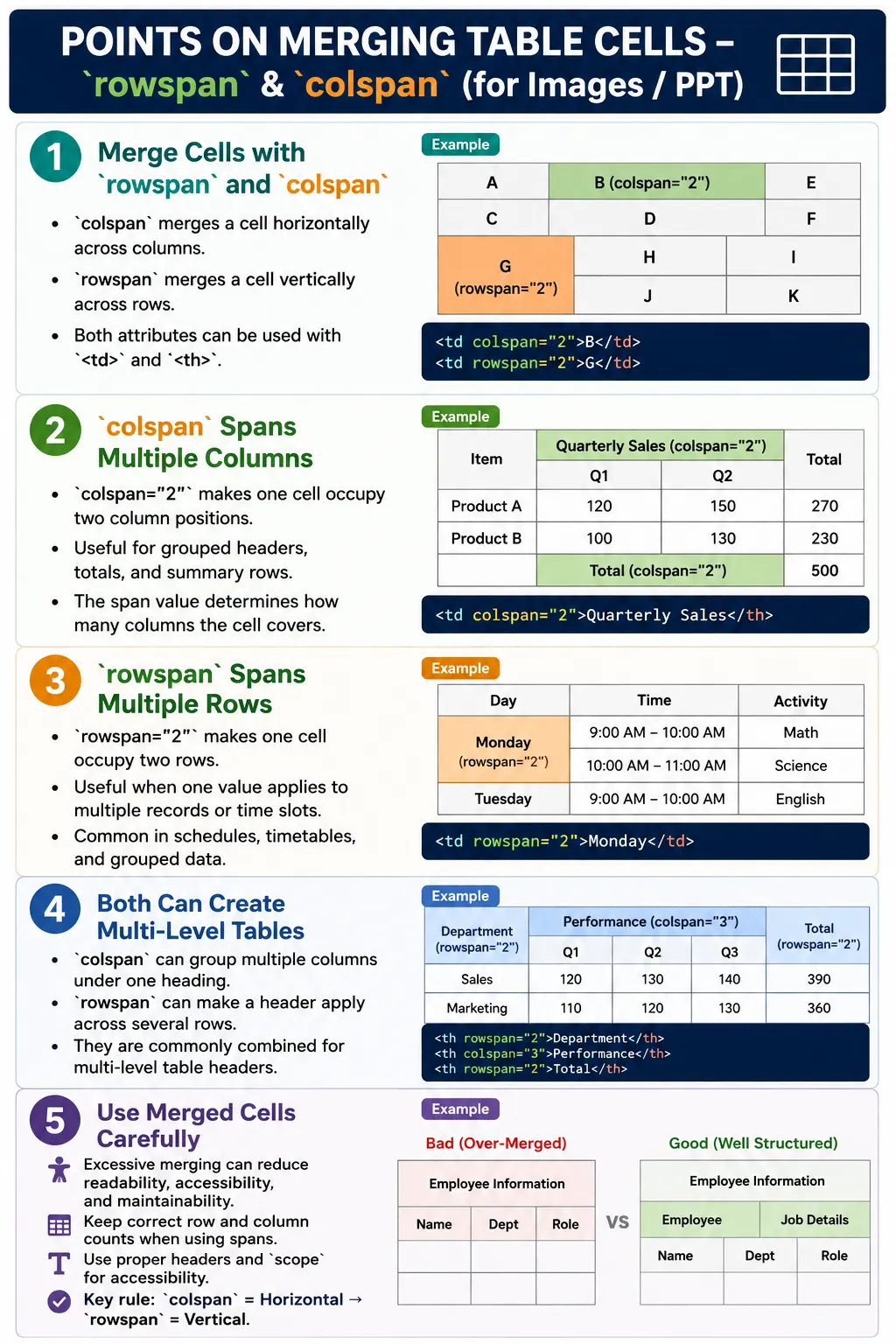
HTML provides two attributes for this purpose: colspan and rowspan. The colspan attribute merges cells horizontally across columns. The rowspan attribute merges cells vertically across rows. These attributes allow table authors to represent grouped information more clearly when a simple one-cell-per-position structure is not enough.
Cell merging is powerful, but it should be used carefully. Excessive merging can make a table hard to read, hard to maintain, and difficult for assistive technologies to interpret. The best approach is to use rowspan and colspan only when the data genuinely requires it.
Why Cell Merges Are Needed
Consider a table row where a total should apply across the entire table. If the table has two columns and the total label should occupy both columns, leaving one empty cell is awkward and unclear.
Without Merging

+-------------+--------+
| Total Sales |        |
+-------------+--------+
With colspan, one cell can span both columns and represent a single full-width summary row.
With colspan

+----------------------+
|      Total Sales     |
+----------------------+
Cell merging is useful when the table structure itself needs to communicate grouping. A cell may label multiple columns, represent a person across multiple subject rows, or show an activity that lasts across several time slots.
What Is colspan?
The colspan attribute tells a table cell to span across multiple columns. It can be used on <td> and <th> elements.
<td colspan="2">
    Content
</td>
This means one cell occupies the space of two columns.
One Cell
   ↓
Occupies
Two Columns
The number in colspan tells the browser how many column positions the cell should cover. A value of 2 spans two columns. A value of 3 spans three columns.
Basic colspan Example
A basic colspan example has one row with a merged cell and another row with two normal cells.
<table>
    <tr>
        <td colspan="2">
            Merged Cell
        </td>
    </tr>

    <tr>
        <td>Left</td>
        <td>Right</td>
    </tr>
</table>
The browser represents this as one full-width cell above two separate cells.
+------------------+
|   Merged Cell    |
+---------+--------+
| Left    | Right  |
+---------+--------+
This pattern is common for summary rows, section labels, and grouped headers.
Using colspan="3"
A cell can span more than two columns. For example, colspan="3" makes one cell cover three columns.
<td colspan="3">
    Course Information
</td>
+----------------------------+
| Course Information |
+--------+--------+----------+The browser reserves the next two column positions for the merged cell, so additional cells in that same row must be counted carefully. Incorrect column counts are one of the most common mistakes with colspan.
Invoice Total Example
Invoices often use colspan for total rows. A total may need to span the width of the table instead of appearing in only one column.
<table>
    <tr>
        <th>Item</th>
        <th>Price</th>
    </tr>

    <tr>
        <td>Laptop</td>
        <td>$1200</td>
    </tr>

    <tr>
        <td colspan="2">
            Total: $1200
        </td>
    </tr>
</table>
This creates a final row where the total message spans both columns. It communicates that the total applies to the entire invoice table.
What Is rowspan?
The rowspan attribute tells a table cell to span multiple rows. It can also be used on both <td> and <th> elements.
<td rowspan="2">
    Content
</td>
This means one cell occupies the space of two rows.
One Cell
   ↓
Occupies
Two Rows
Rowspan is useful when one value applies to multiple rows. For example, a student's name may apply to several subject rows, or a timetable activity may run across more than one time slot.
Basic rowspan Example
A basic rowspan example shows one cell spanning two rows while the adjacent column contains separate values.
<table>
    <tr>
        <td rowspan="2">
            John
        </td>
        <td>Math</td>
    </tr>

    <tr>
        <td>Science</td>
    </tr>
</table>
+--------+----------+
| John | Math |
| +----------+
| | Science |
+--------+----------+The "John" cell occupies two rows. The second row does not need another cell for John because that position is already occupied by the row-spanning cell.
Using rowspan="3"
The same principle applies when a cell spans three rows.
<td rowspan="3">
    Alice
</td>
This cell occupies the current row and the next two rows. When using larger row spans, developers must carefully count the cells in following rows so the table remains aligned.
Student Subjects Example
A student subjects table is a common real-world example. One student name can apply to multiple subject rows.
<table>
    <tr>
        <th>Student</th>
        <th>Subject</th>
    </tr>

    <tr>
        <td rowspan="2">
            Emma
        </td>
        <td>Math</td>
    </tr>

    <tr>
        <td>Science</td>
    </tr>
</table>
This avoids repeating Emma's name in every row while still making it clear that both subject rows belong to Emma.
Combining rowspan and colspan
Both attributes can be used in the same table. A table may use colspan for a grouped header and rowspan for a label that applies to multiple rows.
<table>
    <tr>
        <th colspan="2">
            Employee
        </th>
        <th>
            Salary
        </th>
    </tr>

    <tr>
        <td>John</td>
        <td>IT</td>
        <td>5000</td>
    </tr>
</table>
In this example, the Employee header spans the Name and Department columns, while Salary remains separate.
Multi-Level Header Example
Multi-level headers are one of the strongest reasons to use merged cells. In a marks table, the "Marks" header may span multiple subject columns, while "Name" spans two header rows.
<table>
    <tr>
        <th rowspan="2">
            Name
        </th>
        <th colspan="2">
            Marks
        </th>
    </tr>

    <tr>
        <th>Math</th>
        <th>Science</th>
    </tr>

    <tr>
        <td>John</td>
        <td>95</td>
        <td>90</td>
    </tr>
</table>
+--------+------------------+
| Name | Marks |
| +--------+---------+
| | Math | Science |
+--------+--------+---------+
| John | 95 | 90 |
+--------+--------+---------+This structure visually communicates that Math and Science are both part of the Marks group.
Timetable Example
Timetables commonly use rowspan because one class or activity may occupy multiple time slots.
<table>
    <tr>
        <th>Time</th>
        <th>Monday</th>
        <th>Tuesday</th>
    </tr>

    <tr>
        <td>9 AM</td>
        <td rowspan="2">
            HTML
        </td>
        <td>CSS</td>
    </tr>

    <tr>
        <td>10 AM</td>
        <td>JavaScript</td>
    </tr>
</table>
The HTML class occupies both 9 AM and 10 AM on Monday. The Tuesday column has separate entries for each time slot.
How the Browser Handles rowspan
When the browser sees a cell with rowspan, it creates the cell in the current row and reserves the same column position in the following rows.
<td rowspan="2">
    HTML
</td>
Create Cell
↓
Occupy Current Row
↓
Reserve Position
↓
Continue Into Next RowThis is why the next row must not include an extra cell for the same position. The row-spanning cell already occupies it.
How the Browser Handles colspan
When the browser sees a cell with colspan, it creates the cell and lets it occupy multiple column positions in the current row.
<td colspan="3">
    Summary
</td>
Create Cell
↓
Occupy 3 Columns
↓
Skip Next 2 Cell PositionsRows with colspan must still align with the table's overall column structure. The total number of occupied columns should remain consistent.
Accessibility Considerations
Merged cells can make tables more difficult to interpret. Assistive technologies must understand which headers apply to which data cells, and merged structures can complicate that relationship.
Best practices include using merged cells only when necessary, keeping the table structure as simple as possible, using proper <th> elements, using the scope attribute where appropriate, and using id and headers for complex tables.
If a table becomes too complex because of many merged cells, consider whether the data can be split into smaller tables or presented in a simpler structure.
How to Count Columns Correctly
When using colspan, the most important rule is to count occupied column positions, not just the number of visible cells. A row with one cell using colspan="2" already occupies two columns. If the table is designed to have three columns, that row should usually contain either one more normal cell or no additional cells depending on the intended layout.
Three-column table

Normal row:
Cell 1 + Cell 2 + Cell 3 = 3 columns

Merged row:
Cell colspan="2" + Cell 3 = 3 columns
This counting is important because visual misalignment often comes from forgetting that a merged cell has already reserved multiple positions. Developers should mentally expand the merged cell into the number of columns it occupies and then verify that the row still matches the overall table structure.
How to Count Rows Correctly
When using rowspan, the same idea applies vertically. A cell with rowspan="2" occupies the current row and one additional row. The following row should not include another cell in that same position because the row-spanning cell already fills it.
rowspan="2"

Current row: cell appears here
Next row:    same cell still occupies this position
This is why rowspan tables can be harder to maintain than colspan tables. When a row-spanning cell reaches into later rows, developers must remember that the layout of those later rows is affected by a cell that appeared earlier in the markup. If many row spans are used, the table becomes harder to reason about.
When to Use Merged Cells
Merged cells should be used when they improve the meaning of the table. They are appropriate for grouped headers, summary rows, schedules, report sections, invoice totals, and cases where one label truly applies to multiple rows or columns.
For example, a header named "Marks" spanning Math and Science columns is meaningful because both subjects belong to the same group. A timetable entry spanning two time slots is meaningful because the same class occupies both periods. An invoice total spanning all columns is meaningful because the total summarizes the entire table.
Merged cells should not be used merely to create visual spacing or page layout. If the goal is visual arrangement rather than tabular meaning, CSS is the better tool.
When to Avoid Merged Cells
Avoid merged cells when they make the table harder to read than necessary. If the same information can be repeated clearly in separate rows, repeating it may sometimes be more accessible and easier to maintain than using a large rowspan. If a table has many merged headers and users struggle to understand which values belong to which headings, the structure may need to be simplified.
Also avoid merging cells for purely decorative purposes. A table should communicate data relationships. If a merge does not clarify a relationship, it may be adding complexity without value.
Maintainability Concerns
Merged cells can increase maintenance cost. When a new row or column is added to a table, existing rowspan and colspan values may need to be updated. For example, if a summary row uses colspan="3" and a fourth column is added later, the colspan may need to become colspan="4".
The same applies to row spans. If a cell spans three rows and a new related row is inserted, the value may need to change to rowspan="4". If developers forget to update the span value, the table may render incorrectly or become confusing.
For this reason, complex tables should be reviewed carefully whenever the data model changes. Automated tests can help verify expected span values, but developers still need to understand the table structure.
Common Mistakes
A common mistake is creating an incorrect column count. If a cell spans two columns and additional cells are added as though the span did not exist, the row may become inconsistent.
<tr>
    <td colspan="2">
        Total
    </td>
    <td>500</td>
    <td>Extra</td>
</tr>
Another mistake is overusing rowspan. Very large row spans such as rowspan="15" can make tables difficult to understand and maintain. Developers also sometimes use merges for page layout, such as colspan="10" to create a menu area. Tables should not be used for layout purposes.
Forgetting accessibility is also a serious mistake. Complex merged tables without proper headers can confuse screen readers and make important data inaccessible.
Course Schedule Example
A course schedule can use both rowspan and colspan to create grouped duration headers.
<table>
    <tr>
        <th rowspan="2">
            Course
        </th>
        <th colspan="2">
            Duration
        </th>
    </tr>

    <tr>
        <th>Theory</th>
        <th>Practical</th>
    </tr>

    <tr>
        <td>HTML</td>
        <td>20 Days</td>
        <td>10 Days</td>
    </tr>
</table>
The Course header applies across two header rows, while Duration groups the Theory and Practical columns.
Selenium Perspective
From a Selenium testing perspective, merged cells can be validated by reading the rowspan and colspan attributes. Automation testers may verify that expected cells span the correct number of rows or columns and that table alignment remains correct.
WebElement cell =
driver.findElement(By.tagName("td"));
Read the colspan value:
String colspan =
cell.getAttribute("colspan");

System.out.println(colspan);
Read the rowspan value:
String rowspan =
cell.getAttribute("rowspan");

System.out.println(rowspan);
Automation testers commonly verify correct rowspan, correct colspan, proper table rendering, and expected row and column alignment. These checks are useful in timetables, reports, invoices, and multi-level header tables.
Common Interview Questions
A common interview question is: what does colspan do? It allows a cell to span multiple columns. What does rowspan do? It allows a cell to span multiple rows.
Can both attributes be used together? Yes. A cell can simultaneously span multiple rows and columns. Should merged cells be overused? No. Overusing merged cells can reduce readability, complicate maintenance, and make accessibility more challenging.
Are rowspan and colspan supported on both <td> and <th>? Yes. Both attributes can be applied to data cells and header cells.
Comparison Table
| Attribute | Purpose | Direction |
|---|---|---|
colspan |
Merge multiple columns | Horizontal |
rowspan |
Merge multiple rows | Vertical |
Interview-Ready Answer
The colspan and rowspan attributes are used to merge cells in HTML tables. colspan merges cells horizontally across multiple columns, while rowspan merges cells vertically across multiple rows. They are commonly used for multi-level headers, schedules, invoices, and reports. Although powerful, they should be used carefully because excessive cell merging can make tables harder to read, maintain, and make accessible.
One-Line Insight
Think of colspan as stretching a cell sideways across columns and rowspan as stretching it downward across rows.