HTML Mastery Checklist
Introduction
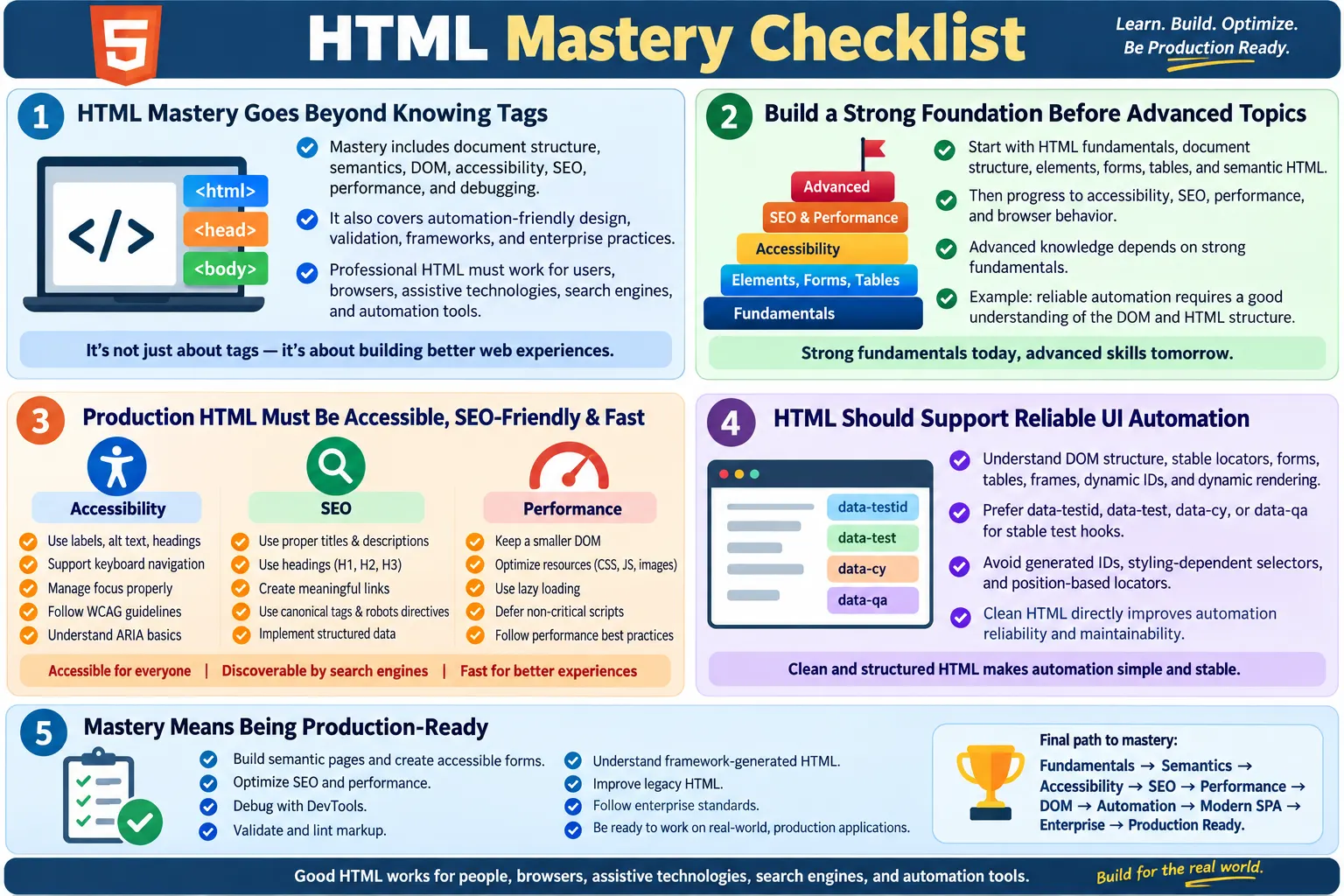
The HTML Mastery Checklist is a comprehensive way to evaluate whether your HTML knowledge has moved from beginner awareness to real-world production readiness. HTML mastery is not only about remembering tags. It includes understanding document structure, semantic markup, browser parsing, DOM creation, accessibility, SEO, performance, automation-friendly design, debugging, validation, modern framework output, and enterprise best practices.
Many learners underestimate HTML because it appears simple at first. A beginner can create a heading, paragraph, link, and image within minutes. But professional HTML is deeper. It must work for users, browsers, assistive technologies, search engines, automation tools, design systems, and long-term maintenance. A page that looks correct can still have weak headings, inaccessible forms, poor metadata, invalid nesting, brittle locators, unnecessary DOM complexity, and poor mobile behavior.
This checklist can be used by frontend developers, full-stack developers, manual testers, automation testers, accessibility engineers, SEO specialists, web designers, students, and interview candidates. It helps you identify what you already know, what needs revision, and what separates basic HTML knowledge from production-ready HTML skill.
How to Use This Checklist
Use this checklist as a practical self-assessment rather than a memorization exercise. For each area, ask whether you can explain the concept, write correct examples, inspect the behavior in a browser, debug related issues, and apply the knowledge in real projects. If you can only define a topic but cannot use it, mark it as partially learned. If you can explain it, implement it, test it, and review it in other people's code, you are closer to mastery.
HTML mastery grows in layers. First, you learn the syntax. Then you learn structure. Then you learn semantics. After that, you learn accessibility, SEO, browser behavior, automation, and maintainability. The order matters because advanced topics depend on strong foundations. For example, accessibility is much easier when you already understand semantic elements. Automation is more reliable when you understand the DOM. SEO is stronger when headings, links, metadata, and content structure are clear.
1. HTML Fundamentals
HTML fundamentals begin with understanding what HTML is and what role it plays in web development. HTML defines the structure and meaning of web content. CSS controls presentation. JavaScript controls behavior and interaction. A complete web page usually depends on all three, but HTML is the structural foundation that browsers parse first.
You should know the evolution of HTML from earlier versions to HTML5 and the modern Living Standard. You do not need to memorize every historical detail, but you should understand that HTML continues to evolve and that modern browser behavior follows living specifications. You should also understand basic client-server architecture: the browser sends a request, the server returns resources, and the browser parses HTML to create the DOM.
- Understand what HTML is.
- Know the role of HTML in web development.
- Understand HTML vs CSS vs JavaScript.
- Know the evolution of HTML, HTML5, and the Living Standard.
- Understand client-server architecture.
- Understand how browsers parse HTML.
2. HTML Document Structure
A valid HTML document has a predictable structure. You should know why <!DOCTYPE html> is used, what the <html> element represents, what belongs in the <head>, and what belongs in the <body>. You should know why <meta charset="UTF-8"> matters and why the viewport meta tag is important for responsive mobile rendering.
Page titles are also part of document structure. A meaningful <title> improves browser tab clarity, bookmarking, search result appearance, and accessibility. A production-ready developer should never treat document structure as boilerplate only. The head section communicates important information to browsers, search engines, social platforms, and assistive technologies.
- Create a valid HTML document.
- Use
<!DOCTYPE html>. - Understand
<html>,<head>, and<body>. - Use
<meta charset>. - Configure the viewport meta tag.
- Use meaningful page titles.
3. Text and Content Elements
Text and content elements are the visible foundation of most pages. You should understand headings from <h1> to <h6>, paragraphs, line breaks, horizontal rules, ordered lists, unordered lists, description lists, and inline formatting elements. More importantly, you should know when each element is appropriate.
Headings should describe structure, not merely create large text. Paragraphs should group related text. Lists should represent grouped items. Inline formatting elements should be used with semantic awareness. For example, <strong> communicates importance, while <b> is more visual. <em> communicates emphasis, while <i> may represent alternate voice or style depending on context.
4. Links and Navigation
Links are one of the most important parts of the web. You should know how to create hyperlinks, when to use relative URLs, when to use absolute URLs, how anchor links work, how to build navigation menus, and how to open external links safely. For links opened in a new tab, you should understand the importance of rel="noopener noreferrer" for security and privacy.
Good link text matters. "Click here" is weak because it does not describe the destination. "HTML Forms Tutorial" is stronger because it tells users and search engines where the link leads. Navigation should use real anchor elements when navigating to pages or sections. Buttons should be used for actions. This distinction helps accessibility, usability, and automation.
5. Images and Multimedia
Image mastery includes more than adding <img>. You should understand src, alt, image dimensions, responsive images, lazy loading, file formats, and image accessibility. Meaningful alt text helps users who cannot see images and gives search engines context. Decorative images should use empty alt text so they are ignored by assistive technologies.
Multimedia skills include embedding audio and video, using controls, providing captions and transcripts where needed, and understanding performance impact. Modern sites must balance visual richness with loading speed and accessibility. A large unoptimized image or video can harm user experience even if the markup is syntactically correct.
6. Tables
Tables are used for structured tabular data, not page layout. You should know how to build tables using <table>, <tr>, <td>, and <th>. You should understand <thead>, <tbody>, and <tfoot>. You should know when and how to use rowspan and colspan.
Accessible tables require meaningful headers and clear relationships between header cells and data cells. A simple table may only need <th> elements. More complex tables may require captions, scopes, or additional structure. A production-ready professional should also know when not to use a table. If content is not tabular data, another structure may be more appropriate.
7. Forms
Forms are one of the most important HTML skills because they connect users to application behavior. You should know how forms submit data, how method and action work, and how controls such as text inputs, password fields, email fields, radio buttons, checkboxes, selects, textareas, and buttons behave.
Form mastery requires accessibility. Every input should have a proper label. Related controls should use <fieldset> and <legend> where appropriate. Built-in validation attributes such as required, pattern, min, max, and type should be used thoughtfully. Error messages should be clear and associated with fields.
8. Semantic HTML
Semantic HTML is the practice of using elements according to their meaning. You should know how and when to use <header>, <nav>, <main>, <section>, <article>, <aside>, and <footer>. These elements make page structure clearer to browsers, assistive technologies, search engines, developers, and testers.
Mastery does not mean replacing every <div>. Generic containers are still useful when no semantic element fits. The goal is to avoid unnecessary div soup and choose meaningful elements where they improve structure. Semantic HTML improves accessibility, SEO, code readability, and long-term maintainability.
9. HTML5 Features
HTML5 introduced and standardized many features that modern developers should understand at least conceptually. These include audio, video, canvas basics, SVG basics, drag and drop basics, geolocation basics, local storage, and session storage. Not every role requires deep expertise in every API, but a production-ready professional should know what these features are used for and what risks they involve.
For example, local storage and session storage can persist data in the browser, but they should not be used carelessly for sensitive information. Geolocation requires user permission and must be handled respectfully. Canvas and SVG are both visual technologies, but they have different accessibility and rendering characteristics. Knowing these differences helps you make better implementation choices.
10. Accessibility
Accessibility is one of the clearest differences between basic HTML knowledge and professional HTML mastery. You should understand WCAG principles, form labels, image alt text, heading hierarchy, keyboard navigation, visible focus, focus management, color contrast, and ARIA basics. You should know that ARIA is useful when necessary but should not replace native HTML when native elements already provide the right behavior.
Accessible HTML benefits many users. Keyboard users need reachable controls. Screen reader users need semantic structure and accessible names. Users with low vision need readable contrast and scalable content. Users with cognitive disabilities benefit from clear structure and consistent interactions. Accessibility is not an optional advanced topic; it is part of quality web development.
11. SEO
HTML supports SEO by giving search engines structured information about a page. You should know how to write unique page titles, meta descriptions, semantic headings, descriptive links, canonical tags, robots meta tags, and structured data with JSON-LD where appropriate. You should understand that good HTML helps search engines interpret content more clearly.
SEO mastery does not mean keyword stuffing. It means creating clear, crawlable, well-structured pages. A page should have a meaningful title, a logical heading hierarchy, useful internal links, descriptive image text, clean canonical signals, and important content available in HTML. For public content pages, technical clarity matters.
12. Performance
HTML performance includes reducing unnecessary file size, avoiding excessive DOM nodes, lazy-loading appropriate images, deferring non-critical scripts, and prioritizing critical content. A page can be visually correct but inefficient if it contains too many wrappers, large blocking resources, unoptimized images, or unnecessary hidden content.
Performance is not only a backend or JavaScript concern. HTML structure affects rendering, layout, accessibility tree creation, automation speed, and maintainability. Clean markup helps browsers work efficiently and helps developers debug quickly.
13. Browser Knowledge
HTML mastery requires understanding what browsers do with markup. You should understand parsing, DOM creation, render tree basics, layout, paint, and how DevTools can inspect live elements. You should know the difference between View Source and Inspect Element, especially for JavaScript-heavy pages where the live DOM may differ from the original HTML response.
Cross-browser testing also matters. Modern browsers are more consistent than older browsers, but differences still exist in form controls, media behavior, accessibility support, and edge cases. A production-ready professional tests important workflows across supported browsers and devices.
14. HTML Validation and Quality
Validation and linting help maintain quality. HTML validation checks whether markup follows standards. Linting can enforce project conventions, catch common mistakes, and improve consistency. You should know how to fix invalid nesting, duplicate IDs, missing attributes, deprecated tags, and improper document structure.
Validation does not guarantee a perfect user experience, but invalid HTML can create unpredictable behavior. Professional teams use validation and linting as guardrails. They do not replace human judgment, but they catch errors early and make code review more effective.
15. Automation-Friendly HTML
Automation-friendly HTML is important for testers and developers. You should understand the DOM, stable locators, data-* attributes, dynamic IDs, accessible names, forms, tables, frames, and dynamic rendering. UI automation tools locate and interact with rendered HTML elements, so markup quality directly affects test reliability.
Stable attributes such as data-testid, data-test, data-cy, or data-qa can make important workflows easier to test. Avoid depending on generated IDs, exact wrapper positions, or styling classes that change frequently. Automation-friendly HTML is a collaboration between developers and testers.
16. Modern HTML
Modern HTML mastery includes understanding how HTML works inside SPAs and framework-generated applications. React, Angular, Vue, and Svelte may use JSX, templates, and components, but the browser still renders HTML and the DOM. You should understand server-side rendering, static site generation, hydration, client-side routing, and dynamic DOM updates conceptually.
This knowledge helps with SEO, accessibility, performance, and automation. If content appears only after JavaScript runs, SEO and testing strategies may need adjustment. If hydration delays interactivity, tests may need better readiness signals. If components re-render, automation may need to avoid stale references.
17. Enterprise Best Practices
Enterprise HTML is about consistency across teams and years. You should understand naming conventions, clean HTML principles, reusable patterns, code review guidelines, accessibility standards, design systems, automation hooks, and documentation. Enterprise environments need rules because many developers may build related interfaces over time.
Good enterprise HTML standards reduce defects. They make components reusable, testing more reliable, accessibility easier to maintain, and onboarding faster. They also prevent teams from inventing conflicting patterns for the same problem.
18. Debugging Skills
HTML debugging includes using DevTools to inspect elements, identify invalid nesting, find duplicate IDs, debug forms, review accessibility information, inspect computed styles, and diagnose automation locator issues. A strong HTML professional can move from a visual issue to the underlying DOM cause.
For example, if a button cannot be clicked, the cause may be an overlay, disabled state, hidden element, duplicate control, JavaScript timing issue, or incorrect selector. If a form does not submit, inspect names, types, validation states, disabled attributes, and event behavior. Debugging skill turns HTML knowledge into practical problem-solving.
19. Interview Readiness
Interview readiness means being able to explain semantic HTML, the DOM, accessibility, SEO basics, validation, linting, framework-generated HTML, and automation-friendly markup. You should be able to answer both definition questions and scenario questions. Scenario questions are especially important because they reveal whether you can apply concepts.
Before interviews, practice explaining why a form needs labels, why headings matter, why clickable generic elements are risky, why alt text matters, why canonical tags are used, why stable locators matter, and how browsers create the DOM. Clear explanation is as important as technical memory.
20. Real-World Skills
Real-world HTML skill includes reading legacy HTML, reviewing code, refactoring outdated markup, working with reusable components, collaborating with developers and testers, and improving existing pages without breaking behavior. Many production projects are not built from scratch. You often inherit old markup, inconsistent patterns, or framework-generated output that must be improved carefully.
A production-ready professional can modernize old pages, replace deprecated tags, improve accessibility, preserve SEO signals, and keep automation stable. This requires judgment. Not every old page should be rewritten immediately, but important issues should be identified and prioritized.
Self-Assessment Score
| Score | Skill Level |
|---|---|
| 0-40% | Beginner |
| 41-70% | Intermediate |
| 71-90% | Advanced |
| 91-100% | HTML Expert / Production Ready |
This score is only a guide. Someone may be strong in forms and automation but weaker in SEO. Another person may be strong in accessibility but weaker in SPA rendering. Use the score to plan learning, not to label yourself permanently.
Production-Ready HTML Developer Checklist
You are production-ready when you can build semantic HTML pages from scratch, create accessible forms, structure content for SEO, optimize HTML for performance, debug issues with DevTools, validate and lint markup, build automation-friendly structure, understand framework-generated HTML, review legacy pages, and apply enterprise standards.
- Build semantic HTML pages from scratch.
- Create accessible forms.
- Structure content for SEO.
- Optimize HTML for performance.
- Debug HTML issues with DevTools.
- Validate and lint HTML.
- Build automation-friendly markup.
- Understand how frameworks generate HTML.
- Review and improve legacy HTML.
- Apply enterprise coding standards.
Interview Readiness Checklist
Before attending an HTML-related interview, make sure you can explain core concepts clearly. You should be able to define HTML, semantic HTML, and the DOM. You should know the difference between id and class, the difference between XPath and CSS selectors, the purpose of data-* attributes, the importance of accessibility, and the difference between validation and linting.
You should also be able to explain framework-generated HTML. React, Angular, and Vue do not remove HTML; they generate or update it. Interviewers often look for this practical understanding because it connects modern frontend work with browser fundamentals.
Final HTML Learning Roadmap
HTML Fundamentals
  ?
Document Structure
  ?
Elements and Attributes
  ?
Forms and Tables
  ?
Semantic HTML
  ?
Accessibility (WCAG)
  ?
SEO Fundamentals
  ?
Performance Optimization
  ?
Browser Rendering and DOM
  ?
Automation-Friendly HTML
  ?
Validation and Linting
  ?
Modern SPA Concepts
  ?
Enterprise Standards
  ?
Debugging and Code Reviews
  ?
Interview Preparation
  ?
Production-Ready HTML Developer / Tester
HTML Mastery Summary
| Area | Mastered |
|---|---|
| HTML Fundamentals | Review and confirm |
| Document Structure | Review and confirm |
| Elements and Attributes | Review and confirm |
| Forms | Review and confirm |
| Tables | Review and confirm |
| Semantic HTML | Review and confirm |
| Accessibility | Review and confirm |
| SEO | Review and confirm |
| Performance | Review and confirm |
| Browser and DOM | Review and confirm |
| Automation | Review and confirm |
| Validation and Linting | Review and confirm |
| Modern HTML | Review and confirm |
| Enterprise Practices | Review and confirm |
| Debugging | Review and confirm |
| Interview Preparation | Review and confirm |
How to Prove HTML Mastery
HTML mastery should be proven through practical work, not only through self-confidence. A strong learner can show pages they built, explain why the structure was chosen, demonstrate keyboard navigation, inspect accessibility names, validate markup, and describe how the page supports SEO and automation. This proof is more convincing than simply saying that HTML is easy.
One good way to prove mastery is to build the same page in stages. First, create a basic content page with headings, paragraphs, links, images, and lists. Then improve it with semantic landmarks. Next, add a form with labels and validation. After that, add metadata, responsive image handling, accessible navigation, and stable test attributes. Finally, inspect the page in DevTools, validate it, and explain the final DOM structure.
This kind of project demonstrates real skill because it touches multiple areas at once. It shows that you understand HTML as a complete production concern. You are not only placing tags on a page; you are creating markup that works for users, browsers, crawlers, assistive technologies, and test automation.
Practice Routine for Mastery
A practical HTML practice routine should include building, inspecting, breaking, and fixing. Build small pages from scratch. Inspect production websites and study their markup. Break your own pages intentionally by removing labels, changing headings, creating duplicate IDs, or adding invalid nesting, then use tools and DevTools to find and fix the issues. This makes debugging skills stronger.
Practice forms heavily because forms reveal many HTML skills at once. A strong form requires labels, input types, validation, grouping, error messages, keyboard behavior, accessibility, and sometimes automation hooks. Practice tables too, especially accessible data tables. Practice navigation menus, breadcrumb structures, image handling, and metadata. These are common in real projects and interviews.
For testers, practice writing locators against clean and messy HTML. Compare a stable data-testid locator with a fragile position-based XPath. Watch how tests break when IDs change or wrapper elements are added. For developers, practice rendering clean HTML from components. Inspect the final DOM instead of trusting the component name. This habit is essential in modern framework projects.
Common Signs You Are Not Yet Production Ready
A learner may know many tags but still not be production-ready. One warning sign is overusing <div> for everything. Another is creating forms without labels. Another is using headings only for font size. Another is writing links with vague text such as "Click here." Another is using tables for layout. These habits may still produce a visible page, but they do not produce strong professional markup.
Another warning sign is ignoring the rendered DOM. In modern applications, source templates and final browser output can differ. If you never inspect the live DOM, you may miss accessibility problems, automation issues, hidden duplicate content, dynamically generated IDs, and invalid output produced by components. Production-ready professionals verify what the browser actually renders.
A third warning sign is separating HTML from users. HTML is not just code for browsers. It affects people using keyboards, screen readers, mobile devices, slow networks, search engines, and automation tools. If your markup only works for a visual mouse user on your own browser, it is not fully production-ready.
Common Mastery Mistakes
One common mistake is trying to learn frameworks before understanding HTML well. Frameworks can make development productive, but they can also hide weak fundamentals. If you do not know what good HTML looks like, you may create components that look polished but render inaccessible or unstable markup.
Another mistake is treating accessibility as an advanced optional topic. Accessibility should be learned early because it affects element choice, form structure, focus behavior, headings, images, links, and dynamic updates. Waiting until the end of a project to think about accessibility usually creates rework.
A third mistake is learning only by reading. HTML must be practiced in the browser. You need to inspect, validate, resize, test with keyboard, check screen reader behavior where possible, and see how search metadata appears. Practical feedback turns theory into usable skill.
Monthly Review Checklist
HTML mastery stays sharp through review. Once a month, choose one page you built or maintain and audit it. Check the document title, meta description, heading hierarchy, landmark structure, links, images, forms, tables, validation, accessibility, performance, and automation hooks. This habit keeps your skills practical and prevents slow quality decay.
For a learning site, review whether each article has a unique title, useful description, canonical link, proper headings, readable content, internal links, footer, analytics, search index entry, and consistent navigation. For an application, review whether user workflows remain keyboard accessible, forms announce errors clearly, locators remain stable, and dynamic content updates are understandable.
This review habit is especially useful for senior engineers and leads. It turns HTML quality into a recurring practice instead of a one-time cleanup. Teams that review HTML regularly catch issues before they spread into templates, components, and automation suites.
Mastery for Developers and Testers
Developers and testers use HTML mastery differently, but they depend on the same foundation. Developers use HTML mastery to create clean structure, accessible components, SEO-friendly pages, and maintainable templates. Testers use HTML mastery to inspect the DOM, identify defects, choose locators, verify accessibility basics, and understand why UI automation passes or fails.
The strongest teams do not separate these concerns too strictly. Developers should care whether markup is testable. Testers should understand whether markup is semantic. Accessibility engineers should understand component output. SEO specialists should understand headings and metadata. When everyone shares a baseline understanding of HTML, collaboration becomes easier.
This is why HTML mastery is a career-wide skill. It does not belong to one role. It improves the quality of every web-facing role that touches user interface, content, testing, accessibility, or search visibility.
Using the Checklist in Interviews
In interviews, this checklist helps you organize answers with confidence. If an interviewer asks about semantic HTML, connect it to accessibility, SEO, and maintainability. If they ask about automation, connect HTML attributes to stable locators and DOM inspection. If they ask about modern frameworks, explain that frameworks generate HTML and that the final rendered DOM still matters.
The strongest interview answers are not isolated definitions. They show relationships. A form label is not only a tag; it improves accessibility, usability, testing clarity, and defect prevention. A heading hierarchy is not only formatting; it improves document structure, screen reader navigation, and content scanning. This connected explanation shows real mastery.
Final Goal
You can consider yourself to have mastered HTML when you can build semantic, accessible, SEO-friendly, responsive, and standards-compliant webpages; understand how browsers parse HTML and build the DOM; create automation-friendly markup with stable locators; debug and validate HTML confidently; read and modernize legacy HTML; understand how HTML works inside modern frameworks; and apply enterprise-level coding standards during code reviews.
Mastery is not a final certificate. It is a working ability. If you can create good markup, inspect real pages, explain decisions, fix defects, support users, improve search clarity, help automation, and guide others, your HTML knowledge is ready for serious professional work. The real measure is whether your markup continues to perform well when requirements, browsers, frameworks, and teams change.
One-Line Insight
Mastering HTML is not just about knowing tags; it is about creating clean, semantic, accessible, high-performance markup that works reliably for users, browsers, search engines, and automation tools.