<main> Element
Introduction
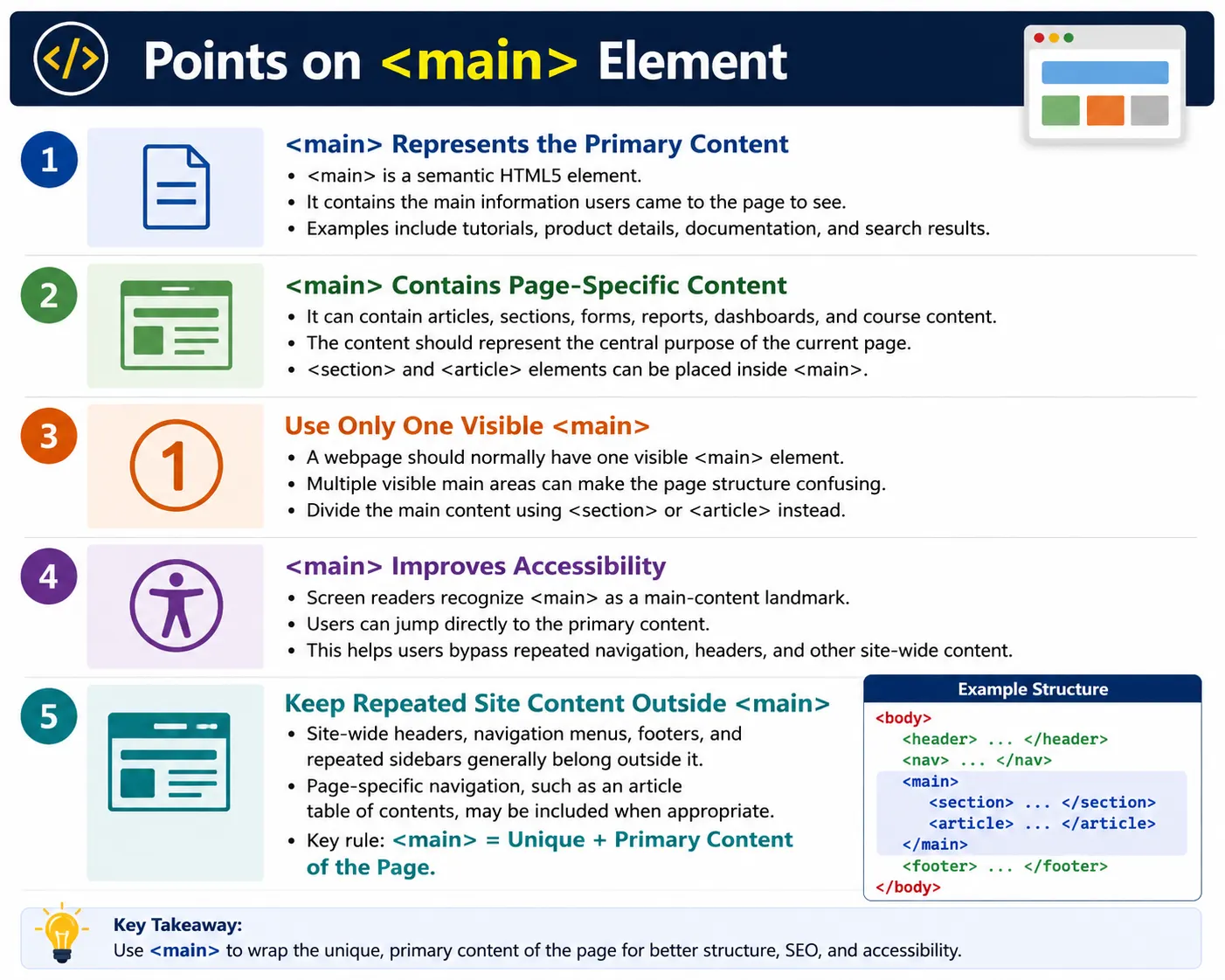
The <main> element is a semantic HTML5 element that represents the primary content of a webpage. It contains the information that is unique to the current page and excludes content that is repeated across multiple pages, such as the website header, global navigation menu, repeated sidebar, copyright information, and footer.
When users open a page, the main content is usually the reason they came there. On a tutorial page, it is the tutorial. On a product page, it is the product details. On a search results page, it is the list of results. On a documentation page, it is the documentation content. The <main> element identifies that central content area.
The <main> element helps browsers understand the page structure, screen readers quickly locate the primary content, search engines identify the main topic of the page, and developers write cleaner and more maintainable HTML. It is a simple element, but it plays an important role in semantic page structure.
What Is the Main Element?
The <main> element defines the dominant content of the document. Its syntax is straightforward.
<main>
  ...
</main>
As a semantic element, it tells browsers and assistive technologies that the content inside it is the main content users came to read or interact with. It is more meaningful than a generic container because the element itself describes the role of the content.
A page should normally contain one visible <main> element. That element should wrap the central page-specific content and should not include repeated site-wide regions such as the header or footer.
Why Use Main?
Before HTML5, developers commonly used generic containers to represent page content.
<div id="content">
  ...
</div>
This works visually, but the browser cannot determine from the element alone that this is the page's primary content. The meaning depends on the developer's ID or class naming.
Using <main> clearly communicates the purpose.
<main>
  ...
</main>
The structure becomes easier to read, easier to test, and easier for assistive technologies to interpret. Instead of a generic content wrapper, the page has a proper main landmark.
What Belongs Inside Main?
The <main> element typically contains page-specific content. This may include articles, blog posts, tutorials, product information, course content, documentation, search results, forms that are central to the page, dashboards, reports, examples, exercises, and sections that belong to the main topic.
Course details
Tutorial
Images
Examples
Exercises
If the content is unique to the current page and represents the central purpose of that page, it likely belongs inside <main>. For example, on a SoftwareTips4U HTML tutorial page, the article content, code examples, tables, and explanations belong inside the main area.
What Should Not Be Inside Main?
Avoid placing repeated site-wide content inside <main>. Content such as website headers, main navigation menus, footers, copyright notices, and repeated sidebars generally belongs outside the main element.
Header: no
Navigation: no
Footer: no
The reason is simple. The main element should identify the page's unique primary content. Repeated elements such as global navigation are useful, but they are not the main content of the page. Keeping them outside <main> makes the structure clearer.
There are exceptions for page-specific navigation. For example, a table of contents that navigates within the current article may be appropriate inside <main>. A site-wide menu should normally remain outside it.
Basic Example
A basic page can use <main> to wrap the central page content.
<main>
  <h1>HTML Tutorial</h1>
  <p>Welcome to HTML.</p>
</main>
In the browser, the user sees the heading and paragraph.
HTML Tutorial
Welcome to HTML.
The visual result might look similar to a div, but the semantic meaning is stronger. The page clearly identifies this as the main content.
Typical Page Structure
A common page structure places <main> between the header or navigation and the footer.
<body>
  <header>
    ...
  </header>

  <nav>
    ...
  </nav>

  <main>
    ...
  </main>

  <footer>
    ...
  </footer>
</body>
This structure is easy to understand. The header introduces the page or site. The nav contains major navigation links. The main element contains the primary page content. The footer contains closing or site information.
Header
  |
Navigation
  |
Main content
  |
Footer
Main with Sections
The <main> element often contains multiple sections. Each section can represent a different topic within the page.
<main>
  <section>
    <h2>HTML</h2>
  </section>

  <section>
    <h2>CSS</h2>
  </section>
</main>
Here, <main> represents the overall primary content. The section elements divide that content into logical parts. This is common in tutorials, landing pages, course pages, and documentation.
Main with Articles
The main element can also contain multiple articles. This is useful for blogs, news websites, tutorials, card-based content, and article listing pages.
<main>
  <article>
    <h2>What Is HTML?</h2>
    <p>...</p>
  </article>

  <article>
    <h2>HTML Elements</h2>
    <p>...</p>
  </article>
</main>
Each article is a self-contained piece of content, while the main element represents the overall primary content area of the page.
Browser Workflow
When the browser reads the HTML, it identifies the header, navigation, main content, and footer. The main element tells the browser which part of the document contains the primary content.
Read HTML
  |
<header>
  |
<nav>
  |
<main>
  |
Primary content
  |
Render page
This semantic structure also becomes available to assistive technologies and can support better document navigation.
Accessibility Benefits
Screen readers recognize <main> as a landmark. This allows users to jump directly to the primary content instead of listening to repeated navigation links on every page.
Header
  |
Navigation
  |
Skip
  |
Main content
This is especially important on sites with large menus, sidebars, ads, or repeated header content. Keyboard and screen reader users benefit when the main content is clearly marked because they can reach the important content faster.
SEO Benefits
Search engines analyze page structure to understand what a page is about. The <main> element helps indicate where the primary content lives. While using <main> alone does not guarantee higher rankings, it provides clearer document structure and makes the content easier to interpret.
Good SEO depends on content quality, metadata, performance, headings, links, and user value. Semantic structure supports those efforts by making the page easier for machines and humans to understand.
Can a Page Have Multiple Main Elements?
A webpage should contain only one visible <main> element that represents the primary content. Multiple visible main elements create confusion because the page should have one dominant content area.
<main>
  ...
</main>

<main>
  ...
</main>
This is a bad pattern. A better structure uses one main element and divides the content inside it using sections or articles.
<main>
  ...
</main>
This is a common interview point: a page should have only one visible <main> element.
Main vs Section
The <main> element and <section> element have different purposes. The main element represents the overall primary content of the page. The section element divides content into thematic parts.
<main>
  <section>
    HTML
  </section>

  <section>
    CSS
  </section>
</main>
The relationship is simple: main contains the page's primary content, and sections organize that content into logical topics.
Main
  |
Sections
  |
Content
Styling Main
Like any HTML element, <main> can be styled using CSS.
main {
  max-width: 1200px;
  margin: auto;
  padding: 20px;
}
This CSS can constrain the content width, center the main area, and add spacing. Styling changes the visual presentation, but the semantic meaning remains the same.
Real-World Example
A SoftwareTips4U HTML course page might use <main> to wrap the unique course content.
<body>
  <header>
    <h1>SoftwareTips4U</h1>
  </header>

  <nav>
    ...
  </nav>

  <main>
    <h2>HTML Course</h2>
    <p>Master HTML from beginner to advanced.</p>

    <section>
      <h3>Introduction</h3>
      <p>Learn HTML basics.</p>
    </section>

    <section>
      <h3>Forms</h3>
      <p>Understand HTML forms.</p>
    </section>
  </main>

  <footer>
    © 2026 SoftwareTips4U
  </footer>
</body>
The header, navigation, and footer are outside the main element. The course content that is unique to the page is inside it.
Common Mistakes
A common mistake is using a generic div instead of <main>.
<div id="content">
  ...
</div>
A better version is:
<main>
  ...
</main>
Another mistake is using multiple visible main elements on the same page. Use only one visible <main> element and organize content inside it with sections and articles.
Putting site-wide navigation inside main is also usually wrong.
<main>
  <nav>
    ...
  </nav>
</main>
If the navigation is a site-wide menu, it should be outside main. Page-specific navigation, such as a table of contents for the current article, may be appropriate inside main.
Placing the page footer inside main is another common mistake. The page footer belongs outside the main content area.
Complete Example
The following complete example shows a semantic HTML page with header, navigation, main content, and footer.
<!DOCTYPE html>
<html>
<head>
  <title>SoftwareTips4U</title>
</head>
<body>
  <header>
    <h1>SoftwareTips4U</h1>
  </header>

  <nav>
    <a href="#">Home</a>
    <a href="#">Courses</a>
  </nav>

  <main>
    <h2>HTML Mastery</h2>
    <p>Welcome to the HTML course.</p>

    <section>
      <h3>Introduction</h3>
      <p>Learn HTML fundamentals.</p>
    </section>
  </main>

  <footer>
    <p>© 2026 SoftwareTips4U</p>
  </footer>
</body>
</html>
This example clearly separates repeated site content from the primary page content.
Selenium Perspective
Selenium can locate the main element by tag name.
WebElement main =
driver.findElement(
    By.tagName("main"));
Automation can verify page headings inside the main content.
String heading =
driver.findElement(
    By.tagName("h2"))
    .getText();

System.out.println(heading);
Automation testers commonly verify main content visibility, correct page heading, content loading, accessibility landmarks, and the presence of sections and articles. Semantic HTML makes these checks easier to reason about.
Comparison Table
<main> |
<div> |
|---|---|
| Semantic element | Generic container |
| Represents primary page content | No inherent meaning |
| Improves accessibility | No semantic benefit by itself |
| Helps define page structure | Used for layout or grouping |
Common Interview Questions
What is the purpose of the <main> element? It represents the primary content of a webpage.
Can a page contain multiple <main> elements? No. A page should have only one visible <main> element.
What content belongs inside <main>? Page-specific content such as articles, tutorials, documentation, search results, and product details belongs inside main.
Should the website navigation be inside <main>? Generally no. Site-wide navigation belongs outside main. Page-specific navigation may be placed inside it when appropriate.
Why is <main> important for accessibility? It provides a landmark that allows screen reader and keyboard users to quickly jump to the primary content.
Interview-Ready Answer
The <main> element is a semantic HTML5 element that represents the primary content of a webpage. It contains the information that is unique to the current page, such as articles, tutorials, documentation, or product details, and excludes repeated elements like headers, navigation menus, and footers. A page should contain only one visible <main> element. Using <main> improves accessibility by providing a landmark for screen readers and helps search engines better understand the structure of the page.
One-Line Insight
<main> contains the content users came to see: the unique, primary information on the page.