List Styling vs Semantics
Introduction
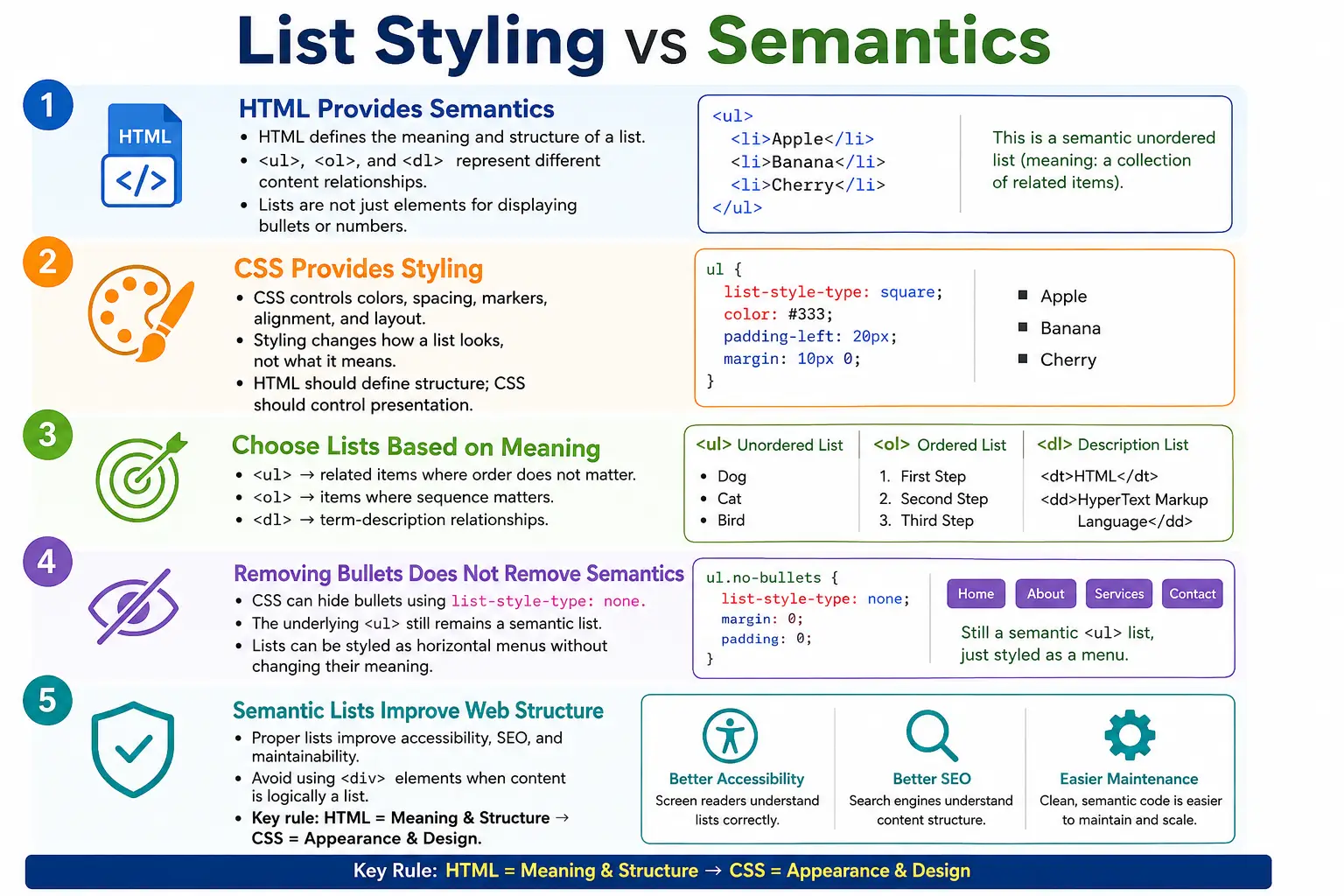
One of the most important concepts in modern HTML and CSS is understanding the difference between semantics and styling. Many beginners mistakenly think lists exist only to display bullets or numbers. In reality, lists are primarily semantic structures, while bullets, numbering, spacing, colors, and layout are styling concerns.
This distinction matters because HTML and CSS have different responsibilities. HTML describes the meaning and structure of content. CSS controls how that content appears visually. When developers confuse these responsibilities, they often create pages that look correct but are less accessible, less meaningful, harder to maintain, and weaker from an SEO perspective.
Understanding the separation between list semantics and list styling is essential for accessibility, SEO, maintainability, professional web development, and modern CSS design. A list can remain a list even when bullets are removed. A group of <div> elements can visually look like a list but still lack list semantics. The browser, screen reader, search engine, and automated test all care about the underlying HTML structure.
What Is Semantics?
Semantics refers to the meaning of content. In HTML, semantic elements tell the browser what the content represents, not just how it should look. For example:
<ul>
  <li>HTML</li>
  <li>CSS</li>
  <li>JavaScript</li>
</ul>
This tells browsers that these items belong together as a list. It also communicates that the order does not matter because the list is unordered. The meaning exists even if no bullets are shown. The meaning comes from the HTML elements, not from the visual marker.
Semantic HTML helps tools understand content. A screen reader can announce that there is a list with three items. A search engine can understand that HTML, CSS, and JavaScript are related topics. A developer reading the code can understand that the items form a group.
What Is Styling?
Styling refers to appearance. Styling controls color, size, spacing, layout, bullets, numbering, alignment, borders, backgrounds, and responsive behavior. CSS is the primary technology used for styling web pages.
ul {
    color: blue;
}
This CSS changes the color of the list text, but it does not change the meaning of the list. The content is still a list. The list still contains related items. The browser still understands the structure as <ul> with child <li> elements.
This is the core idea: styling can change appearance without changing semantics. A list can be red, blue, horizontal, vertical, bulleted, unbulleted, large, small, compact, or spaced out. If the HTML remains <ul>, <ol>, or <dl>, the semantic meaning remains.
HTML Provides Meaning
HTML focuses on structure, meaning, and relationships. When you write an unordered list, you are saying that the items form a related collection and that order does not matter.
<ul>
  <li>HTML</li>
  <li>CSS</li>
</ul>
The meaning is a collection of related items. The HTML does not say what color the items should be. It does not say whether the items should be displayed horizontally or vertically. It does not decide whether the marker should be a disc, circle, square, or custom icon. Those are styling decisions.
HTML should answer the question: what is this content? If the answer is a group of related items, use a list. If the answer is a heading, use a heading. If the answer is navigation, use navigation structure. Correct HTML gives the page a meaningful foundation.
CSS Provides Appearance
CSS focuses on visual presentation. It answers the question: how should this content look?
ul {
    color: red;
}
The meaning remains list. Only the appearance changes. CSS can remove bullets, create spacing, align items horizontally, change marker color, use custom images, or transform a list into a polished navigation menu.
This separation makes websites easier to maintain. If a design changes, developers can update CSS without rewriting meaningful HTML. If a navigation menu changes from vertical to horizontal, the HTML can remain a list because the content is still a list of navigation items.
Lists Are Semantic Elements
HTML provides three primary list types: <ul>, <ol>, and <dl>. Each has a specific meaning.
An unordered list represents related items where order does not matter. An ordered list represents items where sequence matters. A description list represents term-description relationships. These are semantic differences, not merely visual differences.
Choosing the correct list type should be based on content meaning. If the content is a group of features, use <ul>. If the content is a procedure, use <ol>. If the content is a glossary or specification list, use <dl>.
Unordered List Semantics
An unordered list communicates that items are related and that order does not matter.
<ul>
  <li>HTML</li>
  <li>CSS</li>
  <li>JavaScript</li>
</ul>
The meaning is a related group of items. The browser may display bullets by default, but the bullets are not the meaning. They are only the default visual representation.
Ordered List Semantics
An ordered list communicates that sequence matters.
<ol>
  <li>Download File</li>
  <li>Install Software</li>
  <li>Run Program</li>
</ol>
The meaning is a sequence. If the user runs the program before installing it, the process fails. Numbering is not just decoration here. It reflects the fact that the items have an order.
Description List Semantics
A description list communicates a term-description relationship.
<dl>
  <dt>HTML</dt>
  <dd>Markup Language</dd>
</dl>
The meaning is that HTML is the term and Markup Language is the description. A description list is not a bullet list and not a numbered sequence. It represents a relationship between labels and details.
Styling Is Independent of Meaning
Consider this unordered list:
<ul>
  <li>HTML</li>
  <li>CSS</li>
</ul>
The default output is a bulleted list:
• HTML
• CSS
If bullets are removed with CSS, the output changes visually.
ul {
    list-style-type: none;
}
HTML
CSSThe important point is that it is still a list. The semantics remain unchanged because the HTML structure remains unchanged. Removing bullets does not remove list meaning.
Example: Navigation Menu
Navigation menus are a common place where this concept matters. A basic menu can be written as a list of navigation items.
<ul>
  <li>Home</li>
  <li>Courses</li>
  <li>Contact</li>
</ul>
The default output is:
• Home
• Courses
• Contact
CSS can remove bullets and arrange the items horizontally.
ul {
    list-style-type: none;
    display: flex;
    gap: 20px;
}
The visual result may look like this:
Home Courses ContactSemantically, it is still a list of navigation items. The page has gained a menu layout without losing list structure.
Why Semantics Matter
Search engines and assistive technologies care about structure. For example:
<ul>
  <li>HTML</li>
  <li>CSS</li>
</ul>
A screen reader can understand that this is a list with two items, even if bullets are hidden. A search engine can understand that HTML and CSS are grouped topics. A browser can apply list behavior. A developer can style the items predictably.
If the same content is written as several plain <div> elements, the visual result can be made similar, but the meaning is weaker. The tools reading the page no longer receive the same structural signal.
Accessibility Example
Accessibility depends heavily on semantic structure. A semantic list can be announced as a list by screen readers.
<ul>
  <li>HTML</li>
  <li>CSS</li>
</ul>
A screen reader may announce:
List with two itemsEven with this CSS, the screen reader can still recognize the list structure.
ul {
    list-style-type: none;
}
This is why removing bullets for a navigation menu is acceptable when the underlying HTML remains semantic. The visual marker is gone, but the list meaning remains available to assistive technologies.
SEO Example
Search engines also benefit from meaningful structure. A list such as this can be understood as a related group of topics:
<ul>
  <li>HTML</li>
  <li>CSS</li>
  <li>JavaScript</li>
</ul>
This meaning exists regardless of styling. Search engines do not need bullets to understand that the items are grouped. They need the HTML structure. Semantic lists support clearer content organization, which can help crawling, indexing, and page understanding.
Bad Practice: Using Lists Only for Styling
Lists should represent related content. They should not be used only to create spacing or indentation.
<ul>
  <li></li>
  <li></li>
</ul>
If this is used only to create spacing, it creates false semantic meaning. Browsers and assistive technologies think this is a list, even though there are no meaningful list items. This can confuse users and make the document harder to understand.
Bad Practice: Using Divs Instead of Lists
The opposite mistake is using <div> elements when the content is clearly a list.
<div>HTML</div>
<div>CSS</div>
<div>JavaScript</div>
This may visually look like a list after CSS is applied, but semantically it is not a list. A better structure is:
<ul>
  <li>HTML</li>
  <li>CSS</li>
  <li>JavaScript</li>
</ul>
The list elements communicate grouping. The CSS can then make the list look however the design requires.
Visual Appearance Can Be Identical
CSS can make non-list elements visually behave like list items.
div {
    display: list-item;
}
A <div> may visually look like a list item when this style is applied. However, the semantics are still missing. The browser has been instructed to display it like a list item, but the HTML has not described it as part of a real list structure.
This is why professional developers do not judge semantics by appearance alone. Two pages may look identical, but one may be much more meaningful and accessible because it uses the correct HTML elements.
Professional Navigation Menu Example
Professional websites often use a semantic navigation structure with a list inside a <nav> element.
<nav>
  <ul>
    <li>Home</li>
    <li>Courses</li>
    <li>Contact</li>
  </ul>
</nav>
Then CSS removes bullets and controls layout.
ul {
    list-style: none;
}
This preserves accessibility, SEO, and semantics while changing appearance. Users see a clean menu. Assistive technologies still understand a grouped navigation list.
Styling Options
CSS can change list appearance in many ways. Bullet type can be changed with list-style-type.
list-style-type: square;Bullets can be removed completely.
list-style-type: none;Bullet position can be controlled.
list-style-position: inside;Modern CSS can style markers directly.
li::marker {
    color: red;
}
Custom image markers can also be used.
list-style-image: url(icon.png);These options prove that visual presentation belongs in CSS. The HTML list structure does not need to change just because the marker design changes.
Semantics Never Change
Consider this list:
<ul>
  <li>HTML</li>
  <li>CSS</li>
</ul>
Regardless of CSS declarations such as color: red;, font-size: 30px;, or list-style-type: none;, the meaning remains unordered list. CSS can dramatically change how the content looks, but it does not change what the content is.
Real-World Example
A dashboard menu can be written as a semantic list.
<ul>
  <li>Dashboard</li>
  <li>Reports</li>
  <li>Settings</li>
</ul>
CSS can turn it into a horizontal navigation bar.
ul {
    list-style: none;
    display: flex;
    gap: 20px;
}
The visual output is:
Dashboard Reports SettingsSemantically, it is still a list. This is exactly how modern HTML and CSS should work together.
Accessibility Benefits
Semantic lists help screen readers, voice assistants, keyboard users, and other assistive technologies understand content organization. A list is not just visual grouping. It is structural grouping. Users can navigate from item to item, understand how many items exist, and interpret whether the content is grouped or sequential.
When lists are replaced with unrelated <div> elements, that structure is lost. The page may still look fine to a sighted mouse user, but it can become less clear to users relying on assistive tools.
SEO Benefits
Search engines understand grouped content, menus, navigation structures, related topics, and procedures more accurately when semantic HTML is used. A list of web technologies, a list of product features, or a list of navigation links gives crawlers useful structure.
SEO benefits do not come from bullets. They come from meaningful HTML. Search engines care that the content is organized in a way that reflects relationships. CSS decoration is secondary.
Common Mistakes
A common mistake is removing bullets and then replacing lists with <div> elements.
<div>Home</div>
<div>About</div>
<div>Contact</div>
A better version keeps list semantics.
<ul>
  <li>Home</li>
  <li>About</li>
  <li>Contact</li>
</ul>
Another mistake is using lists only for layout. Lists should represent related items. They should not be used merely to create indentation or vertical spacing. A third mistake is assuming that bullets define a list. Bullets do not define a list. HTML structure defines the list.
Selenium Perspective
From a Selenium automation perspective, the HTML structure remains detectable regardless of CSS styling. Selenium can locate a list using its tag name.
driver.findElement(
  By.tagName("ul")
);
Even if bullets are hidden with CSS, the element remains <ul>.
list-style: none;This means UI automation can validate semantic structure separately from visual presentation. A test can check that a navigation menu is still a list, even if the browser displays it as a horizontal bar.
Comparison Table
| Aspect | Semantics | Styling |
|---|---|---|
| Purpose | Meaning | Appearance |
| Technology | HTML | CSS |
| Affects Accessibility | Yes | Limited |
| Affects SEO | Yes | Minimal |
| Controls Bullets | No | Yes |
| Controls Colors | No | Yes |
| Controls Layout | No | Yes |
Common Interview Questions
A common interview question is: what is the difference between semantics and styling? The answer is that semantics provide meaning, while styling controls appearance.
Another common question is whether removing bullets removes list semantics. No. The list remains a list because the HTML structure remains <ul>, <ol>, or <dl>.
Interviewers may also ask which technology provides semantics. The answer is HTML. They may ask which technology provides styling. The answer is CSS. They may ask why <ul> should be used instead of <div> for navigation items. The answer is better accessibility, SEO, and semantic meaning.
Interview-Ready Answer
List semantics define the meaning and structure of grouped content using elements such as <ul>, <ol>, and <dl>. Styling controls only the visual presentation through CSS. Even if bullets or numbering are removed using CSS, the list remains semantically meaningful, helping accessibility tools and search engines understand the content structure correctly.
Key Takeaway
HTML lists describe relationships between items. CSS only changes how those relationships are displayed. This separation is one of the foundations of professional front-end development. Write HTML for meaning first, then use CSS for presentation.
If content is a list, use a real list. If the order matters, use <ol>. If the order does not matter, use <ul>. If the content is a term-description relationship, use <dl>. After that, use CSS to create the desired visual design.
One-Line Insight
HTML lists describe relationships between items; CSS only changes how those relationships are displayed.