Line Breaks vs Horizontal Rules
Introduction
HTML provides many elements that help structure and present content on a webpage. Two simple but commonly misunderstood elements are the line break element <br> and the horizontal rule element <hr>. Both can affect how content appears visually in the browser, but they serve very different purposes. A common beginner mistake is using them interchangeably, especially when trying to create spacing or separate content visually.
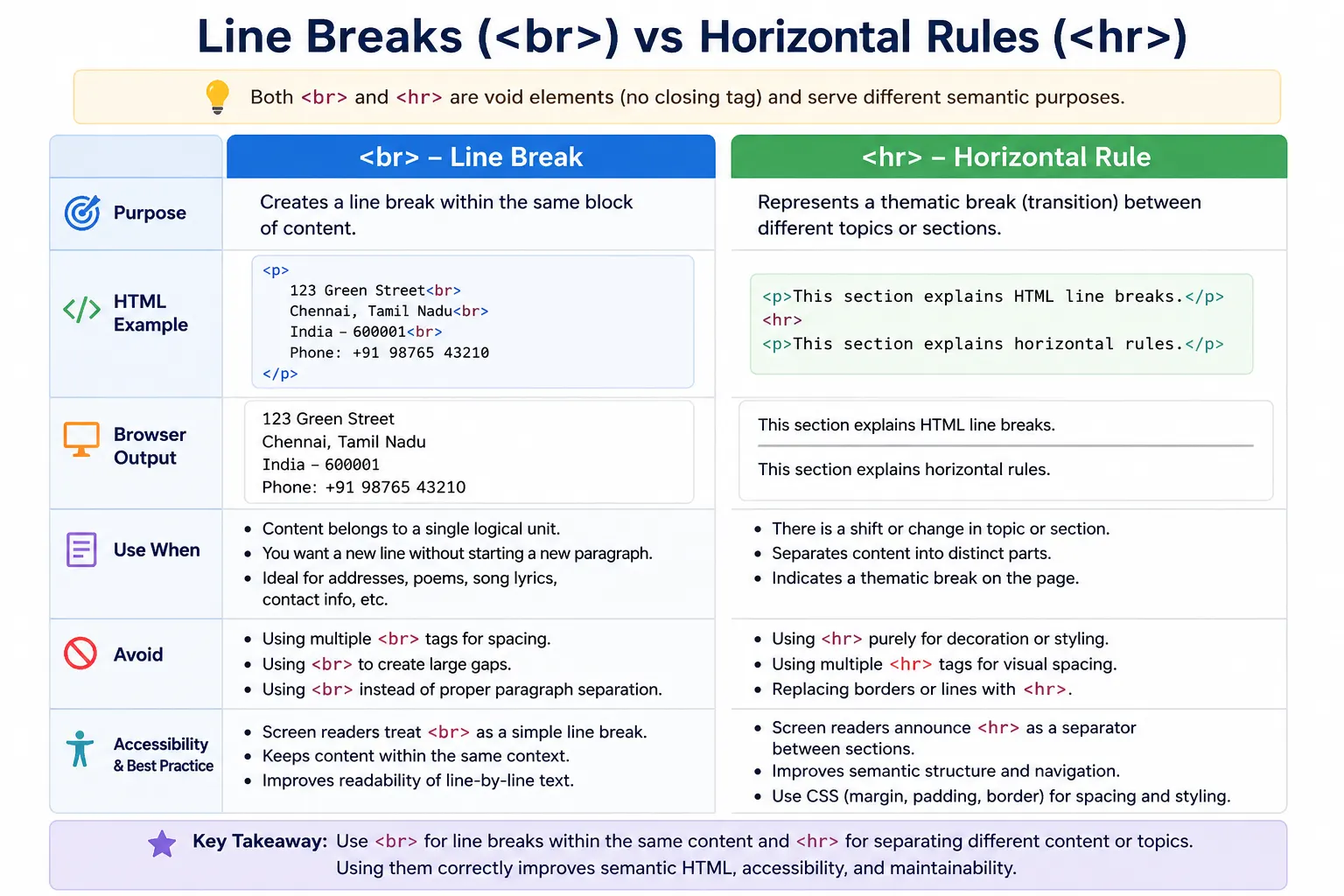
The <br> element creates a line break inside the same block of content. It tells the browser to move the following text to the next line without starting a new paragraph or section. It is useful when the content naturally requires line-by-line formatting, such as addresses, poems, song lyrics, or contact information.
The <hr> element, on the other hand, represents a thematic break between sections. It tells the browser and assistive technologies that the content before and after the element belongs to different topics, sections, or ideas. Although browsers usually display <hr> as a horizontal line, its real purpose is semantic separation, not decoration.
Understanding the difference between <br> and <hr> is important for writing clean, semantic, accessible, and maintainable HTML. These elements should not be used merely to force visual layout. HTML should describe meaning and structure, while CSS should handle spacing, borders, and decoration.
Quick Definition
The <br> element creates a new line within the same block of content.
Example:
<p>
SoftwareTips4U<br>
Learn HTML<br>
Learn CSS
</p>
Output:
SoftwareTips4U
Learn HTML
Learn CSS
The content remains part of the same paragraph, but each item appears on a new line.
The <hr> element creates a thematic break between sections.
Example:
<h2>HTML</h2>

<hr>

<h2>CSS</h2>
Output:
HTML
-------------------
CSS
Here, the horizontal rule indicates that the topic is changing from HTML to CSS.
The simplest difference is this:
<br> moves text to the next line.
<hr> separates one section or topic from another.
What Is a Line Break (<br>)?
The <br> element forces content to continue on the next line.
Example:
<p>
Name: Suresh<br>
City: Chennai<br>
Country: India
</p>
Output:
Name: Suresh
City: Chennai
Country: India
All the information belongs to the same logical block, but each part appears on a separate line.
The <br> tag is especially useful when line breaks are part of the meaning of the content. It should not be used just because a developer wants extra vertical space.
Purpose of <br>
The main purpose of <br> is to create a line break without starting a new paragraph.
It is useful when the content naturally requires line separation but still belongs to one block of meaning.
Common use cases include addresses, poems, song lyrics, contact information, short formatted text, and signature blocks.
For example, an address usually belongs together as one block, but each part is commonly shown on a separate line.
<p>
SoftwareTips4U<br>
123 Main Street<br>
Chennai<br>
India
</p>
Output:
SoftwareTips4U
123 Main Street
Chennai
India
Using separate paragraphs for each address line would not be ideal because the full address is one connected unit of information.
Example: Poem with <br>
Poems often require line breaks within the same stanza.
Example:
<p>
Roses are red,<br>
Violets are blue,<br>
HTML is awesome,<br>
And CSS too.
</p>
Each line should appear separately, but the content still belongs to one paragraph-like poetic block.
This is a valid use of <br> because the line breaks are meaningful.
What Is a Horizontal Rule (<hr>)?
The <hr> element represents a thematic break between sections of content.
Example:
<p>Introduction</p>

<hr>

<p>Main Content</p>
Output:
Introduction
----------------
Main Content
The horizontal line is only the default visual representation. Semantically, <hr> means the content is shifting to a new topic, idea, or section.
It is not simply a decorative line.
Purpose of <hr>
The main purpose of <hr> is to indicate a meaningful break in content.
It can represent a topic change, section break, transition, or separation between related but distinct content blocks.
Example:
<h2>HTML Basics</h2>

<p>HTML structures webpages.</p>

<hr>

<h2>HTML Forms</h2>

<p>Forms collect user input.</p>
The <hr> indicates that the page is moving from one major topic to another.
In this case, it is semantically meaningful because “HTML Basics” and “HTML Forms” are separate sections.
Visual Comparison
Using <br>:
<p>
HTML<br>
CSS<br>
JavaScript
</p>
Output:
HTML
CSS
JavaScript
The content remains part of the same logical block.
Using <hr>:
<p>HTML</p>

<hr>

<p>CSS</p>

<hr>

<p>JavaScript</p>
Output:
HTML
----------------

CSS
----------------

JavaScript
Here, each item is visually and semantically separated.
The key difference is meaning. <br> continues content on the next line, while <hr> separates content into different sections.
Syntax Comparison
The syntax for a line break is:
<br>The syntax for a horizontal rule is:
<hr>Neither element requires a closing tag.
You should not write:
</br>or:
</hr>Both are void elements.
Both Are Void Elements
A void element is an element that cannot contain content and does not have a closing tag.
Examples include:
<br>
<hr>
<img>
<meta>
<input>
The <br> element cannot contain text or child elements.
The <hr> element also cannot contain text or child elements.
They exist as standalone markers in the document.
Semantic Meaning of <br>
The semantic meaning of <br> is line continuation.
It tells the browser:
“Continue this content on the next line.”
It does not create a new paragraph. It does not create a new section. It does not indicate a topic change.
For example:
<p>
Phone: 1234567890<br>
Email: info@example.com<br>
Website: softwaretips4u.com
</p>
All items belong to the same contact information block.
That is why <br> is appropriate here.
Semantic Meaning of <hr>
The semantic meaning of <hr> is thematic separation.
It tells the browser and assistive technologies:
“The content before and after this point belongs to different sections or ideas.”
For example:
<h2>Introduction</h2>

<p>This section introduces HTML.</p>

<hr>

<h2>Advanced Concepts</h2>

<p>This section explains advanced HTML behavior.</p>
Here, <hr> marks a clear transition.
This is different from merely moving text to a new line.
Browser Rendering Behavior
When the browser sees <br>, it moves the following content to the next line.
Flow:
Current Line
      ↓
Move To Next Line
When the browser sees <hr>, it renders a horizontal divider across the available width by default.
Flow:
Render Horizontal Divider
Across Available Width
CSS can modify the appearance of <hr>, but the semantic meaning remains a thematic break.
Real-World Example: Contact Information
Correct use:
<p>
Phone: 1234567890<br>
Email: info@example.com<br>
Website: softwaretips4u.com
</p>
This is correct because phone, email, and website are part of one contact information block.
Incorrect use:
<p>
Phone: 1234567890
</p>

<hr>

<p>
Email: info@example.com
</p>
This wrongly suggests that phone and email are separate thematic sections.
They are not. They are related contact details.
Use <br> when the content is still one logical block.
Real-World Example: Blog Article
Correct use:
<h2>Introduction</h2>

<p>HTML basics...</p>

<hr>

<h2>Forms</h2>

<p>Form concepts...</p>
This is appropriate because “Introduction” and “Forms” are separate article sections.
The <hr> creates a meaningful separation between topics.
<br> vs Multiple Paragraphs
A common mistake is using multiple <br> tags to create vertical spacing.
Bad:
<p>
HTML Basics<br><br><br>
CSS Basics
</p>
This is poor structure.
If “HTML Basics” and “CSS Basics” are separate thoughts, use paragraphs:
<p>HTML Basics</p>

<p>CSS Basics</p>
Then use CSS for spacing:
p {
    margin-bottom: 20px;
}
HTML should define content structure. CSS should define visual spacing.
<hr> vs CSS Borders
Another common mistake is using <hr> purely because a line looks nice.
If the line has no semantic meaning, use CSS instead.
Bad:
<hr>used only as decoration.
Better:
.section {
    border-top: 1px solid gray;
}
Use <hr> only when there is a real thematic break between sections.
If the purpose is purely design, CSS is the correct tool.
Accessibility Perspective
The difference between <br> and <hr> matters for accessibility.
Screen readers may treat <br> as a short pause or line break.
The <hr> element may be announced as a separator or horizontal rule, depending on the screen reader.
This means <hr> communicates a stronger structural break than <br>.
If developers use <hr> only for decoration, screen reader users may hear unnecessary separators, which can make the page confusing.
Semantic accuracy improves accessibility.
SEO Perspective
Search engines treat <br> mostly as formatting. It does not create a major structural break in content.
The <hr> element can indicate a separation between sections or topics, though it is not a major SEO factor by itself.
For SEO, the most important rule is to structure content logically. Use headings for sections, paragraphs for text, <br> for meaningful line breaks, and <hr> for thematic breaks.
Clean structure helps search engines understand content more accurately.
Common Mistake: Using <br> for Layout
Bad:
<br><br><br><br>This is often used by beginners to push content down.
This is not recommended.
Use CSS margins or padding instead.
Example:
.section {
    margin-top: 40px;
}
Layout should be handled by CSS, not repeated line breaks.
Common Mistake: Using <hr> for Decoration
Bad:
<hr>when there is no topic change.
If the goal is simply to draw a line for visual styling, use CSS borders.
Example:
.card {
    border-top: 1px solid #ccc;
}
The <hr> element should carry meaning, not just decoration.
Common Mistake: Replacing Paragraphs with <br>
Bad:
Text One<br><br>
Text Two
Better:
<p>Text One</p>

<p>Text Two</p>
Paragraphs represent separate thoughts. Line breaks represent line continuation.
This distinction is important for semantic HTML.
DOM Representation
Example:
<p>Hello<br>World</p>DOM structure:
p
├── Text: Hello
├── br
└── Text: World
The <br> exists inside the paragraph and forces a line break.
Example:
<p>Section A</p>

<hr>

<p>Section B</p>
DOM structure:
body
├── p
├── hr
└── p
The <hr> sits between two content blocks and separates them.
Selenium Perspective
Selenium usually does not interact directly with <br> elements because they are not interactive.
Example:
driver.findElement(By.tagName("br"));This is rarely useful.
Selenium can locate <hr> elements:
driver.findElement(By.tagName("hr"));This may be used in rare cases for layout validation, but most automation focuses on meaningful content, controls, links, forms, and dynamic elements.
Still, understanding these elements helps testers interpret DOM structure correctly.
Comparison Table
| Feature | <br> | <hr> |
|---|---|---|
| Purpose | New line | Thematic section break |
| Visual Effect | Moves text to next line | Draws horizontal line |
| Semantic Meaning | Line continuation | Content separation |
| Creates New Section | No | Yes |
| Common Use | Addresses, poems, contact text | Article/topic separation |
| Void Element | Yes | Yes |
| Accessibility Meaning | Line break | Separator |
Common Interview Questions
A common question is: What does <br> do?
It creates a line break.
What does <hr> do?
It represents a thematic break between sections.
Are <br> and <hr> void elements?
Yes. Both are void elements and do not require closing tags.
Should multiple <br> tags be used for spacing?
No. CSS margins and padding should be used for spacing.
Which element indicates content separation?
The <hr> element indicates thematic content separation.
Interview-Ready Answer
The <br> element creates a line break within the same block of content, while the <hr> element represents a thematic break between sections or topics. <br> is used when content needs line-by-line formatting, such as addresses or poems. <hr> is used when there is a meaningful transition between content sections. Both are void elements, but they have different semantic purposes.
Key Takeaway
Although <br> and <hr> both affect visual layout, they should not be used interchangeably. The <br> element moves content to the next line within the same logical block, while the <hr> element separates different sections or topics.
Use <br> for meaningful line breaks in content such as addresses, poems, and contact details. Use <hr> for meaningful thematic separation between content sections. Avoid using either element purely for spacing or decoration. CSS should handle visual layout and spacing.
One-Line Insight
<br> moves content to the next line; <hr> signals the start of a new section or idea.