Lazy Loading Images
Introduction
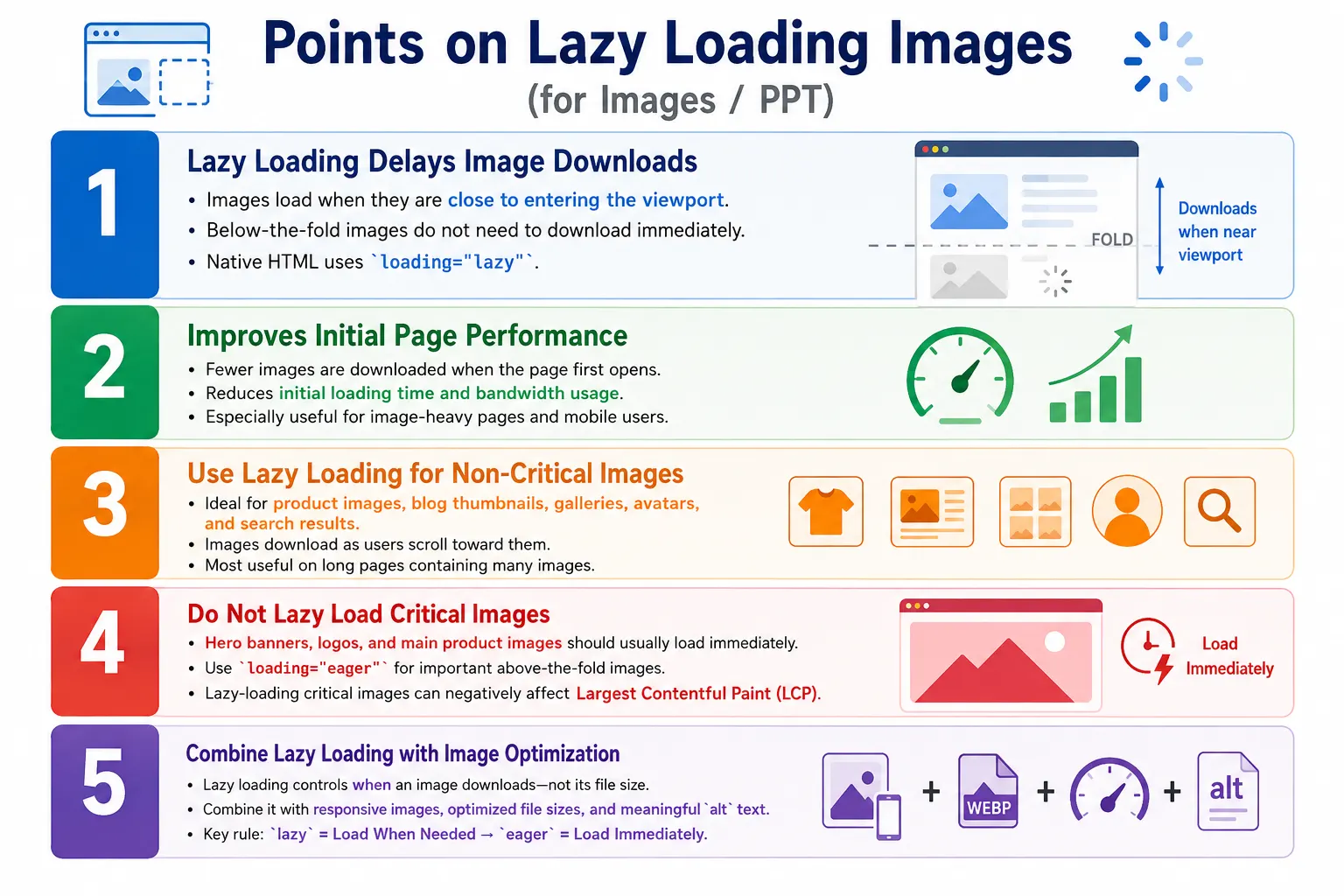
Lazy loading images is a web performance optimization technique in which images are loaded only when they are about to become visible in the user's viewport, instead of loading every image as soon as the page opens. In a small page with one or two images, this difference may not be very noticeable. In a long page with galleries, product cards, user avatars, article thumbnails, and related content sections, it can make a major difference to the initial loading experience.
Modern HTML supports native lazy loading using the loading attribute on the <img> element. The browser can be instructed to delay downloading an image until it is close to entering the visible area of the page. The simplest example looks like this:
<img src="course.jpg"
     alt="HTML Course"
     loading="lazy">
In this example, the browser still knows the image exists, but it does not need to download it immediately if the image is far below the visible part of the page. This makes lazy loading one of the easiest performance improvements a developer can apply to image-heavy pages.
Why Lazy Loading Is Needed
Imagine a webpage containing one logo, one banner, fifty product images, twenty blog thumbnails, and thirty user profile pictures. That page contains more than one hundred images. Without lazy loading, the browser may begin downloading all of them during the initial page load. Many of those images may be far below the fold, meaning the user cannot see them when the page first appears.
User Opens Page
        ↓
Browser Downloads
        ↓
ALL 102 Images
        ↓
Longer Loading Time
Most users may never scroll far enough to view many of those images. If the user leaves the page after reading the first section, the bandwidth spent downloading the lower images was wasted. On mobile devices, that wasted bandwidth also affects battery usage, data plans, and perceived speed. Lazy loading addresses this problem by prioritizing visible images first and postponing images that are not yet needed.
What Is Lazy Loading?
Lazy loading delays downloading non-visible images until they are needed. Normal image loading treats all images as important immediately. The browser discovers image references in the HTML and starts fetching them as resources. Lazy loading changes that behavior for selected images. It tells the browser that some images are not critical for the first view and can wait until the user scrolls closer to them.
Normal Loading

Page Opens
     ↓
Download Every Image
     ↓
Display Page
Lazy Loading
Page Opens
↓
Download Visible Images
↓
User Scrolls
↓
Download Next Images
↓
Continue As NeededThis behavior is especially useful for long pages. A tutorial page may have diagrams throughout the article. An e-commerce page may have dozens of products. A social media feed may contain an endless list of photos and profile images. Lazy loading lets the browser load the page in stages based on what the user is actually approaching.
Browser Loading Process
When the browser parses HTML and finds an image with loading="lazy", it evaluates whether the image is immediately needed. If the image is outside the viewport and not close enough to require loading, the browser can delay the download. When the user scrolls and the image approaches the viewport, the browser begins fetching the image and displays it when available.
<img src="product.jpg"
     alt="Product"
     loading="lazy">
HTML Parser
↓
Finds Image
↓
Checks loading="lazy"
↓
Image Outside Viewport?
↓
YES
↓
Delay Download
↓
User Scrolls
↓
Download Image
↓
Display ImageThe exact distance at which the browser starts loading a lazy image is controlled by the browser. Developers do not normally set that threshold when using native HTML lazy loading. This is one reason native lazy loading is simple to use. The browser makes a practical loading decision based on its own implementation, network conditions, and rendering behavior.
The loading Attribute
The loading attribute controls when an image should be loaded. It is used directly on the <img> element. The syntax is straightforward:
<img loading="value">The two values developers commonly discuss are lazy and eager. The value lazy means the image should be loaded only when needed. The value eager means the image should load immediately, as part of the normal loading process.
<img src="gallery1.jpg"
     alt="Gallery Image"
     loading="lazy">
This image is a good lazy loading candidate if it appears below the visible area of the page. The browser can wait before downloading it.
<img src="logo.png"
     alt="Company Logo"
     loading="eager">
This image is a better eager loading candidate because a logo is usually visible immediately when the page opens. Users expect it to appear as part of the initial layout.
Browser Timeline
Without lazy loading, the browser may discover a long list of images and begin downloading them immediately. This can occupy network bandwidth that should have been used for visible images, CSS, JavaScript, fonts, or other resources needed to make the first screen usable.
Without Lazy Loading

Page Opens
    ↓
Image 1
    ↓
Image 2
    ↓
Image 3
    ↓
Image 100
With lazy loading, the browser starts with the visible images and postpones the rest. As the user scrolls, more images are loaded in time for display.
With Lazy Loading

Page Opens
    ↓
Image 1
    ↓
Image 2
    ↓
Stop
    ↓
User Scrolls
    ↓
Image 3
    ↓
Image 4
    ↓
Continue...
This staged approach gives users a faster first experience. Instead of making the user wait for content they cannot yet see, the browser focuses on the content that matters immediately.
Real-World Example
An e-commerce website is one of the clearest examples of lazy loading. A product listing page may contain one hundred products. Each product may have a thumbnail, title, price, rating, and action button. When the page first opens, the user may see only products one through six. Loading all one hundred product images immediately is unnecessary.
Products

1
2
3
4
...
100
Initially, the user sees only a small set of products. With lazy loading, only those visible product images are downloaded first.
User Sees

Products 1-6
       ↓
Only These Images Load
When the user scrolls, the next group of images becomes relevant.
Products 7-12
       ↓
Now Download
This reduces initial loading time and makes the page feel faster, especially when users are browsing on mobile networks or lower-powered devices.
HTML Example
Native lazy loading does not require JavaScript in modern browsers. A normal image can become a lazy-loaded image by adding the loading attribute.
<img src="course-thumbnail.jpg"
     alt="HTML Course"
     loading="lazy">
Multiple lazy images can be placed on the same page. Each image is considered independently by the browser.
<img src="img1.jpg"
     alt="Image 1"
     loading="lazy">

<img src="img2.jpg"
     alt="Image 2"
     loading="lazy">

<img src="img3.jpg"
     alt="Image 3"
     loading="lazy">
If the images are below the fold, they can wait. If some are visible immediately, the browser may still load those visible images because they are needed for the first rendered view.
Images That Should Not Be Lazy Loaded
Lazy loading is useful, but it should not be applied blindly to every image. Images that appear immediately when the page loads should usually load eagerly. This includes the company logo, the hero banner, the main product image, and other above-the-fold content. These images contribute to the user's first impression and often influence Largest Contentful Paint, a Core Web Vitals metric.
<img src="hero.jpg"
     alt="Homepage Banner"
     loading="eager">
If a hero image is lazy loaded, the browser may delay a resource that is actually critical for the first screen. That delay can make the page appear incomplete or slow, even though lazy loading was intended to improve performance. The correct approach is to lazy-load below-the-fold images and load important above-the-fold images immediately.
Images That Should Be Lazy Loaded
Good candidates for lazy loading include blog thumbnails, product galleries, photo albums, user avatars, infinite scrolling content, search results, and related product images. These images are often repeated many times and are frequently below the initial viewport.
<img src="blog.jpg"
     alt="Blog Thumbnail"
     loading="lazy">
Lazy loading works best when many non-critical images exist on the page. A short landing page with one image may not benefit much. A long catalog page with hundreds of thumbnails can benefit significantly.
Before and After Lazy Loading
The practical benefit of lazy loading is easiest to understand by comparing before and after behavior. Without lazy loading, a page with fifty images may trigger fifty downloads early in the page lifecycle.
Without Lazy Loading

50 Images
    ↓
50 Downloads
    ↓
Long Wait
With lazy loading, the browser may download only the first few visible images. More images are downloaded as the user scrolls.
With Lazy Loading

50 Images
    ↓
5 Downloads
    ↓
Fast Page
    ↓
More Images Download As Needed
This does not mean lazy loading makes images smaller. It means the browser becomes smarter about when to download them.
Benefits of Lazy Loading
The first major benefit is faster initial page load. Only visible or near-visible images need to be downloaded early. This reduces the amount of data required before the user can start interacting with the page.
The second benefit is reduced bandwidth usage. Users do not download images they never view. If a user opens a page, reads the first section, and leaves, below-the-fold images may never be downloaded at all. This is especially important for mobile users with slower connections or data limits.
The third benefit is improved responsiveness. Fewer immediate network requests means the browser can focus on loading essential page resources. This can help the page render faster and respond more smoothly.
Lazy loading can also support better Core Web Vitals when applied correctly. It can reduce unnecessary work during initial loading. However, it must be used carefully. Lazy-loading critical above-the-fold images can hurt metrics such as Largest Contentful Paint because the browser may delay the exact image needed for the first meaningful view.
Lazy Loading and SEO
Modern search engines can understand native lazy-loaded images. Because the image still exists in the HTML with a real src attribute, crawlers can generally discover it. This is one reason native HTML lazy loading is preferable to complicated JavaScript-only approaches when simple image lazy loading is all that is needed.
Good SEO practices still matter. Always provide meaningful alt text. Use descriptive filenames when possible. Make sure important images remain accessible. Avoid hiding essential image content behind JavaScript behavior that search engines may not process reliably. Also avoid lazy-loading critical hero images when those images are central to the page's first visual experience.
Lazy Loading vs Eager Loading
Lazy loading and eager loading serve different purposes. Lazy loading is best for images that are not immediately visible. Eager loading is best for images that should appear as soon as the page renders. The decision should be based on the image's role in the layout, not on a desire to apply one rule everywhere.
| Feature | Lazy | Eager |
|---|---|---|
| Loads Immediately | No | Yes |
| Saves Bandwidth | Yes | No |
| Faster Initial Load | Yes | No |
| Best for Hero Images | No | Yes |
| Best for Gallery Images | Yes | No |
Lazy Loading Workflow
The lazy loading workflow follows the user's movement through the page. The browser loads visible images first. Hidden images wait. When the user scrolls and an image approaches the viewport, the browser downloads and displays it.
Page Opens
    ↓
Visible Images
    ↓
Download
    ↓
Hidden Images
    ↓
Wait
    ↓
User Scrolls
    ↓
Download
    ↓
Display
This workflow is simple from a developer's point of view, but it is powerful because it aligns network activity with actual user behavior.
Browser Support
Native lazy loading is supported in all major modern browsers. Older browsers that do not understand the loading attribute may simply ignore it and load images normally. This makes native lazy loading a progressive enhancement. Users on modern browsers receive the performance benefit, while older browsers still display the images.
Because the fallback behavior is generally safe, adding loading="lazy" to appropriate below-the-fold images is a low-risk optimization. The key is choosing the right images, not forcing every image to be lazy.
Lazy Loading with Responsive Images
Lazy loading works together with responsive images. Responsive images decide which image file is best for the device and layout. Lazy loading decides when that selected image should be downloaded. Together, they reduce both unnecessary size and unnecessary timing.
<img
src="photo.jpg"
srcset="
photo-400.jpg 400w,
photo-800.jpg 800w,
photo-1200.jpg 1200w"
sizes="100vw"
loading="lazy"
alt="Mountain">
In this example, the browser determines the correct image size, waits until the image approaches the viewport, and downloads only the selected image candidate. This is more efficient than downloading one large image immediately for every user.
Lazy Loading vs JavaScript Lazy Loading
Before native HTML lazy loading became available, developers often used JavaScript libraries to detect scrolling and replace placeholder image values with real image URLs. That approach worked, but it added complexity. The page needed additional JavaScript, event handling, scroll detection, and fallback logic.
Old Method
    ↓
JavaScript
    ↓
Detect Scroll
    ↓
Load Image
Today, native HTML is usually sufficient for standard images:
loading="lazy"JavaScript lazy loading may still be used for advanced custom behavior, background images, animations, or specialized frameworks. For normal content images, native lazy loading is simpler, cleaner, and easier to maintain.
Common Mistakes
One common mistake is lazy loading hero images. A hero image usually appears immediately when the page opens, so delaying it can make the page feel slower.
<img src="banner.jpg"
     loading="lazy">
Another mistake is forgetting the alt attribute. Lazy loading controls when the image downloads, but it does not replace accessibility requirements.
<img src="photo.jpg"
     loading="lazy">
A better version includes meaningful alternative text:
<img src="photo.jpg"
     alt="Mountain"
     loading="lazy">
Developers also sometimes lazy-load tiny icons. This is usually unnecessary because icons are small and often visible immediately. Another serious mistake is using huge images and assuming lazy loading solves the problem. Lazy loading delays download timing; it does not compress images, resize images, or fix poor image optimization. A massive 8000 by 6000 pixel image is still too large even if it loads later.
Course Listing Example
A course listing page is a practical use case. Each course card may include a thumbnail. The first few course cards appear immediately, while the rest appear after scrolling. Lazy loading is well suited for the lower thumbnails.
<img src="html-course.webp"
     alt="HTML Beginner Course"
     loading="lazy">

<img src="css-course.webp"
     alt="CSS Beginner Course"
     loading="lazy">

<img src="javascript-course.webp"
     alt="JavaScript Course"
     loading="lazy">
Only visible course thumbnails load initially. Additional thumbnails load when the user scrolls toward them. This keeps the first page experience fast while still preserving all images for users who continue browsing.
Selenium Perspective
From a Selenium testing perspective, lazy loading can be validated by inspecting image attributes and observing image behavior after scrolling. Test automation can verify that expected below-the-fold images contain loading="lazy".
WebElement image =
driver.findElement(By.tagName("img"));

String loading =
image.getAttribute("loading");

System.out.println(loading);
The expected output may be:
lazyTests can also read the image source:
String src =
image.getAttribute("src");
Automation tests often verify that loading="lazy" exists where expected, images become visible after scrolling, and image sources load correctly. These checks are useful for product listings, galleries, course cards, and pages where image performance is part of the expected quality.
Common Interview Questions
A common interview question is: what is lazy loading? Lazy loading is a technique that delays loading images until they are close to entering the viewport.
Another question is: which HTML attribute enables native lazy loading? The answer is loading="lazy". Interviewers may also ask what the opposite of lazy loading is. In HTML image loading behavior, loading="eager" tells the browser to load the image immediately.
Should hero images be lazy loaded? Generally no. Hero images should load immediately because they are visible when the page first renders. Does lazy loading reduce image file size? No. It delays when images are downloaded; it does not compress or resize them.
Comparison Table
| Feature | loading="lazy" | loading="eager" |
|---|---|---|
| Loads Immediately | No | Yes |
| Saves Initial Bandwidth | Yes | No |
| Best for Below-the-Fold Images | Yes | No |
| Best for Hero Images | No | Yes |
| Improves Initial Load Performance | Yes | No |
Interview-Ready Answer
Lazy loading is a performance optimization technique that delays downloading images until they are close to entering the viewport. In HTML, it is enabled using loading="lazy". This reduces initial page load time and bandwidth usage, making it ideal for galleries, product listings, long pages, and below-the-fold images. Critical above-the-fold images, such as hero banners, logos, and main product images, should generally use eager loading instead.
Key Takeaway
Lazy loading is most effective when applied to images that users may not see immediately. It improves initial loading performance by reducing unnecessary early downloads. At the same time, it should be used carefully. Important images in the first viewport should not be delayed.
The best image strategy combines several ideas: optimize image file size, use responsive images when needed, provide meaningful alt text, and use lazy loading for non-critical images. Lazy loading is not a replacement for image optimization, but it is an important part of modern HTML performance practice.
One-Line Insight
Lazy loading does not make images smaller; it makes the browser smarter about when to download them.