Lazy Loading Content
Introduction
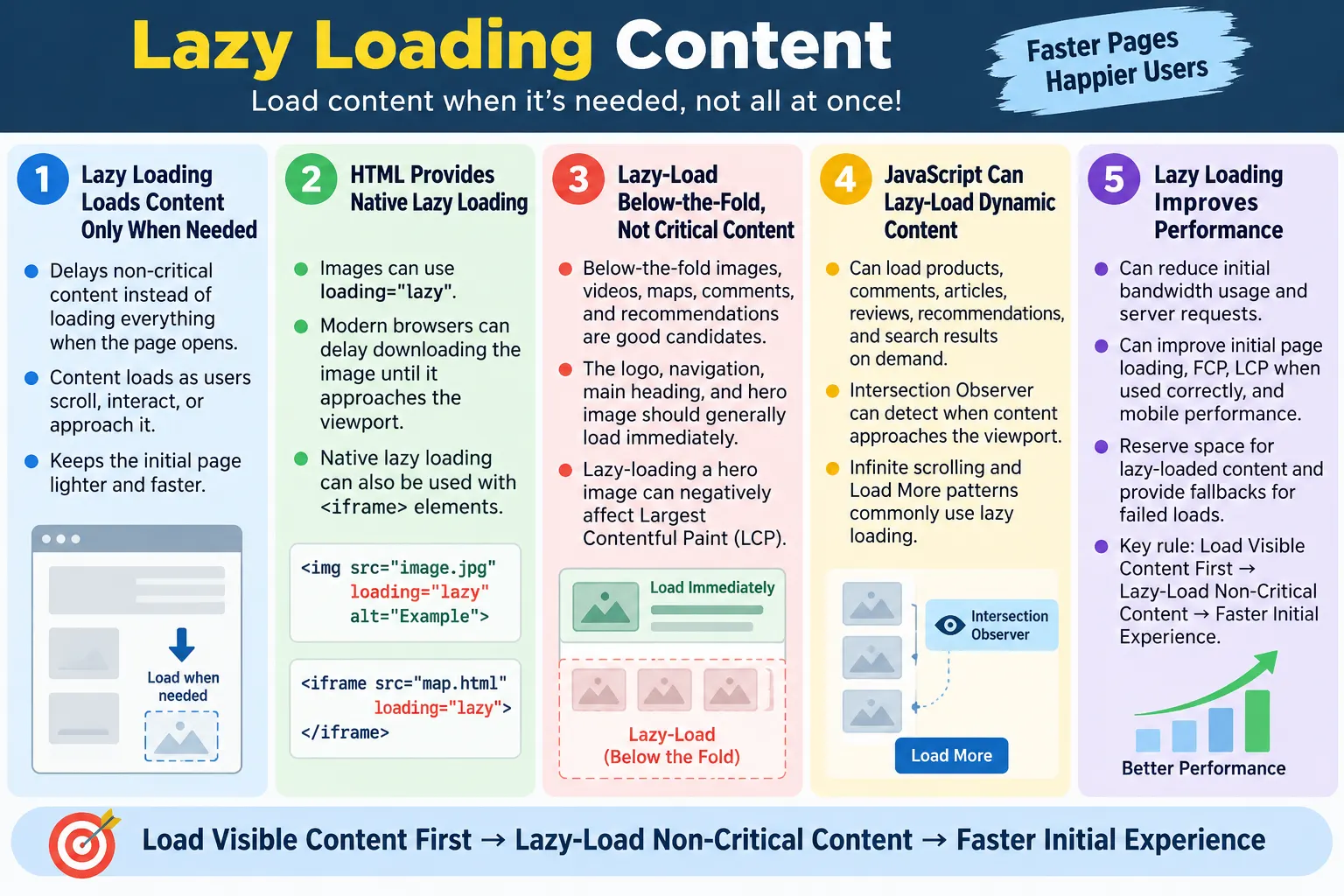
Lazy Loading Content is a performance optimization technique where content is loaded only when it is needed instead of loading everything when the webpage first opens. Rather than downloading all images, videos, embedded pages, product cards, comments, or page sections immediately, the browser or application loads them as the user scrolls, interacts, or approaches the part of the page where the content will be displayed. This keeps the initial page lighter and makes the first experience faster.
The core idea is simple: users should not pay the loading cost for content they cannot see yet. If a page has one hundred images but only five are visible at the top, downloading all one hundred immediately wastes bandwidth and delays the first useful view. If a page has a comments section far below the article, those comments do not need to block the heading and introduction. Lazy loading prioritizes visible and important content first, then loads additional content when it becomes relevant.
Lazy loading helps websites load faster, reduce bandwidth usage, improve Core Web Vitals support, improve user experience, and reduce initial server requests. Modern HTML supports native lazy loading for images and iframes through the loading="lazy" attribute. JavaScript is commonly used to lazy-load other types of content such as products, comments, articles, search results, recommendations, and infinite scrolling feeds.
What Is Lazy Loading?
Lazy loading delays loading non-critical content until it is actually required. A normal page may attempt to fetch all content immediately, regardless of whether the user will ever see it. A lazy-loaded page focuses first on visible content, then loads hidden or lower-priority content as the user moves through the page. This turns one large loading event into smaller loading steps.
Page Loads
  ↓
Load Visible Content
  ↓
User Scrolls
  ↓
Load Hidden Content
  ↓
Continue Scrolling
  ↓
Load More Content
Only the content currently needed is downloaded. This approach is useful because many users do not scroll through an entire page. If the user reads only the first section, there is no reason to immediately download every below-the-fold image, every embedded map, every video, and every recommendation widget. Lazy loading avoids unnecessary work.
Lazy loading can happen at the browser level or the application level. Browser-level lazy loading is used for elements such as images and iframes. Application-level lazy loading uses JavaScript to fetch additional data, render components, or load sections when needed. Both approaches share the same goal: delay non-critical work until it becomes useful.
Why Lazy Loading Is Important
Without lazy loading, a large page can become slow quickly. Imagine a catalog page with one hundred product images. If the browser downloads every image immediately, the network becomes busy, the first screen takes longer to become useful, and mobile users may waste data on images they never view. With lazy loading, the page loads only the first visible items first. As the user scrolls, the next group of images loads.
Without Lazy Loading:

100 Images
  ↓
Download All
  ↓
Slow Page

With Lazy Loading:

100 Images
  ↓
Load First 5
  ↓
User Scrolls
  ↓
Load Next 5
The initial page becomes usable much faster. Users can begin reading, browsing, or interacting while the rest of the page loads later. This is especially valuable on mobile networks, where bandwidth and latency can vary. It also helps servers and CDNs because fewer resources are requested immediately.
Lazy loading improves perceived performance. A user does not judge a page by whether every hidden resource has loaded. The user judges whether the visible page is useful. If the page shows meaningful content quickly and loads additional content smoothly as needed, it feels fast and responsive.
How Lazy Loading Works
Lazy loading works by detecting when content is needed and then loading it. For images and iframes, modern browsers can do this natively. The browser observes the element's position relative to the viewport and delays the network request until the element is close enough to be needed. For dynamic content, JavaScript often listens for scrolling, button clicks, route changes, or intersection events, then requests data and displays the new content.
Browser Opens Page
  ↓
Render Visible Area
  ↓
Detect Scroll
  ↓
Load New Content
  ↓
Display Content
The best implementations load content slightly before it becomes visible. If content loads only after it is already on screen, users may see empty spaces or loading spinners. By loading content as it approaches the viewport, the browser can often have it ready by the time the user reaches it. Native lazy loading and JavaScript APIs such as Intersection Observer are designed around this idea.
Lazy loading should feel seamless. Users should not need to think about it. They scroll, and content appears at the right time. If the network is slow, the page should show appropriate placeholders, reserve space to prevent layout shift, and handle errors gracefully. A good lazy-loading strategy improves performance without making the page feel incomplete.
Native HTML Lazy Loading
HTML provides native lazy loading for images through the loading attribute. The most common value is lazy. When this attribute is added to an image, the browser may delay downloading it until it approaches the viewport. This is one of the simplest performance improvements for image-heavy pages.
<img
  src="course.webp"
  loading="lazy"
  alt="HTML Course">
The browser decides exactly when to load the image. Developers do not need to write custom scroll handlers for ordinary image lazy loading. This makes native lazy loading simpler and usually more reliable than older JavaScript-only techniques. It also allows the browser to make smart decisions based on connection, viewport, and resource priority.
Native lazy loading should be used thoughtfully. It is excellent for below-the-fold images, article illustrations, gallery images, related post thumbnails, and product images not visible immediately. It should usually not be used for the logo, hero image, primary banner, or other images visible in the initial viewport.
Lazy Loading Iframes
Iframes can also be lazy-loaded in modern browsers. Iframes are often used for embedded videos, maps, forms, social media widgets, ads, demos, and third-party content. These embeds can be heavy because they may load entire external pages with their own scripts, styles, images, and network requests. Lazy loading iframes can reduce the initial cost of a page significantly.
<iframe
  src="video.html"
  loading="lazy">
</iframe>
The embedded page is loaded only when needed. This is useful when an iframe appears lower on the page. For example, a map near the contact section does not need to load before the user reads the main content. A video embed halfway down an article does not need to load before the heading appears.
Like images, iframes that are visible immediately should not always be lazy-loaded. If an embedded tool is the main purpose of the page and appears above the fold, it may be critical. The decision depends on visibility and importance.
Lazy Loading with JavaScript
JavaScript is commonly used to lazy-load dynamic content such as products, comments, articles, news feeds, recommendations, reviews, search results, and dashboard widgets. Instead of embedding all data in the initial HTML, the page loads a first set of content, then requests more data when the user scrolls or interacts.
- Products
- Comments
- Articles
- News feeds
- Recommendations
- Reviews
Scroll
  ↓
JavaScript
  ↓
Request Data
  ↓
Display New Content
Modern JavaScript implementations often use the Intersection Observer API. Instead of continuously checking scroll position, the browser notifies the application when a target element enters or approaches the viewport. This is more efficient than old scroll-event techniques. When the observer detects that a placeholder is near the visible area, the application fetches data and renders the new content.
JavaScript lazy loading should include error handling. If the network request fails, the user should not be trapped with an empty section. The page can show a retry button, fallback message, or Load More button. Good lazy loading is not only fast; it is resilient.
Infinite Scrolling
Many websites use lazy loading for infinite scrolling. In this pattern, the page loads a set of items first. As the user scrolls near the bottom, more items are fetched and appended. This creates a continuous browsing experience. Social feeds, product catalogs, image galleries, and news apps commonly use this model.
Products
  ↓
Scroll
  ↓
More Products
  ↓
Scroll
  ↓
More Products
Infinite scrolling can feel smooth when implemented well, but it also has usability risks. Users may lose their place, footers may become hard to reach, browser back behavior can become confusing, and accessibility may suffer if new content is inserted without clear announcements. Search engines and users also benefit from stable URLs or pagination when content is important.
A good infinite scroll implementation should preserve performance, update state when appropriate, avoid duplicate loading, and support keyboard and screen reader users. It should also avoid loading too many DOM elements forever. Some applications remove or virtualize older items to keep the DOM manageable.
Load More Button
A Load More button is a simpler alternative to automatic infinite scrolling. Instead of loading content as soon as the user reaches the bottom, the page gives the user a button. The user decides when additional content should load. This pattern is often easier to control, easier to test, and more predictable for accessibility.
Articles
  ↓
Load More
  ↓
More Articles
The Load More pattern is useful for article lists, product grids, search results, and comments. It reduces initial load while keeping the interaction explicit. It also avoids surprising users with continuous loading. If the user does not want more content, no extra request is made.
From a testing perspective, Load More is straightforward. The tester can verify the initial count, click the button, wait for more items, check the new count, and confirm that the button behaves correctly when no more content remains. It also provides a fallback-friendly design because the action is visible and intentional.
Lazy Loading Images
Images are the most common lazy-loading target. They often consume more bandwidth than HTML, CSS, and JavaScript combined. A page with many images can become slow if every image loads immediately. Lazy loading allows below-the-fold images to wait until the user scrolls near them.
Good:

<img
  src="html-course.webp"
  loading="lazy"
  alt="HTML Course">
Lazy-loaded images still need good HTML. They should have meaningful alt text when they convey information. They should have appropriate dimensions to avoid layout shift. They should be compressed and sized correctly. Lazy loading delays the download, but it does not reduce the file size. A huge unoptimized image is still huge when it eventually loads.
Avoid lazy loading the hero image because it is immediately visible and often contributes to Largest Contentful Paint. The hero image should normally load eagerly and may need higher priority depending on the page. Lazy loading is best for content that starts outside the initial viewport.
Lazy Loading Videos
Videos are usually much heavier than images, so lazy loading or partial loading is important. HTML video supports the preload attribute. When preload="metadata" is used, the browser downloads only basic video information until playback begins. This avoids downloading the full video file during initial page load.
<video
  controls
  preload="metadata">
</video>
This approach works well when the video is available but not automatically played. The user sees a player and can choose to start playback. Until then, the browser avoids downloading large video data. For embedded video platforms, a common pattern is to show a lightweight thumbnail first and load the full player only after the user clicks.
Video lazy loading improves performance because video players often load scripts, tracking, thumbnails, captions, and media data. Delaying that work protects the initial page experience. It also respects users who may never play the video.
Lazy Loading Third-Party Content
Third-party content is a strong candidate for lazy loading because it can be expensive and unpredictable. Advertisements, maps, chat widgets, social media feeds, review widgets, and embedded tools often make additional network requests and run scripts from external servers. These resources can slow the first render if they load too early.
- Advertisements
- Maps
- Chat widgets
- Social media feeds
- Review widgets
- Embedded tools
Many third-party resources are useful only after the main content appears. A map near the footer can wait. A chat widget can load after the page becomes interactive. A social feed can load when the user scrolls to it. Ads should be handled carefully so they do not block the primary content or cause layout shift.
Lazy loading third-party content also improves reliability. If the third-party service is slow, the main page can still appear. Users should not wait for a non-essential widget before reading the primary content.
Browser Workflow
The browser workflow for lazy loading begins with the initial HTML and visible content. The page displays what is needed first. As the user scrolls, the browser or JavaScript detects content that is approaching the viewport. The resource is then requested, loaded, and displayed.
Initial HTML
  ↓
Visible Content
  ↓
User Scrolls
  ↓
Lazy Load Content
  ↓
Display
This workflow protects the initial render. Instead of treating all resources as critical, the browser focuses on what the user can see and what the user is likely to need soon. For long pages, this can dramatically reduce initial network requests. It also spreads work over time instead of forcing everything into the first load.
However, lazy loading should not create visible delays. If users scroll and repeatedly see empty placeholders, the experience feels broken. Good implementations load slightly ahead of the viewport, reserve layout space, and handle slow networks gracefully.
Real-World Example
An online shopping page is a clear example. The initial load may show products 1 through 20. When the user scrolls, products 21 through 40 load. Further scrolling loads products 41 through 60. The page does not download every product image and detail at once. It loads content progressively.
Online Shopping

Initial load:
Products 1-20

Scroll:
Products 21-40

Further scroll:
Products 41-60
This approach saves bandwidth for users who view only the first few products. It also makes the first screen faster. The page can show the first product set quickly while the rest of the catalog waits. Large e-commerce sites, media libraries, learning platforms, and search result pages all benefit from this pattern.
The same principle applies to articles. A page can load the title, introduction, and first content sections first. Images lower in the article, comments, related posts, and embedded media can load later. Users get the content they came for quickly.
Lazy Loading vs Eager Loading
Lazy loading and eager loading are opposite strategies. Lazy loading loads content when needed. Eager loading loads content immediately. Neither is always right or always wrong. Critical content should usually be loaded eagerly. Non-critical content can often be lazy-loaded.
| Lazy Loading | Eager Loading |
|---|---|
| Loads content when needed | Loads everything immediately |
| Faster initial page load | Slower initial page load on large pages |
| Lower bandwidth usage | Higher bandwidth usage |
| Better for large pages | Better for critical content |
The decision depends on visibility and importance. The main heading should be eager. The hero image is usually eager. A footer image is usually lazy. A product image visible at the top is eager, while product images lower down can be lazy. The right strategy is based on user need.
Performance Benefits
Lazy loading helps with faster page loading, reduced bandwidth usage, better First Contentful Paint, better Largest Contentful Paint when critical content is not lazy-loaded, and improved mobile performance. It reduces the amount of data needed for the first view and prevents lower-priority content from competing with critical resources.
- Faster page loading
- Reduced bandwidth usage
- Better First Contentful Paint
- Better Largest Contentful Paint when critical content is not lazy-loaded
- Improved mobile performance
- Reduced initial server requests
The performance gain depends on the page. A small page with one image may not benefit much. A long article with many images, a product listing with hundreds of cards, or a media-heavy landing page can benefit significantly. Lazy loading is most valuable when there is a large gap between what exists on the full page and what the user sees first.
SEO Considerations
Search engines are generally capable of processing modern lazy-loaded content when it is implemented correctly. However, important content should remain accessible. Do not hide essential text, headings, or primary links behind user actions that crawlers cannot trigger. The main topic and primary content should be available in the initial HTML where possible.
- Do not lazy-load above-the-fold content such as the hero image
- Ensure important content is accessible to search engines
- Use proper HTML markup
- Avoid hiding essential content behind unreachable user actions
- Provide stable links or pagination for large content sets when needed
For infinite scrolling pages, SEO requires extra care. If more content loads only after scrolling and there are no crawlable links or paginated URLs, search engines may not discover all items reliably. Important content collections should have accessible URLs, pagination, or links that support discovery.
Lazy loading can indirectly improve SEO through better performance and Core Web Vitals support. But poor lazy loading can harm discoverability if content becomes inaccessible. The implementation matters.
Best Practices
Good lazy loading starts by identifying what is below the fold and non-critical. Lazy-load below-the-fold images. Use loading="lazy" for supported elements. Keep hero images eagerly loaded. Optimize image sizes. Lazy-load non-critical iframes. Test scrolling behavior. Ensure dynamically loaded content remains accessible.
- Lazy-load below-the-fold images
- Use
loading="lazy"for supported elements - Keep hero images eagerly loaded
- Optimize image sizes
- Lazy-load non-critical iframes
- Test scrolling behavior
- Ensure dynamically loaded content remains accessible
- Reserve space to reduce layout shift
- Provide fallbacks or retry behavior for failed dynamic loads
Best practices also include measuring results. Use browser developer tools, Lighthouse, PageSpeed Insights, and real device testing. Lazy loading should improve actual user experience, not just satisfy a checklist. If a page becomes jumpy, delayed, or hard to navigate, the implementation needs adjustment.
Common Mistakes
A common mistake is lazy-loading hero images. The hero image is part of the initial view and usually should load immediately. Lazy-loading it can delay Largest Contentful Paint and make the page feel slower. Another mistake is lazy-loading everything, including the logo, navigation, main heading, and critical content. These resources should not be delayed.
Bad:

<img
  loading="lazy"
  src="hero.webp">
Broken scroll loading is another risk. If JavaScript fails, users may never see additional content. Applications should provide graceful error handling where appropriate. Missing alt text is also common. Lazy-loaded images still require meaningful alt attributes when they convey information. Lazy loading does not remove accessibility responsibilities.
Huge image files are another mistake. Lazy loading delays downloads but does not reduce file size. Images should still be compressed, resized, and delivered in appropriate formats. Lazy loading a 5 MB image is better than loading it immediately, but optimizing that image is better still.
Selenium Perspective
Automation testers often verify that lazy-loaded images appear after scrolling, infinite scrolling works correctly, Load More buttons function properly, and dynamic content loads successfully. Selenium can simulate scrolling and inspect attributes after content appears. It can also verify that new items are added to the page when expected.
JavascriptExecutor js =
(JavascriptExecutor) driver;

js.executeScript(
  "window.scrollBy(0,1000)");

WebElement image =
driver.findElement(By.tagName("img"));

System.out.println(
  image.getAttribute("loading"));
Tests should cover both the happy path and failure conditions. For infinite scroll, verify that more content loads when the user scrolls. For Load More buttons, verify that the button adds items and handles the end of the list. For lazy images, verify that the page reserves space and that images eventually load. Performance tools such as Lighthouse and Chrome DevTools are better for measuring network and rendering effects, while Selenium is useful for behavior verification.
Common Interview Questions
What is lazy loading? Lazy loading is a technique that loads content only when it is needed rather than during the initial page load.
Why is lazy loading important? It improves page performance, reduces bandwidth usage, and speeds up the initial rendering of a webpage.
Which HTML elements support native lazy loading? Modern browsers support native lazy loading for <img> and <iframe> using the loading="lazy" attribute.
Should the hero image be lazy-loaded? Generally, no. The hero image is usually visible immediately and often contributes to Largest Contentful Paint.
What is the difference between lazy loading and infinite scrolling? Lazy loading is the technique of loading content on demand, while infinite scrolling is a user interface pattern that often uses lazy loading to fetch more content as the user scrolls.
Does lazy loading improve SEO? It can indirectly improve SEO through better page performance and Core Web Vitals when implemented correctly. However, essential content should remain accessible to both users and search engines.
Comparison Table
| Lazy Loading | Normal Loading |
|---|---|
| Loads on demand | Loads immediately |
| Faster initial page load | Slower initial page load on large pages |
| Lower bandwidth usage | Higher bandwidth usage |
| Best for below-the-fold content | Best for above-the-fold content |
| Improves scalability on large pages | Simpler implementation |
Interview-Ready Answer
Lazy Loading Content is a performance optimization technique where non-critical resources are loaded only when they are needed instead of during the initial page load. HTML supports native lazy loading for images and iframes using the loading="lazy" attribute, while JavaScript is commonly used to lazy-load dynamic content such as products, comments, articles, recommendations, and search results. Lazy loading reduces bandwidth usage, improves page load speed, enhances Core Web Vitals support, and provides a better user experience.
A strong answer should also mention that critical above-the-fold content should generally not be lazy-loaded. The main heading, navigation, logo, and hero image usually need to appear immediately. Lazy loading is best for below-the-fold images, non-critical iframes, videos, comments, recommendations, and long lists of content. It improves performance when implemented correctly and tested for accessibility, SEO, and user experience.
One-Line Insight
Lazy loading improves performance by loading content only when users are about to see it, instead of loading everything upfront.