Interview Questions on Tables
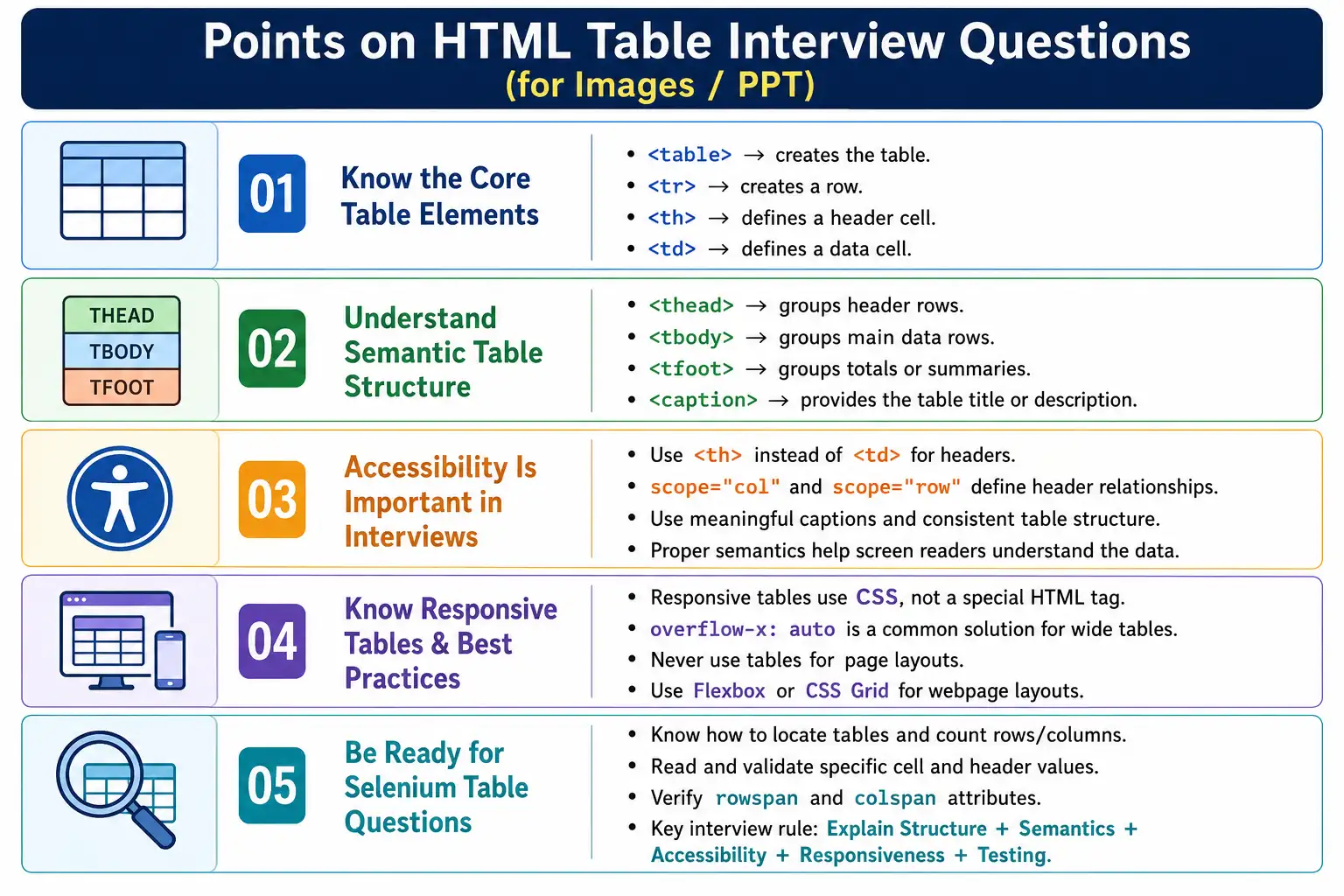
Introduction
HTML tables are one of the most frequently discussed topics in web development and Selenium interviews. At first glance, tables look simple because the basic tags are easy to remember. However, interviewers usually expect more than the ability to write a few rows and cells. They often test whether you understand table structure, semantic meaning, accessibility, responsive design, browser behavior, and automation validation.
A strong answer about tables should explain both how tables are created and why tables should be used carefully. Tables are meant for structured tabular data, not page layouts. They should use proper header cells, captions, semantic sections, and accessibility attributes where appropriate. They should also remain usable on smaller screens and be easy to validate in testing.
This article covers the most common interview questions on HTML tables in a connected, practical way. Instead of memorizing isolated answers, focus on the reasoning behind each answer. That reasoning is what makes your interview response sound professional and production-ready.
Basic Level Questions
The most basic interview question is: what is an HTML table? An HTML table is used to display tabular data in rows and columns. It is created using the <table> element and typically contains <tr> for rows, <th> for header cells, and <td> for data cells. A table is appropriate when the information has a row-and-column relationship, such as reports, records, schedules, marks, prices, and comparisons.
The tag that creates an HTML table is <table>. It acts as the container for the full table structure.
<table>
    ...
</table>
The <tr> tag stands for table row. It defines one horizontal row inside the table. Each row usually contains header cells or data cells. The <td> tag stands for table data. It contains the actual values inside a row, such as John, 25, London, or $5000.
<td>John</td>The <th> tag stands for table header. It defines a header cell and gives semantic meaning to row or column headings. Headers explain what the data cells represent. For example, Name, Age, Department, and Salary are commonly written as header cells.
Difference Between th and td
A very common interview question is the difference between <th> and <td>. The <th> element represents a header cell, while <td> represents a data cell. Browsers usually render <th> as bold and center-aligned by default, but the real difference is semantic, not visual.
<th> |
<td> |
|---|---|
| Header cell | Data cell |
| Usually bold by default | Normal text by default |
| Provides semantic meaning | Stores data values |
| Used for headings | Used for values |
A table can technically exist without <th>, but using <th> is recommended because it improves accessibility and clearly identifies headers. A <td> cannot exist outside a <tr>, and a <tr> cannot exist outside a <table> in valid table structure. Table cells must belong to rows, and rows must belong to a table.
If rows have different numbers of columns, the browser attempts to render the table, but the layout can become confusing. Consistent columns are important unless rowspan or colspan is intentionally used.
Intermediate Level Questions
Intermediate questions usually focus on table organization. The <thead> element groups the header rows of a table. The <tbody> element contains the main data rows. The <tfoot> element groups footer or summary rows, such as totals, averages, counts, or final balances.
Using <thead>, <tbody>, and <tfoot> improves semantic structure, accessibility, CSS styling, JavaScript selection, and maintainability. These elements make the table easier to understand because each part has a clear role.
The <caption> element provides a title or description for a table. It helps users and screen readers understand the table's purpose before reading the rows. The caption should be the first child inside the <table> element. A table can have only one caption.
<table>
    <caption>Employee Report</caption>
    ...
</table>
Another common question is about colspan and rowspan. The colspan attribute allows a cell to span multiple columns.
<td colspan="2">Total</td>The rowspan attribute allows a cell to span multiple rows.
<td rowspan="2">John</td>A single cell can use both rowspan and colspan when it needs to span multiple rows and columns. However, these attributes should be used carefully because incorrect values can break table alignment and make the table harder to understand.
Accessibility Questions
Accessibility questions are very important in modern interviews. Interviewers may ask why <th> should be used instead of <td> for headers. The answer is that <th> identifies header cells, allowing browsers and assistive technologies to associate headers with the corresponding data cells.
The scope attribute explicitly identifies whether a header applies to a row or a column. For example, scope="col" means the header applies to a column.
<th scope="col">Name</th>Table accessibility matters because screen readers and other assistive technologies must correctly interpret the relationships between headers and data. A sighted user can visually connect a value to its header, but a screen reader depends on HTML semantics.
An accessible table usually includes a meaningful <caption>, proper <th> elements, useful scope attributes, semantic sections such as <thead>, <tbody>, and <tfoot>, and a clear, consistent table structure. The obsolete summary attribute is not used in modern HTML5. Modern HTML relies on <caption> and surrounding descriptive text instead.
Responsive Table Questions
A responsive table is a standard HTML table enhanced with CSS so it works well on different screen sizes. HTML does not provide a special responsive table tag. Responsiveness is achieved with CSS.
The most common responsive table solution is wrapping the table in a container and applying horizontal scrolling with overflow-x: auto.
.table-container {
    overflow-x: auto;
}
Responsive tables are important because business reports, comparison tables, transaction histories, and schedules are often viewed on mobile devices. Without responsive design, wide tables may overflow the screen and become hard to use.
In an interview, it is useful to mention that different responsive strategies exist. Large tables often work best with horizontal scrolling because all data remains available. Smaller tables may be transformed into stacked layouts or card-style views. The key is to preserve data meaning and accessibility while improving mobile usability.
Best Practice Questions
A very common best-practice question is whether tables should be used for page layouts. The answer is no. Tables should only display tabular data. Page layouts should be created using semantic HTML and CSS layout systems such as Flexbox and Grid.
Tables should be used for reports, price lists, student records, financial statements, schedules, product comparisons, inventory reports, banking transactions, and similar structured data. They should not be used for navigation menus, headers, footers, sidebars, or page layout grids.
Tables should not be used for layouts because they reduce accessibility, create poor semantics, are harder to maintain, and are less responsive than CSS layouts. Modern CSS provides layout tools specifically designed for arranging page sections.
Common table mistakes include using tables for layouts, missing <th>, missing <caption>, ignoring accessibility, using incorrect rowspan or colspan, creating inconsistent columns, using inline styling, and failing to make tables responsive. Inline styles should generally be avoided because CSS should handle presentation while HTML defines structure.
Selenium Interview Questions
Selenium interview questions often focus on locating tables, counting rows and columns, reading cell values, verifying headers, and validating merged cells. To locate a table, use the table tag or a more specific locator when available.
WebElement table =
driver.findElement(By.tagName("table"));
To count rows, locate all <tr> elements.
List<WebElement> rows =
driver.findElements(By.tagName("tr"));

System.out.println(rows.size());
To count columns, inspect the header row or a specific data row depending on the table structure.
List<WebElement> columns =
driver.findElements(By.tagName("th"));
or:
List<WebElement> columns =
driver.findElements(By.tagName("td"));
To read a specific cell value, XPath is commonly used.
WebElement cell =
driver.findElement(By.xpath("//tr[2]/td[1]"));

System.out.println(cell.getText());
To verify a table header, read the text from a <th> element.
String header =
driver.findElement(By.tagName("th")).getText();
To verify rowspan or colspan, read the attribute value from the cell.
String colspan = cell.getAttribute("colspan");
String rowspan = cell.getAttribute("rowspan");
A strong Selenium answer should also mention that real projects often require validating row count, column count, header names, cell values, totals, sorting, filtering, pagination, and responsiveness.
Advanced Questions
Advanced table questions test deeper HTML knowledge. A table can have multiple <tbody> elements. This is useful when related rows need to be grouped logically within the same table.
The <tfoot> element can appear before <tbody> in the markup, although browsers render it at the bottom of the table. Many developers place it after <tbody> because it matches the visual reading order and is easier to understand.
Semantic HTML is important for tables because it improves accessibility, maintainability, code readability, and indirectly supports SEO through better structure. Semantic markup helps browsers and assistive technologies understand what each part of the table means.
Interviewers may also ask which CSS layout systems replaced table layouts. The answer is Flexbox and CSS Grid. These systems are designed for page layout, while tables are designed for tabular data.
Another small but common question is the browser's default alignment for <th>. Most browsers render header cells as bold and center-aligned by default, although this appearance can be changed with CSS. The semantic meaning remains more important than the default styling.
Rapid-Fire Interview Questions
| Question | Answer |
|---|---|
| Which tag creates a table? | <table> |
| Which tag creates a row? | <tr> |
| Which tag creates a header cell? | <th> |
| Which tag creates a data cell? | <td> |
| Which tag groups table headers? | <thead> |
| Which tag groups data rows? | <tbody> |
| Which tag groups summary rows? | <tfoot> |
| Which tag provides a table title? | <caption> |
| Which attribute merges columns? | colspan |
| Which attribute merges rows? | rowspan |
| Which attribute identifies row or column headers? | scope |
| Which CSS property enables horizontal scrolling? | overflow-x: auto |
| Should tables be used for layouts? | No |
| Best CSS layout systems? | Flexbox and Grid |
| Are tables responsive by default? | No |
Top 10 Most Asked Interview Questions
The most frequently asked table questions usually include: what is an HTML table, what is the difference between <th> and <td>, what are <thead>, <tbody>, and <tfoot>, what is the purpose of <caption>, what are rowspan and colspan, why should tables not be used for page layouts, how do you make a table responsive, what is the scope attribute, how do you locate and read tables in Selenium, and what are the best practices for creating accessible tables.
These questions are connected. They all test whether you understand the professional use of tables. If you can explain structure, semantics, accessibility, responsiveness, and automation validation, you can answer almost any table interview question confidently.
How to Answer Table Questions Professionally
A good interview answer should not stop at tag names. For example, if the interviewer asks what a table is, a beginner may say that a table is created using <table>, <tr>, and <td>. That answer is technically correct but incomplete. A stronger answer explains that tables are used for tabular data, that headers should be represented with <th>, and that semantic structure improves accessibility and maintainability.
The best pattern is to answer in three layers. First, define the concept clearly. Second, give a small example or practical use case. Third, mention the production concern, such as accessibility, responsiveness, or testing. This makes the answer sound grounded in real development instead of memorized from a tag list.
For instance, when asked about <caption>, you can say that it provides a title for the table, should be placed as the first child of <table>, and helps both visual users and screen reader users understand the table's purpose. That answer is concise, accurate, and practical.
Scenario-Based Questions
Interviewers may also ask scenario-based questions. One common scenario is a wide employee report that works on desktop but breaks on mobile. A strong answer is to keep the semantic table structure and wrap the table in a scrollable container using overflow-x: auto. You can also mention that card layouts or priority columns may be considered for smaller data sets, but horizontal scrolling is often safest for large reports because it preserves all columns.
Another scenario may involve a screen reader user struggling to understand a table. In that case, you should check whether the table has meaningful headers, a caption, proper <th> elements, scope attributes where useful, and a consistent row and column structure. Accessibility issues usually come from missing semantics, not from missing visual styling.
A Selenium scenario may ask how to validate a dynamic report table. In that case, mention that you would identify the table, read headers, count rows, validate expected cell values, check totals if present, and verify sorting or filtering behavior when those features exist. If the table is dynamic, stable locators and explicit waits may also be required.
Common Interview Traps
One common trap is saying that tables are bad. Tables are not bad. Misusing tables for page layouts is bad. Tables are the correct semantic choice for tabular data. A professional answer should make that distinction clearly.
Another trap is treating <th> as only a styling tag because browsers display it in bold by default. The visual appearance can be changed with CSS, but the semantic meaning remains. The real purpose of <th> is to identify header cells.
A third trap is saying that responsive tables require a special HTML tag. They do not. A responsive table is a normal table whose presentation is adapted with CSS. This is an important distinction because HTML provides structure, while CSS controls layout and responsiveness.
A fourth trap is ignoring accessibility in table answers. Modern interviews increasingly expect developers and testers to understand how markup affects users of assistive technologies. Mentioning caption, headers, scope, and semantic sections can make your answer stronger.
Interview-Ready Summary
HTML tables are used exclusively for displaying structured tabular data. A well-designed table uses semantic elements like <caption>, <thead>, <tbody>, <tfoot>, <th>, and <td>, along with attributes such as scope, rowspan, and colspan where appropriate. Modern best practices emphasize accessibility, responsiveness, and using CSS Flexbox or Grid for page layouts instead of tables. Selenium testers should also know how to locate tables, read rows and cells, validate headers, verify merged cells, and confirm table content during automation testing.
One-Line Insight
In interviews, do not just explain how to create a table; explain why semantic structure, accessibility, and responsive design make a table professional and production-ready.