Interview Questions for Testers
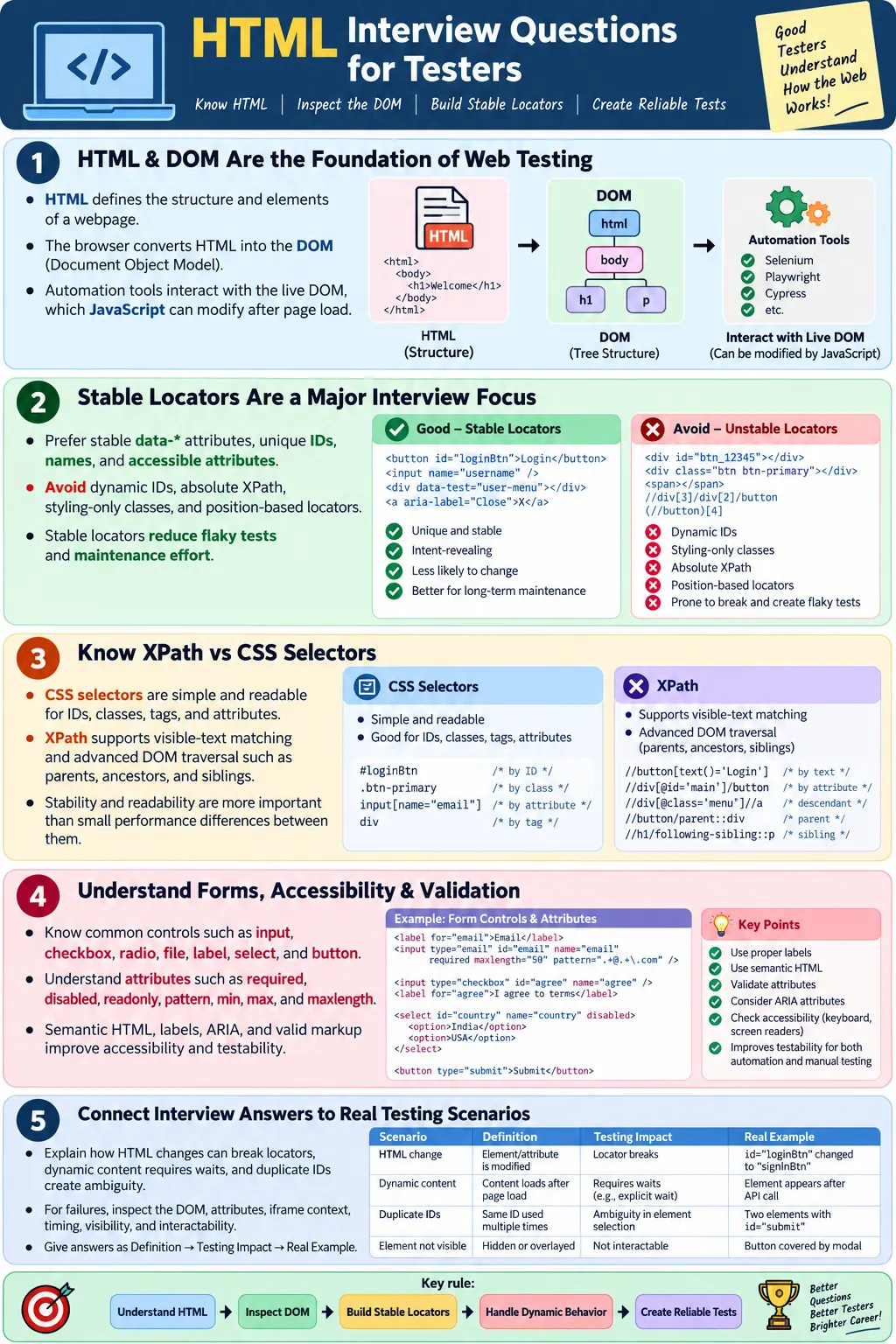
Introduction
HTML interview questions for testers are common in manual testing, Selenium, automation testing, Playwright, Cypress, WebdriverIO, and QA Engineer interviews because every web testing activity starts with the page structure. A tester does not need to become a frontend developer to test web applications effectively, but they must understand how HTML creates elements, how the browser converts HTML into the DOM, and how automation tools identify those elements. Without this foundation, locator design becomes guesswork.
Interviewers ask HTML questions to check whether a tester can inspect a page, understand form controls, debug element-not-found errors, recognize unstable locators, and communicate clearly with developers. For automation roles, HTML knowledge is even more important because scripts interact with inputs, buttons, links, tables, dialogs, frames, and dynamic elements through the DOM. The stronger your HTML understanding, the stronger your automation decisions become.
This article expands the most commonly asked HTML interview topics for testers. It connects basic HTML concepts with real testing work: DOM inspection, stable locators, XPath and CSS selectors, forms, accessibility, performance, cross-browser behavior, validation, and project-level testability. The goal is not to memorize answers blindly. The goal is to understand why each question matters in real testing.
HTML Fundamentals
The first set of questions usually checks whether you understand what HTML is and how it relates to CSS, JavaScript, browsers, and the DOM. These are basic questions, but they are important because many automation problems come from misunderstanding the relationship between the source HTML and the live DOM.
What is HTML? HTML stands for HyperText Markup Language. It is the standard markup language used to structure web pages. It defines elements such as headings, paragraphs, forms, images, tables, links, buttons, lists, and sections. Browsers parse HTML and render it into a webpage that users can interact with.
Is HTML a programming language? No. HTML is a markup language, not a programming language. It structures content but does not contain programming logic such as loops, conditions, functions, classes, or algorithms. JavaScript provides behavior and logic, while CSS controls presentation.
| HTML | CSS | JavaScript |
|---|---|---|
| Structure | Presentation | Behavior |
| Defines page elements | Styles elements | Adds interactivity |
| Creates DOM | Creates CSSOM | Manipulates the DOM |
What is the DOM? The Document Object Model is the browser's object representation of an HTML document. Automation tools interact with the DOM rather than the raw HTML source. This distinction is important because JavaScript can change the DOM after the page loads. The element that Selenium or Playwright sees may be different from the original HTML sent by the server.
Semantic HTML
What is semantic HTML? Semantic HTML uses meaningful elements that describe the purpose of content. Examples include <header>, <nav>, <main>, <section>, <article>, <aside>, and <footer>. These elements give structure to the page beyond generic containers.
<header><nav><main><section><article><footer>
Semantic HTML improves accessibility, SEO, maintainability, and testability. Screen readers can understand page regions more clearly. Search engines can parse structure more easily. Developers can maintain pages with better organization. Testers can inspect the DOM and understand what each section represents.
HTML Elements
Interviewers often ask the difference between <div> and <span>. A <div> is a block-level generic container, commonly used for layout or grouping. A <span> is an inline generic container, commonly used for inline text or small pieces of content. Neither has strong semantic meaning by itself.
<div> |
<span> |
|---|---|
| Block-level | Inline |
| Used for layout | Used for inline content |
What is the difference between <section> and <article>? A section groups related content within a page. An article represents independent, self-contained content that could stand alone, such as a blog post, news item, forum post, or tutorial article. For testers, this matters because semantic structure can affect accessibility and page organization.
What is the purpose of the <form> tag? The form element collects user input and submits it to a server or handles it through JavaScript. Common form elements include <input>, <textarea>, <select>, <option>, <button>, and <label>. Testers should know these controls because forms are one of the most tested parts of web applications.
ID and Class
What is the difference between id and class? An ID should be unique within a page and identifies one element. A class can be reused across multiple elements and is commonly used for grouping and styling. Automation testers often prefer stable unique IDs because they make simple locators. However, IDs must not be dynamic or duplicated.
id |
class |
|---|---|
| Unique | Can be reused |
| One element | Multiple elements |
| Used for unique identification | Used for grouping and styling |
In interviews, a strong answer should mention automation impact. A unique ID is useful for locators, but duplicate IDs are invalid HTML and can confuse automation. Classes are useful, but styling-only classes may change during redesigns, so they are less stable than IDs or data-test attributes.
HTML Attributes
What are HTML attributes? Attributes provide additional information about HTML elements. They appear inside the opening tag and influence identity, behavior, accessibility, validation, and automation. Examples include id, class, type, name, required, href, src, alt, aria-label, and data-*.
<input
  id="email"
  type="email"
  required>
What is the purpose of the alt attribute? It provides alternative text for images, improving accessibility and serving as fallback text if the image cannot be displayed. Testers should verify meaningful alt text for informative images and empty alt text for decorative images.
Why is the placeholder attribute used? It displays temporary hint text inside an input field. However, placeholder is not a replacement for a real label. Labels are better for accessibility and usability because placeholders disappear after typing.
What is the difference between disabled and readonly? A disabled field cannot receive input and is usually not submitted with the form. A readonly field cannot be edited but is usually submitted with the form. For testers, this matters when validating form behavior and submitted data.
Custom Data Attributes
What are custom data-* attributes? They are valid HTML attributes used to store additional custom data. In automation, they are commonly used as stable locators, such as data-testid="login-button". They are not tied to styling, so they usually survive UI redesigns better than classes.
<button data-testid="login-button">
  Login
</button>
Interviewers often ask why data-testid attributes are useful. A strong answer is that they provide stable automation-specific identifiers independent of layout and styling. They reduce flaky tests and make locators easier to maintain.
DOM and Automation
Why should automation testers learn HTML? Because automation tools interact with HTML elements through the DOM. Understanding HTML helps testers build stable locators, debug failures, inspect elements, and understand page structure. A tester who understands DOM relationships can create better CSS selectors and XPath expressions.
What is DOM inspection? DOM inspection means using browser developer tools to examine HTML elements, attributes, state, and hierarchy. Chrome DevTools, Edge DevTools, Firefox Developer Tools, and Safari Web Inspector are commonly used. The usual shortcut is F12, or right click and choose Inspect.
What HTML attributes are commonly used for locators? Common locator attributes include id, name, class, type, data-*, href, and aria-label. A common locator preference order is stable data-* attributes, unique ID, name, accessible attributes, CSS selector, and relative XPath.
XPath and CSS
What is the difference between XPath and CSS Selector? CSS selectors are simple and readable for IDs, classes, tags, and attributes. XPath supports text matching and advanced DOM traversal, including parent, ancestor, and sibling navigation. Both locate elements in the DOM, but they use different syntax and have different strengths.
Which locator is faster? CSS selectors are often considered slightly faster, but in modern browsers the difference is usually negligible. Stability and readability are more important than tiny performance differences. A stable locator that is clear is better than a slightly faster locator that breaks often.
Can CSS locate elements using text? Standard CSS selectors cannot match elements by visible text. XPath can match text with expressions such as //button[text()='Login']. Can XPath locate parent elements? Yes. XPath supports parent, ancestor, sibling, and other navigation axes.
Forms
Forms are a central interview topic because testers validate login, registration, search, checkout, profile, contact, and admin workflows. Testers should know input types such as text, password, email, number, date, checkbox, radio, and file. They should understand how validation attributes affect behavior.
textpasswordemailnumberdatecheckboxradiofile
What is HTML validation? In form context, HTML validation checks whether inputs satisfy constraints such as required, pattern, min, max, and maxlength. Testers should verify both valid and invalid inputs. They should also understand that browser-native validation messages may differ between browsers.
What is the purpose of the <label> element? It associates descriptive text with form controls, improving accessibility and usability. A proper label also makes testing easier because the form structure is clearer.
HTML5 Topics
Interviewers may ask about HTML5 semantic elements, the viewport meta tag, and lazy loading. HTML5 introduced semantic elements such as header, main, nav, section, article, aside, and footer. These elements improve document structure and accessibility.
<meta
  name="viewport"
  content="width=device-width, initial-scale=1.0">
The viewport meta tag enables proper rendering on mobile devices. Without it, mobile browsers may render the page with a desktop-width layout and scale it down, causing poor usability. Testers working on responsive websites should understand this tag.
What is lazy loading? Lazy loading means loading images or iframes only when they are needed, often when they approach the viewport. It improves initial page performance. Example: <img loading="lazy">. Testers should verify that lazy-loaded content appears correctly when users scroll.
Automation Questions
Why are data-testid attributes useful? They provide stable locators independent of styling changes. What are unstable locators? Examples include dynamic IDs, absolute XPath, styling-only classes, and position-based locators. These locators break easily when the UI changes.
- Dynamic IDs
- Absolute XPath
- Styling-only classes
- Position-based locators
What happens when HTML changes? Possible effects include locator failure, test failure, element-not-found errors, stale elements, interactability problems, and maintenance updates. Why avoid absolute XPath? Because it depends on the exact DOM structure and breaks easily when layout changes.
What causes flaky UI tests? Common causes include dynamic HTML, poor locators, timing issues, unstable IDs, and missing waits. A strong interview answer should mention both locator stability and synchronization. Good automation needs stable locators and waits for meaningful page states.
Accessibility
Why is accessibility important? Accessibility improves usability for all users, including people using screen readers, keyboard navigation, magnification, voice control, or other assistive technologies. It also helps automation because accessible names, labels, roles, and semantic structure make elements easier to understand.
What is ARIA? ARIA stands for Accessible Rich Internet Applications. It provides additional semantic information for assistive technologies when native HTML semantics are not enough. However, ARIA should not replace semantic HTML when native elements can do the job.
What is aria-label? It provides an accessible name for elements without visible text. For example, an icon-only search button can use aria-label="Search". Automation can sometimes use accessible names or ARIA attributes as stable locators, but they must remain truthful for users.
Performance
Performance questions may include lazy loading, deferred loading, DOM size, and rendering. Lazy loading loads content only when needed. Deferred loading loads non-critical resources after the initial page content has rendered. These techniques improve initial page speed when used correctly.
Why should DOM size be minimized? A very large DOM can slow rendering, increase memory usage, and reduce JavaScript performance. It can also make automation slower and harder to debug. Excessive nested elements make locators more fragile and increase maintenance cost.
When answering performance questions, testers should connect concepts to user experience. A page that loads slowly may fail performance expectations. A huge DOM may make interactions sluggish. Lazy-loaded content must still appear when needed. Deferred scripts must not break critical functionality.
Cross-Browser Topics
Why do browsers render HTML differently? Browsers use different rendering engines and may implement features differently while following web standards. Chrome and Edge use Blink, Firefox uses Gecko, and Safari uses WebKit. Differences may appear in default styles, form controls, validation messages, media controls, and newer feature support.
What browsers should automation be tested on? Common browsers include Chrome, Firefox, Edge, and Safari if supported by the project. The exact list should come from requirements, analytics, and business needs.
What is feature detection? Feature detection checks whether a browser supports a specific feature instead of identifying the browser itself. It is generally better than browser detection because browser capabilities change over time.
Validation
What is HTML validation? HTML validation checks whether HTML has correct syntax and structure according to web standards. It detects issues such as invalid nesting, duplicate IDs, missing required attributes, deprecated elements, and malformed markup.
Name an HTML validation tool. Common examples are the W3C Markup Validator and the Nu HTML Checker. Browser DevTools and IDE validation also help inspect and catch issues, though they do not replace full standards validation.
Why does validation matter for testers? Valid HTML produces a more predictable DOM. It reduces locator ambiguity, duplicate IDs, cross-browser inconsistencies, and accessibility problems. Selenium does not validate HTML, but Selenium tests benefit from standards-compliant markup.
Real Project Questions
What makes a good automation-friendly HTML page? A good automation-friendly page has unique IDs, stable data-* attributes, semantic HTML, accessible labels, a simple DOM, and valid HTML. These qualities make locators easier to create and maintain.
- Unique IDs
- Stable
data-*attributes - Semantic HTML
- Accessible labels
- Simple DOM
- Valid HTML
Which HTML changes usually do not break automation? Color changes, font changes, margin changes, and padding changes usually do not break tests as long as stable locators remain unchanged. However, if tests depend on styling classes, even visual changes can break automation.
What is the most important HTML concept for an automation tester? Understanding the DOM and stable locators. Most automation failures occur because elements cannot be located reliably, making knowledge of HTML structure, attributes, and DOM relationships essential.
Top 10 Must-Know Interview Questions
Every tester preparing for web testing interviews should be ready to answer a core group of questions. These questions appear repeatedly because they reveal whether the candidate understands the connection between HTML and real testing work.
- What is HTML?
- What is the DOM?
- What is the difference between
idandclass? - What is the difference between XPath and CSS Selector?
- Why are
data-testidattributes useful? - What is semantic HTML?
- Why avoid absolute XPath?
- What are stable locators?
- How do HTML changes affect automation tests?
- Why is HTML knowledge important for Selenium testers?
If you can answer these questions with practical examples, you will be able to handle most HTML-related interview discussion for QA and automation roles. The best answers connect theory to testing impact.
How to Answer in Interviews
A good interview answer should be short first, then practical. Start with the definition, then explain why it matters for testing, then give a real example. For example, when asked about the DOM, do not stop at "DOM means Document Object Model." Add that automation tools interact with the DOM and that JavaScript can change it after page load, which affects locators and waits.
When asked about XPath vs CSS, do not argue that one is always better. Explain that CSS is simple for IDs, classes, and attributes, while XPath is useful for text matching and DOM traversal. Then say that stability and readability matter more than choosing one tool blindly. This shows maturity.
When asked about stable locators, mention data-test attributes, unique IDs, names, accessible attributes, and relative XPath where needed. Also mention what to avoid: dynamic IDs, absolute XPath, styling-only classes, and position-based locators. Interviewers value candidates who understand maintenance, not just syntax.
Scenario-Based HTML Questions
Many interviewers move from definitions to scenarios because scenarios reveal whether you can apply HTML knowledge in real testing work. One common scenario is: a Selenium test was working yesterday, but today it fails with element not found. A strong answer explains that the tester should inspect the DOM, confirm whether the element still exists, check whether the locator attribute changed, verify whether the element is inside an iframe, and confirm whether the element is loaded dynamically after a delay.
Another common scenario is: a button is visible on the page but Selenium cannot click it. A practical answer should mention that the element may be hidden by another overlay, disabled, outside the viewport, not yet clickable, covered by a sticky header, or duplicated with a hidden version. The issue may not be the locator alone. Visibility, interactability, timing, and page state should also be checked.
A third scenario is: the same script passes in Chrome but fails in Firefox. A good answer should mention cross-browser differences, timing differences, native control behavior, rendering differences, and possible JavaScript errors in one browser. The tester should reproduce manually in the failing browser, inspect the DOM, check console errors, and avoid assuming that the automation framework is the only cause.
Manual Testing Interview Angle
For manual testing roles, HTML questions are usually less code-heavy but still important. Interviewers may ask how you inspect an element, how you understand a form, how you identify field constraints, or how you verify links and images. A manual tester who understands HTML can test more deeply because they can see the structure behind the UI.
For example, when testing a registration form, a manual tester can inspect whether an email input uses type="email", whether required fields use required, whether labels are connected to inputs, and whether validation messages appear correctly. This does not replace user-facing testing, but it gives better insight into why the application behaves the way it does.
Manual testers also benefit from understanding attributes such as disabled, readonly, maxlength, pattern, min, and max. These attributes often explain validation behavior. When a defect is reported, HTML knowledge helps the tester provide better evidence and clearer reproduction steps.
Automation Testing Interview Angle
For automation roles, HTML questions usually focus on locators, DOM inspection, dynamic elements, forms, waits, frames, and maintainability. The interviewer wants to know whether you can build tests that survive real application changes. Syntax alone is not enough. A candidate may know how to write XPath but still create fragile automation if they do not understand HTML structure.
When answering automation questions, connect HTML to framework design. Explain that page object models centralize locators. Explain that data-test attributes reduce maintenance. Explain that explicit waits are required when JavaScript updates the DOM after page load. Explain that if an element moves into an iframe, the test must switch context before locating it.
A strong automation answer also includes tradeoffs. CSS selectors are readable and good for attributes. XPath is useful for text and relationships. IDs are excellent when stable, but bad when dynamic. Classes are convenient, but risky when used only for styling. These balanced answers show project experience.
Playwright and Cypress Interview Angle
For Playwright and Cypress roles, interviewers may expect modern locator thinking. Playwright encourages user-facing locators such as roles, labels, text, and test IDs. Cypress teams often use data attributes such as data-cy or data-testid. HTML knowledge remains essential because these tools still depend on the page structure and accessible names.
If asked why Playwright's role locators are useful, explain that they encourage accessible HTML. A button with a proper accessible name can be located in a way that resembles how users understand the page. If asked why Cypress projects prefer data attributes, explain that they separate tests from styling and reduce selector fragility.
Modern tools provide helpful waiting behavior, but they do not remove the need for good HTML. A poorly labeled form, hidden duplicate controls, dynamic IDs, and excessive DOM nesting can still create testing problems. Interviewers appreciate candidates who understand both tool features and markup quality.
Common Wrong Answers to Avoid
One wrong answer is saying that HTML is a programming language. It is a markup language. Another weak answer is saying CSS is always better than XPath or XPath is always better than CSS. The real answer depends on the HTML and the locator need. CSS is often simpler for attributes, while XPath is useful for text and traversal.
Another wrong answer is saying that passing tests prove the HTML is valid. A page may pass functional tests but still contain invalid nesting, duplicate IDs, missing labels, or accessibility problems. Functional testing and HTML validation solve different problems. Similarly, saying that Selenium validates HTML is incorrect. Selenium automates browser actions; it does not check standards compliance.
Avoid saying that accessibility is only for disabled users or only a legal requirement. Accessibility improves usability for everyone and often improves testability. Labels, roles, semantic elements, and accessible names make pages easier to use and easier to automate.
Quick Revision Table
| Topic | Tester-Focused Key Point |
|---|---|
| HTML | Structures web pages |
| DOM | Automation interacts with the live DOM |
| Semantic HTML | Improves accessibility, SEO, and maintainability |
id |
Useful when unique and stable |
data-testid |
Stable automation locator |
| XPath | Good for text and DOM traversal |
| CSS Selector | Good for IDs, classes, and attributes |
| Labels | Improve forms, accessibility, and testability |
| Validation | Checks structure and standards compliance |
| Cross-browser | Confirms behavior across supported browsers |
Interview-Ready Summary
For UI automation testers, HTML is the foundation of web automation. Interviewers commonly focus on the DOM, semantic HTML, forms, HTML attributes, XPath vs CSS selectors, stable locators, data attributes, accessibility, HTML validation, performance concepts, and how HTML changes impact automation. A strong understanding of HTML enables testers to inspect the DOM, build reliable locators, troubleshoot automation failures, and create maintainable test frameworks.
The strongest candidates connect HTML knowledge to real project problems. They explain how duplicate IDs affect locators, how missing labels affect accessibility, how dynamic content requires waits, how data-test attributes reduce flakiness, and how page object models centralize locator maintenance. That practical connection is what separates memorized answers from job-ready understanding.
One-Line Insight
Master HTML first: the quality of your automation depends on how well you understand the structure behind every webpage.