Interview Pitfalls on Lists
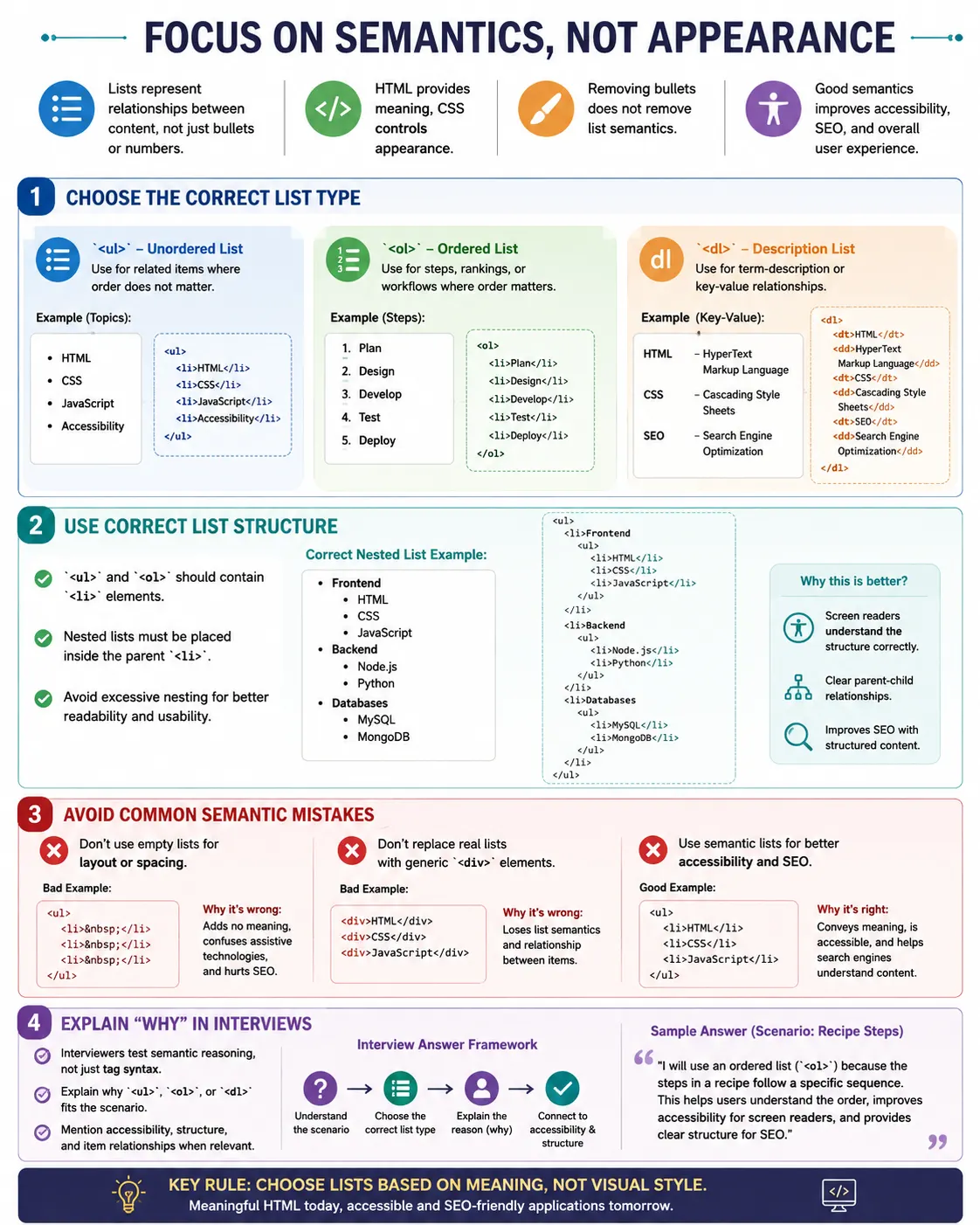
Introduction
HTML lists appear simple, but they are one of the most common areas where interviewers test a candidate's understanding of HTML semantics, accessibility, SEO, document structure, real-world usage, and best practices. Many candidates know the basic syntax of <ul>, <ol>, and <li>, but struggle when the interviewer asks why a particular list type should be used or how a list affects accessibility.
In interviews, list questions are rarely only about memorizing tags. Interviewers often want to know whether you understand meaning. They may ask when to use an ordered list instead of an unordered list, where a nested list should be placed, why menus are often built with lists, or whether removing bullets with CSS removes list semantics. These questions reveal whether you think like a professional front-end developer or only like someone copying syntax.
The biggest mistake candidates make is treating lists as visual tools. Lists are not primarily about bullets or numbers. Lists are about relationships between pieces of content. Bullets and numbers are default browser styling. The semantic meaning comes from the HTML structure.
Pitfall 1: Thinking Lists Are Only for Bullets
Many beginners believe that <ul> means bullets and <ol> means numbers. This understanding is incomplete. Bullets and numbers are visual representations. The real purpose of list elements is to represent related, grouped, ordered, or descriptive content.
The wrong understanding is: lists are for displaying bullets. The correct understanding is: lists represent related content, structured content, and grouped information.
ul {
    list-style: none;
}
Even without bullets, this HTML is still a list:
<ul>
  <li>HTML</li>
  <li>CSS</li>
</ul>
An interviewer may ask: if bullets are removed using CSS, does the list stop being a list? The answer is no. The semantics remain unchanged. CSS changes appearance; HTML provides meaning.
Pitfall 2: Confusing ul and ol
Many candidates choose lists based on appearance. They think, "I want numbers, so I use <ol>." That logic is not strong enough. The correct question is: does order matter?
If changing the item order changes the meaning, use <ol>. If changing the item order does not change the meaning, use <ul>.
Installation steps are a good use case for an ordered list because the sequence matters.
<ol>
  <li>Download File</li>
  <li>Install Software</li>
  <li>Run Program</li>
</ol>
Programming languages are usually a good use case for an unordered list because the order is not normally important.
<ul>
  <li>Java</li>
  <li>Python</li>
  <li>JavaScript</li>
</ul>
The interview question is often: when should <ol> be used instead of <ul>? The answer is: when changing item order changes meaning.
Pitfall 3: Forgetting li
Another common mistake is writing text directly inside a list container.
<ul>
  HTML
  CSS
  JavaScript
</ul>
This is incorrect because list content should be inside <li> elements.
<ul>
  <li>HTML</li>
  <li>CSS</li>
  <li>JavaScript</li>
</ul>
An interviewer may ask: can text appear directly inside <ul>? The correct answer is no. A list should contain list items. The <li> element defines each item in the list.
Pitfall 4: Incorrect Nested Lists
Nested lists are a very common interview trap. Many candidates write a child list outside the parent item.
<ul>
  <li>Frontend</li>
  <ul>
    <li>HTML</li>
  </ul>
</ul>
This is wrong because the nested list should belong to the Frontend item. The correct structure is:
<ul>
  <li>
    Frontend
    <ul>
      <li>HTML</li>
    </ul>
  </li>
</ul>
The child list belongs inside the parent <li>. If an interviewer asks where a nested list should be placed, the answer is: inside a parent list item.
Pitfall 5: Using Lists for Layout
Lists should represent meaningful content, not spacing tricks. A bad example is using empty list items only to create layout.
<ul>
  <li></li>
  <li></li>
  <li></li>
</ul>
This creates false semantics. Screen readers may think this is a real list, even though the content has no meaning. If the goal is positioning or spacing, use CSS layout tools.
display: flex;
display: grid;
An interviewer may ask whether lists should be used only for positioning elements. The answer is no. Lists should represent related content.
Pitfall 6: Using Divs Instead of Lists
The opposite mistake is using <div> elements when the content is clearly a list.
<div>HTML</div>
<div>CSS</div>
<div>JavaScript</div>
This may look similar visually, but it does not communicate a semantic relationship. A better version is:
<ul>
  <li>HTML</li>
  <li>CSS</li>
  <li>JavaScript</li>
</ul>
If an interviewer asks why <ul> should be used instead of multiple <div> elements, the answer is better semantics, accessibility, and SEO.
Pitfall 7: Thinking Lists Are Only for Navigation
Many candidates associate lists only with menus. In reality, lists are used for menus, features, requirements, FAQs, specifications, error messages, instructions, product details, search suggestions, form options, and data summaries.
An interviewer may ask you to name three real-world uses of HTML lists. Good answers include navigation menus, form requirements, product features, validation errors, dropdown menu structures, FAQ content, and product specifications.
Pitfall 8: Misusing Description Lists
Description lists are often misunderstood. This is a bad example:
<dl>
  <dt>HTML</dt>
  <dt>CSS</dt>
  <dt>JavaScript</dt>
</dl>
The problem is that descriptions are missing. A description list should contain term-description relationships.
<dl>
  <dt>HTML</dt>
  <dd>Markup Language</dd>
</dl>
If asked about the purpose of <dl>, answer that it displays term-description relationships, such as definitions, FAQs, specifications, metadata, and key-value data.
Pitfall 9: Using Tables Instead of Description Lists
Some candidates use tables for simple key-value specifications.
<table>
  <tr>
    <td>RAM</td>
    <td>16 GB</td>
  </tr>
</table>
Tables are correct for tabular data, but simple specifications can often be represented more meaningfully with a description list.
<dl>
  <dt>RAM</dt>
  <dd>16 GB</dd>
</dl>
If the question is which element is better for product specifications, a strong answer is <dl>, especially when the structure is a straightforward label-value relationship.
Pitfall 10: Ignoring Accessibility
Accessibility is one of the main reasons interviewers care about semantic lists. A group of <div> elements provides no list structure.
<div>HTML</div>
<div>CSS</div>
A real list gives assistive technologies meaningful structure.
<ul>
  <li>HTML</li>
  <li>CSS</li>
</ul>
A screen reader can announce that there is a list with two items. If an interviewer asks how lists improve accessibility, explain that screen readers can announce item counts, list structure, and nested relationships.
Pitfall 11: Thinking list-style none Removes Semantics
Another common misunderstanding is thinking that removing bullets removes accessibility or list meaning.
ul {
    list-style: none;
}
This only removes visual markers. It does not remove the semantic meaning of the <ul> element. The list remains a list in the document structure.
An interviewer may ask: does list-style: none remove list semantics? The answer is no. It only removes visual markers.
Pitfall 12: Excessive Nesting
HTML technically allows deeply nested lists, but practical readability matters.
Level 1
  Level 2
    Level 3
      Level 4
        Level 5
Deep nesting can be hard to read, hard to navigate, and difficult for screen reader users. Best practice is to keep nesting shallow when possible. If the hierarchy becomes too deep, consider headings, separate sections, accordions, or separate pages.
If asked whether unlimited nesting is allowed, answer that it is technically possible, but practically it should be limited for readability and usability.
Pitfall 13: Forgetting That Menus Use Lists
Many candidates write navigation like this:
<nav>
  <a href="#">Home</a>
  <a href="#">About</a>
</nav>
This can work, but professional websites often use list structure because menus are collections of related navigation items.
<nav>
  <ul>
    <li>
      <a href="#">Home</a>
    </li>
    <li>
      <a href="#">About</a>
    </li>
  </ul>
</nav>
If asked why professional websites build menus with lists, answer that menus are collections of related navigation items, and lists communicate that grouping semantically.
Pitfall 14: Choosing the Wrong List Type
Interviewers often give scenarios and ask which list should be used. Registration steps should use <ol> because sequence matters. Programming languages should use <ul> when the order is irrelevant. Product specifications should use <dl> because they are label-value pairs.
The safest approach is to ask what relationship exists between the items. Are they grouped items? Use <ul>. Are they ordered steps? Use <ol>. Are they terms and details? Use <dl>.
Pitfall 15: Memorizing Syntax Without Understanding Semantics
Many candidates know the tags but cannot explain why they are used. They can write <ul> and <li>, but they cannot explain accessibility, SEO, document structure, or real-world usage. Interviewers often care more about purpose than syntax.
A strong candidate explains that lists represent structured relationships. They choose list types based on meaning, not appearance. They know that CSS can change bullets and layout without changing semantics. They understand that semantic HTML improves accessibility and maintainability.
How to Answer List Questions in Interviews
The best way to answer list questions is to start with meaning before syntax. If the interviewer gives a scenario, first identify the relationship between the items. If the items are related but order does not matter, say that an unordered list is appropriate. If the items are steps, rankings, or a process, say that an ordered list is appropriate. If the content contains labels and values, terms and definitions, or questions and answers, say that a description list is appropriate.
After choosing the element, explain why. For example, do not only say, "I will use <ol>." Say, "I will use <ol> because the order of the steps matters, and changing the order would change the meaning." This shows semantic reasoning. Interviewers usually value that explanation more than a memorized tag name.
Then mention accessibility when relevant. A strong answer can say that proper list elements help screen readers announce item counts and list structure. For nested lists, mention that the child list must be placed inside the parent <li>. For menu questions, mention that navigation menus are usually built with <nav>, <ul>, <li>, and <a> because menus are grouped navigation links.
Scenario-Based Examples
If the interviewer says, "Create a list of course features," the correct answer is usually <ul> because features are related items and their order usually does not matter.
<ul>
  <li>Video Lessons</li>
  <li>Practice Exercises</li>
  <li>Interview Questions</li>
</ul>
If the interviewer says, "Create installation instructions," the correct answer is <ol> because users must follow the steps in sequence.
<ol>
  <li>Download Installer</li>
  <li>Run Setup</li>
  <li>Restart System</li>
</ol>
If the interviewer says, "Show laptop specifications," the correct answer is often <dl> because each label has a value.
<dl>
  <dt>RAM</dt>
  <dd>16 GB</dd>
</dl>
Quick Interview Cheat Sheet
| Scenario | Correct Element |
|---|---|
| Features | <ul> |
| Categories | <ul> |
| Navigation Menu | <ul> |
| Installation Steps | <ol> |
| Workflow Process | <ol> |
| Rankings | <ol> |
| Definitions | <dl> |
| FAQs | <dl> |
| Specifications | <dl> |
Most Asked Interview Questions
The difference between <ul> and <ol> is one of the most common questions. <ul> is used when order is not important. <ol> is used when order is important.
Another common question is: what is <li>? It is the list item element. Interviewers may also ask what <dl> is used for. It is used for term-description pairs.
They may ask whether lists can be nested. Yes, lists can be nested, but the nested list should be inside the parent <li>. They may ask whether removing bullets removes semantics. No, it does not. They may ask why lists are important for accessibility. Screen readers understand grouped content, item counts, and hierarchy.
Interview-Ready Answer
The biggest mistakes candidates make with HTML lists are focusing only on visual appearance rather than semantic meaning, choosing the wrong list type, incorrect nesting, using lists for layout, and ignoring accessibility. Interviewers typically evaluate whether you understand when and why each list type should be used, not just how to write the syntax.
Key Takeaway
In interviews, lists are less about bullets and numbers and more about semantics, accessibility, and choosing the correct structure for the content. A professional answer explains why the element is used, not only how it is written.
Use <ul> for related items where order does not matter. Use <ol> for ordered steps, rankings, and workflows. Use <dl> for term-description and key-value relationships. Place nested lists inside parent <li> elements, and remember that CSS styling does not remove HTML semantics.
One-Line Insight
In interviews, lists are less about bullets and numbers and more about semantics, accessibility, and choosing the correct structure for the content.