Internal Linking Strategy
Introduction
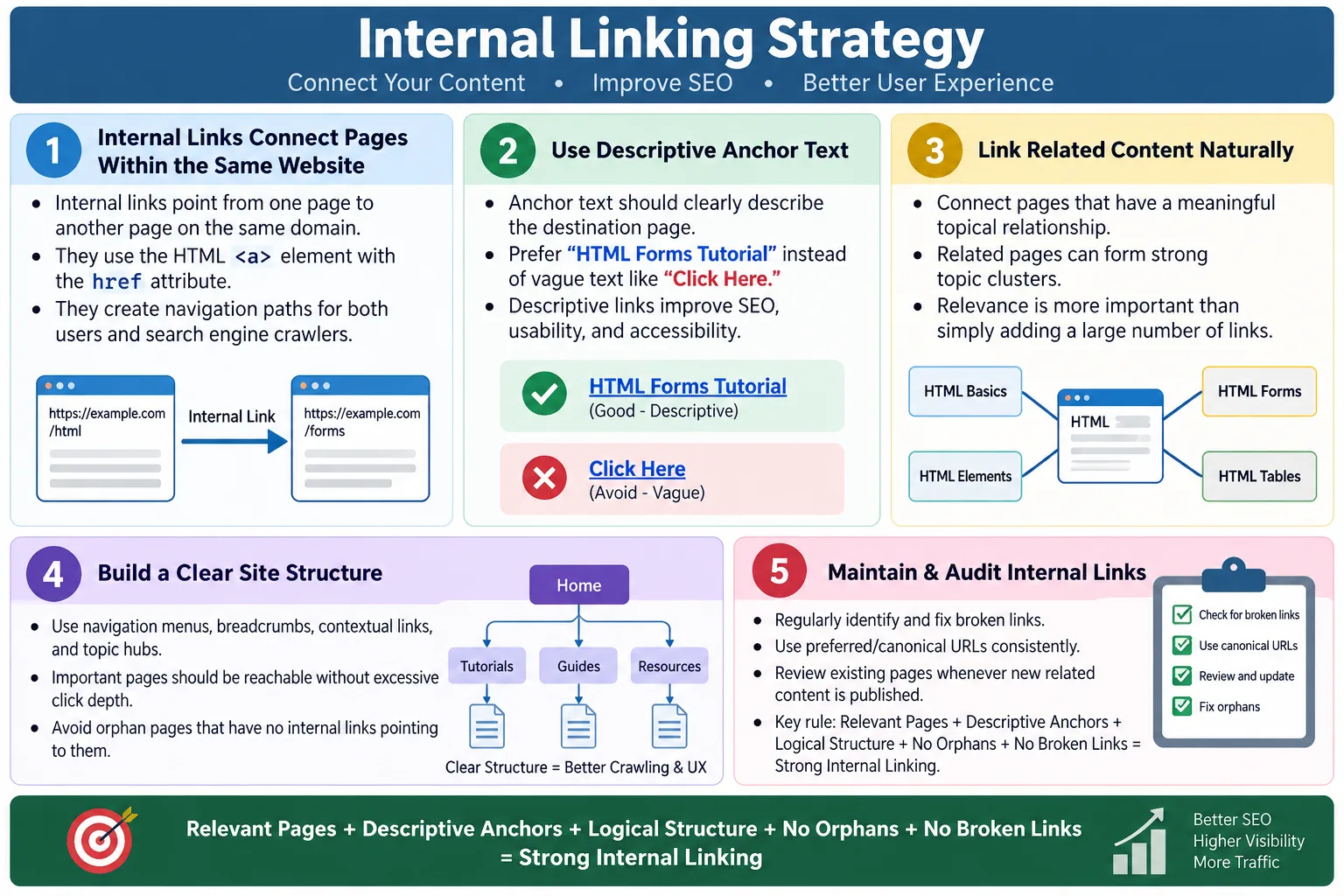
Internal Linking is the practice of linking one page of a website to another page within the same domain. It is one of the most practical ways to connect content, guide users, and help search engines discover and understand pages. A website is not only a collection of individual documents. It is a connected structure. Internal links are the paths that make that structure usable.
An effective internal linking strategy helps users navigate the website, enables search engines to discover content, and establishes relationships between related pages. A tutorial about HTML forms can link to input types, labels, validation, accessibility, and form submission. A page about SEO can link to title tags, meta descriptions, canonical links, robots tags, structured data, and image SEO. These links help users continue learning naturally instead of reaching a dead end.
A well-planned internal linking structure improves website navigation, user experience, SEO, crawlability, and content discovery. Unlike external links, which point to other websites, internal links connect pages that belong to the same website. This makes them fully within the site's control. Good internal linking is not about adding random links everywhere. It is about connecting related content in a way that makes the website easier to explore and understand.
What Is an Internal Link?
An internal link points to another page on the same website. It is created using the standard HTML anchor element, <a>, with the href attribute pointing to a page within the same domain. The clickable text inside the anchor is called anchor text.
<a href="/html/forms">
    HTML Forms Tutorial
</a>
This link connects one page to another within the same domain. If a user is reading about HTML basics and sees a link to HTML Forms Tutorial, they can move to the related page easily. A search engine crawler can also follow that link and discover the forms page. The link creates both a user path and a crawl path.
Internal links can appear in navigation menus, breadcrumbs, body content, sidebars, cards, related article sections, footers, tables of contents, and pagination. Each placement has a purpose. Navigation links create core site structure. Contextual links connect related ideas inside content. Breadcrumbs show hierarchy. Footer links provide access to common site pages. A strong strategy uses these link types thoughtfully.
Internal vs External Links
Internal links and external links both use the <a> element, but they point to different destinations. An internal link points to another page on the same website. An external link points to a different website. Both can be useful, but they serve different roles.
| Internal Link | External Link |
|---|---|
| Points to another page on the same website | Points to a different website |
| Improves site navigation | References outside resources |
| Helps search engines discover pages | Connects to external information |
Internal:

<a href="/css">
    Learn CSS
</a>

External:

<a href="https://developer.mozilla.org/">
    MDN Web Docs
</a>
External links can support credibility by pointing to useful references, documentation, or sources. Internal links support the structure of your own site. They keep users moving through your content and help search engines understand which pages are related. A healthy website usually uses both, but internal linking is especially important for building a coherent content network.
Why Internal Linking Is Important
Internal links help users find related information, search engines discover pages, organize website content, connect related topics, and improve navigation. A page with no internal links leading to it is hard to find. A page that does not link to related pages may leave users without a next step. Internal linking solves both problems by creating meaningful paths.
- Users find related information.
- Search engines discover pages.
- Website content becomes organized.
- Related topics become connected.
- Navigation becomes easier.
Page A
  ↓
Internal Link
  ↓
Page B
  ↓
Page C
For users, internal links reduce effort. They do not need to search manually for the next lesson. For search engines, internal links create crawl paths. Crawlers discover pages by following links. If a page is important but not linked from anywhere, it may be discovered late or not understood as important. Internal links also provide context through anchor text and surrounding content.
Internal linking is also a content planning tool. If two pages naturally link to each other, they likely belong to the same topic cluster. If a page has no related pages, it may be isolated or need better content strategy. A strong internal linking plan reflects the knowledge structure of the website.
HTML Structure
Internal links use the standard anchor element. The href attribute stores the destination URL, and the anchor text tells users what the link points to. The anchor text should be descriptive. A link should make sense even when read outside the surrounding paragraph.
<a href="/html/tables">
    HTML Tables
</a>
The link above is simple and meaningful. It tells the user that the destination is about HTML tables. It also gives search engines context about the linked page. A vague link such as Read more or Click here is weaker because it does not describe the destination clearly.
Internal links should point to stable, preferred URLs. If a page has a canonical URL, internal links should generally use that canonical version. Avoid linking to tracking URLs, duplicate paths, or temporary URLs when a clean page URL exists. Consistent linking supports canonical signals and reduces crawl confusion.
Website Structure
Internal linking should reflect website structure. A learning website may start with a home page, then course categories, then individual lessons. A clean structure helps both users and search engines understand how pages relate to one another.
Home
├── HTML
│   ├── Forms
│   ├── Tables
│   └── Lists
├── CSS
└── Java
In this example, HTML is a major category, and Forms, Tables, and Lists are pages within that category. The HTML hub page should link to those lessons. Each lesson can link back to the HTML hub and to related lessons. This creates a predictable structure. Users can move from broad topics to detailed topics and back again.
A disorganized website may mix unrelated pages without clear grouping. Users may not know where they are. Search engines may have difficulty understanding topic clusters. Logical structure, supported by internal links, makes a website easier to crawl, navigate, and maintain.
Use Descriptive Anchor Text
Anchor text is the clickable text inside a hyperlink. Descriptive anchor text helps users understand the destination before clicking. It also helps search engines understand what the linked page is about. A link labeled Learn HTML Forms is more useful than a link labeled Click Here.
<a href="/html/forms">
    Learn HTML Forms
</a>
<a href="/html/forms">
Click Here
</a>Descriptive anchor text improves accessibility as well. Screen reader users can list links on a page. If many links say Click Here, the link list becomes useless. If links say HTML Forms Tutorial, HTML Input Types, and Form Validation Guide, the user can understand each destination quickly.
Anchor text should be natural. Avoid stuffing keywords into every link. A sentence should read well. The link should describe the destination accurately. If the link text feels forced, rewrite the sentence. Good internal linking supports the content rather than interrupting it.
Link Related Content
Internal links are most useful when they connect related content. Suppose an article explains HTML Forms. Related links may include HTML Input Types, Validation, Labels, Accessibility, Fieldset and Legend, Form Submission, and GET vs POST. These topics naturally support the learner's next step.
HTML Forms
  ↓
Input Types
  ↓
Validation
  ↓
Labels
  ↓
Accessibility
Related links help users continue learning without leaving the site. They also help search engines understand topical relationships. If several pages about forms link to each other, search engines can see that they form a content cluster. This can strengthen the site's topical organization.
Do not link unrelated pages just to increase the number of links. A page about HTML forms should not randomly link to a page about Java exceptions unless there is a meaningful reason. Relevance matters more than link count. Useful links are better than many links.
Breadcrumb Navigation
Breadcrumbs are a common internal linking strategy. They show the page's location within the website hierarchy. A breadcrumb trail might show Home, HTML, Forms, and Input Types. Each item except the current page is usually a link. Breadcrumbs help users move upward in the site structure.
Home
  >
HTML
  >
Forms
  >
Input Types
<nav>
<a href="/">Home</a>
>
<a href="/html">HTML</a>
>
<a href="/html/forms">
Forms
</a>
</nav>Breadcrumbs help both users and search engines understand page hierarchy. Users can quickly move to a parent section. Search engines can interpret the page's position in the site. Breadcrumb structured data can further support this understanding when implemented correctly.
Breadcrumbs are especially useful on large websites with deep content. Tutorial sites, documentation sites, e-commerce sites, and knowledge bases all benefit from breadcrumb navigation. It reduces the feeling of being lost inside a large site.
Navigation Menu
Navigation menus are one of the most important sources of internal links. A navigation menu usually links to major sections, course categories, product categories, documentation areas, or important pages. It appears consistently across many pages, helping users move around the site predictably.
<nav>
  <ul>
    <li>
      <a href="/html">
        HTML
      </a>
    </li>
    <li>
      <a href="/css">
        CSS
      </a>
    </li>
    <li>
      <a href="/java">
        Java
      </a>
    </li>
  </ul>
</nav>
A good navigation menu should be clear, consistent, and not overloaded. If the menu contains too many links, users may struggle to find the right section. If it contains too few links, important areas may be hidden. The best menu reflects the main structure of the website.
From an SEO perspective, navigation links help search engines discover important pages and understand which sections are central. Since navigation appears across many pages, the links in it send strong structural signals. Use navigation carefully and keep it relevant.
Contextual Links
Contextual links appear inside page content. They are often more specific than navigation links because they connect ideas at the point where the user needs them. For example, a paragraph about forms can link to input types when that topic is mentioned naturally.
<p>
Before learning forms,
read our
<a href="/html/input-types">
HTML Input Types
</a>
tutorial.
</p>
Contextual links are valuable because they appear inside meaningful text. The surrounding sentence explains why the link is relevant. Users can decide whether to follow the link based on the context. Search engines also see the relationship between the linked page and the current topic.
Use contextual links where they genuinely help. Do not interrupt every sentence with links. A page overloaded with links becomes hard to read. Link when a related page provides deeper explanation, prerequisite knowledge, examples, or the next logical topic.
Footer Links
Many websites include important internal links in the footer. Footer links often point to pages such as About, Privacy Policy, Terms, Contact, Sitemap, and sometimes major categories. They provide a consistent fallback navigation area at the bottom of the page.
<footer>
  <a href="/about">
    About
  </a>

  <a href="/privacy">
    Privacy Policy
  </a>

  <a href="/contact">
    Contact
  </a>
</footer>
Footer links are useful, but they should not become a dumping ground for every page on the website. A massive footer with hundreds of links can overwhelm users and dilute clarity. Keep footer links focused on important site-wide pages and essential sections.
For SEO, footer links can help crawlers discover common pages, but contextual and navigation links often provide stronger relevance signals. Use footer links as support, not as the main internal linking strategy.
Hub-and-Spoke Strategy
A hub-and-spoke strategy uses a central topic page as the hub and detailed subtopic pages as spokes. The hub page introduces the broad topic and links to detailed pages. Each spoke page covers a specific subtopic and can link back to the hub and to related spokes.
HTML Course
├── HTML Basics
├── HTML Forms
├── HTML Tables
├── HTML Lists
└── Semantic HTML
This structure works well for educational websites. An HTML course hub can link to all major HTML lessons. Each lesson can link back to the course hub and to related lessons. Users can follow a learning path. Search engines can understand that the site has deep coverage of the HTML topic.
Hub pages should be useful by themselves. They should not be only link lists. A good hub explains the topic, organizes the learning path, and links to detailed pages with descriptive anchor text. Spoke pages should provide depth and link to related supporting content.
Silo Structure
A silo structure groups related content together. HTML pages link mainly to other HTML pages. CSS pages link mainly to CSS pages. Java pages link mainly to Java pages. This does not mean topics can never cross-link, but related content should be organized logically.
HTML
├── Forms
├── Tables
├── Images

CSS
├── Flexbox
├── Grid
├── Animation
Silo structure helps users understand where they are. It also helps search engines identify topic clusters. A strong HTML section with many internally linked lessons communicates topical depth. A random structure where every page links to unrelated content is harder to interpret.
Cross-links are still useful when topics genuinely relate. A page about HTML forms may link to CSS form styling or JavaScript validation if the relationship is clear. The goal is logical organization, not artificial isolation.
Deep Pages
Important pages should be reachable through internal links without requiring too many clicks. If a valuable course page is buried several levels deep with no clear path, users and search engines may treat it as less important. A deep page is not automatically bad, but important content should not be hidden unnecessarily.
Bad:

Home
  ↓
  ↓
  ↓
  ↓
  ↓
Course

Good:

Home
  ↓
HTML
  ↓
Forms
Good internal linking reduces click depth for important pages. A course page can be linked from the homepage, category page, navigation, related pages, or hub page. The more naturally connected a page is, the easier it is to discover.
Orphan pages are an extreme version of this problem. An orphan page has no internal links pointing to it. It may exist on the server, but users and crawlers have no normal path to reach it. Important pages should never be orphaned.
Browser Workflow
When the browser loads an HTML page, anchor elements become clickable links. Users can click those links to navigate. Search engine crawlers can also extract and follow links from the HTML. This is one of the basic ways the web is connected.
HTML
  ↓
Anchor Links
  ↓
Browser
  ↓
User Navigation
  ↓
Search Engine Crawling
This workflow shows why real HTML links matter. If navigation is built in a way that does not expose real anchor elements, crawlers and assistive technologies may have more difficulty. JavaScript-enhanced navigation can still work, but important links should be accessible as links. The anchor element is the foundation of internal linking.
Best Practices
Use descriptive anchor text. Link related content naturally. Keep navigation consistent. Use breadcrumb navigation where appropriate. Organize content into logical categories. Avoid orphan pages. Regularly check for broken internal links. These practices create a stronger website structure.
- Use descriptive anchor text.
- Link related content naturally.
- Keep navigation consistent.
- Use breadcrumb navigation where appropriate.
- Organize content into logical categories.
- Avoid orphan pages.
- Regularly check for broken internal links.
Internal linking should be reviewed whenever new pages are added. A new article should link to relevant existing pages, and existing pages should link to the new article where appropriate. This two-way update keeps the site connected. Publishing a page without linking it from anywhere weakens discovery.
Common Mistakes
Using Click Here is one of the most common internal linking mistakes. It hides the destination topic. A better link uses descriptive anchor text such as HTML Forms Tutorial. This helps users, screen readers, and search engines.
<a href="/forms">
Click Here
</a>

<a href="/forms">
HTML Forms Tutorial
</a>
Linking unrelated pages is another mistake. Links should serve users. Do not link pages that have no meaningful relationship just to increase the number of links. Too many links can also be harmful to usability. A page overloaded with hundreds of links becomes difficult to scan and navigate.
Broken internal links create a poor experience. A user clicks a link and reaches a 404 error. Crawlers also waste time following broken links. Regular link checks should be part of site maintenance. Orphan pages are another issue. Pages that no other page links to are difficult for users and search engines to discover.
SEO Benefits
A strong internal linking strategy helps improve crawlability, helps search engines discover new pages, clarifies relationships between topics, distributes attention to important content, and improves user navigation and engagement. Internal links help search engines understand site structure, but they do not guarantee higher rankings on their own.
- Improve crawlability.
- Help search engines discover new pages.
- Clarify relationships between topics.
- Distribute attention to important content.
- Improve user navigation and engagement.
Internal linking supports SEO by making a website easier to crawl and understand. It also supports users by offering relevant next steps. Better engagement can result when users find more useful content. However, internal links are not a replacement for high-quality content, good page structure, performance, accessibility, and technical SEO.
Selenium Perspective
Automation testers commonly verify that navigation links work, breadcrumb links function correctly, footer links are valid, no broken internal links exist, and correct destination pages open. Selenium can click links by text and then verify the current URL or page heading.
WebElement link =
driver.findElement(
By.linkText("HTML Forms Tutorial"));

link.click();

System.out.println(
driver.getCurrentUrl());
Testing internal links is useful because broken navigation can affect both user experience and SEO. A site may have correct content but fail because users cannot reach it. Automated tests can cover critical navigation paths, while crawlers or scripts can check all links at scale.
Testers should also verify that links use meaningful text where possible. This may require manual review or accessibility checks. A link can technically work but still be poor if the text is vague. Functional correctness and content quality both matter.
Internal Linking in Tutorial Websites
Tutorial websites benefit greatly from internal linking because learning is sequential and connected. A learner reading about HTML basics may need headings, paragraphs, links, images, forms, tables, semantic HTML, accessibility, and SEO. Internal links can guide learners from beginner topics to advanced topics without making them search manually.
A good tutorial site uses course navigation, previous and next links, related article links, and contextual links. Course navigation shows the full learning path. Previous and next links support linear progress. Related links support exploration. Contextual links explain prerequisites or deeper topics at the moment they are mentioned.
Internal links also help maintain content authority. If many HTML pages link to a central HTML course page and to related lessons, the site communicates that it has a strong HTML section. This helps users trust the site and helps search engines understand topical depth.
Internal Linking Audit Workflow
An internal linking audit starts by crawling the site or listing all pages. Identify important pages, orphan pages, broken links, pages with too many links, and pages with weak anchor text. Then review whether important content is reachable from navigation, category pages, hub pages, and related articles.
Next, examine topic clusters. Do HTML pages link to related HTML pages? Do SEO pages link to other SEO pages? Are there hub pages that organize major topics? Are there isolated articles that should be connected to a broader section? This review helps improve both user journeys and search engine understanding.
Finally, fix issues in priority order. Broken links should be fixed quickly. Orphan pages should be linked from relevant pages. Important pages with weak internal links should be added to hubs or navigation where appropriate. Vague anchor text should be improved. Internal linking is not a one-time task. It should evolve as the site grows.
Internal Linking Checklist
A practical checklist helps keep internal linking consistent. Every new page should answer a few questions. Where does this page belong? Which existing pages should link to it? Which related pages should it link to? Is the anchor text descriptive? Is the link destination correct? Is the page reachable from the course or category structure?
- Use real HTML anchor elements for important links.
- Use descriptive anchor text.
- Link to related content naturally.
- Keep navigation and breadcrumbs consistent.
- Connect hub pages with detailed subtopic pages.
- Avoid orphan pages.
- Fix broken internal links.
- Avoid excessive unrelated links.
- Use canonical URLs for internal links.
- Review links when adding or removing pages.
Choosing Where to Place Internal Links
Internal link placement affects how useful the link feels. A navigation menu link is useful when the destination is a major section. A breadcrumb link is useful when the destination is a parent category. A contextual link is useful when the destination explains a concept mentioned in the paragraph. A footer link is useful for site-wide utility pages. Choosing the right placement makes the link feel natural rather than forced.
For example, a page about internal linking can naturally mention anchor text, breadcrumbs, canonical URLs, robots tags, and sitemaps. Those topics can become contextual links if related pages exist. A link to the privacy policy, however, does not belong in the middle of a paragraph about anchor text. It belongs in the footer. The best placement depends on user intent at that moment.
Important learning paths may need multiple link types. A course page may appear in the main navigation, in breadcrumbs, in related article sections, and in contextual links. This is acceptable when each placement serves a real purpose. The goal is not to hide important content behind a single link. The goal is to make important content reachable from natural paths.
Internal Linking and Topic Clusters
Topic clusters are groups of pages that cover related subjects. A central hub page introduces the broad topic, and supporting pages explain specific subtopics. Internal links connect the cluster. For an HTML SEO cluster, the hub may link to pages about titles, meta descriptions, canonical links, robots tags, structured data, image SEO, heading hierarchy, and internal linking. Each supporting page can link back to the hub and to closely related subtopics.
This structure helps users because they can move through related lessons in a logical way. It helps search engines because it shows topical depth. A website with one isolated page about HTML SEO may look thin. A website with many well-connected pages about HTML SEO signals deeper coverage. The links reveal that relationship.
Topic clusters should be built around real user needs. Do not create clusters only for search engines. If learners naturally need title tags before meta descriptions, or canonical links before robots directives, the link structure should reflect that path. Good topic clusters feel like a curriculum, not a link manipulation tactic.
Internal Linking and Page Priority
Internal links also communicate priority. Pages linked from the homepage, main navigation, hub pages, and many related articles are easier to discover and may be understood as more central. Pages with few internal links may appear less important. This does not mean every page should link to every important page. It means important pages should be connected through logical paths.
For a learning site, high-priority pages may include course home pages, major topic hubs, popular tutorials, and interview preparation guides. These pages should be easy to reach. Lower-priority utility pages may live in the footer or be linked only where needed. Link structure should match content importance and user need.
When adding a new important page, do not only add it to the nav file. Also review older related pages. If the new page expands a topic mentioned in existing articles, add contextual links from those articles. This gives users more ways to find the new content and helps search engines understand its relationship to the existing cluster.
Maintaining Internal Links Over Time
Internal linking requires maintenance because websites change. Pages are renamed, removed, merged, split, or moved. New pages are added. Old content becomes outdated. If links are not maintained, broken links and orphan pages accumulate. A site that was once well connected can become messy over time.
A practical maintenance process includes periodic link audits. Check for 404 links, redirected links, links to outdated pages, duplicate links, and pages with no inbound internal links. Review high-traffic pages first because broken links there affect more users. Review navigation and footer links because they appear across many pages. Review course sequences because learners depend on them.
When removing a page, update links that pointed to it. If the content moved, redirect the old URL and update internal links to the new URL. If the content was merged into another page, link to the new consolidated page. Internal links should not rely on redirects forever when the source can be updated. Clean links are easier to maintain and crawl.
Internal Linking and Accessibility
Internal links are also an accessibility concern. Descriptive anchor text helps screen reader users understand links. Keyboard users should be able to focus and activate links. Link text should be visually identifiable. Links should not rely only on color if the distinction is unclear. A link that is hidden, tiny, or difficult to focus creates a poor experience.
Screen reader users may navigate by listing all links on a page. In that list, anchor text such as Click Here, Read More, or More is not helpful. Descriptive text such as HTML Forms Tutorial or Canonical Links Guide works much better. This is why accessibility and SEO both prefer descriptive anchor text.
Internal links should also make sense in context. If a sentence says Learn more about this, the link text may be vague. Rewriting the sentence to say Learn more in the HTML Forms Tutorial makes the destination clearer. Small writing choices improve both usability and search understanding.
Internal Linking and URL Consistency
URL consistency matters in internal linking. If the preferred URL is /html/forms, internal links should consistently use that URL rather than mixing /html/forms, /html/forms/, /html/forms.html, and tracking-parameter versions. Inconsistent links can create duplicate URL signals and make audits harder.
Canonical links can help search engines understand the preferred URL, but internal links should support the canonical choice. A clean site does not force canonical tags to fix messy internal linking everywhere. It links directly to preferred URLs. This is especially important for large sites, static sites, and sites with generated navigation.
When building or updating navigation files, use the same URL style across the section. If pages are published as HTML files, link consistently to those files. If the production server supports clean extensionless URLs, use those consistently. Consistency makes the site easier for users, developers, testers, and crawlers.
Common Interview Questions
What is an internal link? An internal link connects one page to another page within the same website. It uses the HTML anchor element and points to a URL on the same domain.
Why are internal links important? They improve navigation, help search engines discover pages, and organize website content. They also connect related topics and help users continue learning.
What is anchor text? Anchor text is the clickable text inside a hyperlink. It should describe the destination page clearly.
Why should anchor text be descriptive? Descriptive anchor text tells users and search engines what the destination page is about. It is also better for accessibility because screen reader users can understand links out of context.
What is an orphan page? An orphan page is a page that has no internal links pointing to it, making it difficult for users and search engines to discover.
What are breadcrumbs? Breadcrumbs are navigation links that show a page's location within the website hierarchy. They help users move upward through the site structure and help search engines understand hierarchy.
Comparison Table
| Good Internal Linking | Poor Internal Linking |
|---|---|
| Descriptive anchor text | Click Here links |
| Related content linked | Random links |
| Breadcrumb navigation | No hierarchy |
| Logical site structure | Disorganized pages |
| No broken links | Broken links |
| No orphan pages | Hidden pages |
Interview-Ready Answer
An Internal Linking Strategy is the practice of connecting related pages within the same website using HTML anchor elements. It improves navigation, helps search engines discover and understand content relationships, and makes it easier for users to explore related topics. Effective internal linking includes descriptive anchor text, logical navigation menus, breadcrumb navigation, contextual links within content, and avoiding broken or orphaned pages.
A strong answer should also mention that internal links should be relevant and useful, not random. They should support the user's journey and the site's topic structure. Good internal linking enhances both user experience and search engine crawlability, but it works best when combined with high-quality content and clear site organization.
One-Line Insight
Internal links act as the roads that connect your website, helping both users and search engines reach the right destination.