Image SEO with HTML
Introduction
Image SEO means optimizing images so search engines and users can understand them clearly. Images are not just visual decoration. They can explain concepts, show products, support tutorials, improve engagement, and make a page easier to understand. At the same time, images can slow a page down, create accessibility problems, and become invisible to search engines if they are not implemented properly. HTML plays an important role because image-related attributes help browsers load images, assistive technologies describe images, and search engines interpret image meaning.
Search engines cannot understand images exactly like humans. A person may look at a diagram and immediately recognize that it shows an HTML course structure or Selenium WebDriver communication flow. A search engine needs more context. It can analyze the file name, surrounding text, image alt text, captions, page topic, structured data, and links. HTML gives search engines and assistive technologies several of these signals directly. This is why good image SEO starts with correct HTML.
Image SEO with HTML is also closely connected to accessibility and performance. Meaningful alt text helps users who cannot see the image. Responsive image attributes help browsers choose the right image size for the device. Lazy loading can improve initial page speed. Width and height attributes reduce layout shift. Proper formats reduce file size. Captions provide visible context. When these practices are combined, images become more useful for users and easier for search engines to understand.
Why Image SEO Matters
Images can help with Google Image Search visibility, better page engagement, improved accessibility, faster page loading, and better user experience. Many users search visually. They may look for diagrams, screenshots, product photos, charts, icons, infographics, and examples. A well-optimized image has a better chance of being understood and discovered. A poorly named, missing-alt, oversized image may still appear visually on the page, but it provides weak signals to search engines and poor support for assistive technology users.
- Google Image Search visibility
- Better page engagement
- Improved accessibility
- Faster page loading
- Better user experience
Images also affect page performance. Large uncompressed images are one of the most common causes of slow pages. A slow page can frustrate users, increase bounce rates, and reduce overall page quality. HTML attributes such as srcset, sizes, loading, width, and height help the browser make better loading decisions. Good image SEO is not only about search visibility. It is also about making images efficient and usable.
Accessibility is another major reason image SEO matters. Users who rely on screen readers cannot visually inspect an image. The alt attribute gives them a text alternative. If the image is meaningful and the alt text is missing, the user loses information. If the image is decorative and the alt text is noisy, the user hears unnecessary content. Good alt text improves both accessibility and search interpretation.
Basic Image SEO Example
A basic image SEO example uses a descriptive file name and meaningful alt text. The src attribute tells the browser where the image file is located. The alt attribute describes the image. The file name itself also gives search engines additional context. These simple details are easy to overlook, but they matter.
<img
  src="html-course-diagram.png"
  alt="HTML course structure diagram">
In this example, the image file name is html-course-diagram.png, which is more useful than IMG_1234.png. The alt text says HTML course structure diagram, which clearly describes the image. A screen reader user can understand the purpose of the image, and a search engine receives a strong textual clue about the image topic.
The surrounding content also matters. If this image appears inside a page about HTML course structure, with headings and paragraphs discussing HTML lessons, the image context becomes even clearer. Image SEO is strongest when file name, alt text, caption, surrounding text, and page topic all support the same meaning.
Use Descriptive File Names
Descriptive file names help search engines understand the image topic. A camera-generated file name such as IMG_1234.png provides almost no useful meaning. It tells the browser where the file is, but it does not describe the image. A descriptive file name such as html-course-structure-diagram.png gives search engines and developers immediate context.
<img src="IMG_1234.png" alt="HTML diagram"><img src="html-course-structure-diagram.png" alt="HTML course structure diagram">File names should be short, readable, and relevant. Use words that describe the image naturally. Separate words with hyphens rather than spaces. Avoid stuffing keywords into file names. A good file name helps humans too. Developers, content writers, and SEO reviewers can understand what an asset is without opening it.
For tutorial websites, descriptive file names are especially useful. Screenshots, diagrams, flowcharts, and examples may be reused across lessons. A file named selenium-webdriver-architecture.png is easier to manage than image7.png. Good naming reduces confusion in the project and improves image context for search engines.
Use Meaningful Alt Text
The alt attribute provides a text alternative for the image. It should describe the image clearly and naturally. The best alt text depends on the image purpose. If the image explains a concept, the alt text should summarize that concept. If the image shows a product, the alt text should identify the product. If the image is a chart, the alt text may need to summarize the important information.
<img
  src="selenium-webdriver-flow.png"
  alt="Selenium WebDriver communication flow">
<img
src="selenium-webdriver-flow.png"
alt="image">The first example is useful because it describes what the image represents. The second example is weak because image does not tell the user anything meaningful. A screen reader already knows it is an image, so saying image is usually redundant and unhelpful. Alt text should communicate the content or purpose of the image.
Good alt text should be concise, but not empty when the image is meaningful. It should not begin with phrases like image of or picture of unless that wording is genuinely needed. It should avoid keyword stuffing. The goal is to provide an equivalent or useful text alternative for people and machines.
Decorative Images
Not every image needs descriptive alt text. If an image is only decorative and does not communicate meaningful information, use an empty alt attribute. This tells screen readers to ignore the image. Decorative borders, background flourishes, separators, and purely visual patterns usually fall into this category.
<img
  src="border-design.png"
  alt="">
An empty alt attribute is different from a missing alt attribute. Missing alt text can cause assistive technologies to announce the file name or treat the image unpredictably. An empty alt attribute intentionally says that the image does not need to be announced. This is the correct choice for decorative images that add no informational value.
Choosing between meaningful alt text and empty alt text requires judgment. Ask whether the user would lose important information if the image were removed. If yes, provide alt text. If no, and the image is purely decorative, use alt="". This keeps the page cleaner for screen reader users.
Avoid Keyword Stuffing
Alt text should help users, not just search engines. Keyword stuffing happens when the alt attribute repeats keywords unnaturally. This creates poor accessibility and can look spammy. Search engines are designed to understand natural language and page context. Repeating the same phrase many times does not make an image more useful.
<img
  src="html.png"
  alt="HTML HTML tutorial HTML course HTML training">
<img
src="html.png"
alt="HTML tutorial overview">The better example uses a short, natural description. It includes the topic without repeating it excessively. A screen reader user can understand the image quickly. A search engine can also interpret the context. This is the ideal balance.
A useful test is to read the alt text aloud. If it sounds awkward, robotic, or repetitive, rewrite it. Alt text is content. It should follow the same quality expectations as headings, captions, and paragraphs.
Use Responsive Images
Responsive images improve performance on different devices. A desktop user with a large display may need a larger image. A mobile user may only need a smaller version. Without responsive image attributes, the browser may download an unnecessarily large image on a small screen. This wastes bandwidth and slows the page.
<img
  src="html-course-800.png"
  srcset="html-course-400.png 400w,
          html-course-800.png 800w,
          html-course-1200.png 1200w"
  sizes="(max-width: 600px) 400px,
         (max-width: 1000px) 800px,
         1200px"
  alt="HTML course overview diagram">
The srcset attribute gives the browser multiple image candidates. The sizes attribute tells the browser how much space the image is expected to occupy under different viewport conditions. The browser can then choose the most suitable image size. This helps reduce unnecessary downloads and improves user experience.
Responsive images are especially important for tutorial pages that use screenshots and diagrams. A screenshot that looks sharp on desktop may be too large for mobile. Providing multiple sizes lets the browser choose efficiently. This is good for users, performance, and SEO.
Use Lazy Loading
Lazy loading delays off-screen image loading. Images below the fold do not need to load immediately when the page opens. The loading="lazy" attribute tells the browser that the image can be loaded later, closer to when the user scrolls near it. This can improve initial page load speed.
<img
  src="html-example.png"
  alt="HTML code example"
  loading="lazy">
Lazy loading is useful for long articles with many images. A page may contain diagrams, screenshots, examples, and illustrations throughout the content. Loading all of them immediately can slow down the initial experience. Lazy loading lets the browser prioritize content that the user sees first.
Use lazy loading thoughtfully. Important above-the-fold images, especially the main hero image or content needed immediately, may not always be good candidates for lazy loading. Images that appear later in the page are usually better candidates. Performance optimization should support user experience, not delay important content unnecessarily.
Specify Width and Height
Adding width and height attributes helps prevent layout shift. Layout shift happens when the browser initially does not know how much space an image will occupy. The page content may load first, then jump when the image appears. This creates a poor user experience. By specifying dimensions, the browser can reserve space before the image loads.
<img
  src="html-form-example.png"
  alt="HTML form example"
  width="800"
  height="450">
Width and height attributes do not prevent responsive design. CSS can still make images scale within their containers. The attributes give the browser the intrinsic aspect ratio. This helps the browser allocate layout space correctly. It is a simple habit with meaningful performance benefits.
For SEO, user experience matters. A page that jumps while loading feels unstable. Users may accidentally click the wrong item or lose their reading position. Reducing layout shift improves perceived quality and supports better page performance metrics.
Use Proper Image Formats
Different image formats are suited to different kinds of content. JPEG is good for photos. PNG is useful for transparent images and screenshots, although it can be larger. SVG is excellent for icons, logos, and diagrams because it is vector-based. WebP offers compressed web images with good quality. AVIF provides high compression for modern browsers, though support and workflow should be considered.
| Format | Best For |
|---|---|
| JPEG | Photos |
| PNG | Transparent images and screenshots |
| SVG | Icons, logos, diagrams |
| WebP | Compressed web images |
| AVIF | High compression modern images |
Choosing the right format can greatly reduce file size while preserving quality. A photographic banner may be better as JPEG or WebP. A logo may be better as SVG. A screenshot may be PNG or WebP depending on quality needs. The right format depends on image content, transparency, browser support, and compression goals.
Image format decisions should be part of content publishing. Uploading huge PNG files for every image can slow down a site. Converting everything blindly to one modern format can create compatibility or quality issues. The best approach is practical: choose the format that gives good quality at a reasonable size for the use case.
Use Captions When Helpful
Captions provide visible context for users and search engines. The <figure> element groups an image with its caption, and <figcaption> provides the caption text. Captions are useful when an image needs explanation or when the surrounding text does not fully describe it.
<figure>
  <img
    src="html-document-structure.png"
    alt="HTML document structure with head and body sections">

  <figcaption>
    Basic structure of an HTML document
  </figcaption>
</figure>
Alt text and captions are not the same. Alt text is a text alternative for the image, especially important for users who cannot see it. A caption is visible supporting text that gives context to all users. Sometimes both are useful. The alt text describes the image, while the caption explains why it matters in the page.
For tutorial websites, captions are useful for diagrams, screenshots, charts, and examples. A caption can tell the learner what they are looking at and how it connects to the topic. This improves comprehension and gives search engines more surrounding context.
Image Sitemap
For large websites, an image sitemap can help search engines discover important images. This is especially useful when images are loaded dynamically, used in galleries, or not easily discovered through normal crawling. Image sitemaps can point search engines to important visual assets that support the content.
- Course diagrams
- Product images
- Infographics
- Tutorial screenshots
A small website may not need a separate image sitemap immediately, but larger content sites, e-commerce sites, and image-heavy tutorial platforms can benefit from one. The sitemap should focus on important images rather than every decorative asset. Decorative backgrounds and layout graphics are usually not the priority.
An image sitemap does not replace good HTML. File names, alt text, responsive images, captions, and performance optimization still matter. The sitemap is an additional discovery tool, not a substitute for meaningful image markup.
Common Mistakes
Common mistakes include missing alt text, generic file names, huge uncompressed images, not using responsive images, missing width and height, keyword stuffing in alt text, putting important text only inside images, and using images where real HTML text is better. These mistakes affect accessibility, SEO, performance, and maintainability.
- Missing alt text
- Using generic file names
- Using huge uncompressed images
- Not using responsive images
- Missing width and height
- Keyword stuffing in alt text
- Putting important text only inside images
- Using images where real HTML text is better
Putting important text only inside images is especially problematic. Search engines and assistive technologies may not interpret the text reliably. If the text is important, it should be real HTML text. An image can support the text, but it should not be the only place where essential information appears. This is important for accessibility, translation, copying, responsiveness, and SEO.
Another common issue is overusing screenshots. Screenshots are useful for tutorials, but if a screenshot contains a large amount of code or text, consider including the code as real HTML text in a <pre> and <code> block. This is better for accessibility, search, and learner usability.
Selenium Perspective
Automation testers may verify image SEO-related HTML. Selenium can find image elements, check whether the image is displayed, read the alt attribute, inspect the src value, and verify dimensions or lazy loading where appropriate. These checks help catch template regressions and missing attributes.
WebElement image =
driver.findElement(By.tagName("img"));

String alt =
image.getAttribute("alt");

String src =
image.getAttribute("src");
Common automated checks include verifying that meaningful images have an alt attribute, the src is valid, the image is displayed, dimensions are present, lazy loading is used for below-the-fold images, and decorative images use empty alt text. Not every image should have descriptive alt text, so tests should be designed with context. A strict rule that every image must have non-empty alt text can be wrong for decorative images.
For broader image SEO audits, tools can scan all images and report missing alt attributes, large file sizes, broken image URLs, missing dimensions, and non-responsive images. Selenium is useful for browser-rendered validation, while crawlers and scripts are efficient for large-scale checks.
Image SEO and Accessibility
Image SEO and accessibility overlap heavily. Meaningful alt text helps screen reader users and gives search engines text context. Captions help all users understand images. Avoiding text-only images supports users with low vision, users who translate pages, and users on small screens. Choosing efficient formats and dimensions helps users on slower connections and mobile devices.
Accessibility should guide alt text decisions. If the image communicates information, the alt text should communicate equivalent meaning. If the image is decorative, the empty alt should remove noise. If the image is complex, such as a chart or diagram, the alt text may provide a short description while the surrounding text or caption explains the full meaning. The goal is equal access to the information.
This user-first approach also improves SEO quality. Search engines reward clear, useful, accessible content. Alt text written for real users is usually better than alt text written only for keyword targeting. Good image SEO begins with making images understandable.
Image SEO and Performance
Performance is a core part of image SEO because images often account for a large portion of page weight. A page with many large images may load slowly, especially on mobile networks. Slow loading can hurt user experience and reduce engagement. HTML gives developers tools to reduce this problem, including responsive images, lazy loading, and width and height attributes.
Image compression also matters. Before adding an image to a page, reduce unnecessary file size. Use appropriate dimensions. Avoid uploading a 3000-pixel-wide image if it will only display at 600 pixels. Use modern formats when appropriate. Remove unused decorative assets. These decisions make pages faster without reducing educational value.
Performance optimization should not make images unclear. A diagram that is compressed too aggressively may become unreadable. A screenshot that is too small may frustrate learners. The goal is a practical balance: clear enough to serve the user, efficient enough to load quickly.
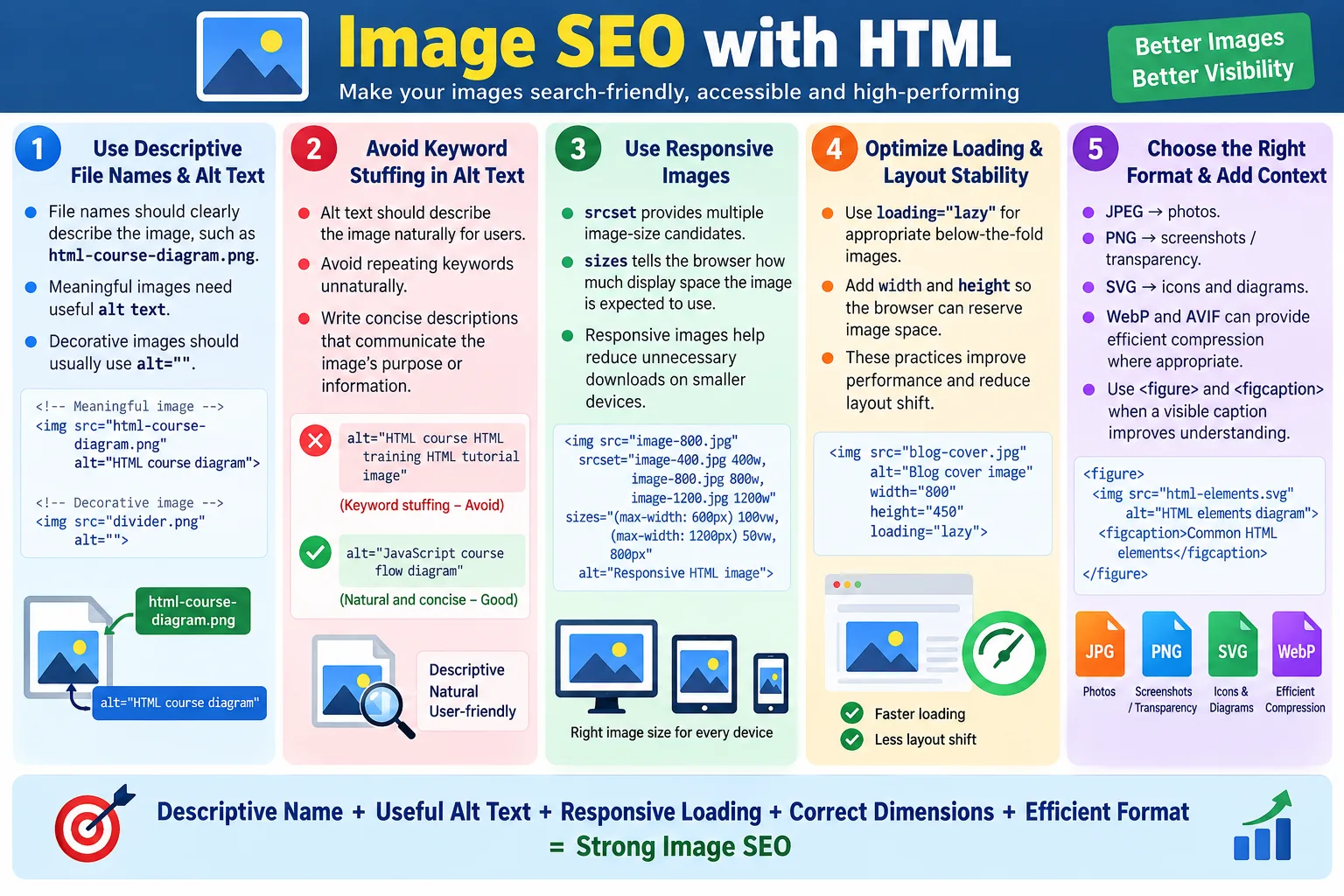
Image SEO Checklist
A practical checklist helps maintain image quality across a website. Start with the file name. Is it descriptive? Then check alt text. Does it describe the image clearly if the image is meaningful? If the image is decorative, is the alt empty? Next, check file size, format, dimensions, responsiveness, lazy loading, and captions. Finally, review whether important text is available as real HTML text.
- Use descriptive file names.
- Write meaningful alt text for meaningful images.
- Use empty alt text for decorative images.
- Avoid keyword stuffing.
- Use responsive images with
srcsetandsizeswhen appropriate. - Use lazy loading for off-screen images.
- Specify width and height to reduce layout shift.
- Choose the right image format.
- Use captions when they help users understand the image.
- Avoid putting important text only inside images.
This checklist is useful for developers, testers, content writers, and SEO reviewers. Image SEO is not the responsibility of only one role. Writers choose meaningful descriptions. Designers choose visual assets. Developers implement responsive markup. Testers verify attributes and behavior. SEO reviewers check discoverability and performance. Good results come from shared discipline.
Image SEO in Tutorial Websites
Tutorial websites rely heavily on images because many technical concepts are easier to understand visually. A diagram can explain browser rendering, API flow, Selenium architecture, HTML document structure, or a testing lifecycle faster than a long paragraph. Screenshots can show real output, form behavior, browser tools, or code results. Because these images carry educational meaning, they should be optimized carefully.
For a tutorial image, the file name should describe the concept. A file name like html-dom-tree-diagram.png is better than diagram1.png. The alt text should describe the image enough for a learner who cannot see it. A caption can explain the learning purpose. If the image contains important text, that text should also appear in the article as real HTML text. This ensures the lesson remains understandable even if the image does not load or cannot be seen.
Tutorial pages often include long content and multiple images. Lazy loading is useful for screenshots and diagrams placed later in the page. Width and height attributes reduce layout shift while the learner scrolls. Responsive images help mobile learners avoid downloading oversized assets. These small improvements make the learning experience smoother.
Image SEO in E-Commerce Websites
E-commerce websites depend on product images. A user often decides whether to inspect or purchase a product based on the image. Search engines also use product images to understand product pages and image search relevance. Descriptive file names, useful alt text, proper dimensions, and compressed formats are essential.
A product image file name should identify the product clearly. For example, blue-running-shoes-side-view.webp is more useful than product123.webp. Alt text should describe the product image naturally, such as Blue running shoes side view. If a product has multiple images, each alt text can describe the view or detail shown. Avoid copying the same alt text for every product image if the images show different angles or features.
Performance is especially important in e-commerce. Product listing pages may show many thumbnails. Large unoptimized images can slow browsing and reduce conversion. Responsive image sizes, modern formats, caching, and lazy loading below the initial viewport can make category pages faster. Good image SEO here supports both search discovery and business outcomes.
Image SEO and Core Page Quality
Image SEO should not be treated as a separate checklist disconnected from page quality. Images should support the page topic. A page about HTML forms should use images that clarify forms, labels, validation, layout, or examples. Random stock images may make the page look decorative, but they may not improve understanding. Search engines and users both benefit when images are relevant to the page content.
The surrounding text around an image also matters. A diagram placed under a heading about HTML document structure receives strong context. A caption that says Basic structure of an HTML document adds visible explanation. A paragraph before or after the image can describe what the reader should notice. These signals work together with file name and alt text.
Image quality also matters. Blurry diagrams, cropped screenshots, unreadable text, and low-contrast images reduce usefulness. Compress images, but keep them readable. If a screenshot shows code, make sure the code is large enough to read. If an image is important for learning, it should be clear on both desktop and mobile screens.
Choosing Alt Text by Image Purpose
The best alt text depends on why the image exists. If the image is informational, describe the information. If it is functional, describe the function. If it is decorative, use empty alt text. If it is complex, provide a short alt text and explain the full details in surrounding content. This purpose-based approach is better than using the same alt style for every image.
For example, an icon inside a button may need alt text or an accessible label that describes the action, not the visual icon. A search icon used as a button should communicate Search, not merely magnifying glass. A chart image may need alt text such as Bar chart comparing page load time before and after image optimization, while the paragraph below explains the exact values.
For decorative images, empty alt text avoids noise. A screen reader user does not need to hear about decorative borders, background patterns, or visual separators. For meaningful screenshots, alt text should describe the screenshot purpose rather than every pixel. The goal is to give the user equivalent understanding, not to overdescribe unnecessarily.
Responsive Image Strategy
A strong responsive image strategy starts by identifying how large an image appears in different layouts. If an image is never displayed wider than 800 pixels, serving a 2400-pixel file is wasteful. If a diagram appears full-width on desktop and smaller on mobile, provide multiple image sizes. The browser can select the best candidate using srcset and sizes.
Responsive images are most valuable for large content images, hero images, product images, and diagrams. Small icons and simple SVG graphics may not need multiple raster sizes. The strategy should match the asset. Use SVG for vector diagrams or icons when appropriate. Use raster responsive images for photos, screenshots, and complex graphics.
Testing responsive images requires checking real viewport sizes. Resize the browser or use device emulation. Confirm that images remain clear, do not overflow containers, and do not download unnecessarily large versions. Also check that captions and surrounding text still align well on mobile. Image SEO and responsive design should work together.
Image SEO Audit Workflow
An image SEO audit begins by listing all images on a page. For each image, check whether it is meaningful or decorative. Meaningful images should have useful alt text. Decorative images should use empty alt text. Then check file names, file sizes, dimensions, lazy loading, responsive attributes, and format choices.
Next, review page context. Does the image support the topic? Is there surrounding text or a caption when needed? Is important information duplicated in real HTML text when the image contains essential text? Is the image clear enough for users? Does it load quickly? These questions go beyond simple attribute checking and focus on real usefulness.
Finally, check technical quality at scale. Broken image URLs should be fixed. Oversized images should be compressed or resized. Missing dimensions should be added. Repeated generic alt text should be rewritten. The audit should prioritize high-traffic pages, important tutorial pages, product pages, and images that carry key information.
Image SEO and Structured Data
Structured data can also reference images. Article, Product, Recipe, Course, Organization, and other schema types may include image-related properties. These image URLs should point to relevant, accessible images that represent the page or entity. The structured data image should align with the visible page image and metadata.
For example, an article schema may include an image that represents the article topic. A product schema may include product image URLs. An organization schema may include a logo. These images should not be random or outdated. If the visible product image changes, structured data should be reviewed. If a page has a main tutorial diagram, the schema image should be chosen thoughtfully.
Structured data image properties do not replace normal HTML image optimization. The visible image still needs meaningful alt text, dimensions, responsive handling, and performance optimization. Structured data adds another machine-readable signal, while HTML image markup supports the actual page experience.
Image SEO Testing Checklist
Testing image SEO requires both automated and manual checks. Automated checks can detect missing alt attributes, broken src values, missing width and height, large file sizes, and absent lazy loading. Manual checks are needed to judge whether alt text is meaningful, whether the image supports the page, and whether captions are helpful.
- Verify every image has an appropriate
altattribute. - Check meaningful images for descriptive alt text.
- Check decorative images for empty alt text.
- Confirm image URLs load successfully.
- Review file names for clarity.
- Check width and height attributes where appropriate.
- Verify responsive image behavior on mobile and desktop.
- Check lazy loading for below-the-fold images.
- Review image file sizes and formats.
- Confirm important text is not only inside the image.
This checklist helps teams avoid treating images as simple decoration. Every image should have a purpose, and the HTML should support that purpose. When images are meaningful, accessible, fast, and well-described, they improve the entire page.
Interview-Ready Answer
Image SEO with HTML means optimizing image elements so search engines, browsers, and assistive technologies can understand and load images efficiently. Important practices include using descriptive file names, meaningful alt text, responsive images with srcset and sizes, lazy loading, proper width and height attributes, suitable image formats, and captions using <figure> and <figcaption> when helpful. Good image SEO improves accessibility, search visibility, page speed, and user experience.
A strong interview answer should also mention that alt text is not for keyword stuffing. It should describe meaningful images for users. Decorative images should use empty alt text. Large images should be optimized for performance. Important text should not exist only inside images. These details show practical understanding rather than memorizing only the <img> syntax.
One-Line Insight
Good image SEO helps search engines understand images and helps users load, view, and access them more effectively.