HTML5 Input Types
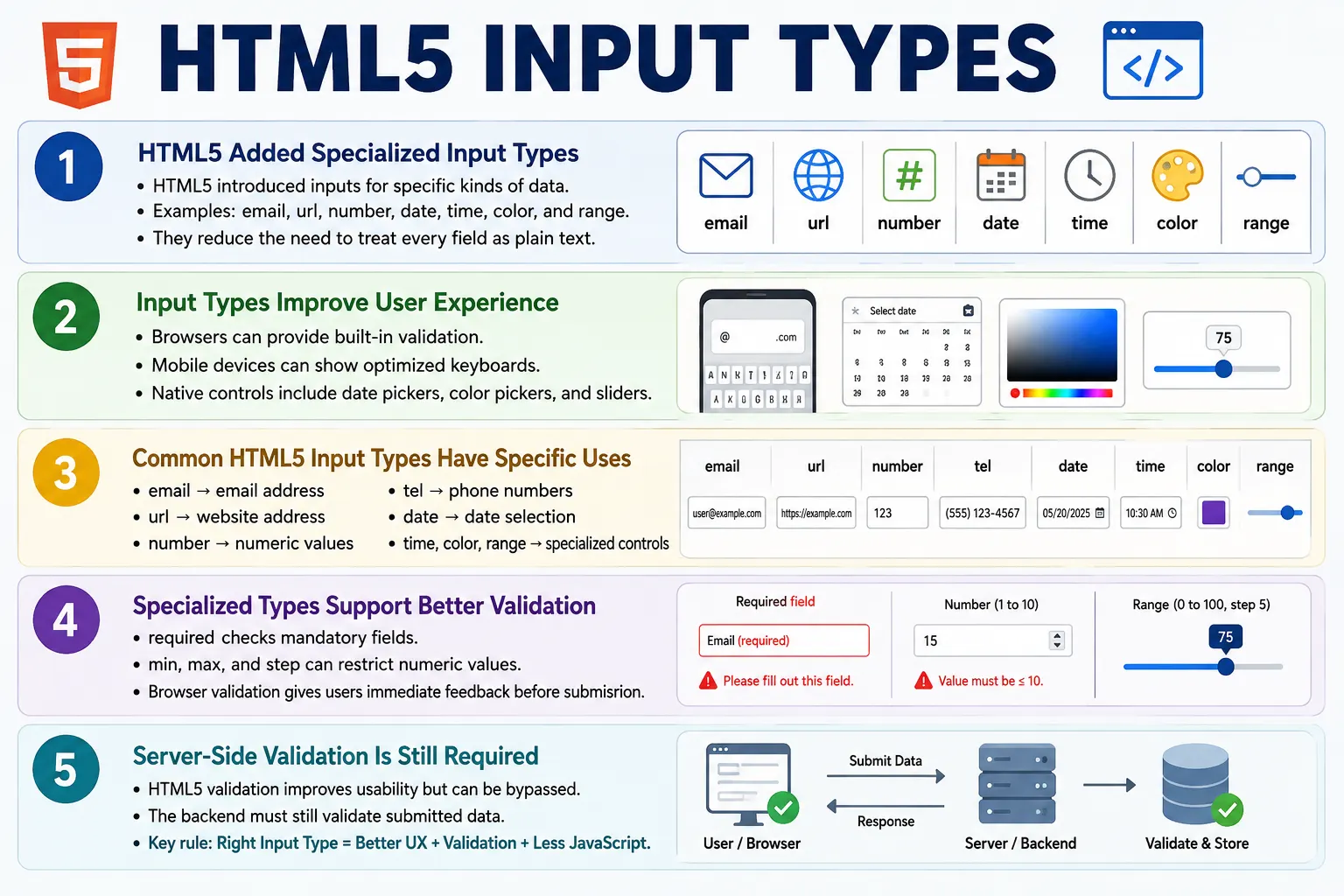
Introduction
HTML5 introduced several new <input> types that make forms more intelligent, user-friendly, and easier to validate. Before HTML5, many form fields were built using type="text", and developers had to write JavaScript to validate email addresses, URLs, numbers, dates, and other specialized data. HTML5 improved this by giving the browser more information about the type of data being collected.
These specialized input types provide built-in browser validation, optimized mobile keyboards, and native UI controls such as date pickers, color pickers, and sliders. They improve user experience, accessibility, mobile usability, developer productivity, and consistency of data entry.
HTML5 input types do not remove the need for server-side validation, but they make the frontend experience much better. They help users enter the right kind of data before the form is submitted and reduce the amount of custom JavaScript needed for common form tasks.
What Are HTML5 Input Types?
HTML5 input types are specialized versions of the <input> element. Their behavior is controlled by the type attribute.
<input type="input-type">For example, an email input is created like this:
<input type="email">The browser automatically treats the field as an email input. It may validate the email format, provide email-specific autofill, and show an email-friendly keyboard on mobile devices.
Why HTML5 Introduced New Input Types
Before HTML5, developers often used plain text inputs for many kinds of data.
<input type="text">Then they wrote JavaScript for email validation, date selection, number validation, URL validation, and color selection. This created extra work and inconsistent behavior across websites.
With HTML5, developers can use a more meaningful input type.
<input type="email">The browser can provide built-in assistance. This makes forms smarter with less code and gives users controls that better match the expected input.
Common HTML5 Input Types
HTML5 introduced or standardized many specialized input types. These types are commonly used in modern forms.
| Input Type | Purpose |
|---|---|
email | Email address |
url | Website URL |
number | Numeric input |
tel | Telephone number |
search | Search field |
date | Date picker |
time | Time picker |
datetime-local | Date and time picker |
month | Month picker |
week | Week picker |
color | Color picker |
range | Slider control |
Email Input
The email input is used to collect email addresses.
<input type="email" required>Browsers can provide email validation, email-friendly keyboards on mobile devices, and better autofill suggestions. A valid email-style value looks like this:
john@example.comA value such as john@ is usually considered invalid by browser validation. The email type improves user experience, but server-side validation is still required because browser checks can be bypassed.
URL Input
The URL input is used to collect website addresses.
<input type="url">A valid URL may look like this:
https://softwaretips4u.comBrowsers can validate the basic URL format before submission. This is useful for website fields, profile links, portfolio links, company URLs, and social media profile URLs.
Number Input
The number input is used to collect numeric values.
<input type="number">Many browsers display increment and decrement controls.
?
25
?
Number inputs are useful for age, quantity, count, score, rating, price, and other numeric values. They can also be constrained using min, max, and step.
Number Input with Limits
The min, max, and step attributes define numeric limits and increments.
<input type="number" min="1" max="100" step="5">Example values may include:
1
6
11
16
The step attribute controls the allowed increment. These constraints improve validation and help guide users toward accepted values.
Telephone Input
The telephone input is used to collect phone numbers.
<input type="tel">On mobile devices, a numeric keypad is often displayed. This makes phone number entry easier. Unlike number input, telephone input is better for phone numbers because phone numbers may contain country codes, plus signs, spaces, hyphens, and parentheses.
Search Input
The search input is designed for search boxes.
<input type="search">Some browsers display a built-in clear button, often shown as an "x". Search inputs are useful for site search, product search, filtering, admin tables, and searchable lists.
Date and Time Inputs
The date input allows users to select a calendar date.
<input type="date">A browser may display a calendar picker.
2026-08-15The time input allows users to select a time.
<input type="time">The exact UI depends on the browser and operating system. Some browsers show spinners, dropdowns, or native time pickers.
Datetime, Month, and Week Inputs
The datetime-local input allows users to select both a date and a time.
<input type="datetime-local">An example value may represent August 15, 2026 at 10:30.
2026-08-15 10:30The month input lets users choose a month and year.
<input type="month">The week input lets users select a calendar week.
<input type="week">These controls are useful for scheduling, billing cycles, reporting periods, and planning tools.
Color Input
The color input opens a color picker in supporting browsers.
<input type="color">The selected value is typically submitted as a hexadecimal color value such as:
#ff0000Color inputs are useful for design tools, theme customization, profile color preferences, dashboards, and drawing applications.
Range Input
The range input creates a slider.
<input type="range" min="0" max="100">The browser displays a slider control.
0 -----?------100Range inputs are commonly used for volume, brightness, ratings, progress settings, price ranges, zoom level, and preference sliders. If the exact numeric value matters, it is often helpful to display the selected value near the slider.
HTML5 Validation
Many HTML5 input types include built-in validation. For example, an email field marked as required checks both presence and basic email format.
<input type="email" required>The workflow is simple:
User Types
  ?
Browser Validates
  ?
Submit
This validation improves usability because users receive feedback before the data reaches the server. However, it is not a security boundary. Server-side validation is still required.
Mobile-Friendly Keyboards
Different input types can display optimized keyboards on mobile devices. A text input shows a standard keyboard. An email input may show @ and . keys. A telephone input may show a numeric keypad.
Text:
ABC Keyboard

Email:
ABC
@
.

Telephone:
123456789
This makes data entry faster and more accurate. It is one of the strongest practical benefits of choosing the correct input type.
Browser Workflow
When the browser sees an input element, it reads the type, creates the appropriate control, applies validation rules, allows user entry, and submits the final value with the form.
Read Input Type
  ?
Create Appropriate Control
  ?
Apply Validation
  ?
User Enters Data
  ?
Submit Form
The type attribute gives the browser the information it needs to provide smarter behavior.
Complete Example
The following form combines several HTML5 input types.
<form>
    <label>Email</label>
    <input type="email" required>

    <br><br>

    <label>Website</label>
    <input type="url">

    <br><br>

    <label>Age</label>
    <input type="number" min="1" max="120">

    <br><br>

    <label>Birthday</label>
    <input type="date">

    <br><br>

    <label>Favorite Color</label>
    <input type="color">

    <br><br>

    <label>Volume</label>
    <input type="range" min="0" max="100">

    <br><br>

    <button type="submit">Submit</button>
</form>
In production, spacing should usually be handled with CSS, but this example shows how different input types work together.
Advantages of HTML5 Input Types
HTML5 input types provide better user experience, built-in browser validation, mobile-friendly keyboards, reduced JavaScript, improved accessibility, consistent data entry, and native browser controls. They allow the browser to understand the expected data instead of treating every field as plain text.
They also improve developer productivity. Instead of building every validation behavior from scratch, developers can rely on built-in browser features for common cases and focus custom code on application-specific rules.
Common Mistakes
A common mistake is using text for everything.
<input type="text">This is weak for email, phone, date, URL, and numeric fields. Use specialized input types whenever appropriate.
Another mistake is assuming browser validation is enough. HTML5 validation improves usability, but server-side validation is always required because client-side validation can be bypassed.
Developers also sometimes ignore browser differences. Not every browser presents date pickers, time pickers, and color pickers identically. The appearance and behavior may vary across browsers and operating systems.
Missing labels is another common issue.
<input type="date">A better version includes a label.
<label>Birthday</label>
<input type="date">
Real-World Example
A SoftwareTips4U registration form may use several HTML5 input types.
<form>
    <label>Email</label>
    <input type="email" required>

    <label>Phone</label>
    <input type="tel">

    <label>Website</label>
    <input type="url">

    <label>Date of Birth</label>
    <input type="date">

    <label>Favorite Color</label>
    <input type="color">

    <button type="submit">Register</button>
</form>
Each input type matches the kind of data expected from the user, which makes the form more usable and more accurate.
Testing Considerations
HTML5 input types should be tested across browsers and devices. A date input may look different on Chrome, Safari, Firefox, Android, and iOS. A color input may open different native controls. A number input may allow different keyboard behavior depending on the platform.
Testers should verify accepted values, invalid values, default values, required validation, min and max restrictions, step behavior, and submitted data format. Mobile testing is especially important because optimized keyboards are one of the main benefits of HTML5 input types.
Browser Support and Fallback Behavior
HTML5 input types are designed to improve forms progressively. If a browser does not fully support a specialized input type, it typically falls back to a text-like input. This means the form can still be usable, but the enhanced UI control or validation may not appear.
This fallback behavior is useful because it allows developers to use modern input types without completely breaking older browsers. However, it also means developers should not depend only on browser UI. A date picker may appear in one browser and not another. A color picker may look different across operating systems. A range slider may have different styling by default.
Good form design treats HTML5 input types as helpful browser assistance, not as the only layer of correctness. Labels, instructions, server-side validation, and clear error messages are still required.
Choosing the Right HTML5 Input Type
The correct input type should match the actual data the user is expected to enter. Use email for email addresses, url for website links, tel for phone numbers, number for numeric quantities, date for calendar dates, and range for values that are better adjusted visually than typed exactly.
Do not choose a type only because it looks convenient. For example, phone numbers should usually use tel, not number, because phone numbers are identifiers rather than mathematical quantities. They may contain country codes, leading zeros, spaces, or symbols. Similarly, use number when the value is truly numeric, such as age or quantity.
Search fields should use search when the control is clearly used for searching. This can give users a familiar browser experience and may provide additional UI behavior such as a clear button.
Validation Strategy
HTML5 validation is useful for immediate feedback, but it should be part of a larger validation strategy. Browser validation can catch empty required fields, invalid email formats, invalid URL formats, and values outside min or max constraints. This helps users correct mistakes quickly.
Server-side validation must repeat important checks because users can bypass client-side validation. A malicious or advanced user can modify HTML, disable validation, or send requests directly. The backend must verify that submitted data is valid, safe, and allowed by business rules.
For high-quality user experience, combine input types with clear labels, helper text, useful validation messages, and backend rules. The browser can help, but the application remains responsible for data integrity.
Selenium Perspective
Selenium can enter values into HTML5 input types and verify their attributes. For example, an email field can be filled like this:
driver.findElement(By.id("email"))
      .sendKeys("john@example.com");
A date field can be filled using an expected date format.
driver.findElement(By.id("dob"))
      .sendKeys("2026-08-15");
The input type can be verified through the type attribute.
String type =
driver.findElement(By.id("email"))
      .getAttribute("type");

System.out.println(type);
Automation testers commonly verify input type, validation messages, accepted values, default values, min and max restrictions, date behavior, range behavior, and submitted form data.
Quick Reference Table
| Input Type | Common Use |
|---|---|
email | Email address |
url | Website URL |
number | Numeric values |
tel | Phone number |
search | Search box |
date | Date picker |
time | Time picker |
datetime-local | Date and time |
month | Month picker |
week | Week picker |
color | Color picker |
range | Slider |
Common Interview Questions
What are HTML5 input types? They are specialized input types that provide browser-supported controls and validation for different kinds of user input.
Which input type validates email addresses? The email input type.
Which input type displays a calendar picker? The date input type.
Which input type displays a slider? The range input type.
Which input type opens a color picker? The color input type.
Which input type is used for website addresses? The url input type.
Do HTML5 input types eliminate the need for server-side validation? No. Server-side validation is always required for security and data integrity.
Interview-Ready Answer
HTML5 introduced new input types such as email, url, number, date, time, color, and range to improve form usability and reduce the need for custom JavaScript. These input types provide built-in browser validation, optimized mobile keyboards, and native UI controls such as calendars, sliders, and color pickers. Although they improve the user experience, server-side validation remains essential because client-side validation can be bypassed.
One-Line Insight
HTML5 input types let the browser understand what kind of data you are collecting, resulting in smarter forms with less code.