HTML vs Framework-Generated HTML
Introduction
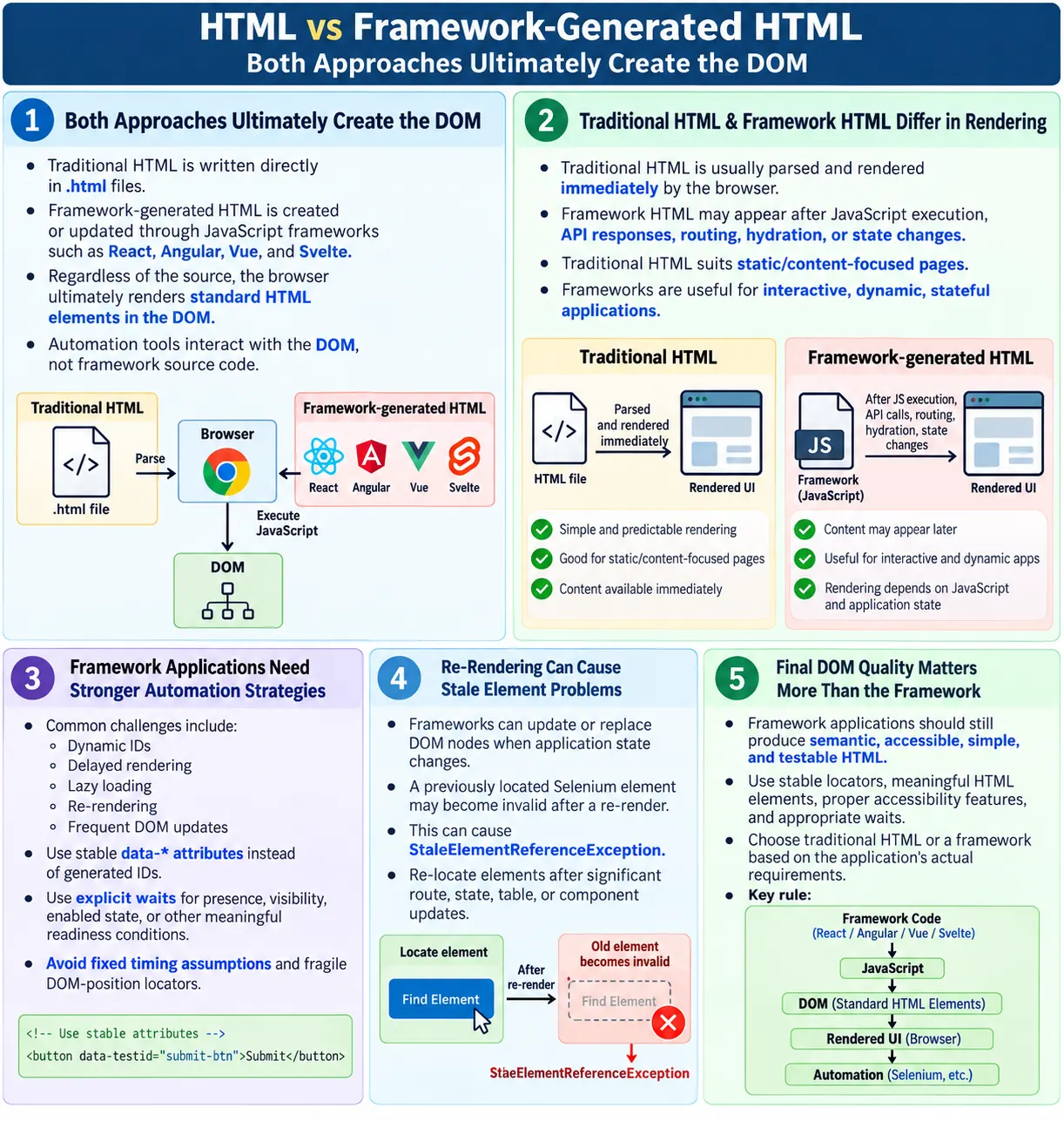
HTML vs framework-generated HTML refers to the difference between HTML written directly by developers and HTML created or updated dynamically by JavaScript frameworks such as React, Angular, Vue, Svelte, and others. This distinction matters because modern web applications are often not made from plain static HTML files alone. Many applications start with JavaScript framework code, templates, components, and data, then generate the final DOM that the browser displays.
Even when frameworks are involved, the browser ultimately renders HTML elements in the DOM. Users do not interact with React components, Angular templates, or Vue directives directly. They interact with buttons, links, inputs, tables, images, headings, and text nodes that exist in the browser's DOM. Automation tools such as Selenium, Playwright, and Cypress also interact with the DOM, not the framework source code.
Understanding this difference helps developers write better markup and helps testers build stable automation. A test failure on a React application is still usually a DOM issue: the element is not present, not visible, not enabled, has changed attributes, appears after an asynchronous render, or was replaced by a framework update. The framework changes how the HTML is created, but the final testing surface is still the rendered DOM.
What Is Traditional HTML?
Traditional HTML is written directly in an .html file and sent by the web server to the browser. The browser receives the HTML, parses it, creates the DOM, applies CSS, runs JavaScript, and renders the page. This approach is common for static websites, documentation pages, simple landing pages, and content pages where the structure does not change heavily after load.
<!DOCTYPE html>
<html>
<head>
  <title>HTML</title>
</head>
<body>
  <h1>SoftwareTips4U</h1>
  <p>Learn HTML</p>
</body>
</html>
The workflow is direct. A developer writes HTML, the server returns it, and the browser parses it immediately. JavaScript may enhance the page afterward, but the main content can already exist in the initial HTML response.
Developer
  ?
Writes HTML
  ?
Server
  ?
Browser
  ?
DOM
This model is simple, predictable, and often fast for content-heavy pages. It is also easy to inspect because View Source closely matches the initial content users and search engines receive.
What Is Framework-Generated HTML?
Framework-generated HTML is created or updated dynamically by JavaScript frameworks. Developers may write React JSX, Angular templates, Vue templates, Svelte components, or another component format. The framework then turns that component code into DOM elements that the browser renders.
function App() {
  return (
    <h1>SoftwareTips4U</h1>
  );
}
React converts this component output into DOM elements. Angular and Vue do similar work through their own template and rendering systems. The final browser result is still a heading element in the DOM.
Developer
  ?
Framework Code
  ?
JavaScript
  ?
Browser
  ?
DOM
  ?
Rendered HTML
The browser does not render JSX or Angular directives directly. It executes JavaScript, and that JavaScript creates or updates DOM elements. This is why framework applications may show an empty root element in the original page source but a complete interface in DevTools after JavaScript runs.
Static HTML vs Framework HTML
Traditional HTML and framework-generated HTML solve different problems. Traditional HTML is often best for stable content and simple pages. Framework-generated HTML is often best for interactive applications, dynamic dashboards, complex forms, stateful UI, and applications where the interface changes frequently based on data and user actions.
| Traditional HTML | Framework-Generated HTML |
|---|---|
| Written directly in HTML files | Generated or updated by JavaScript |
| Parsed immediately by the browser | Created after JavaScript executes |
| Simple page structure | Dynamic UI updates |
| Best for static content | Best for interactive applications |
Neither approach is automatically better in every case. A tutorial page may not need a full JavaScript framework. A complex application with live updates, filters, routing, and reusable stateful components may benefit from one. The decision should match the problem.
Browser Perspective
From the browser's perspective, the final result is a DOM. The browser does not care whether a button came from a static HTML file, a React component, an Angular template, a Vue template, or a server-rendered framework. Eventually, the browser has elements, attributes, text nodes, styles, and event listeners.
Traditional HTML
  ?
DOM

Framework HTML
  ?
DOM
  ?
Rendered Page
This is the key idea for testers. Automation tools interact with the rendered DOM, not with the framework source. If a framework component renders a button, the test locates the button in the DOM. If the component has not rendered yet, the test must wait. If the component re-renders and replaces the node, the test may need to locate it again.
Traditional HTML Example
In traditional HTML, a list can be written directly in the document. The browser parses the markup and creates the DOM immediately.
<ul>
  <li>HTML</li>
  <li>CSS</li>
  <li>JavaScript</li>
</ul>
This is straightforward. View Source shows the list. DevTools shows the DOM list. Search engines, assistive technologies, and automation tools can access the list as soon as the page loads, assuming no script modifies it afterward.
React Example
In React, a developer may write a component that returns a list. The syntax looks like HTML, but JSX is not delivered directly to the browser as HTML. It is processed by the build system and React runtime.
function CourseList() {
  return (
    <ul>
      <li>HTML</li>
      <li>CSS</li>
      <li>JavaScript</li>
    </ul>
  );
}
After rendering, the browser DOM looks similar to the traditional list:
<ul>
  <li>HTML</li>
  <li>CSS</li>
  <li>JavaScript</li>
</ul>
The important difference is timing and update behavior. React may render this after JavaScript loads, after data is fetched, or after state changes. It may also re-render the list when data changes.
Angular Example
Angular templates use directives such as *ngFor to generate repeated elements. The template is not the final DOM. Angular processes the template and produces DOM elements based on component data.
<li *ngFor="let course of courses">
  {{course}}
</li>
After rendering, the DOM may contain:
<li>HTML</li>
<li>CSS</li>
<li>JavaScript</li>
For automation testers, the Angular syntax is not what Selenium sees. Selenium sees the rendered list items. If the data loads asynchronously, tests must wait until those list items exist.
Vue Example
Vue uses template directives such as v-for to render repeated elements. Like Angular and React, the final DOM contains normal HTML elements.
<li v-for="course in courses">
  {{ course }}
</li>
The rendered DOM may be:
<li>HTML</li>
<li>CSS</li>
<li>JavaScript</li>
The framework syntax helps developers create dynamic UI, but users and automation interact with the result. This is why inspecting the live DOM is essential when testing framework applications.
DOM Creation Differences
Traditional HTML and framework-generated HTML differ mainly in how the DOM is created and updated. Traditional HTML is parsed by the browser's HTML parser. Framework-generated HTML is created or modified by JavaScript after the framework executes.
Traditional HTML:

HTML
  ?
Browser Parser
  ?
DOM
Framework:
JavaScript
?
Framework
?
DOM Updates
?
Rendered PageThe result is still a DOM, but the timing and update model are different. Static HTML usually exists immediately. Framework DOM may appear after bundle loading, hydration, route changes, API responses, or state updates.
Key Differences
| Feature | Traditional HTML | Framework HTML |
|---|---|---|
| Source | HTML file | JavaScript framework |
| Rendering | Immediate | After JavaScript execution |
| Content | Mostly static | Often dynamic |
| Updates | Commonly full page reload | Partial UI updates |
| Interactivity | Limited without JavaScript | Built-in dynamic behavior |
Impact on Automation
Automation tools work with the rendered DOM. Selenium does not need to know whether an element came from HTML, React, Angular, or Vue. It only needs a rendered element that can be located and interacted with.
driver.findElement(
  By.cssSelector("[data-testid='login-button']"));
This locator works if the final DOM contains an element with data-testid="login-button". The framework source is irrelevant to Selenium. What matters is whether the attribute exists in the rendered DOM at the time the test runs.
Framework applications often require more careful waits. The element may appear after data loads, after a route transition, after hydration, or after an animation. A test that works on static HTML may fail on a framework application if it does not wait for the UI to be ready.
Common Automation Challenges
Framework-generated HTML can introduce dynamic IDs, delayed rendering, virtual DOM updates, lazy loading, infinite scrolling, Shadow DOM in some applications, and frequent DOM updates. These issues do not make automation impossible, but they require stronger locator and waiting strategies.
- Dynamic IDs
- Delayed rendering
- Virtual DOM updates in React
- Lazy loading
- Infinite scrolling
- Shadow DOM in some applications
- Frequent DOM updates
Automation testers should use explicit waits, stable data-* attributes, robust locators, and state-based assertions. Avoid depending on generated IDs, exact wrapper structure, or timing assumptions.
Dynamic IDs and Stable Locators
Frameworks and component libraries sometimes generate IDs dynamically. These IDs may change between builds, sessions, users, or page loads. Locating elements by dynamic IDs creates flaky tests. A locator may pass today and fail tomorrow without a user-facing change.
The better approach is to ask developers to expose stable attributes for important elements. A login button, checkout button, search field, or save action can include a stable data-testid, data-test, data-cy, or data-qa attribute depending on project convention.
Good framework applications are designed with testing in mind. The final DOM should contain stable hooks for important workflows, even if the component internals change.
Delayed Rendering and Explicit Waits
Framework-generated content often appears after asynchronous work. A component may render a loading state first, then replace it with content after an API response. If automation tries to click before the element appears or becomes enabled, the test fails.
Explicit waits solve this by waiting for a meaningful condition, such as element presence, visibility, enabled state, or expected text. Waiting for a fixed number of seconds is weaker because it either slows tests or still fails when the application is slower than expected.
The best wait condition reflects user readiness. Wait for the button to be visible and enabled, the table row to appear, the loading spinner to disappear, or the route heading to be displayed.
Virtual DOM and Re-Rendering
React popularized the virtual DOM concept, but the automation issue is practical: components may re-render and replace DOM nodes. A Selenium element reference captured before an update may become stale after the update. The user may see the same button, but the underlying DOM node may be new.
When this happens, Selenium may throw StaleElementReferenceException. The fix is usually to locate the element again after the DOM update. Tests should avoid holding element references across route changes, state changes, table refreshes, or component re-renders.
Understanding framework rendering helps testers debug these failures without guessing. The element did not vanish from the user's perspective, but the DOM reference changed.
SEO Considerations
Traditional HTML usually makes content available immediately in the HTML response. This is helpful for search engines and users because important content can be discovered early. Framework applications may render content after JavaScript runs. Modern search engines can process JavaScript better than before, but client-side rendering can still delay content availability and complicate SEO.
Modern frameworks support techniques such as Server-Side Rendering and Static Site Generation to improve SEO and initial page load. Server-Side Rendering sends pre-rendered HTML from the server. Static Site Generation creates HTML at build time. Both approaches help ensure important content is available earlier.
- Traditional HTML often exposes content immediately.
- Pure client-side rendering may delay content.
- SSR can send rendered HTML from the server.
- SSG can generate static HTML at build time.
- Important content should be crawlable and meaningful.
For public pages, developers and testers should inspect what is available in the initial HTML and what appears only after JavaScript. SEO-sensitive content should not depend unnecessarily on delayed rendering.
Performance Considerations
Traditional HTML can be faster for simple pages because the browser can parse and render content immediately with less JavaScript overhead. Framework applications often ship larger JavaScript bundles and may require JavaScript execution before the page becomes interactive or fully rendered.
However, frameworks can provide excellent user experience for highly interactive applications. They can update parts of the UI without full page reloads, manage complex state, and reuse components. The performance tradeoff depends on the application type.
| Traditional HTML | Framework HTML |
|---|---|
| Faster initial rendering for simple pages | Larger JavaScript bundles |
| Less JavaScript overhead | Initial rendering may require JavaScript execution |
| Simple architecture | Better for highly interactive applications |
Performance testing should include initial load, hydration, interactivity, route transitions, lazy-loaded content, and DOM size. A framework does not automatically make a page slow, but it adds runtime work that must be managed.
Accessibility Considerations
Framework-generated HTML can be accessible or inaccessible depending on what the components render. A framework does not guarantee semantic markup. Developers can still produce div soup, missing labels, poor headings, inaccessible custom widgets, and incorrect ARIA.
The final DOM should be reviewed for semantic elements, labels, alt text, keyboard behavior, focus management, and ARIA correctness. Component libraries should be evaluated carefully. A visually polished component is not automatically accessible.
Automation testers and QA engineers should inspect the rendered DOM, not only the framework component name. If a custom dropdown renders inaccessible markup, the framework does not hide that problem from users.
View Source vs Inspect Element
Traditional HTML often makes View Source useful because the source contains most of the page content. Framework applications may show only a root element and script tags in View Source, while the real UI appears in Inspect Element after JavaScript runs.
This distinction is important during debugging. View Source shows the initial HTML response. Inspect Element shows the live DOM. For framework applications, Inspect Element is usually more useful for automation and UI debugging because it shows what the browser actually rendered.
If a tester cannot find expected content in View Source, that does not always mean the content is missing. It may be rendered client-side. But for SEO and performance, it may still matter whether important content is available early.
Server-Side Rendering and Hydration
Some frameworks use server-side rendering. The server sends HTML that already contains the page content. Then JavaScript loads and hydrates the page, attaching event handlers and making it interactive. This combines some benefits of traditional HTML and framework interactivity.
Hydration can introduce its own debugging issues. If the server-rendered HTML does not match what the client framework expects, hydration warnings or re-rendering may occur. Users may see content quickly, but interactivity may not be ready until JavaScript finishes.
Automation tests should wait for the page to be interactive, not merely present. A button may exist in the HTML before the framework attaches its event handlers. Testing should align with the application's actual readiness signal.
Static Site Generation
Static Site Generation creates HTML files at build time. Frameworks such as Next.js, Nuxt, SvelteKit, and others can generate static pages that behave more like traditional HTML on initial load while still using framework features for routing and interactivity.
This approach can be useful for documentation, blogs, marketing pages, and tutorial sites. Content is available as HTML, performance can be strong, and the framework can still enhance navigation or interactive areas.
From a testing perspective, static generated pages should still be inspected as final HTML. The source framework components matter during development, but users and tools receive the generated output.
When Traditional HTML Is Enough
Traditional HTML is often enough for static content, simple pages, documentation, landing pages, small business websites, and learning pages. If the page mainly presents text, images, links, and simple forms, a full framework may add unnecessary complexity.
Using traditional HTML can reduce JavaScript overhead, simplify hosting, improve initial rendering, and make debugging easier. It also makes content visible immediately. For content-first sites, this simplicity is a strength.
The choice should be pragmatic. Do not use a framework only because it is popular. Use it when the application needs component state, complex interaction, dynamic updates, routing, or reusable UI architecture at scale.
When Framework-Generated HTML Makes Sense
Framework-generated HTML makes sense for interactive applications, dashboards, complex forms, real-time updates, single-page applications, component libraries, and products with large reusable UI systems. Frameworks help organize state, split UI into components, manage routing, and update parts of the interface efficiently.
For example, an ecommerce checkout, admin dashboard, banking app, online editor, or analytics tool may benefit from a framework because the UI changes frequently based on user input and data. In these cases, traditional static HTML would become difficult to manage manually.
The framework should still produce clean semantic HTML. Component-driven development does not remove the need for good markup.
Component Abstraction vs Final DOM
One of the biggest mindset changes in framework applications is the difference between component abstraction and final DOM output. A developer may work with components such as <LoginForm />, <ProductCard />, or <UserMenu />, but those component names are usually not what the browser renders. The browser receives ordinary HTML elements such as <form>, <button>, <input>, <section>, and <div>.
This distinction matters because users, screen readers, search engines, and automation tools do not experience the developer's component tree directly. They experience the rendered document. A clean component structure in source code is useful for development, but it must still result in meaningful HTML. A component called PrimaryButton should still render a real <button> when it performs an action. A navigation component should still expose links and navigation landmarks. A form component should still connect labels with inputs.
Good framework code therefore has two responsibilities. It should be maintainable for developers, and it should produce a high-quality DOM for everyone else. If either side is ignored, problems appear. A page may be easy for developers to organize but difficult for users with assistive technology. A form may look correct but fail automation because important controls have no stable attributes. A component library may be visually consistent but produce overly nested, generic markup that is hard to inspect and hard to test.
Hydration and Automation Timing
Hydration is an important concept in many modern framework applications. During server-side rendering or static generation, the browser may receive HTML that already displays content. Then the JavaScript framework loads and connects event handlers to that HTML. After hydration, the page becomes fully interactive. From a user's point of view, content may appear before the page is ready to respond to clicks, typing, or route changes.
This creates a subtle automation issue. A test may find a button because the server-rendered HTML already contains it, but clicking too early may fail or produce no useful result if the framework has not finished attaching behavior. The element exists, but the application is not ready. This is different from a pure static page, where the browser can often interact with standard controls as soon as they are parsed.
Automation should therefore wait for readiness signals that match the application. Some teams expose a stable marker when the app is hydrated. Others wait for a known heading, enabled button, completed network state, removed loading indicator, or visible route content. The exact signal depends on the application, but the principle is the same: do not assume that visible markup always means interactive readiness in a framework-rendered page.
Debugging Framework-Generated HTML
Debugging framework-generated HTML requires looking at more than one layer. First, inspect the live DOM to confirm what the browser actually rendered. This reveals missing elements, changed attributes, extra wrappers, hidden nodes, disabled controls, and incorrect text. Second, inspect the framework source or component tree if available. This helps explain why the DOM looks the way it does. Third, check network requests because many framework pages render different HTML after API responses arrive.
For example, if a product list is missing from the DOM, the problem may not be an HTML issue. The API may have failed, the component may still be in a loading state, the route may not have completed, or the list may be hidden behind a feature flag. If a Selenium test cannot find an element, the first question should be whether the element is present in the live DOM at that moment. If it is absent, the issue is usually rendering, data, timing, or conditional logic. If it is present, the problem may be the locator, visibility, overlay, frame, Shadow DOM, or disabled state.
This layered debugging approach avoids random fixes. Instead of increasing sleep time blindly, testers can identify whether the page is waiting for data, re-rendering the component, changing route content, or replacing DOM nodes. Framework applications reward this kind of systematic inspection because their UI can change without a full page reload.
Testing Strategy for Framework Applications
A strong testing strategy for framework applications should combine component awareness with DOM-based validation. Unit and component tests can verify framework-level behavior close to the source code. End-to-end tests should verify real user workflows in the browser. HTML quality checks should verify that the rendered output remains semantic, accessible, and stable for automation.
End-to-end tests should focus on user-visible outcomes rather than implementation details. A test should verify that a user can log in, add an item to a cart, submit a form, filter a table, or complete a payment flow. It should not depend heavily on the internal component hierarchy. If a component is refactored but the user workflow remains the same, the test should ideally continue passing.
At the same time, teams should intentionally support automation by adding stable attributes to important controls. This is not a workaround; it is a design decision. Production applications often change class names, wrapper elements, CSS modules, generated IDs, and layout structure. Stable test attributes protect tests from these unrelated changes while keeping assertions focused on behavior.
- Use user-focused end-to-end workflows.
- Use stable locators for important controls.
- Wait for meaningful application readiness.
- Avoid depending on internal wrapper structure.
- Validate accessibility and semantic output.
- Re-locate elements after major DOM updates.
What Testers Should Inspect
When testing framework-generated HTML, testers should inspect the final output with the same seriousness as they inspect functionality. The first check is whether important content exists in the DOM. The next check is whether controls use appropriate HTML elements. Buttons should usually be buttons, navigation should use links where navigation is intended, forms should use inputs and labels, and headings should describe the page structure.
Testers should also look for generated IDs, unstable class names, hidden duplicate content, missing accessible names, disabled states, loading placeholders, and unexpected re-rendering. If a locator keeps failing, inspect whether the element is being replaced. If a click fails, inspect whether another element overlays it. If text is not found, inspect whether it appears after an API call or route transition. These checks connect HTML understanding directly to practical automation debugging.
For SEO-sensitive pages, testers should also compare the initial HTML response with the live DOM. If important article content, product names, titles, or internal links appear only after delayed JavaScript rendering, the team should confirm that this behavior is intentional and acceptable. Framework-generated pages can be excellent for SEO, but they need the right rendering strategy.
Choosing the Right Approach
The choice between traditional HTML and framework-generated HTML should be based on page purpose, not trend. A static tutorial article, privacy policy, documentation page, or simple informational page often benefits from direct HTML or static generation. The content loads quickly, is easy to crawl, and is simple to maintain. Adding a heavy client-side framework to such a page may increase complexity without improving the user experience.
On the other hand, a complex application with rich state, repeated components, dynamic data, user permissions, live updates, and advanced interaction may benefit from a framework. In that context, framework-generated HTML can improve maintainability and consistency. The important requirement is that the final DOM remains clean, meaningful, accessible, and testable.
The best teams do not treat traditional HTML and framework HTML as enemies. They understand both. They use static HTML where content clarity and simplicity matter most. They use frameworks where interactivity and scale require stronger application structure. In both cases, the browser still renders HTML, and quality still depends on the markup that reaches the user.
Best Practices
Whether HTML is handwritten or framework-generated, the same quality principles apply. Use semantic HTML regardless of framework. Keep DOM structures simple. Use stable data-* attributes for important test targets. Avoid relying on generated IDs. Use accessibility features correctly. Test across browsers. Use appropriate waits for dynamic content.
- Use semantic HTML regardless of framework.
- Keep DOM structures simple.
- Use stable
data-*attributes. - Avoid relying on generated IDs.
- Use accessibility features.
- Test across browsers.
- Use appropriate waits for dynamic content.
The framework is an implementation detail. The user experience, accessibility, SEO, performance, and automation quality all depend on the final DOM.
Common Mistakes
One common mistake is assuming framework HTML is different HTML. Frameworks still produce normal HTML elements in the browser. Another mistake is ignoring dynamic rendering. Frameworks may render content after API calls or asynchronous operations, so tests must wait for readiness.
Using dynamic IDs is another common issue. Avoid locating elements using IDs that change between page loads. Depending on timing is also risky. Always wait for elements to be present and ready before interacting with them.
A final mistake is trusting component names instead of inspecting output. A component called AccessibleButton may still render bad markup if implemented incorrectly. Always inspect the rendered DOM.
Selenium Perspective
For Selenium, the framework type is secondary. React, Angular, and Vue all eventually produce DOM elements. Selenium interacts with those rendered elements.
React
  ?
DOM
  ?
Selenium

Angular
  ?
DOM
  ?
Selenium

Vue
  ?
DOM
  ?
Selenium
Selenium does not interact with React components, Angular components, or Vue templates directly. It locates elements through the browser. This is why stable DOM attributes and proper waits matter more than knowing which framework created the UI.
Common Interview Questions
What is framework-generated HTML? It is HTML that is created or updated dynamically by JavaScript frameworks such as React, Angular, or Vue.
Does Selenium interact with React components? No. Selenium interacts with the rendered DOM elements created by the browser.
Does React create HTML? React creates and updates DOM elements through JavaScript. The browser ultimately renders standard HTML elements.
What is the difference between static HTML and framework HTML? Static HTML is written directly in HTML files, while framework-generated HTML is created or updated dynamically by JavaScript.
Why do automation tests sometimes fail on framework-based applications? Common reasons include delayed rendering, dynamic DOM updates, changing IDs, asynchronous data loading, and timing issues.
Do browsers render framework code directly? No. Browsers execute JavaScript, which generates or updates DOM elements that are then rendered.
Comparison Summary
| Traditional HTML | Framework-Generated HTML |
|---|---|
| Direct HTML markup | JavaScript-generated DOM |
| Immediate rendering | Dynamic rendering |
| Simpler architecture | Component-based architecture |
| Good for static websites | Good for interactive applications |
| Minimal JavaScript | JavaScript-dependent UI |
Interview-Ready Answer
Traditional HTML is written directly in HTML files and parsed immediately by the browser to create the DOM. Framework-generated HTML, used by frameworks such as React, Angular, Vue, and Svelte, is created or updated dynamically through JavaScript after the page loads or after data and state changes. Regardless of the source, browsers ultimately render standard HTML elements and build the DOM.
Automation tools such as Selenium, Playwright, and Cypress interact with the rendered DOM rather than the framework itself. Framework-based applications often require stable locators and appropriate waits because content may be rendered asynchronously, replaced during re-rendering, or updated dynamically.
One-Line Insight
Frameworks may generate the HTML, but browsers render the same DOM, and that is what automation tools interact with.