HTML vs DOM: Key Differences
Introduction
One of the most important concepts in web development, browser rendering, JavaScript, Selenium, Playwright, and UI automation is understanding the difference between HTML and the DOM. Many beginners assume that HTML and DOM are the same because both seem to describe the structure of a webpage. However, they are fundamentally different.
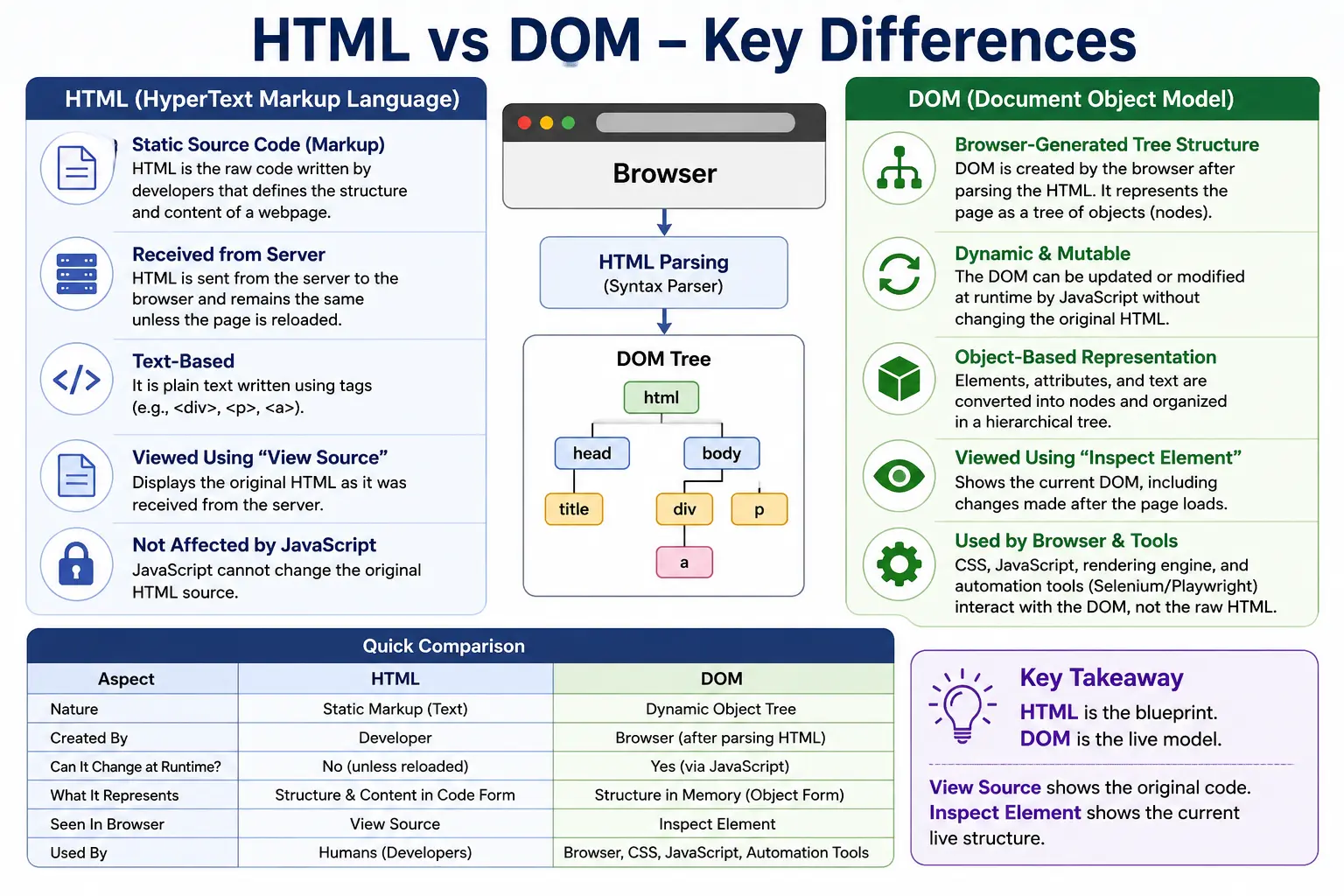
HTML is the source code of a webpage. It is the markup written by developers or generated by servers. The DOM, on the other hand, is the browser-created object model built after parsing that HTML. HTML is the input. DOM is the browser’s internal output.
This difference is extremely important because modern web pages are not always static. JavaScript can modify the DOM after the initial HTML is loaded. Frameworks such as React, Angular, and Vue can create, replace, and update DOM elements dynamically. As a result, what you see in “View Source” may not match what you see in “Inspect Element.” This is why understanding HTML vs DOM is essential for debugging, frontend development, and automation testing.
In simple terms, HTML is the blueprint, while the DOM is the actual living structure built from that blueprint.
Quick Definition of HTML
HTML stands for HyperText Markup Language. It is the standard markup language used to create and structure webpages.
HTML is written as tags and text.
Example:
<h1>SoftwareTips4U</h1>
<p>Learn HTML</p>
This source code describes what content should exist on the page. It tells the browser that there should be a heading and a paragraph. However, HTML itself is still just text. It must be parsed by the browser before it becomes a usable page structure.
HTML may be stored in files such as:
index.html
about.html
contact.html
It may also be generated dynamically by a backend server. But regardless of how it is produced, HTML reaches the browser as source markup.
Quick Definition of DOM
DOM stands for Document Object Model. It is the browser’s object-based representation of an HTML document.
After the browser receives HTML, it parses it and creates a tree-like structure.
Example DOM:
Document
 │
 html
 │
 body
 ├── h1
 │    └── SoftwareTips4U
 │
 └── p
      └── Learn HTML
The DOM represents the webpage as nodes. Each element, attribute, and text value becomes part of this structure.
The DOM is important because browsers, JavaScript, CSS, and automation tools interact with this object model. JavaScript does not directly manipulate the original HTML text. It manipulates DOM nodes.
Simple Analogy: Blueprint vs House
A good way to understand the difference is through a house analogy.
HTML is like a blueprint. It contains instructions for building the structure. It describes where rooms, doors, and windows should be placed.
The DOM is like the actual house built from that blueprint. Once the house exists, people can open doors, paint walls, add furniture, remove windows, or modify rooms.
Similarly, HTML describes the page structure, but the DOM is the constructed browser structure that can be modified at runtime.
The relationship looks like this:
HTML Source
      ↓
HTML Parser
      ↓
DOM Creation
      ↓
Browser Rendering
HTML is the input. DOM is the output.
Relationship Between HTML and DOM
HTML and DOM are closely related, but they are not identical.
The browser receives HTML as source code. Then the HTML parser reads the markup and creates DOM nodes. These nodes are organized into parent-child relationships. The resulting DOM becomes the working structure of the webpage.
Example HTML:
<body>
    <h1>Hello</h1>
</body>
DOM created:
Document
 │
 html
 │
 body
 │
 h1
 │
 Hello
The DOM is created from HTML, but it can later change independently of the original HTML source.
This is the most important point: the DOM can be updated dynamically while the HTML source remains unchanged.
Key Difference 1: Nature
HTML is a markup language. It uses tags to describe content and structure.
The DOM is a programming object model. It represents the page as objects that browsers and JavaScript can manipulate.
HTML is text-based.
The DOM is object-based.
HTML looks like this:
<div>
   <p>Hello</p>
</div>
The DOM represents it like this:
div
 └── p
      └── Hello
In practical terms, HTML is what developers write, while the DOM is what browsers create.
Key Difference 2: Format
HTML is written in tag format.
Example:
<h1>Hello</h1>The DOM is represented as a tree structure.
Example:
h1
 └── Hello
HTML can be opened in a text editor. The DOM is stored in browser memory and can be inspected using developer tools.
This difference is why “View Source” and “Inspect Element” may show different results.
Key Difference 3: Storage Location
HTML is usually stored as a file on a server or generated dynamically by backend code.
Example:
index.htmlWhen a browser requests a webpage, the server sends HTML over the network.
The DOM is stored inside browser memory.
Example:
Chrome Memory
Firefox Memory
Safari Memory
The DOM exists only while the page is loaded. Once the tab is closed or refreshed, the DOM is destroyed and recreated when the page loads again.
Key Difference 4: Mutability
HTML source is generally static after it is received from the server.
Example HTML source:
<h1>Hello</h1>The DOM can change anytime.
Example JavaScript:
document.querySelector("h1").innerText = "Welcome";Updated DOM:
h1
 └── Welcome
The original HTML source may still contain:
<h1>Hello</h1>But the DOM now contains:
<h1>Welcome</h1>This dynamic nature is what enables modern interactive web applications.
Key Difference 5: Dynamic Behavior
HTML is static by nature. It defines initial structure.
Example:
<p>Product Price</p>The DOM is dynamic. It can change based on JavaScript, user actions, API responses, and application state.
For example:
document.body.append("New Content");This adds new content to the DOM.
JavaScript can add nodes, remove nodes, update text, change attributes, attach event listeners, and modify styles.
This means the webpage users see may be very different from the original HTML response.
Key Difference 6: Interaction
HTML cannot interact directly with users. It is source markup.
The DOM can participate in interaction because JavaScript attaches events to DOM nodes.
Example:
document.getElementById("login");This searches the DOM for an element with the id login.
JavaScript APIs such as these work with DOM nodes:
document.getElementById()
document.querySelector()
document.createElement()
document.body.append()
JavaScript does not directly manipulate the HTML file on the server. It manipulates the DOM structure currently loaded in the browser.
Key Difference 7: Browser Usage
HTML is used by the HTML parser.
The parser reads HTML and creates the DOM.
The DOM is used by many browser systems, including CSS, JavaScript, the rendering engine, accessibility tools, and automation tools.
CSS applies styles to DOM elements.
JavaScript modifies DOM elements.
The rendering engine uses the DOM to create the render tree.
Selenium searches the DOM to locate elements.
This makes the DOM the active working structure of the page.
Key Difference 8: Visibility of Changes
This is one of the most practical differences.
Suppose the original HTML is:
<h1>Hello</h1>Then JavaScript runs:
document.querySelector("h1").innerText = "Updated";If you open “View Source,” you may still see:
<h1>Hello</h1>But if you open “Inspect Element,” you will see:
<h1>Updated</h1>This happens because “View Source” shows the original HTML received from the server, while “Inspect Element” shows the current DOM.
For debugging modern applications, Inspect Element is usually more useful because it shows the real structure currently being used by the browser.
HTML vs DOM Example
Initial HTML:
<body>
    <h1>Hello</h1>
</body>
Browser creates DOM:
Document
 │
 html
 │
 body
 │
 h1
 │
 Hello
JavaScript modifies DOM:
document.querySelector("h1").innerText = "SoftwareTips4U";Updated DOM:
Document
 │
 html
 │
 body
 │
 h1
 │
 SoftwareTips4U
The HTML source remains unchanged, but the DOM has changed.
This is how dynamic web applications update content without reloading the page.
Why the DOM Exists
The DOM exists because browsers need a structured, programmable model of the page.
Without the DOM, CSS could not style elements properly, JavaScript could not modify elements, browsers could not manage page structure, and automation tools could not interact with pages reliably.
The DOM acts as a bridge:
HTML
 ↓
Browser
 ↓
JavaScript
It allows source code to become an interactive system.
DOM and CSS
CSS applies styles to DOM nodes.
Example:
h1 {
   color: blue;
}
This rule does not style the raw text inside the HTML file. The browser applies it to the h1 node inside the DOM.
The browser combines the DOM with the CSSOM to create the render tree.
This render tree determines what is visually displayed on the screen.
DOM and JavaScript
JavaScript works entirely through DOM APIs.
Examples:
document.getElementById("login");
document.querySelector(".menu");
document.createElement("div");
These methods allow JavaScript to find, create, update, or remove DOM nodes.
For example:
const heading = document.querySelector("h1");
heading.innerText = "New Title";
This updates the DOM immediately.
The browser then updates the visual page.
DOM and Selenium
For automation testing, this distinction is extremely important.
Selenium does not interact with raw HTML files.
When you write:
driver.findElement(By.id("login"));Selenium searches the DOM tree inside the browser.
It does not search the original index.html file.
This explains several automation issues.
If an element is not yet created in the DOM, Selenium cannot find it.
If JavaScript replaces an element after Selenium finds it, Selenium may throw StaleElementReferenceException.
If an element exists in the DOM but is hidden from rendering, Selenium may find it but may not be able to click it.
Understanding the DOM is essential for XPath, CSS selectors, dynamic elements, waits, and stable automation design.
Real-World Example: Amazon Price Update
Imagine a product page.
Server sends HTML:
<div id="price">$100</div>Then JavaScript runs after checking a discount API:
price.innerText = "$90";The browser shows:
$90The original HTML may still contain $100, but the DOM now contains $90.
This is why testers should inspect the DOM, not only the page source, when validating modern websites.
Comparison Table
| Feature | HTML | DOM |
|---|---|---|
| Full Form | HyperText Markup Language | Document Object Model |
| Nature | Markup Document | Object Model |
| Format | Text | Tree Structure |
| Created By | Developer or Server | Browser |
| Storage | File or Server Response | Browser Memory |
| Mutability | Generally Static | Dynamic |
| Runtime Changes | No direct runtime change | Can change anytime |
| Used By | HTML Parser | CSS, JavaScript, Rendering Engine, Selenium |
| Directly Manipulated | No | Yes |
| Viewed Using | View Source | Inspect Element |
Common Interview Question: Is HTML the Same as DOM?
No, HTML and DOM are not the same.
HTML is the source markup document received from the server or written by the developer. The DOM is the browser-created object representation of that document. The DOM is used for rendering, styling, JavaScript interaction, event handling, and automation. JavaScript can modify the DOM at runtime while the original HTML source remains unchanged.
A short answer would be:
HTML is the source code of a webpage, while the DOM is the browser-generated tree structure created from HTML.
Key Takeaway
HTML and DOM are closely related, but they serve different purposes. HTML is the static markup source that describes the initial page structure. The DOM is the dynamic, object-based tree structure created by the browser after parsing HTML. CSS styles the DOM, JavaScript manipulates the DOM, rendering engines use the DOM to display pages, and Selenium interacts with the DOM during automation.
Understanding this difference is essential for web development, debugging, browser rendering, JavaScript programming, and UI automation.
One-Line Insight
HTML is the blueprint; DOM is the living, interactive structure built from that blueprint.