HTML Validation Tools
Introduction
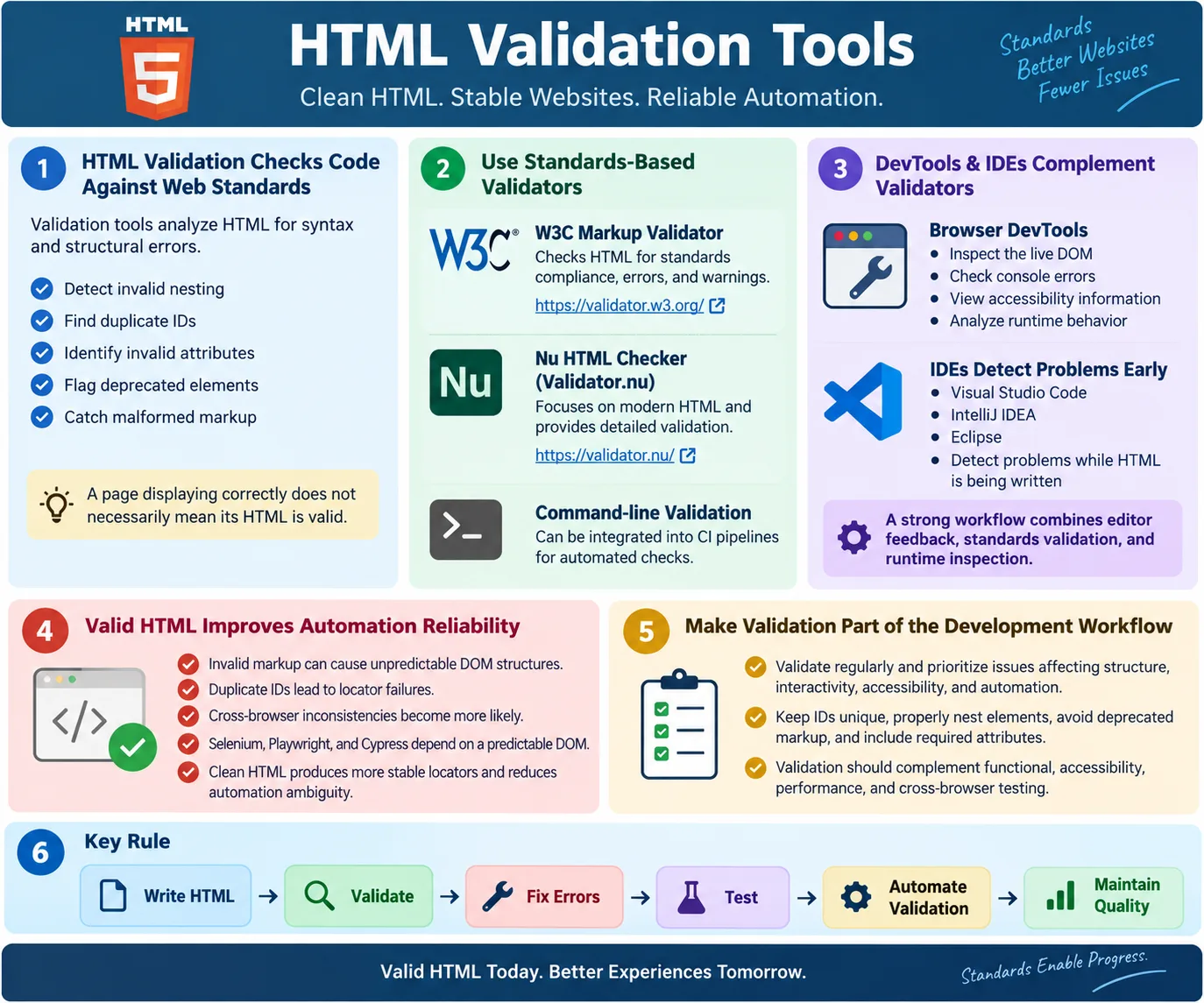
HTML validation tools are utilities that analyze HTML code to verify that it follows web standards and contains no syntax or structural errors. They help developers and testers identify problems such as missing tags, invalid attributes, duplicate IDs, incorrect nesting, deprecated elements, missing required attributes, and malformed markup. A browser may still display a page even when the HTML is invalid, but that does not mean the document is healthy. Invalid HTML can create unexpected rendering, accessibility problems, SEO issues, and automation failures.
Validation improves code quality, browser compatibility, accessibility, SEO, UI automation reliability, and maintainability. It gives teams a standards-based way to check whether the page structure is correct before deployment. This is important because browsers are forgiving. They often try to repair invalid HTML automatically. That repair behavior may differ between browsers, and automation tools interact with the repaired DOM, not always the structure the developer intended.
For testers and SDETs, HTML validation is more than a developer concern. Clean HTML produces a predictable DOM. A predictable DOM leads to better locators. Better locators lead to fewer flaky tests. When validation is part of the development and testing workflow, many issues are caught before users, search engines, assistive technologies, or automation frameworks encounter them.
What Is HTML Validation?
HTML validation is the process of checking whether an HTML document complies with the HTML Living Standard. A validator reads the markup, analyzes its structure, and reports errors or warnings. The goal is not merely to satisfy a tool. The goal is to ensure that the document has a correct, standards-compliant foundation that browsers and other tools can interpret consistently.
Write HTML
  ↓
Validator
  ↓
Detect Errors
  ↓
Fix Issues
  ↓
Valid HTML
Validation checks the markup before or during deployment. It helps catch mistakes that may be easy to miss during visual testing. A page may look correct in one browser because the browser repaired the markup, but another browser, crawler, screen reader, or automation tool may interpret the same invalid structure differently. Validation reduces this risk by catching structural problems at the source.
Why Validate HTML?
Without validation, a team may write HTML, deploy it, and only discover problems later through unexpected browser behavior, accessibility defects, SEO warnings, or automation failures. The page may appear correct at first glance, but hidden structural errors can create long-term maintenance problems. Validation provides earlier feedback.
Without validation:

Write HTML
  ↓
Deploy
  ↓
Unexpected Browser Behavior
  ↓
Automation Problems
With validation:
Write HTML
↓
Validate
↓
Fix Errors
↓
Reliable WebsiteValidation reduces problems before users encounter them. It also supports team discipline. Developers receive clear feedback about standards. Testers receive a cleaner DOM to automate. Accessibility reviewers start from a stronger structural foundation. SEO work benefits from cleaner document parsing. The value compounds across the whole website.
What HTML Validators Check
Validators commonly detect missing closing tags, invalid nesting, duplicate IDs, invalid attributes, deprecated elements, missing required attributes, incorrect document structure, and syntax errors. Some validators also produce warnings for questionable patterns that may not be fatal but could affect compatibility or maintainability.
- Missing closing tags
- Invalid nesting
- Duplicate IDs
- Invalid attributes
- Deprecated elements
- Missing required attributes
- Incorrect document structure
- Syntax errors
These checks are valuable because HTML has rules. Elements have permitted parents and children. Attributes must be valid for the elements that use them. IDs must be unique. Some older elements are obsolete. Validation turns those rules into practical feedback.
Example of Invalid HTML
A common mistake is invalid nesting. For example, placing a block-level <div> directly inside a paragraph is invalid. Browsers may repair the structure silently, but the resulting DOM may not match what the developer expects.
Invalid:

<p>
  <div>
    Hello
  </div>
</p>
The problem is that a <div> element cannot be nested directly inside a <p> element. A better structure places the paragraph inside a div or uses appropriate inline content inside the paragraph.
Correct:

<div>
  <p>
    Hello
  </p>
</div>
This may seem small, but invalid nesting can affect CSS, JavaScript, accessibility, and automation. The browser's repaired DOM may not match the source code, which can confuse debugging.
Example: Duplicate IDs
Duplicate IDs are invalid because an ID is intended to identify one element in the document. Duplicate IDs can confuse JavaScript, CSS selectors, labels, accessibility tools, and automation frameworks. If a test uses By.id("email") and two elements have that ID, the result may be ambiguous.
Invalid:

<input id="email">
<input id="email">
Correct:
<input id="personalEmail">
<input id="workEmail">Validation catches duplicate IDs early. This is one of the most directly useful validation checks for UI automation because duplicate IDs often lead to locator ambiguity.
Example: Missing Required Attribute
Some attributes are not strictly required for browser rendering but are required for good accessibility and quality. Images should include meaningful alt text when they communicate content. Decorative images should use empty alt text so assistive technologies can skip them.
Image:

<img src="logo.png">
Better:
<img
src="logo.png"
alt="Company Logo">The alt attribute improves accessibility and supports HTML best practices. Validation and related tools can help identify missing or weak image alternatives, though a human still needs to judge whether the alt text is meaningful.
Example: Missing Closing Tag
Browsers can often recover from missing closing tags, but relying on browser recovery is poor practice. Properly closing elements improves readability, consistency, and maintainability. It also prevents unexpected DOM structures in more complex layouts.
Bad:

<ul>
  <li>HTML
  <li>CSS
</ul>
Better:
<ul>
<li>HTML</li>
<li>CSS</li>
</ul>HTML has optional closing tags for some elements, but explicit, consistent markup is often easier for teams to read and maintain, especially in educational code, templates, and large applications.
Common HTML Validation Tools
Several tools can validate or inspect HTML. The most common are standards-based validators, browser developer tools, and IDE validation features. Each tool has a different role. A standards validator checks compliance. DevTools inspects the live DOM and runtime behavior. An IDE helps catch mistakes while code is being written.
These tools complement each other. No single tool replaces all others. A validator may catch invalid markup. DevTools may reveal that JavaScript creates a different DOM at runtime. An IDE may catch syntax mistakes before the page is opened. A strong workflow uses multiple layers of feedback.
1. W3C Markup Validator
The W3C Markup Validator is one of the most widely used HTML validation tools. It validates HTML documents against standards, detects syntax errors, reports warnings, and helps teams verify standards compliance. It can be used with public URLs, uploaded files, or direct input depending on the workflow.
- Validates HTML documents
- Detects syntax errors
- Reports warnings
- Checks standards compliance
This tool is useful for public pages, templates, and final checks before release. It gives clear feedback that can be shared between developers and testers.
2. Nu HTML Checker
The Nu HTML Checker, also known as Validator.nu, is the validator used by the W3C validator service for modern HTML. It focuses on HTML5 and the current HTML standard. It provides detailed error reporting and supports validation through URLs, local files, and command-line workflows.
- HTML5 validation
- Detailed error reporting
- Supports local files and URLs
- Command-line support
Command-line validation is valuable for automation. Teams can include validation in CI pipelines so that invalid markup is detected before deployment. This turns validation into an enforceable quality gate instead of a manual afterthought.
3. Browser Developer Tools
Chrome, Edge, and Firefox Developer Tools help inspect HTML and identify runtime issues. DevTools is not a full standards validator, but it is essential for understanding what the browser actually rendered. The Elements panel shows the live DOM. The Console shows warnings and errors. Accessibility panels can reveal names, roles, and properties.
- DOM inspection
- Accessibility inspection
- Console warnings
- Runtime debugging
DevTools complements validation because the browser may change the DOM after the page loads. JavaScript can add, remove, or modify elements. A validator checks the provided document, while DevTools shows the current browser state. Testers need both perspectives.
4. IDE Validation
Modern IDEs provide real-time HTML validation. Visual Studio Code, IntelliJ IDEA, Eclipse, and other editors can highlight syntax problems, support auto-completion, format markup, and warn about invalid structure. This feedback is valuable because it catches problems during development rather than after deployment.
- Syntax highlighting
- Auto-completion
- Error detection
- Formatting assistance
IDE validation is not a replacement for standards validation, but it improves the daily coding experience. It helps developers write cleaner markup from the beginning.
Browser Workflow
The validation workflow sits before reliable browser rendering. HTML is written, passed through a validator, errors are found, developers fix the issues, and the browser renders the corrected document more predictably. This process reduces uncertainty.
HTML
  ↓
Validator
  ↓
Errors Found
  ↓
Developer Fixes
  ↓
Browser Renders Correctly
The goal is not to prevent every possible browser difference. The goal is to avoid avoidable markup errors that make browser behavior less predictable.
HTML Validation vs Browser Rendering
Browsers often attempt to repair invalid HTML automatically. This is useful for users because pages may still display even when authors make mistakes. However, automatic repair can hide problems from developers. The page may appear correct, but the browser may have created a different DOM than expected.
Invalid HTML
  ↓
Browser Repairs
  ↓
Page Appears Correct
Different browsers may repair invalid HTML differently. Automation tools interact with the resulting DOM, which may differ from what the developer expected. Therefore, valid HTML is important. It reduces the amount of guesswork browsers must perform and makes the DOM more predictable.
Validation vs Accessibility Testing
HTML validation and accessibility testing are related but not the same. HTML validation checks syntax, structure, and standards compliance. Accessibility testing checks whether people using assistive technologies can use the content effectively. A page can be valid but still inaccessible. A page can have accessibility issues even if the validator shows no syntax errors.
| HTML Validation | Accessibility Testing |
|---|---|
| Checks HTML syntax | Checks usability for assistive technologies |
| Finds structural errors | Finds accessibility issues |
| Ensures standards compliance | Ensures inclusive user experience |
Both are important and complement each other. Validation provides a clean foundation. Accessibility testing verifies that the foundation creates a usable experience for all users.
HTML Validation and Automation
Invalid HTML can cause unpredictable DOM structures, locator failures, duplicate IDs, accessibility problems, and cross-browser inconsistencies. Clean HTML helps create stable automation tests. This is why SDETs should care about validation even if they do not write the application markup directly.
- Unpredictable DOM structures
- Locator failures
- Duplicate IDs
- Accessibility problems
- Cross-browser inconsistencies
Automation frameworks such as Selenium, Playwright, and Cypress depend on a reliable DOM. If the markup is invalid, locators may behave unpredictably. A duplicated ID may make a test click the wrong element. Incorrect nesting may place an element outside the expected parent. Validation prevents many of these issues early.
SEO Benefits
Valid HTML contributes to better crawlability, cleaner document structure, improved accessibility, and easier parsing by search engines. Validation alone does not guarantee better rankings, but it supports overall website quality. Search engines need to parse content, headings, links, images, and metadata. Cleaner HTML makes that work easier.
- Better crawlability
- Cleaner document structure
- Improved accessibility
- Easier parsing by search engines
SEO problems often come from a combination of issues: weak content, poor performance, missing metadata, inaccessible markup, and confusing structure. Valid HTML is one piece of a larger quality picture.
Validation in CI Pipelines
For professional teams, validation can be automated. A command-line validator can run during CI to check generated HTML or important templates. If invalid markup is detected, the build can fail or produce warnings. This moves validation from a manual checklist to a repeatable process.
CI validation is especially useful for static websites, documentation sites, design systems, and component libraries. It catches regressions when templates change. It also keeps teams disciplined because invalid HTML is detected consistently, not only when someone remembers to run a validator manually.
How Testers Should Use Validation Results
Testers do not need to fix every HTML issue themselves, but they should understand validation results well enough to identify risk. A duplicate ID is not just a coding style issue; it can directly affect Selenium locators and JavaScript behavior. Invalid nesting is not just a standards concern; it can change the DOM that automation sees. Deprecated markup is not just old-fashioned; it may behave inconsistently across browsers and devices.
When reviewing validation results, testers should classify issues by impact. A broken document structure near a critical checkout form deserves more attention than a minor warning in a rarely used static footer. Missing alt text on important images affects accessibility. Duplicate IDs in login or payment flows can create automation ambiguity. The goal is to connect validation findings to user impact and test reliability.
Good bug reports should explain why the validation issue matters. Instead of reporting only "HTML validator shows duplicate ID," a stronger report says "The email field and recovery email field both use id='email', causing labels and automation locators to target the wrong field." This makes the defect actionable and helps developers prioritize it correctly.
Error vs Warning
Validation tools often report both errors and warnings. Errors usually indicate clear violations of the HTML standard, such as invalid nesting, duplicate IDs, or unsupported attributes. Warnings may indicate potential problems, questionable patterns, or compatibility concerns. Both are useful, but they do not always carry the same severity.
An error should normally be fixed unless there is a very specific reason it cannot be fixed immediately. A warning should be reviewed and understood. Some warnings may be harmless in context, while others may reveal real maintainability or accessibility risks. Ignoring all warnings is poor practice because warnings often point to future defects.
Teams should avoid treating validation as a mechanical pass-or-fail exercise without judgment. A clean validation report is helpful, but the real goal is quality. Review the message, inspect the markup, understand the context, and decide the right fix.
Validation and Generated HTML
Many modern websites do not write every final HTML line by hand. Templates, components, markdown processors, CMS systems, static site generators, and frontend frameworks generate HTML. Validation is still important because users and automation interact with the generated output, not the source template alone.
A component may look correct in isolation but produce invalid markup when composed with another component. For example, a card component may include a heading, and a page template may wrap it in another heading incorrectly. A CMS editor may allow content authors to paste invalid markup. A markdown converter may create heading levels that skip too aggressively. Validating generated pages catches these integration issues.
For static sites, teams can validate built HTML files after generation. For dynamic applications, important rendered pages or server-side templates can be validated as part of testing. The key is to validate what the browser receives whenever possible.
Validation and Cross-Browser Stability
Valid HTML does not guarantee identical rendering across browsers, but invalid HTML increases the chance of browser differences. Browsers have error-recovery algorithms, but complicated invalid structures can still lead to unexpected DOM results. If one browser repairs the markup in a way that differs from another browser, layout, JavaScript behavior, accessibility, and automation can diverge.
This is especially important in forms, tables, navigation menus, and nested interactive components. Incorrect table structure can affect how rows and cells are interpreted. Invalid form nesting can affect submission behavior. Improperly nested links or buttons can create inconsistent click targets. Validation reduces these risks by forcing the structure to follow predictable rules.
Cross-browser testing and validation should work together. Validation catches structural issues. Cross-browser testing confirms behavior in supported environments. If a cross-browser issue appears, validation is a good early diagnostic step because invalid markup may be the root cause.
Validation and Accessibility Audits
Accessibility audits often begin with structure. Proper headings, labels, landmarks, image alternatives, table headers, and form relationships all depend on good HTML. Validation tools do not replace accessibility tools, but invalid HTML can undermine accessibility. A label that points to a duplicated ID may not label the intended input. A malformed table may be confusing to screen readers. Missing alt text may leave image meaning unavailable to non-visual users.
Automated accessibility tools such as browser accessibility panels and auditing extensions can identify many accessibility issues, but they assume the DOM is meaningful. Valid HTML provides a cleaner base for those tools. Manual screen reader testing is still needed for important workflows, but validation reduces avoidable structural problems before deeper accessibility testing begins.
Validation and SEO Audits
Search engines are robust, but they still need to parse HTML correctly. Invalid document structure can make pages harder to understand. Missing title tags, weak headings, malformed links, missing image alt text, and incorrect canonical tags are not all pure validation errors, but they are related to HTML quality. A validation-first mindset supports SEO audits because it keeps the document structure clean.
For SEO, validation should be combined with checks for headings, metadata, canonical links, robots directives, internal links, structured data, image attributes, and content accessibility. Validation alone does not make a page rank well, but it prevents avoidable technical noise from weakening the page's foundation.
Practical Validation Workflow
A practical validation workflow starts in the editor. Developers use IDE feedback to catch syntax errors while writing code. Next, the page is run locally and inspected with browser DevTools. Then a standards validator checks the generated HTML. For important pages, accessibility and SEO checks follow. In larger teams, CI validation catches regressions before deployment.
IDE Feedback
  ↓
Local Browser Check
  ↓
HTML Validator
  ↓
Accessibility / SEO Review
  ↓
CI or Release Gate
This workflow does not need to be heavy for every small change. The depth of validation should match risk. A minor text change may need a quick check. A new form, navigation structure, checkout page, or reusable component deserves stronger validation.
Prioritizing Validation Fixes
When a page has many validation findings, prioritize fixes that affect structure, interactivity, accessibility, and automation. Duplicate IDs, invalid nesting, broken forms, malformed tables, missing labels, and unsupported attributes on important elements should be addressed quickly. Cosmetic or low-risk warnings can be scheduled if they do not create immediate risk.
Prioritization should also consider reuse. A validation problem inside a shared component may affect many pages. Fixing the component can improve the whole application. A one-off issue in a low-traffic page may be less urgent, though still worth correcting. This risk-based view keeps validation practical rather than overwhelming.
Limitations of HTML Validation
HTML validation is valuable, but it has limits. A page can be valid and still have poor design, weak content, inaccessible interactions, slow performance, bad SEO, or broken business logic. Validation checks structural correctness, not whether the application meets user needs. It is one quality gate, not the entire quality strategy.
For example, a form can have valid HTML but still show unclear error messages. A table can be valid but too complex for users. A page can validate successfully but still use poor heading hierarchy. A button can be valid but trigger the wrong action. Validation should be combined with functional testing, accessibility testing, usability review, performance analysis, and cross-browser testing.
Best Practices
Validate HTML regularly. Use semantic HTML. Keep IDs unique. Properly nest elements. Close tags correctly. Avoid deprecated elements. Include required attributes. Test across multiple browsers. These practices reduce structural issues and improve long-term maintainability.
- Validate HTML regularly
- Use semantic HTML
- Keep IDs unique
- Properly nest elements
- Close tags correctly
- Avoid deprecated elements
- Include required attributes
- Test across multiple browsers
Validation should be treated as a normal quality activity, not a one-time task. HTML changes over time. Templates are edited. Components are reused. New content is added. Regular validation keeps quality from drifting.
Common Mistakes
Duplicate IDs are a common mistake. They create ambiguous references for JavaScript, CSS, accessibility, and automation. Invalid nesting is another frequent issue, such as placing a div inside a paragraph. Missing required or best-practice attributes, such as image alt text, also create quality problems.
Duplicate IDs:

<input id="email">
<input id="email">

Invalid nesting:

<p>
  <div>Text</div>
</p>
Deprecated elements are another issue. Avoid obsolete elements such as <font> and <center>. Use CSS and modern semantic HTML instead. Ignoring validator warnings is also risky. Warnings may highlight potential compatibility or maintainability issues even if the page appears to work.
Selenium Perspective
Automation testers benefit from validated HTML because it produces a predictable DOM, reduces locator ambiguity, prevents duplicate IDs, and improves automation stability. Selenium itself does not validate HTML. It automates browser interactions. But Selenium tests are easier to write and maintain when the HTML is standards-compliant.
- Produces a predictable DOM
- Reduces locator ambiguity
- Prevents duplicate IDs
- Improves automation stability
If Selenium repeatedly fails to locate elements or clicks the wrong element, invalid HTML may be part of the root cause. Testers should inspect the DOM and consider validation when locator behavior seems inconsistent.
Validation Tools Comparison
| Tool | Purpose |
|---|---|
| W3C Markup Validator | Standards-based HTML validation |
| Nu HTML Checker | HTML5 validation |
| Chrome DevTools | DOM inspection and runtime analysis |
| VS Code | Real-time syntax validation |
| IntelliJ IDEA | HTML inspection and code analysis |
| Eclipse | HTML validation support |
Common Interview Questions
What is HTML validation? HTML validation is the process of checking whether HTML follows web standards and contains no structural or syntax errors.
Why validate HTML? Validation improves code quality, browser compatibility, accessibility, SEO, and automation reliability.
What is the W3C Validator? It is a widely used tool that checks HTML documents for standards compliance and reports errors and warnings.
Does invalid HTML always break webpages? No. Browsers often recover from invalid HTML, but the resulting behavior may differ across browsers and can affect automation.
Why are duplicate IDs a problem? IDs are intended to be unique. Duplicate IDs can confuse JavaScript, CSS, accessibility tools, and automation frameworks.
Does Selenium validate HTML? No. Selenium automates browser interactions but does not check whether HTML is standards-compliant.
Interview-Ready Answer
HTML validation tools analyze HTML documents to ensure they follow web standards and contain no syntax or structural errors. They detect issues such as invalid nesting, duplicate IDs, missing required attributes, deprecated elements, and malformed markup. Popular tools include the W3C Markup Validator, the Nu HTML Checker, browser developer tools, and IDE-based validators.
Validating HTML improves browser compatibility, accessibility, SEO, maintainability, and provides a more predictable DOM for UI automation frameworks such as Selenium, Playwright, and Cypress.
One-Line Insight
Valid HTML creates a predictable, standards-compliant foundation that benefits browsers, users, search engines, and automation tools alike.