<html> Tag and Language Attribute
Introduction
Every HTML document, regardless of whether it is a simple one-page website or a complex enterprise web application, is built around a single root element: the <html> tag. This tag forms the foundation of the document structure and acts as the container for all other HTML elements that make up a webpage. Without the <html> element, a webpage would lack the structural framework browsers rely on to interpret, parse, and render content correctly.
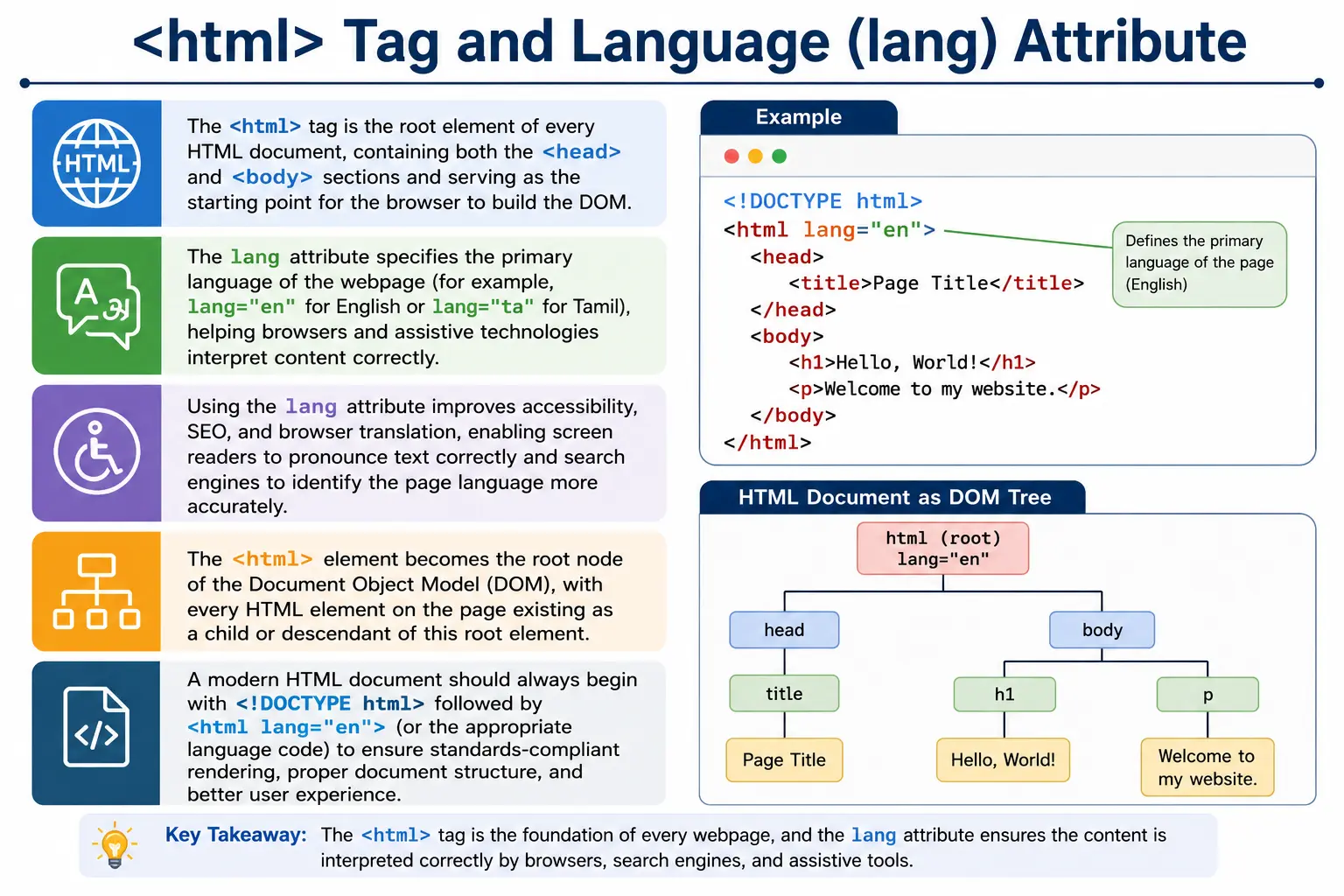
Along with the <html> tag, modern HTML documents typically include the lang attribute. While many beginners overlook this attribute because it does not visibly change the appearance of a webpage, it plays a critical role in accessibility, search engine optimization (SEO), browser translation services, and assistive technologies such as screen readers.
A properly structured HTML document usually begins like this:
<!DOCTYPE html>
<html lang="en">

<head>
    <title>My Website</title>
</head>

<body>
    <h1>Welcome</h1>
</body>

</html>
In this example, the <html> tag defines the root of the document, while lang="en" tells browsers and assistive technologies that the primary language of the page is English.
Understanding the <html> tag and the language attribute is essential because they influence how browsers build the DOM, how search engines understand content, how screen readers interpret text, and how users experience webpages across different languages and devices.
What Is the <html> Tag?
The <html> tag is the root element of an HTML document. It serves as the outermost container that encloses all webpage content and metadata.
Consider the following document:
<!DOCTYPE html>
<html>
<head>
    <title>SoftwareTips4U</title>
</head>
<body>
    <h1>Welcome</h1>
</body>
</html>
Everything except the DOCTYPE declaration resides inside the <html> element.
The browser treats the <html> element as the starting point of the document hierarchy. Every visible element, every metadata element, every image, every form, every heading, and every script ultimately belongs to the <html> element.
Without the <html> tag, the document structure would be incomplete, making it difficult for browsers to reliably interpret and render the page.
Why the <html> Tag Is Important
The <html> element is much more than a simple container. It plays several critical roles during webpage processing.
First, it acts as the root node of the Document Object Model (DOM). When the browser parses HTML and builds the DOM tree, the <html> element becomes the highest-level element beneath the document node.
Second, it establishes the boundaries of the HTML document. Browsers use it to determine where the webpage begins and ends.
Third, it provides a place for global attributes, such as the lang attribute, that apply to the entire document.
Finally, it serves as the parent element for the two most important sections of an HTML document:
<head>
<body>
Without the <html> element, the relationship between these sections would not be properly defined.
Position of the <html> Tag in the Document
In a standard HTML5 document, the <html> element appears immediately after the DOCTYPE declaration.
A typical structure looks like this:
<!DOCTYPE html>

<html>

<head>
</head>

<body>
</body>

</html>
The browser expects this arrangement because it follows the HTML specification.
The hierarchy is:
DOCTYPE
   │
 html
 ├── head
 └── body
This simple structure forms the basis of every webpage on the internet.
The <html> Element as the Root of the DOM
One of the most important concepts in web development is understanding how HTML becomes a DOM.
Consider this document:
<!DOCTYPE html>
<html>
<head>
    <title>Demo</title>
</head>
<body>
    <h1>Hello</h1>
</body>
</html>
After parsing, the browser creates the following DOM structure:
Document
 │
 html
 ├── head
 │      └── title
 │
 └── body
        └── h1
Notice that the <html> element sits directly beneath the document node.
This is why it is called the root element.
Every other element in the page descends from it.
Anatomy of the <html> Tag
The simplest form of the element is:
<html>
</html>
However, modern HTML documents usually include additional attributes:
<html lang="en">
</html>
The lang attribute is the most commonly used attribute on the root element because it provides important information about the language of the document.
What Is the lang Attribute?
The lang attribute specifies the primary language used in the document.
Example:
<html lang="en">This tells browsers:
The primary language of this page is English.Similarly:
<html lang="ta">indicates that the primary language is Tamil.
The browser itself may not visibly change the appearance of the page based on the language setting, but many tools and technologies depend on this information.
Syntax of the lang Attribute
The general syntax is:
<html lang="language-code">Examples:
<html lang="en">

<html lang="ta">

<html lang="hi">

<html lang="fr">
The language code should follow standardized language identifiers defined by international standards.
Common Language Codes
Some widely used language codes include:
| Language | Code |
|---|---|
| English | en |
| Tamil | ta |
| Hindi | hi |
| French | fr |
| German | de |
| Spanish | es |
| Japanese | ja |
| Chinese | zh |
| Arabic | ar |
| Russian | ru |
These codes allow browsers and assistive technologies to understand the language context of the document.
Examples of Language Declarations
An English webpage:
<html lang="en">A Tamil webpage:
<html lang="ta">A Hindi webpage:
<html lang="hi">A French webpage:
<html lang="fr">The structure remains identical. Only the language code changes.
Why the lang Attribute Matters
Many developers treat the language attribute as optional and ignore it.
Although the webpage will still function without it, omitting the attribute removes valuable information that browsers, search engines, and accessibility tools rely upon.
The language attribute affects:
- Accessibility
- Screen readers
- SEO
- Translation services
- Browser behavior
- Internationalization
For this reason, modern HTML standards strongly recommend including it.
Accessibility Benefits of the lang Attribute
Accessibility is one of the most important reasons for using the language attribute.
Screen readers rely heavily on language information.
Consider:
<html lang="en">A screen reader will use English pronunciation rules when reading content aloud.
Now consider:
<html lang="ta">The screen reader can switch to Tamil pronunciation rules.
Without the language declaration, assistive technologies may mispronounce words, making content difficult to understand for users with visual impairments.
The language attribute helps ensure content is read naturally and correctly.
Screen Readers and Pronunciation
Imagine a Tamil webpage without a language attribute:
<html>A screen reader might attempt to read Tamil text using English pronunciation rules.
The result can be confusing or unintelligible.
With:
<html lang="ta">the assistive technology understands how the content should be spoken.
This significantly improves accessibility.
SEO Benefits of the lang Attribute
Search engines attempt to determine the language of webpages.
The language attribute provides a clear signal.
Example:
<html lang="en">This tells search engines:
This page contains English content.Benefits include:
- Better indexing
- Improved language detection
- Better international SEO
- More accurate search results
Search engines use many signals to determine language, but the lang attribute is one of the most direct and reliable indicators.
Browser Translation Features
Modern browsers include automatic translation services.
For example, Chrome may display:
Translate this page?when visiting a foreign-language website.
The language attribute helps browsers detect the content language more accurately.
Example:
<html lang="ta">Chrome immediately knows the page is written primarily in Tamil and can offer translation options accordingly.
Without a language declaration, language detection becomes less reliable.
Multilingual Websites
Many websites contain content in more than one language.
For example:
<html lang="en">

<body>

<p>Hello</p>

<p lang="ta">
வணக்கம்
</p>

</body>

</html>
The page language is English.
However, the second paragraph explicitly declares Tamil.
This allows screen readers and browsers to switch language rules for that specific content.
Language Attribute on Nested Elements
The lang attribute is not limited to the <html> element.
It can be applied to individual elements.
Example:
<p lang="fr">
Bonjour
</p>
This overrides the document language for that section.
This is useful for:
- Quotes in foreign languages
- Multilingual articles
- Educational content
- Translation examples
The browser inherits language settings from parent elements unless a child element specifies a different language.
Browser Behavior Without the lang Attribute
A document without a language declaration still works:
<html>The browser can still render content.
However, the following benefits are reduced:
- Accessibility support
- Translation accuracy
- Language detection
- SEO effectiveness
Therefore:
<html lang="en">is considered best practice.
<html> Tag and DOM Creation
When the browser parses:
<html>
<head></head>
<body></body>
</html>
it creates:
Document
 │
 html
 ├── head
 └── body
The <html> element becomes the root element of the DOM.
Every node in the page ultimately descends from this root.
This relationship is fundamental to browser rendering and JavaScript interaction.
Difference Between <html> and <body>
Beginners often confuse these two elements.
The <html> element contains the entire document.
The <body> element contains visible content.
Structure:
html
 │
 ├── head
 │
 └── body
The body is only one part of the HTML document.
The <html> element contains both metadata and visible content.
Best Practice Example
A modern HTML5 document should look like this:
<!DOCTYPE html>

<html lang="en">

<head>
    <meta charset="UTF-8">
    <title>SoftwareTips4U</title>
</head>

<body>
    <h1>HTML Tutorial</h1>
</body>

</html>
This structure provides:
- Proper document hierarchy
- Language declaration
- Character encoding
- Metadata support
- Browser compatibility
Common Beginner Mistakes
Missing Language Attribute
Poor practice:
<html>Better:
<html lang="en">Using Invalid Language Codes
Incorrect:
<html lang="english">Correct:
<html lang="en">Language codes must follow standardized formats.
Content Outside the HTML Element
Incorrect:
<h1>Hello</h1>

<html>
...
</html>
All document content should reside inside the <html> element.
Forgetting the DOCTYPE
Incorrect:
<html lang="en">Correct:
<!DOCTYPE html>
<html lang="en">
The DOCTYPE and root element work together to create a proper HTML document.
HTML5 Recommendation
The recommended starting template for modern HTML development is:
<!DOCTYPE html>
<html lang="en">
<head>
</head>
<body>
</body>
</html>
This structure provides:
- Standards Mode rendering
- Proper document hierarchy
- Accessibility support
- SEO benefits
- Browser compatibility
Interview Questions
What Is the Root Element of an HTML Document?
The root element is:
<html>What Is the Purpose of the lang Attribute?
It specifies the primary language of the document.
Is the lang Attribute Mandatory?
No.
However, it is strongly recommended.
How Does the lang Attribute Help Accessibility?
It helps screen readers pronounce content correctly.
How Does the lang Attribute Help SEO?
It helps search engines identify the language of the webpage.
Can lang Be Used on Individual Elements?
Yes.
Individual elements can override the document language.
Interview-Ready Answer
The <html> tag is the root element of an HTML document and serves as the container for all webpage content, including the <head> and <body> sections. The lang attribute specifies the primary language of the document, helping browsers, search engines, screen readers, and translation tools correctly interpret the content. Although optional, the lang attribute is considered a best practice because it improves accessibility, SEO, and user experience.
Key Takeaway
The <html> element is the foundation of every webpage. It acts as the root of the DOM, contains the entire document structure, and provides a place for global document settings. Among these settings, the lang attribute is especially important because it communicates the document's language to browsers, search engines, accessibility tools, and translation services.
A modern HTML document should almost always begin with:
<!DOCTYPE html>
<html lang="en">
This simple combination establishes both the document standard and the language context for the entire page.
One-Line Insight
<html> defines the document root, and lang tells browsers, search engines, and assistive technologies what language the page speaks.