HTML Structure for SEO
Introduction
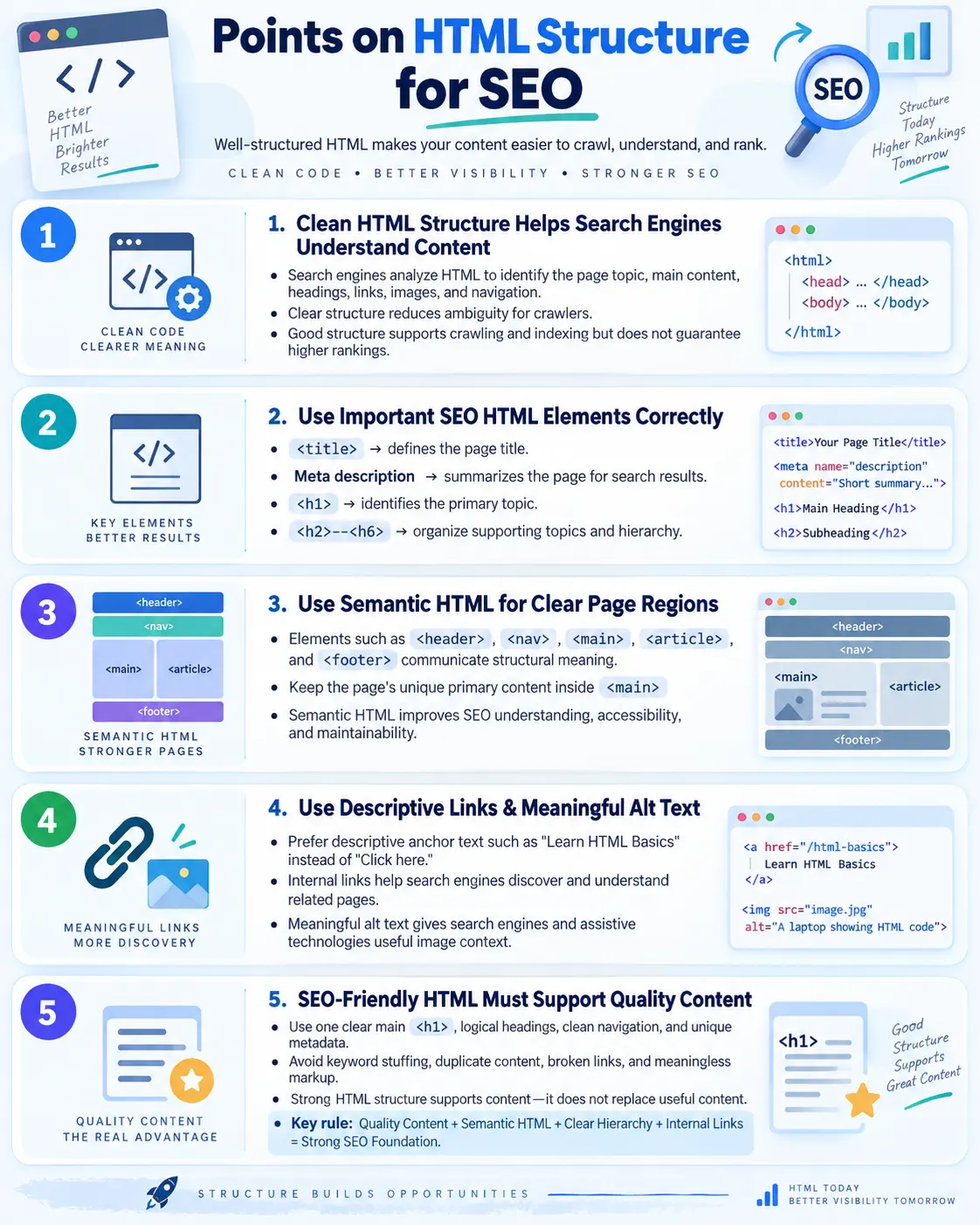
HTML Structure for SEO means organizing webpage content with clean, meaningful, semantic HTML so that search engines can understand the page clearly. A search engine does not experience a webpage in the same way a human visitor does. A visitor sees layout, colors, images, spacing, menus, advertisements, buttons, and visual hierarchy. A search engine first reads the HTML document, follows links, interprets metadata, analyzes headings, identifies main content, examines image alternatives, and tries to understand what the page is about. Because of this, HTML structure becomes the foundation on which many SEO signals are built.
Good HTML structure helps search engines identify the page topic, main content, headings, links, images, navigation, and important sections. It tells the crawler which part of the page is the primary article, which parts are repeated site navigation, which links point to related lessons, and which images support the content. SEO is not only about keywords. Keywords can help describe a topic, but if the page is badly structured, search engines may still struggle to understand hierarchy, relevance, and purpose. A page with a clear title, useful meta description, one strong main heading, logical subheadings, semantic layout, descriptive links, and meaningful image alt text is much easier to crawl, index, and evaluate.
HTML also affects how users experience a page. A structure that helps search engines usually helps people too. Clear headings make a long article easier to scan. Descriptive links tell users where they are going. Semantic landmarks help screen reader users jump to navigation, main content, and footer. Useful alt text makes images meaningful when they cannot be seen or loaded. These improvements are not separate from SEO. Search engines increasingly reward pages that are useful, understandable, accessible, and organized for real users.
Why HTML Structure Matters for SEO
Search engines read HTML to understand content. The crawler requests a page, receives HTML, discovers resources and links, and processes the page structure. A simple flow looks like this: HTML page, search engine crawls, search engine understands structure, and then the content can be indexed. If HTML is clear, the crawler can identify the title, description, headings, body content, internal links, media, and page relationships with less ambiguity. If HTML is confusing, the crawler may still index the page, but it may not understand the content as precisely as it could.
A poorly structured page can create many SEO problems. If there is no meaningful <title>, search engines may generate a title automatically or display a poor title in results. If the page has many unrelated <h1> headings, the main topic becomes less clear. If important text is hidden behind scripts or inserted in a way that cannot be crawled reliably, content may be missed. If navigation links are generic or broken, search engines may not discover important pages efficiently. If images have no alt text, search engines and assistive technologies lose useful context.
HTML structure matters because it reduces confusion. Search engines must process billions of pages, many of which are noisy, duplicated, thin, or technically broken. A clean structure makes your page easier to interpret. It does not guarantee ranking by itself, but it creates a strong technical base. Content quality, backlinks, page speed, relevance, user satisfaction, and authority still matter. However, when two pages have similar content quality, the page with clearer structure, better internal linking, better metadata, and better accessibility often has an advantage because it communicates its value more effectively.
Basic SEO-Friendly HTML Structure
A basic SEO-friendly HTML page starts with a valid document structure. It includes a doctype, an <html> element with a language attribute, a <head> section containing metadata, and a <body> section containing visible content. Inside the body, semantic elements such as <header>, <nav>, <main>, <article>, and <footer> help divide the page into understandable regions.
<!DOCTYPE html>
<html lang="en">

<head>
    <title>HTML Tutorial for Beginners</title>
    <meta name="description" content="Learn HTML basics with examples.">
</head>

<body>

<header>
    <h1>HTML Tutorial</h1>
</header>

<nav>
    <a href="/html">HTML</a>
    <a href="/css">CSS</a>
</nav>

<main>
    <article>
        <h2>What Is HTML?</h2>
        <p>HTML is the standard markup language for creating web pages.</p>
    </article>
</main>

<footer>
    <p>© 2026 SoftwareTips4U</p>
</footer>

</body>
</html>
This structure is simple, but it communicates a lot. The title tells search engines and users what the page is about. The meta description gives a short summary. The header introduces the page. The navigation lists important links. The main element identifies the primary content. The article element contains standalone tutorial content. The footer contains site-level information. This is much better than placing everything inside anonymous <div> elements without structure.
Important HTML Elements for SEO
Several HTML elements play a direct or indirect role in SEO. The <title> element defines the page title shown in browser tabs and often used in search results. The <meta name="description"> element provides a short summary that search engines may display as a snippet. The <h1> element identifies the main topic. The <h2> through <h6> elements create content hierarchy. The <main> element marks primary content. The <article> element represents independent content. The <section> element groups related topics. The <nav> element marks navigation links. The <a> element creates internal and external links. The <img> element with meaningful alt text gives images accessible and searchable meaning.
These elements do not work as isolated tricks. Their value comes from using them together in a coherent page. A strong title with poor content will not solve SEO. A perfect heading hierarchy with weak content will not make the page useful. Semantic HTML supports SEO by making the page understandable. It should be combined with original content, helpful examples, internal linking, fast loading, mobile-friendly design, and good user experience.
| Element | SEO Role |
|---|---|
<title> |
Defines page title shown in search results |
<meta name="description"> |
Provides search result summary |
<h1> |
Main topic of the page |
<h2>-<h6> |
Content hierarchy |
<main> |
Primary content |
<article> |
Independent content |
<section> |
Groups related topics |
<nav> |
Navigation links |
<a> |
Internal and external links |
<img alt=""> |
Image meaning and accessibility |
Use a Meaningful Title
The <title> element is one of the most important HTML elements for SEO. It appears in the browser tab, is often used as the clickable headline in search results, and tells both users and search engines what the page is about. A weak title such as Home or Untitled Document wastes a major opportunity. It gives no clear topic, no context, and no reason for a user to click.
<title>Home</title>A better title clearly describes the page and, when appropriate, includes the site or brand name. For example, HTML Tutorial for Beginners | SoftwareTips4U is more useful because it identifies the topic, audience, and source. The title should be specific enough to distinguish the page from other pages on the same website. If many pages share the same title, search engines may struggle to understand which page is relevant for a query.
<title>HTML Tutorial for Beginners | SoftwareTips4U</title>A good title should match the actual page content. It should not promise something the page does not deliver. It should avoid keyword stuffing, where the same terms are repeated unnaturally. Search engines are better at understanding natural language than older SEO practices assumed. A readable, accurate, user-focused title is stronger than a title overloaded with repeated keywords.
Use Meta Description Correctly
The meta description is a short summary of the page. It does not directly guarantee ranking, but it can influence how the page appears in search results and whether users choose to click. A clear description gives users a reason to visit the page. It should summarize the content accurately, include important concepts naturally, and avoid exaggerated claims.
<meta
  name="description"
  content="Learn HTML structure, elements, forms, tables, and semantic tags with simple examples.">
The description should be unique for each important page. If many pages use the same description, search engines may ignore it or generate their own snippet from the page content. This is especially important for tutorial websites. A page about forms, a page about tables, and a page about semantic HTML should not all have the same description. Each page should describe its own value.
Meta descriptions should also avoid misleading users. If the page is a beginner lesson, say so. If it is an interview guide, say so. If it contains examples, mention examples. A truthful description improves click quality because the users who arrive are more likely to find what they expected. Better alignment between search snippet and page content supports user satisfaction.
Use One Clear H1
The <h1> heading should represent the main topic of the page. On a tutorial page about HTML structure for SEO, the <h1> should clearly say that. A direct heading such as HTML Structure for SEO is better than a vague heading such as Welcome. Search engines use headings to understand topic hierarchy, and users use headings to scan content quickly.
<h1>HTML Structure for SEO</h1>Modern HTML technically allows multiple <h1> elements in some contexts, but for most tutorial and article pages, one clear main <h1> is the safest and simplest approach. It avoids confusion and gives the page a single primary topic. Subtopics should use <h2>, deeper points should use <h3>, and so on.
A common mistake is using headings only for visual size. Developers sometimes choose <h3> because it looks smaller or <h1> because it looks larger. This is wrong. Headings should express structure, not styling preference. CSS should control appearance, while heading tags should communicate hierarchy.
Use Proper Heading Hierarchy
Proper heading hierarchy helps search engines and users understand how content is organized. A good page starts with one <h1>, then uses <h2> for major sections, and <h3> for subsections within those sections. The order should be logical. You should not jump from <h1> directly to <h4> just because the design looks nice. If a section is important enough to be a major part of the article, it probably deserves an <h2>.
<h1>HTML Course</h1>

<h2>HTML Basics</h2>

<h3>HTML Tags</h3>

<h2>HTML Forms</h2>

<h3>Input Types</h3>
This structure is clear. The page is an HTML course. It has major sections for basics and forms. Each major section has related subsections. A bad structure would skip levels or place unrelated topics under the wrong heading. For example, putting Input Types under a heading hierarchy that does not include forms makes the outline less meaningful.
<h1>HTML Course</h1>

<h4>HTML Forms</h4>

<h2>Input Types</h2>
Good heading hierarchy also supports accessibility. Screen reader users often navigate by headings. If headings are logical, users can jump through the page and understand the structure quickly. If headings are used randomly, navigation becomes confusing. SEO and accessibility align here because both benefit from meaningful structure.
Use Semantic HTML
Semantic HTML helps search engines understand page regions. Elements such as <header>, <nav>, <main>, <section>, <article>, <aside>, and <footer> communicate meaning. They tell the browser and assistive technologies what kind of content a region contains. Compared to generic <div> elements, semantic elements make the page easier to interpret.
<header>
<nav>
<main>
<section>
<article>
<aside>
<footer>
A page built entirely with <div> elements can still be styled to look correct, but it does not communicate structure as clearly. A search engine may still understand some of the page through text and links, but semantic HTML removes ambiguity. It also gives assistive technologies better landmarks. A screen reader user can jump directly to navigation or main content if those regions are correctly marked.
Semantic HTML should be used honestly. Do not wrap every small block in <article> just because it sounds important. Use <article> for content that can stand alone, such as a tutorial, blog post, news story, product review, or forum post. Use <section> for a thematic group of content, usually with its own heading. Use <nav> for major navigation blocks, not every group of links. Correct semantic choices make the page cleaner and more maintainable.
Keep Main Content Inside Main
The <main> element identifies the primary page content. For SEO, this is useful because it separates the unique content of the page from repeated site elements such as header, navigation, sidebar, and footer. For accessibility, it gives users a landmark that helps them skip repeated content and reach the main lesson quickly.
<main>
    <h1>HTML Tutorial</h1>
    <p>Main lesson content...</p>
</main>
Repeated navigation and footer content should not be placed inside <main>. The main element should contain the content that is unique to that page. On a tutorial page, this usually includes the article heading, paragraphs, examples, tables, diagrams, and conclusion. On a product page, it includes product information. On a search results page, it includes the results. Keeping this structure clean helps both humans and machines separate primary content from supporting layout.
There should usually be only one visible <main> element per page. Multiple main landmarks can confuse assistive technology users. If a page has several content blocks, they can be sections inside one main element. The principle is simple: the main element is the central content region of the page.
Use Article for Standalone Content
The <article> element is useful for content that can stand alone. Examples include a blog post, tutorial, news article, product review, documentation page, forum answer, or lesson. If the content could be syndicated, shared, printed, or understood independently, <article> is often appropriate.
<article>
    <h2>What Is Semantic HTML?</h2>
    <p>Semantic HTML gives meaning to webpage structure.</p>
</article>
For SEO, article structure can help clarify where the main standalone content begins and ends. This does not mean that every article page must use <article>, but it is a strong semantic fit for educational content. Inside an article, headings should create a logical outline. Links should support the topic. Images should have useful alt text. Code examples should be marked up clearly with <pre> and <code> where appropriate.
Do not use <article> simply as a styling container. If a card, box, or layout block is not independent content, a <section> or <div> may be more appropriate. Semantic accuracy matters. The goal is not to use as many semantic tags as possible, but to use the right tag for the right purpose.
Use Descriptive Links
Links are one of the strongest structural signals on the web. Search engines use links to discover pages, understand relationships, and interpret context. Users rely on links to move through content. A link that says Click here does not explain where it goes. A link that says Learn HTML Basics gives useful context before the user clicks.
<a href="/html">Click here</a><a href="/html">Learn HTML Basics</a>Descriptive link text is better for SEO, accessibility, and usability. Screen reader users can list links on a page and navigate by link text. If many links say "click here," the list becomes useless. Search engines also use anchor text as one signal for the destination page. Natural, descriptive anchor text helps communicate the topic of the linked page.
Internal links should be used thoughtfully. They should connect related lessons, guide users to deeper explanations, and help search engines discover important pages. Avoid irrelevant links or excessive link stuffing. A page about HTML structure for SEO can naturally link to lessons about title tags, meta tags, headings, semantic HTML, alt text, internal linking, and accessibility. These links are useful because they support the user journey.
Use SEO-Friendly Image Alt Text
Images can support SEO when they are used meaningfully. The alt attribute provides text alternative for images. It helps screen reader users understand meaningful images, helps search engines understand image content, and provides fallback text if the image cannot load. An image without alt text loses context.
<img src="html-course.png"><img
src="html-course.png"
alt="HTML course structure diagram">Good alt text should describe the image in the context of the page. If the image is a diagram showing HTML course structure, the alt text should say that. If the image is a decorative background, an empty alt attribute may be better because it prevents screen readers from announcing unnecessary content. The key question is whether the image communicates information. If it does, write meaningful alt text. If it is purely decorative, use alt="".
Avoid keyword stuffing in alt text. Writing HTML HTML tutorial HTML course best HTML guide is not helpful. It looks spammy and creates a bad experience for users who rely on screen readers. Write alt text for humans first. Search engines benefit from accurate human-readable descriptions.
Use Clean Navigation
Navigation helps search engines discover important pages and understand site architecture. A clean navigation menu should use real links, clear labels, and logical grouping. When navigation is built with semantic HTML, it becomes easier for both users and crawlers to interpret.
<nav>
    <ul>
        <li><a href="/html">HTML Course</a></li>
        <li><a href="/css">CSS Course</a></li>
        <li><a href="/java">Java Course</a></li>
    </ul>
</nav>
Good navigation is not only a list of links. It is a map of the site. It should make important sections easy to reach. It should avoid burying important pages too deeply. It should be consistent across the site so users can build familiarity. For SEO, internal navigation distributes discoverability and context. If a page is not linked from anywhere, search engines may have difficulty finding it or understanding its importance.
Navigation should also work without relying entirely on complex scripts. If a menu only appears after JavaScript runs and the links are not present in the HTML, crawling and accessibility may become weaker. Modern search engines can process many JavaScript applications, but clean HTML links remain more reliable, faster, and easier to maintain.
Avoid Hidden or Duplicate Content
Search engines prefer clear, useful, user-focused content. Hidden keyword stuffing, repeated blocks of duplicate content, irrelevant links, and copied text can reduce quality. Hidden content is not always bad. For example, collapsed FAQ sections or tab panels can be legitimate if they are useful to users. The problem is content hidden purely to manipulate search engines or repeat keywords unnaturally.
Duplicate content also creates confusion. If many pages have the same title, same description, same headings, and nearly identical body text, search engines may not know which page to show. Tutorial websites often face this issue when pages are generated from templates. Templates are fine, but the title, description, <h1>, headings, examples, and body content should be unique and relevant to each page.
Broken internal links are another common structural problem. A link that points to a missing page wastes crawl paths and frustrates users. Poor link text, duplicate headings, empty pages, thin content, and irrelevant repeated blocks weaken the page. A clean SEO structure means the page is understandable, useful, and maintained.
Common SEO HTML Mistakes
Many SEO problems start with simple HTML mistakes. Missing <title> elements are common on unfinished pages. Missing meta descriptions reduce snippet control. Multiple confusing <h1> headings make the topic less clear. Poor heading order weakens document structure. Using <div> for everything removes semantic meaning. Missing image alt text affects accessibility and image understanding. Generic link text such as "click here" reduces clarity. Broken internal links block discovery. Duplicate page titles confuse indexing. Thin or copied content reduces value.
Another common mistake is designing only for appearance. A page may look good visually while being structurally weak. For example, a large bold line of text may look like a heading, but if it is only a styled <div>, it does not create a heading in the document outline. A button may look clickable, but if it is a non-semantic <span> with JavaScript, it may not behave correctly for keyboard users. A navigation menu may look polished, but if it uses inaccessible markup or broken links, it creates problems.
SEO-friendly HTML requires discipline. The developer must ask whether the page is understandable without CSS, whether links are descriptive, whether headings form a logical outline, whether images have meaningful alternatives, and whether the main content is easy to identify. These checks are simple, but they make a major difference.
SEO-Friendly Page Checklist
A practical checklist helps keep HTML structure consistent across pages. Start with a meaningful <title>. Add a good meta description. Use one clear main <h1>. Create a logical heading hierarchy. Use semantic HTML structure. Keep main content inside <main>. Use descriptive internal links. Add useful image alt text. Provide clean navigation. Avoid keyword stuffing. Make sure the page is mobile-friendly, fast, and accessible.
The checklist should not be treated as a one-time task. Every new page should follow it. When updating old pages, review titles, descriptions, headings, links, and alt text. When adding new navigation links, make sure they point to real pages and use descriptive names. When adding images, write alt text immediately instead of leaving it for later. Good SEO structure is easier to maintain when it is part of the normal publishing workflow.
- Meaningful
<title> - Good meta description
- One clear main
<h1> - Logical heading hierarchy
- Semantic HTML structure
- Main content inside
<main> - Descriptive internal links
- Useful image alt text
- Clean navigation
- No keyword stuffing
How Search Engines Interpret Structure
When a search engine processes a page, it tries to separate boilerplate from unique content. Boilerplate includes repeated header, navigation, sidebar, ads, and footer content. Unique content is the main reason the page exists. Semantic HTML can help this separation. If the article is inside <main> and the repeated site navigation is inside <nav>, the page communicates its regions clearly.
Search engines also analyze relationships between elements. A title should match the main topic. The <h1> should align with the title. Subheadings should support the page topic. Links should point to related resources. Image alt text should describe relevant visuals. If all these pieces tell the same story, the page appears coherent. If the title says one thing, the headings say another, and the links point to unrelated topics, the page becomes harder to understand.
Structured HTML also supports rich results and enhanced interpretation when combined with structured data. HTML alone communicates visible document structure. JSON-LD structured data can add machine-readable metadata for articles, breadcrumbs, FAQs, products, and other content types. However, structured data should match the visible content. It should not be used to describe content that users cannot find on the page.
HTML Structure and Accessibility Work Together
SEO and accessibility often overlap because both depend on meaningful HTML. A semantic heading structure helps search engines understand content hierarchy and helps screen reader users navigate. Descriptive links help search engines interpret destination pages and help users understand where links go. Alt text helps image search and helps users who cannot see images. Landmarks such as <nav> and <main> help assistive technologies and also make page regions clearer.
This overlap is important because SEO should not be treated as a set of tricks. The best SEO improvements often make the website better for real people. A page that is easier to read, scan, navigate, and understand tends to perform better because users find value in it. Accessibility improvements also reduce friction for users with disabilities, older users, mobile users, and users in temporary difficult situations.
For example, a tutorial page with proper headings can be skimmed quickly by a sighted user and navigated efficiently by a screen reader user. A descriptive internal link helps a crawler understand the target page and helps a learner decide what to read next. Good structure benefits everyone. That is why HTML structure is a foundational skill for developers, testers, content writers, and SEO teams.
Real-World Example
Imagine two pages that both teach HTML forms. The first page has a title of Page 1, no meta description, several random <h1> headings, image files without alt text, and links labeled more. The content may contain useful information, but the structure does not communicate it well. A user scanning the page may feel lost. A search engine may have to infer the topic from scattered text. A screen reader user may struggle to navigate sections.
The second page has the title HTML Forms Tutorial for Beginners, a clear description, one <h1>, sections for form purpose, form attributes, input types, labels, validation, and accessibility, descriptive internal links to related pages, and images with meaningful alt text. This page communicates its purpose clearly. Even before reading every paragraph, a user or crawler can understand the structure. That clarity is the goal of HTML structure for SEO.
This does not mean the second page will automatically outrank every competitor. Ranking depends on many factors. But the second page has a stronger technical and user experience foundation. It is more maintainable, more accessible, easier to crawl, and easier to improve over time.
Maintaining SEO Structure Across a Website
SEO-friendly HTML should not be limited to one page. A website becomes stronger when every important page follows a consistent structural pattern. For a learning website, this means every tutorial page should have a unique title, a clear meta description, one primary heading, logical section headings, useful internal links, and a consistent footer. The navigation should help learners move through topics in order, and the URL structure should make the page topic understandable. Consistency helps users, search engines, and site maintainers.
When a website grows, structural mistakes become easier to introduce. One page may miss a meta description. Another page may use a vague title. A newly created article may be added without a nav link. A tutorial may contain images without alt text. A copied template may leave an old canonical URL unchanged. These issues are small individually, but across hundreds of pages they can weaken crawl quality and user experience. That is why websites should use repeatable templates, checklists, and periodic audits.
A good workflow is to treat HTML structure as part of publishing quality. Before a page is published, verify that the document has a meaningful <title>, a useful description, a single main <h1>, semantic layout, valid internal links, and accessible media. After publishing, check whether the page appears in navigation, whether the canonical URL is correct, and whether the page can be reached from related lessons. This reduces orphan pages and helps search engines discover new content naturally.
For tutorial websites, internal linking is especially important. A beginner reading about HTML structure for SEO may also need lessons about title tags, meta tags, headings, semantic HTML, image alt text, navigation menus, structured data, and accessibility. Linking these related pages creates a learning path. It also helps search engines understand topical clusters. Instead of isolated pages, the website becomes a connected body of knowledge.
Maintaining structure also means avoiding unnecessary changes that break existing signals. If a page URL changes, redirects should be handled properly. If a title changes, it should still match the content. If a page is rewritten, headings should remain logical. If a navigation system is updated, important pages should not disappear accidentally. SEO structure is not a one-time setup. It is an ongoing discipline that keeps the website understandable as content grows.
Finally, remember that structure supports content; it does not replace content. A perfectly structured page with shallow information is still weak. A useful page with poor structure is harder to understand than it should be. The best result comes when strong content and clean HTML work together. The content answers the user's question, and the HTML makes that answer easy to find, understand, navigate, and index.
Interview-Ready Answer
HTML structure affects SEO because search engines use HTML to understand page content, hierarchy, navigation, and relevance. SEO-friendly HTML includes a meaningful <title>, meta description, one clear <h1>, logical heading hierarchy, semantic elements such as <header>, <nav>, <main>, <article>, and <footer>, descriptive links, and meaningful image alt text. A clean semantic structure improves crawlability, indexing, accessibility, and overall content understanding.
In an interview, the best answer should connect HTML structure to both search engines and users. You can say that search engines crawl HTML to identify the page topic, main content, headings, links, images, and navigation. Then explain that semantic HTML reduces ambiguity. Finally, mention that good structure also improves accessibility and user experience, which are important parts of modern web quality.
One-Line Insight
Good SEO starts with HTML that clearly tells search engines what the page is about and how the content is organized.