HTML Performance Metrics
Introduction
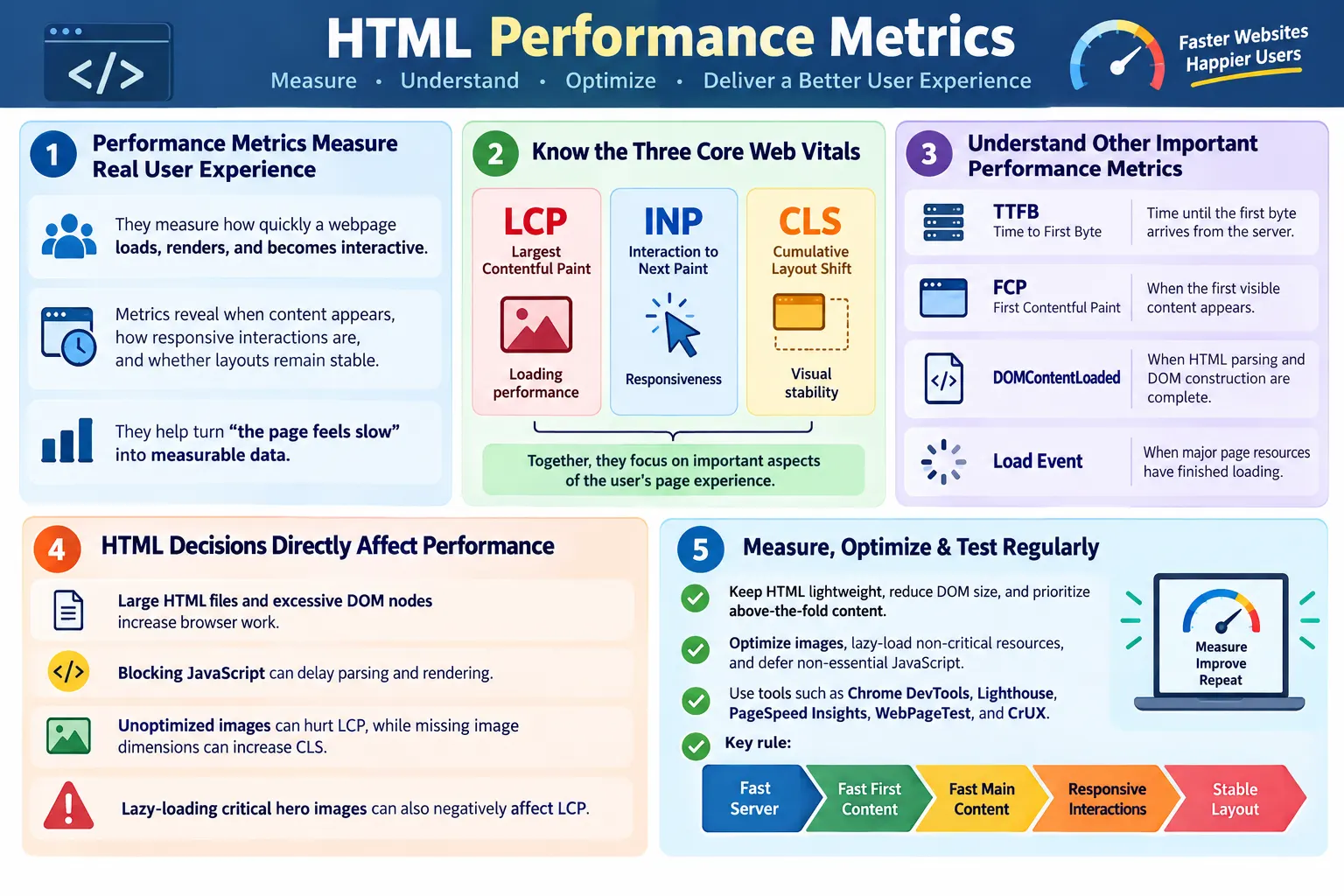
HTML Performance Metrics are measurements used to evaluate how quickly and efficiently a webpage loads, renders, and becomes interactive. These metrics help developers understand whether the HTML structure and related resources provide a fast and smooth user experience. A page may look visually complete after development, but performance metrics reveal what users actually experience: when the first content appears, when the main content appears, whether the layout moves unexpectedly, and how quickly the page responds to interaction.
Although performance depends on HTML, CSS, JavaScript, images, fonts, network conditions, the server, and third-party resources, HTML is the foundation. The browser cannot begin rendering a normal webpage until it receives and parses the HTML document. HTML tells the browser what content exists, which resources are needed, how the page is structured, which images should load, which scripts should run, and what metadata describes the page. Slow, bloated, or poorly structured HTML can affect every later stage of the loading process.
Performance metrics are important for user experience, Core Web Vitals, mobile performance, SEO, and optimization work. They turn vague complaints such as "the page feels slow" into measurable evidence. Once performance is measured, teams can identify bottlenecks, prioritize fixes, and confirm whether changes actually helped. Good performance work is not based on guesswork; it is based on metrics and user impact.
Why Performance Metrics Matter
Users expect webpages to load quickly. When a page takes too long to show useful content, users may leave before reading anything. When buttons respond slowly, users may click repeatedly or lose trust. When layout shifts unexpectedly, users may tap the wrong element. These issues are not only technical problems; they are user experience problems. Performance metrics help teams identify and reduce them.
- Poor user experience
- Higher bounce rates
- Slower interactions
- Increased resource usage
- Lower confidence in the website
Metrics also help different teams communicate. Developers, testers, designers, SEO specialists, and product owners can all understand a concrete number more easily than a subjective description. If Largest Contentful Paint is slow, the team can investigate images, server response, CSS, and critical content. If Cumulative Layout Shift is high, the team can look for missing dimensions, late-loading ads, and unstable UI. Each metric points toward a category of problems.
Browser Loading Process
To understand performance metrics, it helps to understand the browser loading process. The browser requests the page, downloads the HTML, parses it, builds the DOM, loads CSS, loads JavaScript, renders the page, and eventually reaches a usable interactive state. Each step can affect performance. A delay early in the chain can delay everything after it.
Request Page
  ↓
Download HTML
  ↓
Parse HTML
  ↓
Build DOM
  ↓
Load CSS
  ↓
Load JavaScript
  ↓
Render Page
  ↓
Interactive
The HTML document is the entry point. If the server responds slowly, Time to First Byte suffers. If the HTML is very large, download and parsing take longer. If the DOM is excessive, rendering and JavaScript operations can slow down. If the HTML references blocking scripts or unoptimized images, visible content may be delayed. Performance is the result of many connected decisions.
What Affects HTML Performance?
HTML performance depends on several factors. File size matters because larger documents take longer to download and parse. DOM size matters because every element becomes part of the browser's working structure. Semantic HTML matters because it creates clearer structure and often reduces unnecessary wrappers. Critical content matters because users need meaningful content quickly. Deferred resources and lazy loading matter because non-critical content should not block the first view.
- HTML file size
- DOM size
- Semantic HTML
- Critical content
- Deferred resources
- Lazy loading
- Image optimization
- Server response time
HTML performance also depends on what the document asks the browser to do. An HTML file that includes a huge hero image without dimensions may hurt LCP and CLS. A page that loads multiple synchronous scripts before content may delay rendering. A page that contains thousands of hidden elements may increase DOM size. The markup is not just content; it is a set of instructions that influence browser work.
Core Web Vitals
Google's Core Web Vitals measure real-world user experience. They focus on loading performance, responsiveness, and visual stability. The three primary metrics are Largest Contentful Paint, Interaction to Next Paint, and Cumulative Layout Shift. These metrics are part of Google's broader page experience evaluation and are widely used in performance discussions.
| Metric | Measures |
|---|---|
| Largest Contentful Paint (LCP) | Loading performance |
| Interaction to Next Paint (INP) | Responsiveness |
| Cumulative Layout Shift (CLS) | Visual stability |
Core Web Vitals are useful because they connect technical performance to user perception. Users care when the main content appears, whether interactions feel responsive, and whether the page stays stable. These metrics help teams focus on outcomes rather than only raw file sizes or internal timings.
Largest Contentful Paint (LCP)
Largest Contentful Paint measures how long it takes for the largest visible content element to appear in the viewport. This element may be a hero image, main heading, large banner, featured image, or prominent content block. LCP is important because it often represents when the page feels useful to the user. A page may display a small logo quickly, but if the main content takes much longer, the user still experiences the page as slow.
- Hero image
- Main heading
- Large banner
- Featured content
- Important above-the-fold text
Page Opens
  ↓
Largest Content Appears
  ↓
LCP Measured
HTML affects LCP in several ways. The largest visible element should be discoverable early. A hero image should have an appropriate source, size, dimensions, and loading priority. Critical text should not be hidden behind heavy JavaScript. CSS should not unnecessarily delay the main content. A faster LCP generally indicates better perceived loading performance.
Interaction to Next Paint (INP)
Interaction to Next Paint measures how quickly the page responds to user interactions throughout the page's lifetime. It looks at interactions such as clicking a button, opening a menu, typing into a form, selecting a control, or triggering a visible update. INP replaced First Input Delay as the Core Web Vitals responsiveness metric because it evaluates responsiveness more broadly, not only the first interaction.
User Clicks
  ↓
Browser Processes Event
  ↓
Visual Update
  ↓
INP Measured
HTML can influence INP through DOM size, element structure, and resource loading. A very large DOM can make event handling, style recalculation, and layout updates more expensive. Buttons and forms should be simple and accessible. Heavy JavaScript should not block the main thread during user interaction. Deferred and optimized scripts can help keep interactions responsive.
INP is especially important for application-like pages. A page that loads quickly but responds slowly still feels poor. Users expect menus to open, forms to accept input, and buttons to show results without noticeable delay.
Cumulative Layout Shift (CLS)
Cumulative Layout Shift measures unexpected layout movement while the page loads. A layout shift happens when visible content moves from one position to another without user action. Small shifts may be acceptable, but unexpected movement can be frustrating. Users may accidentally click the wrong element if a button moves just as they tap it.
Bad Example:

Button
  ↓
Image Loads
  ↓
Button Moves
Good HTML practices help reduce CLS. Specify image width and height so the browser can reserve space. Reserve space for ads, embeds, and dynamic content. Avoid inserting content above existing content after the page starts rendering unless it is expected. Use stable layout patterns. HTML that defines dimensions and structure clearly helps the browser maintain visual stability.
CLS matters strongly on mobile because the screen is smaller and shifts are more disruptive. A small movement can push important content out of view or cause accidental taps. Stable HTML structure improves confidence and usability.
First Contentful Paint (FCP)
First Contentful Paint measures when the browser first displays any content from the page. Content can include text, a logo, an image, SVG, or other visible element. FCP is not one of the three Core Web Vitals, but it remains an important performance metric because it indicates when the page stops being blank.
Page Opens
  ↓
First Visible Content
  ↓
FCP
HTML affects FCP because the browser needs the document to discover and render content. Lightweight HTML, critical CSS, semantic structure, and early visible text can improve FCP. If the page waits for a large script before rendering anything, FCP may be delayed. If the server response is slow, FCP is delayed before the browser even begins meaningful work.
FCP does not guarantee the page is useful, but it is still important. A fast FCP reassures users that the page is loading. It should be followed by fast meaningful content, especially LCP.
Time to First Byte (TTFB)
Time to First Byte measures how long it takes for the browser to receive the first byte of the server response after requesting the page. It includes network latency, server processing, backend work, routing, CDN behavior, and sometimes redirects. TTFB is not purely an HTML metric, but it directly affects HTML delivery because the browser cannot parse the document until the first bytes arrive.
Browser Request
  ↓
Server Processing
  ↓
First Byte Received
TTFB depends primarily on server performance, network latency, backend processing, and CDN usage. Slow database queries, uncached server rendering, overloaded servers, distant hosting, and redirect chains can increase TTFB. Faster server responses allow the browser to begin downloading and parsing HTML sooner.
For static websites, TTFB is often improved through CDN hosting, efficient server configuration, and caching. For dynamic applications, backend optimization and server-side caching are often important.
DOMContentLoaded
The DOMContentLoaded event occurs when HTML parsing is complete and the DOM has been built. It does not wait for every image, CSS background image, video, iframe, or most external media to finish loading. It tells developers that the document structure is ready for scripts that need to access DOM elements.
HTML Parsed
  ↓
DOM Ready
  ↓
DOMContentLoaded
DOMContentLoaded can be delayed by scripts that block parsing. If JavaScript is loaded synchronously in the document, the browser may pause parsing until the script downloads and executes. Using defer for application scripts can help keep parsing smoother. Smaller HTML and reduced DOM complexity can also help the DOM become ready faster.
This event is useful for understanding when the page structure is available, but it does not mean the page is fully loaded or visually complete. It is one milestone in the loading timeline.
Load Event
The page load event fires after all major resources have finished loading. This includes images, CSS, JavaScript, fonts, iframes, and other resources that participate in page loading. The load event usually happens later than DOMContentLoaded because it waits for more than the HTML structure.
Everything Loaded
  ↓
Load Event
The load event can be useful, but it should not be treated as the only performance measure. A page may become usable before the load event if non-critical images or iframes are still loading. Conversely, a page may fire the load event but still respond slowly because JavaScript keeps doing heavy work. Modern performance analysis uses multiple metrics rather than relying on one event.
HTML Metrics That Influence Performance
Good HTML practices influence many performance metrics. Small HTML files download and parse faster. Semantic HTML creates clearer structure. Reduced DOM size helps rendering and JavaScript performance. Proper heading hierarchy improves accessibility and content understanding. Optimized images improve LCP and reduce bandwidth. Deferred resources and lazy loading protect the initial render. Minified HTML reduces transfer size.
- Small HTML files
- Semantic HTML
- Reduced DOM size
- Proper heading hierarchy
- Optimized images
- Deferred non-critical resources
- Lazy loading
- Minified HTML
HTML
  ↓
DOM
  ↓
CSS
  ↓
JavaScript
  ↓
Render
  ↓
Interactive
Every optimization helps improve this process. Performance should be treated as a chain. Weakness in one link can affect the entire experience. Clean HTML gives the rest of the page a stronger start.
HTML Optimization Techniques
Common HTML optimization techniques include minifying HTML, compressing with Gzip or Brotli, using semantic HTML, reducing DOM size, optimizing images, lazy-loading below-the-fold content, deferring non-critical JavaScript, and prioritizing critical content. These techniques directly or indirectly affect major performance metrics.
- Minify HTML
- Compress with Gzip or Brotli
- Use semantic HTML
- Reduce DOM size
- Optimize images
- Lazy-load below-the-fold content
- Defer non-critical JavaScript
- Prioritize critical content
Optimization should be measured after implementation. A change that seems beneficial may not improve the real bottleneck. For example, minifying a tiny HTML file may not help much if the real problem is an oversized hero image. Deferring a script may help greatly if that script was blocking rendering. Metrics help decide what matters.
Browser Performance Timeline
The browser performance timeline shows the major milestones during page loading. A simplified sequence is request, TTFB, FCP, LCP, interactive, and load complete. Each point represents a different aspect of the user experience. Together, they create a fuller picture than any single metric.
Request
  ↓
TTFB
  ↓
FCP
  ↓
LCP
  ↓
Interactive
  ↓
Load Complete
A fast TTFB means the server responded quickly. A fast FCP means the page showed something quickly. A fast LCP means the main visible content appeared quickly. Good INP means interactions remain responsive. Low CLS means the page stays visually stable. The best pages perform well across the timeline, not only in one area.
Tools for Measuring Performance
Common tools for measuring performance include Chrome DevTools, Lighthouse, PageSpeed Insights, WebPageTest, and the Chrome User Experience Report. Each tool has a different role. Chrome DevTools is excellent for local debugging and timeline analysis. Lighthouse provides audits and suggestions. PageSpeed Insights combines lab and field-style reporting where available. WebPageTest provides detailed network and filmstrip analysis. CrUX provides real-user experience data from Chrome users.
- Chrome DevTools
- Lighthouse
- PageSpeed Insights
- WebPageTest
- Chrome User Experience Report (CrUX)
Performance testing should use both lab and real-world perspectives when possible. Lab tools are controlled and repeatable, which is useful for debugging. Field data reflects real users, real devices, real networks, and real behavior. A page can perform well in a lab but poorly for users on slower devices. Both views matter.
How to Interpret Performance Metrics
Performance metrics should be interpreted together rather than in isolation. A single number rarely explains the whole experience. For example, a page may have a good Time to First Byte but a poor Largest Contentful Paint because the server responds quickly but the hero image is too large. Another page may have a good First Contentful Paint but poor Interaction to Next Paint because users can see content quickly, but heavy JavaScript blocks interactions. A third page may load fast but have poor Cumulative Layout Shift because images and ads appear without reserved space.
The first step is to identify which part of the experience is weak. If TTFB is high, investigate the server, CDN, redirects, backend processing, and caching. If FCP is slow, investigate render-blocking resources, critical CSS, initial HTML, and server response. If LCP is slow, inspect the largest visible element, image size, preload strategy, font behavior, and whether the element is discoverable early. If INP is poor, look for heavy JavaScript, long tasks, event handlers, large DOM updates, and expensive layout work. If CLS is poor, look for missing image dimensions, late ad insertion, dynamic banners, and unstable containers.
Performance metrics should also be compared across devices. Desktop results may look good while mobile results are weak. Mobile devices often have slower CPUs, smaller screens, less memory, and less stable networks. A page that works well on a fast office connection can feel slow on a phone. For this reason, mobile performance should not be treated as a final quick check. It should be part of the core evaluation.
Finally, metrics should lead to specific action. A report that says "performance is poor" is not useful enough. A better report says "LCP is slow because the hero image is 2 MB and lazy-loaded" or "CLS occurs because image dimensions are missing in the article body." Clear metric interpretation turns measurement into engineering work.
Improving Metrics Through HTML Decisions
HTML decisions can improve performance before CSS and JavaScript optimizations even begin. Placing important content early in the document helps the browser discover it sooner. Using semantic headings gives the page a clear structure. Specifying image dimensions improves layout stability. Using responsive image attributes helps the browser choose an appropriate image. Adding loading="lazy" to below-the-fold images reduces initial work. Adding defer to non-critical scripts protects HTML parsing.
To improve LCP, make the main visible content easy to discover and quick to load. If the LCP element is a hero image, use the right image size and format, avoid unnecessary lazy loading, and ensure the image URL appears early enough for the browser to request it. If the LCP element is text, avoid blocking it with slow fonts or heavy scripts. To improve CLS, reserve space for images, ads, embeds, and dynamic content. To improve INP, reduce unnecessary DOM size and avoid script-heavy interactions.
Performance improvements should be implemented carefully and measured after each meaningful change. If an optimization improves one metric but damages another, the team needs to adjust. For example, deferring a script can improve rendering but may delay important interaction if the script is required too early. Lazy loading images can reduce bandwidth but can hurt LCP if applied to the hero image. Good performance work understands tradeoffs.
HTML performance is therefore not only about code length. It is about giving the browser a clear, stable, prioritized document. The browser performs best when it receives meaningful content early, avoids unnecessary DOM work, downloads appropriately sized resources, and does not have to correct unstable layouts after rendering begins.
Best Practices
Best practices for HTML performance focus on reducing initial work and improving rendering stability. Keep HTML lightweight. Optimize the DOM. Prioritize above-the-fold content. Minify HTML. Enable Gzip or Brotli compression. Optimize images. Use lazy loading for non-critical images. Defer non-essential JavaScript. Specify image dimensions. Test performance regularly.
- Keep HTML lightweight
- Optimize the DOM
- Prioritize above-the-fold content
- Minify HTML
- Enable Gzip or Brotli compression
- Optimize images
- Use lazy loading for non-critical images
- Defer non-essential JavaScript
- Specify image dimensions
- Test performance regularly
These practices should become part of the development workflow, not something checked only at the end. New pages should be built with performance in mind. Templates should be reviewed. Images should be sized properly. Scripts should be loaded intentionally. Performance is easier to maintain when it is part of everyday work.
Common Mistakes
Large HTML files increase download and parsing time. Excessive DOM nodes slow rendering and JavaScript execution. Blocking JavaScript delays the initial display. Unoptimized images negatively affect LCP. Missing image dimensions can contribute to layout shifts. Lazy-loading critical images can hurt LCP because hero images should normally load immediately.
Another common mistake is focusing on only one metric. A page can have a good FCP but poor LCP. A page can load quickly but respond slowly to clicks. A page can look fast but shift content unexpectedly. Good performance work looks at the full experience.
Teams also sometimes test only on fast desktop machines. Mobile performance can be very different. Pages should be checked under realistic conditions, including slower networks and less powerful devices when possible.
Selenium Perspective
Selenium focuses on functional testing rather than detailed performance analysis. It can verify that a page loads, critical content is visible, lazy-loaded content appears after scrolling, and dynamic rendering works. However, Selenium is not the primary tool for measuring metrics such as LCP, INP, CLS, FCP, or TTFB. Browser performance tools are better suited for that work.
Automation testers may still support performance quality by checking page load completion, visibility of critical content, lazy loading behavior, dynamic rendering, and user interaction after resources load. If a page is functionally correct but visibly slow, testers can document the issue and support investigation with browser tool evidence.
In real projects, Selenium and performance tools complement each other. Selenium confirms that features work. Lighthouse, DevTools, WebPageTest, and field data explain how efficiently the page works.
Common Interview Questions
What are HTML performance metrics? They are measurements that evaluate how quickly HTML is downloaded, parsed, rendered, and made interactive.
What are the Core Web Vitals? The Core Web Vitals are Largest Contentful Paint, Interaction to Next Paint, and Cumulative Layout Shift.
What does LCP measure? LCP measures the time taken for the largest visible content element to appear.
What does CLS measure? CLS measures unexpected layout movement while the page loads.
What does INP measure? INP measures webpage responsiveness by measuring how quickly the page responds to user interactions throughout the page lifecycle.
Does HTML affect performance? Yes. HTML influences parsing speed, DOM size, rendering, Core Web Vitals, accessibility, and overall page performance.
Comparison Table
| Metric | Measures |
|---|---|
| TTFB | Server response time |
| FCP | First visible content |
| LCP | Largest visible content |
| INP | Responsiveness to user interactions |
| CLS | Visual stability |
| DOMContentLoaded | HTML parsing completed |
| Load Event | All major resources loaded |
Interview-Ready Answer
HTML Performance Metrics are measurements that evaluate how efficiently a webpage loads, renders, and responds to user interactions. HTML plays a foundational role because the browser must download and parse it before rendering the page. Important metrics include Time to First Byte, First Contentful Paint, Largest Contentful Paint, Interaction to Next Paint, Cumulative Layout Shift, DOMContentLoaded, and the page load event.
A strong answer should also explain that optimizing HTML through semantic markup, smaller file sizes, reduced DOM size, deferred resources, lazy loading, image optimization, and stable dimensions helps improve these metrics. Better performance results in better user experience, stronger Core Web Vitals, improved mobile usability, and indirect SEO benefits.
One-Line Insight
Fast HTML creates the foundation for fast websites because every performance metric begins with efficient HTML delivery and rendering.