HTML Parsing Process
Introduction
The HTML Parsing Process is one of the most important internal operations performed by a browser. Every webpage begins as plain text. When a server sends an HTML document to the browser, the browser cannot directly display that text as a visual webpage. It must first read the HTML, understand its structure, identify elements and relationships, convert those elements into internal objects, and finally build a structured representation called the Document Object Model, commonly known as the DOM.
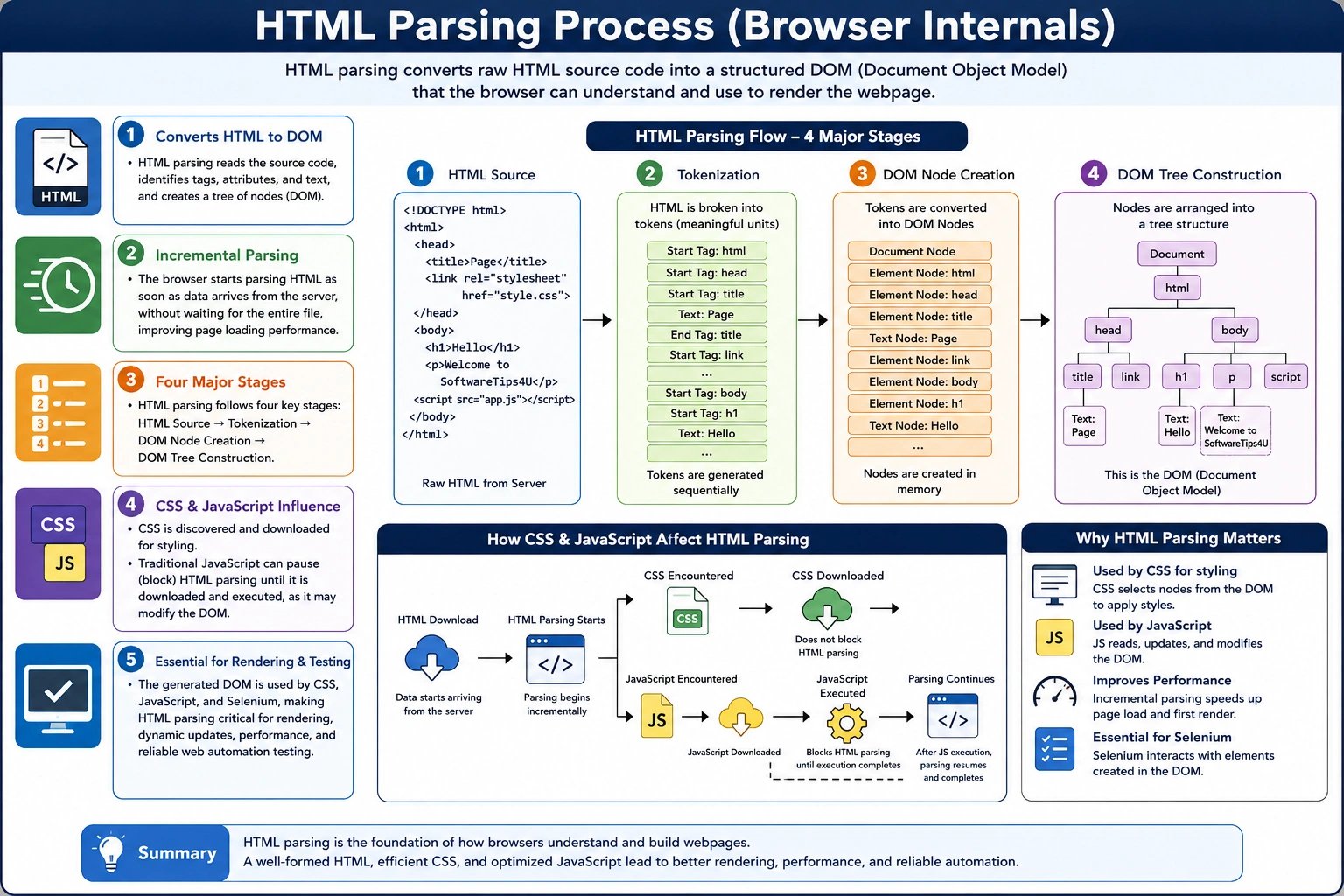
This process is called HTML parsing.
Understanding HTML parsing is essential for anyone learning HTML, CSS, JavaScript, Selenium, browser rendering, or web performance. It explains how web pages are built internally, why rendering takes time, how JavaScript can affect page loading, why poorly written HTML may still display in browsers, and why Selenium sometimes fails to find elements even when they appear in the source code.
In simple terms, HTML parsing converts raw HTML text into a structured DOM tree that browsers can style, render, and manipulate.
The flow looks like this:
HTML Source Code
        ↓
Tokenization
        ↓
Node Creation
        ↓
DOM Tree Construction
Once the DOM is created, CSS can style it, JavaScript can modify it, and Selenium can interact with it.
What Is HTML Parsing?
HTML parsing is the process by which a browser reads HTML source code and converts it into a structured internal representation.
An HTML document is originally just text.
Example:
<h1>Welcome</h1>
<p>Learning HTML</p>
To a browser, this is not yet a webpage. It is simply a sequence of characters. The browser must analyze the characters, identify meaningful structures, create internal objects, and organize those objects into a tree.
That tree is called the DOM.
The process can be summarized as:
HTML
  ↓
Parser
  ↓
Tokens
  ↓
Nodes
  ↓
DOM
HTML parsing is therefore the bridge between raw HTML code and the browser’s internal page structure.
Why HTML Parsing Is Necessary
Browsers cannot directly render raw HTML text. They need a structured model.
Consider this HTML:
<body>
    <h1>Welcome</h1>
    <p>Learning HTML</p>
</body>
Before displaying it, the browser must understand several things.
It must identify that body is an element. It must understand that h1 and p are child elements of body. It must identify that “Welcome” is text inside the h1 element and “Learning HTML” is text inside the p element.
Only after this structure is understood can the browser build the page visually.
Parsing is necessary because the browser must:
Read tags, understand parent-child relationships, create internal objects, handle attributes, process comments, recover from errors, and build the DOM tree.
Without parsing, there would be no DOM. Without the DOM, CSS could not apply styles properly, JavaScript could not manipulate elements, and Selenium could not locate elements.
High-Level HTML Parsing Flow
The HTML parsing process follows a predictable sequence.
HTML Received
      ↓
HTML Parser Starts
      ↓
Tokenization
      ↓
Node Creation
      ↓
DOM Construction
      ↓
DOM Ready
Although this looks simple, the actual process is highly optimized. Browsers do not wait for the full HTML file before doing anything. They begin parsing as soon as data starts arriving from the server. This incremental parsing improves performance because the browser can begin constructing the DOM while the rest of the document is still downloading.
Step 1: Browser Receives HTML
The process starts when the browser receives an HTML response from a server.
Example:
<!DOCTYPE html>
<html>
<head>
    <title>SoftwareTips4U</title>
</head>
<body>
    <h1>Hello World</h1>
</body>
</html>
At this stage, the browser has received plain text. No DOM exists yet. Nothing has been rendered on the screen. The browser must now begin interpreting the HTML.
This is similar to receiving a blueprint. The blueprint itself is not a building. It must be interpreted and converted into a real structure. In the same way, HTML source code is only the blueprint of a webpage. The browser must parse it to create the actual internal structure.
Step 2: HTML Parser Starts Reading
Once the HTML is received, the browser’s HTML parser begins reading the document from top to bottom.
The parser reads character by character.
For example, when it encounters:
<html>it recognizes this as a start tag token.
When it later encounters:
</html>it recognizes this as an end tag token.
The parser does not treat HTML as random text. It follows HTML parsing rules defined by browser standards. These rules tell the browser how to interpret tags, text, attributes, comments, missing tags, nested elements, and invalid structures.
This parsing process is very fast, but it is also complex because real-world HTML is often imperfect.
Step 3: Tokenization
Tokenization is the process of converting raw HTML text into meaningful units called tokens.
A token is a meaningful piece of HTML recognized by the parser.
Consider this HTML:
<body>
    <h1>Hello</h1>
</body>
The parser generates tokens such as:
StartTag(body)
StartTag(h1)
Text(Hello)
EndTag(h1)
EndTag(body)
Each token represents a meaningful part of the document.
Different types of tokens include start tag tokens, end tag tokens, text tokens, comment tokens, and doctype tokens.
For example:
| HTML | Token Type |
|---|---|
| <html> | Start Tag Token |
| </html> | End Tag Token |
| Hello | Text Token |
| <!--comment--> | Comment Token |
| <!DOCTYPE html> | Doctype Token |
Tokenization is important because it converts the character stream into structured units that the browser can use to create DOM nodes.
Step 4: Tree Construction
After tokenization, the browser uses tokens to build a tree structure.
Example:
<body>
    <h1>Hello</h1>
    <p>HTML</p>
</body>
The DOM tree becomes:
Document
   │
 html
   │
 body
 ├── h1
 │     └── Hello
 │
 └── p
       └── HTML
This tree structure represents the hierarchy of the HTML document. The body contains h1 and p. The h1 contains the text “Hello.” The p contains the text “HTML.”
This tree is not just visual organization. It becomes the working model used by the browser, JavaScript, CSS, and automation tools.
Step 5: DOM Node Creation
Every meaningful part of the HTML document becomes a DOM node.
For example:
<h1>Hello</h1>creates two important nodes:
Element Node → h1
Text Node → Hello
The element node represents the tag itself. The text node represents the text content inside the tag.
A more detailed example:
<img src="logo.png" alt="Logo">creates an element node for img, and its attributes such as src and alt are associated with that element.
Different kinds of DOM nodes are created during parsing.
Types of DOM Nodes Created During Parsing
Element Nodes
Element nodes represent HTML tags.
Examples include:
<h1></h1>
<div></div>
<p></p>
<section></section>
Each tag becomes an element node in the DOM tree.
Text Nodes
Text inside elements becomes text nodes.
Example:
<p>Hello World</p>The text Hello World becomes a text node inside the p element.
Attribute Nodes
Attributes provide additional information about elements.
Example:
<img src="logo.png">The attribute src="logo.png" is associated with the img element.
Modern DOM implementations usually expose attributes through element properties rather than treating them as normal child nodes, but conceptually, attributes are part of the element’s DOM representation.
Comment Nodes
HTML comments are also represented in the DOM.
Example:
<!-- Header Section -->This creates a comment node.
Comments are not rendered visually, but they may still exist in the DOM structure.
DOM Construction Example
Consider this HTML:
<html>
<body>
    <div>
        <p>Hello</p>
    </div>
</body>
</html>
The browser constructs this DOM:
Document
   │
 html
   │
 body
   │
 div
   │
 p
   │
 Hello
This structure allows the browser to understand exactly where each element belongs.
JavaScript can then access the paragraph using selectors, CSS can style it, and Selenium can locate it during automation.
Parsing Happens Incrementally
An important point about HTML parsing is that browsers do not wait for the entire file to download before starting.
Instead, parsing happens incrementally.
Receive HTML
      ↓
Parse Immediately
      ↓
Continue Receiving
      ↓
Continue Parsing
This improves performance because the browser can begin building the DOM while additional parts of the document are still arriving.
For large pages, incremental parsing is essential. If browsers waited for the full document before parsing, pages would feel much slower.
This also explains why some elements may become available before others. In Selenium automation, this matters because a script may find elements that have already been parsed while later elements are still loading.
Error Handling During HTML Parsing
One of the most interesting features of HTML parsing is that browsers are forgiving.
Real-world HTML often contains mistakes.
Example:
<p>Hello
<div>World</div>
The p tag is not explicitly closed before the div starts.
Instead of stopping with an error, the browser automatically corrects the structure and creates a valid DOM.
This forgiving behavior is one reason websites continue to work even when HTML is not perfectly written.
However, this does not mean invalid HTML is safe. Different browsers may correct errors differently in complex cases. Invalid HTML can cause layout issues, accessibility problems, JavaScript bugs, and Selenium locator failures.
Good developers should still write clean, valid HTML.
HTML Parser vs XML Parser
HTML parsers and XML parsers behave differently.
HTML parsers are forgiving. XML parsers are strict.
In HTML, if a closing tag is missing, the browser may automatically fix it. In XML, the parser usually stops and throws an error.
| Feature | HTML Parser | XML Parser |
|---|---|---|
| Error Recovery | Yes | No |
| Flexible Syntax | Yes | No |
| Auto Fixing | Yes | No |
| Strict Structure Required | No | Yes |
This difference exists because the web contains billions of pages, many of which include imperfect HTML. Browsers are designed to keep pages usable even when markup contains mistakes.
How CSS Affects HTML Parsing
When the browser encounters external CSS:
<link rel="stylesheet" href="style.css">the browser starts downloading the CSS file.
HTML parsing can usually continue while CSS is being downloaded. However, CSS is important for rendering because the browser needs styling information to build the CSSOM and render tree.
The process looks like this:
HTML Parsing Continues
        +
CSS Download
        ↓
CSS Parsing
        ↓
CSSOM Creation
CSS generally does not modify the DOM structure. It affects how DOM nodes are styled and rendered.
However, CSS can delay rendering because the browser must understand styles before painting the page correctly.
How JavaScript Affects HTML Parsing
JavaScript can have a major impact on HTML parsing.
When the browser encounters a traditional script tag:
<script src="app.js"></script>the default behavior is:
HTML Parsing Stops
      ↓
Download JavaScript
      ↓
Execute JavaScript
      ↓
Resume Parsing
Why does parsing stop?
Because JavaScript can modify the DOM.
For example:
document.write("Hello");This script can insert new HTML into the document while parsing is happening.
The browser must pause because JavaScript may change the structure of the page.
This is called parser blocking.
Parser-Blocking Scripts
A parser-blocking script is a script that stops HTML parsing until it has been downloaded and executed.
Example:
<script>
document.write("Hello");
</script>
The browser must execute this script before continuing because it may alter the HTML structure.
Parser-blocking scripts can slow page loading, especially if the script file is large or hosted on a slow server.
This is one reason performance-focused developers avoid placing blocking scripts early in the document unless necessary.
Async and Defer
To reduce JavaScript blocking, HTML provides two useful script attributes: async and defer.
Async
Example:
<script async src="app.js"></script>With async, the script downloads in parallel with HTML parsing. However, once the script finishes downloading, it executes immediately, which may still interrupt parsing.
Async is useful for independent scripts such as analytics.
Defer
Example:
<script defer src="app.js"></script>With defer, the script also downloads in parallel, but it executes only after HTML parsing is complete.
This is often better for scripts that depend on the DOM being ready.
A simplified comparison:
| Attribute | Download | Execution |
|---|---|---|
| Normal Script | Blocks parsing | Immediately |
| Async | Parallel | As soon as downloaded |
| Defer | Parallel | After parsing |
Using defer is a common best practice for improving page loading performance.
Relationship Between Parsing and DOM
The DOM is the final output of HTML parsing.
The relationship is:
HTML Source
      ↓
HTML Parser
      ↓
Tokens
      ↓
DOM Nodes
      ↓
DOM Tree
Once the DOM is available, the browser can continue with CSSOM creation, render tree construction, layout, painting, and JavaScript interaction.
The DOM is not the same as the original HTML source. The DOM is the browser’s interpreted version of that source.
This distinction matters because browser correction, JavaScript changes, and dynamic rendering can make the DOM different from the original page source.
Real Browser Example
Input HTML:
<body>
    <h1>SoftwareTips4U</h1>
</body>
Output DOM:
Document
   │
 html
   │
 body
   │
 h1
   │
 SoftwareTips4U
This DOM becomes the foundation for everything else.
CSS applies styles to the h1.
JavaScript can modify the h1.
Selenium can locate the h1.
The browser can render the h1 onto the screen.
Why HTML Parsing Matters for Selenium
Selenium automation depends heavily on DOM availability.
Selenium interacts with the DOM, not directly with raw HTML source code.
This helps explain several common automation problems.
Missing Elements
If Selenium searches for an element before parsing creates it, the test may fail.
This often happens when pages load slowly or elements are added dynamically.
Dynamic Elements
Modern applications often load elements after API responses.
The original HTML may not contain those elements. JavaScript creates them later.
Selenium must wait until the elements are present in the DOM.
Stale Element Exceptions
A stale element exception occurs when Selenium stores a reference to a DOM node, but JavaScript later replaces that node.
The old reference no longer points to a valid element.
Understanding DOM construction and updates helps explain why this happens.
DOM Updates
JavaScript frameworks such as React, Angular, and Vue frequently update the DOM after parsing.
Selenium tests must account for these updates using explicit waits and stable locators.
Performance Considerations in HTML Parsing
HTML parsing performance affects page loading.
Faster parsing occurs when:
- HTML is clean
- DOM structure is not excessively large
- JavaScript blocking is minimized
- CSS and scripts are loaded efficiently
- Invalid nesting is avoided
Poor HTML can lead to:
- Slow rendering
- Higher memory usage
- Delayed page load
- Layout instability
- Selenium timing issues
A clean, semantic HTML structure improves both user performance and automation stability.
Best Practices for Better HTML Parsing
Developers can support efficient parsing by writing clean markup.
Useful practices include:
Use semantic HTML, avoid unnecessary nesting, close tags properly, place critical content early, avoid parser-blocking scripts, use defer where appropriate, reduce excessive DOM size, and avoid invalid HTML structures.
These practices improve browser performance, accessibility, SEO, and automation reliability.
Interview-Ready Explanation
A concise interview answer would be:
HTML parsing is the process by which a browser reads HTML source code, converts it into tokens, creates DOM nodes, and constructs the Document Object Model. The DOM is then used for rendering, CSS styling, JavaScript interaction, and browser automation.
A stronger technical answer would be:
When a browser receives HTML from a server, its HTML parser reads the document incrementally, tokenizes tags and text, creates corresponding nodes, and builds the DOM tree. During parsing, CSS files may be discovered and downloaded, while traditional JavaScript can block parsing because it may modify the DOM. The completed DOM becomes the foundation for rendering and runtime interaction.
Key Takeaway
The HTML Parsing Process is the mechanism that converts raw HTML text into a structured DOM tree. This process involves receiving HTML, reading it from top to bottom, tokenizing tags and text, creating DOM nodes, handling errors, and constructing the final DOM structure.
The DOM is essential because CSS styles it, JavaScript modifies it, browsers render it, and Selenium interacts with it. Understanding HTML parsing helps developers write cleaner markup, optimize page performance, debug browser behavior, and build more stable automation scripts.
One-Line Insight
HTML Parsing = HTML Source → Tokens → DOM Nodes → DOM Tree.