HTML Loading Order
Introduction
When a user opens a webpage, the browser does far more than simply download an HTML file and display it. Behind the scenes, the browser follows a carefully designed sequence of operations to retrieve resources, parse documents, execute scripts, apply styles, construct rendering structures, and finally display content on the screen. This sequence is known as the HTML Loading Order.
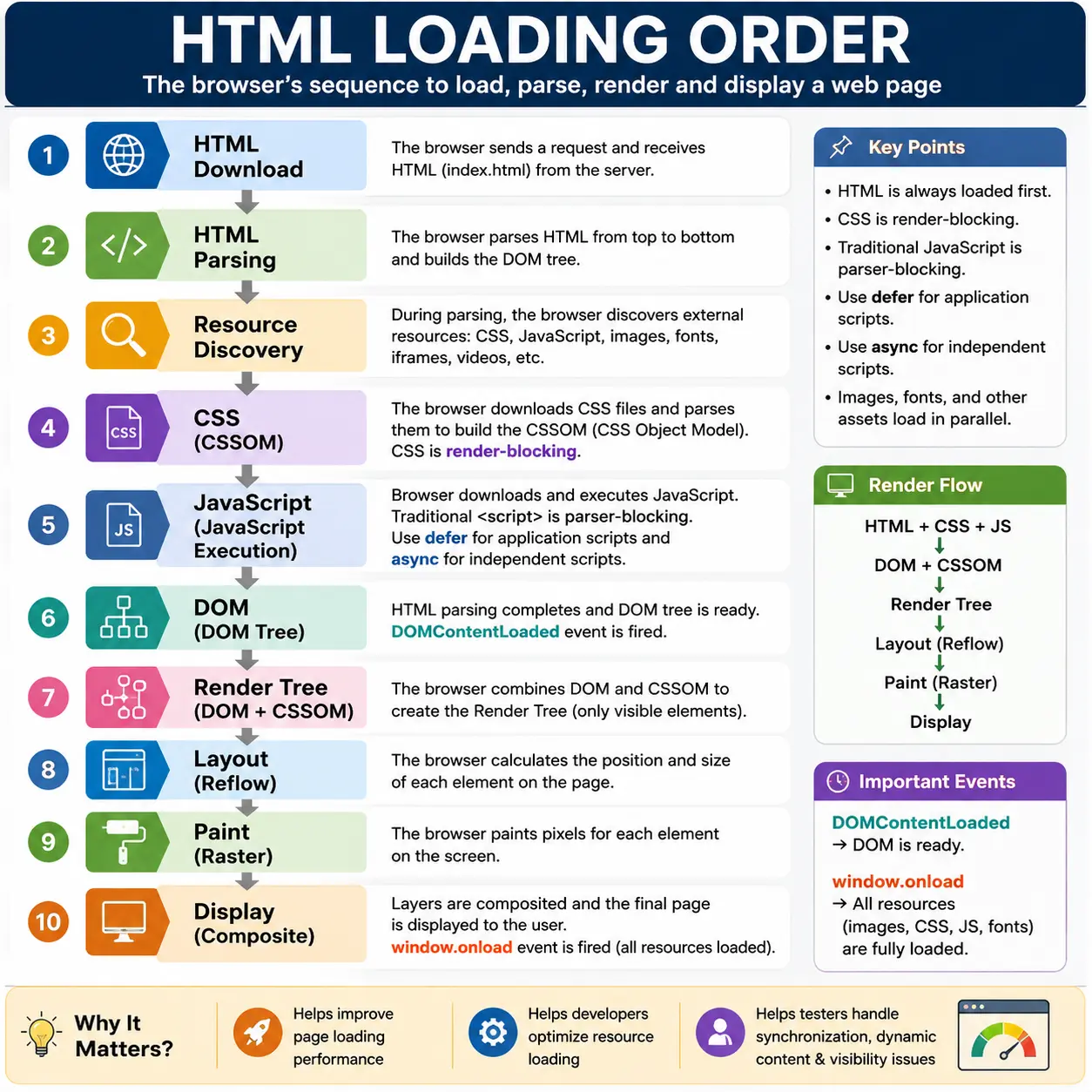
Understanding HTML Loading Order is one of the most important topics in modern web development because it directly influences page performance, rendering speed, user experience, SEO, browser behavior, and automation testing stability. Many common web development issues—such as slow page loads, layout shifts, JavaScript errors, flashing content, and Selenium synchronization problems—can be traced back to misunderstandings about how browsers load and process resources.
At first glance, a webpage may appear to load instantly. However, the browser is performing dozens of operations in a specific order. HTML must be downloaded before it can be parsed. During parsing, additional resources such as CSS, JavaScript, images, fonts, and multimedia files are discovered. Some of these resources are critical for rendering, while others can be loaded later. The browser prioritizes certain resources over others to ensure users see meaningful content as quickly as possible.
For frontend developers, understanding HTML Loading Order helps optimize website performance. For backend developers, it helps explain how browsers consume server responses. For Selenium and Playwright engineers, it explains why elements sometimes appear late, why explicit waits are necessary, and why timing-related automation failures occur.
In simple terms, HTML Loading Order describes the sequence in which the browser downloads, parses, processes, and renders HTML and its related resources to create the final webpage users interact with.
What Is HTML Loading Order?
HTML Loading Order refers to the structured sequence followed by a browser when loading a webpage and its associated resources.
The browser does not load everything simultaneously or randomly. Instead, it follows a predictable workflow designed to maximize performance and rendering efficiency.
A simplified loading sequence looks like this:
1. HTML Download
2. HTML Parsing
3. Resource Discovery
4. CSS Download & Parsing
5. JavaScript Download & Execution
6. DOM Completion
7. Render Tree Creation
8. Layout Calculation
9. Painting
10. Page Display
Each stage builds upon the previous stage.
Without HTML, no parsing can occur.
Without parsing, no DOM can be created.
Without the DOM and CSSOM, no render tree can be generated.
Without the render tree, layout and painting cannot happen.
This dependency chain makes loading order critical to browser rendering.
Why HTML Loading Order Matters
HTML Loading Order affects virtually every aspect of webpage behavior.
Consider the following HTML document:
<!DOCTYPE html>
<html>
<head>
    <link rel="stylesheet" href="style.css">
    <script src="app.js"></script>
</head>
<body>
    <h1>Hello World</h1>
</body>
</html>
Many beginners assume the browser downloads everything simultaneously and instantly renders the page. In reality, the browser follows a structured process that determines when resources are discovered, downloaded, executed, and rendered.
A poor understanding of loading order can lead to:
- Slow page rendering
- JavaScript execution failures
- Flash of unstyled content (FOUC)
- Layout shifts
- Broken functionality
- Automation timing issues
A strong understanding helps developers build faster and more reliable applications.
Step 1: Browser Requests HTML
Everything begins when a user enters a URL.
For example:
https://softwaretips4u.comThe browser sends an HTTP request to the server.
GET /The server responds with an HTML document.
<!DOCTYPE html>
<html>
<head>
    <title>SoftwareTips4U</title>
</head>
<body>
    <h1>Welcome</h1>
</body>
</html>
At this point, the browser has received only text.
Nothing has been rendered yet.
The browser's next task is to understand the structure of the document.
Step 2: HTML Parsing Begins
As soon as HTML starts arriving, the browser begins parsing it.
Browsers do not wait for the entire document before starting work.
Instead, parsing occurs incrementally.
The parser reads the document from top to bottom.
Top
 ↓
Bottom
Example:
<html>
<head>
</head>
<body>
</body>
</html>
The parser identifies:
- Elements
- Attributes
- Text nodes
- Parent-child relationships
This process converts HTML from plain text into a meaningful structure.
Step 3: Resource Discovery
While parsing HTML, the browser discovers references to external resources.
Example:
<link rel="stylesheet" href="style.css">

<script src="app.js"></script>

<img src="logo.png">
The browser now realizes additional files are required.
These may include:
- Stylesheets
- JavaScript files
- Images
- Fonts
- Videos
- External libraries
HTML acts as a roadmap that tells the browser what resources exist and where they are located.
Without HTML parsing, resource discovery cannot happen.
Browser Resource Prioritization
Browsers assign priorities to resources.
A simplified priority order often looks like:
HTML
 ↓
CSS
 ↓
JavaScript
 ↓
Fonts
 ↓
Images
 ↓
Other Resources
This prioritization exists because certain resources are more important for rendering than others.
HTML is always the highest priority because it starts the entire rendering process.
Step 4: DOM Construction Continues
As parsing proceeds, the browser builds the Document Object Model.
Example:
<body>
    <h1>Welcome</h1>
    <p>Learning HTML</p>
</body>
The browser creates:
Document
 │
 html
 │
 body
 ├── h1
 │     └── Welcome
 │
 └── p
       └── Learning HTML
This DOM becomes the browser's internal representation of the page.
Many browser operations depend on the existence of the DOM.
CSS Loading Order
One of the first critical resources discovered is CSS.
Example:
<link rel="stylesheet" href="style.css">When encountered, the browser:
Download CSS
      ↓
Parse CSS
      ↓
Create CSSOM
The CSS Object Model (CSSOM) contains styling rules used to determine how elements should appear.
Why CSS Receives High Priority
CSS plays a direct role in rendering.
Without CSS:
DOM Exists
      ↓
Styles Unknown
The browser knows what elements exist but does not know how they should look.
Displaying content before CSS arrives may result in:
Flash of Unstyled Content (FOUC)To prevent this, browsers often delay painting until critical CSS has been processed.
This makes CSS a render-blocking resource.
JavaScript Loading Order
JavaScript behaves differently from CSS.
Traditional JavaScript files can block HTML parsing.
Example:
<script src="app.js"></script>Loading process:
HTML Parsing
      ↓
Pause
      ↓
Download JS
      ↓
Execute JS
      ↓
Resume Parsing
This behavior is known as parser blocking.
Why JavaScript Blocks Parsing
JavaScript can modify the DOM while it is being constructed.
Example:
document.write("New Content");Since JavaScript can alter document structure, the browser must stop parsing and execute the script before continuing.
Otherwise, the browser might build an incorrect DOM.
Example of Blocking Behavior
Consider:
<h1>Title</h1>

<script src="app.js"></script>

<p>Paragraph</p>
Loading sequence:
Parse h1
      ↓
Encounter Script
      ↓
Pause Parsing
      ↓
Download JS
      ↓
Execute JS
      ↓
Resume Parsing
      ↓
Parse Paragraph
Large JavaScript files can significantly slow down page loading.
Async Script Loading
To reduce blocking, HTML provides the async attribute.
Example:
<script async src="app.js"></script>Behavior:
HTML Parsing
       ↓
JS Downloads In Parallel
       ↓
Executes Immediately When Ready
Advantages:
- Faster downloads
- No parser blocking
Disadvantages:
- Execution order is unpredictable
Async scripts are commonly used for:
- Analytics
- Advertisements
- Tracking scripts
Defer Script Loading
Another optimization is defer.
Example:
<script defer src="app.js"></script>Behavior:
HTML Parsing
       ↓
JS Downloads In Parallel
       ↓
DOM Finished
       ↓
Execute JS
Advantages:
- No parser blocking
- Maintains script order
- Safer for application code
This makes defer the preferred choice for most application scripts.
Async vs Defer
| Feature | Async | Defer |
|---|---|---|
| Blocks Parsing | No | No |
| Executes Before DOM Complete | Yes | No |
| Execution Order Guaranteed | No | Yes |
| Best Use Case | Analytics, Ads | Application Logic |
Modern applications typically favor defer because predictable execution order is important.
Image Loading Order
Images behave differently from CSS and JavaScript.
Example:
<img src="logo.png">When discovered:
Discover Image
      ↓
Queue Download
      ↓
Continue Parsing
Images do not block HTML parsing.
The browser can continue building the DOM while image downloads occur in the background.
This improves rendering speed.
Font Loading
Fonts are often discovered through CSS.
Example:
@font-face {
    font-family: MyFont;
}
Process:
Download Font
      ↓
Apply Font
Font loading can affect text rendering.
Some browsers temporarily display fallback fonts until custom fonts become available.
DOM Loading Events
Understanding browser loading events is important for development and testing.
DOMContentLoaded Event
Triggered when:
HTML Parsed
      ↓
DOM Created
At this point:
- DOM is ready
- JavaScript can interact with elements
However:
- Images may still be loading
- Fonts may still be downloading
Example:
document.addEventListener("DOMContentLoaded", function() {
    console.log("DOM Ready");
});
Load Event
Triggered when:
HTML Loaded
CSS Loaded
Images Loaded
Fonts Loaded
Everything is complete.
Example:
window.onload = function() {
    console.log("Page Fully Loaded");
};
The load event occurs later than DOMContentLoaded.
Real Browser Loading Timeline
Consider:
<head>
    <link rel="stylesheet" href="style.css">
    <script defer src="app.js"></script>
</head>

<body>
    <h1>Hello</h1>
    <img src="logo.png">
</body>
Timeline:
Download HTML
       ↓
Parse HTML
       ↓
Discover CSS
       ↓
Download CSS
       ↓
Discover JS
       ↓
Download JS
       ↓
Create DOM
       ↓
Execute Deferred JS
       ↓
Create CSSOM
       ↓
Render Tree
       ↓
Layout
       ↓
Paint
       ↓
Image Finishes Loading
       ↓
Window Load Event
This sequence explains why some content appears before images finish loading.
HTML Loading Order and Browser Rendering
Loading order directly feeds into rendering.
Full flow:
HTML Download
       ↓
HTML Parsing
       ↓
DOM Creation
       ↓
CSS Download
       ↓
CSSOM Creation
       ↓
Render Tree
       ↓
Layout
       ↓
Paint
       ↓
Display
The browser cannot render until critical resources have been processed.
HTML Loading Order and Selenium
Loading order explains many Selenium issues.
Problem 1: Element Not Found
driver.findElement(...)fails because:
HTML Downloaded
      ↓
DOM Not Yet Ready
Problem 2: Element Exists but Changes Later
DOM Created
      ↓
JavaScript Updates DOM
Result:
StaleElementReferenceExceptionProblem 3: Element Visible Too Late
DOM Exists
      ↓
CSS Still Applying
Element may not yet be interactable.
Selenium Best Practices
Because of loading order, Selenium tests should use:
- Explicit Waits
- ExpectedConditions
- Visibility checks
- DOM readiness validation
Example:
WebDriverWait wait =
    new WebDriverWait(driver, Duration.ofSeconds(10));
This helps synchronize automation with browser loading behavior.
Best Practices for Optimizing Loading Order
Place CSS in the Head
<head>
   <link rel="stylesheet" href="style.css">
</head>
Allows early CSS discovery.
Use Defer for Application Scripts
<script defer src="app.js"></script>Prevents parser blocking.
Minimize Large Blocking Scripts
Avoid:
<script src="huge-file.js"></script>near the top of the page.
Large scripts delay parsing and rendering.
Optimize Resource Downloads
Common techniques include:
- CSS minification
- JavaScript minification
- Image compression
- Lazy loading
- Resource caching
These optimizations shorten the loading sequence.
Common Interview Questions
What Loads First?
The first resource is:
HTMLEverything else is discovered through HTML.
Does CSS Block HTML Parsing?
No.
HTML parsing continues while CSS downloads.
However:
CSS Can Delay Renderingbecause the browser needs CSSOM before painting.
Does JavaScript Block HTML Parsing?
Traditional scripts do.
Example:
<script src="app.js"></script>Parser pauses until execution completes.
Which Is Better: Async or Defer?
For application logic:
deferis usually preferred.
For analytics and advertisements:
asyncis typically better.
Interview-Ready Answer
HTML Loading Order is the sequence in which a browser downloads, parses, and processes HTML and its dependent resources. The browser first downloads HTML, begins parsing it, discovers external resources such as CSS and JavaScript, constructs the DOM, creates the CSSOM, builds the render tree, calculates layout, paints content, and finally displays the rendered webpage. Understanding this sequence is essential for performance optimization, debugging rendering issues, and building stable automation tests.
Conclusion
HTML Loading Order is one of the most fundamental concepts in browser behavior and web performance. Every webpage follows a structured process that begins with HTML download and ends with painted pixels on the screen. HTML acts as the starting point, guiding the browser toward all required resources and enabling the creation of the DOM.
Understanding how browsers load HTML, CSS, JavaScript, images, and fonts helps developers create faster websites, helps testers design reliable automation scripts, and helps engineers diagnose performance bottlenecks. Modern browsers are highly optimized, but the order in which resources are loaded still plays a major role in user experience.
Whether you are building a simple webpage, a complex React application, or a Selenium automation framework, understanding HTML Loading Order provides valuable insight into how webpages truly come to life.
One-Line Insight
HTML loads first, creates the DOM, discovers external resources, and drives the entire browser rendering process from code to pixels.