HTML in Modern SPA Apps
Introduction
HTML in modern SPA apps refers to the way HTML is created, updated, and managed inside Single Page Applications built with frameworks such as React, Angular, Vue, Svelte, and similar technologies. A traditional website usually loads a new HTML document for each page navigation. A Single Page Application loads one main HTML document first and then uses JavaScript to update the visible interface without performing full page reloads.
This architecture gives users a faster and more app-like experience. Navigation can feel smooth, dashboards can update in place, forms can validate immediately, and large interfaces can respond without asking the browser to reload the whole document. Even so, HTML remains essential. The browser still renders HTML elements. Buttons, inputs, forms, headings, tables, images, links, and dialogs are still HTML in the final DOM, even if they were produced by JavaScript instead of handwritten directly in the original file.
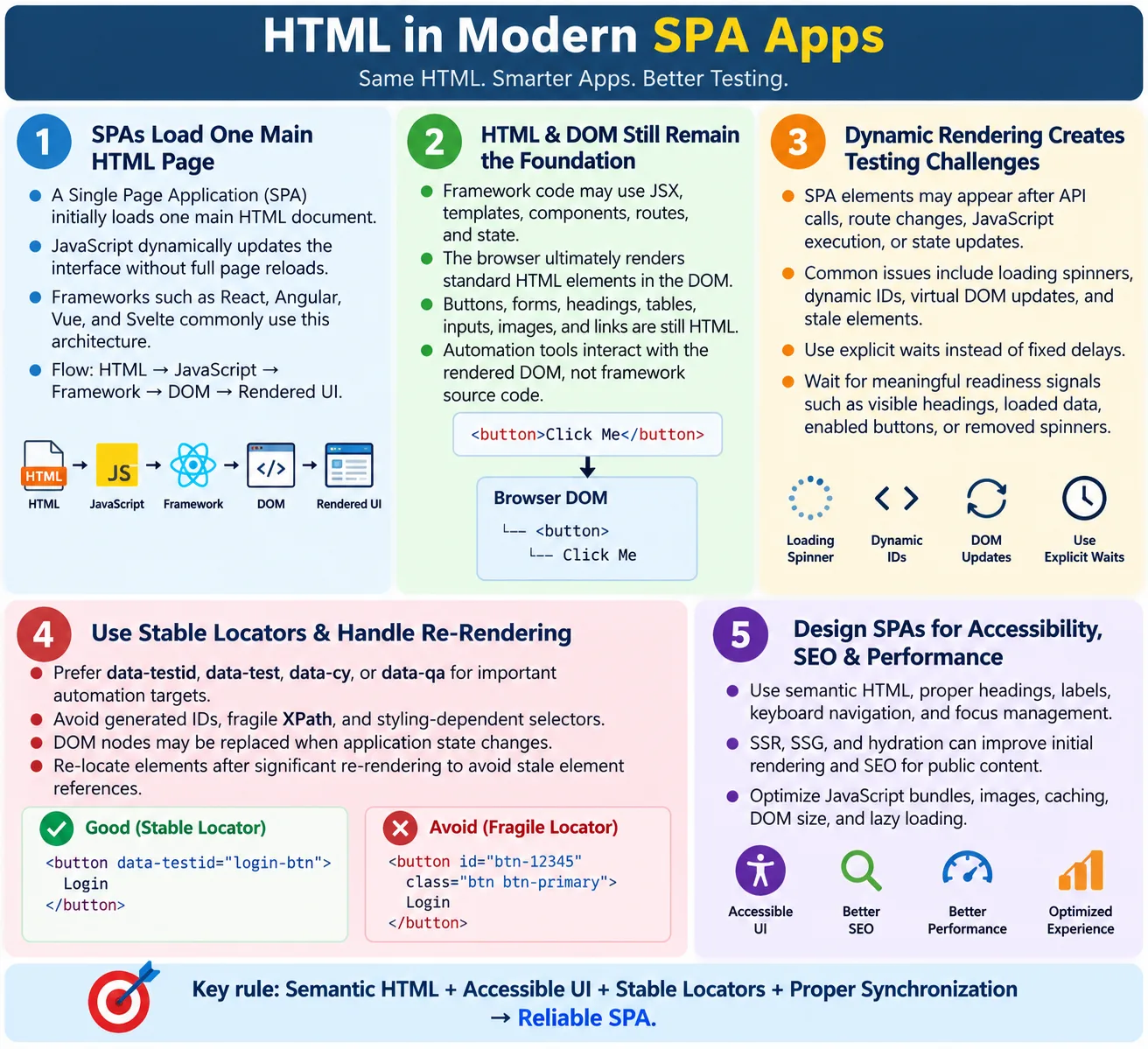
For developers, testers, and automation engineers, this distinction is important. In SPA development, source code may contain JSX, templates, components, routes, state, and framework-specific syntax. But the browser and automation tools do not interact with React components or Angular templates directly. They interact with the rendered DOM. Understanding this relationship helps you debug UI issues, write stable automation, evaluate accessibility, and reason about SEO and performance in modern web applications.
What Is an SPA?
A Single Page Application is a web application that loads a single HTML page initially and updates the visible content dynamically as users interact with the application. Instead of requesting a full new HTML document for every screen, the application uses JavaScript to change the DOM, fetch data, update routes, and render new views within the same page context.
Common examples include Gmail, Google Maps, Trello, Notion, and many modern ecommerce dashboards, admin panels, banking portals, analytics tools, and SaaS products. These applications feel closer to desktop or mobile apps because they can update sections of the interface without a full browser refresh.
The word "single" does not mean the app has only one screen. It means the browser initially loads one application shell. Inside that shell, the framework can display many routes, views, components, dialogs, forms, tables, and workflows. The user may feel like they are moving between pages, but the browser often stays inside the same loaded document while JavaScript manages the transition.
Traditional Website vs SPA
In a traditional website, navigation often follows a full request-response cycle. The user clicks a link, the browser requests a URL, the server sends a new HTML page, and the browser replaces the current document with the new one.
User Requests Page
  ?
Server
  ?
New HTML Page
  ?
Browser
  ?
Page Reload
This model is simple and reliable. It is excellent for many content-heavy websites, documentation sites, blogs, and static pages. Each URL can return meaningful HTML directly from the server. Search engines and users can receive content early.
In an SPA, the first load is different. The browser downloads a main HTML file, loads JavaScript bundles, starts the framework, and lets the framework update the page dynamically.
User Opens App
  ?
Single HTML Page
  ?
JavaScript Loads
  ?
Dynamic Content Updates
  ?
No Full Page Reload
The result is smoother interaction, but the application becomes more dependent on JavaScript execution, routing logic, API calls, and rendering timing. This is why SPA testing and debugging require strong DOM inspection skills.
Basic SPA HTML
Many SPAs start with a small HTML file that contains a root container and script references. The initial HTML may look simple:
<!DOCTYPE html>
<html lang="en">
<head>
  <meta charset="UTF-8">
  <title>SPA Example</title>
</head>
<body>
  <div id="root"></div>
  <script src="app.js"></script>
</body>
</html>
At first, this document contains little more than a mounting point. After JavaScript loads, the framework attaches itself to the root element and creates the visible user interface. In React, that root is often id="root". In Vue, it might be id="app". Angular applications commonly use an application root element such as <app-root>. The details vary, but the concept is similar.
Rendering Process
The rendering process in an SPA usually begins with the browser downloading the HTML. Then it downloads JavaScript bundles. The framework starts, evaluates route information, fetches needed data, creates or updates DOM elements, and finally displays the visible UI.
Browser
  ?
Downloads HTML
  ?
Downloads JavaScript
  ?
Framework Starts
  ?
Creates DOM
  ?
Displays UI
This means the visible page may not be complete immediately after the initial HTML response. There may be a loading spinner, skeleton screen, blank root container, or placeholder content. The final DOM appears only after scripts run and data is available. For users, this may feel smooth if implemented well. For testers, it means synchronization matters.
React Example
React developers often write components using JSX, which looks similar to HTML but is processed by the build system and React runtime. A simple component may be:
function Welcome() {
  return <h1>Welcome</h1>;
}
The browser does not render JSX directly. The React application creates DOM elements, and the rendered result is ordinary HTML in the browser:
<h1>Welcome</h1>From a browser, accessibility, SEO, and automation perspective, the final heading is what matters. React may be the tool that produced it, but the user experiences a real heading in the DOM.
Angular Example
Angular uses templates that can include bindings. A template might contain:
<h1>{{title}}</h1>If the component value is HTML Course, the rendered DOM may become:
<h1>HTML Course</h1>The template syntax is a development-time and runtime abstraction. The browser ultimately displays DOM nodes with text content. Testers should inspect the rendered output rather than assuming the template is what users receive.
Vue Example
Vue also uses template syntax and reactive data. A simple template might be:
<h1>{{ message }}</h1>If message is Welcome, the rendered DOM becomes:
<h1>Welcome</h1>Whether the framework is React, Angular, Vue, or Svelte, the browser receives elements and text in the DOM. The framework controls when and how those nodes are created, updated, and removed.
HTML Is Still the Foundation
Even in modern SPAs, HTML remains the foundation. Headings are HTML. Buttons are HTML. Forms are HTML. Tables are HTML. Images are HTML. Inputs are HTML. Links are HTML. Frameworks may generate these elements dynamically, but the final interface depends on the same HTML semantics that traditional pages use.
This is why frontend teams should not treat HTML as less important just because a framework is involved. If a React component renders a clickable <div> instead of a real <button>, the accessibility problem still exists. If an Angular template omits form labels, screen reader users still suffer. If a Vue component creates vague link text, SEO and usability can still be weaker. The framework does not remove the responsibility to produce good HTML.
DOM Updates in SPAs
Traditional websites often replace the whole document during navigation. SPAs update only the parts of the DOM that need to change. A user clicks a menu item, the router updates the current view, the framework fetches data if needed, and the DOM is patched or replaced in specific areas.
User Clicks
  ?
Framework Updates DOM
  ?
Only Changed Content Renders
This is one reason SPAs can feel responsive. The application can update a table, show a modal, change a route, or display validation feedback without reloading the entire page. However, partial updates also mean that elements can appear, disappear, or be replaced while a test is running. Automation code must account for this dynamic behavior.
Advantages of HTML in SPAs
SPAs provide several benefits when used for the right type of application. Navigation can be faster after the initial load because the app does not need a full page reload for every interaction. UI components can be reused across screens. State can be managed centrally. Data-driven areas can update dynamically. User experiences can feel smoother and more interactive.
- Faster navigation after the initial application load
- Reduced full page reloads
- Better app-like user experience
- Dynamic updates for data-driven screens
- Reusable UI components
- Efficient rendering of changed content
These strengths are especially useful for dashboards, admin systems, collaboration tools, maps, editors, complex forms, messaging interfaces, and applications where users spend time interacting with many controls inside the same session.
Challenges in SPA HTML
SPAs also introduce challenges. They depend heavily on JavaScript. Content may arrive from APIs. DOM updates may be asynchronous. Loading states may appear between views. Client-side routing may change the screen without triggering a normal page load. Debugging can become more complex because the source HTML, framework component tree, network responses, and final DOM all play a role.
- JavaScript dependency
- Dynamic DOM updates
- Loading states
- API-driven content
- Complex debugging
- Automation timing issues
These challenges do not make SPAs bad. They simply require stronger engineering discipline. Teams must manage performance, accessibility, SEO, state, error handling, and testability intentionally.
SEO Considerations
Traditional websites often send complete HTML directly from the server. Client-rendered SPAs may generate important content only after JavaScript runs. Search engines can render JavaScript better than they could in the past, but relying entirely on client-side rendering can still create delays and uncertainty for public content pages.
Modern SPA frameworks often address this with Server-Side Rendering, Static Site Generation, and hydration. Server-Side Rendering sends pre-rendered HTML from the server, then JavaScript hydrates it to make it interactive. Static Site Generation creates HTML at build time. Hydration connects framework behavior to already rendered markup.
For content-heavy pages such as tutorials, articles, documentation, product pages, and marketing pages, SSR or SSG can provide stronger SEO and faster initial rendering. For private dashboards behind login, SEO may be less important, but accessibility and performance still matter.
Accessibility in SPAs
SPAs should continue following accessibility best practices. Semantic HTML, proper headings, labels, keyboard navigation, focus management, and careful ARIA usage are all still required. The dynamic nature of SPAs makes focus management especially important. When a route changes without a full page reload, the browser may not automatically move focus the way it would after a traditional navigation.
For example, when a user opens a modal, focus should move into the modal. When it closes, focus should return to the triggering control. When a route changes, the page should provide a clear new heading and focus behavior should not confuse keyboard or screen reader users. Dynamic errors should be announced appropriately. Loading states should be understandable.
ARIA can help in certain cases, but it should not replace good HTML. Use a real button for actions, a real link for navigation, a real label for form inputs, and semantic headings for structure. The framework should generate accessible HTML, not hide inaccessible patterns behind attractive components.
Performance Considerations
SPA performance depends on JavaScript bundle size, lazy loading, code splitting, image optimization, caching, network requests, rendering efficiency, and DOM size. The initial HTML file may be small, but the JavaScript required to make the app useful can be large. If users wait too long for scripts to download, parse, execute, and render, the app feels slow.
Good performance strategy includes splitting code by route, lazy loading non-critical sections, optimizing images, caching static assets, reducing unnecessary dependencies, and keeping the DOM simple. Efficient HTML still matters because deeply nested or excessive DOM structures can slow rendering and make interaction more expensive.
Performance should be measured from the user's perspective. Initial content display, time to interactive behavior, route transitions, loading indicators, and responsiveness during updates all matter. A SPA can be fast and polished, but it must be engineered that way.
Automation Testing in SPAs
Automation tools interact with the rendered DOM. Selenium, Playwright, and Cypress do not need to know whether an element was generated by React, Angular, Vue, or Svelte. They locate elements in the browser and perform actions on those elements.
driver.findElement(
  By.cssSelector("[data-testid='login-button']"))
  .click();
This locator works if the final DOM contains the attribute at the time the command runs. The framework source is not what Selenium sees. This is why stable DOM attributes and proper waits matter so much in SPA testing.
Automation Challenges
Common SPA automation issues include delayed rendering, AJAX requests, loading spinners, dynamic IDs, virtual DOM updates, infinite scrolling, and route changes without full page reloads. Tests that assume immediate page readiness often fail in SPAs because elements may not exist yet or may be replaced after a state update.
- Delayed rendering after route changes
- AJAX requests and API-driven content
- Loading spinners and skeleton screens
- Dynamic IDs generated by frameworks or libraries
- Virtual DOM updates that replace elements
- Infinite scrolling and lazy-loaded content
- Client-side route changes without browser reloads
Best practices include explicit waits, stable data-* attributes, avoiding brittle XPath expressions, and waiting for application state instead of fixed delays. A test should wait for the condition that proves the UI is ready, such as a visible heading, enabled button, removed loading spinner, completed table row, or expected route content.
Client-Side Routing
SPAs often use client-side routing. The URL may change, and the visible view may change, but the browser does not necessarily request a new HTML document. The framework intercepts navigation, updates application state, and renders the matching component.
This affects testing and accessibility. Automation cannot always rely on traditional page load events after navigation. Screen reader users may need clear focus movement and page title updates to understand that the view changed. Analytics tracking may need route-change events instead of only full page-load events. SEO may require SSR or SSG for routes that should be publicly indexed.
Loading States and Error States
SPA screens often move through several states: initial loading, data loaded, empty result, error, retry, and success. Good HTML should represent each state clearly. A spinner alone may not be enough. Users should know what is happening, especially if loading takes time or an error occurs.
For automation, tests should verify not only happy paths but also loading and error states. If an API fails, does the page show a meaningful message? If a table is empty, does the page explain that no records were found? If a save request is in progress, is the button disabled appropriately? These are HTML and UX concerns inside a dynamic SPA context.
Stable Locators in SPAs
Dynamic applications often change class names, wrappers, generated IDs, and component structure. Tests that depend on these details are fragile. Stable locators make automation more reliable. Teams often use attributes such as data-testid, data-test, data-cy, or data-qa.
These attributes should be added intentionally to important controls and workflow elements. Login buttons, search fields, checkout actions, table rows, alerts, route headings, and modal controls are good candidates. The goal is not to clutter every element, but to provide stable hooks for important user journeys.
Hydration in Modern SPAs
Many modern SPA frameworks can render HTML on the server or at build time and then hydrate it in the browser. Hydration means the browser receives already visible HTML, then JavaScript attaches event handlers and framework state to make that HTML interactive. This approach combines faster initial content display with rich client-side behavior.
Hydration is useful, but it creates a timing distinction. A button may be visible before it is fully wired to the framework. A route may display content before client-side state is completely ready. A page may appear loaded while background scripts are still attaching behavior. Users may not notice this if hydration is fast, but automation tests can expose the gap if they click too early.
For testing, this means presence is not always the same as readiness. A strong SPA test waits for the application to be interactive. Some applications expose a readiness marker. Others rely on visible route headings, enabled controls, completed loading indicators, or predictable UI state. The right wait should match how the application tells users it is ready.
Route Changes Without Page Loads
In a traditional website, navigating to a new page usually triggers a browser page load. In an SPA, route changes can happen entirely inside JavaScript. The URL may change from /dashboard to /settings, but the original HTML document may remain loaded. The framework replaces the visible view instead of the browser replacing the whole document.
This affects automation strategy. Waiting for a standard page load event may not be enough because no traditional page load occurs. Instead, tests should wait for route-specific content. If the user navigates to settings, wait for the settings heading, a known field, or a route-specific landmark. If the user opens an order details route, wait for the order number or details panel.
It also affects accessibility. When the route changes, keyboard and screen reader users need a clear indication that the view changed. Updating the document title, providing a logical main heading, and managing focus can make SPA navigation feel more like real page navigation. Without this, users may activate a link and remain focused on an old control while the screen changes around them.
State Changes and Re-Rendering
SPAs are state-driven. A user types into a field, selects a filter, submits a form, opens a menu, or receives data from an API, and the framework updates the view based on the new state. This is powerful because the UI can react quickly. It also means DOM nodes can be updated or replaced at any time.
Automation engineers commonly see this as stale element references. A test locates a button or row, the application re-renders, and the old DOM node is no longer valid even though the user sees an equivalent element on the screen. The fix is usually to locate the element again after the state change rather than keeping old element references across updates.
State-driven rendering also affects assertions. A good test should assert meaningful outcomes after state changes. If a filter is applied, verify the resulting table contents or empty state. If a save action succeeds, verify the success message or updated data. If validation fails, verify the error text and field state. The test should follow user-visible behavior, not framework internals.
API-Driven HTML
Many SPAs render HTML based on API responses. The original page may not contain product names, user details, table rows, course data, or dashboard numbers. Those values arrive from backend services after the application loads. The framework then converts data into DOM elements.
This makes network behavior part of UI behavior. If an API is slow, the page may remain in a loading state. If an API fails, the page should show an error state. If data is empty, the page should show a meaningful empty result. If data changes, the rendered HTML should update consistently.
Testing API-driven HTML requires more than checking whether elements exist. Tests should cover loading, success, empty, error, and retry states where those states matter. Good applications make each state accessible and understandable. A spinner should not be the only signal. Users should know whether data is loading, unavailable, empty, or successfully displayed.
Debugging SPA HTML
Debugging SPA HTML requires looking at several layers. First, inspect the live DOM to see what the browser actually rendered. Second, inspect network requests to confirm whether data arrived correctly. Third, inspect console errors because JavaScript failures can stop rendering. Fourth, inspect framework-specific tools when available, such as React DevTools, Angular DevTools, or Vue Devtools.
If an element is missing, ask whether the route loaded, whether the API succeeded, whether the component rendered, whether a feature flag hid the element, whether a permission check blocked it, or whether it appears only after user interaction. Randomly increasing waits rarely solves the real problem. A careful inspection usually reveals whether the issue is timing, data, state, permissions, or markup.
This layered debugging approach is especially useful for testers. When a test fails, the test failure is often only the symptom. The root cause may be a slow API, a changed locator, a disabled button, a hidden overlay, a route guard, a stale DOM reference, or a component that did not render. Understanding SPA HTML helps you diagnose the right layer.
SPA Readiness Signals
A reliable SPA should provide observable readiness signals. These signals may be visible to users, such as headings, loaded data, enabled buttons, and removed spinners. They may also be stable DOM attributes used by tests. The important point is that readiness should not be guessed with fixed time delays.
For example, after login, a test can wait for the dashboard heading. After search, it can wait for the result count or table rows. After saving a form, it can wait for a success message and the save button to become enabled again. After route navigation, it can wait for the route-specific heading and URL. These waits are tied to application behavior, so they are stronger than sleeping for a fixed number of seconds.
Teams can also create explicit test hooks for complex applications. A root element may expose a loaded state, or key controls may expose stable attributes when ready. These hooks should not replace user-visible assertions, but they can make large suites more reliable when used carefully.
When SPA Architecture Makes Sense
SPA architecture is a strong fit for applications where users perform many actions in one session. Dashboards, internal tools, collaboration products, real-time editors, reporting systems, project management tools, and complex ecommerce flows can benefit from dynamic updates and client-side state. In these cases, a framework can reduce duplication and organize UI behavior effectively.
SPA architecture is not always necessary for content-first pages. A simple article, privacy policy, documentation page, or static tutorial may be faster and easier to maintain as static HTML or statically generated HTML. Using an SPA for every page can add JavaScript cost without improving the user experience. The right architecture depends on the page's purpose.
Many modern sites use a hybrid model. Public content pages may be statically generated or server-rendered for speed and SEO. Authenticated dashboards may behave like SPAs. This balance gives users fast content pages and interactive application screens where interactivity truly matters.
Browser Workflow
The browser workflow in an SPA can be summarized as:
HTML
  ?
JavaScript
  ?
Framework
  ?
DOM
  ?
Rendered UI
The final rendered UI is still made of HTML elements in the DOM. That is why HTML knowledge remains valuable even when using modern frameworks. If you understand how the DOM is created and updated, you can debug framework applications more effectively.
Best Practices
Good SPA development keeps HTML quality visible. Use semantic HTML. Keep the interface accessible. Use stable data-* attributes for automation. Keep the DOM simple. Avoid unnecessary nesting. Implement proper focus management. Optimize JavaScript bundles. Validate rendered HTML. Test across supported browsers. Design loading and error states carefully.
- Use semantic HTML for structure.
- Keep dynamic views accessible.
- Use stable
data-*attributes for automation. - Keep the DOM simple and inspectable.
- Avoid unnecessary wrapper elements.
- Implement proper focus management.
- Optimize JavaScript bundles and assets.
- Validate the rendered DOM, not only source templates.
- Test across supported browsers and devices.
Common Mistakes
One common mistake is assuming HTML is no longer important because the team uses a framework. Frameworks still produce HTML, and the browser still renders HTML. Another mistake is ignoring accessibility. Dynamic applications must remain keyboard accessible, screen reader friendly, and semantically meaningful.
Using dynamic IDs for automation is another frequent issue. Generated IDs may change between builds or sessions. Relying on fixed delays is also risky. Tests should wait for real conditions instead of using arbitrary sleeps. Finally, teams sometimes forget SEO. Pure client-side rendering may not be the best experience for public content pages that need strong search visibility.
Traditional HTML vs SPA HTML
| Traditional Website | SPA |
|---|---|
| Multiple HTML pages | One initial HTML page |
| Full page reloads | Dynamic DOM updates |
| Server sends HTML for each page | JavaScript generates or updates UI |
| Simple navigation model | Client-side routing |
| Easier initial rendering | Requires JavaScript execution |
Common Interview Questions
What is a Single Page Application? It is a web application that loads a single HTML page initially and dynamically updates content without full page reloads.
Does an SPA still use HTML? Yes. Browsers always render HTML elements, regardless of whether they were written directly or generated by a framework.
How is HTML different in an SPA? The initial HTML is often minimal, and JavaScript frameworks generate or update the page content dynamically.
Why do automation tests often require waits in SPAs? Elements may appear only after asynchronous operations such as API calls, route changes, or framework rendering complete.
Does Selenium interact with React or Angular? No. Selenium interacts with the rendered DOM elements produced by the browser.
Why are data-testid attributes important in SPAs? They provide stable, framework-independent locators that are less likely to change during UI updates.
Interview-Ready Answer
Modern Single Page Applications load a single HTML page and then use JavaScript frameworks such as React, Angular, Vue, or Svelte to dynamically generate and update the DOM without full page reloads. Although developers may write framework-specific templates, JSX, or components, browsers ultimately render standard HTML elements.
HTML remains essential for structure, accessibility, SEO, performance, and automation. UI automation tools such as Selenium, Playwright, and Cypress interact with the rendered DOM, so testers must account for asynchronous rendering, dynamic content, client-side routing, stable locators, and proper synchronization when testing SPAs.
One-Line Insight
In a modern SPA, JavaScript builds the interface, but the browser and your automation tools still work with HTML and the DOM.