HTML Errors Affecting SEO
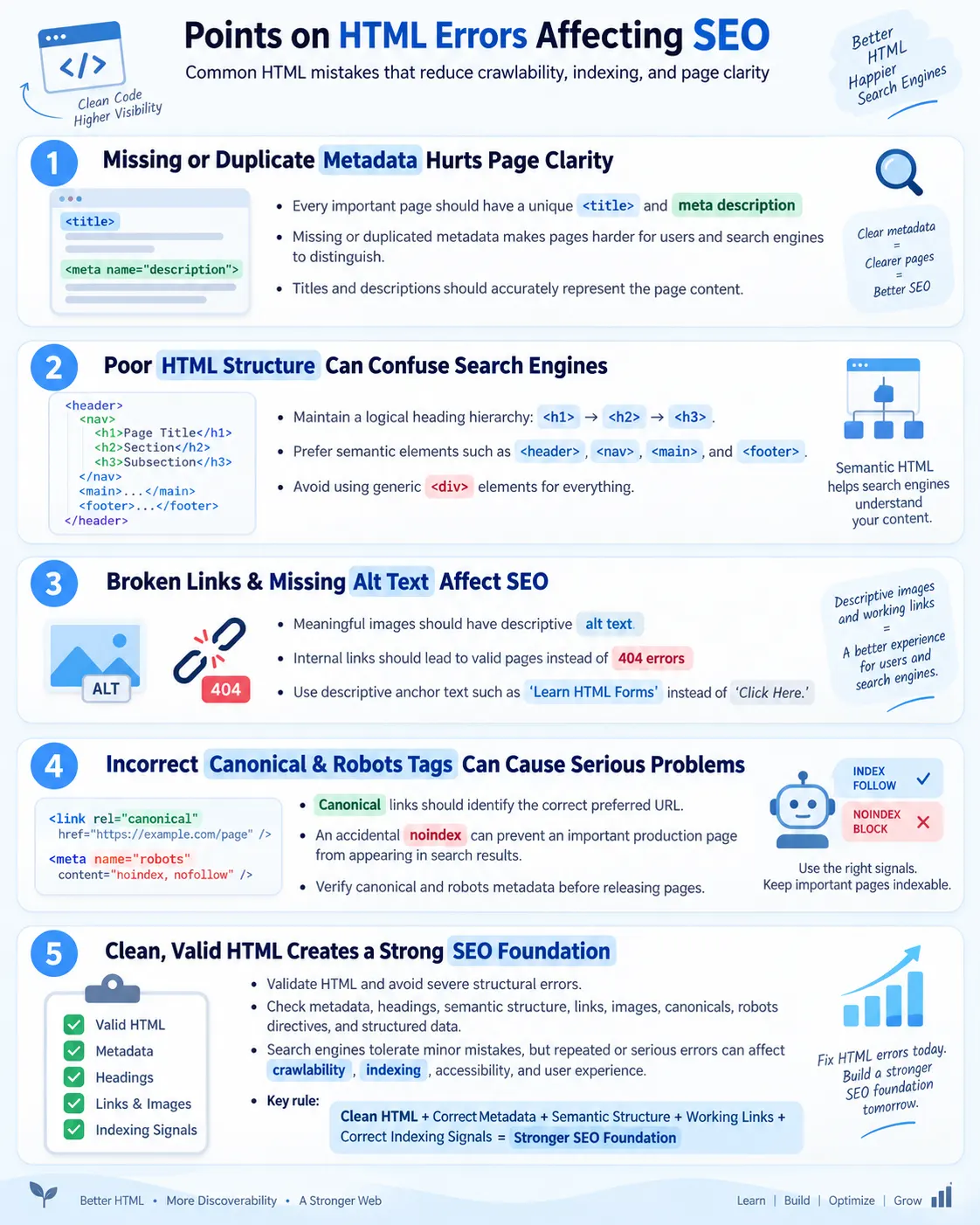
Introduction
HTML errors are mistakes in the structure, markup, or metadata of a webpage that can make it harder for search engines to crawl, understand, and index the content. Modern search engines are generally tolerant of minor HTML mistakes and can often interpret imperfect markup. Browsers are also forgiving. They try to repair broken markup and display the page anyway. However, that tolerance should not become an excuse for careless HTML. Significant HTML issues can still affect crawlability, indexing, accessibility, user experience, search engine understanding, and overall SEO performance.
SEO does not depend on HTML alone. High-quality content, performance, mobile usability, backlinks, user experience, and site authority all matter. But HTML is the first layer that search engines read. It contains the page title, meta description, headings, links, images, canonical signals, robots directives, structured data, and semantic structure. If that layer is weak, the page may communicate poorly even when the visible design looks acceptable.
Writing clean, semantic, and valid HTML helps both users and search engines. It gives browsers a reliable structure to parse. It helps assistive technologies expose content correctly. It helps crawlers identify the main topic, sections, links, images, and metadata. This article explains the most common HTML errors that affect SEO, why they matter, how to fix them, and how testers can verify them in real projects.
Why HTML Matters for SEO
Search engines first read the HTML of a webpage. They request the page, parse the document, identify metadata, build an understanding of the page structure, discover links, evaluate images, and decide how the content should be indexed. If the HTML is poorly structured, search engines may misunderstand the page or miss important signals.
HTML
  ↓
Crawler Reads HTML
  ↓
Understands Content
  ↓
Indexes Page
  ↓
Search Results
Clean HTML makes this workflow more reliable. A unique title tells the search engine what the page is about. A meta description summarizes the page. A logical heading hierarchy outlines the content. Semantic elements such as <header>, <nav>, <main>, and <footer> describe page regions. Anchor links connect pages. Image alt text explains visuals. Canonical links clarify preferred URLs. Robots tags control indexing. Structured data adds machine-readable meaning.
When these pieces are missing, duplicated, misleading, or broken, SEO becomes weaker. Search engines may still index the page, but the page is not communicating as clearly as it could. Good HTML is not a magic ranking trick. It is the foundation that allows the rest of SEO to work cleanly.
Missing Title Tag
The <title> tag is one of the most important on-page HTML elements. It identifies the page topic, appears in browser tabs, is commonly shown in search results, and helps search engines understand the page. A missing title leaves search engines and users with less context.
<head>

</head>
<head>
<title>
Complete HTML Tutorial
</title>
</head>The title should be unique, descriptive, and aligned with the visible page content. A title such as Home or Untitled is weak. A title such as HTML Errors Affecting SEO tells users and search engines what the page covers. Every important page should have a meaningful title.
Missing Meta Description
A meta description gives a brief summary of the page. It does not usually act as a direct ranking factor, but it can influence how a page appears in search results and whether users click it. If no description is provided, search engines may generate their own snippet from page content. Sometimes that works well, but sometimes the generated snippet is less clear than a well-written description.
<head>

<title>
HTML
</title>

</head>
<meta
name="description"
content="Learn HTML with practical examples and tutorials.">A good meta description should summarize the page accurately, use natural language, match user intent, and be unique for each page. Missing descriptions are especially common when pages are generated quickly from templates. They should be checked before publishing.
Poor Heading Structure
Heading structure helps search engines, users, and screen readers understand the organization of a page. A page should usually have one clear <h1> for the main topic, then <h2> for major sections, and <h3> for subsections where needed. Skipping heading levels unnecessarily makes the outline confusing.
<h1>
HTML
</h1>

<h4>
Forms
</h4>
<h1>
HTML
</h1>
<h2>
Forms
</h2>A logical heading hierarchy makes long pages easier to scan. It also supports accessibility because screen reader users often navigate by headings. Headings should be chosen for structure, not for font size. CSS should control appearance.
Multiple Unrelated H1 Elements
Multiple unrelated <h1> elements can weaken the clarity of a page. Modern HTML can technically allow multiple <h1> elements in some contexts, but for most article, tutorial, and landing pages, one primary <h1> is the clearest approach. The main heading should represent the main topic of the page.
<h1>
HTML
</h1>

<h1>
CSS
</h1>

<h1>
Java
</h1>
<h1>
Programming Tutorials
</h1>
<h2>
HTML
</h2>
<h2>
CSS
</h2>
<h2>
Java
</h2>The better structure has one main topic and several subtopics. This is easier for users to understand and easier for search engines to interpret. It also creates a cleaner document outline.
Using Div for Everything
Using <div> for everything is a common structural mistake. A <div> is a generic container. It does not tell the browser, search engine, or assistive technology what kind of content it contains. Semantic elements provide clearer meaning.
<div class="header">

<div class="menu">

<div class="content">
<header>
<nav>
<main>
<section>
<footer>Semantic HTML helps define regions and purpose. A <nav> element communicates navigation. A <main> element communicates primary page content. A <footer> communicates footer information. This improves accessibility and makes the page structure clearer.
Missing Image Alt Text
Image alt text improves accessibility, helps search engines understand images, and supports image search. Missing alt text makes meaningful images harder to understand for screen reader users and search engines. If an image communicates information, it should have meaningful alt text.
<img
src="html.png">
<img
src="html.png"
alt="HTML tutorial diagram">Decorative images should use empty alt text, such as alt="", so screen readers can ignore them. Meaningful images should describe the image naturally. Do not stuff keywords into alt text. Write for users first.
Broken Internal Links
Broken internal links create a poor user experience and waste crawl resources. If users click a link and reach a 404 page, trust is reduced. Search engine crawlers also waste time following broken paths. Broken links can happen when pages are renamed, moved, deleted, or linked incorrectly.
<a href="/old-course">
HTML
</a>

↓

404 Page
Internal links should be checked regularly. Important navigation links, footer links, breadcrumbs, related article links, and contextual links should point to existing pages. When pages move, update internal links instead of relying only on redirects.
Generic Anchor Text
Generic anchor text such as Click Here does not describe the destination. Descriptive anchor text helps users, screen readers, and search engines understand where the link goes. Anchor text is a context signal.
<a href="/forms">
Click Here
</a>
<a href="/forms">
Learn HTML Forms
</a>The better link tells users what they will get. It is also better for accessibility because a screen reader user can understand the link outside the sentence. Good anchor text should be natural, relevant, and concise.
Duplicate Page Titles
Duplicate page titles make it harder for users and search engines to distinguish pages. If every page is titled Home, search results become unclear. Each page should have a unique, descriptive title that matches its content.
Bad:
Every Page
  ↓
Home

Better:
HTML Tutorial
CSS Tutorial
Java Tutorial
Duplicate titles often come from reused templates. Templates should allow page-specific title values. During audits, duplicate titles should be reviewed and rewritten to reflect each page's purpose.
Duplicate Meta Descriptions
Duplicate meta descriptions create similar problems. A generic description such as Learn Programming on every page does not explain what each page covers. A page about HTML forms, a page about CSS Grid, and a page about Java loops should each have its own description.
Unique descriptions help users decide which result to click. They also help search engines understand that pages serve different intents. Duplicate descriptions are not always catastrophic, but they are a sign of weak page-level metadata.
Missing Canonical Link
If the same content is available through multiple URLs, a canonical link helps identify the preferred URL. Without a canonical, search engines may choose a parameterized or duplicate version as the indexed page. This can split signals and create confusion.
example.com/page

example.com/page?ref=email

example.com/page?utm=google
<link
rel="canonical"
href="https://example.com/page">Canonical tags should point to the preferred URL, use the correct protocol and host, and appear once in the head. They should not point to unrelated pages or copied template URLs.
Incorrect Robots Meta Tag
An incorrect robots meta tag can prevent important pages from appearing in search results. The most dangerous example is accidentally placing noindex on an important production page. This can happen when staging settings are copied to production.
<meta
name="robots"
content="noindex">
Robots directives should match the page's purpose. Public pages usually use index, follow. Utility pages, staging pages, and private workflow pages may use noindex. Always verify production metadata before release.
Missing Language Attribute
The lang attribute helps browsers and assistive technologies understand the page language. It supports correct pronunciation by screen readers, translation behavior, and language-specific processing. Missing language information is an accessibility and quality issue.
<html><html lang="en">For multilingual websites, each page should declare the correct language. If a page is in Tamil, English, or another language, the lang value should reflect that. This helps both users and tools process the page correctly.
Missing Structured Data When Appropriate
Structured data is not required for every page, but pages such as articles, products, courses, FAQs, events, recipes, organizations, and breadcrumbs may benefit from it. Structured data helps search engines better understand content and may make pages eligible for rich results.
<script
type="application/ld+json">

...

</script>
The structured data must match the visible content. Do not add FAQ schema if the page does not show FAQs. Do not mark a normal article as a product. Use valid JSON-LD and validate before publishing.
Poor Navigation Structure
Logical navigation helps users and search engines. If important content is buried too deeply, users may not find it and crawlers may treat it as less important. A clear structure moves from home to category to detail page.
Bad:
Home
  ↓
  ↓
  ↓
  ↓
Course

Good:
Home
  ↓
HTML
  ↓
Forms
Navigation menus, breadcrumbs, hub pages, and related links all help. Important pages should not be orphaned. A strong internal linking structure supports crawlability and user exploration.
Images Containing Important Text
Putting important text only inside images is a mistake. Search engines and assistive technologies work better with real HTML text. If instructions, explanations, code, or important labels are only inside an image, some users and tools may not access them properly.
Bad:
Image
  ↓
All Instructions

Better:
<h2>
Instructions
</h2>

<p>
...
</p>
Images can support content, but they should not replace essential HTML text. Screenshots are useful in tutorials, but code and instructions should also be available as real text where possible.
Slow Image Loading
Large, unoptimized images can slow page loading. Slow pages create poor user experience and can weaken overall page quality. HTML supports image performance through lazy loading, width and height attributes, responsive images, and appropriate formats.
<img
loading="lazy"
src="course.webp"
alt="HTML Course">
Modern formats such as WebP or AVIF can reduce file size when used appropriately. Images should also be compressed, resized, and served at suitable dimensions. Performance matters for both users and SEO.
Invalid HTML
Invalid HTML can lead to unpredictable browser behavior and make pages harder to maintain. Browsers often repair markup, but the repaired DOM may not match what the developer intended. Severe structural errors can affect layout, accessibility, crawling, and testing.
<p>

<div>

Hello

</p>
<div>
<p>
Hello
</p>
</div>Validate HTML regularly, especially templates used across many pages. A single template error can affect hundreds of pages. Clean nesting and valid structure make the page more predictable.
Browser Workflow
When a crawler processes a page, it reads the HTML, builds or interprets the DOM, understands content, and decides how to index the page. Clean HTML helps search engines interpret the page more reliably.
HTML
  ↓
Crawler
  ↓
DOM
  ↓
Search Engine
  ↓
Index
If the HTML contains missing metadata, broken links, invalid structure, and confusing headings, the search engine may still process the page, but the page is not providing its best signals. Clean HTML reduces ambiguity.
Best Practices
Good HTML SEO starts with consistent page-level habits. Use semantic HTML. Include a unique title for every page. Write unique meta descriptions. Maintain a logical heading hierarchy. Add meaningful alt text to images. Use descriptive anchor text. Fix broken links. Use canonical links where needed. Add structured data when appropriate. Validate HTML regularly.
- Use semantic HTML.
- Include a unique
<title>for every page. - Write unique meta descriptions.
- Maintain a logical heading hierarchy.
- Add meaningful alt text to images.
- Use descriptive anchor text.
- Fix broken links.
- Use canonical links where needed.
- Add structured data when appropriate.
- Validate HTML regularly.
Common Mistakes
Common mistakes include missing titles, missing meta descriptions, duplicate titles, duplicate descriptions, broken links, missing alt text, poor heading hierarchy, invalid HTML, missing canonical links, and accidental noindex on important pages. These issues often come from copied templates, rushed publishing, or missing review processes.
- Missing
<title> - Missing meta description
- Duplicate titles
- Duplicate descriptions
- Broken links
- Missing alt text
- Poor heading hierarchy
- Invalid HTML
- Missing canonical links
- Accidental
noindexon important pages
The best defense is a consistent checklist. Every page should be reviewed for metadata, headings, semantic structure, image attributes, links, canonicals, robots directives, and validation. Automation can catch many errors, but manual judgment is still needed for content quality and semantic accuracy.
SEO Benefits of Clean HTML
Clean HTML helps improve crawlability, indexing, accessibility, user experience, page structure, and eligibility for rich results when structured data is used appropriately. Good HTML is one part of SEO. High-quality content, page performance, backlinks, and user experience also play major roles.
- Improve crawlability
- Improve indexing
- Enhance accessibility
- Improve user experience
- Clarify page structure
- Support eligibility for rich results when structured data is appropriate
Clean HTML also makes websites easier to maintain. Developers can understand templates more quickly. Testers can verify behavior more reliably. Content teams can publish pages with fewer technical mistakes. SEO reviewers can audit pages more efficiently.
Selenium Perspective
Automation testers often verify page title, meta description, heading structure, image alt text, broken links, canonical tag, robots meta tag, and structured data presence. Selenium can inspect the rendered DOM and retrieve metadata values.
String title =
driver.getTitle();

System.out.println(title);
String description =
driver.findElement(
By.cssSelector(
"meta[name='description']"))
.getAttribute("content");Selenium can also click internal links, check current URLs, inspect images, and verify headings. For full-site SEO audits, crawlers and scripts may be more efficient, but Selenium is useful for critical pages and browser-rendered checks.
HTML SEO Audit Workflow
An HTML SEO audit should start with metadata. Check title, description, canonical, robots tag, language attribute, and structured data. Then review visible structure, including headings, semantic landmarks, images, links, and navigation. Finally, validate HTML and test important pages in real browsers.
Audit priority matters. Start with homepage, course hubs, high-traffic pages, landing pages, and pages recently created from templates. Then expand to the rest of the site. Fix errors that block indexing or break navigation first. Then improve duplicate metadata, heading structure, alt text, and semantic quality.
A good audit combines automated checks with human review. Automation can flag missing fields and broken links. Humans decide whether a title is meaningful, whether heading structure makes sense, whether alt text is useful, and whether internal links are relevant.
Release Checklist
Before publishing a page, run a simple release checklist. Confirm the page has a unique title, unique meta description, correct canonical URL, correct robots directive, one clear main heading, logical headings, meaningful internal links, image alt text, valid structured data if used, and no broken links. This checklist prevents many common SEO mistakes.
- Unique page title
- Unique meta description
- Correct canonical URL
- Correct robots directive
- Correct
langattribute - One clear main heading
- Logical heading hierarchy
- Semantic HTML regions
- Meaningful image alt text
- Working internal links
- Valid structured data where appropriate
- No severe HTML validation errors
Template-Level HTML Errors
Some HTML errors are more dangerous because they exist in templates rather than individual pages. A single article template may generate hundreds of tutorial pages. If that template has a missing canonical link, duplicate meta description, incorrect robots tag, or invalid heading structure, the issue spreads across the whole section. This is why template-level SEO checks are especially important.
Template errors often look small in code. A copied title variable may output the same title on every page. A meta description placeholder may remain empty. A navigation partial may link to a removed page. A robots directive may be hardcoded as noindex. A layout may render the site logo as an <h1> on every page while the article title appears as a styled paragraph. Each of these issues can affect many pages at once.
The best way to prevent template-level errors is to test representative pages from each template. Check one article page, one course hub page, one utility page, one category page, and one error page. Verify that each template produces correct metadata, heading structure, semantic regions, canonical URLs, robots directives, and links. When a template changes, repeat the checks. A careful template review saves far more time than fixing hundreds of individual pages later.
Content-Level HTML Errors
Other HTML errors happen inside content. A writer may paste code examples without escaping HTML characters. A section may use headings out of order. An image may be inserted without alt text. A link may point to a draft page or old URL. A copied table may have broken structure. These errors are more localized than template errors, but they still affect page quality.
Content-level errors are common on tutorial websites because lessons contain many examples, code blocks, images, tables, and links. Code examples must be escaped properly so they display as examples instead of being interpreted as real markup. Tables should use proper rows and cells. Lists should use real list elements when they represent lists. Images should be added with appropriate alt text. Links should be tested.
A good content workflow includes previewing the page after editing. Do not only inspect the source. Open the page and check whether examples render correctly, headings appear in the right order, code blocks are readable, tables scroll properly on mobile, and links open the expected destination. HTML quality is both structural and visual.
HTML Errors and Accessibility
Many HTML errors affect accessibility before they affect rankings. Missing alt text affects users who cannot see images. Poor heading hierarchy affects screen reader navigation. Missing language attributes can cause incorrect pronunciation. Generic links make link navigation difficult. Invalid form labels can make forms unusable. Semantic HTML is not only an SEO concern; it is a user access concern.
Accessibility and SEO often align because both depend on meaningful HTML. A page with clear headings is easier for screen readers and search engines. A page with descriptive links is easier for users and crawlers. A page with real text instead of text inside images is easier to read, translate, index, and resize. Clean HTML supports many systems at once.
When auditing HTML errors, include accessibility checks. Use browser accessibility tools, screen reader testing where appropriate, keyboard navigation checks, and automated accessibility tools. Automated tools can catch missing alt attributes, skipped headings, missing labels, and invalid ARIA usage. Manual review is still needed to judge whether alt text is meaningful, headings are descriptive, and links make sense.
HTML Errors and Page Performance
Some HTML errors affect performance. Missing image dimensions can create layout shift. Huge images without responsive attributes can slow loading. Render-blocking resources placed incorrectly can delay content. Excessive nested markup can increase page complexity. Duplicate scripts can add unnecessary network and processing cost. While these are not always classic validation errors, they are HTML implementation issues that affect user experience.
Performance matters because users expect pages to load quickly and remain stable. A page that shifts while loading feels unreliable. A page with oversized images consumes bandwidth. A page with unnecessary scripts can feel slow on low-end devices. Search engines consider page experience as part of broader quality evaluation, and users are more likely to stay on fast, stable pages.
HTML performance checks should include image attributes, lazy loading, resource ordering, duplicate scripts, and unnecessary markup. A clean page head should avoid repeated analytics snippets, repeated stylesheet links, and unused scripts. The page body should prioritize content and avoid excessive layout wrappers where simpler semantic HTML would work.
HTML Errors in Static Websites
Static websites are easy to maintain in some ways, but they are also vulnerable to copied-page mistakes. A developer may duplicate an existing page to create a new tutorial and forget to update the title, meta description, canonical URL, heading, navigation link, or structured data. The page may look mostly correct, but metadata may still point to the original page. This is a common SEO problem in static HTML sites.
Static websites should use consistent page templates and review scripts where possible. A simple audit can check whether every full HTML page has the expected analytics, AdSense snippet, title, description, canonical link, robots tag, footer, scripts, and nav loader. It can also identify duplicate titles, duplicate descriptions, missing H1 elements, missing alt attributes, and broken links. These checks are practical and catch real production issues.
For static tutorial pages, consistency matters. Every page should follow the same shell, but page-specific values must be unique. The title should match the article. The description should summarize the article. The canonical should point to the correct URL. The nav should include the page in sequence. The article should use the site's list and table styles. This combination creates both consistency and page-level accuracy.
Prioritizing HTML SEO Fixes
Not every HTML error has the same impact. Prioritization helps teams fix the most important problems first. Errors that block indexing or misdirect search engines should be high priority. Examples include accidental noindex on important pages, missing or wrong canonical tags on duplicate pages, broken navigation to important content, and severe invalid markup that prevents content from rendering correctly.
Next, fix metadata and structure issues on high-value pages. Missing titles, duplicate titles, missing descriptions, weak headings, and broken links on the homepage, course hubs, popular articles, and landing pages matter more than the same issue on a low-traffic utility page. High-value pages should receive careful manual review.
After that, improve broader quality issues across the site. Add missing alt text, improve generic anchor text, validate structured data, clean semantic markup, and optimize images. These improvements may not all produce immediate ranking changes, but they improve the long-term quality, accessibility, and maintainability of the website.
Practical Audit Workflow
A practical HTML SEO audit starts with a crawl or file scan. Collect all pages and check for required elements. Each full page should have one title, one meta description, one canonical link, a robots meta tag where your site standard requires it, a language attribute, a main heading, and expected scripts. Then scan body content for headings, links, images, tables, and semantic regions.
The second step is duplicate detection. Find duplicate titles and descriptions. Find pages with the same canonical URL. Find repeated H1 text where it should be unique. Duplicate metadata often reveals copied pages or incomplete publishing. These problems are easy to create and easy to miss without a scan.
The third step is quality review. Automated checks can say that a description exists, but a human must decide whether it is useful. Automated checks can say that an alt attribute exists, but a human must decide whether it describes the image. Automated checks can list headings, but a human must decide whether the outline makes sense. The strongest audit combines automation with editorial judgment.
The final step is regression prevention. Once errors are fixed, add checks to the release process. If a page is created without a title, the process should catch it. If a production page contains noindex, the process should flag it. If a navigation link points to a missing file, the process should report it. Prevention is cheaper than repeated cleanup.
Testing Checklist for QA Teams
QA teams can include HTML SEO checks in normal page validation. These checks do not require advanced SEO knowledge. They require attention to metadata, structure, and links. Testers can verify that each page has the correct title, meta description, H1, canonical URL, robots directive, footer, navigation, image alt text, and working internal links.
- Verify browser title matches the page topic.
- Verify meta description exists and is page-specific.
- Verify one clear main heading appears on the page.
- Verify heading levels follow a logical order.
- Verify meaningful images have alt text.
- Verify decorative images use empty alt text if needed.
- Verify internal links open valid pages.
- Verify canonical URL matches the expected page.
- Verify robots directive is correct for the environment.
- Verify structured data is valid where used.
This checklist can be automated partly, but it should not be reduced entirely to automation. A test can detect that alt text exists, but a tester must decide whether it is meaningful. A test can detect that headings exist, but a tester should review whether they are logical. QA adds value by checking both technical presence and practical usefulness.
Developer Prevention Checklist
Developers can prevent many SEO-impacting HTML errors by building strong templates and reusable components. Page components should output semantic HTML. Layouts should include correct head metadata. Navigation components should use real anchor links. Image components should require alt text decisions. Templates should avoid duplicate metadata and should receive page-specific values from content data.
- Use semantic elements in layout templates.
- Require page-specific title and description values.
- Generate canonical URLs from the final page path.
- Set robots directives by page type and environment.
- Use real links for navigation and breadcrumbs.
- Make image components require alt text or decorative intent.
- Validate generated HTML after template changes.
- Run link checks before publishing large content batches.
Good developer defaults reduce editorial mistakes. If a template requires a title, the page cannot accidentally publish without one. If image components require an alt decision, missing alt text becomes less likely. If canonical generation is centralized, copied-page canonical mistakes are reduced. Engineering quality directly supports SEO quality.
Common Interview Questions
Why does HTML affect SEO? HTML affects SEO because search engines use HTML to understand, crawl, and index webpage content. It contains titles, headings, links, metadata, images, canonical tags, robots tags, and structured data.
Which HTML tag is most important for SEO? The <title> tag is one of the most important on-page HTML elements because it identifies the page topic and is commonly shown in search results.
Does missing alt text affect SEO? Yes. It reduces image accessibility and makes it harder for search engines to understand image content. It also weakens the user experience for screen reader users.
Why is semantic HTML important? Semantic HTML helps search engines and assistive technologies understand the structure and purpose of different sections of a webpage.
Can invalid HTML hurt SEO? Minor HTML errors are often handled gracefully by modern search engines, but severe or widespread markup issues can interfere with crawling, rendering, accessibility, or user experience.
What HTML errors commonly affect SEO? Examples include missing title, missing meta description, poor heading hierarchy, missing alt text, broken links, duplicate metadata, incorrect robots directives, missing canonical links, and invalid HTML structure.
Comparison Table
| Good HTML | HTML Error |
|---|---|
Unique <title> |
Missing or duplicate title |
| Unique meta description | Duplicate or missing description |
| Semantic HTML | Excessive generic <div> elements |
| Proper headings | Skipped or inconsistent heading levels |
| Image alt text | Missing alt |
| Working internal links | Broken links |
| Correct canonical tag | Missing or incorrect canonical |
| Valid HTML | Invalid markup |
Interview-Ready Answer
HTML errors can affect SEO by making it harder for search engines to understand, crawl, and index webpages. Common issues include missing or duplicate <title> tags, missing meta descriptions, poor heading hierarchy, missing image alt text, broken internal links, invalid HTML, incorrect robots meta tags, missing canonical links, and lack of semantic HTML. Using clean, valid, and semantic HTML improves crawlability, accessibility, and user experience, all of which contribute to better overall SEO.
A strong answer should also explain that search engines can tolerate minor HTML mistakes, but serious or repeated problems can reduce clarity. Good SEO depends on a combination of clean HTML, useful content, performance, accessibility, and strong site structure.
One-Line Insight
Search engines read your HTML before they rank your content; well-structured HTML helps them understand your page correctly.