HTML Document Anatomy
Introduction
Every webpage on the internet, whether it is a simple personal portfolio, a corporate website, an e-commerce platform, a social media application, or a sophisticated React-based web application, begins with an HTML document. While modern web development often focuses heavily on CSS frameworks, JavaScript libraries, APIs, and cloud infrastructure, the foundation of every webpage remains the HTML document itself. Before a browser can render content, apply styles, execute scripts, or create interactive experiences, it must first understand the structure of the HTML document it receives.
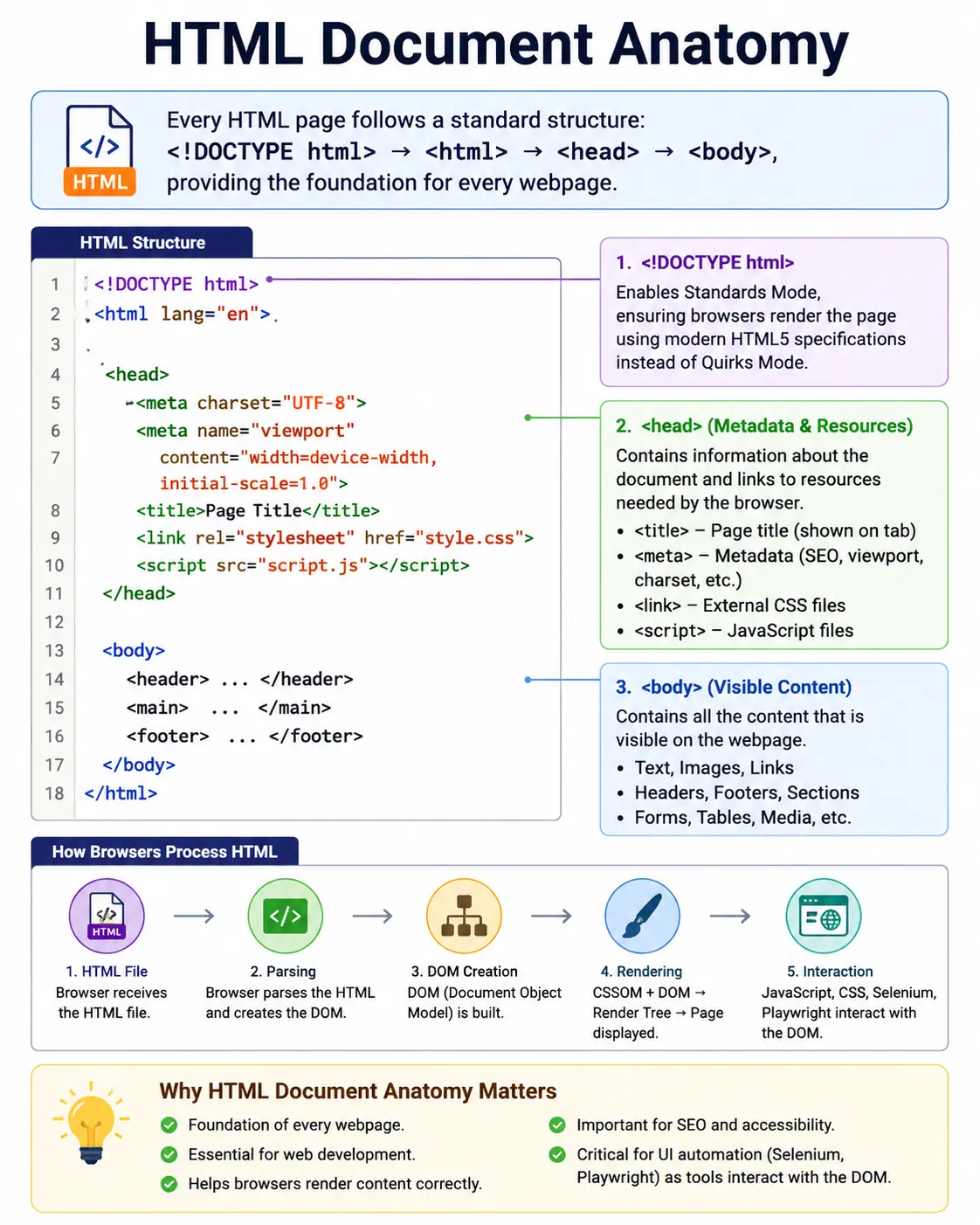
This structure is known as HTML Document Anatomy. Just as the human body consists of different organs working together to sustain life, an HTML document consists of multiple structural components working together to create a complete webpage. Each part has a specific purpose. Some components provide information to the browser, some provide metadata to search engines, and others contain the visible content users interact with every day.
Understanding HTML document anatomy is one of the most fundamental skills in web development because every browser relies on this structure to parse HTML, create the DOM, discover resources, and begin rendering. Without understanding the anatomy of an HTML document, concepts such as browser rendering, SEO, accessibility, JavaScript interaction, CSS styling, and automation testing become much harder to grasp.
Whether you are a frontend developer, a backend developer, a Selenium automation engineer, an API tester, or someone beginning their journey into web technologies, mastering HTML document anatomy provides the foundation upon which all other web concepts are built.
What Is HTML Document Anatomy?
HTML Document Anatomy refers to the complete structure and organization of an HTML document. It describes how various HTML elements are arranged and how they work together to define a webpage.
A standard HTML document typically contains four major components:
<!DOCTYPE html>
<html>
<head>
</head>
<body>
</body>
</html>
Although this structure appears simple, each component plays a critical role in the browser's processing and rendering pipeline.
At a high level, the anatomy can be visualized as:
HTML Document
│
├── <!DOCTYPE html>
│
└── <html>
     │
     ├── <head>
     │
     └── <body>
Everything else in an HTML page exists within this framework.
Why HTML Documents Need Structure
Imagine receiving a book where chapters, headings, paragraphs, and page numbers are all mixed together randomly. Reading such a book would be nearly impossible.
Browsers face a similar challenge when processing webpages.
The browser needs a predictable structure so it can determine:
- What type of document it is processing
- Which content is metadata
- Which content should be displayed
- Which resources must be downloaded
- Which scripts should execute
- Which styles should be applied
The HTML document anatomy provides this organization.
Because all browsers understand this standard structure, webpages can be rendered consistently across different platforms and devices.
The Basic HTML Document Structure
A modern HTML5 document typically looks like this:
<!DOCTYPE html>
<html lang="en">

<head>
    <meta charset="UTF-8">
    <meta name="viewport"
          content="width=device-width, initial-scale=1.0">

    <title>My Website</title>
</head>

<body>

    <h1>Welcome to SoftwareTips4U</h1>

    <p>Learning HTML Document Anatomy</p>

</body>

</html>
Every major part of this structure contributes something important to the browser's understanding of the page.
Complete Anatomy Overview
A complete HTML document can be represented as:
HTML Document
│
├── <!DOCTYPE html>
│
└── <html>
     │
     ├── <head>
     │     ├── meta
     │     ├── title
     │     ├── link
     │     ├── style
     │     └── script
     │
     └── <body>
           ├── header
           ├── navigation
           ├── content
           ├── images
           ├── forms
           └── footer
Each section serves a specific purpose within the document.
Understanding the DOCTYPE Declaration
The first line in a modern HTML document is:
<!DOCTYPE html>Although it is not technically an HTML tag, it is one of the most important declarations in the document.
Its primary purpose is to tell the browser:
This document follows HTML5 standards.Before HTML5 became the standard, browsers often had multiple rendering modes. Without a proper DOCTYPE declaration, browsers could enter a compatibility mode called Quirks Mode.
Standards Mode vs Quirks Mode
When the browser encounters:
<!DOCTYPE html>it activates:
Standards ModeIn Standards Mode, browsers follow modern HTML, CSS, and JavaScript specifications.
Without the DOCTYPE declaration:
<html>many browsers may enter:
Quirks ModeQuirks Mode attempts to emulate older browser behavior and may result in inconsistent rendering.
For this reason, every modern webpage should begin with:
<!DOCTYPE html>The HTML Element
After the DOCTYPE declaration comes the root element:
<html lang="en">
</html>
The <html> element acts as the container for the entire document.
Everything visible and invisible within the webpage resides inside this root element.
Why the HTML Element Matters
The browser uses the <html> element as the starting point when constructing the DOM.
Visual hierarchy:
html
 ├── head
 └── body
The entire webpage exists under this root node.
Without the <html> element, the browser would have no defined document root.
Understanding the lang Attribute
Example:
<html lang="en">The lang attribute specifies the language of the document.
Examples:
<html lang="en">
<html lang="ta">
<html lang="fr">
<html lang="es">
This information helps:
- Screen readers
- Search engines
- Accessibility tools
- Translation software
Providing the correct language improves both accessibility and SEO.
The Head Section
Inside the root element, the first major section is:
<head>
</head>
The head section contains information about the webpage rather than content displayed to users.
Think of it as the control center of the document.
Purpose of the Head Section
The head stores:
- Metadata
- Document title
- CSS links
- JavaScript references
- SEO information
- Character encoding
- Responsive settings
Most of the content in the head is invisible to users but extremely important to browsers and search engines.
Anatomy of the Head Section
Typical structure:
head
│
├── title
├── meta
├── link
├── style
└── script
Each element contributes specific information to the browser.
The Title Element
One of the most important elements in the head section is:
<title>Learn HTML</title>The title defines the name of the webpage.
Where the Title Appears
The title appears in several places:
- Browser tabs
- Browser history
- Bookmarks
- Search engine results
Example:
Chrome Tab
----------------
Learn HTML
Search engines also use the title as a ranking and display factor.
A meaningful title improves both usability and SEO.
Meta Tags
Meta tags provide metadata about the document.
Metadata means:
Data about the pagerather than visible page content.
Character Encoding Meta Tag
Example:
<meta charset="UTF-8">This specifies how characters are encoded.
UTF-8 supports:
- English
- Tamil
- Hindi
- Arabic
- Chinese
- Japanese
- Emojis
Without proper encoding, text may appear corrupted.
Viewport Meta Tag
Example:
<meta name="viewport"
content="width=device-width, initial-scale=1.0">
This tag is essential for responsive web design.
It tells browsers how to scale content on:
- Phones
- Tablets
- Laptops
- Desktop monitors
Without this tag, mobile pages often display incorrectly.
Description Meta Tag
Example:
<meta name="description"
content="HTML Tutorial">
Search engines use this information when displaying search results.
A good description improves click-through rates and SEO visibility.
The Link Element
External resources are commonly connected using:
<link rel="stylesheet"
href="style.css">
The <link> element creates relationships between the document and external resources.
Common Uses of Link
Loading:
- Stylesheets
- Favicons
- Fonts
- Preload resources
Example:
<link rel="icon"
href="favicon.ico">
The browser discovers and downloads these resources during page loading.
The Style Element
The <style> element allows CSS to be embedded directly inside the document.
Example:
<style>

h1 {
    color: blue;
}

</style>
This creates internal CSS.
When Internal CSS Is Used
Internal styles are commonly used for:
- Small websites
- Quick prototypes
- Testing
- Demonstrations
However, larger projects typically use external stylesheets because they improve maintainability.
The Script Element
JavaScript is loaded using:
<script src="app.js"></script>or:
<script>
alert("Hello");
</script>
The script element introduces behavior and interactivity.
Purpose of JavaScript
JavaScript allows webpages to:
- Respond to clicks
- Validate forms
- Call APIs
- Modify DOM elements
- Create animations
- Update content dynamically
Without scripts, webpages remain largely static.
The Body Section
After the head comes the most visible part of the document:
<body>
</body>
Everything users see belongs inside the body.
Purpose of the Body
The body contains:
- Headings
- Paragraphs
- Images
- Forms
- Videos
- Tables
- Navigation menus
- Buttons
Essentially:
Everything visibleexists within the body.
Typical Body Structure
Modern webpages often follow a structure similar to:
<body>

<header>
</header>

<nav>
</nav>

<main>
</main>

<footer>
</footer>

</body>
This structure improves readability and semantics.
Semantic HTML Anatomy
HTML5 introduced semantic elements that describe content meaning rather than appearance.
Example:
<body>

<header>
</header>

<nav>
</nav>

<main>

<section>
</section>

<article>
</article>

</main>

<aside>
</aside>

<footer>
</footer>

</body>
These tags help browsers, search engines, accessibility tools, and developers understand page structure.
Visual Representation of a Modern Page
+----------------------+
| Header               |
+----------------------+
| Navigation           |
+----------------------+
| Main Content         |
|                      |
+----------------------+
| Sidebar              |
+----------------------+
| Footer               |
+----------------------+
This layout appears in countless modern websites.
HTML Document Anatomy and DOM Creation
The browser converts the HTML structure into a DOM tree.
Example HTML:
<html>

<head>
<title>Demo</title>
</head>

<body>
<h1>Hello</h1>
</body>

</html>
Generated DOM:
Document
 │
 html
 ├── head
 │     └── title
 │           └── Demo
 │
 └── body
       └── h1
             └── Hello
Every HTML element becomes a DOM node.
How Browsers Process HTML Anatomy
The browser processes the document in stages:
HTML Document
      ↓
DOCTYPE Check
      ↓
Parse HTML
      ↓
Parse Head
      ↓
Load Resources
      ↓
Parse Body
      ↓
Create DOM
      ↓
Render Page
This structured process allows browsers to consistently build webpages.
Common Beginner Mistakes
One frequent mistake is forgetting the DOCTYPE declaration.
Bad:
<html>Good:
<!DOCTYPE html>
<html>
Another mistake is omitting the language attribute.
Bad:
<html>Good:
<html lang="en">Developers also sometimes place visible content inside the head section.
Bad:
<head>
<h1>Hello</h1>
</head>
Visible content belongs in the body.
Another issue is using multiple title elements.
Bad:
<title>Page1</title>
<title>Page2</title>
Only one title element should exist.
HTML Document Anatomy and Selenium
Selenium primarily interacts with elements inside the body.
Example:
driver.findElement(By.tagName("h1"));However, Selenium can also access metadata.
Example:
driver.getTitle();The returned value comes from:
<title>inside the head section.
Understanding document anatomy helps automation engineers understand where information originates.
Interview-Ready Answer
HTML Document Anatomy refers to the standard structure of an HTML page. A typical document consists of a DOCTYPE declaration, a root <html> element, a <head> section containing metadata and resources, and a <body> section containing all visible page content. Together, these components define the structure, behavior, accessibility, SEO information, and presentation of a webpage.
Key Takeaway
Every webpage begins with a structured HTML document. The DOCTYPE declaration activates standards mode, the <html> element serves as the root container, the <head> section stores metadata and resources, and the <body> section contains visible content. This anatomy forms the foundation for browser rendering, DOM creation, CSS styling, JavaScript execution, SEO, accessibility, and automation testing.
One-Line Insight
HTML Document Anatomy = DOCTYPE + HTML + HEAD + BODY = Complete Web Page Structure.