HTML Comments & Best Practices
Introduction
As HTML documents grow larger and more complex, maintaining readability becomes increasingly important. A simple web page containing a heading and a few paragraphs may be easy to understand without additional explanation, but modern websites often contain hundreds or even thousands of lines of code. These pages may include navigation systems, forms, media content, interactive components, templates, reusable sections, and integrations with CSS and JavaScript. In such environments, developers need a way to communicate information within the code itself without affecting what users see in the browser.
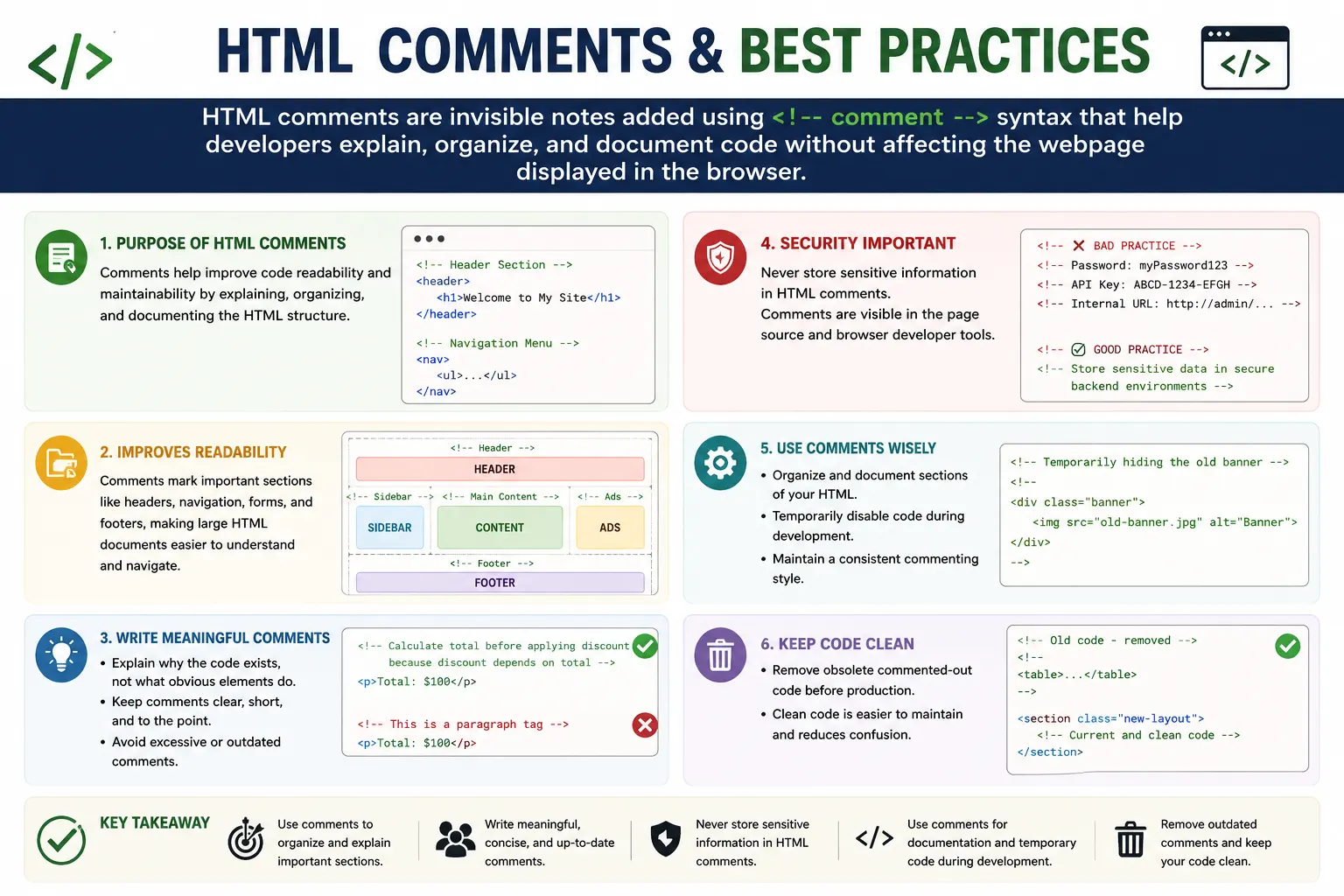
This is where HTML comments become valuable. HTML comments allow developers to insert notes, explanations, reminders, and organizational markers directly into the source code. These comments are ignored by browsers during rendering, meaning they do not appear on the visible webpage. Instead, they exist solely to help developers understand, maintain, and collaborate on the code.
Comments may seem like a small feature of HTML, but they play a significant role in real-world web development. They improve maintainability, make large documents easier to navigate, help teams collaborate effectively, and provide context for future updates. At the same time, poor commenting practices can clutter code, create confusion, and even introduce security risks.
Understanding HTML comments and learning how to use them effectively is an essential skill for every web developer. Whether you are building a personal website, contributing to a large enterprise application, or preparing for technical interviews, mastering comment usage and best practices can significantly improve the quality of your code.
What Are HTML Comments?
HTML comments are pieces of text added to an HTML document that are ignored by the browser during rendering. They provide information for developers without affecting the visual appearance of the webpage.
The syntax for an HTML comment is:
<!-- This is a comment -->Everything between the opening <!-- and closing --> markers is treated as comment content.
For example:
<!-- Website Header -->
<h1>Welcome to SoftwareTips4U</h1>
When the browser processes this code, it ignores the comment and only displays:
Welcome to SoftwareTips4UThe comment remains part of the source code but does not become visible page content.
Comments exist primarily for human readers rather than browsers. They act as notes embedded within the codebase to improve understanding and organization.
Why HTML Comments Exist
The primary purpose of comments is communication. Code often needs explanation, especially when multiple developers work on the same project or when a developer returns to a project after several months.
Consider the following code:
<div class="container">
    ...
</div>
Without additional context, a future developer may not immediately understand the purpose of the container.
Now consider:
<!-- Main Product Catalog Container -->
<div class="container">
    ...
</div>
The purpose becomes much clearer.
Comments help developers:
- Explain code behavior
- Organize large files
- Document decisions
- Leave reminders
- Collaborate with teammates
- Temporarily disable code
- Mark important sections
In large projects, comments often serve as a form of internal documentation.
Basic Comment Syntax
HTML comments follow a simple structure:
<!-- Comment Text -->Anything inside the comment markers is ignored during rendering.
Examples:
<!-- Navigation Menu -->

<!-- Footer Section -->

<!-- TODO: Add Search Functionality -->
Comments can contain plain text, symbols, or even blocks of HTML code.
Because comments are ignored by the rendering engine, they do not affect layout, styling, or functionality.
How Browsers Process Comments
When a browser receives an HTML document, it begins parsing the content and building the Document Object Model (DOM).
Consider:
<!-- Header Section -->
<h1>Hello</h1>
The browser recognizes the comment as a comment node and then proceeds to process the heading element.
Rendering flow:
Comment Found
↓
Comment Ignored for Display
↓
Process h1 Element
↓
Render Heading
The comment becomes part of the DOM internally but is not painted on the screen.
This behavior allows developers to store information within the document without impacting the user experience.
Single-Line Comments
The most common type of comment is the single-line comment.
Example:
<!-- Main Header -->Single-line comments are useful for labeling sections and providing brief explanations.
Example:
<!-- Navigation Menu -->
<nav>
    ...
</nav>
This immediately tells developers what the section represents.
Single-line comments are simple, clean, and easy to maintain.
Multi-Line Comments
Comments are not limited to a single line.
Example:
<!--
This section contains
the primary navigation menu
used throughout the website.
-->
Multi-line comments are useful when more detailed explanations are required.
They are often used for:
- Documentation
- Technical notes
- Development instructions
- TODO lists
- Architectural explanations
While multi-line comments can be helpful, excessive use should be avoided to prevent clutter.
Using Comments to Organize Large Documents
As websites grow, HTML documents can become difficult to navigate.
Consider a page containing:
- Header
- Navigation
- Hero section
- Product catalog
- Testimonials
- Contact form
- Footer
Without comments, locating specific sections may take time.
Using comments improves structure:
<!-- Header Section -->

<header>
</header>

<!-- Navigation Section -->

<nav>
</nav>

<!-- Hero Banner -->

<section>
</section>

<!-- Product Catalog -->

<section>
</section>

<!-- Footer Section -->

<footer>
</footer>
This approach creates visual landmarks within the document.
Many professional development teams rely on comments to improve navigation and readability.
Temporarily Disabling HTML Code
One practical use of comments is temporarily disabling code.
Example:
<!--
<p>This paragraph is disabled.</p>
-->
The browser ignores the paragraph entirely.
This can be useful during:
- Testing
- Debugging
- Feature development
- Temporary content removal
Instead of deleting code immediately, developers may comment it out while evaluating changes.
However, leaving large amounts of disabled code permanently is generally discouraged.
Comments as Documentation
Comments often serve as lightweight documentation.
Example:
<!--
Dynamic content below is populated
by the backend product service.
-->
This provides valuable context.
Without such information, future developers may struggle to understand why a section behaves a certain way.
Documentation comments become particularly useful in enterprise applications where multiple teams work together.
Good documentation comments explain:
- Why something exists
- Why a particular approach was chosen
- Important dependencies
- Potential risks
They should not simply restate obvious code behavior.
Comments and Team Collaboration
Modern web development is highly collaborative.
A project may involve:
- Frontend developers
- Backend developers
- QA engineers
- UX designers
- DevOps engineers
Comments can facilitate communication among team members.
Example:
<!-- TODO: Replace placeholder image after design approval -->Or:
<!-- Added for accessibility compliance -->Such notes help teams understand ongoing work and project decisions.
Comments become especially valuable during code reviews and maintenance activities.
HTML Comments and the DOM
Although comments are not displayed visually, browsers do create comment nodes internally.
Example:
<!-- Header -->
<h1>Hello</h1>
DOM representation:
Document
├── Comment Node
└── h1 Element Node
Comment nodes exist within the DOM tree but are ignored during rendering.
Most developers rarely interact with comment nodes directly, but understanding their existence helps explain browser behavior.
View Source vs Inspect Element
Comments are often visible in browser developer tools.
If a page contains:
<!-- Header Section -->View Source typically shows:
<!-- Header Section -->Inspect Element may also display:
<!-- Header Section -->within the DOM structure.
This highlights an important fact:
Comments are hidden from the webpage interface but not hidden from users who inspect the source.
Therefore, comments should never be treated as private storage.
Best Practice #1: Use Comments for Structure
One of the most valuable uses of comments is organizing large documents.
Example:
<!-- Header -->

<header>
</header>

<!-- Navigation -->

<nav>
</nav>

<!-- Main Content -->

<main>
</main>

<!-- Footer -->

<footer>
</footer>
This approach improves readability and maintainability.
Future developers can quickly locate important sections.
Best Practice #2: Write Meaningful Comments
A comment should provide useful information.
Poor example:
<!-- Div -->
<div>
This adds no value.
Better example:
<!-- Customer Testimonial Container -->
<div>
Meaningful comments provide context rather than repeating obvious information.
A useful rule is:
If the comment merely repeats what the code already says, it probably isn't necessary.
Best Practice #3: Avoid Overcommenting
Too many comments can become distracting.
Example:
<!-- Heading -->
<h1>Welcome</h1>

<!-- Paragraph -->
<p>Hello</p>

<!-- Link -->
<a href="#">Home</a>
This creates unnecessary noise.
The HTML itself already explains these elements.
Comments should enhance understanding, not overwhelm the document.
Best Practice #4: Never Store Sensitive Information
One of the most important rules is:
Never place secrets inside comments.
Bad example:
<!-- Database Password: admin123 -->Or:
<!-- API_KEY=ABC123 -->Comments are visible through:
- View Source
- Developer Tools
- Browser inspection
Sensitive information in comments can create serious security vulnerabilities.
Never store:
- Passwords
- Tokens
- API keys
- Internal credentials
- Private URLs
inside comments.
Best Practice #5: Remove Dead Code
Developers sometimes comment out large blocks of unused HTML.
Example:
<!--
Old product catalog
that is no longer used
-->
Over time, these blocks accumulate and clutter the codebase.
Modern teams use version control systems such as Git.
Since Git preserves historical versions, there is rarely a need to keep large amounts of dead code in comments.
Unused code should generally be removed rather than permanently commented out.
Best Practice #6: Explain Complex Logic
Comments are most valuable when explaining something that is not immediately obvious.
Example:
<!--
This section is populated
by a server-side template engine
during page generation.
-->
This information cannot be easily inferred from the HTML alone.
Such comments provide real value to future maintainers.
Best Practice #7: Follow a Consistent Style
Consistency improves readability.
Example:
<!-- Header Section -->Or:
<!-- ====================
     HEADER SECTION
==================== -->
Choose a style and use it consistently throughout the project.
Consistent comments make navigation easier and create a professional appearance.
Common Mistakes with HTML Comments
Several mistakes occur frequently.
One common mistake is nesting comments.
Example:
<!--
Header

<!-- Navigation -->

-->
HTML does not support nested comments.
Another mistake is using comments for SEO keywords.
Search engines generally ignore comments, so they provide no ranking benefit.
A third mistake is leaving outdated comments that no longer reflect reality.
Incorrect comments can be more harmful than having no comments at all.
Comments and SEO
Comments do not improve search rankings.
Example:
<!-- Best HTML Tutorial -->Search engines largely ignore comment content.
SEO efforts should focus on:
- Quality content
- Title tags
- Meta descriptions
- Structured data
- Accessibility
- Performance
rather than comment keywords.
Comments and Performance
A few comments have virtually no performance impact.
However, extremely large numbers of comments increase HTML file size.
In massive applications, excessive comments may:
- Increase download size
- Increase parsing overhead slightly
The impact is usually small, but unnecessary comments should still be minimized in production environments.
Comments and Selenium Automation
Selenium primarily interacts with rendered DOM elements.
Example:
driver.findElement(By.id("login"));Selenium generally ignores comments because they are not interactive elements.
However, understanding comments can still help during:
- Source inspection
- Debugging
- DOM analysis
Automation engineers typically focus on visible elements rather than comment nodes.
Interview Perspective
HTML comments frequently appear in beginner and frontend interviews.
Common questions include:
What is an HTML comment?
Can comments be nested?
Are comments visible to users?
What is the syntax of an HTML comment?
Should sensitive data be stored in comments?
A strong answer demonstrates both technical knowledge and awareness of best practices.
Conclusion
HTML comments are simple yet valuable tools that help developers communicate within code. They improve readability, support collaboration, document important decisions, organize large documents, and provide context for future maintenance. Although comments do not affect rendering, styling, SEO, or functionality, they play a significant role in code quality and long-term maintainability.
Effective comments provide meaningful information without creating clutter. They explain complex sections, organize large pages, and support teamwork. Poor comments, on the other hand, can create confusion, expose sensitive information, and reduce code quality.
Modern development emphasizes clean, self-explanatory code, but comments still have an important place when used thoughtfully. The goal is not to comment everything but to comment intelligently—providing information that future developers genuinely need.
One-Line Insight
HTML comments are invisible notes that help developers understand, organize, and maintain code without affecting what users see in the browser.