HTML Changes Impact on Tests
Introduction
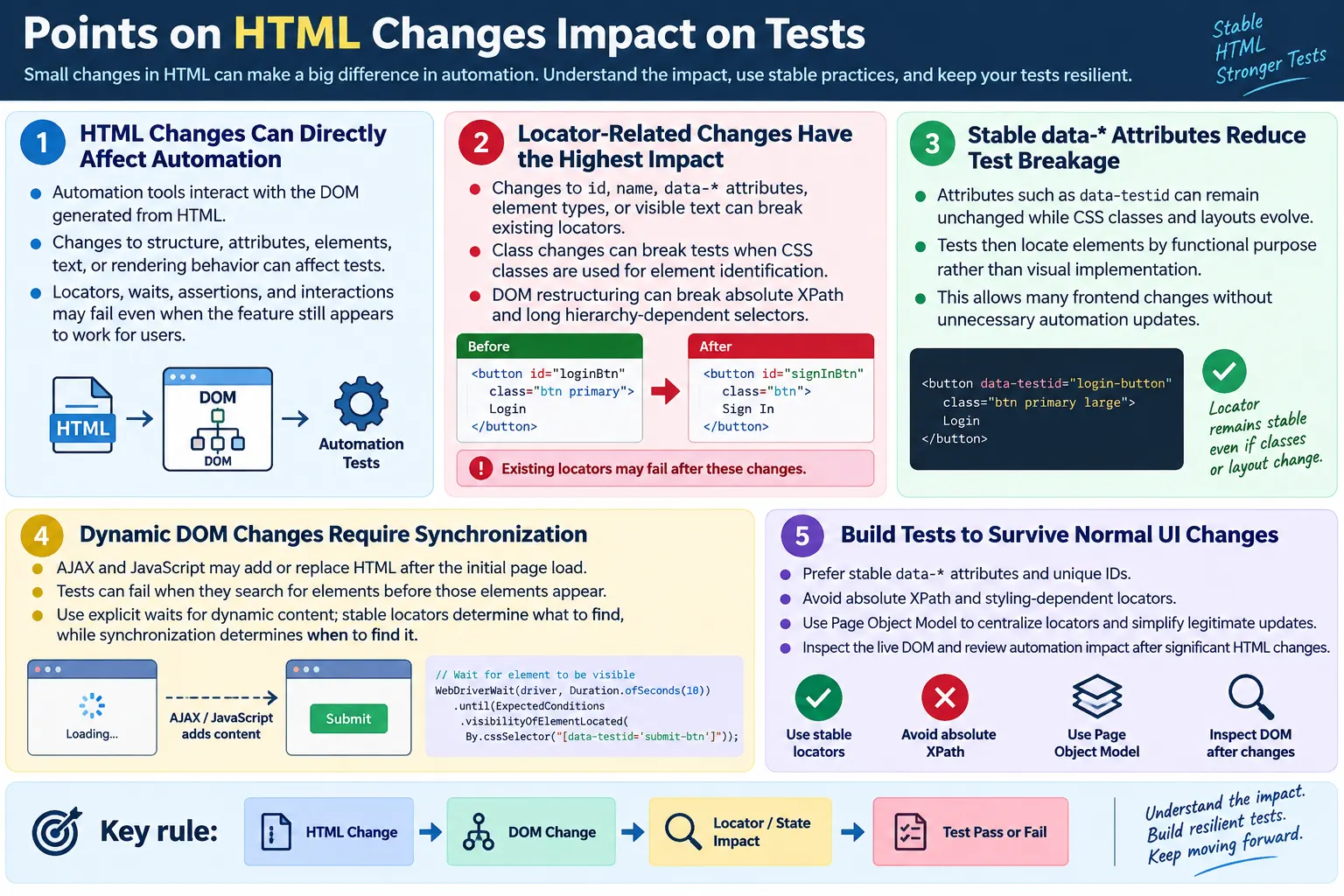
HTML changes impact on tests refers to how modifications in a webpage's HTML structure, attributes, elements, text, or rendering behavior can affect automated UI tests. Automation tools such as Selenium, Playwright, Cypress, Puppeteer, and WebdriverIO interact with the DOM generated from HTML. When the HTML changes, the DOM may also change. When the DOM changes, locators, waits, assertions, and interactions may behave differently. A test that passed yesterday can fail today even if the user-facing feature still appears to work.
Understanding the relationship between HTML changes and automation helps testers build stable, maintainable, and resilient test suites. It also helps developers understand why small markup changes can create automation failures. A locator is not magic. It depends on real attributes, element types, text, and DOM relationships. If those details are changed without considering test impact, automated tests may need updates.
This does not mean every HTML change is dangerous. Many visual updates do not affect tests at all when locators are stable. Changing colors, fonts, margins, or background styles usually has no direct impact. But changes to IDs, names, data attributes, element types, visible text used by locators, frames, visibility, or DOM hierarchy can have major impact. Good automation design separates stable behavior from temporary implementation details.
Why HTML Changes Affect Automation
Automation tools identify elements using HTML and the DOM. A script may search for an element by ID, name, CSS selector, XPath, text, role, or data attribute. If the element's identifying information changes, the locator may stop matching. If the element moves into an iframe, the tool may no longer find it in the main document. If the element becomes hidden, the tool may find it but fail to interact with it.
HTML Changes
  ↓
DOM Changes
  ↓
Locator Changes
  ↓
Automation Test
  ↓
Pass or Fail
Even a small HTML change can break a locator if the locator depends on that part of the DOM. For example, adding a wrapper div may not affect a user, but it can break an absolute XPath. Renaming a class may not affect a user if styles are updated correctly, but it can break a CSS locator that depends on the old class. Changing button text from Login to Sign In may be acceptable for product wording, but it can break XPath that searches for //button[text()='Login'].
How Automation Works
Consider a simple login form. The username input has an ID, and the login button has an ID. Selenium can locate these elements directly and interact with them. The test is simple because the HTML exposes stable identifiers.
<input
  id="username"
  type="text">

<button id="loginBtn">
  Login
</button>
driver.findElement(By.id("username"))
.sendKeys("admin");
driver.findElement(By.id("loginBtn"))
.click();If the HTML changes, the locator may no longer find the element. If id="username" becomes id="userName", the old Selenium locator fails. If the button ID changes from loginBtn to signinBtn, the click step fails. The application may still display a login field and a button, but the automation code depends on the old identifiers.
Types of HTML Changes
HTML changes can include ID changes, class name changes, attribute changes, element type changes, text changes, DOM structure changes, visibility changes, frame changes, and dynamic content changes. Some changes have little impact, while others break automation immediately. The impact depends on what the tests depend on.
- ID changes
- Class name changes
- Attribute changes
- Element type changes
- Text changes
- DOM structure changes
- Visibility changes
- Frame changes
The same change can have different impact in different projects. A class change has no test impact if no tests use class locators. It has high impact if the entire test suite depends on class selectors. A text change is safe if locators use stable data attributes, but risky if tests use text-based XPath. Locator strategy determines how sensitive tests are to HTML updates.
1. ID Changes
ID changes usually have high impact because IDs are common locator targets. A unique ID is one of the simplest and most readable locators. But if the ID changes without updating tests, automation cannot find the element.
Original:

<input id="username">

Updated:

<input id="userName">
Old locator:
By.id("username")
Result:
NoSuchElementExceptionThe solution is to update the locator or use a stable automation attribute if available. If the ID changed because the element's meaning changed, the test may need a real update. If the ID changed only because of refactoring, a stable data-testid would have reduced maintenance.
2. Class Name Changes
Class name changes affect tests when classes are used as locators. Classes are often tied to styling. They may change during redesigns, theme updates, CSS framework migrations, or component refactoring. A class-based locator can fail even when the feature still works.
Original:

<button class="login-btn">
  Login
</button>

Updated:

<button class="signin-btn">
  Login
</button>
Old CSS selector:
.login-btnThe locator fails because the class changed. This is why styling classes are weaker than functional test attributes. If a class is purely visual, it should not be the main automation hook unless no better option exists.
3. Data-Test Attribute Remains Stable
Stable data-test attributes reduce maintenance because they are independent of styling and layout. A class can change while the test attribute remains the same. The automation continues working because it locates the element by purpose rather than appearance.
Original:

<button
  class="login-btn"
  data-testid="login-button">
  Login
</button>

Updated:

<button
  class="signin-btn"
  data-testid="login-button">
  Login
</button>
Locator:
By.cssSelector("[data-testid='login-button']")
Result:
Test Continues to WorkThis is one of the strongest arguments for using data-test attributes. They allow frontend implementation to evolve without forcing unnecessary test changes.
4. Text Changes
Text changes affect tests when visible text is used as a locator or assertion. Text-based XPath is useful, but it is sensitive to wording changes. If a button changes from Login to Sign In, XPath that expects Login fails.
Original:

<button>
  Login
</button>

Updated:

<button>
  Sign In
</button>
XPath:
//button[text()='Login']
Result:
The locator fails because the visible text changed.Text locators are acceptable when text is stable and meaningful, but they are risky for localized applications or frequently updated content. A better approach is to locate by stable attribute and separately assert visible text when wording is part of the requirement.
5. DOM Structure Changes
DOM structure changes can break tests that depend on exact hierarchy. Adding a wrapper div may have no visual impact, but it can break absolute XPath or long CSS chains. Relative locators are usually less affected.
Original:

<form>
  <input>
</form>

Updated:

<div>
  <form>
    <input>
  </form>
</div>
An absolute XPath such as /html/body/form/input may fail because the form is no longer directly under the body. A relative XPath such as //input is much less affected, though it may still be too broad if multiple inputs exist. The best locator is usually one based on a stable attribute.
6. Element Type Changes
Element type changes can break tag-based locators. A Submit action may be implemented as a <button> in one version and an <a> in another. If the old locator specifically searches for a button, it no longer finds the element.
Original:

<button>
  Submit
</button>

Updated:

<a>
  Submit
</a>
Old locator:
//buttonElement type changes can also affect interaction behavior and accessibility. A real button and a link have different semantic meanings. If an action behaves like a button, changing it to a link may not only affect tests but also keyboard behavior and screen reader expectations.
7. Attribute Changes
Attribute changes affect tests when locators depend on those attributes. The name attribute is common in forms. If it changes, Selenium locators using By.name fail.
Original:

<input name="email">

Updated:

<input name="userEmail">
Locator:
By.name("email")This locator fails because the attribute no longer exists with the expected value. Attribute changes should be reviewed for automation impact, especially when attributes are used as stable hooks.
8. Visibility Changes
Sometimes an element still exists in the DOM but becomes hidden. Automation may locate it successfully but fail when trying to interact with it. Selenium may throw ElementNotInteractableException. Other frameworks may report visibility or actionability failures.
Original:

<button>
  Save
</button>

Updated:

<button style="display:none">
  Save
</button>
The element exists, but it is not interactable. Tests should distinguish between presence and visibility. Presence means the element is in the DOM. Visibility means the user can see it. Clickability means it can be interacted with. These are different conditions.
9. Frame Changes
Frame changes have high impact because elements inside iframes belong to a different document context. If a Pay button moves from the main document into an iframe, Selenium must switch to the frame before locating the button.
Original:

<button>
  Pay
</button>

Updated:

<iframe>
  <button>
    Pay
  </button>
</iframe>
Automation that previously searched the main document will fail. The test must switch into the frame, interact with the element, and often switch back afterward. This is not merely a locator update; it changes the automation workflow.
10. Dynamic Content
Modern applications frequently modify the DOM after the page loads. A page may load, send an AJAX request, receive data, and then render elements. If automation searches before the element appears, the locator fails even if the locator is correct.
Page Loads
  ↓
AJAX Request
  ↓
New HTML Added
  ↓
Element Appears
Automation should use explicit waits before interacting with dynamic elements. A stable locator tells the tool what to find, but synchronization tells it when to look. Both are necessary for reliable tests.
Browser Workflow
The browser receives HTML, builds the DOM, applies JavaScript changes, and exposes the current document structure. Automation tools then use locators to find elements and perform actions. Any HTML change can influence the locator's behavior if the test depends on the changed part of the DOM.
HTML
  ↓
DOM
  ↓
Locator
  ↓
Automation
  ↓
Result
This workflow explains why testers should inspect the live DOM after UI changes. Page source may not show the final state after JavaScript rendering. DevTools inspection provides a more accurate view of what automation sees.
Which Changes Usually Break Tests?
Changes to locator-related attributes usually have the highest impact. ID changes, name changes, data-test attribute changes, element type changes, and text changes can break tests immediately. DOM restructuring can also break tests when locators depend on hierarchy.
| HTML Change | Impact |
|---|---|
| ID change | High |
| Name change | High |
| Data-test attribute change | High |
| Class change used as locator | Medium to High |
| Button text change | High if text-based locator is used |
| DOM restructuring | Medium to High |
Adding wrapper <div> elements |
Medium |
| Styling change only | Usually none unless class is used as locator |
Which Changes Usually Do Not Break Tests?
Pure visual changes usually do not break automation when locators are stable. CSS color changes, font changes, margin or padding changes, background changes, and responsive layout adjustments are generally safe. These changes affect appearance, not element identity.
- CSS color changes
- Font changes
- Margin or padding changes
- Background changes
- Responsive layout adjustments
However, there is an important exception. If tests use styling-related classes as locators, then visual changes can break tests. A color change may rename a class from btn-green to btn-blue. If the test uses that class, the visual change becomes a test failure. Stable test attributes avoid this problem.
How to Minimize Test Breakage
Test breakage can be reduced by using stable locator strategies and by reviewing automation impact during HTML changes. Prefer data-* attributes. Use unique IDs when available. Avoid absolute XPath. Build relative, meaningful locators. Avoid relying solely on CSS classes. Use explicit waits for dynamic content. Collaborate with developers on stable automation hooks.
- Prefer
data-*attributes - Use unique IDs when available
- Avoid absolute XPath
- Build relative, meaningful locators
- Avoid relying solely on CSS classes
- Use explicit waits for dynamic content
- Collaborate with developers on stable automation hooks
Minimizing breakage is not only a tester responsibility. Developers can help by preserving stable attributes or communicating when they must change. Testers can help by avoiding fragile locators and centralizing locator definitions. The team should treat automation stability as part of product quality.
Best Practices
Create resilient locators. Inspect the DOM after UI changes. Keep locators simple. Verify automation after major UI updates. Use page object models to centralize locators. Review locator strategy during code reviews. These practices reduce scattered maintenance and make tests easier to update when genuine changes occur.
- Create resilient locators
- Inspect the DOM after UI changes
- Keep locators simple
- Verify automation after major UI updates
- Use page object models to centralize locators
- Review locator strategy during code reviews
Page Object Model Impact
The Page Object Model is useful because it centralizes locators. If an HTML change affects a locator, the update can often be made in one page object instead of many test files. This does not make bad locators good, but it reduces the cost of necessary changes.
For example, if the login button changes from id="loginBtn" to data-testid="login-button", a page object can update the locator once. Tests that call loginPage.clickLogin() do not need to change. This separation between test intent and locator implementation makes automation easier to maintain.
Change-Risk Analysis for Testers
When a UI change is delivered, testers should not only ask whether the screen looks correct. They should also ask what changed in the DOM and which automated tests depend on that area. A small visual change may hide a large automation impact if it renames attributes, changes element types, or moves elements into new containers. A change-risk analysis helps testers decide whether the automation suite needs updates, focused regression, or only a quick confirmation.
The first step is to identify the changed feature area. If the login form changed, review login locators, login validation tests, password reset entry points, and any shared authentication components. If the checkout page changed, review cart tests, payment tests, order submission, error messages, and confirmation pages. HTML changes often affect more than the visible element that was edited because components are reused across pages.
The second step is to inspect the locator strategy. If the tests use stable data attributes, the risk may be low. If they use absolute XPath, class names, or visible text that changed, the risk is higher. This helps prioritize test updates. Not every UI change requires rewriting automation, but every meaningful HTML change should trigger at least a quick locator impact review.
Locator Contracts Between Developers and Testers
Stable automation works best when developers and testers treat certain HTML attributes as contracts. A contract means that an attribute such as data-testid="submit-order" should not be renamed casually. If the business meaning of the element remains the same, the locator should remain the same. This allows the UI implementation to change while tests continue to locate the same business action.
This does not mean locators can never change. If a feature is redesigned, removed, split into multiple actions, or renamed for business reasons, the tests should change too. But if an attribute changes only because of code cleanup or styling refactor, the team should consider whether the automation contract is being broken unnecessarily. Keeping stable hooks saves maintenance time.
A simple agreement can make a major difference. Developers can preserve data-testid values during visual refactors. Testers can avoid relying on private implementation details. Product teams can understand that stable HTML supports faster release feedback. The result is less friction between application changes and automated regression testing.
Debugging After HTML Changes
When a test fails after an HTML update, the debugging process should be structured. First, confirm whether the element exists in the current DOM. Use browser DevTools or automation logs. If the element does not exist, the application state may be wrong, the feature may have changed, or the test may be searching too early. If the element exists, check whether the locator still matches it.
Second, check whether the locator matches multiple elements. A changed page may introduce another matching element, such as a hidden mobile menu or a duplicated modal button. The test may locate the first match, but not the intended one. This is a common cause of confusing failures. A locator should be specific enough to identify the intended target in the current context.
Third, check visibility and interaction state. The element may exist but be hidden, disabled, covered by a loading overlay, or not yet clickable. In Selenium, this may appear as an interactability or click interception error. In Playwright or Cypress, the framework may wait and then report that the element never became actionable. These failures are related to HTML and state, not always locator syntax.
Regression Planning After Markup Updates
HTML changes should influence regression planning. If a change touches only CSS colors and stable locators remain unchanged, broad regression may not be necessary from an automation perspective. If a change modifies shared components, form controls, navigation menus, modals, or test attributes, the regression scope should be wider. Shared markup can affect many pages.
For example, changing a reusable Button component can affect login, checkout, search, profile, and admin pages. Even if the change was requested for one screen, the component may render across the application. Testers should understand whether the HTML change is local or shared. Component-level changes often require broader automation verification.
Regression planning should also consider locator reuse. If the same page object locator is used by many tests, one HTML change can affect a large portion of the suite. Centralized locators make updates easier, but they also reveal impact. A changed locator in a shared component should be treated with care because it can influence many workflows.
Stable Attributes vs Visual Refactoring
Visual refactoring should not automatically break tests. A design team may change button colors, spacing, card layout, or responsive behavior. If tests use stable attributes, those changes should usually have little impact. Problems arise when tests depend on visual implementation details such as color-related classes, layout containers, or exact child positions.
This is why stable attributes are valuable. They allow visual refactoring and automation to coexist. Developers can improve the UI without creating avoidable test failures. Testers can focus on whether the user workflow still works rather than repairing selectors after every design update.
The practical rule is to keep locators tied to business meaning. Use submit-order, not green-button. Use profile-menu, not top-right-blue-icon. Use payment-error, not red-text-message. Business meaning changes less often than visual presentation.
Dynamic Applications and Re-Rendered DOM
Modern JavaScript applications often re-render parts of the DOM when state changes. A user clicks a filter, the list re-renders. A payment request starts, the button becomes disabled. A modal opens, new markup appears. An API response arrives, the old content is replaced. These changes may not be full page reloads, but they still affect automation.
Re-rendering can create stale element references in Selenium when a previously located element is replaced by a new DOM node. The locator may still be correct, but the stored element reference is no longer valid. The fix is often to locate the element again after the state change. This is different from a broken locator. It is a timing and DOM lifecycle issue.
Playwright and Cypress handle some of this automatically, but the concept still matters. Tests should be written with the understanding that the DOM is alive. Stable locators help find the new element after re-rendering, but the test must still wait for the correct state before interacting or asserting.
Developer Checklist Before HTML Changes Ship
Developers can reduce automation breakage by reviewing a short checklist before shipping markup changes. Did any IDs change? Did any data-testid values change? Did an element move into an iframe? Did a button become a link? Did visible text used by tests change? Were duplicate hidden elements added? Did form labels remain connected? These questions catch many automation issues before they reach the test pipeline.
This checklist should not slow development. It should become part of normal frontend quality. The same review also helps accessibility and maintainability. Unique IDs, meaningful labels, semantic elements, and stable attributes benefit more than automation. They make the application easier to understand and safer to change.
Common Mistakes
Using absolute XPath is a common mistake because it breaks after minor layout changes. Depending on styling classes is risky because classes may change during redesigns. Using dynamic IDs is fragile because generated IDs often change every session or build. Ignoring AJAX updates creates timing failures when elements do not exist immediately after page load. Hardcoding visible text can break when UI wording changes or localization is introduced.
Another mistake is treating every locator failure as a test problem. Sometimes the better fix is in the HTML. If a critical button has no stable identifier, adding a data-test attribute is better than writing a complicated XPath. Automation and application code should work together.
Selenium Perspective
In Selenium, a locator failure often appears as NoSuchElementException. Interaction changes may appear as ElementNotInteractableException, stale element reference errors, timeout exceptions, or click interception errors. The root cause may be an HTML change, a timing issue, or an actual product defect.
Original:

driver.findElement(By.id("loginBtn")).click();

If ID changes:

<button id="signinBtn">
  Sign In
</button>
The automation fails because loginBtn no longer exists. A more stable locator can reduce this risk.
Better:

<button data-testid="login-button">
  Sign In
</button>

driver.findElement(
  By.cssSelector("[data-testid='login-button']"))
  .click();
The test continues working even if styling or ID values change. This is why stable attributes are preferred for long-term automation.
HTML Changes vs Test Impact
| HTML Change | Test Impact |
|---|---|
| ID renamed | Locator fails |
| Name changed | Locator fails |
data-testid removed |
Locator fails |
| Class renamed | CSS locator may fail |
| Button text changed | Text-based XPath fails |
| DOM restructuring | Absolute XPath may fail |
| CSS color changed | Usually no impact |
| Font changed | Usually no impact |
| Responsive layout | Usually no impact if locators are stable |
Common Interview Questions
Why do HTML changes break automation tests? They break tests because automation tools locate elements using the HTML and DOM. Changes to attributes, text, element types, or structure can invalidate locators.
Which HTML change most commonly breaks Selenium tests? Changes to locator-related attributes such as ID, name, data attributes, element type, or text used in XPath commonly break tests.
How can locator failures be reduced? They can be reduced by using stable attributes, avoiding absolute XPath, and creating maintainable locator strategies.
Why are data-testid attributes useful? They provide automation-specific identifiers that remain stable even when styling or layout changes.
Does every HTML change break automation? No. Pure visual changes such as colors or fonts usually do not affect tests unless the locator depends on styling-related classes.
What role does the Page Object Model play? It centralizes locators, making it easier to update them in one place when HTML changes.
Interview-Ready Answer
HTML changes impact UI automation because automation tools interact with the DOM created from HTML. Changes to IDs, names, data-* attributes, element types, text, or DOM structure can cause existing locators to fail, leading to broken tests. Visibility changes, iframe changes, and dynamic content updates can also affect whether elements can be found or interacted with.
To minimize maintenance, testers should use stable locators such as data-* attributes or unique IDs, avoid absolute XPath and styling-dependent classes, use explicit waits for dynamic content, and centralize locators using design patterns such as the Page Object Model. Stable HTML and thoughtful locator strategies make automation more resilient to UI changes.
One-Line Insight
The more stable the HTML, the more stable the automation: good locator strategies turn UI changes into minor updates instead of widespread test failures.