HTML Career Expectations
Introduction
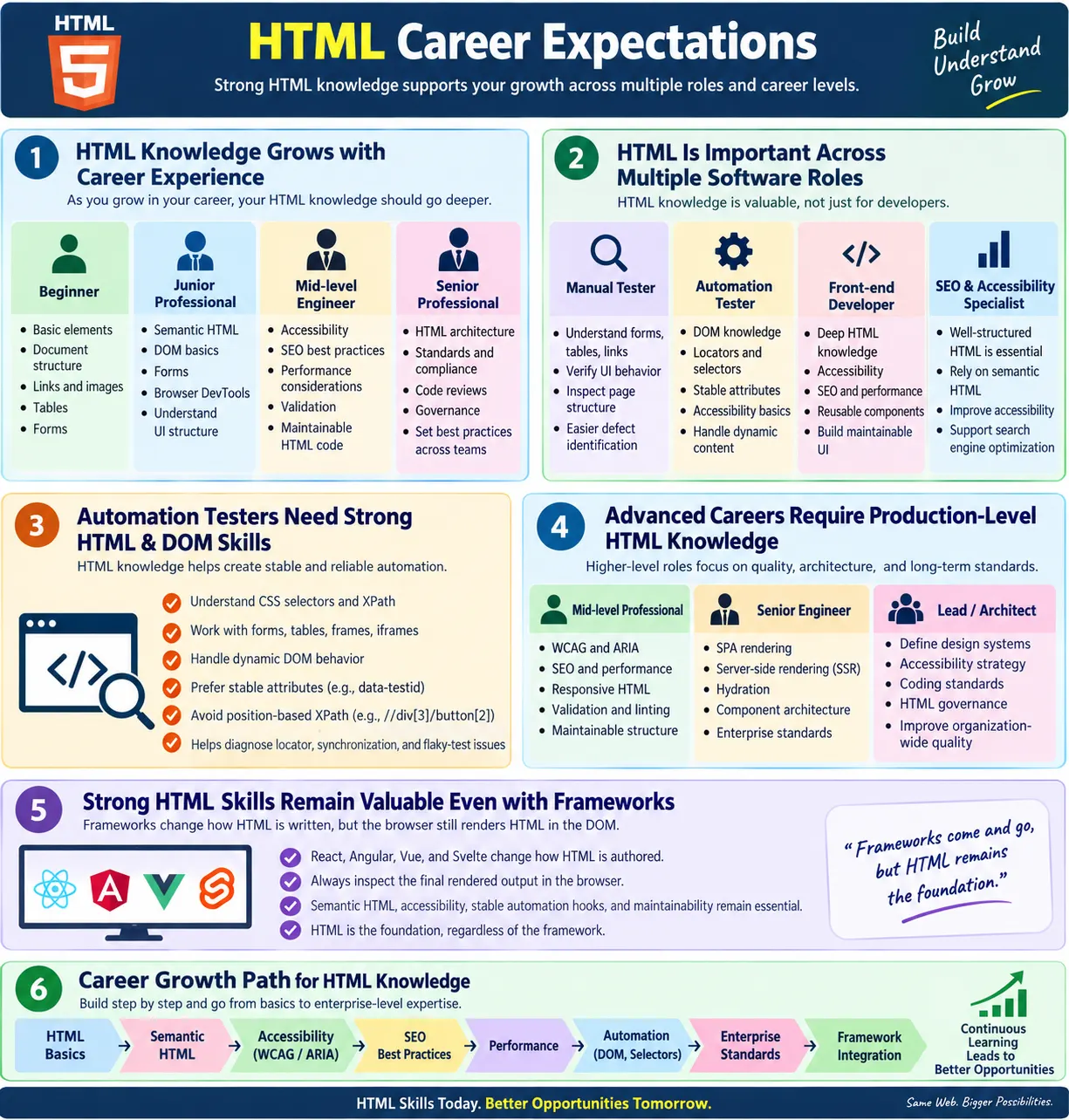
HTML career expectations describe the level of HTML knowledge expected at different stages of a software professional's career. At the beginning, HTML may look like a simple markup language used to place headings, paragraphs, links, images, tables, and forms on a page. As experience grows, employers expect much more. They expect semantic markup, accessibility awareness, SEO understanding, performance thinking, maintainable structure, browser behavior knowledge, and automation-friendly design.
This matters because every web application uses HTML at the point where the user interacts with the browser. Even when applications are built using React, Angular, Vue, Svelte, server-side frameworks, CMS platforms, or design systems, the browser ultimately renders HTML elements in the DOM. A professional who understands HTML deeply can debug UI issues faster, write better tests, improve accessibility, communicate clearly with frontend teams, and avoid fragile implementation patterns.
HTML is not only a frontend developer skill. Manual testers inspect forms and UI behavior. Automation testers locate elements through the DOM. SEO specialists inspect titles, metadata, headings, links, and structured data. Accessibility engineers evaluate semantic structure, labels, roles, focus behavior, and assistive technology support. Full-stack developers connect backend data with frontend markup. UI designers and web designers need to understand how visual designs translate into meaningful structure. Because of this, HTML remains a career-long foundation rather than a beginner-only topic.
Why HTML Skills Matter
Strong HTML knowledge helps professionals build better websites and applications because HTML defines the structure that browsers, users, assistive technologies, search engines, and automation tools depend on. A page can have attractive CSS and powerful JavaScript, but if the HTML structure is weak, the experience may still be poor. A button built from a generic container may look correct but fail keyboard accessibility. A form without labels may work visually but confuse screen reader users. A page with generic headings may be harder to understand and harder to audit.
For testers, HTML knowledge turns UI testing from guesswork into inspection-based analysis. When a test fails, a tester who understands the DOM can identify whether the issue is a locator problem, a timing problem, an inaccessible control, a hidden overlay, a stale element, or a real functional defect. For developers, HTML knowledge prevents overuse of generic elements and helps create components that are accessible, semantic, and stable. For SEO specialists, HTML knowledge reveals whether the page communicates meaning clearly to crawlers.
HTML also connects many career paths. It links frontend development with accessibility. It links testing with automation. It links content with SEO. It links design systems with browser behavior. Professionals who treat HTML seriously often make better decisions across the whole web stack.
Career Progression
HTML expectations increase as experience increases. A beginner is expected to understand basic elements and page structure. A junior professional should inspect and debug HTML confidently. A mid-level engineer should understand semantic structure, accessibility, SEO, browser behavior, validation, and maintainability. A senior engineer should review HTML architecture, define standards, guide others, and improve long-term quality. A lead or architect should create governance, patterns, and cross-team consistency.
Beginner
  ?
Junior Developer / Tester
  ?
Mid-Level Engineer
  ?
Senior Engineer
  ?
Lead / Architect
The same progression applies differently depending on role. An automation tester may go deeper into locators, DOM inspection, waits, Shadow DOM awareness, frames, and stable test hooks. A frontend developer may go deeper into semantic HTML, accessibility, forms, component architecture, and responsive structure. An SEO specialist may focus more on metadata, headings, internal links, canonical tags, robots directives, and structured data. The foundation is shared, but the emphasis changes.
Beginner Expectations: 0 to 1 Year
At the beginner level, the expectation is basic fluency. A beginner should know how an HTML document is structured, what the head and body sections do, how headings and paragraphs work, how lists are created, how links navigate, how images are embedded, how tables represent tabular data, and how forms collect user input. They should understand common attributes such as id, class, href, src, alt, type, name, and value.
Typical beginner tasks include creating simple pages, adding links and images, building small forms, using tables for data, and fixing obvious markup mistakes. A beginner should also start learning HTML5 elements such as <header>, <nav>, <main>, <section>, <article>, and <footer>, even if they are not yet expected to make complex architectural decisions.
Interview expectations at this level are usually direct. Questions may include: What is HTML? What is the difference between id and class? What is the purpose of the <form> element? What is semantic HTML? What is the difference between <div> and semantic elements? What is the purpose of alt text? The answers do not need to be advanced, but they should be clear and accurate.
Junior Developer or Tester Expectations: 1 to 3 Years
At the junior level, employers expect professionals to move beyond simply writing tags. A junior developer or tester should understand semantic HTML, forms and validation, HTML5 input types, tables, accessibility basics, meta tags, DOM basics, and browser developer tools. They should be able to inspect a page, identify elements, understand attributes, and debug straightforward UI issues.
For junior developers, cleaner HTML becomes important. They should avoid unnecessary nesting, use labels with form controls, choose buttons for actions and links for navigation, and understand why headings should follow a logical structure. They should also start understanding how HTML works with CSS and JavaScript rather than treating each technology separately.
For junior testers, HTML knowledge supports better defect reporting. Instead of saying "the form is broken," a tester can explain that the email input has no label, a submit button is disabled, an error message is not associated with the field, or a locator points to a dynamic ID. This improves communication with developers and speeds up defect resolution.
Junior Automation Tester Expectations
Automation testers at the junior level must understand how tools locate elements in the DOM. They should know XPath, CSS selectors, DOM inspection, stable locators, and data-* attributes. They should understand that automation tools do not interact with the visual design directly. They interact with rendered HTML elements through the browser.
A common automation example is:
driver.findElement(
  By.cssSelector("[data-testid='login-button']"));
This works only if the rendered DOM contains a stable attribute. Junior automation testers should learn why dynamic IDs, position-based XPath, and styling classes can create brittle tests. They should also understand basic forms, tables, frames, iframes, alerts, and page navigation because these are common in UI automation tasks.
Mid-Level Engineer Expectations: 3 to 6 Years
At the mid-level stage, HTML expectations become broader and more quality-focused. A mid-level engineer should understand accessibility principles, WCAG basics, ARIA basics, SEO fundamentals, performance optimization, semantic structure, cross-browser compatibility, responsive HTML, validation, and linting. They should not merely write HTML that renders; they should write HTML that is maintainable, testable, accessible, and appropriate for production.
Mid-level professionals are often expected to review HTML code, improve maintainability, mentor juniors, and build reusable components. They should be able to explain why a component should render a real button instead of a clickable <div>, why every input needs a label, why heading hierarchy matters, why alt text should be meaningful, and why the DOM should not be filled with unnecessary wrappers.
This is also the stage where professionals should become comfortable with browser developer tools. Inspecting elements, checking computed accessibility names, debugging layout issues, reviewing network-loaded HTML, validating forms, and analyzing DOM changes become everyday skills. Mid-level engineers should be able to move between source code and rendered output confidently.
Senior Engineer Expectations: 6+ Years
Senior engineers are expected to think beyond individual pages. They should understand enterprise HTML standards, accessibility compliance, performance optimization, component architecture, SPA rendering, SSR and hydration concepts, SEO architecture, security considerations, and HTML in CI/CD workflows. At this level, HTML quality becomes part of engineering leadership.
A senior engineer should define coding standards, lead code reviews, design reusable HTML patterns, guide accessibility improvements, and improve automation reliability. They should spot architectural problems early, such as component libraries that generate inaccessible markup, dashboards that rely on unstable locators, public pages that render important content only after JavaScript, or templates that duplicate metadata across many pages.
Senior professionals should also understand tradeoffs. Static HTML may be ideal for simple content pages. Server-side rendering or static generation may be better for SEO-heavy content. SPA rendering may be appropriate for interactive dashboards. Custom controls may be necessary in some cases, but they require keyboard and accessibility support. Senior engineers are expected to choose patterns based on product needs, not trends.
Technical Lead and Architect Expectations
Technical leads and architects are expected to define HTML guidelines at an organizational level. Their concerns include enterprise coding standards, accessibility strategy, performance strategy, component libraries, design systems, HTML governance, cross-team consistency, browser compatibility planning, and long-term maintainability.
A lead or architect may not write every line of HTML, but they influence how teams write it. They decide whether the organization uses a design system, what accessibility standard is expected, how components are reviewed, what linting rules are enforced, how automation hooks are named, and how teams prevent inconsistent markup across products.
At this level, HTML becomes part of architecture. The question is not only "Does this page work?" but "Can many teams build consistent, accessible, testable, maintainable pages over several years?" Good HTML governance reduces defects, improves onboarding, supports automation, strengthens accessibility, and makes large products easier to evolve.
HTML Expectations by Role
| Role | HTML Expectations |
|---|---|
| Manual Tester | Understand page structure, forms, tables, links, and UI behavior |
| Automation Tester | Understand DOM, locators, semantic HTML, stable attributes, and accessibility basics |
| Front-End Developer | Deep HTML, accessibility, SEO, performance, forms, and component structure |
| Full-Stack Developer | HTML plus integration with backend data and frontend frameworks |
| UI/UX Developer | Semantic HTML, accessibility, responsive structure, and design translation |
| Accessibility Engineer | WCAG, ARIA, semantic HTML, assistive technologies, and testing patterns |
| SEO Specialist | Metadata, semantic HTML, structured data, internal links, and crawlability |
HTML Skills Expected in Automation
Automation engineers should understand DOM structure, HTML attributes, forms, tables, frames, iframes, basic Shadow DOM awareness, stable locators, data-testid attributes, accessibility-related attributes, and the way HTML changes affect automation. Without this knowledge, automation becomes fragile and difficult to debug.
For example, a test that relies on //div[3]/button[2] may break when the layout changes. A test that relies on a generated ID may fail between builds. A test that clicks an element before the SPA finishes rendering may fail intermittently. HTML knowledge helps automation engineers choose better locators and synchronization strategies.
Automation engineers with strong HTML knowledge can also provide useful feedback to developers. They can suggest stable test attributes, identify inaccessible custom controls, report missing labels, and explain why a DOM structure causes flaky tests. This makes them more valuable than testers who only write scripts.
HTML Skills Expected in Front-End Development
Front-end developers are expected to know semantic HTML deeply. They should understand forms, accessibility, SEO, responsive design, validation, browser compatibility, component structure, and performance. They should be able to translate designs into markup that is meaningful, accessible, and maintainable.
Modern frontend work often happens inside frameworks, but the expectation remains the same: components should render good HTML. A React component should not hide poor semantics. An Angular component should not omit labels. A Vue component should not create inaccessible controls. Framework skills are stronger when paired with HTML discipline.
Good front-end developers also understand that HTML is part of user experience. The right element can provide keyboard behavior, accessibility semantics, form behavior, browser validation, and automation stability without extra JavaScript. The wrong element can create unnecessary bugs.
HTML Skills Expected in Enterprise Projects
Large organizations expect developers and testers to follow coding standards, use semantic HTML, maintain accessibility compliance, write automation-friendly markup, pass validation and linting, support reusable components, follow naming conventions, and participate in code reviews. Enterprise projects care about consistency because many teams may work on the same product over time.
In enterprise environments, HTML quality affects more than one page. A bad component pattern can spread across hundreds of screens. An inaccessible dropdown in a shared component library can create compliance issues across the product. A naming convention inconsistency can make automation harder for every test team. A missing standard for test attributes can lead to locator chaos.
Enterprise expectations therefore include process, not only syntax. Teams may enforce HTML linting, accessibility checks, code review checklists, design system rules, and automated tests. Professionals who understand this environment are better prepared for large-scale projects.
Common Interview Expectations
Entry-level interviews usually focus on basics: HTML structure, lists, tables, forms, images, links, headings, attributes, and simple semantic concepts. Candidates should be able to explain what common elements do and write small snippets correctly.
Mid-level interviews commonly include semantic HTML, accessibility, SEO, validation, DOM inspection, browser behavior, and automation. Candidates may be asked to review a snippet and identify problems. They may need to explain why a field needs a label, why a link should have descriptive text, or why a dynamic ID is a poor locator.
Senior interviews often include HTML architecture, performance, enterprise standards, accessibility compliance, framework rendering, code reviews, design systems, and maintainability. Senior candidates should be able to explain tradeoffs, define patterns, and guide teams.
Skills That Increase Career Value
Some HTML-related skills increase career value significantly because they connect directly to production quality. Semantic HTML is the first. Accessibility is the second. WCAG knowledge, ARIA judgment, browser DevTools, SEO basics, responsive structure, performance optimization, automation-friendly HTML, and cross-browser testing all make a professional more effective.
- Semantic HTML
- Accessibility and WCAG
- ARIA basics and correct usage
- SEO-friendly HTML structure
- HTML5 APIs and modern browser features
- Browser DevTools inspection
- Responsive design awareness
- Performance optimization
- Automation-friendly markup
- Cross-browser testing
These skills are valuable because they show that the professional understands real production concerns. Anyone can memorize tags. Strong professionals understand how markup affects users, tools, crawlers, tests, and long-term maintenance.
Common Career Mistakes
One common mistake is treating HTML as "easy" and refusing to learn it deeply. This often leads to weak semantics, poor accessibility, fragile automation, invalid structure, and overuse of generic containers. Another mistake is assuming that frameworks eliminate the need for HTML knowledge. Frameworks generate HTML; they do not replace the need to understand it.
Other mistakes include ignoring accessibility, ignoring semantic HTML, writing invalid markup, depending on fragile locators, not understanding the DOM, and using CSS or JavaScript to compensate for poor element choices. These mistakes become more costly as projects grow.
A professional career improves when HTML is treated as a serious engineering skill. Clean markup is not only about passing interviews. It reduces defects, improves accessibility, supports automation, strengthens SEO, and makes systems easier to maintain.
Learning Roadmap
A practical HTML learning roadmap starts with basics and moves toward production concerns. Learn document structure, common elements, links, images, lists, tables, and forms first. Then learn semantic HTML and accessibility. After that, study SEO, performance, automation, enterprise standards, and modern framework integration.
HTML Basics
  ?
Semantic HTML
  ?
Forms
  ?
Accessibility
  ?
SEO
  ?
Performance
  ?
Automation
  ?
Enterprise Standards
  ?
Modern Framework Integration
This order matters because advanced topics become easier when the foundation is strong. Accessibility depends heavily on semantic HTML. Automation depends on DOM understanding. SEO depends on structure and metadata. Framework integration depends on knowing what the framework should produce in the browser.
Career Growth Tips
Master semantic HTML before relying heavily on frameworks. Learn accessibility early because it changes how you think about forms, buttons, links, focus, headings, and dynamic updates. Practice inspecting the DOM with browser DevTools. Understand how HTML affects automation and how locators are chosen. Learn validation and linting so you can catch errors early.
Study real production websites. Inspect their markup. Notice good patterns and bad patterns. Review forms, navigation menus, headings, image alt text, metadata, and responsive behavior. Participate in code reviews, even if only by observing at first. Code review is where many professional expectations become visible.
Stay updated with modern web standards, but do not chase every trend. The core principles of semantic structure, accessibility, maintainability, and user-centered markup remain stable even as frameworks change.
How Employers Evaluate HTML Skill
Employers do not evaluate HTML skill only by asking whether a candidate can write a few tags. In practical interviews, they often evaluate how candidates reason about structure, user experience, maintainability, and defects. A candidate may be asked to review a snippet and explain what is wrong with it. They may be asked why a form field needs a label, why a button should not be built from a generic element, or why a page title matters for SEO.
For developers, employers look for the ability to produce clean, semantic, accessible markup that fits into larger applications. For testers, they look for the ability to inspect HTML, understand the DOM, identify element states, and write reliable automation locators. For senior candidates, they look for judgment: can this person define a standard, guide a team, review code, and prevent recurring quality problems?
Good candidates explain tradeoffs. They do not simply say "always use this tag" without context. They understand that public content pages, authenticated dashboards, static sites, SPAs, and enterprise design systems have different constraints. The best answers connect HTML choices to real outcomes: accessibility, test reliability, SEO clarity, rendering performance, and maintainability.
Portfolio Expectations
A portfolio or sample project can show HTML maturity more clearly than a list of skills. A beginner portfolio may show basic pages, forms, lists, images, and navigation. A stronger portfolio shows semantic layout, accessible forms, meaningful headings, descriptive links, responsive structure, clean metadata, and well-organized code. Even a simple project can demonstrate professional habits if the markup is thoughtful.
For frontend developers, portfolio pages should avoid excessive generic containers and should demonstrate real HTML structure. Use landmarks such as <header>, <nav>, <main>, and <footer>. Use clear headings. Add meaningful alt text. Build forms with labels. Include responsive behavior. Validate the HTML. These details show that the candidate understands production-quality markup.
For automation testers, a portfolio can include examples of locating elements through stable attributes, testing forms, validating table content, handling frames, and avoiding brittle XPath. It can also include short explanations of why certain locators were chosen. This shows that the candidate understands HTML as the interface between application behavior and test automation.
HTML in Code Reviews
Code reviews are where HTML expectations become practical. A reviewer should look beyond whether the page visually matches the design. The reviewer should ask whether the markup uses the right elements, whether the structure is semantic, whether forms are labeled, whether interactive controls are keyboard accessible, whether headings are logical, whether images have meaningful alternatives, and whether important elements are testable.
A junior reviewer may focus on obvious issues such as missing closing tags, wrong attributes, or invalid nesting. A mid-level reviewer should catch accessibility, SEO, and maintainability issues. A senior reviewer should notice broader patterns, such as repeated inaccessible component usage, inconsistent locator strategy, excessive wrapper elements, or design system drift.
Good code review comments explain why a change is needed. Instead of saying "Don't use div," a better comment says, "This element performs an action, so use a native button. It will provide keyboard support and semantic meaning without extra JavaScript." This style helps the team learn rather than merely obey.
HTML and Communication Skills
As careers grow, communication becomes as important as technical knowledge. A tester who finds an accessibility issue must explain it clearly to a developer. A developer who proposes a component pattern must explain how it supports accessibility and automation. A senior engineer who defines a standard must explain why the standard improves quality and reduces long-term cost.
HTML issues are often underestimated because the page may appear correct visually. Good professionals can explain hidden impact. They can say that a missing label affects screen reader users, a dynamic ID affects automation reliability, a missing canonical affects SEO, a skipped heading affects document structure, or a clickable <div> affects keyboard users. This kind of explanation turns HTML knowledge into team influence.
In interviews, this communication skill is visible. Candidates who explain user impact and business value sound more experienced than candidates who only recite definitions. Strong answers connect the technical detail to a practical consequence.
What Separates Average and Strong HTML Professionals
An average HTML user can create a page that looks correct. A strong HTML professional creates a page that works correctly for browsers, users, assistive technologies, search engines, and automation tools. The difference is not always visible at first glance. It appears during testing, code review, accessibility audits, SEO audits, performance work, and long-term maintenance.
Strong professionals choose semantic elements by default. They know when ARIA is needed and when native HTML is better. They avoid fragile locators. They inspect the rendered DOM. They understand that frameworks generate HTML rather than replace it. They use validation and linting. They care about focus behavior and keyboard access. They think about how pages will be maintained after the initial implementation.
This depth creates career advantage. Teams trust professionals who prevent problems early. A developer who consistently writes accessible and testable markup reduces QA rework. A tester who understands HTML reports better defects. A senior engineer who defines good HTML patterns improves every team that uses those patterns.
Role-Specific Growth Path
Manual testers can grow by learning DOM inspection, form behavior, accessibility basics, and browser DevTools. This helps them write better defect reports and understand whether a problem is visual, functional, structural, or accessibility-related. Over time, this knowledge can support a move into automation or accessibility testing.
Automation testers can grow by mastering CSS selectors, XPath strategy, stable locator design, dynamic DOM behavior, frames, Shadow DOM awareness, and SPA synchronization. They should also learn enough accessibility to identify poor element choices because inaccessible HTML often creates automation problems too.
Frontend developers can grow by mastering semantic HTML, forms, accessibility, performance, SEO, responsive patterns, and component output. Full-stack developers can grow by understanding how server data becomes HTML and how metadata, validation, and templates affect the final page. SEO specialists can grow by understanding HTML source, rendered DOM, structured data, canonical signals, and internal linking. Accessibility engineers can grow by combining WCAG knowledge with hands-on HTML and assistive technology testing.
Practical Study Plan
A practical study plan should combine reading, building, inspecting, and reviewing. Start by building simple pages with headings, paragraphs, links, images, lists, tables, and forms. Then rebuild the same page using semantic elements. Add labels, alt text, metadata, responsive structure, and keyboard-friendly controls. Validate the page and inspect it with browser DevTools.
Next, study accessibility scenarios. Test the page using only the keyboard. Check whether focus is visible. Inspect accessible names for buttons and inputs. Add error messages to forms and make sure they are clear. Then study SEO basics by reviewing title tags, meta descriptions, headings, internal links, canonical links, and structured data.
Finally, connect HTML to automation. Add stable test attributes. Write sample locators. Inspect how dynamic content changes the DOM. Compare a static page with a framework-generated page. This practical cycle makes HTML knowledge useful in real jobs, not just interviews.
How HTML Expectations Change With Frameworks
Modern frameworks change how HTML is authored, but they do not reduce HTML expectations. In React, developers may write JSX. In Angular, they may write templates. In Vue, they may use template syntax. In Svelte, they may write component files. The source format differs, but the browser still receives a DOM made of HTML elements.
Employers therefore expect professionals to inspect final output. A component may look clean in source code but render poor markup. A design system may provide a button component, but the component must still behave like a button. A route may be built with a framework, but it should still have a meaningful heading and accessible navigation. A form may be reactive, but it still needs labels, error messages, and usable controls.
Framework knowledge and HTML knowledge should reinforce each other. The best framework developers understand what their components render. The best automation testers understand that framework internals matter less than the final DOM. The best senior engineers define standards that make framework output semantic, accessible, and testable.
Career Expectations Summary
| Career Level | HTML Knowledge Expected |
|---|---|
| Beginner | Basic HTML elements and document structure |
| Junior | Semantic HTML, forms, DOM basics, and DevTools |
| Mid-Level | Accessibility, SEO, performance, validation, and reusable structure |
| Senior | Enterprise standards, architecture, code reviews, and framework rendering |
| Architect | Design systems, governance, HTML strategy, and cross-team consistency |
Common Interview Questions
Is HTML important for automation testers? Yes. Automation tools interact with HTML elements through the DOM, so testers need to understand elements, attributes, locators, forms, tables, frames, and dynamic rendering.
Is HTML enough for front-end development? No. Front-end developers also need CSS, JavaScript, browser knowledge, accessibility, and usually one or more modern frameworks. HTML is the foundation, not the entire stack.
Should senior developers know accessibility? Yes. Accessibility is an expected part of modern web development. Senior developers should be able to guide accessible component design and review markup quality.
Does React replace HTML? No. React generates and updates HTML elements that browsers render. Developers still need to understand the final DOM output.
Is HTML still relevant in 2026? Yes. Every modern web application still relies on HTML as the foundation of its user interface, even when frameworks generate the markup dynamically.
Interview-Ready Answer
HTML is a foundational skill expected throughout a software career. Beginners should understand document structure, forms, links, images, tables, and basic elements. Junior professionals should understand semantic HTML, forms, DOM inspection, accessibility basics, and browser developer tools. Mid-level professionals are expected to know accessibility, SEO, validation, performance, and browser behavior.
Senior engineers should be able to define coding standards, review HTML for maintainability and accessibility, optimize performance, improve automation reliability, and design reusable component structures. Regardless of role or framework, strong HTML understanding remains essential because browsers, assistive technologies, search engines, and automation tools ultimately rely on the rendered HTML and DOM.
One-Line Insight
Frameworks may evolve, but strong HTML knowledge remains a career-long advantage for developers, testers, SEO specialists, and accessibility professionals alike.