HTML Caching Basics
Introduction
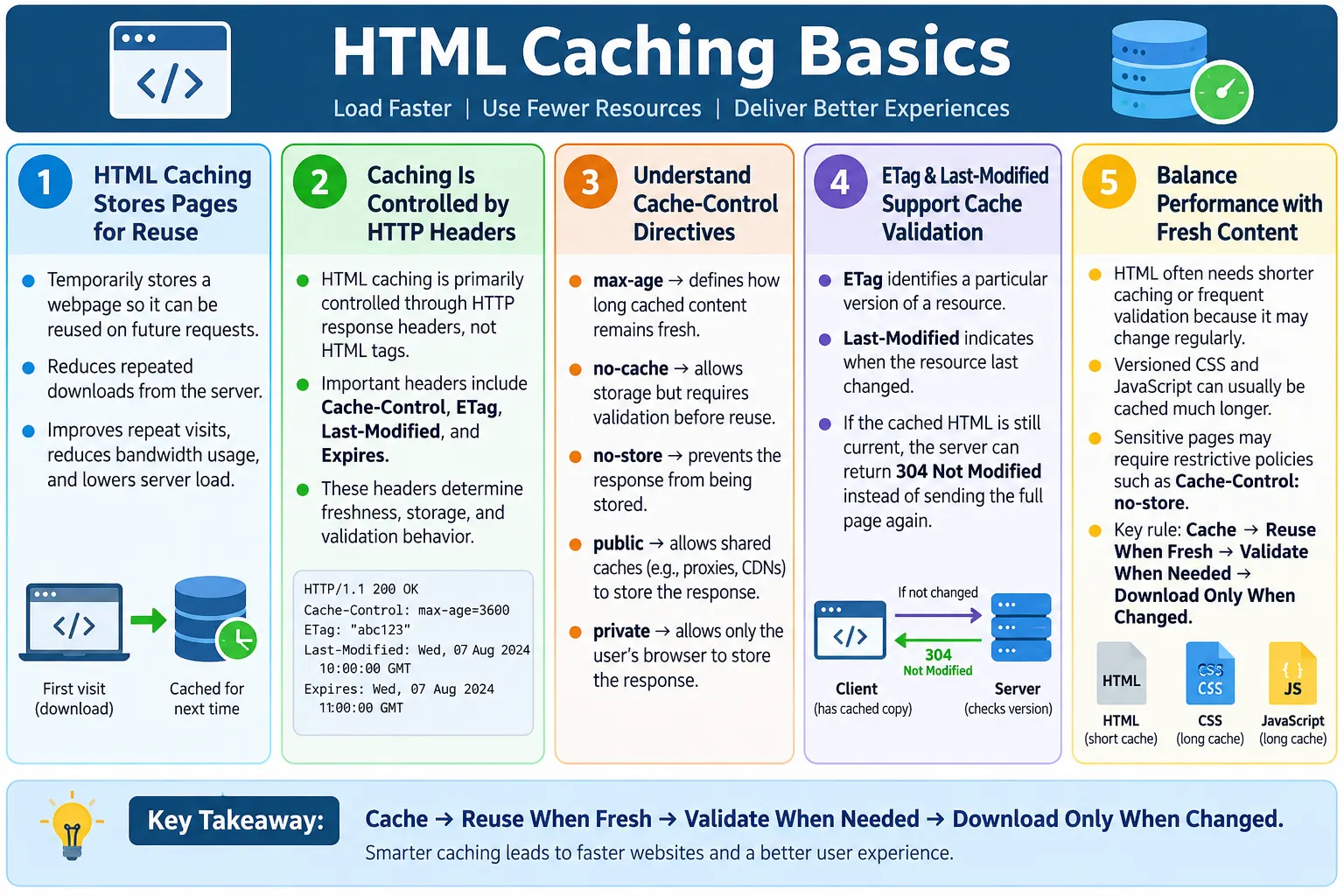
HTML Caching is the process of storing an HTML page temporarily so that it can be served faster on future requests instead of downloading it again from the server every time. When caching works correctly, repeat visits become faster, network traffic is reduced, and the server performs less repeated work. Caching is one of the foundational ideas behind web performance because it prevents browsers from doing unnecessary downloads when a resource has not changed.
HTML caching reduces network requests, server load, page loading time, and bandwidth usage. It is especially useful for repeat visitors, frequently accessed pages, static pages, documentation pages, and pages served through a CDN. However, HTML must be cached more carefully than images, CSS, JavaScript, fonts, and other static assets. HTML pages often change more frequently, may include user-specific content, and may determine which other resources the browser loads. For that reason, HTML is often cached for shorter periods or revalidated before reuse.
The key skill is balance. If HTML is cached too aggressively, users may see outdated content. If HTML is never cached, the browser downloads it on every visit even when nothing has changed. Proper caching uses HTTP headers to tell browsers and intermediate caches how long a page can be reused, when it must be validated, and whether it should be stored at all.
What Is Caching?
Caching means saving a copy of a resource so it can be reused later. A resource can be an HTML page, CSS file, JavaScript file, image, font, API response, video, or other web asset. When the browser already has a valid cached copy, it can avoid downloading the same content again. This makes repeat visits faster and reduces unnecessary server communication.
First Visit
  ↓
Download HTML
  ↓
Store in Cache
  ↓
Next Visit
  ↓
Use Cached HTML (if still valid)
Instead of downloading the page again, the browser may reuse the cached version if allowed. The phrase "if allowed" is important. Browsers do not simply cache everything forever. They follow rules provided by HTTP response headers. These rules define whether a resource is cacheable, how long it stays fresh, and whether the browser must ask the server before reusing it.
Caching is not only a browser feature. CDNs, proxy servers, application servers, service workers, and operating systems may also cache resources. This article focuses mainly on browser HTTP caching for HTML pages, because that is the basic concept web developers and testers need to understand first.
Why HTML Is Cached
Without caching, every visit requires a fresh request and full download. The browser asks the server for the HTML, the server responds with the page, and the browser parses and renders it. This is necessary when the page is new or has changed, but wasteful when the content is the same as a recent copy already stored on the user's device.
Without Caching:

Visit Page
  ↓
Request HTML
  ↓
Download HTML
  ↓
Render Page

With Caching:

Visit Page
  ↓
Cached HTML Available
  ↓
Reuse or Validate
  ↓
Render Faster
Caching reduces unnecessary network activity. If the browser can reuse a fresh cached copy, it may not need to contact the server at all. If the browser needs validation, it may send a lightweight conditional request and receive a short response confirming that the cached copy is still valid. Either way, caching can be faster than downloading the full page again.
HTML caching is also useful for server performance. If many users repeatedly request pages that have not changed, caching prevents the server from generating and sending the same content unnecessarily. This can reduce server load and improve scalability.
Browser Cache
Browsers automatically maintain a cache. When a browser downloads a resource, it may store the response locally along with metadata such as response headers, expiration rules, validators, and timestamps. On future requests, the browser checks this information to decide whether it can reuse the cached response, validate it, or request a new copy.
Server
  ↓
Browser Downloads HTML
  ↓
Browser Cache
  ↓
Future Requests
The browser cache improves repeat visits. A user who returns to a page may see it load faster because the browser already has a recent copy. The same applies when navigating back and forth between pages. Browser caching is one of the reasons websites often feel faster after the first visit.
The browser does not make caching decisions randomly. It follows HTTP caching headers. If the server says the page can be cached for five minutes, the browser may reuse it during that period. If the server says the page must not be stored, the browser should not store it. If the server provides validation headers, the browser can ask whether the cached copy is still current.
HTTP Caching Headers
Caching behavior is controlled primarily through HTTP response headers, not HTML tags. This is an important interview point. Adding a tag inside the HTML body does not normally control modern browser caching. The server response headers define the caching policy before the browser even processes the page content.
| Header | Purpose |
|---|---|
| Cache-Control | Defines caching rules |
| ETag | Resource version identifier |
| Last-Modified | Indicates when the resource last changed |
| Expires | Expiration date using an older mechanism |
These headers allow the server to communicate caching intent clearly. A static article page may allow short or moderate caching. A private account page may use restrictive caching. A versioned CSS file may be cached for a long time. The browser reads these headers and applies the policy.
Cache-Control
Cache-Control is the most important modern caching header. It tells browsers and intermediate caches how a response should be stored and reused. A common directive is max-age, which defines how long the response remains fresh in seconds.
Cache-Control: max-age=300This means the page can be cached for 300 seconds, or five minutes. During that time, the browser can treat the cached copy as fresh. After that, the browser checks whether a newer version is available before reusing it, depending on the full caching policy and validation headers.
Other common directives include no-cache, no-store, public, private, and must-revalidate. The names can be confusing. no-cache does not necessarily mean "do not store." It usually means the response may be stored but must be revalidated before reuse. no-store is stronger and tells caches not to store the response.
max-agedefines freshness durationno-cacherequires validation before reuseno-storeprevents storagepublicallows shared caches to store the responseprivatelimits caching to the user's browsermust-revalidaterequires revalidation after freshness expires
ETag
ETag is a resource version identifier. The server sends an ETag with the response. Later, when the browser wants to reuse the cached copy, it can send the ETag back to the server in a conditional request. The server compares the ETag with the current version of the resource. If the resource has not changed, the server can respond with 304 Not Modified.
ETag: "v12345"Browser
↓
Send ETag
↓
Server
↓
Changed?
↓
Yes / NoIf unchanged, the server can respond without sending the full HTML body again. This saves bandwidth and usually improves speed. The browser reuses its cached copy because the server confirmed that it is still current.
304 Not ModifiedETags are useful because they can represent precise resource versions. The server can generate them based on content, timestamps, build versions, or other versioning logic. They are especially useful when the server wants validation without forcing full downloads.
Last-Modified
Last-Modified is another validation header. It tells the browser when the resource last changed. On a later request, the browser can send If-Modified-Since with that timestamp. If the page has not changed since then, the server returns 304 Not Modified.
Last-Modified:
Tue, 24 Jun 2026 10:00:00 GMT

If-Modified-Since:
Tue, 24 Jun 2026 10:00:00 GMT
If the page has not changed, the server avoids sending the full HTML again. The browser uses its cached copy. This is similar in purpose to ETag, but based on modification time rather than an arbitrary resource version identifier.
Last-Modified is simple and widely understood. ETag can be more precise in some systems. Many servers use one or both. The important concept is validation: the browser checks whether its cached copy is still valid before downloading the full resource again.
Expires
Expires is an older caching header that provides a specific expiration date and time. If the current time is before the Expires value, the browser may treat the resource as fresh. Modern websites usually rely more on Cache-Control, but Expires is still seen in many responses for compatibility.
The limitation of Expires is that it depends on absolute dates and clock accuracy. Cache-Control: max-age is usually more flexible because it defines freshness relative to the time of the response. Still, understanding Expires is useful because interview questions and real headers may include it.
HTML vs CSS and JavaScript Caching
HTML is usually cached differently from CSS and JavaScript. HTML often changes frequently because it contains page content, metadata, links, user-specific sections, or dynamic state. CSS and JavaScript files often change less frequently and can be versioned with file names or hashes. A versioned file such as app.8f3a2.js can be cached aggressively because a new build creates a new filename.
| HTML | CSS / JavaScript |
|---|---|
| Changes frequently | Often changes less frequently |
| Usually shorter cache duration | Often cached for much longer |
| May require frequent revalidation | Frequently versioned and aggressively cached |
This difference is important. If CSS and JavaScript use hashed filenames, they can be cached for months because the filename changes when the content changes. HTML usually points to the current asset filenames, so it often needs shorter caching or validation to ensure users receive the latest page and correct asset references.
Browser Workflow
When a user opens a page, the browser checks whether it already has a cached copy. If the cached HTML is fresh, the browser may use it immediately. If it is stale or requires validation, the browser contacts the server. The server either sends a new version or confirms that the cached version is still valid.
User Opens Page
  ↓
Browser Checks Cache
  ↓
Fresh?
  ↓
Yes
  ↓
Use Cache
  ↓
No
  ↓
Request Server
This workflow reduces repeated downloads. It also explains why developers sometimes see confusing behavior during testing. A browser may show an older copy if caching headers allow it. Hard refresh, disabled cache in developer tools, or cache-busting techniques may be needed during debugging.
Cache Validation
Even if HTML is cached, the browser may validate it with the server. Validation is a middle ground between always downloading the full page and blindly using an old copy. The browser asks the server whether the cached copy is still current. If it is current, the server returns 304 Not Modified and no HTML body is sent again.
Cached HTML
  ↓
Validate with Server
  ↓
304 Not Modified
  ↓
Reuse Cached Copy
Validation is valuable for HTML because pages can change. A site may publish updates, change navigation, adjust metadata, or update article content. Validation ensures users do not download the full page unnecessarily, while still allowing the server to tell them when a new version exists.
ETag and Last-Modified are common validation mechanisms. They allow the browser and server to communicate efficiently about whether the cached resource is still valid.
Dynamic Pages
Dynamic pages often need shorter cache durations or restrictive caching policies. Examples include news websites, social media feeds, banking applications, shopping carts, dashboards, account pages, and pages with personalized content. These pages may change frequently or contain information specific to one user.
- News websites
- Social media feeds
- Banking applications
- Shopping carts
- Personal dashboards
For dynamic pages, caching must be handled carefully. A public news article may be cached briefly and revalidated. A shopping cart should not be cached in a way that shows stale quantities. A banking page should not be stored in shared caches. Pages containing private information may require Cache-Control: no-store.
Static Pages
Static pages usually change less frequently and may be cached longer. Examples include About pages, Contact pages, documentation, privacy policies, terms pages, and static tutorials. These pages may still need updates, but they are less likely to change every minute. Caching them can improve repeat visits and reduce server work.
- About page
- Contact page
- Documentation
- Privacy policy
- Terms page
- Static tutorial pages
Even static HTML should not always be cached forever. If the HTML references changing assets or site navigation, users may need updates. A common strategy is moderate caching with validation. This gives performance benefits while still allowing updates to appear when needed.
HTML Caching vs Application Cache
HTML caching should not be confused with the older HTML5 Application Cache, often called AppCache. AppCache was a feature that allowed web applications to define offline caching behavior through a manifest file. It was difficult to use correctly, caused many update problems, and has been deprecated and removed from modern browsers.
Modern web applications use HTTP caching, Service Workers, and the Cache Storage API for advanced offline and caching behavior. HTTP caching is the basic browser-server caching mechanism controlled by response headers. Service Workers are programmable scripts that can intercept requests and manage caching strategies for Progressive Web Apps. Cache Storage is an API used with Service Workers to store and retrieve responses.
- HTTP caching
- Service Workers
- Cache Storage API for Progressive Web Apps
Do not confuse normal browser HTTP caching with obsolete AppCache. In interviews, this distinction shows that you understand both historical terminology and modern best practices.
SEO Benefits
Proper HTML caching helps improve page speed, reduce server load, improve user experience, and support Core Web Vitals. Caching itself is not a direct ranking factor. Search engines do not rank a page simply because it has a particular cache header. However, faster websites often provide a better experience, and performance is part of the broader SEO and user experience picture.
- Improve page speed
- Reduce server load
- Improve user experience
- Support Core Web Vitals
Caching can also support crawl efficiency. If a server handles repeat requests efficiently and validates unchanged content, resources are used more effectively. For large sites, correct caching policies can reduce unnecessary load and help infrastructure respond more consistently.
Best Practices
Good HTML caching starts with understanding how often the content changes. Cache HTML appropriately based on update frequency. Use Cache-Control headers. Support cache validation with ETag or Last-Modified where appropriate. Cache static assets longer than HTML. Test caching behavior after deployment.
- Cache HTML appropriately based on how often it changes
- Use
Cache-Controlheaders - Support cache validation with ETag or Last-Modified where appropriate
- Cache static assets longer than HTML
- Test caching behavior after deployment
- Use restrictive policies for private or sensitive pages
For public static pages, a short or moderate cache duration with validation may be a good balance. For private pages, avoid shared caching and consider no-store. For versioned CSS and JavaScript, longer caching is usually safe because file names change when content changes. The caching policy should match the resource type.
Testing HTML Caching Behavior
Testing caching behavior requires looking at the network response, not only the visible page. A page may look correct while using the wrong cache policy. Browser developer tools are the easiest starting point. Open the Network panel, load the page, select the HTML document request, and inspect the response headers. Check whether Cache-Control, ETag, Last-Modified, or Expires are present and whether they match the intended policy.
After the first load, refresh the page and observe what happens. If the cached copy is fresh, the browser may serve it from cache. If validation is required, the browser may send a conditional request and receive 304 Not Modified. If caching is disabled or the policy requires a new response, the full HTML may download again. These behaviors can be seen clearly in the status code, size, and timing columns of the Network panel.
Testing should include both normal refresh and hard refresh scenarios. A normal refresh may use validation. A hard refresh often bypasses parts of the cache. Disabling cache in developer tools is useful for debugging, but it does not represent normal user behavior. For realistic testing, use a fresh browser profile, normal navigation, repeat visits, and deployment update checks.
Deployment testing is especially important. After publishing a new version of a page, verify that users can receive the updated HTML within the expected time. Also verify that versioned CSS and JavaScript assets still load correctly. A bad HTML caching policy can point users to old asset references or delay important content updates. A good caching policy improves speed while still allowing updates to reach users predictably.
Common Mistakes
One common mistake is caching HTML too long. If a frequently updated page is cached for too long, users may see outdated content, stale navigation, old prices, outdated article text, or old asset references. This can create confusion and support issues. Aggressive caching is useful for versioned static assets, but it is risky for changing HTML.
Another mistake is disabling all caching. Serving every page without any caching increases server requests, network traffic, and page load times. Some developers disable caching to avoid stale content problems, but this removes performance benefits even when validation would solve the issue more efficiently.
Developers also confuse browser cache with server cache. Browser cache stores resources on the user's device. Server-side caches store generated content closer to the application or in infrastructure such as CDNs, reverse proxies, and memory stores. Both can improve performance, but they operate in different places and are configured differently.
Ignoring validation headers is another common issue. ETag or Last-Modified allows browsers to reuse cached HTML efficiently when the content has not changed. Without validation, the browser may download full pages unnecessarily or rely only on freshness rules.
Caching Sensitive Pages
Pages containing private information require special care. Banking pages, medical records, account pages, admin screens, invoices, personal dashboards, and checkout pages should not be cached in ways that expose private data. A shared computer or shared cache could otherwise show sensitive content to the wrong person.
For sensitive pages, restrictive caching policies such as Cache-Control: no-store may be appropriate. This tells browsers and caches not to store the response. Some pages may also use private to prevent shared caches from storing the response while still allowing the user's browser to store it under controlled conditions. The exact policy depends on security requirements.
Security and freshness matter more than speed for private content. A page that loads slightly faster but leaks sensitive data is unacceptable. Caching decisions must consider privacy, compliance, and user trust.
Selenium Perspective
Automation testers may encounter caching when verifying updated content, testing deployments, performing refresh tests, or debugging inconsistent results. A test may fail because the browser loaded a cached copy instead of the latest page. During deployment validation, testers often need to confirm that users receive updated HTML and assets.
Sometimes tests disable browser caching to ensure the latest content is loaded. Browser developer tools, WebDriver configuration, fresh browser profiles, cache clearing, or unique test URLs may be used depending on the setup. For functional testing, removing cache effects can make results more predictable. For performance testing, cache behavior should be tested intentionally because repeat visits are part of real user experience.
Performance-related caching behavior is more commonly analyzed using browser developer tools or network inspection tools. The Network panel can show whether a resource was served from memory cache, disk cache, revalidated with 304 Not Modified, or downloaded fully. This is often the clearest way to confirm caching behavior.
Common Interview Questions
What is HTML caching? HTML caching is the temporary storage of an HTML page so it can be reused on future visits instead of downloading it again.
Why is HTML usually cached for a shorter time than CSS? HTML content often changes more frequently, while CSS and JavaScript files are commonly versioned and remain unchanged for longer periods.
What is Cache-Control? Cache-Control is an HTTP response header that defines how browsers and intermediaries should cache a resource.
What is ETag? ETag is an HTTP header containing a resource version identifier used to determine whether cached content is still current.
What does 304 Not Modified mean? It tells the browser that the cached version is still valid, so the server does not send the resource body again.
Is HTML caching an HTML feature? No. HTML caching is controlled primarily through HTTP headers, not through HTML markup.
Comparison Table
| Cached HTML | Non-Cached HTML |
|---|---|
| Faster repeat visits | Downloads every time |
| Lower bandwidth usage | Higher bandwidth usage |
| Reduced server load | More server requests |
| Better user experience | Slower repeat visits |
| Requires proper cache management | Always retrieves fresh content |
Interview-Ready Answer
HTML caching is the process of temporarily storing an HTML page so that browsers can reuse it on future visits instead of downloading it again. Caching behavior is controlled using HTTP headers such as Cache-Control, ETag, Last-Modified, and Expires. Because HTML pages often change more frequently than CSS or JavaScript files, they are usually cached for shorter periods or validated before reuse.
A strong answer should also mention that proper HTML caching improves page speed, reduces bandwidth usage, lowers server load, and enhances user experience while ensuring users receive up-to-date content when necessary. Sensitive pages require restrictive caching policies, while static assets can often be cached more aggressively when they are versioned.
One-Line Insight
HTML caching helps browsers reuse pages efficiently, but it must be balanced with delivering fresh content when pages change.