HTML Anti-Patterns for Automation
Introduction
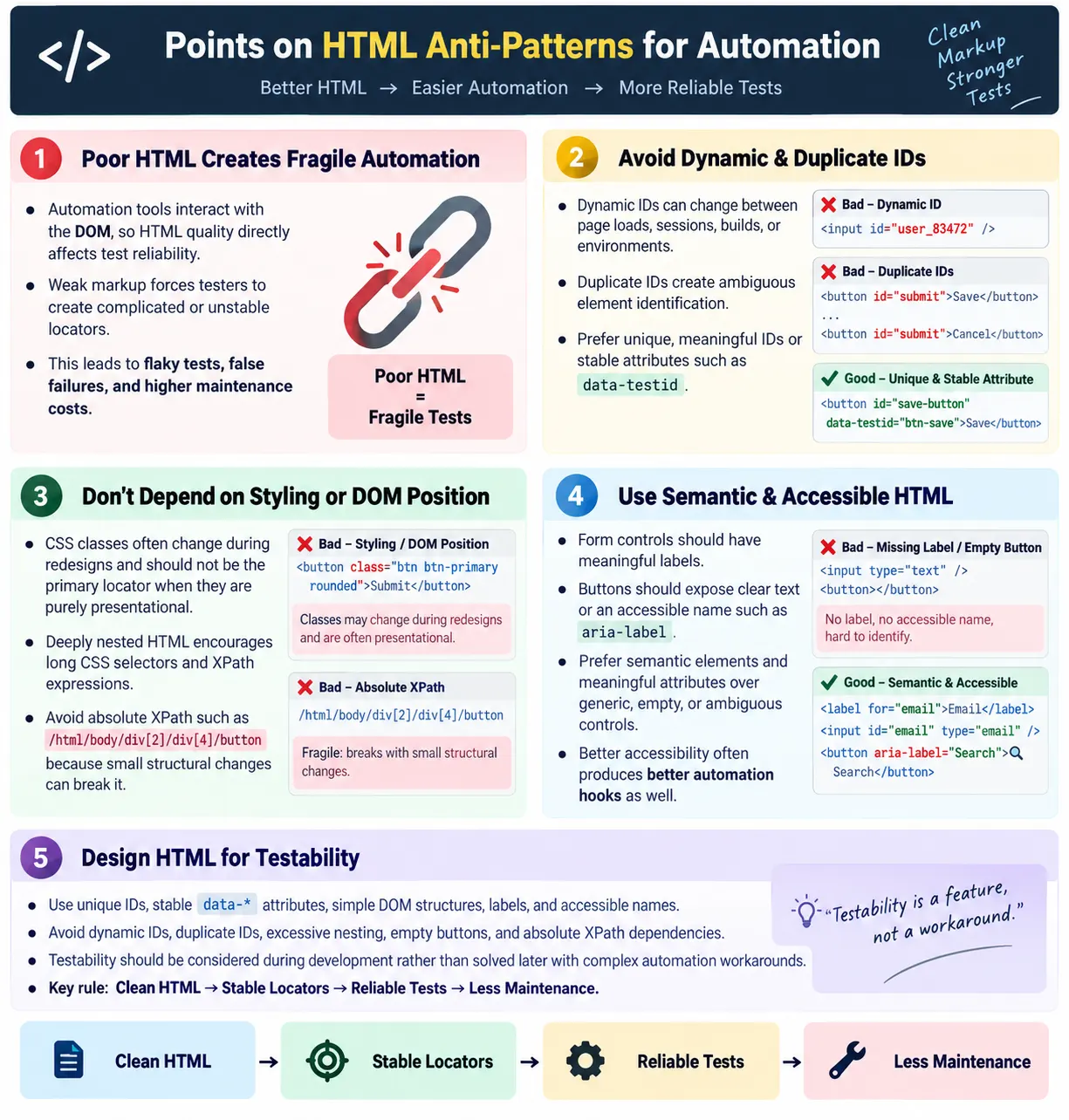
HTML anti-patterns for automation are HTML design practices that make automated UI testing difficult, unreliable, or fragile. These patterns force testers to create unstable locators, increase test maintenance, and lead to flaky automation. The problem is not always in the automation framework. Very often, the problem begins in the markup. If the HTML does not expose stable, meaningful, and accessible elements, tools such as Selenium, Playwright, Cypress, Puppeteer, and WebdriverIO have to work harder to identify the right elements.
Good HTML is not only important for developers and users. It also makes UI automation easier, faster, and more reliable. A clean DOM with unique identifiers, meaningful labels, semantic elements, and stable data attributes allows tests to locate elements directly. Poor HTML with dynamic IDs, duplicate IDs, empty buttons, missing labels, excessive nesting, and styling-dependent locators creates unnecessary automation risk.
Automation tools interact with the DOM, not with the visual page in the same way a human does. A human can see a green button and understand that it means Save. A test needs a locator. If that button has no meaningful text, no accessible name, no stable ID, and no test attribute, the test may need a fragile XPath or a class-based selector. The automation becomes unstable because the HTML does not give it a reliable way to identify the element.
What Is an HTML Anti-Pattern?
An anti-pattern is a poor implementation that creates unnecessary problems. In UI automation, an HTML anti-pattern is a markup decision that makes element identification harder than it should be. It may still render correctly in the browser. Users may still be able to click the page. But automation, accessibility tools, maintainers, and sometimes even developers suffer because the HTML lacks clarity.
Poor HTML
  ↓
Difficult Locators
  ↓
Flaky Tests
  ↓
Frequent Maintenance
The better approach is to write clean HTML that supports stable locators. A page with meaningful IDs, stable data-* attributes, labels, accessible names, and simple structure enables reliable automation. Tests become easier to write, easier to debug, and less likely to fail for false reasons.
Clean HTML
  ↓
Stable Locators
  ↓
Reliable Automation
  ↓
Easy Maintenance
Why HTML Quality Matters
Automation tools depend on the DOM. They search for elements by ID, name, CSS selector, XPath, role, text, or accessibility information. Poor HTML results in difficult element identification, unstable locators, frequent test failures, and higher maintenance costs. When the markup is weak, automation code becomes full of workarounds.
- Difficult element identification
- Unstable locators
- Frequent test failures
- Higher maintenance costs
The cost becomes visible as the test suite grows. A single fragile locator may be manageable. Hundreds of fragile locators create constant noise. Test failures become harder to trust because the team must first ask whether the application is broken or whether the locator broke again. Good HTML reduces that uncertainty.
1. Dynamic IDs
Dynamic IDs are one of the most common automation anti-patterns. An element may receive an ID generated by the backend or frontend framework. The ID works for rendering, but it changes between page loads, sessions, builds, or environments. A locator based on that ID fails as soon as the value changes.
Bad:

<button id="btn_123456">
  Login
</button>

Next page load:

<button id="btn_987654">
  Login
</button>
The problem is simple: the locator changes every time. A test using By.id("btn_123456") is not testing the login button reliably. It is testing a temporary generated value. A better approach is to use a stable ID or a data-test attribute.
Better:

<button
  id="loginBtn"
  data-testid="login-button">
  Login
</button>
Dynamic IDs are not always avoidable internally, but pages can still expose stable test attributes. If the framework requires generated IDs, add a stable data-testid for automation. This allows the implementation to keep its internal behavior while giving tests a reliable hook.
2. Missing Unique IDs
Missing unique IDs make automation harder because the tester may have to identify elements by position, class, placeholder, or surrounding structure. Two text inputs with no IDs are visually understandable to a user if labels are present, but automation may not be able to distinguish them cleanly if the markup does not connect labels and controls.
Bad:

<input type="text">
<input type="text">
Automation cannot easily distinguish between these inputs unless there are labels, names, placeholders, or nearby text. A better approach is to provide meaningful IDs.
Better:

<input id="firstName">
<input id="lastName">
IDs should be unique and meaningful. They do not need to be long, but they should describe the element's purpose. A clear ID helps JavaScript, CSS, accessibility relationships, and automation.
3. Using CSS Classes as Test Locators
CSS classes are often intended for styling, not testing. A class such as btn green rounded describes visual appearance. If the UI changes, the class may change. A test that depends on that class breaks even though the user's workflow still works.
Bad:

<button class="btn green rounded">
  Submit
</button>

After redesign:

<button class="btn blue">
  Submit
</button>
The better approach is to use a stable attribute that describes function, not appearance.
Better:

<button data-testid="submit-button">
  Submit
</button>
Classes can be acceptable when they are stable and semantic, but many class names are not. Utility classes, generated classes, theme classes, and layout classes should generally not be used as primary automation locators.
4. No Data-Test Attributes
When important controls have no IDs, names, labels, or data-test attributes, testers are forced to create complex locators. A simple submit button without attributes may require XPath based on text or position. That may work, but it is not as stable as a dedicated test attribute.
Bad:

<button>
  Submit
</button>
Better:
<button data-testid="submit-button">
Submit
</button>Data-test attributes are especially useful for repeated components, icon buttons, dynamic content, and important business actions. They separate automation from styling and layout.
5. Deeply Nested HTML
Deeply nested HTML creates complex DOM paths. It may happen when developers wrap elements in many divs for layout, styling, or component composition. Some nesting is normal, but excessive nesting makes locators fragile and harder to read.
Bad:

<div>
  <div>
    <div>
      <div>
        <button>Save</button>
      </div>
    </div>
  </div>
</div>
This structure can lead testers toward long XPath expressions or long CSS chains. A cleaner structure is easier to test and maintain.
Better:

<section>
  <button>Save</button>
</section>
The goal is not to remove all containers. The goal is to avoid unnecessary wrappers and expose meaningful elements. Semantic containers such as <section>, <nav>, <main>, and <article> are often clearer than anonymous div chains.
6. Duplicate IDs
Duplicate IDs are invalid HTML and a serious automation problem. IDs are supposed to be unique within a document. If two elements share the same ID, a locator may return the first element, the wrong element, or behave inconsistently depending on the tool and context.
Bad:

<input id="email">
<input id="email">
Better:
<input id="personalEmail">
<input id="workEmail">Duplicate IDs also hurt accessibility and scripting. A label connected to a duplicate ID may not point to the intended input. JavaScript using getElementById may behave unexpectedly. Fixing duplicate IDs improves the page beyond automation.
7. Empty Buttons
Empty buttons are difficult to identify and poor for accessibility. A button with no text, no label, and no accessible name gives automation little meaningful information. It may also be unusable for screen reader users.
Bad:

<button></button>
A better button contains visible text or an accessible label. If the button is icon-only, the accessible label becomes essential.
Better:

<button>
  Save
</button>
Better icon button:
<button aria-label="Save">
Save icon
</button>Meaningful buttons are easier for users and easier for automation. A test can locate by text, accessible name, or stable attributes when the element exposes purpose.
8. Missing Labels
Missing labels make forms harder to use, harder to understand, and harder to automate. A label connects human meaning to a form control. Without a label, the input may depend on placeholder text or visual placement, both of which are weaker.
Bad:

<input type="email">
Better:
<label for="email">
Email
</label>
<input
id="email"
type="email">Labels improve accessibility and automation. They help screen readers announce the field correctly. They also help testers reason about which input is which. In tools that support accessibility-based locators, labels can become strong locator hooks.
9. Absolute Position-Based HTML
Absolute position-based locators are usually a symptom of poor HTML hooks. A locator such as /html/body/div[2]/div[4]/button depends on exact DOM structure. A small layout change can break it. This kind of locator is difficult to read because it does not describe the element's purpose.
Bad locator:

/html/body/div[2]/div[4]/button
Prefer meaningful attributes, relative locators, labels, roles, or data-test attributes. Tests should locate the Save button because it is the Save button, not because it is the fourth button inside the second div under the body.
10. Generic Buttons
Generic button text creates ambiguity. If a page has two buttons both labeled Click, automation cannot easily know which one is intended. Users may also find the interface unclear. Button text should describe the action.
Bad:

<button>Click</button>
<button>Click</button>
Better:
<button data-testid="save-button">
Save
</button>
<button data-testid="cancel-button">
Cancel
</button>Specific labels improve usability and testability. They also make test code more readable because the locator can refer to a real action.
11. Using Images as Buttons Without Labels
Images used as buttons without proper semantics create accessibility and automation problems. An image alone is not necessarily a button. If it triggers an action, it should be inside a button or another appropriate interactive element, and it should have an accessible name.
Bad:

<img src="save.png">
Better:
<button aria-label="Save">
<img src="save.png" alt="">
</button>This better version tells the browser, assistive technology, and automation that the control is a button named Save. The image can remain decorative inside the button because the button already has the accessible label.
12. Missing Accessible Names
Icon-only controls often have missing accessible names. A search button may display only a magnifying glass icon. A human may infer the meaning visually, but screen readers and automation tools need a programmatic name.
Bad:

<button>
  Search icon
</button>
Better:
<button aria-label="Search">
Search icon
</button>Automation can then locate the element using a selector such as button[aria-label='Search'] or an accessibility-based locator in frameworks that support it. Accessible names make the interface better for users and more reliable for tests.
13. Hidden Elements Used for Automation
Some pages contain hidden elements that match the same locator as visible elements. Automation may find a hidden Save button instead of the visible one. This can happen with modals, responsive menus, duplicated desktop and mobile markup, or inactive tabs.
Bad:

<div style="display:none">
  <button>Save</button>
</div>
Tests should verify visibility before interaction, and HTML should avoid unnecessary duplicate interactive controls when possible. If duplicate markup is required for responsive design, use stable attributes carefully so visible and hidden versions can be distinguished.
14. Dynamic Text Used as Locator
Visible text can be a useful locator when the text is stable. It becomes fragile when the text contains dynamic user data, dates, counters, or environment-specific values. A button that says Welcome John today and Welcome David tomorrow is not a stable text target.
Bad:

<button>
  Welcome John
</button>

Tomorrow:

<button>
  Welcome David
</button>
Better:
<button data-testid="profile-button">
Welcome John
</button>The test can locate the profile button through the stable attribute and then separately validate the displayed user name if that is part of the test. Locator identity and content validation should not be mixed unnecessarily.
15. Random Attribute Values
Random attribute values make HTML harder to understand and automation harder to maintain. An input with id="abc123xyz" gives no clue about purpose. It may be generated, temporary, or meaningless. A meaningful ID such as username is easier to read and use.
Bad:

<input id="abc123xyz">
Better:
<input id="username">Meaningful identifiers help everyone. Developers understand the markup faster, testers write better locators, and debugging becomes easier. Random values should not be used as primary automation hooks.
Browser Workflow
The browser workflow explains why HTML quality matters so much. The browser parses HTML into the DOM. Automation tools use locators against that DOM. If the DOM exposes stable, meaningful hooks, automation is reliable. If the DOM exposes only unstable or ambiguous structure, tests become fragile.
HTML
  ↓
DOM
  ↓
Locator
  ↓
Automation
  ↓
Reliable Test
Clean HTML produces stable automation. It reduces the need for long selectors, sleeps, brittle XPath, and repeated locator repairs. Testability should be treated as part of frontend quality, not as something testers must solve after the page is built.
Impact on Test Maintenance
HTML anti-patterns increase maintenance costs. A test suite may start small, and fragile locators may not seem serious at first. As the suite grows, every UI update can break many tests. The team spends time updating locators instead of improving coverage. Failures become noisy, and people begin ignoring automation results.
Stable HTML has the opposite effect. Tests fail less often for false reasons. When they do fail, the failure is more likely to indicate a real product issue or an intentional change that needs a test update. This makes automation more valuable. The team can trust the signal because the locator foundation is strong.
Why These Anti-Patterns Happen
HTML anti-patterns usually do not happen because developers intentionally want to make testing difficult. They often happen because teams focus on visual delivery first. If a screen looks correct in the browser, the markup may be considered done. But visual correctness is only one part of frontend quality. The same page also needs to be accessible, maintainable, performant, and testable.
Another reason is framework abstraction. Modern frontend frameworks generate a lot of markup through components. Developers may not always inspect the final DOM carefully. A component can look clean in source code but render deeply nested HTML in the browser. A UI library may generate dynamic IDs or duplicate hidden elements. Automation interacts with the rendered DOM, so the final output matters.
Time pressure also contributes. When deadlines are tight, teams may skip labels, use generic buttons, or avoid adding test attributes. These shortcuts save a few minutes during development but cost much more later during automation and debugging. A small amount of testability work during development prevents repeated maintenance across many test runs.
Automation-Friendly HTML Standards
Teams can prevent many anti-patterns by defining simple automation-friendly HTML standards. These standards do not need to be complicated. They can state that business-critical controls must have stable identifiers, form fields must have labels, IDs must be unique, icon buttons must have accessible names, and test attributes should use a consistent naming convention.
For example, a team may agree that all important interactive elements use data-testid values written in lowercase hyphen-separated words. A login button becomes login-button. A submit order button becomes submit-order-button. A search input becomes search-input. This standard gives testers predictable hooks and gives developers clear naming guidance.
Standards also help code reviewers. Instead of debating every locator individually, reviewers can check whether the page follows agreed rules. Are IDs unique? Are labels connected to inputs? Are icon buttons named? Are repeated components distinguishable? Are test attributes functional rather than visual? This creates consistency across the application.
How to Review HTML for Automation
A tester reviewing HTML for automation should inspect the live DOM, not only the source code. Browser DevTools shows what automation tools actually see after JavaScript has rendered the page. The tester should identify the main workflow elements and ask whether each one has a stable, meaningful locator. If the answer is no, the markup may need improvement before automation is written.
The review should also check uniqueness. A locator that matches five elements is not safe unless the test intentionally handles multiple matches. Search for duplicate IDs. Search for repeated test IDs. Check whether hidden elements share the same locator as visible elements. Many flaky tests are caused by locators that match the wrong element or more elements than expected.
Finally, the reviewer should check whether locators depend on layout or styling. If the only available locator is an absolute XPath or a long chain of divs, that is a sign of poor testability. It may be better to ask for a stable attribute than to build a fragile test. Good automation review is not just about writing test code; it is about improving the page's automation surface.
Anti-Patterns in Component Libraries
Component libraries can introduce anti-patterns if teams are not careful. A modal component may render hidden copies of controls. A select component may create complex nested markup. A table component may generate rows without stable identifiers. A button component may render as a div with click handlers instead of a real button. These choices can make automation and accessibility harder.
The solution is not to avoid component libraries. The solution is to configure and wrap components responsibly. Reusable components should support labels, accessible names, stable test attributes, and predictable structure. If a component is used across the application, improving its testability improves many pages at once.
For example, a shared Button component can accept a testId property and render it as data-testid. A TextField component can require a label. A Table component can allow row-level identifiers. These design choices turn automation-friendly HTML into a reusable pattern rather than a one-time fix.
Impact on Different Automation Tools
HTML anti-patterns affect all major automation tools. Selenium, Playwright, Cypress, Puppeteer, and WebdriverIO have different APIs, but they all need reliable ways to identify elements. A dynamic ID is a problem in every tool. A duplicate ID is a problem in every tool. An empty button with no accessible name is a problem in every tool. The syntax may change, but the underlying DOM issue remains.
Playwright and Cypress provide strong locator and waiting features, but they cannot magically fix poor HTML. They can reduce some timing flakiness, but they still benefit from stable attributes and accessible names. Selenium requires testers to manage waits more explicitly in many cases, so weak HTML can become even more painful. The better the markup, the simpler the automation code in every framework.
This is why automation-friendly HTML should be considered tool-independent. A team may use Selenium today and Playwright tomorrow. Stable IDs, data attributes, labels, semantic elements, and accessible names remain valuable regardless of the framework. Good HTML is a long-term investment.
Balancing User-Facing Text and Test Locators
Visible text can be a useful locator, but it should be used thoughtfully. Stable button text such as Save or Cancel may be acceptable. But text that changes by language, user, date, count, or business configuration is not a stable locator. If the application supports localization, text-based locators may break when the language changes. Data-test attributes provide a language-neutral automation hook.
This does not mean visible text is unimportant. Tests should still validate important user-facing text when that is the purpose of the test. The key is to separate element identification from content validation. Locate the profile area by a stable test attribute, then assert that it displays the expected user name. Locate the alert by data-testid="payment-error", then verify the error message. This separation makes tests clearer and less fragile.
Fixing Existing Anti-Patterns
Many teams inherit applications that already contain automation anti-patterns. The practical solution is gradual improvement. Start with the most important workflows: login, checkout, payment, search, account management, and high-risk business flows. Add stable attributes and labels where tests are most valuable. Do not try to fix the entire application in one pass unless the project scope allows it.
When a flaky test is caused by poor HTML, treat it as a testability defect. Instead of hiding the problem with sleeps or longer XPath, improve the markup when possible. Add a stable test ID, fix a duplicate ID, connect a label, or give an icon button an accessible name. Each improvement reduces future maintenance.
Over time, teams can create a checklist for new pages and components. This prevents new anti-patterns from entering the codebase while old ones are cleaned up. The goal is steady improvement, not perfection in a single sprint.
Best Practices
Automation-friendly HTML uses unique IDs, stable data-* attributes, simple structure, labels for forms, semantic elements, meaningful attribute values, and accessible names. It avoids dynamic IDs, duplicate IDs, excessive nesting, empty buttons, generic controls, and absolute XPath dependencies.
- Use unique IDs
- Add
data-*attributes for testing - Keep HTML simple
- Reduce unnecessary nesting
- Add labels to forms
- Use semantic HTML
- Avoid dynamic IDs
- Avoid duplicate IDs
- Use meaningful attribute values
- Provide accessible names
Common Mistakes
Dynamic IDs break tests frequently. Duplicate IDs create ambiguous locators. Styling classes often change during redesigns. Absolute XPath breaks after layout changes. Missing labels hurt both accessibility and automation. No test attributes force testers to create fragile locators. These mistakes are common because pages are often built visually first and tested structurally later.
The better approach is to think about testability during development. If a feature is important enough to automate, it is important enough to expose stable HTML hooks. This does not require complicated markup. Often, one meaningful ID, label, or data-test attribute solves the issue cleanly.
Selenium Perspective
From a Selenium perspective, poor HTML causes flaky tests, slow debugging, frequent locator updates, and higher maintenance costs. Selenium can locate elements only through the DOM. If the DOM is confusing, the Selenium code becomes confusing too.
- Flaky tests
- Slow debugging
- Frequent locator updates
- Higher maintenance costs
Good HTML enables a clean locator such as this:
driver.findElement(
  By.cssSelector("[data-testid='login-button']"))
  .click();
Poor HTML may force a fragile locator such as this:
driver.findElement(
  By.xpath("/html/body/div/div/div[4]/button"));
The first locator communicates purpose. The second locator communicates position. Purpose is usually stable. Position is usually fragile.
Good vs Bad HTML for Automation
| Good HTML | Bad HTML |
|---|---|
| Unique IDs | Duplicate IDs |
Stable data-* attributes |
Dynamic IDs |
| Semantic elements | Excessive nested <div> elements |
| Meaningful labels | Missing labels |
| Accessible names | Empty buttons |
| Relative, meaningful locators | Absolute XPath |
Common Interview Questions
What is an HTML anti-pattern in automation? It is a poor HTML design practice that makes element identification and automated testing unreliable or difficult.
Why are dynamic IDs a problem? They change between page loads or builds, causing locators to fail even when the application behavior is correct.
Why avoid CSS classes as locators? Classes are primarily for styling and may change during UI redesigns, so tests based on them can become fragile.
Why use data-testid? It provides a stable, automation-specific locator that is independent of styling and layout changes.
Why should IDs be unique? Unique IDs allow automation tools, scripts, labels, and assistive technologies to identify the correct element consistently.
Why are labels important? Labels improve accessibility and make form elements easier to identify, understand, and automate.
Interview-Ready Answer
HTML anti-patterns for automation are poor HTML design practices that make automated testing unreliable and difficult to maintain. Examples include dynamic IDs, duplicate IDs, excessive DOM nesting, relying on styling classes for locators, missing labels, empty buttons, generic element names, and the absence of stable data-* attributes. These issues lead to fragile locators and flaky tests.
Automation-friendly HTML uses unique IDs, meaningful data-* attributes, semantic elements, accessible labels, and a simple DOM structure. This makes tests more stable, easier to read, and easier to maintain across UI changes.
One-Line Insight
Good automation starts with good HTML: clean, semantic, and stable markup eliminates many automation problems before testing even begins.