Heading Hierarchy
Introduction
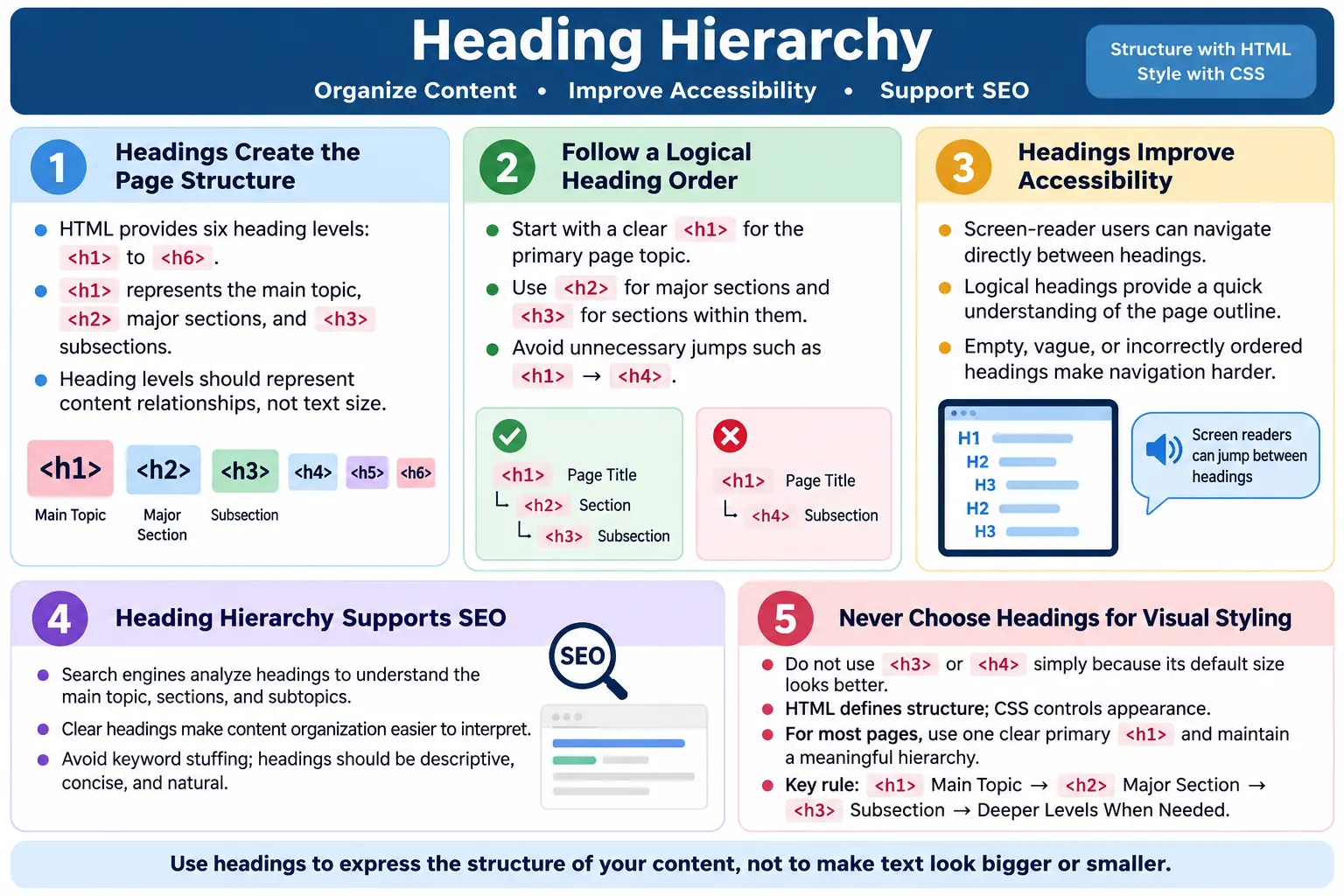
Heading Hierarchy is the logical organization of headings, from <h1> to <h6>, inside an HTML document. It creates a structured outline of the page and helps users, search engines, browsers, and assistive technologies understand how the content is arranged. A heading is not just large bold text. A heading is a structural signal. It tells the reader that a new topic, section, or subsection begins there.
Good heading hierarchy improves readability, SEO, accessibility, content organization, and user navigation. When headings are used correctly, a long page becomes easier to scan. Users can quickly understand the main topic and then move into the sections that matter to them. Search engines can identify the page topic, major sections, and supporting subtopics. Screen reader users can move between headings instead of listening to every line from the top of the page. Developers can maintain content more easily because the structure is predictable.
Think of headings as the table of contents for your webpage. A printed book has a title, chapters, sections, and subsections. A webpage should follow the same idea. The <h1> is usually the main title. <h2> elements define major sections. <h3> elements define subsections under those major sections. Lower levels are used only when the content genuinely needs deeper structure. This hierarchy should represent meaning, not visual appearance.
What Is Heading Hierarchy?
Heading hierarchy is the arrangement of HTML heading tags from the most important level, <h1>, to the least important level, <h6>. Each heading level represents a level in the document structure. The heading level is not chosen because it looks big or small. It is chosen because it expresses the relationship between one section and another.
<h1>
  ↓
<h2>
  ↓
<h3>
  ↓
<h4>
  ↓
<h5>
  ↓
<h6>
The hierarchy starts with the most general topic and moves toward more specific subtopics. If a page is about HTML, the <h1> might be HTML Tutorial. A major section might be HTML Forms as an <h2>. Under that, Text Inputs, Password Inputs, and Validation may be <h3> headings. This shows that those subsections belong under the forms section.
The important idea is relationship. A lower-level heading belongs under the closest previous higher-level heading. If a heading appears at the wrong level, the document outline becomes confusing. A user may still see text on the screen, but the underlying structure becomes harder to understand for assistive technologies and search engines.
Why Heading Hierarchy Is Important
A well-structured hierarchy helps users scan content quickly. Many users do not read long pages from top to bottom. They look at the title, scan section headings, and decide which part to read. Clear headings reduce effort. A user who wants information about SEO benefits can jump to a section named SEO Benefits. A user who wants common mistakes can find that section immediately. Without descriptive headings, the page feels like an unbroken wall of text.
Search engines analyze headings to understand page structure. They look at the main heading, section headings, and repeated concepts to infer relevance. Headings alone do not guarantee ranking, but they help search engines understand the organization of the content. A page with logical headings communicates its topic more clearly than a page with random heading levels or vague labels such as More and Details.
Screen readers also rely heavily on headings. Users can navigate by heading level, move to the next heading, list all headings on a page, or jump directly to a specific section. If headings are logical and descriptive, this navigation is powerful. If headings are skipped, empty, vague, or used only for styling, the experience becomes frustrating. Proper heading hierarchy is therefore an accessibility requirement, not just a design preference.
- Users can scan content quickly.
- Search engines can understand the page structure.
- Screen readers can navigate between sections.
- Developers can organize content logically.
- Long pages become easier to maintain and review.
HTML Heading Elements
HTML provides six heading levels. The levels are <h1>, <h2>, <h3>, <h4>, <h5>, and <h6>. These headings create a document outline. The <h1> is the main page heading. The <h2> is used for major sections. The <h3> is used for subsections under <h2>. The remaining levels are used for deeper subdivisions when needed.
| Tag | Purpose |
|---|---|
<h1> |
Main page heading |
<h2> |
Major section |
<h3> |
Subsection |
<h4> |
Sub-subsection |
<h5> |
Lower-level heading |
<h6> |
Lowest heading level |
Most pages do not need all six levels. A normal tutorial page often uses only <h1>, <h2>, and sometimes <h3>. Deep levels such as <h5> and <h6> should be rare. If a page needs many deep levels, it may be trying to cover too much in one document. In that case, splitting content into separate pages may improve readability.
Basic Example
A simple HTML course page can show how heading hierarchy works. The page has one main topic, which is the course itself. Under that, there are major sections such as introduction and HTML elements. Under each major section, there are smaller subsections.
<h1>HTML Course</h1>

<h2>Introduction</h2>

<h3>What Is HTML?</h3>

<h3>History of HTML</h3>

<h2>HTML Elements</h2>

<h3>Paragraph Tag</h3>

<h3>Heading Tags</h3>
The outline created by this structure is easy to understand. HTML Course is the main page topic. Introduction and HTML Elements are major sections. What Is HTML? and History of HTML are subsections inside introduction. Paragraph Tag and Heading Tags are subsections inside HTML elements.
HTML Course (H1)
├── Introduction (H2)
│   ├── What Is HTML? (H3)
│   └── History of HTML (H3)
└── HTML Elements (H2)
    ├── Paragraph Tag (H3)
    └── Heading Tags (H3)
This is the kind of structure that helps everyone. A visual reader can scan the headings. A screen reader user can jump by headings. A search engine can see the relationship between the main topic and its sections. A developer can add new content without guessing where it belongs.
Use Only One Main Topic
Usually, a webpage has one primary topic, represented by a single <h1>. This does not mean a page can never contain more than one important concept. It means the page should have one main purpose. For example, a page titled Complete HTML Tutorial can include forms, tables, semantic HTML, media, and accessibility as subtopics. Those subtopics should use lower-level headings.
<h1>Complete HTML Tutorial</h1>

<h2>HTML Basics</h2>

<h2>HTML Forms</h2>

<h2>Semantic HTML</h2>
In modern HTML, multiple <h1> elements can be technically valid in some situations, especially inside sectioning contexts. However, for most websites, tutorials, articles, and interview-preparation pages, using one clear primary <h1> is easier to maintain and easier to understand. It avoids ambiguity. It also aligns with common SEO and accessibility auditing expectations.
The key is clarity. A page with unrelated <h1> headings such as HTML, CSS, and Java appears to have multiple primary topics. A better structure would use one <h1> such as Programming Tutorials, then use <h2> for HTML, CSS, and Java. This creates a single page topic with clear subtopics.
Correct Heading Hierarchy
A correct heading hierarchy follows a natural progression. The main heading introduces the page. A second-level heading introduces a major section. A third-level heading introduces a subsection inside that major section. This does not mean every <h2> must have <h3> elements. It means that if you do use a lower level, it should belong to the higher level above it.
<h1>HTML</h1>

<h2>Forms</h2>

<h3>Input Types</h3>

<h3>Validation</h3>

<h2>Tables</h2>

<h3>Rowspan</h3>
This structure is good because it moves from general to specific. The page is about HTML. Forms and tables are major topics. Input types and validation belong under forms. Rowspan belongs under tables. A reader can understand the structure even without seeing the visual design. This is the goal of semantic HTML.
Correct hierarchy also makes future editing easier. If another forms subsection is added, it can become another <h3> under forms. If a new major topic is added, it can become a new <h2>. The page remains predictable because each heading level has a clear role.
Incorrect Heading Hierarchy
An incorrect hierarchy uses heading levels randomly or skips levels without a structural reason. For example, jumping from <h1> to <h4> and then back to <h2> creates a confusing outline. Browsers will still render the headings, but the document structure is weak.
<h1>HTML</h1>

<h4>Forms</h4>

<h2>Tables</h2>
The problem is not visual rendering. The problem is meaning. If Forms is a major section, it should probably be an <h2>. If it is a subsection, then there should be a parent heading that explains what it belongs to. Skipping levels may make users wonder whether content is missing or whether the page was assembled carelessly.
Sometimes skipped levels happen because a developer chooses a heading based on default font size. For example, <h4> may look closer to the desired visual size, so it is used as a major heading. This is not a good reason. Use CSS to change visual size. Use heading levels to describe structure.
Headings Are Not for Styling
One of the most common mistakes is using headings only because they look large, bold, or visually prominent. A heading should introduce a section of content. If you only need large text, use a paragraph, span, or other appropriate element and style it with CSS. This keeps visual design separate from document structure.
<h1>Large Text</h1>The example above is bad if Large Text is not the main topic of the page. A better approach is to use a normal element and apply a class.
<p class="large-text">
  Large Text
</p>
.large-text {
font-size: 40px;
}This separation is central to modern web development. HTML provides meaning. CSS provides presentation. JavaScript provides behavior. When headings are used for appearance, the HTML meaning becomes inaccurate. This can harm accessibility, confuse search engines, and make maintenance harder.
Screen Readers and Headings
Screen readers allow users to jump between headings. This is one of the fastest ways for many blind or low-vision users to understand a page. Instead of reading from the top line by line, a user can move from heading to heading and decide which section to explore. This is similar to how sighted users visually scan bold section titles.
Heading Level 1
  ↓
Heading Level 2
  ↓
Heading Level 2
  ↓
Heading Level 3
A logical hierarchy makes navigation faster and easier. A screen reader user can understand that heading level 2 sections are major topics and heading level 3 sections are details under those topics. If the page jumps from heading level 1 to heading level 5, the user may wonder whether levels 2, 3, and 4 are missing. If headings are empty, the user hears a heading announcement with no useful name. If headings are vague, navigation becomes less helpful.
Good headings are therefore a practical accessibility feature. They do not require advanced ARIA, complex scripts, or special browser APIs. They require thoughtful writing and correct HTML. Many accessibility improvements start with simple semantic HTML, and heading hierarchy is one of the best examples.
Search Engines and Headings
Search engines analyze headings to understand the main topic, major sections, subtopics, and content organization. A heading is not the only SEO signal, but it is an important structural cue. A page with a clear <h1> and descriptive <h2> headings gives search engines a clearer summary of what the page covers.
<h1>Java Tutorial</h1>

<h2>Variables</h2>

<h2>Loops</h2>

<h2>Collections</h2>
This structure clearly communicates the page. The main topic is Java Tutorial. The page has major sections about variables, loops, and collections. If each section contains useful paragraphs and examples, the page becomes easier for search engines to interpret. The headings act as signposts.
Headings should not be stuffed with repeated keywords. A heading such as Java Java Tutorial Java Variables Best Java Course is unnatural and unhelpful. Search engines are designed to reward useful content, not mechanical keyword repetition. A good heading is descriptive, concise, and accurate. It should help a human first. Search engines benefit from that clarity.
Long Article Example
Heading hierarchy becomes especially important in long articles. A short page may be understandable even with minimal structure, but a long tutorial needs strong organization. Consider a page called HTML Master Course. It may include basics, elements, forms, validation, accessibility, media, and SEO. Without headings, this would be overwhelming. With headings, it becomes a navigable document.
<h1>HTML Master Course</h1>

<h2>HTML Basics</h2>

<h3>History</h3>

<h3>Features</h3>

<h2>HTML Elements</h2>

<h3>Paragraphs</h3>

<h3>Lists</h3>

<h2>Forms</h2>

<h3>Input Types</h3>

<h3>Validation</h3>
HTML Master Course
├── HTML Basics
│ ├── History
│ └── Features
├── HTML Elements
│ ├── Paragraphs
│ └── Lists
└── Forms
├── Input Types
└── ValidationThis outline is useful before reading the article. It shows what the page covers and how each idea fits into the larger lesson. A long article without hierarchy forces the reader to work harder. A long article with clear headings supports learning, navigation, and review.
Browser Workflow
When the browser receives HTML, it parses the document and builds the DOM. Heading elements become nodes in that DOM. Visual styling is then applied through CSS, but the semantic identity of the heading remains part of the document. Other tools, including search engines and screen readers, can use those headings to understand the page.
HTML
  ↓
Heading Elements
  ↓
DOM
  ↓
Browser
  ↓
Search Engine
  ↓
Screen Reader
This workflow shows why headings should be correct at the HTML level. If the page only visually imitates headings using styled <div> elements, the document structure is weaker. The text may look like a heading on screen, but it is not a heading in the DOM. A screen reader may not announce it as a heading, and heading navigation may skip it.
When the correct heading element is used, the browser can render it visually, search engines can analyze it structurally, and assistive technologies can expose it as a navigable heading. This is why semantic HTML is more powerful than visual styling alone.
Accessibility Benefits
Proper heading hierarchy helps screen reader navigation, faster content scanning, better understanding of document structure, and WCAG-aligned accessibility. Users can move directly to the section they need instead of reading the entire page. This matters especially on long tutorials, documentation pages, government forms, dashboards, and support pages.
Accessibility is not only about users who are blind. Headings also help users with cognitive disabilities, attention difficulties, low vision, and users who are reading under time pressure. Clear headings reduce mental effort. They divide content into meaningful chunks. They make pages feel less overwhelming. They also help keyboard and assistive technology users build a mental map of the page.
- Screen reader users can jump between sections.
- Users can understand the page outline quickly.
- Long content becomes easier to scan and review.
- Important sections become easier to locate.
- Assistive technologies can expose a more useful structure.
SEO Benefits
Proper headings help identify the page topic, organize content into logical sections, improve readability, and make content easier for search engines to interpret. Headings support SEO, but high-quality content remains the most important factor. A page cannot rank well only because it has headings. The headings must introduce useful content that answers real questions.
Search engines use many signals, including content quality, links, page experience, performance, mobile usability, structured data, and relevance. Heading hierarchy is part of the content and structure signal. It helps search engines determine whether the page is organized around a clear topic and whether the sections support that topic.
Good headings can also improve user engagement. If visitors can scan a page and quickly find the section they need, they are more likely to stay, read, and continue to related pages. This creates a better learning experience. Good SEO starts with making pages useful and understandable, and headings are one of the simplest ways to do that.
Best Practices
The most important best practice is to use headings to represent document structure. Start with an <h1> for the main topic. Use <h2> for major sections. Use <h3> under <h2> when a section needs subsections. Continue the hierarchy naturally only when deeper levels are genuinely needed. Keep headings descriptive and concise. Use CSS, not heading levels, for visual styling.
- Use headings to represent document structure.
- Start with an
<h1>for the main topic. - Use
<h2>for major sections. - Use
<h3>under<h2>when needed. - Continue the hierarchy naturally.
- Keep headings descriptive and concise.
- Use CSS, not heading levels, for visual styling.
Another best practice is to review the page outline without looking at the full paragraphs. If the headings alone tell a clear story, the structure is likely strong. If the headings are vague or random, the article needs improvement. A good heading outline should work like a summary of the page.
Common Mistakes
A common mistake is using multiple unrelated <h1> elements. For example, a page that uses <h1>HTML</h1>, <h1>CSS</h1>, and <h1>Java</h1> suggests that there are three separate main topics. If the page is actually a programming tutorials overview, a better structure is one <h1> for the overall page and <h2> headings for each topic.
<h1>Programming Tutorials</h1>

<h2>HTML</h2>

<h2>CSS</h2>

<h2>Java</h2>
Skipping heading levels is another mistake. A page may go from <h1> to <h4> because <h4> happens to look visually smaller. This weakens the outline. Use appropriate intermediate levels when they reflect the document structure. If the section is a major section, use <h2>. If it is a subsection, use <h3>.
Using headings for appearance is also common. If text is large only because it is visually important, that does not automatically make it a heading. Use CSS for size, color, spacing, and weight. Use heading tags for content structure. Empty headings should also be avoided. A heading such as <h2></h2> gives no meaning and may create confusing announcements in assistive technologies. Vague headings such as More or Details should be replaced with specific headings such as HTML Form Validation or Accessibility Benefits.
Selenium Perspective
Automation testers may verify heading presence, heading order, single main page heading, dynamic heading updates, and accessibility compliance. Selenium can locate headings by tag name, CSS selector, XPath, or accessible text depending on the test need. A basic test may check that a page has an <h1> and that its text matches the expected page title.
WebElement heading =
driver.findElement(
By.tagName("h1"));

System.out.println(
heading.getText());
For deeper checks, tests can collect all headings on a page and verify that levels do not jump unexpectedly. However, Selenium alone is not a complete accessibility testing solution. Tools such as Axe, Lighthouse, and other accessibility engines can detect heading structure issues more systematically. Selenium can be combined with these tools in automated test suites.
Testing heading hierarchy is especially useful on content-heavy websites where templates generate pages. A template issue can affect hundreds of pages. For example, if the template accidentally renders the article title as a styled paragraph instead of an <h1>, every generated page may lose its primary heading. Automated checks can catch this kind of regression quickly.
Common Interview Questions
What is heading hierarchy? Heading hierarchy is the logical arrangement of heading elements, from <h1> to <h6>, that defines the structure of a webpage. It shows the relationship between the main topic, major sections, and subsections.
Why is heading hierarchy important? It improves readability, accessibility, SEO, and navigation for users and assistive technologies. It helps people scan the page, helps search engines understand the content, and helps screen reader users move between sections.
Should headings be used for styling? No. Headings should represent document structure. CSS should be used for visual styling. Choosing <h3> only because it looks like the desired size is a misuse of headings.
How many <h1> elements should a page have? Typically one main <h1> should represent the primary topic of the page. Modern HTML may allow multiple <h1> elements in some contexts, but for clarity, accessibility, and SEO, using a single primary <h1> is generally considered best practice.
Can heading levels be skipped? Browsers will render skipped heading levels, but skipping levels unnecessarily creates a confusing document outline. Use heading levels that reflect the logical structure of the content.
How do screen readers use headings? Screen readers allow users to navigate quickly between sections by moving from one heading to another or by listing headings on the page. This makes correct heading structure very important for accessibility.
Comparison Table
| Good Heading Hierarchy | Poor Heading Hierarchy |
|---|---|
One clear <h1> |
Multiple unrelated <h1> elements |
Logical order such as <h1> to <h2> to <h3> |
Random heading levels |
| Descriptive headings | Vague headings |
| Used for structure | Used only for appearance |
| Easy for screen readers | Difficult to navigate |
Practical Review Workflow
A practical way to review heading hierarchy is to ignore the body paragraphs for a moment and read only the headings. Start with the <h1>. Does it clearly describe the page? Then read each <h2>. Do those headings represent the major sections? Then check whether each <h3> belongs under the nearest <h2>. This simple review catches many structural mistakes.
Next, check whether any headings are empty, duplicated unnecessarily, or vague. A heading such as Introduction may be acceptable, but repeated headings like More, More, and More are not useful. A page should also avoid using headings for non-section content such as buttons, labels, decorative text, or large marketing slogans that do not introduce a content section.
Finally, test the page with accessibility tools when possible. Browser extensions and automated checkers can identify skipped heading levels and missing <h1> elements. Manual review is still important because tools cannot always judge whether a heading is descriptive or whether the structure makes sense to a learner. The best approach combines automated checks with human judgment.
Heading Hierarchy in Real Projects
In real projects, heading hierarchy often becomes difficult because pages are assembled from reusable components. A header component may contain a logo and navigation. A hero component may contain a marketing headline. A card component may contain a title. A sidebar may contain filters. A footer may contain link groups. If each component is designed independently without considering the final page outline, the result can be structurally messy. For example, a card component may always render its title as an <h2>, even when the card appears inside a section that already uses <h3> for item titles.
This is why heading levels should be decided at the page or layout level, not only inside isolated components. In a design system, components can provide flexible heading options. A card title might allow the consuming page to choose whether it should be an <h2>, <h3>, or simple text. A modal dialog might use a heading for its title, but that heading should fit the surrounding accessibility pattern. A reusable section component should not blindly force one heading level everywhere. Flexibility helps maintain correct structure across different page types.
Content management systems can also create heading problems. Authors may choose headings from a rich text editor based on visual size rather than structure. A writer may use Heading 4 because it looks smaller, not because it belongs under a heading level 3 section. Teams can prevent this by creating clear authoring guidelines. For example, a content guide can say that every article title is the only <h1>, major article sections use <h2>, and subpoints use <h3>. Visual styles should be handled by the site theme, not by forcing writers to pick heading levels for appearance.
Dashboards and application screens need the same discipline. A dashboard may have a page title, widget headings, table headings, and modal headings. The page title should usually be the <h1>. Main dashboard regions can use <h2>. Widgets inside those regions can use <h3> if needed. The structure should help users understand the screen. This is especially important for keyboard and screen reader users who need to move through complex interfaces efficiently.
How to Fix Heading Problems
Fixing heading hierarchy starts with identifying the current outline. Browser developer tools, accessibility extensions, and automated audit tools can show the heading order. You can also inspect the HTML directly and list every heading in order. Once the current outline is visible, compare it to the logical structure of the page. The goal is not to mechanically change every skipped level without thinking. The goal is to make the heading outline match the content outline.
If a page is missing an <h1>, add one that clearly describes the main topic. If a page has multiple unrelated <h1> elements, keep the one that represents the whole page and convert the others to lower-level headings. If the page jumps from <h1> to <h4>, decide whether that section should be an <h2> or whether intermediate structure is actually missing. If headings are empty, remove them or replace them with meaningful text. If headings are vague, rewrite them so they describe the content that follows.
When a heading is used only for visual styling, replace it with a more appropriate element and apply CSS. For example, a large promotional phrase that does not introduce a content section can be a paragraph or span with a class. If the text does introduce a real section, keep it as a heading and style it as needed. This distinction keeps the page visually flexible while preserving semantic meaning.
Fixing headings should be done carefully on live websites. Changing headings can affect accessibility, SEO, automated tests, and visual styling. If CSS selectors depend on heading tags, updates may change the design. If tests locate elements by heading tags, tests may need updates. A good fix includes reviewing the page visually, checking the accessibility outline, and confirming that layout and automated tests still behave correctly.
Heading Hierarchy Checklist
A checklist is useful before publishing a page. First, confirm that the page has one clear primary <h1>. Second, verify that major sections use <h2>. Third, check whether lower-level headings belong under the correct parent section. Fourth, make sure headings are not empty. Fifth, confirm that headings are descriptive enough to be useful when read alone. Sixth, ensure that CSS, not heading level choice, controls visual appearance.
- One clear main
<h1>for the page topic. <h2>elements for major sections.<h3>and lower levels only when the structure requires them.- No empty headings.
- No vague headings such as
MoreorDetailswithout context. - No headings used only to make text larger or bolder.
- No unnecessary level jumps that confuse the outline.
- Headings still make sense when read as a table of contents.
This checklist works for developers, testers, content writers, and SEO reviewers. Developers can apply it while building templates. Testers can use it during accessibility checks. Content writers can use it while drafting articles. SEO reviewers can use it while auditing pages. Heading hierarchy is simple, but consistency across many pages requires a shared habit.
Interview-Ready Answer
Heading Hierarchy is the logical organization of HTML heading elements, from <h1> to <h6>, that defines the structure of a webpage. The <h1> represents the main topic, <h2> elements identify major sections, and lower-level headings define subsections. A proper heading hierarchy improves readability, accessibility, and SEO by helping users, search engines, and screen readers understand the relationships between different parts of the content. Headings should be chosen based on document structure, while CSS should be used for visual styling.
A strong interview answer should also mention practical discipline. Use one clear main heading for most pages, keep headings descriptive, avoid skipping levels without reason, do not use headings only to make text bigger, and verify the heading outline during accessibility or SEO review. This shows that you understand headings as a real structural tool rather than a simple formatting tag.
One-Line Insight
Headings are the outline of your webpage; they organize content for users, search engines, and assistive technologies alike.