<head> vs <body>
Introduction
Every HTML document is divided into two major sections: the <head> element and the <body> element. These two sections work together to create a complete webpage, but they serve entirely different purposes. Understanding the distinction between them is one of the most important fundamentals of HTML because browsers process them differently, search engines use them differently, and developers interact with them differently.
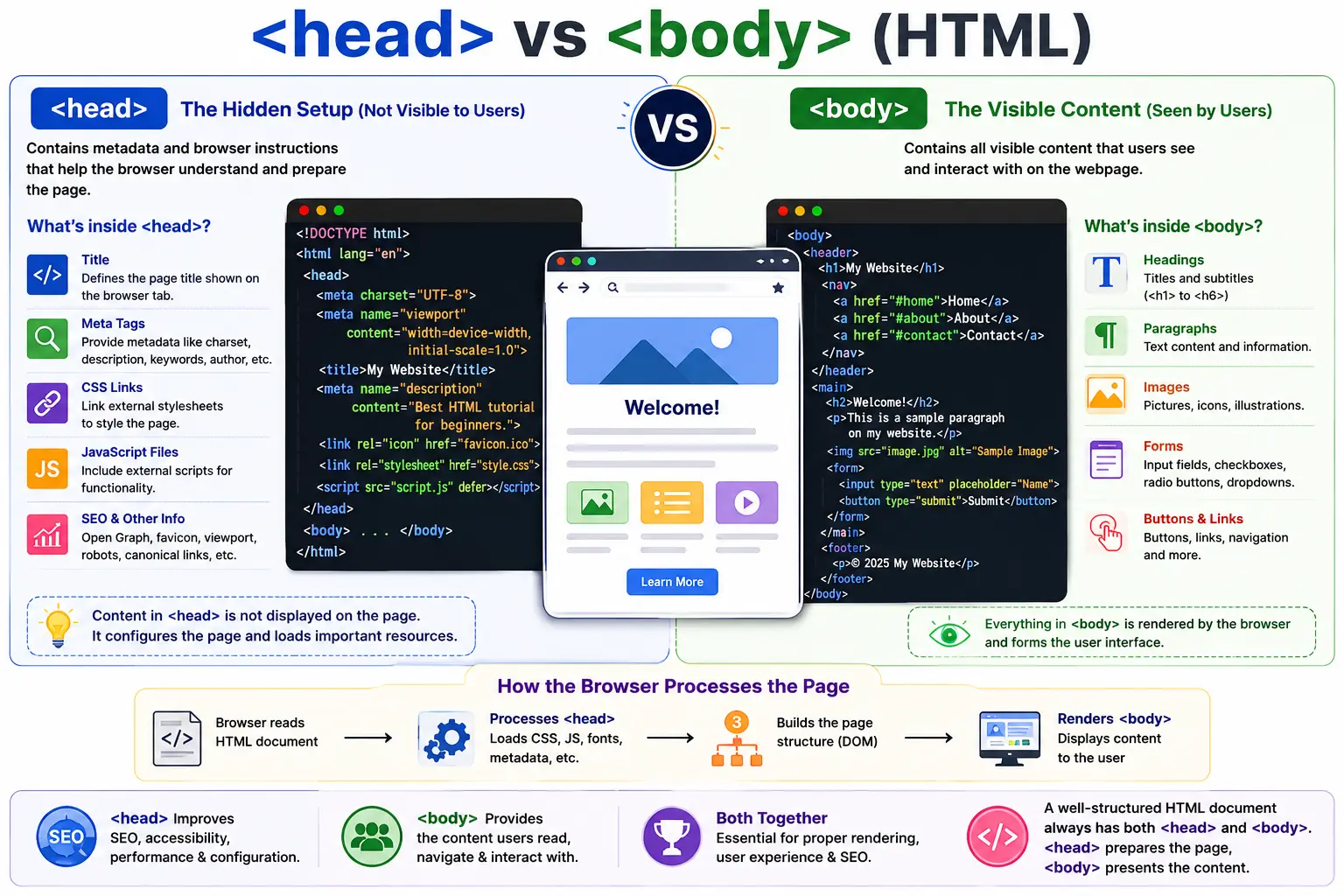
When beginners first learn HTML, they often focus primarily on the content displayed on the screen. They create headings, paragraphs, images, links, and forms inside the <body> element and quickly see visible results. However, behind every visible webpage is another equally important section—the <head> element—which contains information that helps browsers understand how the page should behave, how it should appear in search engines, what resources it requires, and how it should be rendered.
A simple HTML document demonstrates this structure clearly:
<!DOCTYPE html>
<html lang="en">

<head>
    <title>SoftwareTips4U</title>
</head>

<body>
    <h1>Welcome</h1>
    <p>Learning HTML</p>
</body>

</html>
In this example, the <head> section contains information about the page, while the <body> section contains content that users can actually see.
A useful way to think about these elements is to compare them to a movie production. The <head> contains the behind-the-scenes instructions, settings, and resources required to create the movie. The <body> contains the actual movie that viewers watch. Both are essential, but they serve very different roles.
Understanding how these two sections interact is critical for web development, browser rendering, SEO, accessibility, JavaScript integration, CSS loading, and Selenium automation testing.
Understanding the Overall Structure of an HTML Document
Before examining each section individually, it is important to understand where they fit within the overall document structure.
Every HTML page follows a hierarchy similar to this:
<!DOCTYPE html>

<html>

<head>
    ...
</head>

<body>
    ...
</body>

</html>
Visually, the structure looks like:
HTML Document
│
├── HEAD
│    └── Page Information
│
└── BODY
     └── Visible Content
The browser expects this organization because it separates document configuration from document content.
The <head> section provides information about the page.
The <body> section provides the content of the page.
Together, they form a complete web document.
What Is the <head> Element?
The <head> element contains metadata and resources associated with the webpage. It provides information that browsers, search engines, accessibility tools, and other systems use to process the document correctly.
A typical head section looks like this:
<head>
    <title>SoftwareTips4U</title>
    <meta charset="UTF-8">
    <link rel="stylesheet" href="style.css">
</head>
Unlike the body section, most content inside the head is not displayed directly to users.
Users generally do not see the head section, but browsers rely heavily on it.
Think of the <head> as the configuration center of the webpage.
It contains instructions that tell browsers how the document should be interpreted, rendered, indexed, and processed.
Purpose of the <head> Element
The primary purpose of the head section is to provide information about the webpage rather than content for the webpage.
The browser uses information stored in the head section for many important tasks.
These include:
- Setting the page title
- Loading CSS files
- Loading JavaScript files
- Defining character encoding
- Specifying responsive design settings
- Providing SEO metadata
- Loading fonts
- Loading icons
- Defining social media previews
Without the head section, browsers would have difficulty understanding how the document should behave.
Although users rarely interact directly with information in the head section, almost every aspect of webpage functionality depends on it.
Common Elements Found Inside <head>
The head section can contain many specialized elements.
Some of the most important include:
<title>
<meta>
<link>
<style>
<script>
Each serves a different purpose.
Let's examine them individually.
The <title> Element
The title element defines the title of the webpage.
Example:
<title>SoftwareTips4U</title>This title appears in several important locations.
First, it appears in the browser tab.
For example:
Chrome Tab
-----------------
SoftwareTips4U
Second, it appears when users bookmark the page.
Third, search engines often display it as the clickable headline in search results.
Because of this, the title element is important for both usability and SEO.
Every webpage should contain a meaningful title.
Meta Tags Inside <head>
Meta tags provide additional information about the webpage.
One common example is character encoding.
<meta charset="UTF-8">This tells the browser which character set the page uses.
UTF-8 supports:
- English
- Tamil
- Hindi
- Arabic
- Chinese
- Japanese
- Emojis
Without proper character encoding, text may display incorrectly.
Another important meta tag is the viewport tag:
<meta name="viewport"
      content="width=device-width, initial-scale=1.0">
This helps webpages display properly on mobile devices.
Modern responsive websites depend on this tag.
SEO Metadata in the Head Section
Search engines rely heavily on metadata.
For example:
<meta name="description"
      content="Learn HTML from basics to advanced topics">
This description may appear in search results.
Metadata helps search engines understand:
- Page purpose
- Page content
- Language
- Keywords
- Author information
Although users may never see these tags directly, they play a major role in website discoverability.
CSS Loading Through the Head Section
One of the most common uses of the head element is loading CSS.
Example:
<link rel="stylesheet"
      href="style.css">
This tells the browser to download and apply an external stylesheet.
Without CSS, webpages would appear as plain unstyled content.
When browsers encounter CSS links inside the head section, they typically begin downloading the stylesheet immediately.
This is one reason CSS links are usually placed inside the head rather than the body.
Internal CSS Within <head>
CSS can also be written directly inside the document.
Example:
<style>
h1 {
    color: blue;
}
</style>
This approach is called internal CSS.
Although large projects usually use external stylesheets, internal styles are useful for:
- Small webpages
- Quick prototypes
- Learning exercises
- Testing purposes
The browser processes these styles before rendering visible content.
JavaScript Inside <head>
JavaScript can also be included within the head section.
Example:
<script src="app.js"></script>JavaScript enables:
- Interactivity
- Dynamic content
- User input handling
- API communication
- Animations
Modern websites depend heavily on JavaScript.
However, developers must carefully manage script placement because JavaScript can affect page loading performance.
What Is the <body> Element?
While the head section contains information about the page, the body section contains the actual content displayed to users.
Example:
<body>
    <h1>SoftwareTips4U</h1>
    <p>Learn HTML</p>
</body>
Everything visible on a webpage generally resides inside the body element.
When users visit a webpage, most of what they see comes from content inside the body.
Think of the body as the user-facing portion of the document.
Purpose of the <body> Element
The body section defines the visible user interface.
It contains:
- Headings
- Paragraphs
- Images
- Links
- Tables
- Forms
- Buttons
- Videos
- Menus
- Navigation systems
- Product listings
- Dashboards
Essentially, the body contains everything users interact with.
Without the body element, a webpage would have no visible content.
Common Elements Found Inside <body>
The body section contains the elements users recognize most.
Headings:
<h1>Welcome</h1>Paragraphs:
<p>Learning HTML</p>Images:
<img src="logo.png">Links:
<a href="about.html">
    About
</a>
Buttons:
<button>
    Submit
</button>
Forms:
<form>
    <input type="text">
</form>
These elements create the interactive experience users expect from websites.
Visual Representation of Head and Body
A webpage can be visualized like this:
+--------------------------------+
|            HEAD                |
|--------------------------------|
| Title                          |
| Meta Tags                      |
| CSS Files                      |
| JS Files                       |
+--------------------------------+

+--------------------------------+
|            BODY                |
|--------------------------------|
| Heading                        |
| Paragraph                      |
| Image                          |
| Form                           |
| Footer                         |
+--------------------------------+
The head provides instructions.
The body provides content.
Browser Processing Order
Browsers process the head and body differently.
A simplified flow looks like:
DOCTYPE
   ↓
html
   ↓
head
   ↓
Load Metadata
Load CSS
Load Scripts
   ↓
body
   ↓
Create Visible Content
The browser typically processes important head resources before rendering visible content.
This allows CSS and other configuration settings to be available when body elements appear.
DOM Representation
Consider this document:
<html>

<head>
    <title>Demo</title>
</head>

<body>
    <h1>Hello</h1>
</body>

</html>
The browser creates the following DOM structure:
Document
 │
 html
 ├── head
 │      └── title
 │
 └── body
        └── h1
Notice that both head and body are sibling nodes under the html element.
Each contains different types of information.
SEO Perspective: Head vs Body
Both sections contribute to SEO, but in different ways.
The head provides metadata:
<meta name="description"
      content="HTML Tutorial">
Search engines use this information to understand the page.
The body provides actual content:
<h1>HTML Basics</h1>
<p>Learn the fundamentals of HTML.</p>
Search engines analyze this content to determine relevance and ranking.
The head explains the page.
The body delivers the page.
Accessibility Perspective
Accessibility tools also rely on both sections.
The head often contains language information:
<html lang="en">This helps screen readers interpret content correctly.
The body contains semantic elements such as:
<header>
<nav>
<main>
<footer>
These elements help assistive technologies understand page structure.
Together, head and body improve accessibility.
Head and Body in Modern Websites
Modern websites use both sections extensively.
Example:
<head>

<title>SoftwareTips4U</title>

<meta charset="UTF-8">

<link rel="stylesheet"
      href="style.css">

</head>

<body>

<header>
    Logo
</header>

<nav>
    Menu
</nav>

<main>
    Course Content
</main>

<footer>
    Copyright
</footer>

</body>
The head prepares the page.
The body presents the page.
Common Beginner Mistakes
One common mistake is placing visible content inside the head section.
Incorrect:
<head>
    <h1>Hello</h1>
</head>
Visible content belongs in the body.
Correct:
<body>
    <h1>Hello</h1>
</body>
Another mistake is placing metadata inside the body.
Incorrect:
<body>
<title>My Page</title>
</body>
The title belongs in the head section.
Selenium Perspective
Selenium interacts with both sections, but in different ways.
The head section provides information like the page title:
driver.getTitle();This retrieves the value stored inside:
<title>Most Selenium interactions occur inside the body.
Example:
driver.findElement(By.id("login"));These elements usually exist within the visible page content.
Understanding the distinction helps testers understand what Selenium is accessing.
Common Interview Questions
What Is the Purpose of <head>?
The head section stores metadata, resources, scripts, stylesheets, and document settings.
What Is the Purpose of <body>?
The body section contains all visible content displayed to users.
Can <title> Be Placed Inside <body>?
No.
The title belongs inside the head section.
Which Section Contains Forms and Buttons?
The body section.
Which Section Loads CSS?
Typically the head section.
Which Section Is Visible to Users?
The body section.
Key Differences Between <head> and <body>
| Feature | <head> | <body> |
|---|---|---|
| Visible to Users | Usually No | Yes |
| Purpose | Metadata & Resources | Page Content |
| Contains Title | Yes | No |
| Contains Meta Tags | Yes | No |
| Contains CSS Links | Yes | No |
| Contains Headings | No | Yes |
| Contains Forms | No | Yes |
| Contains Images | Rarely | Yes |
| Used for SEO | Yes | Yes |
| Used for Rendering | Indirectly | Directly |
Conclusion
The <head> and <body> elements form the two major sections of every HTML document, but they serve fundamentally different purposes. The head acts as the information and configuration center of the webpage, containing metadata, stylesheets, scripts, SEO settings, and browser instructions. The body serves as the presentation layer, containing the text, images, forms, navigation systems, and interactive elements that users actually see and interact with.
A well-structured webpage depends on both sections working together. The head prepares the browser to understand and render the page correctly, while the body delivers the content and user experience. Understanding the distinction between these two elements is essential for HTML development, browser rendering, accessibility, SEO, JavaScript integration, and Selenium automation.
One-Line Insight
<head> tells the browser about the page, while <body> shows the page to the user.