GET vs POST
Introduction
GET and POST are the two most commonly used HTTP methods for submitting HTML forms. The method attribute of the <form> element determines how form data is sent from the browser to the server. Choosing the correct method is important because it affects security, performance, user experience, data handling, caching, bookmarking, and RESTful web development.
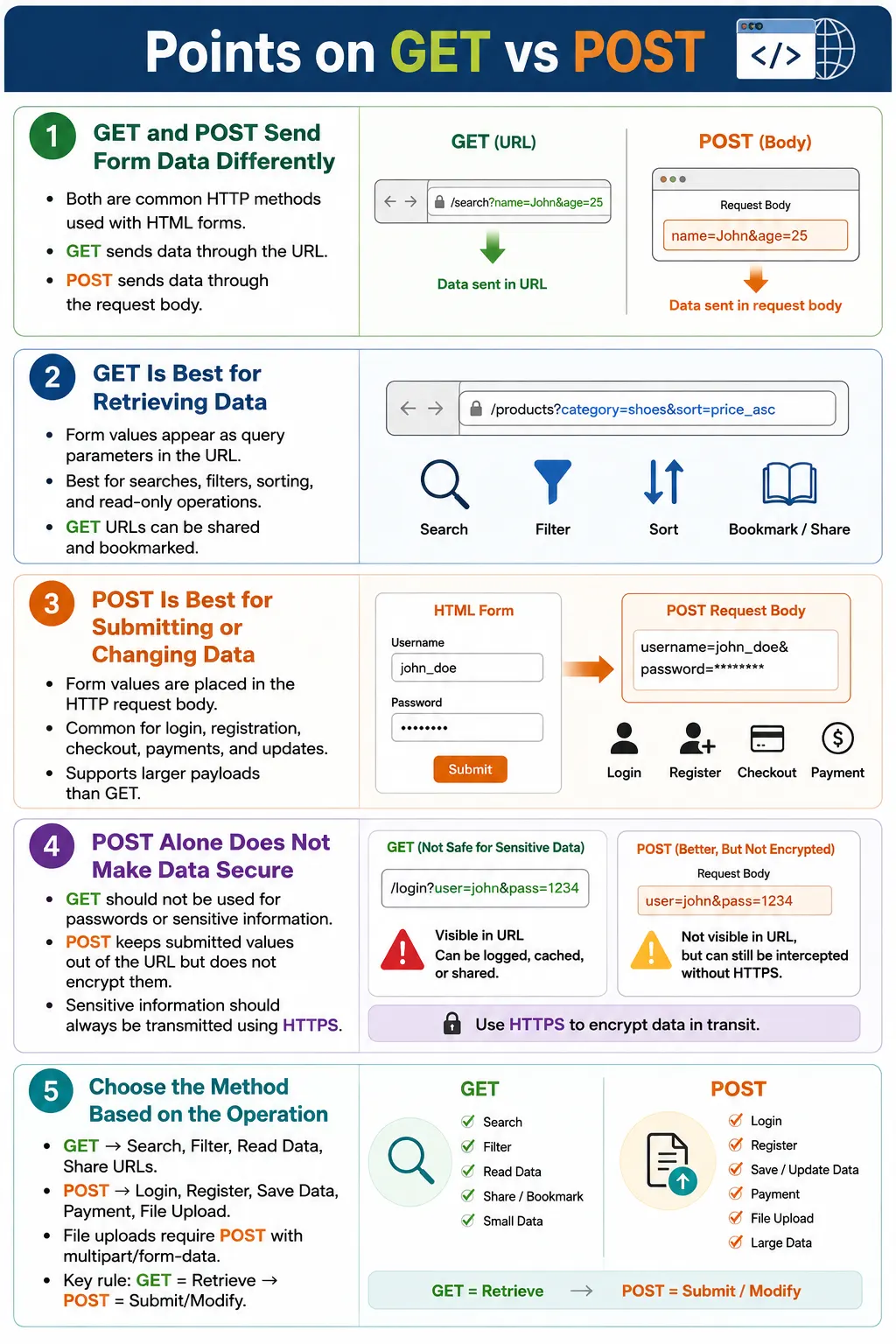
At a high level, GET sends form data as part of the URL, while POST sends form data in the HTTP request body. This difference may sound small, but it has major practical effects. A search form usually works well with GET because the resulting URL can be bookmarked and shared. A login form should use POST because usernames and passwords should not appear in the URL.
Understanding GET and POST is essential for HTML developers, backend developers, API testers, automation testers, and interview preparation. Many form-related defects happen because the wrong method is used, sensitive data is exposed in URLs, file uploads are configured incorrectly, or teams assume POST automatically makes data secure.
What Is GET?
The GET method sends form data as part of the URL using query parameters. When a user submits a GET form, the browser appends the form field names and values to the URL after a question mark.
<form action="/search" method="get">
    <input type="text" name="q">
    <button>Search</button>
</form>
If the user searches for HTML, the browser requests a URL similar to this:
/search?q=HTMLThe form data becomes part of the URL. The parameter name is q, and the submitted value is HTML. This makes GET useful when the submitted data represents a query, filter, or navigation state.
GET Request Flow
The GET flow starts when the user fills the form and clicks submit. The browser collects the form values, appends them to the URL as query parameters, sends the request, and receives a response from the server.
User
  ↓
Fill Form
  ↓
Click Submit
  ↓
Browser Appends Data to URL
  ↓
Request Sent
  ↓
Server Processes
  ↓
Response Returned
Because the submitted values are part of the URL, GET requests are easy to share and bookmark. This is why search pages, product filters, sorting options, and result pages often use GET.
Characteristics of GET
GET appends data to the URL. It is mainly used to retrieve data, not to create or modify it. Parameters are visible in the browser address bar, browser history, server logs, and shared links. GET requests can be bookmarked, can be shared through links, and may be cached by browsers or intermediate systems depending on HTTP cache headers.
GET is limited by practical URL length constraints imposed by browsers, servers, proxies, and infrastructure. It is not suitable for large payloads or sensitive information. If data should not be visible in a URL, GET is the wrong choice.
Real-world GET examples include Google Search, product search, blog search, filtering products, news search, sorting results, and navigation to a resource.
https://example.com/search?q=laptopWhat Is POST?
The POST method sends form data in the HTTP request body instead of the URL. When a user submits a POST form, the browser sends the request to the action URL, but the submitted values are placed inside the request body.
<form action="/login" method="post">
    <input type="text" name="username">
    <input type="password" name="password">
    <button>Login</button>
</form>
The browser sends a request like this:
POST /login

Request Body:
username=john
password=******
The URL remains /login. The submitted form values do not appear in the browser address bar. This makes POST more appropriate for login, registration, checkout, payment, feedback forms, contact forms, profile updates, and file uploads.
POST Request Flow
The POST flow is similar to GET from the user's perspective, but different in how the browser sends data. The browser creates a request body, encodes the submitted form values, sends the request, and receives a response from the server.
User
  ↓
Fill Form
  ↓
Click Submit
  ↓
Browser Creates Request Body
  ↓
Request Sent
  ↓
Server Processes
  ↓
Response Returned
POST is commonly used when the operation creates, updates, or submits data. Submitting the same POST request multiple times may have side effects, such as creating duplicate records, unless the application prevents it.
Characteristics of POST
POST sends data in the request body. The submitted values do not appear in the URL. POST supports much larger payloads than GET and is suitable for sensitive or large data. It is commonly used for operations that create or modify server-side data, such as account registration, payment processing, file uploads, and feedback submission.
POST requests are not bookmarkable with their submitted body data. The URL can be bookmarked, but the form values inside the request body are not preserved in the bookmark. POST requests are also typically not cached by browsers in the same way as GET requests, although exact behavior depends on HTTP headers and browser implementation.
GET Example
A search form is a typical GET example because users may want to share or bookmark the search result.
<form action="/search" method="get">
    <input type="search" name="keyword">
    <button>Search</button>
</form>
If the user enters HTML, the generated URL may be:
/search?keyword=HTMLThis is useful because the URL represents the search state. A user can copy it, share it, bookmark it, or reload it later.
POST Example
A login form is a typical POST example because credentials should not appear in the URL.
<form action="/login" method="post">
    <input type="text" name="username">
    <input type="password" name="password">
    <button>Login</button>
</form>
The URL remains:
/loginThe data is sent in the request body:
username=john
password=secret
Browser Comparison
The easiest way to remember the difference is to compare where the submitted data goes.
GET:
URL
  ↓
Contains Data

POST:
URL
  ↓
No Submitted Data
  ↓
Request Body
  ↓
Contains Data
GET makes the submitted values visible in the URL. POST keeps the submitted values out of the URL by placing them in the request body.
GET vs POST Comparison
| Feature | GET | POST |
|---|---|---|
| Data Location | URL | Request body |
| Visible in URL | Yes | No |
| Suitable for Sensitive Data | No | Better than GET, but HTTPS is still required |
| Bookmarkable | Yes | No, submitted body data is not preserved |
| Browser History | Parameters appear in history | URL appears, request body is not stored in the URL |
| Typical Use | Retrieve data | Create, update, or submit data |
| Payload Size | Limited by practical URL length | Much larger payloads |
| File Upload | No | Yes, with multipart/form-data |
Security Comparison
Security is one of the most important reasons to choose the correct method. GET is not appropriate for passwords or sensitive values because data appears in the URL.
Bad:
/login?username=john&password=12345
This URL may appear in browser history, server logs, analytics tools, screenshots, copied links, or shared messages. That is a serious risk.
POST is better for sensitive form submission because the values are not exposed in the URL. However, POST does not encrypt data. If the request is sent over plain HTTP, attackers on the network may still intercept it. Sensitive information should always be transmitted over HTTPS regardless of whether GET or POST is used.
POST:
Password
  ↓
Request Body
  ↓
Not Exposed in URL

Still Required:
HTTPS
Browser History and Caching
GET requests store full URLs in browser history, including query parameters. This is useful for searches and filters because users can return to the same result page later. It is dangerous for sensitive data because values remain visible in history.
GET History:
Full URL
  ↓
Includes Query Parameters
POST requests store the URL in history, but not the submitted request body as part of the URL.
POST History:
URL
  ↓
Submitted Form Data Not Stored in URL
GET requests may be cached, while POST requests are typically not cached in the same way. Actual caching behavior depends on HTTP cache headers and browser behavior.
Idempotency
Idempotency is an important concept in HTTP. A GET request should be safe and should not change server data. Calling the same GET request multiple times should produce the same kind of result without modifying the database.
Search
  ↓
Search
  ↓
Search

No database changes
POST commonly creates or changes data. Submitting the same POST request multiple times may create duplicate records unless the application prevents it.
Register
  ↓
New User Created
This is why browsers may warn users before resubmitting POST data after refresh. The browser is protecting users from accidentally repeating an operation that could have side effects.
File Uploads
GET is not used for file uploads. File uploads require POST with multipart/form-data encoding.
<form method="post" enctype="multipart/form-data">
    <input type="file">
</form>
This combination tells the browser to send the file data in a format that the server can process. Without multipart/form-data, file upload forms will not work correctly.
REST API Perspective
Although traditional HTML forms mainly use GET and POST, RESTful APIs use additional HTTP methods. GET retrieves resources. POST creates resources. PUT replaces or updates resources. PATCH partially updates resources. DELETE removes resources.
| Method | Common Purpose |
|---|---|
| GET | Retrieve resources |
| POST | Create resources |
| PUT | Replace or update resources |
| PATCH | Partially update resources |
| DELETE | Remove resources |
HTML forms are more limited than REST APIs in method support, but understanding GET and POST provides the foundation for understanding API behavior.
Which Method Should You Choose?
Use GET when the form retrieves information, searches, filters, reads data, navigates to a resource, or produces a shareable URL. Search forms, filter panels, sort controls, and public result pages are common GET use cases.
Use POST when the form logs in users, registers accounts, saves data, uploads files, processes payments, submits feedback, creates records, or changes server-side state. POST is also the better choice for sensitive form submissions, combined with HTTPS.
Use GET:
Search
Filter
Read data
Share URLs

Use POST:
Login
Register
Save data
Upload files
Payment
Browser Workflow
GET and POST follow different browser workflows. GET creates a URL, appends parameters, and sends the request.
GET:
Create URL
  ↓
Append Parameters
  ↓
Send Request
POST creates a request body, encodes the data, and sends the request.
POST:
Create Request Body
  ↓
Encode Data
  ↓
Send Request
This difference explains most practical behavior differences between the two methods.
Common Mistakes
A serious mistake is using GET for passwords or sensitive information.
<form method="get">In a login form, this would expose credentials in the URL. Use POST instead.
method="post"Another mistake is using POST for search forms. Search forms are usually better with GET because the resulting URL can be bookmarked, shared, and revisited.
A third mistake is assuming POST is fully secure. POST hides data from the URL but does not encrypt it. HTTPS is required to protect transmitted data.
A fourth mistake is forgetting enctype="multipart/form-data" for file uploads. POST alone is not enough for file upload forms.
Real-World Examples
A search form commonly uses GET.
<form action="/search" method="get">
    <input type="search" name="q">
    <button>Search</button>
</form>
A login form commonly uses POST.
<form action="/login" method="post">
    <input type="text" name="username">
    <input type="password" name="password">
    <button>Login</button>
</form>
A registration form also usually uses POST.
<form action="/register" method="post">
    ...
</form>
A file upload form uses POST with multipart encoding.
<form method="post" enctype="multipart/form-data">
    <input type="file">
</form>
Selenium Perspective
Automation testers often verify the form method because using the wrong method can create security or functional defects. Selenium can locate the form and read its method attribute.
WebElement form =
driver.findElement(By.tagName("form"));

String method =
form.getAttribute("method");

System.out.println(method);
Automation teams may also validate successful submission, proper redirects, expected error handling, URL behavior for GET forms, and file upload configuration. Network-level validation may require browser developer tools, proxy tools, or automation frameworks that can inspect requests.
Quick Comparison Table
| Feature | GET | POST |
|---|---|---|
| Data Location | URL | Request body |
| Visible in URL | Yes | No |
| Bookmarkable | Yes | No |
| Typical Purpose | Retrieve data | Submit or modify data |
| File Upload | No | Yes |
| Search Forms | Yes | Rarely |
| Login Forms | No | Yes |
| Browser Caching | Often | Usually not |
| Typical REST Operation | Read | Create |
Common Interview Questions
What is the difference between GET and POST? GET sends data in the URL, while POST sends data in the request body.
Which method is used for login forms? POST is used for login forms because credentials should not appear in the URL.
Which method is best for search forms? GET is usually best for search forms because the resulting URL can be bookmarked and shared.
Can GET upload files? No. File uploads require POST with multipart/form-data.
Is POST more secure than GET? POST does not expose data in the URL, but both GET and POST should use HTTPS when transmitting sensitive information.
Which method is bookmarkable? GET is bookmarkable because the submitted parameters are part of the URL.
Which method changes server data? POST is commonly used for operations that create or modify data.
Interview-Ready Answer
GET and POST are HTTP methods used by HTML forms. GET appends form data to the URL and is primarily used for retrieving data, such as search results or filters. POST sends form data in the HTTP request body and is used for submitting or modifying data, such as logins, registrations, payments, and file uploads. GET requests are bookmarkable and suitable for non-sensitive data, while POST is better for sensitive or larger payloads. However, sensitive data should always be transmitted over HTTPS regardless of the method used.
One-Line Insight
Use GET to retrieve information and POST to submit or modify information, then protect sensitive data with HTTPS, not POST alone.