Enterprise HTML Guidelines
Introduction
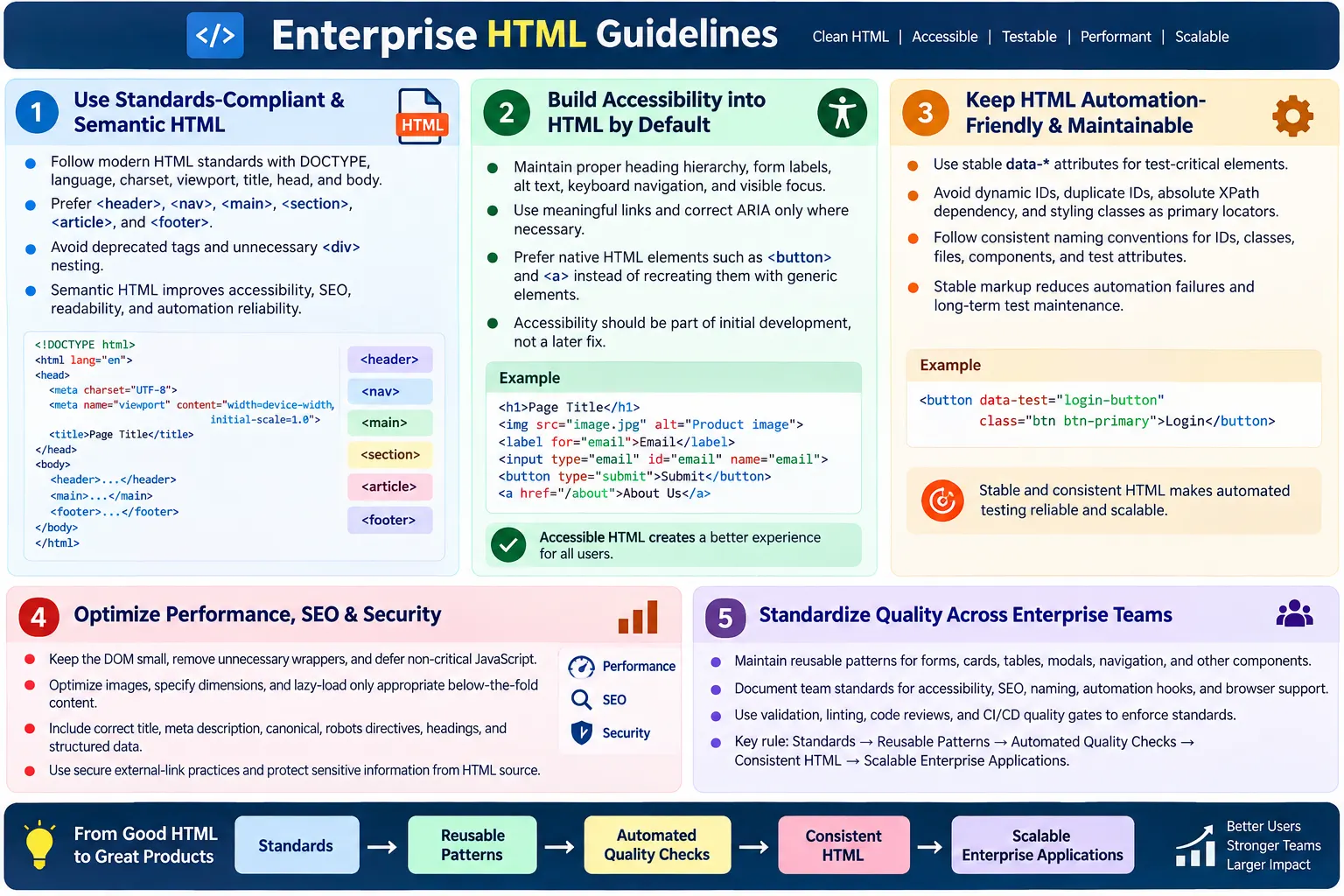
Enterprise HTML guidelines are coding standards used in large projects to keep HTML consistent, scalable, accessible, secure, SEO-friendly, performant, and automation-ready across multiple teams. In small projects, one developer may remember how each page is structured. In enterprise projects, that is not enough. Many developers, testers, designers, accessibility specialists, SEO teams, product owners, and automation engineers may touch the same interface over several years.
Enterprise HTML must support large codebases, multiple developers, long-term maintenance, accessibility compliance, SEO requirements, UI automation, cross-browser compatibility, and security standards. It is not enough for a page to render correctly once in one browser. The markup must remain understandable, testable, and maintainable as the product grows.
Good enterprise guidelines turn HTML quality into a shared standard. They reduce repeated decisions, prevent inconsistent patterns, and make code review more objective. A team can ask whether a page follows the enterprise HTML standard instead of debating every detail from scratch. This consistency is what allows large systems to evolve without collapsing under technical debt.
Use Standards-Compliant HTML
Enterprise HTML should always follow modern standards. The basic document structure should include the HTML5 doctype, correct language, character encoding, viewport settings, page title, head, and body. These basics are not optional. They affect browser mode, accessibility, mobile rendering, text encoding, SEO, and user experience.
<!DOCTYPE html>
<html lang="en">
<head>
  <meta charset="UTF-8">
  <meta name="viewport" content="width=device-width, initial-scale=1.0">
  <title>Page Title</title>
</head>
<body>
  ...
</body>
</html>
Enterprise teams should avoid deprecated tags such as <font>, <center>, and <frameset>. These tags belong to older HTML practices and have modern replacements. Presentation belongs in CSS, not in outdated HTML tags. Standards-compliant HTML is easier to validate, easier to maintain, and more predictable across browsers and tools.
Follow Semantic HTML
Semantic HTML is a core enterprise requirement because it gives meaning to page structure. Teams should use elements such as <header>, <nav>, <main>, <section>, <article>, <aside>, and <footer> where appropriate. These elements communicate purpose to browsers, assistive technologies, search engines, developers, and testers.
<header>for introductory or header content.<nav>for major navigation groups.<main>for the primary content of the page.<section>for thematic sections.<article>for standalone content.<aside>for complementary content.<footer>for footer information.
Enterprise teams should avoid unnecessary div soup. Divs are useful, but they should not replace meaningful elements when a semantic element clearly fits. Semantic HTML improves accessibility, SEO, readability, and automation reliability. It also reduces onboarding time because developers can understand page regions without decoding a pile of generic containers.
Maintain Accessibility by Default
Accessibility should not be treated as a final testing phase. Enterprise HTML should be accessible by default. That means every component, page template, and reusable pattern should start from accessible markup. Retrofitting accessibility after hundreds of pages are built is expensive and unreliable.
- Proper heading hierarchy
- Form labels
- Image alt text
- Keyboard navigation
- Focus visibility
- Sufficient color contrast
- Meaningful links
- Correct ARIA usage
<label for="email">Email</label>
<input id="email" type="email">
Enterprise accessibility should align with WCAG expectations and organizational policies. Reviewers should check whether forms are labeled, images have appropriate alternatives, keyboard users can complete workflows, focus indicators are visible, and errors are understandable. Accessibility failures are user-impacting defects, not optional cleanup items.
Use ARIA Carefully
ARIA can improve accessibility when native HTML cannot express the required pattern, but it should be used carefully. The first rule is simple: use native HTML first. A real button is better than a div with role="button". A real link is better than a clickable span. A real label is better than trying to patch an input with ARIA after the fact.
<button>Submit</button>Avoid this pattern unless there is a strong reason and all required keyboard behavior is implemented:
<div role="button">Submit</div>ARIA should enhance HTML, not replace semantic elements. Incorrect ARIA can make accessibility worse. Enterprise guidelines should define when ARIA is allowed, which patterns are approved, and how components using ARIA must be tested with keyboard and assistive technologies.
Keep HTML Automation-Friendly
Enterprise applications usually rely on UI automation. That means important UI elements should have stable locators. Automation should not depend on fragile absolute XPath expressions, randomly generated IDs, or styling classes that may change during redesigns. HTML should intentionally support testing.
<button data-testid="login-button">Login</button>- Use stable
data-*attributes for test-critical elements. - Avoid dynamic IDs for important controls.
- Avoid duplicate IDs.
- Avoid absolute XPath dependency.
- Avoid styling classes as primary test locators.
This does not mean every element needs a test ID. Enterprise guidelines should define which elements require stable automation hooks: primary actions, important form fields, navigation controls, workflow checkpoints, and dynamic components. Good locator strategy reduces test maintenance and makes failures easier to diagnose.
Follow Naming Conventions
Naming conventions are essential in enterprise HTML because many teams contribute to the same codebase. Names should describe purpose, not random implementation details. A reviewer should be able to understand the role of an element from its class, ID, or test attribute.
data-testid="submit-order-button"
class="product-card"
id="emailInput"
Poor names should be avoided:
id="x123"
class="box1"
data-testid="btn"
Enterprise guidelines should define naming style for classes, IDs, data attributes, files, images, and reusable components. For example, a project may use kebab-case for classes and data attributes, camelCase for IDs, and PascalCase for framework components. The exact convention matters less than applying it consistently.
Keep DOM Size Controlled
Enterprise pages can become heavy over time. Extra wrappers, repeated hidden content, deeply nested components, and generated markup can create large DOMs. Large DOMs hurt rendering, JavaScript performance, automation speed, and maintainability. HTML should be structured, but not bloated.
<div>
  <div>
    <div>
      <button>Save</button>
    </div>
  </div>
</div>
A cleaner version uses meaningful structure with fewer wrappers:
<section>
  <button>Save</button>
</section>
Enterprise teams should review DOM complexity regularly. A small number of extra wrappers may not matter, but repeated across hundreds of components, they create measurable cost. Simpler markup is easier to render, inspect, test, and maintain.
Optimize for Performance
Enterprise pages should prioritize critical content. HTML is part of performance because it defines what the browser receives first, which resources are discovered, and how much work the browser must do before rendering. A strong guideline should cover script loading, image dimensions, lazy loading, compression, and critical content.
<script src="app.js" defer></script>
<img src="course.webp" width="800" height="400" alt="Course image">
<img src="lesson.webp" loading="lazy" alt="Lesson image">- Minify production HTML.
- Enable Gzip or Brotli compression.
- Defer non-critical JavaScript.
- Lazy-load below-the-fold images.
- Avoid lazy-loading hero images.
- Specify image dimensions.
Performance guidelines should be practical. Do not lazy-load images that are needed immediately in the first viewport. Do not block rendering with non-critical scripts. Do not duplicate large hidden sections. Enterprise performance is achieved through many disciplined small decisions.
Support SEO Requirements
Enterprise sites often have SEO requirements, especially when pages are public. Every important page should include a unique title, unique meta description, correct canonical link, meaningful heading hierarchy, descriptive links, useful image alt text, structured data where appropriate, and correct robots directives.
<title>Unique Page Title</title>
<meta name="description" content="Unique page summary.">
<link rel="canonical" href="https://example.com/page">- Proper heading hierarchy
- Descriptive links
- Image alt text
- Structured data where useful
- Correct robots meta tag
SEO should be built into templates, not manually reinvented on every page. A wrong canonical link or accidental noindex tag can create serious visibility problems. Enterprise guidelines should define required metadata for page types and include review checks before release.
Use Secure Link Practices
External links that open in new tabs should use security attributes. Without them, the new page may be able to access the original page through window.opener, depending on browser behavior and context. Enterprise standards should require safe external link patterns.
<a href="https://example.com" target="_blank" rel="noopener noreferrer">
  External Site
</a>
This reduces security and privacy risks. Reviewers should also check that external links are intentional, descriptive, and not broken. Security is not only a backend concern. HTML can introduce risks through links, scripts, iframes, forms, and embedded third-party resources.
Validate and Lint HTML
Enterprise teams should not rely only on human memory to enforce HTML quality. Validation and linting should be part of the workflow. Tools can catch invalid nesting, duplicate IDs, deprecated tags, missing attributes, formatting issues, and standards violations earlier than manual review.
- W3C Validator
- Nu HTML Checker
- HTMLHint
- IDE inspections
- CI/CD linting
Automated checks should run locally where possible and in CI/CD before deployment. A page that fails basic validation should not depend on a browser silently fixing it. Clean HTML is easier for browsers, assistive tools, search engines, and automation frameworks to work with.
Follow Code Review Standards
Enterprise HTML changes should pass code review before merging. Reviewers should check semantics, accessibility, SEO metadata, performance impact, locator stability, naming conventions, browser compatibility, and security concerns. Review should focus on the actual HTML structure, not only the rendered screenshot.
- Semantics
- Accessibility
- SEO metadata
- Performance impact
- Locator stability
- Naming conventions
- Browser compatibility
- Security concerns
Code review should be supported by checklists and tools. Reviewers should give specific feedback such as "this input needs a label" or "this external link needs noopener noreferrer" rather than vague comments. Good review feedback improves the team standard over time.
Maintain Reusable Patterns
Enterprise interfaces should use consistent reusable patterns for headers, navigation, forms, cards, tables, modals, footers, and breadcrumbs. Reusable HTML improves consistency and reduces maintenance because fixes can happen in one shared pattern instead of many unrelated copies.
- Headers
- Navigation
- Forms
- Cards
- Tables
- Modals
- Footers
- Breadcrumbs
A reusable pattern should define structure, semantics, accessibility behavior, states, naming conventions, and automation hooks. If every team builds its own version of a card, modal, or form field, the product becomes inconsistent and difficult to maintain. Enterprise HTML guidelines should encourage reuse through templates, components, partials, or design system patterns.
Document Team Standards
Enterprise standards must be documented. If guidelines exist only in one senior developer's memory, they will not scale. Documentation should define naming conventions, data-testid strategy, accessibility baseline, SEO metadata requirements, browser support policy, component patterns, and code review checklist.
- Naming conventions
data-testidstrategy- Accessibility baseline
- SEO metadata requirements
- Browser support policy
- Component patterns
- Code review checklist
Documentation should be practical and example-driven. Developers need to see the approved way to build a form, button, card, modal, table, and article page. Good documentation reduces review friction because the standard is visible before the code is written.
Manage Cross-Browser Compatibility
Enterprise HTML must work across the organization's supported browsers. The supported browser list should be documented. Teams should know whether they must support only modern evergreen browsers or also older enterprise environments. Browser support decisions affect markup, forms, media, scripts, and polyfill strategy.
Cross-browser review should check whether native elements are used correctly, whether unsupported attributes are avoided or safely handled, and whether progressive enhancement is considered. A feature should not fail completely in a supported browser because the HTML assumes a capability that is not available.
Browser compatibility is not a reason to use outdated HTML. It is a reason to write standards-compliant markup and test it in the environments that matter to the business.
Use Progressive Enhancement
Progressive enhancement is a strong enterprise principle. Core content and basic functionality should be available through solid HTML first. CSS and JavaScript can then enhance the experience. This approach improves resilience, accessibility, SEO, and maintainability.
For example, important navigation should exist as real links. Forms should have meaningful fields and labels. Content should be present in the HTML when possible. JavaScript can add dynamic behavior, but the underlying structure should remain understandable. This makes pages more robust when scripts fail, load slowly, or are blocked.
Enterprise applications may require JavaScript for complex workflows, but the HTML should still be meaningful. Progressive enhancement is about building from a reliable foundation rather than making every page depend on fragile client-side behavior.
Control Third-Party Content
Large sites often include analytics, advertisements, tag managers, chat widgets, payment providers, maps, videos, and embedded content. Enterprise guidelines should define how third-party scripts and iframes are added. Uncontrolled third-party content can affect performance, security, privacy, accessibility, and layout stability.
Reviewers should check whether third-party resources are necessary, loaded efficiently, and placed safely. Scripts should use async or defer when appropriate. Iframes should have meaningful titles when needed. Ad or widget containers should reserve space to avoid layout shift. External dependencies should be reviewed because they become part of the page experience.
Enterprise HTML should not become a dumping ground for random snippets copied from vendors. Each third-party integration should follow the same quality standards as internal code.
Protect Privacy and Sensitive Data
HTML can accidentally expose information. Comments, hidden inputs, data attributes, URLs, and embedded scripts can reveal details that should not be public. Enterprise guidelines should clearly state that sensitive information must never be placed in HTML source.
Developers should avoid putting passwords, API keys, tokens, internal server names, personal data, or private business notes in comments or markup. Hidden fields are not secure storage. Anything sent to the browser can be inspected. Security decisions must happen on the server or through properly protected systems.
Privacy review should also consider analytics attributes and third-party scripts. Enterprise teams must understand what user data is exposed in markup and events.
Support Design Systems
Enterprise HTML should align with the organization's design system. A design system is not only colors and visual components. It also includes markup patterns, accessibility rules, states, naming conventions, and component behavior. If the design system provides an approved button, modal, form field, or card pattern, teams should use it instead of inventing new versions.
Using design system patterns improves consistency across products. It also reduces duplicated accessibility work. A well-tested form field pattern can include label structure, help text, error message handling, and automation hooks. Every team that uses the pattern benefits from that work.
Reviewers should ask whether a new HTML structure already exists in the design system. If it does, reuse it. If it does not, consider whether the new pattern should become part of the shared system.
Establish Ownership and Governance
Guidelines need ownership. In enterprise environments, standards often decay when nobody owns them. A front-end platform team, accessibility group, design system team, or architecture group may be responsible for maintaining HTML guidelines. The owner should update rules as standards, tools, and product needs evolve.
Governance does not mean blocking every team with heavy process. It means providing clear standards, reviewing important patterns, maintaining shared tooling, and helping teams make consistent decisions. Good governance reduces confusion and repeated rework.
When standards change, teams need migration guidance. A new locator strategy, accessibility rule, or metadata requirement should come with examples and rollout expectations.
Build Quality Gates into CI/CD
Enterprise HTML quality should not depend only on manual review. CI/CD pipelines should run automated checks so the same baseline is enforced across teams. A pipeline can validate HTML, run linting, check accessibility rules, verify broken links, test generated pages, and block deployment when critical quality gates fail.
Quality gates are especially useful because enterprise teams often ship frequently. Without automation, one team may follow guidelines carefully while another accidentally deploys invalid markup or missing metadata. Automated checks create consistency. They also reduce the burden on reviewers because repeated mechanical checks are handled by tools.
Not every warning should block deployment. Teams should decide which issues are errors and which are warnings. Duplicate IDs, invalid nesting, missing required metadata, and broken critical links may block release. Minor formatting issues may be warnings or auto-fixed by tooling. The important point is to define the standard intentionally.
Define Page Type Standards
Enterprise sites usually contain many page types: landing pages, documentation pages, product pages, checkout pages, dashboards, reports, search pages, profile pages, admin tools, and help articles. Each page type may need its own HTML requirements. A product page may require structured data and image alt text. A dashboard may require tables, filters, loading states, and empty states. A documentation page may require a strong heading hierarchy and internal navigation.
Guidelines should define common page patterns rather than expecting every team to invent structure. For example, all public article pages may require a unique title, meta description, canonical link, main heading, article body, footer, and navigation. All forms may require labels, validation messages, required field indicators, and stable automation hooks.
Page type standards reduce variation. They also help teams move faster because authors do not need to decide every structural detail from scratch. They can start from a known pattern and focus on page-specific content and behavior.
Handle Error, Empty, and Loading States
Enterprise HTML guidelines should cover states beyond the ideal happy path. Real applications have loading states, empty states, validation errors, server errors, permission errors, and success messages. These states need semantic, accessible, and testable markup. They should not be added as afterthoughts.
An error message should be understandable and connected to the affected field or page region. An empty table should not simply disappear; it should explain that no records are available and, when useful, suggest the next action. A loading state should be announced appropriately and should not trap keyboard users. A success message should be clear enough for users and automation to verify.
Reusable state patterns are valuable in enterprise systems. If every team creates its own error banner or loading markup, accessibility and automation become inconsistent. A shared pattern ensures that error states, loading indicators, and empty views behave predictably across the application.
Support Internationalization and Localization
Enterprise systems often support multiple languages, regions, and content formats. HTML guidelines should include internationalization requirements. The page should declare the correct language with lang. Mixed-language content should use appropriate language attributes where needed. Text should be encoded with UTF-8. Layout should account for longer translated strings and, where required, right-to-left languages.
Form labels, error messages, button text, alt text, titles, and metadata may all need localization. Hard-coded English text inside reusable components can become a long-term problem if the product expands to other languages. Enterprise teams should define where text lives and how translated content is injected into HTML.
Internationalization also affects testing. Automation should not depend unnecessarily on text that changes by language unless the test is specifically validating localized content. Stable locators and semantic structure become even more important in multilingual applications.
Review Generated HTML, Not Only Source Components
Modern enterprise applications often generate HTML through frameworks, templates, markdown processors, CMS systems, or server-side rendering. The source component may look clean, but the final generated HTML can still contain problems. A repeated component may produce duplicate IDs. A markdown converter may skip heading levels. A CMS editor may insert invalid markup. A template may duplicate metadata.
Guidelines should require teams to inspect generated output. This can be done with browser developer tools, automated snapshots, validators, or integration tests. The browser consumes the final HTML, not the developer's mental model of the component. Search engines, screen readers, and automation tools also interact with the generated DOM.
Enterprise review should therefore include both source-level review and output-level verification. This is especially important for shared templates and CMS-driven pages where one mistake can affect many URLs.
Align HTML with Analytics and Tracking Rules
Enterprise products often use analytics to understand user behavior. HTML may include data attributes or identifiers used for analytics events. Guidelines should define how analytics hooks are added so they do not conflict with automation hooks, accessibility attributes, or styling classes.
Analytics attributes should be meaningful and stable, but they should not expose sensitive user data. Teams should avoid putting personal information, account numbers, emails, or private business details into data attributes. Reviewers should check that analytics-related markup follows privacy standards.
When analytics and automation both need stable hooks, teams should decide whether to share attributes or keep them separate. Many projects use separate attributes so analytics changes do not break tests and test changes do not affect reporting.
Plan for Migration and Modernization
Enterprise systems often contain legacy HTML. A guideline is useful only if it explains how to handle existing code. Teams may not be able to modernize every old page immediately, but they should prevent new deprecated patterns and improve old pages when they are touched.
A practical modernization strategy starts with auditing. Identify deprecated tags, duplicate IDs, missing labels, poor heading structure, excessive DOM nodes, and inconsistent patterns. Then prioritize by user impact, business importance, accessibility risk, and maintenance cost. Public high-traffic pages and critical workflows usually deserve earlier attention.
Migration should be tested carefully. Replacing legacy markup can affect layout, scripts, and automation. Teams should use visual regression checks, accessibility checks, and automated tests where possible. Modernization is most successful when it is incremental and supported by clear guidelines.
Define Browser and Device Support
Enterprise HTML guidelines should connect to a documented browser and device support policy. Teams need to know which browsers, operating systems, devices, and viewport sizes matter. Without this policy, developers may make assumptions that conflict with business requirements.
If the organization supports only evergreen browsers, teams can use modern HTML features more confidently. If a specific older browser or embedded webview must be supported, teams may need additional testing and fallbacks. The policy should be realistic and based on user data, contractual requirements, and product needs.
Device support affects HTML decisions such as input types, media usage, table patterns, navigation structure, and responsive image strategy. A guideline should not be abstract; it should reflect the environments where users actually access the product.
Make Guidelines Actionable for Developers
Enterprise guidelines should be written for daily use. A long policy document that developers rarely read will not improve quality. The best guidelines include short rules, examples, approved patterns, anti-patterns, checklists, and links to reusable components. Developers should be able to copy a correct example and adapt it safely.
For example, a form guideline should show the approved label and input structure, error message structure, required field pattern, and automation hook convention. A modal guideline should show focus behavior, heading structure, close button requirements, and ARIA usage. A metadata guideline should show title, description, canonical, robots, and structured data examples.
Actionable guidelines reduce ambiguity. They also reduce code review friction because the reviewer can point to a clear standard instead of making a subjective argument.
Train Teams on the Why
Rules are easier to follow when developers understand why they exist. Enterprise HTML training should explain how semantic HTML improves accessibility and SEO, how stable locators reduce automation maintenance, how deferred scripts improve rendering, how duplicate IDs break labels and tests, and how secure link attributes reduce risk.
Without the why, guidelines feel like bureaucracy. With the why, they become engineering judgment. Developers are more likely to make good decisions in new situations when they understand the principles behind the rules.
Training can happen through onboarding, code review feedback, internal documentation, workshops, design system examples, and automated tooling messages. The goal is to make quality habits normal, not exceptional.
Measure HTML Quality Over Time
Enterprise teams can measure HTML quality over time. Useful signals include validation errors, accessibility violations, duplicate IDs, page weight, DOM size, broken links, missing metadata, automation locator failures, and code review findings. These metrics help teams see whether guidelines are working.
Measurement should be used to improve systems, not blame individuals. If many teams repeatedly miss the same requirement, the guideline may be unclear, the tooling may be weak, or the reusable pattern may be missing. Metrics can reveal where the process needs improvement.
HTML quality is not a one-time achievement. It needs regular review because products change, teams change, standards evolve, and pages accumulate small issues over time.
Enterprise HTML Checklist
| Area | Guideline |
|---|---|
| Standards | Use valid modern HTML |
| Semantics | Prefer meaningful elements |
| Accessibility | WCAG-focused by default |
| SEO | Metadata, headings, canonical |
| Performance | Small DOM, lazy loading, defer scripts |
| Automation | Stable data-* locators |
| Security | Safe external links |
| Maintainability | Consistent names and reusable patterns |
| Validation | Lint and validate in CI/CD |
Common Enterprise Mistakes
A common mistake is allowing every team to create its own HTML patterns. This causes duplicated components, inconsistent accessibility, unstable automation, and uneven user experience. Another mistake is relying only on visual review. A page can look correct while still having poor semantics, missing labels, duplicate IDs, or weak metadata.
Some teams also delay accessibility and automation decisions until late in the project. That creates rework. Stable locators, labels, focus behavior, and semantic structure should be part of the first implementation. Another mistake is treating enterprise standards as documentation only. Standards should be backed by templates, linters, CI checks, reusable components, and code review.
Interview-Ready Answer
Enterprise HTML guidelines are standards used in large teams to ensure HTML is semantic, accessible, secure, performant, SEO-friendly, automation-ready, and maintainable. They include using valid HTML, semantic elements, proper form labels, accessible images, stable data-* locators, consistent naming conventions, optimized images, deferred scripts, canonical metadata, secure external links, reusable patterns, and automated validation through linting and CI/CD.
These guidelines help large organizations scale HTML quality across multiple teams, tools, browsers, users, and years of maintenance. Enterprise HTML must be written not just to render correctly today, but to remain understandable, testable, and reliable as the system grows.
One-Line Insight
Enterprise HTML must be written not just to render correctly, but to scale across teams, tools, browsers, users, and long-term maintenance.