Email & Phone Links
Introduction
HTML hyperlinks can do more than navigate to webpages. Using the anchor element, developers can create links that open an email client, start composing an email, dial a phone number, or launch calling apps on mobile devices. These links are commonly called email links, phone links, protocol links, or special links because they use protocols such as mailto: and tel: instead of normal webpage URLs.
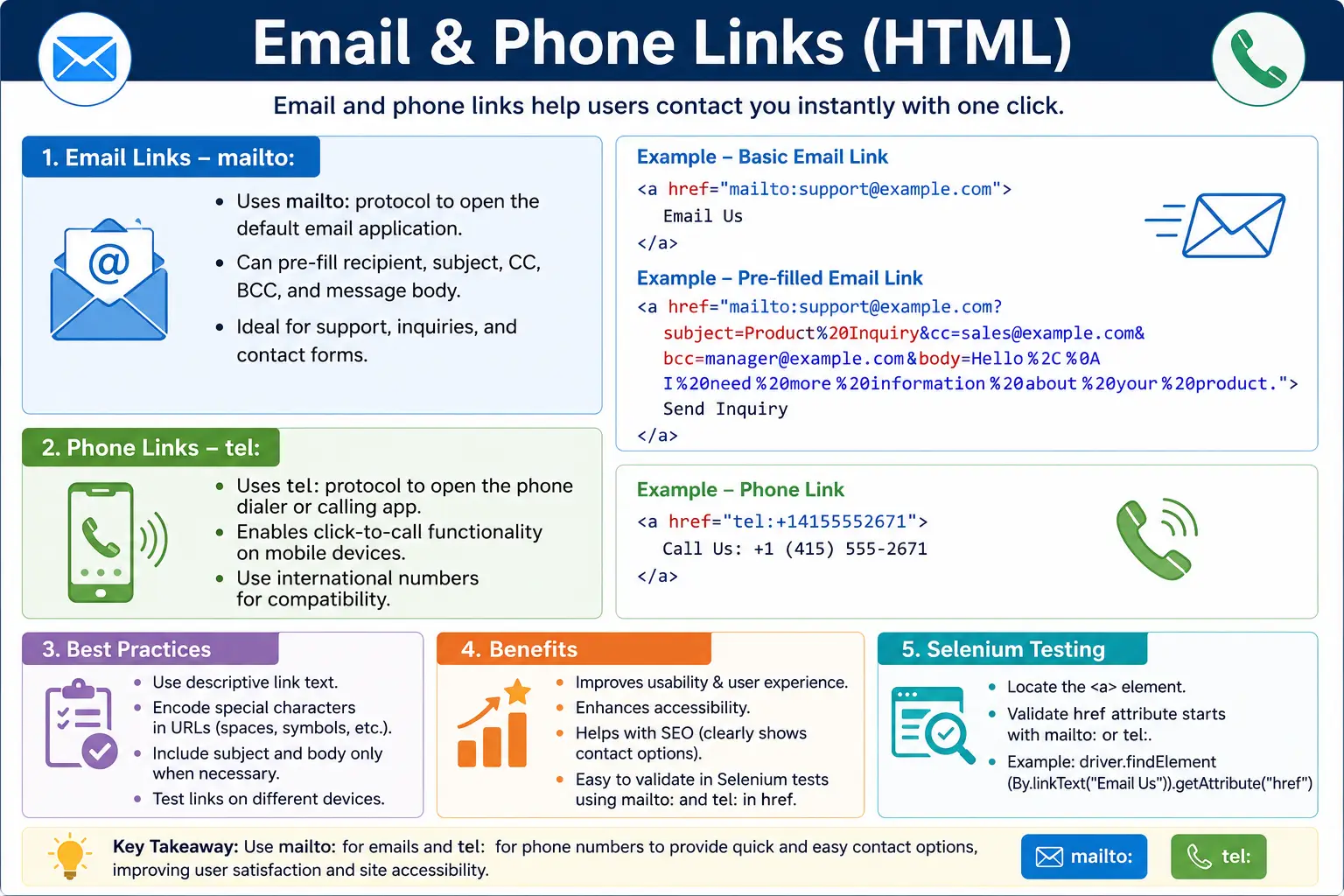
Email and phone links improve user experience by reducing friction. Instead of copying an email address, opening an email application, pasting the address, and typing a subject manually, the user can click one link and begin composing. Instead of copying a phone number from a website and pasting it into a dialer, a mobile user can tap a phone link and start a call. This is especially valuable for business websites, support pages, local service websites, mobile-first applications, contact pages, and customer portals.
Although these links are simple to write, they require care. Email links can include recipients, subjects, CC, BCC, and message bodies, but long mailto URLs can become hard to maintain. Phone links work best when phone numbers use international format. Link text should be descriptive for accessibility. Developers should also understand how browsers, email clients, mobile devices, and automation tools handle these special links.
What Are Email Links?
An email link is a hyperlink that opens the user's default email application. It can optionally pre-fill information such as the recipient, subject, CC, BCC, and message body. Email links use the mailto: protocol.
A basic email link looks like this:
<a href="mailto:user@example.com">
  Send Email
</a>
When the user clicks the link, the browser detects the mailto: protocol and asks the operating system or browser configuration to open the default email application. If an email app is configured, a new email draft is created with the recipient already filled in.
Basic Email Link Syntax
The basic syntax uses the anchor tag and places the email address after mailto: in the href attribute.
<a href="mailto:info@softwaretips4u.com">
  Email Us
</a>
The visible text can be an action label such as Email Us, Contact Support, or Send Message. It can also be the email address itself.
<p>
  <a href="mailto:admin@softwaretips4u.com">
    admin@softwaretips4u.com
  </a>
</p>
In the browser, the email address appears as a clickable link. Clicking it attempts to open a new email draft.
What Happens When an Email Link Is Clicked?
The browser follows a different flow for email links than for normal webpage links. A normal link sends a request to load a page. A mailto link tells the browser to hand the action to an email application.
User Clicks Link
        ↓
Browser Detects mailto:
        ↓
Launch Email Client
        ↓
Create New Email Draft
The exact behavior depends on the user's device and settings. On a desktop, it may open Outlook, Apple Mail, Thunderbird, Gmail in the browser, or another configured mail app. If no email client is configured, the user may see a prompt or nothing useful may happen. On mobile devices, the default mail app usually opens.
Adding an Email Subject
Email links can pre-fill the subject line using a query parameter. The first parameter begins with a question mark after the email address.
<a href="mailto:info@softwaretips4u.com?subject=HTML Course Inquiry">
  Contact Us
</a>
When clicked, the email draft may open with the To field set to info@softwaretips4u.com and the subject set to HTML Course Inquiry. This is useful for support, sales, feedback, training inquiries, and contact forms where the recipient should immediately understand the purpose of the message.
Adding an Email Body
The email body can also be pre-filled. This is useful when you want to guide the user to include specific information.
<a href="mailto:info@softwaretips4u.com?body=I would like more information.">
  Email Us
</a>
When clicked, the email draft may include the text "I would like more information." in the body. The user can then edit the content before sending.
Subject and Body Together
Multiple mailto parameters can be combined. The first parameter starts with ?, and additional parameters are joined with &.
<a href="mailto:info@softwaretips4u.com?subject=Course Inquiry&body=Please send details.">
  Contact Us
</a>
This link can pre-fill both the subject and body. In HTML, the ampersand should be written as & in raw markup, which appears as & in the browser and URL processing. In code examples, seeing & inside escaped HTML is common, but in actual HTML source, use the proper entity form when needed.
Multiple Recipients, CC, and BCC
A mailto link can include multiple direct recipients by separating email addresses with commas.
<a href="mailto:sales@example.com,support@example.com">
  Email Team
</a>
CC can be added with the cc parameter.
<a href="mailto:info@example.com?cc=manager@example.com">
  Send Email
</a>
BCC can be added with the bcc parameter.
<a href="mailto:info@example.com?bcc=admin@example.com">
  Email
</a>
A more complex example can combine recipient, CC, subject, and body.
<a href="mailto:info@example.com?cc=support@example.com&subject=HTML Training&body=Please send course information.">
  Contact Training Team
</a>
Complex mailto links are powerful, but they can become difficult to read and maintain. For complex workflows, a proper contact form may be a better solution.
URL Encoding in Email Links
Email link parameters are part of a URL, so special characters should be encoded. Spaces should be encoded as %20. For example, HTML Course can be written as HTML%20Course.
<a href="mailto:info@softwaretips4u.com?subject=HTML%20Course">
  Ask About HTML Course
</a>
Encoding becomes more important when subjects or bodies contain spaces, line breaks, symbols, ampersands, question marks, or other special characters. Without correct encoding, the email client may interpret the URL incorrectly.
Real-World Email Link
A practical support link might pre-fill a support subject so that incoming emails can be categorized more easily.
<a href="mailto:support@softwaretips4u.com?subject=Website%20Support">
  Contact Support
</a>
This link is useful on a contact page, help page, footer, or support section. It gives the user a simple action and gives the support team a clearer message subject.
What Are Phone Links?
Phone links allow users to initiate phone calls directly from a webpage. They use the tel: protocol. A phone link is especially useful on mobile devices because tapping it can open the phone dialer with the number already filled in.
<a href="tel:+1234567890">
  Call Us
</a>
On desktop devices, clicking a phone link may launch Skype, Microsoft Teams, Zoom Phone, FaceTime, or another calling application if one is configured. On mobile devices, it usually opens the native phone dialer.
Basic Phone Link Syntax
The basic syntax places the phone number after tel: in the href attribute.
<a href="tel:+919876543210">
  Call Support
</a>
The visible text can be a label, such as Call Support, or the formatted phone number itself.
<p>
  <a href="tel:+919876543210">
    +91 98765 43210
  </a>
</p>
This lets users tap the number directly instead of copying it manually.
International Phone Number Format
The best practice for phone links is to use international format in the href value. This means using a plus sign, country code, and phone number without spaces or formatting characters.
<a href="tel:+14155552671">
  (415) 555-2671
</a>
The visible text can be formatted for human readability, while the actual href uses a clean dialing format. This is a good pattern because it is both user-friendly and machine-friendly.
For example, tel:+14155552671 clearly represents a U.S. number, while tel:+919876543210 clearly represents an Indian number. A local number such as tel:4155552671 may be ambiguous depending on the user's region and device settings.
Why Use International Format?
International format avoids ambiguity. Websites are often visited by users from different countries, and phone number interpretation can vary by region. Including the country code makes the number clearer and more reliable.
<!-- Good -->
<a href="tel:+14155552671">(415) 555-2671</a>

<!-- Less reliable -->
<a href="tel:4155552671">(415) 555-2671</a>
The second link may still work in some contexts, but the first link is more explicit and portable.
Click-to-Call Feature
Phone links create a click-to-call experience. This is common on business websites, e-commerce websites, customer support portals, healthcare websites, restaurants, service providers, and mobile-first applications.
<a href="tel:+18001234567">
  Call Customer Support
</a>
For mobile users, this can remove several steps. The user taps the number, the dialer opens, and the call can begin. This small convenience can meaningfully improve conversion on contact-focused pages.
Email vs Phone Links
Email links and phone links are both created with the anchor tag, but they use different protocols and trigger different applications. Email links use mailto: and open an email app. Phone links use tel: and open a dialer or calling app.
| Feature | Email Link | Phone Link |
|---|---|---|
| Protocol | mailto: | tel: |
| Opens Email App | Yes | No |
| Opens Dialer | No | Yes |
| Supports Subject | Yes | No |
| Supports Message Body | Yes | No |
| Mobile Friendly | Yes | Yes |
Combining Email and Phone Links
A contact section often includes both email and phone options. This gives users a choice based on urgency and preference.
<h2>Contact Us</h2>

<p>
  <a href="mailto:info@softwaretips4u.com">
    Email Support
  </a>
</p>

<p>
  <a href="tel:+14155552671">
    Call Support
  </a>
</p>
This simple structure is useful for business pages, support pages, footers, and profile pages. It is clear, accessible, and easy to test.
Accessibility Considerations
Email and phone links should use descriptive link text. Screen reader users may navigate through links out of context, so the link text should explain the action. Email Support Team is better than Click Here.
<a href="mailto:support@example.com">
  Email Support Team
</a>
A poor version gives very little context.
<a href="mailto:support@example.com">
  Click Here
</a>
For phone links, the visible text should also be clear. Call Customer Support is better than a vague phrase. If the visible text is a phone number, make sure it is readable and formatted for humans.
Mobile User Experience
Phone links are especially valuable on mobile devices. A user can tap the number, open the dialer, and start a call without copying and pasting.
Tap Number
      ↓
Dialer Opens
      ↓
Call Starts
Email links also work well on mobile devices because the mail app can open directly. However, developers should remember that users may have different email apps and configurations. The link should help, not replace, other contact options when contact is critical.
SEO Considerations
Email and phone links can improve usability and contact accessibility. Search engines can recognize contact information more effectively when it is presented clearly. For local business websites, visible phone numbers, addresses, and contact links can contribute to a stronger user experience.
These links do not automatically guarantee SEO improvement, but they support clear contact structure. Search engines and users both benefit when contact details are easy to find and understand.
Common Mistakes
A common mistake is omitting the protocol. If an email address is placed directly into href without mailto:, the browser treats it as a normal URL path.
<!-- Bad -->
<a href="support@example.com">
  Email Support
</a>
The correct version uses mailto:.
<!-- Correct -->
<a href="mailto:support@example.com">
  Email Support
</a>
Another mistake is using a phone number without a country code. Local numbers may work for local users, but international format is more reliable.
<!-- Less reliable -->
<a href="tel:9876543210">Call</a>

<!-- Better -->
<a href="tel:+919876543210">Call</a>
Long and complex mailto URLs can also become difficult to maintain. If the message needs many fields, validation, file attachments, tracking, or structured data, a real contact form is usually better.
Generic link text is another common issue. A phone link that says Click Here is less useful than Call Customer Support. Link text should clearly describe the action.
Real-World Contact Page Example
A simple contact page can combine a support email link and a phone link.
<h1>Contact SoftwareTips4U</h1>

<p>
  <a href="mailto:support@softwaretips4u.com?subject=Support%20Request">
    Email Support
  </a>
</p>

<p>
  <a href="tel:+14155552671">
    Call Support
  </a>
</p>
This page gives users two clear contact paths. The email link pre-fills the subject, while the phone link uses an international phone format in the href.
Selenium Perspective
From a Selenium automation perspective, email and phone links can be located by their protocol. CSS attribute selectors are very useful for this.
WebElement email =
driver.findElement(By.cssSelector("a[href^='mailto:']"));
A phone link can be located similarly.
WebElement phone =
driver.findElement(By.cssSelector("a[href^='tel:']"));
Tests can read the href attribute to confirm the target value.
String emailHref = email.getAttribute("href");The output may be something like:
mailto:support@example.comIn real projects, Selenium tests often validate that contact links exist, use the correct protocol, contain the expected email address or phone number, and have descriptive visible text.
Common Interview Questions
A common interview question is: what protocol is used for email links? The answer is mailto:. Another common question is: what protocol is used for phone links? The answer is tel:.
Interviewers may ask how to create a link that opens an email client. Use an anchor tag with href="mailto:user@example.com". They may ask how to create a click-to-call link. Use href="tel:+1234567890".
Another likely question is whether mailto links can pre-fill the subject. Yes, a mailto link can include a subject parameter, such as mailto:user@example.com?subject=Hello. It can also include body, CC, and BCC parameters, although long mailto links should be used carefully.
Interview-Ready Answer
Email links use the mailto: protocol to open the user's email application and optionally pre-fill recipient, subject, CC, BCC, and body information. Phone links use the tel: protocol to launch a phone dialer or calling application, making it easy for users to initiate calls directly from a webpage. Both are created with the anchor tag and should use clear, descriptive link text.
Key Takeaway
Email and phone links extend the anchor tag beyond normal webpage navigation. They connect users directly to communication tools. A good email link uses mailto:, a meaningful recipient, optional encoded parameters, and clear text. A good phone link uses tel:, an international phone format, and user-friendly visible text.
Use these links where direct contact matters: support pages, business websites, mobile pages, contact sections, and customer service workflows. Keep them simple, readable, accessible, and easy to maintain.
One-Line Insight
mailto: starts an email conversation, while tel: starts a phone conversation.