DOM Creation from HTML
Introduction
The Document Object Model, commonly called the DOM, is one of the most important concepts in modern web development. Every webpage that appears in a browser begins as HTML source code, but the browser does not directly work with that raw HTML text forever. Instead, it reads the HTML, understands the structure, converts each meaningful part into objects, connects those objects in a hierarchy, and builds a tree-like representation known as the DOM.
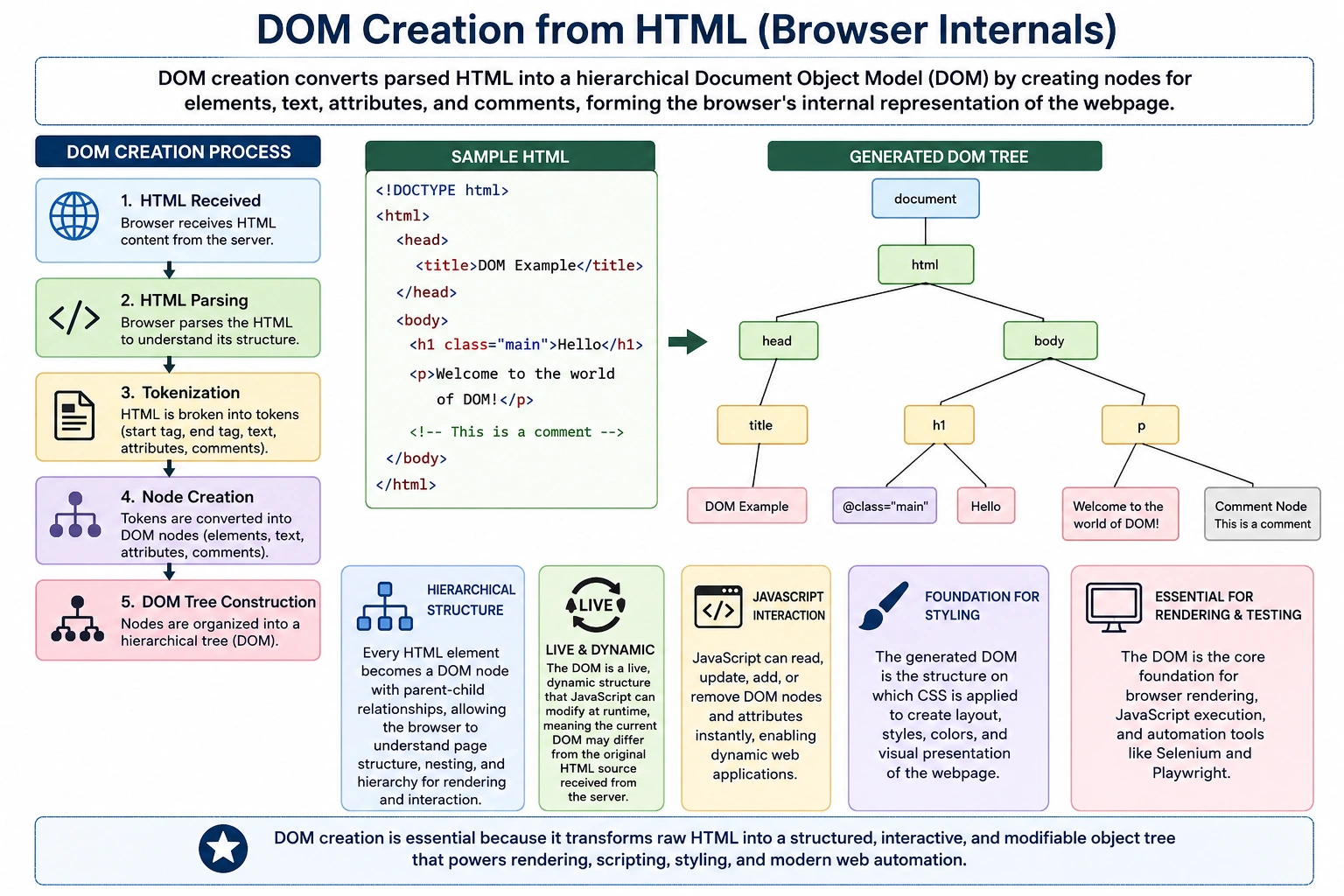
DOM creation is the bridge between HTML source code and a working webpage. Without the DOM, browsers would not be able to apply CSS properly, JavaScript would not be able to modify page content, user interactions would not be handled effectively, and automation tools such as Selenium and Playwright would not be able to locate elements.
For anyone learning HTML, CSS, JavaScript, Selenium, Playwright, or UI automation, understanding how the DOM is created is essential. It explains why some elements appear dynamically, why Selenium sometimes fails to find elements, why stale element exceptions occur, and why the visible webpage may not always match the original HTML source code received from the server.
In simple terms, DOM creation is the process by which a browser converts HTML into an object-based tree structure that can be rendered, styled, scripted, and tested.
What Is the DOM?
DOM stands for Document Object Model. It is a structured, tree-like representation of an HTML document where every element, attribute, and piece of text is represented as an object called a node.
A basic flow looks like this:
HTML Source Code
       ↓
Browser
       ↓
DOM Tree
       ↓
Rendered Web Page
The DOM is not the same as the HTML file. HTML is the source text. The DOM is the browser’s internal object representation of that text.
For example, consider this HTML:
<h1>SoftwareTips4U</h1>
<p>Learn HTML</p>
To humans, this looks like two HTML elements. To the browser, it must become structured objects. The browser creates an element node for h1, a text node for SoftwareTips4U, an element node for p, and a text node for Learn HTML.
This object-based structure allows CSS, JavaScript, browser rendering engines, and automation tools to work with the webpage in a meaningful way.
Why Does the Browser Create a DOM?
The browser creates the DOM because raw HTML text is not enough to render or interact with a webpage. HTML source code is only a textual description of the page. The browser needs a structured model that can be processed programmatically.
The DOM allows the browser to render content visually, apply CSS styles, execute JavaScript, handle user interactions, update content dynamically, and expose elements to automation tools.
For example:
<h1>SoftwareTips4U</h1>
<p>Learn HTML</p>
This source text alone cannot be styled, animated, clicked, updated, or queried directly. Once converted into DOM nodes, the browser can perform operations such as:
document.querySelector("h1");CSS can style the node:
h1 {
    color: blue;
}
Selenium can locate the node:
driver.findElement(By.tagName("h1"));This is why DOM creation is a foundational browser operation.
High-Level DOM Creation Process
The DOM creation process follows a structured sequence.
HTML Received
      ↓
HTML Parsing
      ↓
Tokenization
      ↓
Node Creation
      ↓
DOM Tree Construction
      ↓
DOM Ready
First, the browser receives HTML as plain text from the server. Then the HTML parser reads the document. The parser breaks the HTML into tokens. Those tokens are converted into DOM nodes. Finally, the browser connects the nodes according to parent-child relationships and creates the DOM tree.
The completed DOM becomes the foundation for rendering, CSS styling, JavaScript execution, and automation interaction.
Step 1: Browser Receives HTML
The process begins when the browser receives an HTML document from a server.
Example:
<!DOCTYPE html>
<html>
<head>
    <title>My Website</title>
</head>
<body>
    <h1>Hello World</h1>
</body>
</html>
At this stage, the browser has only received text.
The HTML exists as characters. The DOM has not yet been created. The browser cannot fully render the page because it has not yet converted the structure into internal objects.
This step is like receiving a blueprint. The blueprint describes the building, but the building itself does not exist yet. Similarly, HTML describes the webpage, but the DOM is the actual internal structure the browser uses.
Step 2: HTML Parser Reads the Document
After receiving the HTML, the browser’s HTML parser begins reading the document from top to bottom.
When the parser sees:
<html>it identifies a start tag for the html element.
When it later sees:
<body>it identifies a start tag for the body element.
The parser continues reading the document character by character and tag by tag until the entire document is processed.
The parser’s responsibility is to understand the meaning of the HTML source. It recognizes elements, text, comments, attributes, nesting, and document structure.
This parsing step is essential because browsers cannot build the DOM unless they first understand what the HTML contains.
Step 3: Tokenization
During parsing, the browser converts pieces of HTML into tokens.
A token is a meaningful unit extracted from the HTML source.
For example:
<h1>Hello</h1>is converted into tokens such as:
StartTag(h1)
Text(Hello)
EndTag(h1)
These tokens act as building blocks for DOM node creation.
Other examples include:
| HTML Source | Token Type |
|---|---|
| <html> | Start Tag Token |
| </html> | End Tag Token |
| Hello | Text Token |
| <!-- comment --> | Comment Token |
| <!DOCTYPE html> | Doctype Token |
Tokenization converts raw characters into meaningful browser-understandable units.
Without tokenization, the browser would not know where an element starts, where it ends, or what text belongs inside it.
Step 4: Node Creation
After tokens are generated, the browser creates DOM nodes.
Each meaningful token becomes an object in memory.
Example:
<h1>Hello</h1>creates:
Element Node: h1
Text Node: Hello
The h1 element becomes an element node. The text Hello becomes a text node inside the h1 node.
This is where HTML begins transforming from plain text into a real object model.
Each node contains information the browser can use, such as node type, name, value, attributes, children, parent relationship, and event handling capability.
Step 5: Browser Builds Parent-Child Relationships
HTML is hierarchical. Elements are nested inside other elements.
Example:
<body>
    <div>
        <p>Hello</p>
    </div>
</body>
The browser creates relationships like this:
body
 └── div
       └── p
            └── Hello
The body node is the parent of the div node. The div node is the parent of the p node. The p node contains the text node Hello.
These relationships form the DOM tree.
The tree structure is extremely important because CSS selectors, JavaScript traversal, and automation locators often depend on relationships between elements.
For example, a CSS selector may target a paragraph inside a div:
div p {
    color: blue;
}
JavaScript may access children:
document.body.children;Selenium may use XPath based on hierarchy.
Example: HTML to DOM
Consider this HTML:
<html>
<body>
    <h1>SoftwareTips4U</h1>
    <p>Learning HTML</p>
</body>
</html>
The generated DOM looks like this:
Document
   │
 html
   │
 body
 ├── h1
 │     └── SoftwareTips4U
 │
 └── p
       └── Learning HTML
This structure shows that the document contains the html element, which contains the body, which contains both h1 and p.
Each item is represented as a node.
This DOM tree is the structure that the browser uses for rendering and interaction.
Types of DOM Nodes
The DOM is made of different types of nodes. Each type represents a different part of the HTML document.
Document Node
The document node represents the entire webpage.
It is the root of the DOM hierarchy.
DocumentEvery DOM tree begins with the document node. From this root, all other nodes are connected.
In JavaScript, the global document object represents this node.
Example:
document.title;Element Nodes
Element nodes represent HTML tags.
Examples include:
<div></div>
<h1></h1>
<p></p>
<section></section>
Each HTML element becomes an element node in the DOM.
Element nodes are the most commonly targeted nodes in CSS, JavaScript, Selenium, and Playwright.
Text Nodes
Text inside elements becomes text nodes.
Example:
<p>Hello World</p>The text Hello World becomes a text node inside the p element.
This is important because text is not just stored as part of the element. It becomes its own node in the DOM structure.
Attribute Nodes
Attributes provide additional information about elements.
Example:
<img src="logo.png" alt="Logo">The img element has attributes such as src and alt.
These attributes are associated with the element node.
Attributes are heavily used in automation because stable attributes such as id, name, data-testid, and aria-label help identify elements reliably.
Comment Nodes
HTML comments can also become nodes.
Example:
<!-- Header Section -->This creates a comment node.
Comment nodes are not rendered visually, but they can exist in the DOM.
Visual DOM Example
Consider this HTML:
<body>
    <header>
        <h1>SoftwareTips4U</h1>
    </header>

    <main>
        <p>Learn HTML</p>
    </main>
</body>
The DOM representation becomes:
Document
 │
 html
 │
 body
 ├── header
 │      └── h1
 │            └── SoftwareTips4U
 │
 └── main
        └── p
              └── Learn HTML
This structure helps the browser understand the logical organization of the page. It also helps developers write semantic CSS and JavaScript.
DOM Is a Live Structure
One of the most important facts about the DOM is that it is live.
This means the DOM can change while the page is running.
Example:
document.querySelector("h1").innerText = "Welcome";Original DOM:
h1
 └── SoftwareTips4U
Updated DOM:
h1
 └── Welcome
The original HTML source file may remain unchanged, but the DOM changes immediately.
This is how dynamic websites work. JavaScript updates the DOM based on user actions, API responses, timers, form inputs, or application state.
For example, in an e-commerce application, product cards may not exist in the initial HTML. JavaScript may fetch product data from an API and then create DOM nodes dynamically.
DOM vs HTML Source
Many beginners think HTML source and DOM are the same. They are not.
HTML source is the original text received from the server.
Example:
<h1>Hello</h1>The DOM is the browser-created object representation of that source.
Object RepresentationThe DOM may differ from the source because browsers can fix invalid HTML, JavaScript can update elements, frameworks can generate nodes dynamically, and user interactions can modify the page.
This distinction is very important in debugging. The “View Source” option shows the original HTML source, while “Inspect Element” shows the current DOM.
For modern web applications, the current DOM is often very different from the original HTML response.
Why DOM Creation Is Important for CSS
CSS targets DOM elements.
Example:
h1 {
    color: blue;
}
The CSS rule applies to h1 nodes in the DOM.
Without the DOM, CSS would not know which elements to style.
The browser combines DOM and CSSOM to create the render tree.
This is part of the rendering flow:
HTML
 ↓
DOM
 ↓
CSS
 ↓
CSSOM
 ↓
Render Tree
 ↓
Layout
 ↓
Paint
 ↓
Screen
DOM creation is therefore one of the first steps required for visual rendering.
Why DOM Creation Is Important for JavaScript
JavaScript works directly with DOM nodes.
Example:
document.querySelector("h1");This line searches the DOM for the first h1 element.
JavaScript can:
- Read DOM content
- Modify text
- Change attributes
- Add CSS classes
- Create elements
- Remove elements
- Listen for events
Example:
document.querySelector("h1").style.color = "red";This changes the visual behavior of a DOM node.
Without the DOM, JavaScript would not be able to interact meaningfully with page content.
Why DOM Creation Is Important for User Interaction
User events operate on DOM elements.
Example:
button.onclick = function() {
    alert("Clicked");
};
When a user clicks a button, the browser identifies the corresponding DOM node and triggers the event handler attached to that node.
Common events include:
- Click
- Input
- Submit
- Focus
- Blur
- Keydown
- Mouseover
The DOM makes event-driven interaction possible.
DOM Creation and Browser Rendering
DOM creation is only one part of the browser rendering process, but it is a crucial early stage.
The complete flow is:
HTML
 ↓
DOM
 ↓
CSS
 ↓
CSSOM
 ↓
Render Tree
 ↓
Layout
 ↓
Paint
 ↓
Screen
The DOM provides the structural layer. The CSSOM provides the styling layer. The render tree combines both to determine what should actually appear on the screen.
If DOM creation is delayed, rendering is delayed. If JavaScript blocks parsing, DOM construction slows down. If the DOM is extremely large, rendering becomes more expensive.
This is why DOM size and structure matter for performance.
DOM Creation Errors and Browser Recovery
Browsers are forgiving during DOM creation.
Example:
<p>Hello
<div>World</div>
The closing </p> tag is missing.
Instead of failing completely, the browser automatically fixes the structure and still creates a DOM.
This behavior is called error recovery.
Error recovery helps the web remain usable even when HTML is imperfect.
However, developers should not depend on browser correction. Invalid HTML can lead to unexpected DOM structures, broken CSS selectors, JavaScript bugs, and automation failures.
Writing valid HTML is always the better practice.
DOM Creation and Selenium
For Selenium automation, DOM understanding is extremely important.
Selenium interacts with the DOM, not raw HTML files.
Example:
driver.findElement(By.id("login"));This command searches the browser’s current DOM tree for an element whose id is login.
If the element has not yet been created in the DOM, Selenium cannot find it.
This explains many automation problems.
ElementNotFoundException
This occurs when Selenium searches for an element that is not present in the DOM at that moment.
The element may appear later after JavaScript executes or after an API response returns.
StaleElementReferenceException
This happens when Selenium finds an element, but the DOM later changes and replaces that element.
The old reference becomes invalid.
This is common in React, Angular, Vue, and other dynamic applications.
Dynamic Element Issues
Many modern pages create elements after page load.
For example:
HTML Downloaded
      ↓
DOM Created
      ↓
JavaScript Calls API
      ↓
New DOM Nodes Added
Selenium scripts must wait for those elements to appear.
Explicit Waits
Explicit waits help Selenium wait until the DOM reaches the expected state.
For example, waiting until an element is visible or clickable makes automation scripts more stable.
Understanding DOM creation makes it easier to write reliable locators and waits.
Real-World Example: Amazon Product Page
When you open a page like Amazon, the initial HTML is not the complete final page.
The process may look like this:
HTML Downloaded
      ↓
DOM Created
      ↓
CSS Applied
      ↓
JavaScript Executes
      ↓
APIs Return Product Data
      ↓
DOM Updated
      ↓
Products Displayed
The visible product page is the result of DOM creation plus many dynamic updates.
This is why modern pages can continue changing even after the initial load event.
DOM Creation in Modern Frameworks
Modern frontend frameworks rely heavily on DOM manipulation.
React, Angular, and Vue often create or update DOM nodes dynamically.
For example, a React component may produce DOM elements only after application state is loaded.
This means the browser’s DOM can change frequently during runtime.
From a testing perspective, this requires careful synchronization. From a development perspective, it requires efficient rendering strategies to avoid performance problems.
Performance Considerations
DOM creation affects performance directly.
A small, clean DOM is easier for browsers to process.
A large and deeply nested DOM requires more memory and more calculation.
Poor DOM structure can lead to:
- Slow rendering
- Higher memory usage
- Layout delays
- Expensive JavaScript operations
- Automation timing issues
Best practices include keeping HTML clean, avoiding unnecessary nesting, using semantic elements, reducing excessive DOM size, minimizing blocking JavaScript, and avoiding frequent large-scale DOM updates.
Interview-Ready Answer
A concise interview answer would be:
DOM creation is the process by which a browser parses HTML, converts elements, attributes, and text into nodes, establishes parent-child relationships, and builds a tree-like Document Object Model used for rendering, styling, JavaScript interaction, and automation.
A stronger technical answer would be:
When a browser receives HTML, it parses the document from top to bottom, tokenizes the markup, creates DOM nodes for elements, text, attributes, and comments, and constructs a hierarchical DOM tree. This DOM becomes the browser’s live object representation of the page, which CSS styles, JavaScript manipulates, and tools like Selenium interact with.
Key Takeaway
DOM creation is the process that transforms static HTML text into a live, object-based tree structure. This tree becomes the foundation of browser rendering, CSS styling, JavaScript behavior, user interaction, and UI automation.
HTML source code describes the page, but the DOM is the actual structure the browser works with. Understanding this difference is essential for web development, debugging, performance optimization, Selenium automation, and modern frontend testing.
One-Line Insight
DOM Creation = HTML Parsing + Node Creation + Tree Construction.