<!DOCTYPE> Explained
Introduction
The <!DOCTYPE> declaration is one of the smallest but most important parts of an HTML document. It usually appears as the very first line of a webpage, before the <html> element. Although it looks technical and many beginners ignore it, the DOCTYPE declaration plays a critical role in how browsers understand and render webpages.
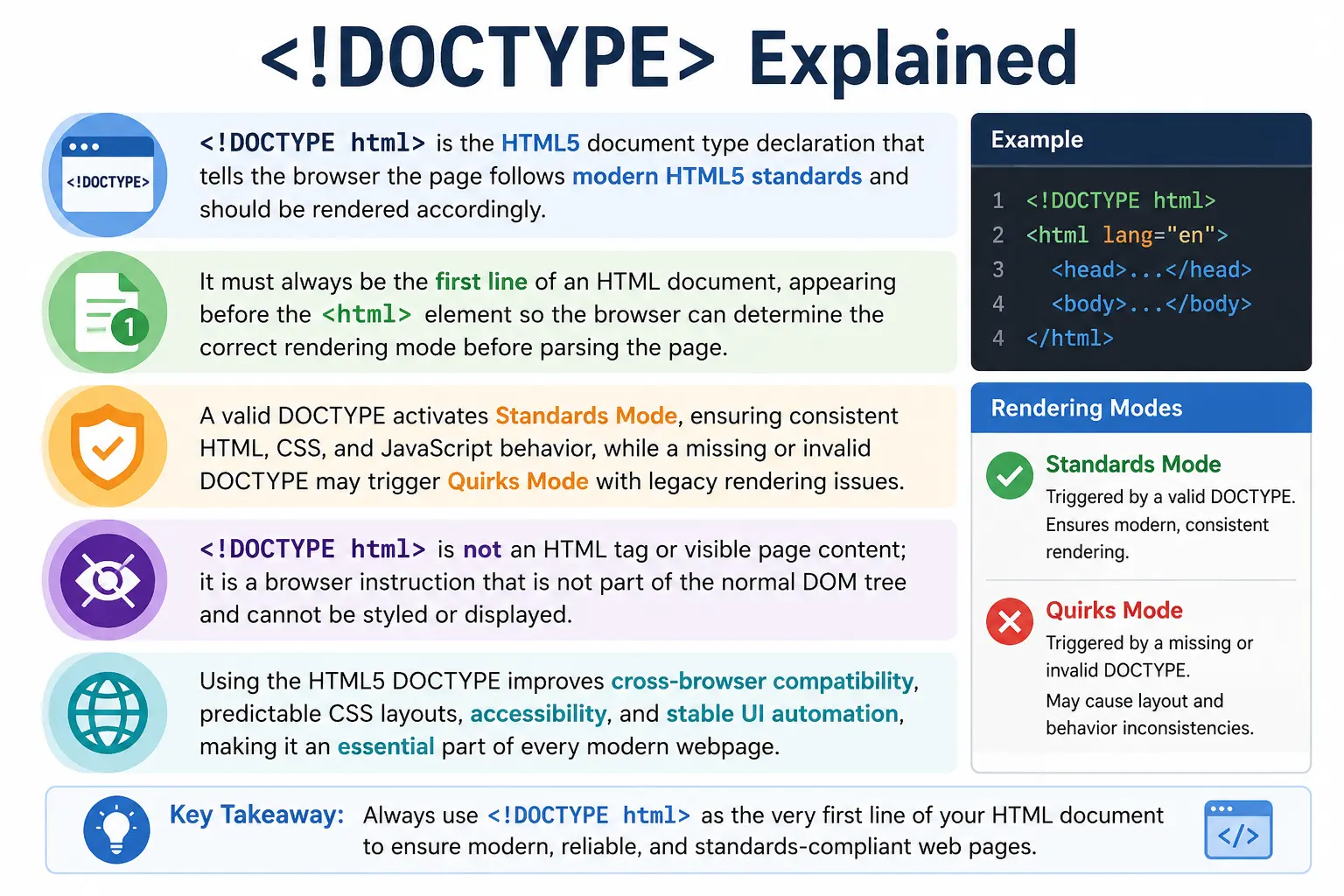
In modern HTML5, the DOCTYPE declaration is written as:
<!DOCTYPE html>This line tells the browser that the document should be interpreted using modern HTML5 standards. It also helps the browser decide which rendering mode to use. With the correct DOCTYPE, the browser renders the page in Standards Mode, which follows modern web standards. Without it, or with an incorrect declaration, the browser may switch to Quirks Mode, where it behaves like older browsers and may render CSS layouts inconsistently.
The DOCTYPE declaration is not visible on the webpage. It is not an HTML tag. It is not part of the visible document content. It is a browser instruction that appears before HTML parsing begins. Its main job is to guide the browser before it starts building the DOM and rendering the page.
Understanding <!DOCTYPE> is important because it connects HTML document structure, browser rendering modes, CSS consistency, accessibility, automation behavior, and cross-browser compatibility.
What Is <!DOCTYPE>?
<!DOCTYPE> stands for Document Type Declaration. In HTML5, it is written as:
<!DOCTYPE html>This declaration tells the browser:
This document follows the HTML5 standard.It appears before the root <html> element:
<!DOCTYPE html>
<html>
<head>
    <title>My Page</title>
</head>
<body>
    Content
</body>
</html>
The browser reads the DOCTYPE first, before parsing the rest of the document. Based on this declaration, it decides how to render the page.
In modern web development, <!DOCTYPE html> is simple, short, and easy to remember. But historically, DOCTYPE declarations were much longer and more complex.
Why Is DOCTYPE Important?
The main purpose of DOCTYPE is to tell the browser which rendering mode to use.
With a correct DOCTYPE:
Browser
   ↓
Standards Mode
Without a correct DOCTYPE:
Browser
   ↓
Quirks Mode
Standards Mode makes the browser follow modern HTML and CSS rules. This leads to more consistent rendering across Chrome, Firefox, Edge, Safari, and other browsers.
Quirks Mode causes the browser to imitate older browser behavior from the early web era. This can create unexpected layout problems, especially in CSS box model calculations, spacing, alignment, and sizing.
For this reason, every modern HTML document should begin with:
<!DOCTYPE html>Even though it is only one line, it helps prevent many rendering inconsistencies.
Position of DOCTYPE in an HTML Document
The DOCTYPE declaration must always appear at the very beginning of the HTML document.
Correct:
<!DOCTYPE html>
<html>
<head>
    <title>My Page</title>
</head>
<body>
    Content
</body>
</html>
Incorrect:
<html>
<!DOCTYPE html>
<head>
    <title>My Page</title>
</head>
<body>
    Content
</body>
</html>
In the incorrect example, the browser encounters the <html> element before seeing the DOCTYPE. This defeats the purpose because the browser needs the declaration before it starts interpreting the document structure.
The DOCTYPE should appear before:
<html>It should not be placed inside <html>, <head>, or <body>.
Is DOCTYPE an HTML Tag?
Many beginners think <!DOCTYPE html> is an HTML tag because it uses angle brackets. That is incorrect.
<!DOCTYPE html> is not an HTML element.
It is not part of the normal DOM tree.
It does not have an opening and closing tag.
It is not displayed on the page.
It is a declaration.
Compare:
<h1>Hello</h1>This is an HTML element.
But:
<!DOCTYPE html>is a browser instruction.
It tells the browser what type of document it is about to process.
Historical Background of DOCTYPE
To understand why DOCTYPE exists, it helps to look at earlier versions of HTML.
Before HTML5, browsers and validators needed more detailed information about which document type definition the page followed. Older HTML versions used lengthy DOCTYPE declarations that referenced external DTDs.
DTD stands for Document Type Definition. A DTD defined the rules that a document was expected to follow.
For example, HTML 4.01 Strict used:
<!DOCTYPE HTML PUBLIC "-//W3C//DTD HTML 4.01//EN"
"http://www.w3.org/TR/html4/strict.dtd">
XHTML 1.0 Strict used:
<!DOCTYPE html PUBLIC
"-//W3C//DTD XHTML 1.0 Strict//EN"
"http://www.w3.org/TR/xhtml1/DTD/xhtml1-strict.dtd">
These declarations were long and difficult for beginners to remember. They also reflected a different era of web standards.
HTML5 simplified the declaration dramatically.
Modern HTML5 uses:
<!DOCTYPE html>No external DTD is required.
This simplification made HTML easier to write, teach, maintain, and validate.
HTML5 DOCTYPE Simplification
One of the biggest improvements in HTML5 was the simplified DOCTYPE.
Instead of long declarations, HTML5 uses only:
<!DOCTYPE html>This line is enough to activate Standards Mode in modern browsers.
The HTML5 DOCTYPE is case-insensitive in practice, but the standard and common convention is to write it exactly as:
<!DOCTYPE html>This simple declaration is now used by almost every modern webpage.
Browser Rendering Modes
The most important reason DOCTYPE exists is browser rendering mode selection.
Browsers generally support different rendering modes:
Standards Mode
Quirks Mode
Almost Standards Mode
For beginners, the two most important modes are Standards Mode and Quirks Mode.
Standards Mode
Standards Mode is triggered by a proper modern DOCTYPE declaration:
<!DOCTYPE html>In Standards Mode, the browser follows modern HTML and CSS specifications.
This means:
- CSS box model works correctly
- Layout behavior is predictable
- Browser compatibility improves
- Modern HTML features work consistently
- Rendering follows current web standards
Browsers such as Chrome, Firefox, Edge, and Safari behave much more consistently when Standards Mode is active.
This is the recommended mode for all modern websites.
Quirks Mode
Quirks Mode is triggered when the DOCTYPE is missing, invalid, or outdated in certain ways.
Example:
<html>
<head>
    <title>Old Page</title>
</head>
<body>
    Content
</body>
</html>
Because the DOCTYPE is missing, the browser may enter Quirks Mode.
In Quirks Mode, the browser tries to emulate old browser behavior from earlier versions of Internet Explorer and other legacy browsers.
This can cause problems such as:
- Incorrect layout behavior
- CSS inconsistencies
- Box model issues
- Unexpected spacing
- Cross-browser rendering differences
Quirks Mode exists for backward compatibility with old websites, not for modern development.
Standards Mode vs Quirks Mode
The difference can be summarized clearly:
| Feature | Standards Mode | Quirks Mode |
|---|---|---|
| Modern CSS Support | Strong | Inconsistent |
| Layout Consistency | Better | Poor |
| Browser Compatibility | Better | Risky |
| Box Model Behavior | Standard | Legacy behavior |
| Recommended | Yes | No |
For modern websites, Standards Mode is always preferred.
How the Browser Processes DOCTYPE
When the browser receives an HTML document, it checks the first part of the file.
If it sees:
<!DOCTYPE html>it selects Standards Mode.
Then it continues with:
HTML Parsing
      ↓
DOM Creation
      ↓
CSSOM Creation
      ↓
Render Tree
      ↓
Layout
      ↓
Paint
A simplified browser flow looks like this:
Receive HTML
      ↓
Read DOCTYPE
      ↓
Select Rendering Mode
      ↓
Parse HTML
      ↓
Create DOM
      ↓
Render Page
The DOCTYPE is checked before the browser begins normal document parsing.
This is why placement matters.
DOCTYPE and the DOM
Although the browser reads the DOCTYPE, it is not part of the normal DOM tree that developers commonly work with.
Example:
<!DOCTYPE html>
<html>
<body>
    <h1>Hello</h1>
</body>
</html>
The DOM structure is essentially:
Document
 │
 html
 │
 body
 │
 h1
The DOCTYPE does not appear as a regular visible element like html, body, or h1.
However, technically, the document can expose document type information through browser APIs, but for normal web development and Selenium work, DOCTYPE is not treated as a visible DOM element.
You cannot style it with CSS.
You cannot display it on the page.
You do not locate it like normal elements.
Common Mistake 1: Missing DOCTYPE
A common beginner mistake is starting an HTML document like this:
<html>
<head>
    <title>My Page</title>
</head>
<body>
    Hello
</body>
</html>
This may still render in the browser, but it risks triggering Quirks Mode.
Correct version:
<!DOCTYPE html>
<html>
<head>
    <title>My Page</title>
</head>
<body>
    Hello
</body>
</html>
Adding the DOCTYPE ensures the browser uses modern rendering behavior.
Common Mistake 2: Using Old DOCTYPEs in Modern Projects
Some developers copy old templates from outdated websites.
Example:
<!DOCTYPE HTML PUBLIC "-//W3C//DTD HTML 4.01//EN">For modern HTML5 projects, this is unnecessary.
Use:
<!DOCTYPE html>instead.
The modern declaration is shorter, cleaner, and correct for HTML5.
Common Mistake 3: Incorrect Placement
Incorrect:
<html>
<!DOCTYPE html>
<head>
    <title>Wrong</title>
</head>
</html>
Correct:
<!DOCTYPE html>
<html>
<head>
    <title>Correct</title>
</head>
</html>
The declaration must appear before the <html> element.
Why Modern Developers Still Use DOCTYPE
Some beginners ask why DOCTYPE is still required if HTML5 is already the standard.
The reason is simple: browsers still need a signal to activate Standards Mode.
<!DOCTYPE html> ensures:
- Standards Mode rendering
- Better browser consistency
- Predictable CSS layout behavior
- Reduced cross-browser issues
- Modern HTML behavior
Even in 2026 and beyond, this line remains part of proper HTML document structure.
DOCTYPE and SEO
DOCTYPE does not directly improve search engine ranking.
Search engines do not rank a page higher simply because it has a DOCTYPE declaration.
However, DOCTYPE can indirectly support SEO because it helps browsers render the page correctly.
Correct rendering contributes to:
- Better user experience
- Better mobile usability
- Fewer layout issues
- More accessible structure
- Better page quality
So while DOCTYPE is not a direct SEO ranking factor, it contributes to a technically healthy webpage.
DOCTYPE and Accessibility
Accessibility tools depend on browsers interpreting HTML correctly.
When the browser uses Standards Mode, semantic HTML and accessibility-related behavior are more predictable.
This helps:
- Screen readers
- Keyboard navigation
- Accessibility tools
- Browser accessibility trees
DOCTYPE alone does not make a site accessible, but it supports correct browser interpretation, which is necessary for reliable accessibility behavior.
DOCTYPE and CSS Layout
DOCTYPE affects CSS rendering mode.
In Quirks Mode, layout behavior may differ from modern CSS expectations.
For example, the box model may behave differently in older compatibility modes.
This can affect:
- Width calculations
- Padding behavior
- Element alignment
- Layout consistency
- Responsive design
Modern CSS assumes Standards Mode. Therefore, DOCTYPE is essential for reliable CSS behavior.
DOCTYPE and JavaScript
JavaScript does not usually interact directly with DOCTYPE.
However, DOCTYPE affects the rendering mode, and rendering mode may influence layout-related JavaScript calculations.
For example, JavaScript methods that inspect element dimensions may produce unexpected results if the browser is in Quirks Mode.
So while DOCTYPE is not a JavaScript programming feature, it affects the environment in which JavaScript runs.
DOCTYPE and Selenium
Selenium rarely interacts directly with DOCTYPE.
You normally do not write:
driver.findElement(...)for DOCTYPE.
However, DOCTYPE can still affect Selenium indirectly.
If a missing or invalid DOCTYPE causes layout inconsistencies, Selenium automation may experience:
- Elements not aligned correctly
- Click interception
- Visibility issues
- Cross-browser differences
- Unexpected scroll behavior
A correctly declared DOCTYPE helps ensure consistent rendering, which supports more stable automation tests.
Real Browser Flow
A real browser processes DOCTYPE early.
The flow is:
Receive HTML
      ↓
Read DOCTYPE
      ↓
Select Rendering Mode
      ↓
Parse HTML
      ↓
Create DOM
      ↓
Apply CSS
      ↓
Render Page
The browser does not wait until later to interpret DOCTYPE. It checks it immediately because the rendering mode affects the entire document.
Common Interview Questions
What Is DOCTYPE?
DOCTYPE is a declaration that tells the browser which HTML standard the document follows.
Is DOCTYPE an HTML Tag?
No. It is not an HTML tag. It is a declaration.
What Is the HTML5 DOCTYPE?
The HTML5 DOCTYPE is:
<!DOCTYPE html>What Happens If DOCTYPE Is Missing?
The browser may enter Quirks Mode, which can cause inconsistent rendering behavior.
Where Should DOCTYPE Be Placed?
It should be the first line of the HTML document, before the <html> element.
Does DOCTYPE Appear on the Page?
No. DOCTYPE is not displayed to users.
Is DOCTYPE Part of the DOM?
It is not part of the normal visible DOM tree used for page rendering and element interaction.
Interview-Ready Answer
<!DOCTYPE html> is a declaration that informs the browser that the document follows HTML5 standards. It must appear at the very top of the document before the <html> element. Its main purpose is to activate Standards Mode so the browser renders the page according to modern web standards instead of falling back to Quirks Mode.
Key Takeaway
The DOCTYPE declaration may look small, but it has an important responsibility. It tells the browser how to interpret and render the HTML document. In HTML5, the declaration is simple:
<!DOCTYPE html>This line should always appear at the top of every modern HTML page. It is not an HTML tag, not visible on the webpage, and not a normal DOM element. Its primary purpose is to activate Standards Mode, ensuring consistent rendering across modern browsers.
One-Line Insight
<!DOCTYPE html> is the browser’s signal to render the page using modern HTML5 standards.