Description Lists (<dl>)
Introduction
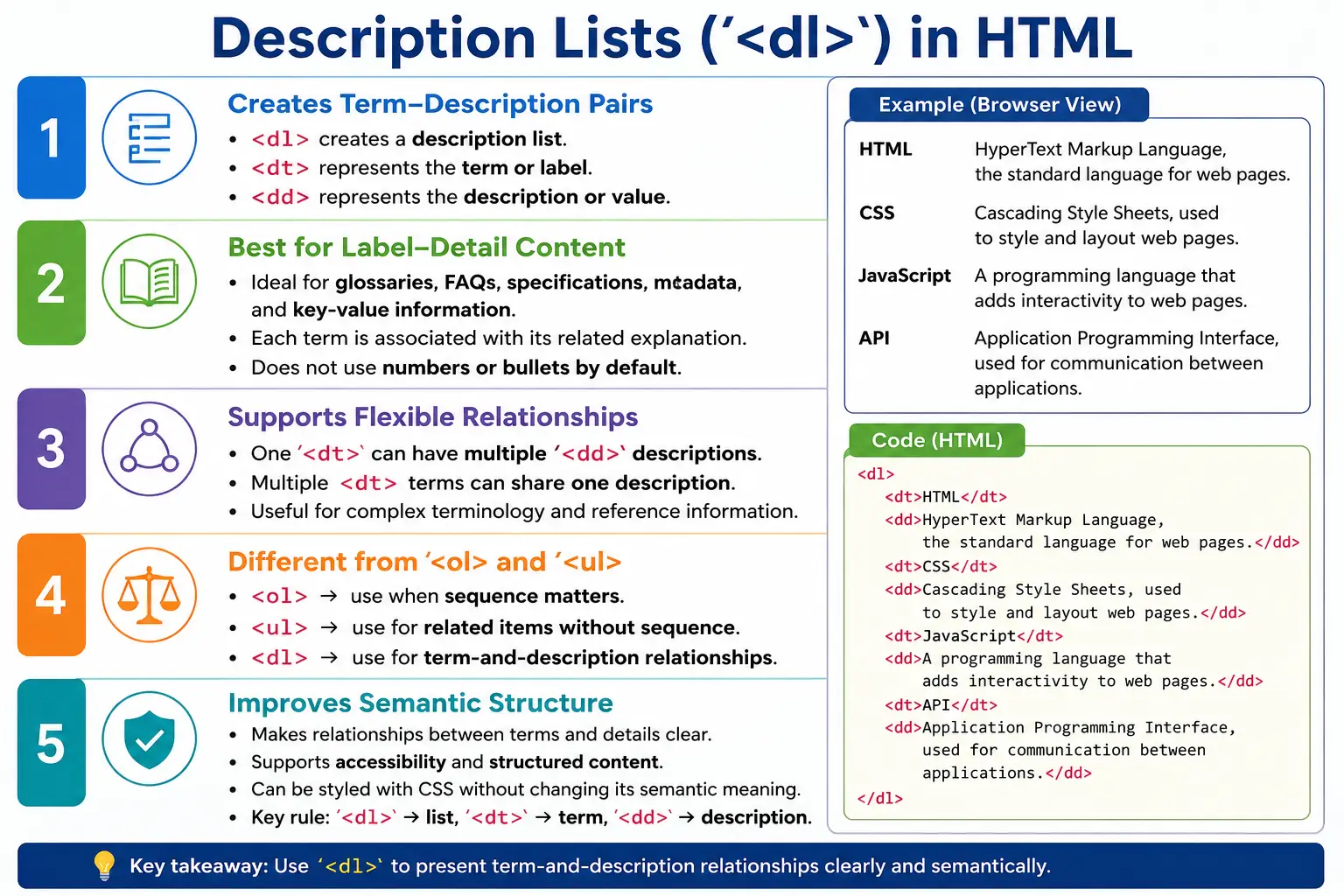
A description list is an HTML list type used to represent terms and their descriptions, questions and answers, names and values, or labels and definitions. Unlike ordered lists and unordered lists, a description list does not use numbers or bullets by default. Instead, it focuses on relationships between a term and its related detail.
HTML provides three elements for description lists. The <dl> element creates the description list container. The <dt> element represents the description term. The <dd> element represents the description details. Together, these elements create a semantic structure for content that has a label-and-explanation relationship.
Description lists are less commonly discussed than ordered and unordered lists, but they are extremely useful in professional HTML. Glossaries, FAQs, product specifications, contact details, metadata, configuration values, terminology references, and technical documentation often need this exact structure. When content is not simply a sequence of items but a set of terms with explanations, <dl> is usually the correct choice.
What Is a Description List?
A description list displays a collection of terms along with their explanations. A simple example is a glossary of web technologies.
HTML
    HyperText Markup Language

CSS
    Cascading Style Sheets

JavaScript
    Programming Language for the Web
This is a perfect use case for a description list because each term has a related explanation. HTML is not merely one item in a collection. It is a term that needs a definition. CSS and JavaScript follow the same pattern.
If this content were written as a plain unordered list, the relationship between term and definition would be weaker. If it were written as a paragraph, it would be harder to scan. A description list provides the correct structure and makes the relationship clear.
Why Use Description Lists?
Use description lists when displaying definitions, glossaries, FAQs, metadata, product specifications, key-value pairs, and terminology references. These are all cases where one piece of content identifies something and another piece explains it.
Term
    Definition
The key idea is association. A description list says that a term and its detail belong together. A product page may show Processor with Intel Core i7, RAM with 16 GB, and Storage with 512 GB SSD. A documentation page may show API with Application Programming Interface and HTTP with HyperText Transfer Protocol. A profile page may show Email with a user address and Phone with a contact number.
Description lists make this pattern semantic. They are not just indentation. They tell the browser that the content has term-detail relationships.
Description List Elements
A description list consists of a <dl> container, one or more <dt> terms, and one or more <dd> descriptions.
<dl>
  <dt>Term</dt>
  <dd>Description</dd>
</dl>
The element roles are simple but important.
| Element | Purpose |
|---|---|
| <dl> | Container for description list |
| <dt> | Description term |
| <dd> | Description or details |
The <dt> should identify the term, label, question, or name. The <dd> should provide the explanation, answer, value, or detail.
Basic Syntax
The simplest description list contains one term and one description.
<dl>
  <dt>HTML</dt>
  <dd>HyperText Markup Language</dd>
</dl>
A more practical example contains several terms.
<dl>
  <dt>HTML</dt>
  <dd>Used to create web page structure.</dd>

  <dt>CSS</dt>
  <dd>Used for styling web pages.</dd>

  <dt>JavaScript</dt>
  <dd>Used to add interactivity.</dd>
</dl>
This structure is easy to read in the source code and meaningful to the browser.
Browser Rendering
Browsers render description lists without bullets or numbers by default. The term is usually shown on its own line, and the description is indented.
HTML
    Used to create web page structure.

CSS
    Used for styling web pages.

JavaScript
    Used to add interactivity.
The browser's default indentation helps users visually distinguish the term from the details. CSS can change the layout, but the semantic structure remains the same.
Structure of a Description List
The structure of a description list is different from ordered and unordered lists. Ordered and unordered lists contain <li> items. Description lists contain <dt> and <dd> pairs.
dl
 │
 ├── dt
 ├── dd
 │
 ├── dt
 ├── dd
 │
 └── dt
     dd
The <dl> element groups the entire list. Each <dt> introduces a term, and each <dd> gives the related explanation. This structure is especially useful when a page needs to present compact reference information.
Real-World Example: Glossary
A glossary is one of the clearest uses of a description list. Each glossary entry has a term and a definition.
<dl>
  <dt>API</dt>
  <dd>
    Application Programming Interface
  </dd>

  <dt>HTTP</dt>
  <dd>
    HyperText Transfer Protocol
  </dd>
</dl>
The output is conceptually:
API
    Application Programming Interface

HTTP
    HyperText Transfer Protocol
This is better than writing API - Application Programming Interface in a bullet list because the relationship is represented directly by HTML.
Real-World Example: Product Details
Product specifications often work well as description lists because each label has a value.
<dl>
  <dt>Processor</dt>
  <dd>Intel Core i7</dd>

  <dt>RAM</dt>
  <dd>16 GB</dd>

  <dt>Storage</dt>
  <dd>512 GB SSD</dd>
</dl>
Here, Processor, RAM, and Storage are labels. Intel Core i7, 16 GB, and 512 GB SSD are their details. A table can also be used for some specification layouts, but a description list is appropriate when the content is a simple set of name-value relationships.
Real-World Example: Contact Information
Contact information is another practical use case.
<dl>
  <dt>Email</dt>
  <dd>support@example.com</dd>

  <dt>Phone</dt>
  <dd>+1 555 123 4567</dd>
</dl>
This makes it clear that Email is the label and support@example.com is the value. The same pattern can be used for address, office hours, department, or support channel.
Multiple Descriptions for One Term
A term can have multiple descriptions. This is useful when one concept has more than one explanation, role, or note.
<dl>
  <dt>HTML</dt>
  <dd>Markup Language</dd>
  <dd>Used for page structure</dd>
</dl>
The output is:
HTML
    Markup Language
    Used for page structure
This is valid because both descriptions belong to the same term. It is cleaner than forcing both details into one long sentence when they are better understood as separate points.
Multiple Terms for One Description
Several terms can also share the same description. This is useful when a full term and abbreviation refer to the same concept.
<dl>
  <dt>HTML</dt>
  <dt>HyperText Markup Language</dt>
  <dd>
    Standard markup language for the web
  </dd>
</dl>
In this example, HTML and HyperText Markup Language both point to the same description. This flexibility makes description lists useful for glossaries and terminology references.
FAQ Example
Description lists work well for FAQs because each question has an answer. The question can be marked as the term, and the answer can be marked as the description.
<dl>
  <dt>
    What is HTML?
  </dt>
  <dd>
    HTML is the standard markup language
    for web pages.
  </dd>

  <dt>
    What is CSS?
  </dt>
  <dd>
    CSS styles web pages.
  </dd>
</dl>
This pattern keeps the FAQ clean and semantic. The question-answer relationship is visible in both the rendered page and the HTML structure.
Metadata Example
Metadata is another strong use case. A page may need to show author, date, category, or version information.
<dl>
  <dt>Author</dt>
  <dd>John Smith</dd>

  <dt>Date</dt>
  <dd>January 2026</dd>
</dl>
The structure communicates that Author is associated with John Smith and Date is associated with January 2026. This is more meaningful than placing the values in unrelated paragraphs.
Description Lists vs Ordered Lists
An ordered list is used when sequence matters.
<ol>
  <li>Step 1</li>
  <li>Step 2</li>
</ol>
1. Step 1
2. Step 2A description list is used when a term has a description.
<dl>
  <dt>HTML</dt>
  <dd>Markup Language</dd>
</dl>
HTML
Markup LanguageThe choice depends on meaning. If the content is a procedure, use <ol>. If it is a term-definition relationship, use <dl>.
Description Lists vs Unordered Lists
An unordered list is used when items belong together but do not need sequence.
<ul>
  <li>HTML</li>
  <li>CSS</li>
</ul>
• HTML
• CSSA description list is used when each term has an associated explanation.
<dl>
  <dt>HTML</dt>
  <dd>Markup Language</dd>
</dl>
HTML
Markup LanguageIf you only need to list HTML and CSS as technologies, use <ul>. If you need to explain what HTML and CSS mean, use <dl>.
Styling Description Lists
Description lists can be styled with CSS. A simple style makes terms bold and descriptions indented.
dt {
    font-weight: bold;
}

dd {
    margin-left: 20px;
}
The result is that the term appears bold and the description appears indented. This matches the default idea of a label and its detail.
A modern layout may also add spacing between descriptions.
dt {
    font-weight: bold;
}

dd {
    margin-bottom: 10px;
}
CSS can turn description lists into grid layouts, card details, compact metadata blocks, or FAQ sections. The HTML should remain semantic even when the visual design changes.
Accessibility Benefits
Description lists provide accessibility benefits because they expose the relationship between a term and its description. Screen readers can understand that a term is associated with details.
<dl>
  <dt>HTML</dt>
  <dd>Markup Language</dd>
</dl>
Assistive technologies can communicate that HTML is associated with Markup Language. This is more meaningful than visual indentation alone. Semantic HTML helps users who depend on structure rather than only visual layout.
SEO Benefits
Description lists provide semantic meaning that can help search engines understand definitions, glossaries, specifications, and FAQs more accurately. A glossary page using proper <dl>, <dt>, and <dd> elements communicates a clear relationship between terms and definitions.
SEO is not about using a tag as a trick. It is about making content understandable. Description lists make certain types of content more structured and more meaningful, which supports both search engines and human readers.
Common Use Cases
Description lists are useful in technical glossaries where terms such as API, HTTP, and REST need definitions. They are useful in product specifications where labels such as Processor, RAM, and Storage need values. They are useful in FAQ pages where questions need answers. They are useful in contact details where labels such as Email, Phone, and Address need values.
Any time the content follows a label-detail pattern, consider a description list. If the content is only a set of items, use an unordered list. If the content is a sequence, use an ordered list.
Common Mistakes
A common mistake is using an unordered list for definitions.
<ul>
  <li>HTML - Markup Language</li>
</ul>
A better version uses a description list.
<dl>
  <dt>HTML</dt>
  <dd>Markup Language</dd>
</dl>
Another mistake is using <dt> without <dd>.
<dl>
  <dt>HTML</dt>
</dl>
This creates an incomplete structure because the term has no detail. Using <dd> without <dt> is also incorrect.
<dl>
  <dd>Markup Language</dd>
</dl>
The description is missing its term. Another mistake is using description lists for navigation menus.
<dl>
  <dt>Home</dt>
  <dt>About</dt>
</dl>
Navigation menus should usually use <ul> because they are groups of links, not term-definition pairs.
Real-World Example
A web technologies section is a clean real-world example.
<h2>Web Technologies</h2>

<dl>
  <dt>HTML</dt>
  <dd>
    Creates page structure.
  </dd>

  <dt>CSS</dt>
  <dd>
    Provides styling.
  </dd>

  <dt>JavaScript</dt>
  <dd>
    Adds interactivity.
  </dd>
</dl>
This is readable, semantic, and easy to style. It also supports future expansion. More terms can be added without changing the overall structure.
Selenium Perspective
From a Selenium automation perspective, a description list can be located using the dl tag.
WebElement list =
driver.findElement(
  By.tagName("dl")
);
All terms can be collected with the dt tag.
List<WebElement> terms =
driver.findElements(
  By.tagName("dt")
);
Descriptions can be collected with the dd tag.
List<WebElement> desc =
driver.findElements(
  By.tagName("dd")
);
Automation can verify that glossary terms exist, that product labels match expected values, and that FAQ questions have corresponding answers. For structured content pages, this kind of validation helps catch missing or mismatched information.
Comparison Table
| Feature | <ol> | <ul> | <dl> |
|---|---|---|---|
| Numbered Items | Yes | No | No |
| Bulleted Items | No | Yes | No |
| Term-Definition Relationship | No | No | Yes |
| FAQ Support | No | No | Yes |
| Glossary Support | No | No | Yes |
Common Interview Questions
A common interview question is: what is the purpose of <dl>? The answer is that it creates a description list.
Another question is what <dt> represents. It represents the description term. Interviewers may then ask what <dd> represents. It represents the description details.
They may also ask whether bullets are displayed in a description list. The answer is no. Description lists do not display bullets or numbers by default. Another common question is when description lists should be used. They should be used for definitions, glossaries, FAQs, specifications, metadata, and key-value data.
Interview-Ready Answer
The <dl> element creates a description list used for term-and-description pairs. Inside a description list, <dt> represents the term and <dd> represents its description. Description lists are ideal for glossaries, FAQs, metadata, specifications, and any content where labels are associated with explanatory details.
Key Takeaway
Description lists fill an important gap in HTML. Ordered lists handle sequences. Unordered lists handle grouped items. Description lists handle relationships between terms and details. They are the right choice for glossary entries, FAQ questions and answers, product specifications, metadata, and key-value information.
Use <dl> when the content has a label-detail relationship. Use <dt> for the label, term, or question. Use <dd> for the detail, definition, value, or answer. This keeps the page semantic, accessible, and easier to maintain.
One-Line Insight
Use <dl> when you need to represent a relationship between a term and its description rather than a simple list of items.