Deprecated Tags
Introduction
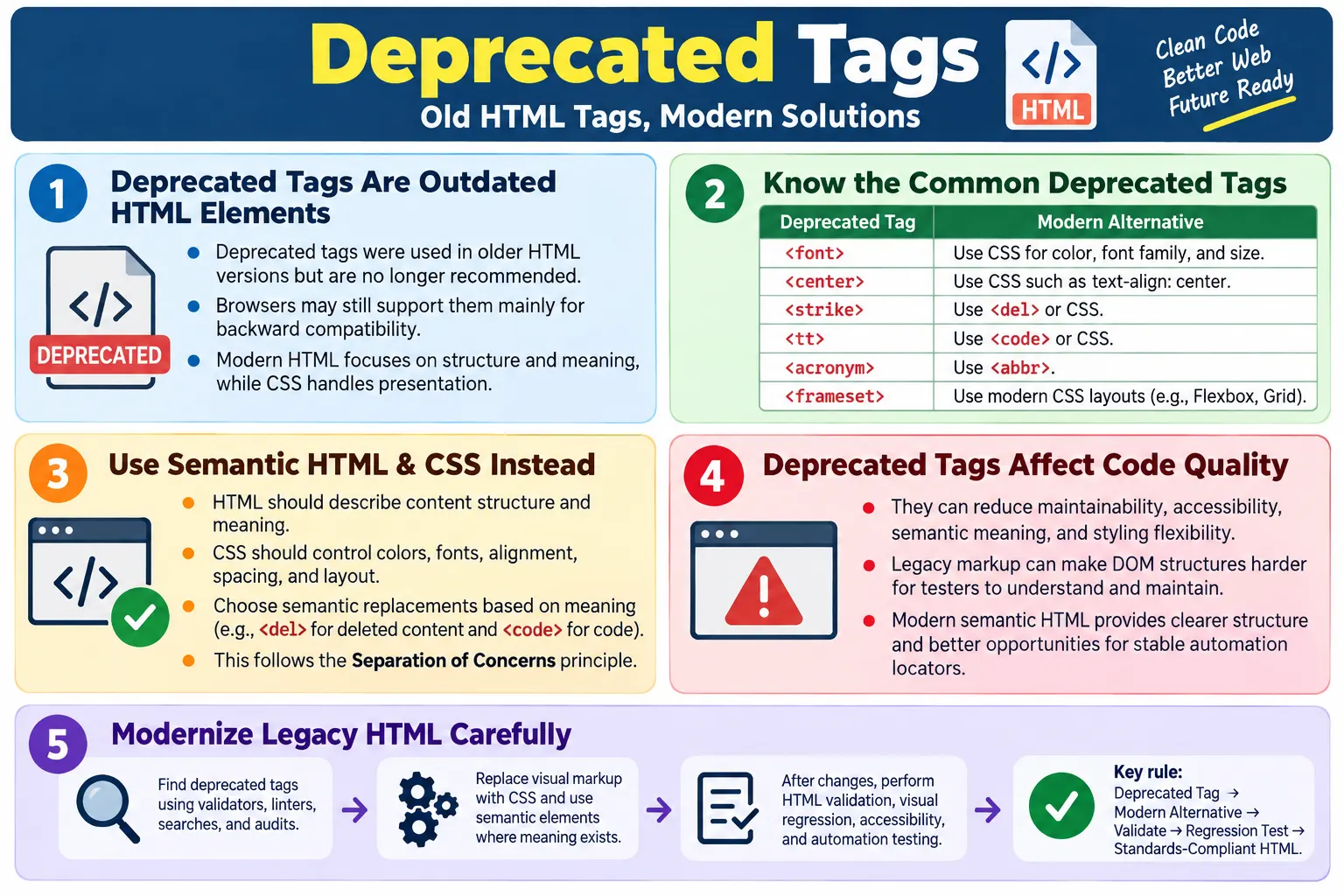
Deprecated tags are HTML elements that were once part of older HTML specifications but are no longer recommended for use in modern web development. They belong to an earlier period of the web, when HTML was commonly used for both page structure and visual presentation. Modern HTML has moved away from that approach. Today, HTML is expected to describe structure and meaning, while CSS controls presentation and layout.
Although most browsers still support many deprecated tags for backward compatibility, developers should avoid using them in new projects. A browser may still render an old tag such as <font> or <center>, but that does not mean the tag is a good choice. Browser support exists mainly to keep older websites from breaking, not to encourage new development with outdated markup.
Deprecated tags create several problems. They reduce maintainability, weaken accessibility, produce non-semantic HTML, make styling harder to manage, and may not be supported forever. They also make the codebase feel old and inconsistent with modern standards. A professional HTML developer should recognize deprecated tags, understand why they were discouraged, and know the correct modern alternatives.
What Does Deprecated Mean?
A deprecated tag is an HTML tag that was valid or commonly supported in older HTML versions but is discouraged in modern HTML because a better alternative exists. In many cases, the modern alternative is CSS. In other cases, the replacement is a more semantic HTML element.
- It was valid or common in older HTML versions.
- It is discouraged in modern HTML.
- It has a better modern alternative.
- It may still render in browsers for backward compatibility.
Old HTML Tag
  ↓
Deprecated
  ↓
Modern Alternative
  ↓
Standards-Compliant HTML
The important point is that deprecated does not always mean the browser immediately stops supporting the tag. It means developers should stop using it because standards and best practices have moved on. If a tag has a clearer, more accessible, more maintainable replacement, the replacement should be used.
Why Were Tags Deprecated?
Many older HTML tags were deprecated because they mixed structure and presentation. Early HTML pages often used markup to control font color, font size, centering, spacing, and visual appearance. This was understandable in the early web because CSS was not yet mature or widely used. Over time, however, this approach became difficult to maintain.
<font color="red">
  Welcome
</font>
This old example uses HTML to apply a red color. Modern HTML separates responsibilities. The HTML describes the content, and CSS controls how it looks.
<p class="welcome">
  Welcome
</p>
.welcome {
color: red;
}This follows the separation of concerns principle. HTML provides structure and meaning. CSS provides presentation. JavaScript provides behavior. When these responsibilities are separated, websites become easier to maintain, easier to redesign, easier to test, and easier to scale.
Problems with Deprecated Tags
Using deprecated tags can lead to poor maintainability. If presentation is spread throughout HTML, a design change requires editing many HTML files instead of changing a CSS rule. For example, if many pages use <font color="blue">, changing the brand color means finding and replacing markup across the site. If a CSS class controls the color, the change can happen in one stylesheet.
Deprecated tags also reduce semantic meaning. A tag such as <center> says something about visual alignment, not content meaning. A modern heading, paragraph, section, article, or navigation element tells browsers, assistive technologies, search engines, and developers what the content represents.
- Poor maintainability
- Difficult styling
- Reduced accessibility
- Non-semantic markup
- Inconsistent behavior
- Harder automation maintenance
Deprecated tags can also make automation and testing harder. Legacy markup is often inconsistent and less descriptive. Modern semantic HTML gives testers better structure to inspect and more stable patterns to automate.
Common Deprecated HTML Tags
Several older tags are commonly discussed in interviews and legacy application reviews. These include <font>, <center>, <big>, <strike>, <tt>, <acronym>, <dir>, <frame>, and <frameset>. Most of these were either presentational or tied to outdated layout models.
| Deprecated Tag | Modern Alternative |
|---|---|
<font> |
CSS: color, font-family, font-size |
<center> |
CSS: text-align: center |
<big> |
CSS: font-size |
<strike> |
<del> or CSS text-decoration |
<tt> |
<code> or CSS font-family |
<acronym> |
<abbr> |
<dir> |
<ul> |
<frame> |
CSS layouts or <iframe> when appropriate |
<frameset> |
Modern CSS layouts using Grid or Flexbox |
The <font> Tag
The <font> tag was used to control text color, size, and font face directly inside HTML. It is one of the clearest examples of old presentational markup. The problem is that it places visual styling inside the content structure.
<font color="blue" size="5">
  HTML
</font>
The modern approach is to use semantic or simple HTML and move the styling into CSS. The HTML identifies the content, while CSS defines how it appears.
<p class="title">
  HTML
</p>
.title {
color: blue;
font-size: 32px;
}This is easier to maintain because the style can be changed from one CSS rule. It is also cleaner because the HTML remains focused on content.
The <center> Tag
The <center> tag was used to center content horizontally. It is deprecated because alignment is presentation, and presentation belongs in CSS.
<center>
  Welcome
</center>
The modern replacement is CSS, usually with text-align: center for inline text or other layout properties for block-level alignment.
<h1 class="center">
  Welcome
</h1>
.center {
text-align: center;
}This keeps the HTML semantic and the visual alignment reusable. If the alignment changes later, the CSS can change without modifying the HTML structure.
The <big> Tag
The <big> tag was used to make text larger. It does not describe meaning; it only describes appearance. Modern HTML avoids this kind of presentational tag.
<big>
  Hello
</big>
The modern replacement is CSS. If text must be visually larger, apply a class and control size through the stylesheet.
<p class="large">
  Hello
</p>
.large {
font-size: 24px;
}If the larger text has semantic importance, use an appropriate semantic element such as a heading. Do not use a styling class as a substitute for heading structure when the content is truly a heading.
The <strike> Tag
The <strike> tag was used to show strikethrough text. In modern HTML, the correct choice depends on meaning. If the text represents removed or deleted content, use <del>. If the strikethrough is purely visual, use CSS.
<strike>
  $100
</strike>
For semantic deleted content, use:
<del>
  $100
</del>
For visual styling only, use CSS:
<span class="old-price">
  $100
</span>
.old-price {
text-decoration: line-through;
}This distinction matters. Semantic tags communicate meaning. CSS communicates appearance.
The <tt> Tag
The <tt> tag was used to display text in a teletype or monospace style. It is outdated because it focuses on visual appearance rather than meaning. If the text represents code, use <code>. If the goal is only a monospace visual style, use CSS.
<tt>
  System.out.println();
</tt>
The semantic modern option for code is:
<code>
  System.out.println();
</code>
For purely visual monospace text, CSS can control the font family. In most tutorial content, <code> is the better choice because it identifies the text as code.
The <acronym> Tag
The <acronym> tag was used to mark acronyms, but modern HTML uses <abbr> for abbreviations and acronyms. This gives a single semantic element for shortened forms.
<acronym title="HyperText Markup Language">
  HTML
</acronym>
The modern version is:
<abbr title="HyperText Markup Language">
  HTML
</abbr>
The title attribute can provide the expanded form. This helps users understand abbreviations and gives assistive technologies better context depending on support and configuration.
The <dir> Tag
The <dir> tag was originally used for directory lists. It is obsolete in modern HTML. If the content is a list, use a standard list element such as <ul> for unordered lists or <ol> for ordered lists.
<dir>
  <li>HTML</li>
</dir>
The modern replacement is:
<ul>
  <li>HTML</li>
</ul>
Modern list elements are semantic, widely supported, accessible, and easy to style with CSS.
The <frameset> and <frame> Tags
Framesets were used to divide a browser window into multiple frames, with each frame loading a separate document. This approach is obsolete. It creates usability, accessibility, navigation, bookmarking, SEO, and maintenance problems.
<frameset>
  ...
</frameset>
Modern websites use CSS Grid, Flexbox, responsive layouts, server-side templates, JavaScript routing, or component-based layouts instead. If another document truly needs to be embedded, <iframe> may be appropriate, but it should be used carefully.
<frame src="menu.html">A modern application usually does not need frames. Navigation, sidebars, headers, and content areas can all be built with normal semantic HTML and CSS layout techniques.
Browser Compatibility
Modern browsers still recognize many deprecated tags for backward compatibility. This is why old websites may still appear to work. The browser vendors do not want large parts of the web to break suddenly, so they continue supporting many legacy behaviors.
Deprecated HTML
  ↓
Browser
  ↓
Still Renders
  ↓
Not Recommended
This support should not be misunderstood. Rendering support is not the same as best practice. A browser may render outdated markup, but validators, accessibility tools, code reviewers, and modern development standards may still reject or discourage it. New code should follow current standards.
Deprecated vs Obsolete
Deprecated and obsolete are related terms, but they are not always identical. Deprecated usually means discouraged and replaced by a better alternative. Obsolete means removed from modern standards or no longer valid for current use. In everyday conversations, developers may use both words loosely, but interviews may expect the distinction.
| Deprecated | Obsolete |
|---|---|
| Discouraged but may still work | Removed from modern standards and should not be used |
| Better alternatives exist | Modern replacements are required |
Many older presentation tags are considered obsolete in modern HTML. Whether a tag is described as deprecated or obsolete, the practical guidance is the same: avoid it in new development and use the modern alternative.
HTML Validation
HTML validators help identify deprecated or obsolete elements. A validator may report warnings or errors when it finds tags that do not belong in modern HTML. This is useful because legacy tags can hide inside large files and templates.
<font>
  ↓
Validation Warning/Error
  ↓
Use CSS Instead
Validation is not just about passing a tool. It helps keep HTML predictable, standards-compliant, and easier for browsers and assistive technologies to interpret. Teams should validate important pages regularly, especially after migrations from old codebases.
Accessibility Impact
Deprecated tags often provide little or no semantic meaning. This can reduce accessibility because assistive technologies benefit from meaningful structure. A screen reader can interpret headings, lists, tables, forms, buttons, navigation, and landmarks more effectively when the HTML uses semantic elements correctly.
Presentation tags do not explain content purpose. A <center> tag says text is centered, but it does not say whether the content is a heading, navigation item, notice, or article title. A <font> tag says something about appearance, not meaning. Modern semantic HTML improves the accessibility foundation of the page.
Replacing deprecated tags with semantic elements and CSS helps separate the meaning of content from its visual design. This is important for users who rely on assistive technologies, custom stylesheets, zoom, high contrast modes, keyboard navigation, or screen readers.
SEO Impact
Search engines prefer clean, semantic, well-structured HTML. Deprecated tags do not automatically destroy SEO, but they can be a sign of poor code quality and weak structure. Modern semantic HTML helps search engines understand headings, main content, navigation, articles, and page hierarchy.
- Semantic HTML
- Proper headings
- Clean document structure
- Meaningful links
- Readable content hierarchy
Replacing deprecated tags contributes to better crawlability and maintainability. It also makes future SEO improvements easier because content and styling are not tangled together.
Automation Perspective
Automation tools like Selenium can still locate deprecated elements if browsers render them. For example, Selenium can technically find a <font> element if it exists in the DOM. However, the presence of deprecated tags often indicates a legacy page structure that may be harder to inspect and maintain.
Modern semantic HTML is easier for testers to work with. It provides clearer structure, more meaningful elements, and better opportunities for stable locators. A well-built button, form, table, or navigation area is easier to automate than a page made from outdated presentational tags and inconsistent layout markup.
- Semantic HTML
- Valid HTML
- Stable DOM structure
- Modern elements
- Standards-compliant markup
Deprecated tags do not directly break Selenium, but modern HTML improves readability, maintainability, and locator quality. Testers should recognize deprecated tags when working with legacy systems and raise modernization concerns when they affect test stability or accessibility.
Legacy Application Reality
Many real-world applications still contain deprecated tags. Large organizations may have pages created years ago, templates copied from older systems, or legacy modules that have not been redesigned. A developer or tester may encounter <font>, <center>, frames, or other old markup in production systems.
When this happens, the right response depends on context. If the legacy page is stable and low-risk, a team may avoid changing it immediately. If the page is being redesigned, migrated, or causing accessibility and maintainability problems, deprecated tags should be replaced as part of modernization.
Modernization should be done carefully. Replacing tags may affect layout, CSS, JavaScript, and tests. The team should compare visual output, run regression tests, validate accessibility, and check important user flows after changes.
Migration Strategy
A practical migration strategy starts by identifying deprecated tags across the codebase. Search tools, validators, linters, and browser audits can help. Once the tags are found, group them by type and risk. Replacing <font> with CSS may be straightforward. Replacing framesets may require a larger layout redesign.
Find Deprecated Tags
  ↓
Group by Type
  ↓
Choose Modern Alternative
  ↓
Update HTML and CSS
  ↓
Validate and Test
Small replacements can often happen incrementally. For example, replace <font> with classes, replace <center> with CSS alignment, and replace <acronym> with <abbr>. Larger changes, such as removing framesets, may need design, routing, and navigation planning.
How Deprecated Tags Affect Maintainability
Maintainability is one of the biggest reasons to avoid deprecated tags. A website is rarely built once and never changed. Colors change, fonts change, layouts change, accessibility requirements improve, and new pages are added. If styling is embedded inside old HTML tags, every future change becomes more expensive.
Consider a site where headings, warnings, and prices all use <font> tags with inline color and size values. A simple redesign may require hundreds of manual edits. Some pages may be missed. Some values may be inconsistent. Some content may be updated while other content remains old. This is how visual inconsistency grows in legacy sites.
With modern CSS, presentation is centralized. A class such as warning-message can be styled once and reused across pages. If the design changes, the CSS changes. The HTML remains meaningful. This is easier for developers, safer for testers, and more predictable for users.
How Deprecated Tags Affect Responsive Design
Deprecated presentation tags were created before modern responsive design became common. They do not adapt well to the wide variety of screen sizes, devices, and user preferences that modern websites must support. A tag such as <center> may center text, but it does not provide a responsive layout strategy. A <font> size may make text larger, but it does not create a scalable typography system.
Modern responsive design depends on CSS media queries, flexible units, CSS Grid, Flexbox, responsive images, and thoughtful content structure. These tools allow a layout to change depending on screen size and context. Deprecated tags cannot provide this level of control.
When legacy markup is modernized, responsive behavior often improves naturally because CSS can handle layout and typography more systematically. The HTML becomes cleaner, and the design can adapt without rewriting the content structure.
How Deprecated Tags Affect Accessibility Testing
Accessibility testing becomes harder when pages rely on deprecated tags. Tools such as screen readers, browser accessibility trees, and automated accessibility checkers benefit from semantic HTML. Deprecated tags usually provide visual instructions, not useful meaning. This makes it harder to communicate structure to assistive technologies.
For example, a large piece of text made larger using <big> may look like a heading to sighted users, but it is not a real heading. A screen reader user may not be able to navigate to it as a heading. The correct solution is to use a heading element such as <h2> or <h3> when the content is actually a heading, then use CSS for the visual style.
Accessibility testers should not judge only by appearance. They should inspect the DOM and accessibility tree. If old presentation tags are being used to imitate real structure, the page may look acceptable but still be weak for assistive technology users.
How Deprecated Tags Affect Code Reviews
Deprecated tags should be caught during code review. If a developer adds <font>, <center>, <big>, or similar legacy markup to a new page, the reviewer should request a modern alternative. This is not about style preference; it is about keeping the codebase aligned with current standards.
A useful review question is: does this HTML describe meaning, or is it being used only for appearance? If the answer is appearance, CSS is usually the right place for that logic. Another review question is: is there a semantic element that better expresses the purpose of this content? If yes, the semantic element should be used.
Code review also prevents legacy copy-paste. Developers sometimes copy old snippets from older pages or internet examples. Without review, deprecated markup can spread into new areas of the site. Review keeps old patterns from becoming new technical debt.
Deprecated Tags in Learning Material
Learners often copy what they see in tutorials. This makes deprecated tags especially risky in educational material. If a beginner sees examples using <font> or <center>, they may assume those tags are still acceptable. Good learning content should teach modern standards from the beginning.
It is still useful to explain deprecated tags because learners may encounter them in legacy applications and interviews. However, the explanation should clearly state that these tags are not recommended for new work. Each old tag should be paired with a modern replacement so learners understand both the history and the correct current practice.
This approach builds practical awareness. A learner can recognize outdated markup in old code, understand why it exists, and replace it with semantic HTML and CSS when appropriate.
Deprecated Tags and Technical Debt
Deprecated tags are a form of technical debt when they remain in active systems. They may not break the page today, but they increase the cost of future work. Every time a developer needs to update styling, improve accessibility, migrate templates, or add tests, outdated markup makes the work harder.
Technical debt is not always urgent. A legacy page with deprecated tags may be low priority if it is rarely used and stable. But when the same page becomes part of a redesign, SEO effort, accessibility audit, or automation suite, the debt becomes visible. The team then pays the cost of old decisions.
A mature approach is to track deprecated markup as modernization work. Teams do not always need to fix every old tag immediately, but they should avoid adding new deprecated tags and should improve old pages when they are already being touched.
Modern Alternatives Are More Expressive
Modern alternatives are not only newer; they are more expressive. CSS gives precise control over layout and presentation. Semantic HTML gives meaning. Together, they produce pages that are easier to maintain and easier to understand.
For example, replacing <tt> with <code> is not just a syntax update. It tells the browser and assistive tools that the text is code. Replacing <strike> with <del> is not just visual; it communicates that content has been removed. Replacing <acronym> with <abbr> aligns with modern semantic usage.
Good modern HTML asks what the content means first. Styling comes after that. This order produces better markup than choosing tags based on how content should look.
Practical Audit Checklist
A practical audit checklist helps teams find and replace deprecated tags systematically. Start by scanning the codebase for known deprecated tags. Then inspect the context of each tag because the right replacement depends on meaning. A visual strikethrough and a semantic deletion are not the same thing.
- Search for common deprecated tags in templates and pages.
- Check whether the tag is used for presentation or meaning.
- Choose a semantic HTML replacement when meaning exists.
- Choose CSS when the need is purely visual.
- Validate the updated HTML.
- Run visual regression checks when layout may change.
- Run accessibility checks after semantic changes.
- Update automation locators if the DOM structure changes.
This checklist keeps modernization controlled. It avoids careless replacement and ensures that accessibility, styling, and testing are all considered.
Testing After Replacing Deprecated Tags
Replacing deprecated tags should be tested like any other code change. Even when the replacement seems simple, it can affect visual layout, CSS inheritance, DOM structure, and automated tests. A careful tester should compare the old and new behavior.
For visual changes, check key browsers and screen sizes. For semantic changes, check headings, lists, forms, and assistive technology behavior where relevant. For automation, check whether locators relied on old tags. A test that locates <font> elements should be rewritten because the modern page should not depend on those elements.
Regression testing is especially important when deprecated tags appear in shared templates. Replacing one shared template can affect many pages. The benefit is high, but the blast radius should be understood.
Best Practices
The best practice is straightforward: use modern semantic HTML and CSS instead of deprecated tags. HTML should describe content structure, and CSS should describe appearance. Validate pages regularly and review old templates before copying them into new work.
- Use semantic HTML.
- Use CSS for styling.
- Avoid deprecated tags.
- Validate HTML regularly.
- Follow modern web standards.
- Separate structure from presentation.
- Use meaningful HTML elements.
When working on legacy pages, do not copy old markup into new pages. Treat deprecated tags as a signal that the code needs review. New features should use current standards even if older areas of the application still need modernization.
Common Mistakes
One common mistake is using <font> for color or size. This should be replaced with CSS. Another mistake is using <center> for alignment. Use CSS such as text-align: center or modern layout techniques instead.
Developers also sometimes use <strike> without thinking about meaning. If the content is deleted or no longer valid, <del> is more semantic. If the strikethrough is purely visual, CSS is appropriate. Another mistake is using framesets for layout, which should be replaced by CSS Grid, Flexbox, or modern application layouts.
The broader mistake is mixing presentation with HTML. HTML should define structure and meaning, while CSS should define appearance. This separation keeps the code cleaner and easier to maintain.
Common Interview Questions
What are deprecated HTML tags? They are tags that were used in older HTML versions but are no longer recommended because better alternatives exist.
Why were tags deprecated? Many tags were deprecated to separate content structure from presentation and encourage the use of CSS and semantic HTML.
Is <font> deprecated? Yes. Use CSS properties such as color, font-size, and font-family instead.
What replaced <center>? CSS, commonly text-align: center, replaced the <center> tag for text alignment.
What replaced <acronym>? The modern replacement is <abbr>.
Are deprecated tags still supported? Most browsers continue to support many of them for backward compatibility, but they should not be used in new projects.
Why should testers know deprecated tags? Testers may encounter legacy applications that still use them, and they should understand how outdated markup can affect accessibility, validation, maintainability, and automation stability.
Deprecated Tags Summary
| Deprecated Tag | Modern Replacement |
|---|---|
<font> |
CSS |
<center> |
CSS text-align |
<big> |
CSS font-size |
<strike> |
<del> or CSS |
<tt> |
<code> or CSS |
<acronym> |
<abbr> |
<dir> |
<ul> |
<frame> |
<iframe> when embedding content, or modern layouts |
<frameset> |
CSS Grid or Flexbox |
Interview-Ready Answer
Deprecated HTML tags are elements that were supported in older HTML versions but are no longer recommended in modern web development because better alternatives exist. Tags such as <font>, <center>, <big>, <strike>, <tt>, and <acronym> have been replaced by CSS or semantic HTML elements such as <abbr> and <del>. Although browsers still support many deprecated tags for backward compatibility, developers should avoid using them because they reduce maintainability, accessibility, standards compliance, and long-term code quality.
Modern HTML emphasizes semantic structure, while CSS handles presentation. This separation makes pages easier to maintain, easier to validate, easier to automate, and more accessible for users.
One-Line Insight
Deprecated tags belong to the past; modern HTML uses semantic elements for structure and CSS for presentation.