Deferred Resources
Introduction
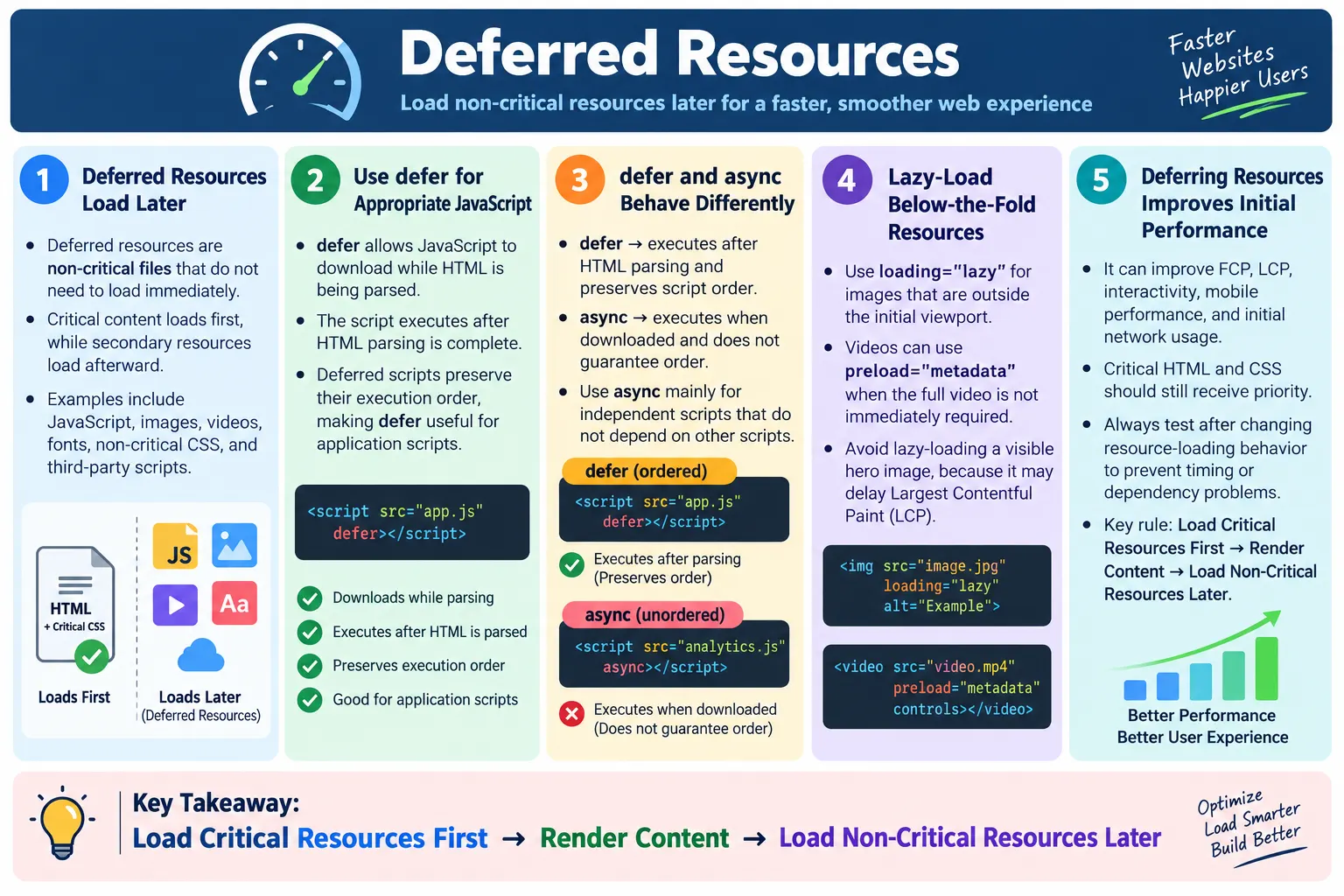
Deferred Resources are website resources that are loaded later instead of during the initial page load. The goal is to prioritize the most important content first and delay non-critical resources until they are actually needed. A fast page does not try to load everything at the same time. It loads what is essential for the first useful view, then loads secondary resources after the page has started rendering or after the user approaches the content that needs them.
Resources that can be deferred include JavaScript files, images, videos, fonts, non-critical CSS, and third-party scripts. These resources may still be important for the full experience, but they may not be required for the first screen. For example, a chat widget may be useful, but the article title should appear before the chat widget loads. A comments section may be useful, but it does not need to block the main content. A below-the-fold image may be attractive, but it does not need to download before the user scrolls near it.
Deferring resources improves page load speed, First Contentful Paint, Largest Contentful Paint, Time to Interactive, and overall user experience. It is especially valuable on mobile devices, where network conditions and CPU performance can vary widely. The user sees useful content sooner while non-essential resources continue loading in the background. This approach makes the site feel faster even when the full page still contains rich functionality.
What Are Deferred Resources?
Deferred resources are files that do not need to be downloaded or executed immediately for the page to display its initial content. They are intentionally delayed so critical content can load first. The browser still loads them, but it loads them later, in a lower priority way, or only when the user needs them. This distinction between critical and non-critical resources is central to web performance.
Browser Requests Page
  ↓
Load Critical Resources
  ↓
Render Initial Content
  ↓
Load Deferred Resources
  ↓
Page Fully Loaded
Users benefit because they can begin reading, navigating, or interacting sooner. The page does not force them to wait for every script, every image, every font, every widget, and every third-party service before showing something meaningful. Deferred loading is therefore not about removing features. It is about loading features in a better order.
The best resource strategy depends on the page. A checkout page may need payment JavaScript quickly, while a blog post may not need comments or social sharing scripts immediately. A course landing page may need a hero image, but student review images can wait. A video page may need a thumbnail quickly, but the full video file can wait until playback begins. Deferral is a prioritization decision, not a one-size-fits-all rule.
Why Deferred Resources Are Important
Without deferring, the browser may try to load too much before rendering. HTML, CSS, JavaScript, images, fonts, third-party scripts, ads, and widgets can compete for network bandwidth and main-thread time. If too many resources are treated as urgent, the initial view is delayed. Users may stare at a blank screen or a partially loaded page while resources that are not immediately needed consume time.
Without Deferring:

HTML
  ↓
CSS
  ↓
JavaScript
  ↓
Images
  ↓
Fonts
  ↓
Render

With Deferred Loading:

HTML
  ↓
Critical CSS
  ↓
Render
  ↓
Deferred JavaScript
  ↓
Deferred Images
  ↓
Deferred Fonts
Deferred loading improves perceived performance. A page that shows the heading, navigation, and main content quickly feels responsive even if recommendations, ads, comments, or secondary images continue loading afterward. This is the same principle used in many fast websites: show the user the primary experience first, then enhance it.
Deferring resources also reduces initial network usage. This is important for users with limited data, slow connections, or mobile devices. It can reduce browser main-thread pressure because scripts and heavy resources do not all execute immediately. Better scheduling often leads to a smoother page and faster interactivity.
Critical vs Deferred Resources
Critical resources are required for the initial page experience. Deferred resources are useful but not required immediately. The classification depends on page purpose. HTML, critical CSS, the hero image, navigation, main content, and essential JavaScript are often critical. Analytics scripts, chat widgets, below-the-fold images, video players, social media widgets, advertisements, and comments are often deferred.
| Critical Resources | Deferred Resources |
|---|---|
| HTML | Analytics scripts |
| Critical CSS | Chat widgets |
| Hero image | Below-the-fold images |
| Navigation | Video players |
| Main content | Social media widgets |
| Essential JavaScript | Advertisement scripts |
The table is a guide, not a fixed law. A chat widget may be critical for a support dashboard but non-critical for a tutorial page. A video player may be critical on a video lesson page but non-critical on an article. The right question is always: Does this resource need to load before users can understand or use the initial page?
Deferred JavaScript
JavaScript often blocks page rendering when it is loaded synchronously. A normal script tag without special attributes can pause HTML parsing while the browser downloads and executes the script. This is useful only when the script must run immediately. For many application scripts, the better approach is to use the defer attribute.
Instead of:

<script src="app.js"></script>

Use:

<script
  src="app.js"
  defer>
</script>
The defer attribute downloads the script while HTML is being parsed, but executes it after HTML parsing is complete. It also preserves the execution order of deferred scripts. This makes it useful for application scripts that depend on the DOM being available or that need to run in a predictable order.
Deferred JavaScript is one of the most common and effective optimization techniques. It allows the browser to continue parsing the document and preparing the page instead of stopping immediately for a script. For content pages, this often improves the first visible experience. For applications, it can help the DOM become ready before scripts enhance behavior.
defer vs async
The defer and async attributes both allow scripts to download without blocking HTML parsing in the same way as a normal script, but they execute differently. A deferred script executes after HTML parsing is complete and preserves script order. An async script executes as soon as it finishes downloading and does not guarantee order. This difference matters when scripts depend on each other.
| defer | async |
|---|---|
| Executes after HTML parsing | Executes immediately after download |
| Preserves script order | Does not guarantee order |
| Best for application scripts | Best for independent scripts |
<script src="app.js" defer></script>

<script src="analytics.js" async></script>
Use defer when the script is part of the page's application logic and order matters. Use async for independent scripts such as analytics or ads when they do not depend on other scripts and other scripts do not depend on them. Choosing the wrong attribute can cause timing bugs, so the decision should match the script's role.
Deferred Images
Images below the visible area can often be loaded later. HTML supports native lazy loading through the loading="lazy" attribute on images. When this attribute is used, the browser can delay loading the image until it approaches the viewport. This reduces initial network usage and helps critical content load faster.
<img
  src="course-image.webp"
  alt="HTML Course"
  loading="lazy">
Lazy loading is especially useful for long pages with many images, such as tutorials, galleries, product lists, documentation pages, and blog posts. Users do not need images that are far below the fold immediately. Loading them only when needed keeps the initial page lighter.
However, lazy loading should not be applied blindly. The hero image, logo, or any image visible immediately should usually load normally. The hero image often contributes to Largest Contentful Paint, and delaying it can hurt performance. The best practice is to load visible images promptly and lazy-load below-the-fold images.
Deferred Videos
Videos can be very large, so they are strong candidates for deferred loading. A page does not usually need to download a full video file during the initial page load unless playback begins immediately. The preload attribute on the <video> element helps control how much video data the browser should load before the user interacts.
<video
  controls
  preload="metadata">
  <source src="course.mp4" type="video/mp4">
</video>
Using preload="metadata" downloads only basic information such as duration and dimensions until the user starts playback. This is usually a good balance for pages where videos are present but not automatically played. It gives the browser enough information to display the player properly without downloading the full media file immediately.
For even stronger deferral, some sites show a video thumbnail first and load the player only when the user clicks. This is common for embedded videos from third-party platforms because full video embeds can load many scripts and network requests. A lightweight thumbnail preserves the visual design while delaying heavy resources.
Deferred Fonts
Custom fonts can delay text rendering if they are not configured carefully. When a browser needs a custom font, it may wait before showing text or may show invisible text briefly depending on font loading behavior. This can make a page feel slow even when the HTML has already loaded. Font optimization ensures text appears quickly.
@font-face {
  font-family: "ExampleFont";
  src: url("example-font.woff2") format("woff2");
  font-display: swap;
}
The font-display: swap rule allows text to appear using a fallback font until the custom font loads. When the custom font becomes available, the browser swaps it in. This avoids a long period of invisible text and improves perceived performance. The page becomes readable sooner.
Fonts should also be limited. Loading many font families, weights, and styles increases network cost. A simple typography system with a small number of font files is faster and easier to maintain. If a font is not needed for the initial view, it may be loaded later or avoided entirely.
Deferred CSS
CSS can be critical or non-critical. Critical CSS is needed to style the above-the-fold content and should load quickly. Non-critical CSS belongs to features that are not visible immediately or are used only in specific situations. Examples include print styles, theme styles, large optional components, modal styles, carousel styles, or rarely used widgets.
Deferring CSS must be done carefully because missing critical CSS can cause flashes of unstyled content or layout shifts. The browser needs enough CSS to render the initial page correctly. The optimization target is not all CSS. It is CSS that is not needed for the first meaningful view.
For static websites, keeping CSS lean may be better than complex CSS deferral. For large applications, splitting CSS by route or component can reduce initial load. The right approach depends on complexity. The principle remains the same: load essential styles first and delay optional styles when practical.
Deferred Third-Party Scripts
Third-party scripts are often expensive. Analytics, live chat, advertising, social sharing widgets, heatmaps, A/B testing tools, tag managers, and embedded media can add network requests, JavaScript execution time, layout changes, and main-thread work. Many of these scripts are useful, but they usually do not need to block the first render.
- Analytics
- Live chat
- Advertising
- Social sharing widgets
- Heatmaps
- Embedded media players
Third-party scripts should be reviewed regularly. If a script is not needed, remove it. If it is needed but not urgent, load it with async, defer it, or trigger it after the main content becomes interactive. Some scripts are business-critical, but many are simply inherited from old experiments and continue to slow the page.
Advertisements require special care because they can affect layout, performance, and user experience. Reserve space for ad containers to reduce layout shift, and avoid letting ads block the main content. The user should be able to see and use the page even while ad resources load.
Browser Workflow
The browser workflow for deferred resources begins with the document. The browser downloads and parses HTML, loads critical CSS, renders the page, then continues loading deferred resources. This order keeps the page focused on visible content first. The user sees progress quickly instead of waiting for every secondary resource.
Download HTML
  ↓
Parse HTML
  ↓
Load Critical CSS
  ↓
Render Page
  ↓
Deferred Resources Load
  ↓
Page Complete
Deferred resources may load in different ways. A deferred script downloads during parsing but executes later. A lazy image loads when near the viewport. A video with metadata preload downloads only basic information. A third-party script may load after interaction or after the main page is interactive. These techniques share the same purpose: protect the initial render.
Good deferral requires testing because timing changes can reveal hidden dependencies. If a script assumes an element exists before it is parsed, deferring it may actually fix the issue. If a script assumes another script has already executed, async loading may break it. Resource loading order must be intentional.
Real-World Example
Consider a course website. The initial load should prioritize the logo, navigation, course title, and enroll button. These elements explain the page and allow the user to act. Student reviews, recommended courses, comments, and advertisements can load later because they support the page but are not required for the first impression.
Initial Load:

Logo
Navigation
Course Title
Enroll Button

Deferred:

Student Reviews
Recommended Courses
Comments
Advertisements
This approach gives users a fast start. They can read the course title and decide whether to continue while secondary sections load lower on the page. It also reduces competition for bandwidth during the initial load. If the user never scrolls to the reviews or comments, some resources may never need to load at all.
The same pattern applies to article pages, product pages, documentation pages, and dashboards. First load the content needed to understand and use the page. Then load enhancements, secondary media, tracking, recommendations, and lower-priority widgets.
HTML Examples
HTML provides simple ways to defer resources. The defer attribute works for external scripts. The loading="lazy" attribute works for images and iframes in modern browsers. The preload attribute on video controls how much media data is fetched. These attributes are small, but they can significantly change loading behavior.
Deferred JavaScript:

<script
  src="main.js"
  defer>
</script>

Lazy-Loaded Image:

<img
  src="html-course.webp"
  alt="HTML Course"
  loading="lazy">

Video Metadata Only:

<video
  controls
  preload="metadata">
</video>
These examples should be applied based on context. Use deferred JavaScript for scripts that can wait until parsing finishes. Use lazy loading for images outside the initial viewport. Use video metadata preload when the user does not need the full video immediately. The best optimization is specific to resource purpose.
Performance Benefits
Deferring resources helps First Contentful Paint because the browser can show text and visible content sooner. It helps Largest Contentful Paint when non-critical resources no longer compete with the main visible element. It can improve Time to Interactive because the browser's main thread is less burdened by non-essential scripts during startup. It also lowers initial network usage and improves mobile performance.
- Faster First Contentful Paint
- Better Largest Contentful Paint
- Faster Time to Interactive
- Lower initial network usage
- Better mobile performance
The benefit depends on what is deferred. Deferring a tiny script may not change much. Deferring a large chat widget, heavy ad script, full video embed, or dozens of below-the-fold images can make a noticeable difference. Performance work should focus on the resources that actually affect the page.
SEO Benefits
Deferred resources can improve page speed, Core Web Vitals support, user experience, and crawl efficiency. These improvements can indirectly support SEO. Search engines want to index useful pages, and users prefer pages that load quickly and remain stable. A page that prioritizes main content is easier to use and often easier to understand.
- Page speed
- Core Web Vitals support
- User experience
- Crawl efficiency
Deferral should not hide important content from search engines. Primary text, main headings, navigation, and important links should be available in the initial HTML where possible. Deferring non-essential resources is helpful; deferring the main content behind unnecessary scripts can create SEO and accessibility problems.
Best Practices
Good deferred loading starts with loading HTML first and prioritizing critical CSS. Use defer for application JavaScript when it can run after parsing. Use async for independent third-party scripts when order does not matter. Lazy-load below-the-fold images, but avoid lazy-loading the hero image. Delay non-essential third-party scripts. Optimize fonts so text appears quickly. Test performance after implementing deferred loading.
- Load HTML first
- Prioritize critical CSS
- Use
deferfor application JavaScript - Use
asyncfor independent third-party scripts - Lazy-load below-the-fold images
- Avoid lazy-loading the hero image
- Delay non-essential third-party scripts
- Optimize fonts
- Test performance after implementing deferred loading
Best practices should be supported by measurement. Use Lighthouse, Chrome DevTools, PageSpeed Insights, and real browser testing to confirm improvements. A theoretical optimization is not enough. The page should actually render faster, remain stable, and preserve functionality.
How to Decide What to Defer
The safest way to decide what to defer is to begin with the user's first task. Ask what the user must see or do during the first few seconds of the visit. On an article page, the title, introduction, navigation, and readable text are usually more important than comments, ads, and related links. On a checkout page, form validation and payment controls may be critical. On a dashboard, the first visible data panel may be critical, while secondary reports can wait. The resource priority should follow the user journey.
Next, review the page in browser developer tools. The Network panel shows which files load first, how large they are, and whether they block other work. The Performance panel shows long tasks, script execution, layout work, and rendering milestones. If a third-party script runs before the main heading appears, it is a candidate for deferral. If a below-the-fold image downloads before visible text appears, it is a candidate for lazy loading. If a stylesheet contains large rules for components not visible on the page, it may be a candidate for splitting or delayed loading.
Finally, test after each change. Deferred loading changes timing, and timing can expose assumptions in code. A script may depend on another script. A widget may expect a container to exist. A lazy-loaded image may need dimensions to avoid layout shift. The correct process is to defer one category of resources, measure the result, and verify that the page still works. This keeps optimization controlled rather than turning it into guesswork.
Common Mistakes
One common mistake is deferring critical JavaScript. If a script is required for the page's initial functionality and must run before the user can interact, deferring it may break the page or delay important behavior. Another mistake is lazy-loading the hero image. The hero image is usually part of the initial view and may contribute to Largest Contentful Paint, so it should normally load immediately.
Bad:

<img
  loading="lazy"
  src="hero.webp">
Deferring required CSS is another problem. Critical CSS should load immediately to avoid unstyled content and layout instability. Loading every script immediately is also a mistake because analytics, advertisements, chat widgets, and social widgets often do not need to block the initial render. Fonts are another area where incorrect handling can make text appear late. Use font strategies that allow text to become visible quickly.
The biggest conceptual mistake is thinking deferral means delaying everything. It does not. Deferral means loading the right resource at the right time. Critical resources still need priority.
Selenium Perspective
Automation testers may verify lazy-loaded images, deferred JavaScript functionality, page rendering, dynamic content loading, and user interaction after deferred resources load. Selenium can inspect attributes such as loading on images and can verify that deferred behavior still works after the page becomes interactive.
WebElement image =
driver.findElement(By.tagName("img"));

System.out.println(
image.getAttribute("loading"));
Selenium can also scroll the page and verify that lazy-loaded content appears when expected. It can click buttons that depend on deferred scripts and confirm that they still work. However, performance tools such as Lighthouse and Chrome DevTools provide more detailed analysis of network timing, render-blocking resources, FCP, LCP, and main-thread work.
A practical testing strategy uses Selenium for behavior and browser performance tools for timing. Deferred resources should improve performance without breaking user workflows.
Common Interview Questions
What are deferred resources? Deferred resources are non-critical files that are loaded after the initial page content has been rendered.
Why defer JavaScript? JavaScript is often deferred to prevent render-blocking and improve page load performance.
What does the defer attribute do? It downloads the script while HTML is being parsed and executes it after parsing is complete.
What is the difference between defer and async? defer preserves execution order and runs after HTML parsing. async executes as soon as the script finishes downloading and does not guarantee execution order.
Should the hero image be lazy-loaded? Generally, no. The hero image is usually visible immediately and often contributes to Largest Contentful Paint.
How do deferred resources improve SEO? They improve page speed and Core Web Vitals support, which enhance user experience and can indirectly benefit SEO.
Comparison Table
| Immediate Loading | Deferred Loading |
|---|---|
| HTML | Analytics scripts |
| Critical CSS | Chat widgets |
| Hero image | Below-the-fold images |
| Navigation | Comments |
| Main content | Advertisements |
| Essential JavaScript | Social media widgets |
Interview-Ready Answer
Deferred Resources are non-critical website resources that are intentionally loaded after the initial page content has been rendered. Common deferred resources include JavaScript, below-the-fold images, videos, fonts, non-critical CSS, and third-party scripts. HTML supports deferred loading through features such as the defer attribute for JavaScript, loading="lazy" for images, and preload="metadata" for videos. Deferring non-essential resources improves page load speed, Core Web Vitals, user experience, and overall website performance while ensuring that critical content is displayed as quickly as possible.
A strong answer should also explain the difference between critical and deferred resources. Critical resources are needed for the first meaningful view, while deferred resources can load later without preventing the user from understanding or using the page. The goal is to load what is needed first and delay everything else until it is useful.
One-Line Insight
Load what is needed first, then defer everything else until the user actually needs it.