Data-Test Attributes
Introduction
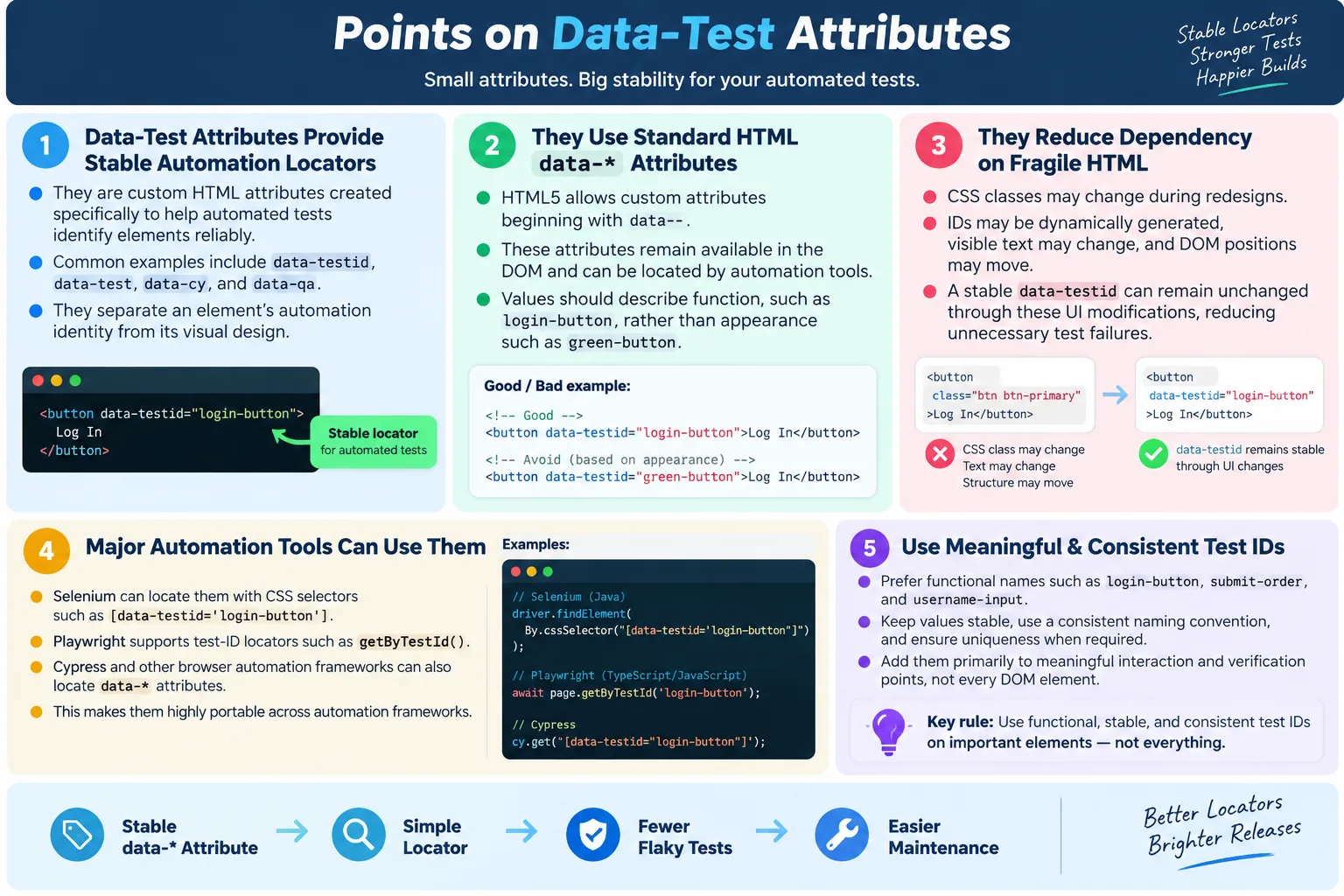
Data-test attributes are custom HTML attributes added specifically to help automation tools identify elements reliably. They are not meant for styling, visual layout, or core application behavior. Their main purpose is to provide stable locators for automated UI tests. In modern testing, this is a major advantage because many web applications change visually more often than they change functionally. A button may move, colors may change, classes may be renamed, and layout containers may be reorganized, but the automation target can remain the same.
Automation tools such as Selenium, Playwright, Cypress, Puppeteer, WebdriverIO, and other browser automation frameworks rely on locators to find elements in the DOM. If a test cannot reliably find the intended element, the rest of the test is unstable. A login test cannot type into the username field if the locator breaks. A checkout test cannot click Place Order if the button is identified by a class that changes during a redesign. Data-test attributes solve this problem by separating automation identity from visual design.
Common data-test attributes include data-testid, data-test, data-cy, and data-qa. These names are conventions chosen by teams and tools. HTML itself does not define one special testing attribute. Instead, HTML5 allows custom attributes through the data-* syntax, and teams use that capability to create meaningful automation hooks. When used consistently, data-test attributes are among the most reliable locator choices available in UI automation.
What Are Data-Test Attributes?
HTML5 allows developers to create custom attributes using the data-* syntax. Any attribute that starts with data- is valid as a custom data attribute. The browser keeps it in the DOM, JavaScript can read it, CSS selectors can match it, and automation tools can locate elements through it. Data-test attributes are simply custom data attributes used for testing and automation.
<button
  data-testid="login-button">
  Login
</button>
In this example, data-testid is a custom attribute. Its value, login-button, describes the purpose of the element. The attribute is not saying that the button should be blue, rounded, or large. It is not tied to the page layout. It tells automation that this element is the login button. That distinction is important because functional identity is usually more stable than styling.
A data-test attribute is most useful when it describes what the element does or represents. A value such as login-button is meaningful. A value such as green-button is weaker because it depends on color. If the design changes from green to blue, the attribute becomes misleading even if it still works technically. Good test attributes describe function, not appearance.
Why Are They Needed?
Without data-test attributes, tests often depend on classes, generated IDs, visible text, or DOM position. Those can work in simple applications, but they are often fragile. A class name may change because the design system changed. An ID may be generated dynamically. Visible text may change because content is updated or translated. DOM position may change because a new wrapper div is added. Each of these changes can break automation even when the user's workflow still works.
HTML
  ↓
Class Name Changes
  ↓
Automation Breaks
With data-test attributes, the visual implementation can change while the automation hook remains stable. The test does not need to care whether the button uses btn primary large today and button green tomorrow. It locates the same element through data-testid="login-button". This keeps automated tests focused on behavior instead of design details.
HTML
  ↓
data-testid Remains Same
  ↓
Automation Continues Working
This separation is especially valuable in teams where frontend development moves quickly. Modern applications frequently refactor components, update CSS frameworks, adjust responsive layouts, and redesign screens. A test suite that depends on styling classes becomes expensive to maintain. A test suite that uses stable data-test attributes can survive normal UI evolution with far fewer false failures.
How They Work
Data-test attributes work because they appear in the DOM like any other HTML attribute. The automation tool searches the DOM using a CSS selector, XPath expression, or a framework-specific API. Once the element is found, the tool can click it, type into it, read its text, check its state, or validate its attributes. The attribute itself does not perform the action. It simply gives the automation tool a stable way to find the correct element.
HTML
  ↓
DOM
  ↓
Automation Tool
  ↓
Locate data-testid
  ↓
Perform Action
For example, Selenium can locate a data-test attribute with a CSS attribute selector. Playwright can use getByTestId when configured for the project's test ID attribute. Cypress can use cy.get with the same CSS selector. Puppeteer and WebdriverIO can also locate attributes using selectors. The attribute is simple HTML, so almost every browser automation tool can use it.
The key advantage is that the locator reads like the business intention. A selector such as [data-testid='submit-order'] tells the reader exactly what the test is trying to interact with. A selector such as .btn.primary.large tells the reader about styling but not about purpose. Readability matters because automation code is maintained over time by multiple people.
Example Without Data Attribute
Consider a login button without a data-test attribute. It may have classes used for styling. A tester might create a locator based on those classes because nothing else is available.
<button class="btn primary large">
  Login
</button>By.cssSelector(".btn.primary.large")This locator works only as long as the classes remain the same and only as long as those classes identify the intended element uniquely. If the design changes, the classes may change. The button might become class="button green". The application behavior is still correct, but the locator fails because it was tied to visual styling.
<button class="button green">
  Login
</button>
This kind of failure is frustrating because it is not a real product defect. It is automation maintenance caused by a weak locator. The test is supposed to verify that login works. Instead, it fails because the button's design class changed. Data-test attributes prevent this unnecessary coupling.
Example With Data Attribute
Now consider the same button with a data-test attribute. The styling classes can change, but the automation hook remains stable.
<button
  class="button green"
  data-testid="login-button">
  Login
</button>By.cssSelector("[data-testid='login-button']")This locator is independent of CSS classes. It does not care whether the button is green, blue, large, small, rounded, or flat. It cares that the element is the login button. That is what makes data-test attributes reliable. They allow tests to locate elements by functional identity.
The attribute can remain stable across releases even when the DOM structure changes. The button may move from the top of the form to the bottom. A wrapper may be added. A responsive layout may place it in a different container on mobile. As long as the element still represents the login button and the attribute remains, the locator continues to work.
Common Data-Test Attributes
Different teams use different naming conventions. Some use data-testid, which is common in React Testing Library and Playwright examples. Some use data-test as a general automation convention. Cypress teams often use data-cy. QA teams sometimes use data-qa. These names are all valid because they follow the HTML data-* rule.
| Attribute | Common Usage |
|---|---|
data-testid |
React Testing Library, Playwright, Selenium |
data-test |
General automation |
data-cy |
Cypress |
data-qa |
QA automation teams |
The exact name matters less than consistency. A project should choose one convention and use it across the application. Mixing data-testid, data-test, data-cy, and data-qa randomly creates confusion. Consistency helps testers know what to expect when they inspect the DOM.
HTML Example
A login form with data-test attributes becomes easy to automate. The username input, password input, and login button each expose a stable automation identity. The form can be styled, moved, or redesigned without changing the test locators.
<form>
  <input
    data-testid="username-input"
    type="text">

  <input
    data-testid="password-input"
    type="password">

  <button data-testid="login-button">
    Login
  </button>
</form>
This HTML is clear for automation. A tester does not need to depend on input order, placeholder text, visual classes, or the internal component structure. The important elements announce their automation identity directly. This is a small markup addition that can remove a large amount of test fragility.
Selenium Example
Selenium does not need a special API for data-test attributes. It can use CSS attribute selectors. This makes the approach simple and portable. The same selector pattern works for many tools.
Locate username:

driver.findElement(
  By.cssSelector("[data-testid='username-input']"));

Locate password:

driver.findElement(
  By.cssSelector("[data-testid='password-input']"));

Locate login button:

driver.findElement(
  By.cssSelector("[data-testid='login-button']"));
These locators are readable. If a test fails at the login button step, another engineer can immediately understand which element the test expected to find. This reduces debugging time. In a page object model, these selectors can be stored once and reused across tests.
Playwright Example
Playwright has built-in support for test ID locators. By default, getByTestId commonly targets data-testid, and the test ID attribute can be configured if a project uses another convention. This makes data-test attributes feel like a first-class locator strategy.
await page.getByTestId("login-button").click();This style is expressive. It reads as: get the element with test ID login-button and click it. The test code does not expose CSS selector syntax directly. The framework abstracts the attribute convention, and the test remains clean.
Cypress Example
Cypress projects often use data-cy or data-testid. A common pattern is to select elements by data attribute using cy.get. Some teams also create custom Cypress commands such as cy.getByTestId to make tests more readable.
cy.get("[data-testid='login-button']")
  .click();
<button data-cy="login-button">
Login
</button>The Cypress community strongly encourages avoiding brittle selectors such as classes and deeply nested DOM paths. Data-test attributes fit that recommendation well because they create selectors specifically for testing.
HTML Impact
Good HTML gives testers multiple stable choices. A button might have an ID and a data-test attribute. An input might have a name, label, and test ID. When HTML is written with testability in mind, automation becomes simple. Poor HTML gives testers only styling classes or layout position, which leads to fragile locators.
<button
  id="login"
  data-testid="login-button">
  Login
</button>
In this good example, automation can use the ID or the data-test attribute. Both are meaningful. In poor HTML, the same button may have only class="btn btn-success". That class tells the browser how to style the button, but it does not communicate the button's business purpose. Automation is stronger when HTML exposes purpose.
Naming Best Practices
Data-test attributes are only useful if they are named well. Good names describe the purpose of the element. They should be clear, stable, and easy to read. Examples include login-button, submit-order, username-input, search-box, and menu-item. These values tell the reader what the element is used for.
login-buttonsubmit-orderusername-inputsearch-boxmenu-item
Bad names are vague or appearance-based. Values such as button1, abc, test, btn, and element do not communicate intent. They may technically work, but they make tests harder to understand and maintain. A data-test attribute should be treated as part of the testing contract, not as a random marker.
Browser Workflow
The browser workflow is straightforward. The page contains HTML. The browser converts that HTML into the DOM. The data-test attribute exists in the DOM. The automation tool uses a locator to find that attribute, then interacts with the element.
HTML
  ↓
DOM
  ↓
data-testid
  ↓
Automation Locator
  ↓
Element Found
This workflow is important because automation locates the current DOM, not just the original source file. If JavaScript renders a component after an API call, the data-test attribute becomes available only after that component appears. Good test code still needs appropriate waits. Data-test attributes solve locator stability, but they do not replace synchronization.
Advantages
Data-test attributes provide stable locators, independence from CSS changes, independence from UI redesigns, readable tests, easier maintenance, fewer flaky tests, and compatibility with major automation tools. They are especially helpful in component-based applications where generated class names and nested markup can make traditional selectors difficult.
- Stable locators
- Independent of CSS changes
- Independent of UI redesigns
- Easy to read
- Easy to maintain
- Reduces flaky tests
- Works with all major automation tools
The biggest practical advantage is reduced maintenance. If a team regularly changes CSS classes or page layout, tests based on those details will need constant updates. Data-test attributes allow the application to evolve while tests remain focused on stable user workflows.
Where Data-Test Attributes Should Be Added
Data-test attributes should be added where automation needs a stable and meaningful point of interaction or verification. The best candidates are elements that represent business actions, user inputs, important messages, and visible results. Login buttons, search boxes, checkout buttons, payment method controls, error alerts, confirmation messages, menu items, tabs, filters, table rows, and cards are common examples. These are elements that tests repeatedly use to prove that the application works.
Not every HTML element needs a data-test attribute. Decorative containers, layout-only divs, icons that do not have independent behavior, and purely visual wrappers usually do not need test IDs. Adding attributes everywhere can make markup noisy and harder to manage. The goal is not to mark every node in the DOM. The goal is to expose stable hooks at the points where tests need to interact with the product.
A practical rule is to add data-test attributes to elements that appear in automated test steps or assertions. If a test clicks it, types into it, selects it, checks its visibility, reads its text, or validates its state, it is a reasonable candidate. If an element exists only to support CSS layout, it is probably not a good candidate. This keeps the markup clean while still supporting reliable testing.
Data-Test Attributes in Component-Based UI
Modern frontend applications are often built with reusable components. A button component may appear on many pages. A modal component may show different content depending on the workflow. A table component may render rows from API data. In these systems, data-test attributes should be designed carefully so that repeated components remain testable without creating duplicate or confusing locators.
For a reusable component, the component can accept a test ID as a prop or configuration value. For example, the same button component might render data-testid="login-button" on the login page and data-testid="submit-order" on the checkout page. This approach keeps the component reusable while allowing each business use case to expose a meaningful automation identifier.
Repeated rows and cards require extra care. If every row in a user table has data-testid="user-row", that may be useful for counting rows, but it may not be enough to identify one specific user. A better approach may include a stable identifier, such as data-testid="user-row" plus data-user-id="12345", or a child element with a meaningful test ID inside the row. The exact design depends on the application, but the principle is the same: make automation identity clear without relying on row position.
How Data-Test Attributes Reduce Flakiness
Flaky tests are tests that sometimes pass and sometimes fail without a real product change. Timing issues are one cause of flakiness, but weak locators are another major cause. If a locator matches multiple elements, sometimes the test may interact with the wrong one. If a locator depends on a class that appears only after an animation, the test may fail before the class is applied. If a locator depends on a generated ID, it may pass in one environment and fail in another.
Data-test attributes reduce this kind of flakiness because they are explicit and stable. The test can locate the intended element directly instead of depending on side effects of layout or styling. A good test ID is not affected by hover classes, responsive classes, animation classes, or theme changes. This makes test behavior more predictable.
They also help when debugging failures. If a test fails to find [data-testid='payment-submit'], the developer or tester can inspect the DOM and quickly see whether the payment submit element is missing, hidden, renamed, or not yet rendered. The locator itself is understandable. That shortens investigation time compared with debugging a long selector chain that gives no clue about the intended business element.
Governance and Team Standards
Data-test attributes work best when teams agree on standards. Without standards, one page may use data-testid, another may use data-test, another may use data-cy, and another may use classes. This creates inconsistency and slows down test development. A simple team convention avoids that problem.
A good standard should define the attribute name, naming style, uniqueness expectations, and when attributes should be added. For example, a team may decide to use data-testid, lowercase hyphen-separated values, functional names, and stable values for all business-critical controls. The standard may also say that visual names such as red-button are not allowed and that unnecessary renaming should be avoided.
Code review can enforce the convention. When a developer adds a new feature, reviewers can check whether important controls have stable test attributes. When a tester sees fragile locators in a test, they can request better HTML hooks instead of building more complex selectors. This makes testability part of normal development quality.
Production HTML Considerations
Some teams ask whether data-test attributes should remain in production HTML. In many applications, they do remain in production because they are harmless, small, and useful for testing against production-like builds. They do not expose sensitive information if named properly. A value such as submit-order or login-button does not reveal anything secret. It simply identifies a visible element that users can already interact with.
Other teams remove test attributes during production builds. This can be done with build tooling, but it introduces a tradeoff. If production removes the attributes, tests that run against production or production-like environments cannot use them. The team then needs a clear strategy for which environments support which locators. For many teams, keeping stable test attributes in production is simpler and more reliable.
The important rule is to avoid putting confidential data into test attributes. Do not include private customer information, tokens, internal secrets, or environment-specific sensitive values. Test attributes should describe UI elements, not expose data. With sensible naming, they are safe and practical.
Limitations
Data-test attributes are powerful, but they have limitations. They require developer support because the attributes must be added to the HTML. Teams must agree on naming conventions. Values must remain stable over time. If a team changes login-button to login-btn without a real reason, tests will fail just as they would with any locator change.
There is also a balance to maintain. Adding data-test attributes to every element can make markup noisy. The goal is not to decorate the entire DOM with automation markers. The goal is to expose stable hooks for meaningful elements that tests need to interact with or verify. Critical workflow controls, important messages, reusable components, and business-significant data are the right places to start.
Best Practices
Use meaningful names. Keep names unique within the page when the test needs a unique target. Use one naming convention across the project. Do not use styling information in attribute values. Keep values stable across releases. Prefer data-test attributes over fragile locators when available.
- Use meaningful names
- Keep names unique within the page
- Use one naming convention across the project
- Do not use styling information in attribute values
- Keep values stable across releases
- Prefer
data-*attributes over fragile locators when available
Teams should also document the convention. For example, a project may decide that all automation attributes use data-testid and values use lowercase words separated by hyphens. That simple rule prevents inconsistency. Developers and testers should both know the convention so new pages are built correctly from the beginning.
Common Mistakes
A common mistake is using dynamic values. A value such as btn12345 is not a good test ID because it does not describe the element and may change. A better value is login-button. Another mistake is using visual language such as green-button. If the button color changes, the value becomes misleading. Functional names are better.
Bad:

<button data-testid="btn12345">

Better:

<button data-testid="login-button">
Duplicate values are another problem. If two buttons on the same page both use data-testid="button", the locator may match the wrong element or multiple elements. If uniqueness is required, the value should uniquely identify the target in that context. Frequent renaming is also harmful. Changing login-button to login-btn without necessity creates avoidable maintenance.
Selenium Perspective
From a Selenium perspective, data-test attributes are often considered one of the best locator choices because they remain stable, improve readability, reduce flaky tests, simplify maintenance, and are independent of UI styling. They work through normal CSS selectors, so no special Selenium feature is required.
driver.findElement(
  By.cssSelector("[data-testid='submit-order']"))
  .click();
In a page object model, data-test selectors can be defined once and reused. This keeps the test code clean and centralizes locator maintenance. If a business workflow changes, the page object can be updated deliberately. If only visual design changes, the test locators usually remain untouched.
Locator Comparison
| Locator | Stability | Purpose |
|---|---|---|
data-testid |
Very High | Automation |
id |
Very High | Element identification |
name |
High | Forms |
class |
Medium | Styling |
| XPath | Medium | Complex navigation |
| Absolute XPath | Very Low | Avoid |
The table shows why data-test attributes are highly valued. They are created for automation, so their purpose matches the test's need. IDs can be equally strong when stable and unique. Classes are weaker when used only for styling. XPath is powerful, but it should be used carefully and preferably as relative XPath rather than absolute XPath.
Common Interview Questions
What are data-test attributes? They are custom HTML data-* attributes created specifically to provide stable locators for automated testing.
Why use data-testid? It provides a stable locator that is independent of styling and layout changes.
Are data-test attributes part of HTML? They are valid HTML5 custom data attributes because they use the standard data-* syntax. Names such as data-testid and data-cy are project conventions, not special HTML keywords.
Which automation tools support them? They can be used with virtually any tool that supports CSS or attribute selectors, including Selenium, Playwright, Cypress, Puppeteer, and WebdriverIO.
Should testers prefer data-test attributes? Yes, when they are available and maintained consistently, they are often among the most reliable locator options.
Why not use CSS classes? Classes are primarily intended for styling and may change during UI redesigns, making tests more fragile.
Interview-Ready Answer
Data-test attributes are custom HTML data-* attributes, such as data-testid, data-test, or data-cy, added specifically to provide stable locators for automated UI testing. Unlike CSS classes or dynamic IDs, they are not tied to styling or layout, making automation scripts more reliable and easier to maintain.
Automation frameworks such as Selenium, Playwright, and Cypress can locate elements using these attributes through CSS selectors or built-in APIs. Using meaningful, stable, and consistently named data-test attributes is considered a best practice for creating robust UI automation tests.
One-Line Insight
Data-test attributes separate automation from UI design, making tests stable even when the interface changes.