Critical Rendering Path (HTML Role)
Introduction
Every webpage that appears on a browser screen goes through a complex sequence of operations before users can see and interact with it. Although modern browsers perform these operations within milliseconds, a significant amount of processing occurs behind the scenes. The browser must download resources, understand the structure of the document, determine how elements should look, calculate where they should appear, and finally paint them on the screen. This entire sequence is known as the Critical Rendering Path (CRP).
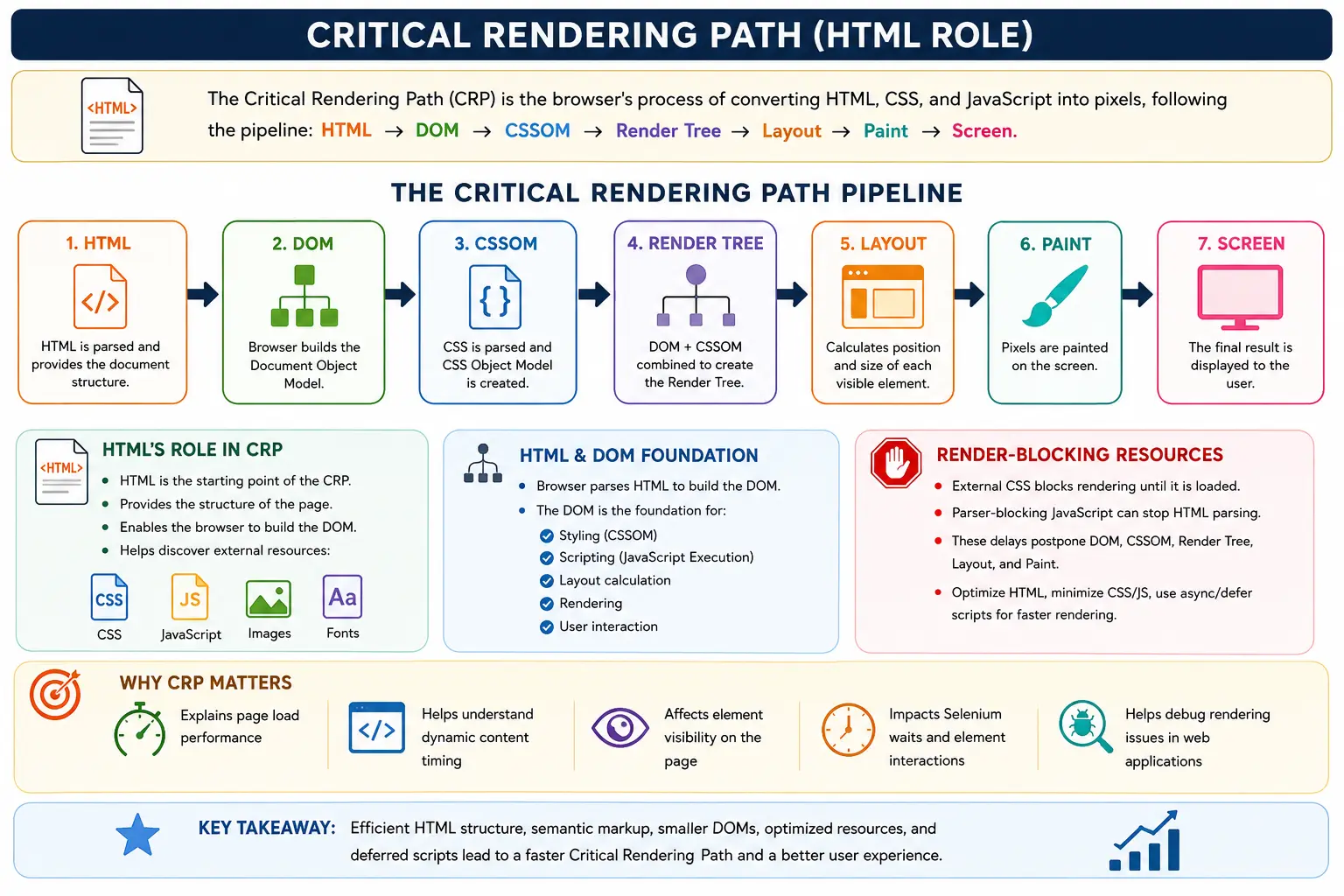
The Critical Rendering Path is one of the most important concepts in web development, browser performance optimization, frontend engineering, and UI automation. It explains how browsers transform HTML, CSS, and JavaScript into a visible webpage. Understanding the Critical Rendering Path helps developers build faster websites, optimize performance, reduce loading times, and create better user experiences.
From an HTML perspective, the Critical Rendering Path begins with HTML itself. HTML serves as the foundation of the entire rendering process. Without HTML, there would be no DOM, no resource discovery, no render tree, and ultimately no webpage. HTML acts as the starting point that initiates every subsequent stage of browser rendering.
For web developers, understanding HTML's role in the Critical Rendering Path helps improve page speed and optimize website performance. For Selenium and Playwright testers, it helps explain synchronization issues, dynamic content loading, element visibility problems, and the need for waits. For performance engineers, it provides insight into how browsers process resources and what factors delay rendering.
In simple terms, the Critical Rendering Path is the browser's journey from receiving HTML code to displaying pixels on the screen, and HTML is the first and most fundamental step in that journey.
What Is the Critical Rendering Path?
The Critical Rendering Path refers to the sequence of browser operations required to convert web resources into a visual webpage.
At a high level, the process looks like this:
HTML
 ↓
DOM
 ↓
CSSOM
 ↓
Render Tree
 ↓
Layout
 ↓
Paint
 ↓
Screen
Each step depends on the previous one. The browser cannot skip any of these stages if it wants to display a webpage correctly.
The goal of the Critical Rendering Path is simple:
Display meaningful content to users as quickly as possible.
Users do not care how complicated a webpage is internally. They only care about how quickly content becomes visible and interactive. Therefore, browsers optimize the Critical Rendering Path heavily to reduce the time between requesting a webpage and displaying it.
Whenever a webpage feels slow, one or more stages in the Critical Rendering Path are typically responsible.
Why Is It Called "Critical"?
The word critical is used because these rendering operations are essential for displaying content.
The browser cannot show a webpage until certain tasks are completed.
For example:
No HTML
   ↓
No DOM

No DOM
   ↓
No Render Tree

No Render Tree
   ↓
No Layout

No Layout
   ↓
No Paint
Each stage is dependent on previous stages.
If HTML downloads slowly, rendering starts late.
If CSS files are large and slow to download, render tree creation is delayed.
If JavaScript blocks parsing, DOM creation slows down.
If layout calculations become expensive, painting is delayed.
Since these steps directly affect how quickly users see content, they are considered critical.
HTML's Position in the Critical Rendering Path
HTML sits at the very beginning of the rendering pipeline.
The browser cannot begin rendering until it receives HTML.
The process starts like this:
HTML
 ↓
DOM
 ↓
CSSOM
 ↓
Render Tree
 ↓
Layout
 ↓
Paint
Everything depends on HTML.
HTML provides:
- Content structure
- Element hierarchy
- Resource discovery
- DOM creation input
Without HTML, the browser has nothing to parse and nothing to render.
This makes HTML the foundation of the Critical Rendering Path.
Step 1: Browser Downloads HTML
The first stage begins when a user enters a URL.
Example:
https://softwaretips4u.comThe browser sends an HTTP request:
GET /The server responds with HTML:
<!DOCTYPE html>
<html>
<body>
    <h1>SoftwareTips4U</h1>
</body>
</html>
At this moment, the browser has only received text.
Nothing has been rendered yet.
The browser cannot display the page simply because it possesses the HTML source. It must first understand what that HTML means.
This leads to the next stage.
Step 2: HTML Parsing Begins
Once HTML arrives, the browser immediately starts parsing it.
Modern browsers do not wait for the entire HTML file before beginning processing. Instead, they parse incrementally as data arrives.
Example:
<body>
    <h1>Hello</h1>
</body>
The parser reads:
body
h1
text
The browser identifies:
- Start tags
- End tags
- Attributes
- Text nodes
- Parent-child relationships
HTML parsing is the first major activity in the Critical Rendering Path.
Without parsing, the browser cannot understand document structure.
Step 3: DOM Creation
As parsing continues, the browser converts HTML into the Document Object Model (DOM).
Example HTML:
<body>
    <h1>Hello</h1>
</body>
Generated DOM:
Document
 │
 html
 │
 body
 │
 h1
 │
 Hello
This transformation is extremely important.
The browser cannot work directly with HTML text.
Instead, it needs an object-based representation.
The DOM provides that representation.
HTML's primary contribution to the Critical Rendering Path is DOM creation.
Everything else depends on the existence of the DOM.
Why DOM Creation Is Critical
The DOM serves as the foundation for rendering.
Without the DOM:
- CSS cannot be applied
- JavaScript cannot manipulate elements
- Layout cannot be calculated
- Rendering cannot occur
Think of the DOM as the browser's internal model of the webpage.
HTML is only the blueprint.
The DOM is the actual structure the browser uses.
The browser's rendering engine relies on the DOM for nearly every visual operation.
This is why HTML parsing and DOM creation are considered critical rendering tasks.
HTML as a Resource Discovery Mechanism
HTML does more than create the DOM.
HTML also tells the browser where additional resources exist.
Example:
<link rel="stylesheet" href="style.css">

<script src="app.js"></script>

<img src="logo.png">
During parsing, the browser discovers:
- CSS files
- JavaScript files
- Images
- Fonts
- Videos
- External resources
This process is called resource discovery.
HTML acts as a map that guides the browser toward required resources.
Without HTML, the browser would not know what assets need downloading.
Step 4: CSS Discovery
As HTML parsing continues, the browser encounters CSS references.
Example:
<link rel="stylesheet" href="style.css">The browser immediately initiates a request for the stylesheet.
Process:
HTML Parser
      ↓
Discovers CSS
      ↓
Downloads CSS
The browser understands that CSS affects visual appearance.
Therefore, CSS becomes part of the Critical Rendering Path.
The sooner CSS is discovered, the sooner rendering can continue.
Step 5: CSSOM Creation
After CSS is downloaded, the browser parses it.
Example:
h1 {
    color: blue;
}
The browser converts CSS into the CSS Object Model (CSSOM).
The CSSOM contains styling information.
It tells the browser:
- Colors
- Fonts
- Sizes
- Margins
- Padding
- Layout rules
Without CSSOM, the browser knows what elements exist but does not know how they should appear.
Step 6: Render Tree Creation
The browser now combines:
DOM
+
CSSOM
to create:
Render TreeExample:
DOM:
h1CSSOM:
color: blueRender Tree:
h1 (blue)The Render Tree contains:
- Visible elements
- Their associated styles
Not every DOM element appears in the Render Tree.
Example:
<div style="display:none">This element exists in the DOM but is excluded from the Render Tree.
The Render Tree becomes the browser's visual model.
Step 7: Layout Calculation
Once the Render Tree exists, the browser calculates layout.
Layout determines:
- Width
- Height
- Position
- Margins
- Padding
- Spacing
Example:
Header → Top
Sidebar → Left
Content → Center
Footer → Bottom
The browser must determine exactly where every visible element belongs.
This process is also known as reflow.
Layout can become expensive when pages contain:
- Large DOM trees
- Complex CSS
- Dynamic resizing
- Frequent DOM updates
Step 8: Painting
After layout is complete, the browser begins painting.
Painting involves drawing:
- Text
- Colors
- Images
- Borders
- Backgrounds
- Shadows
Example:
Draw Heading
Draw Paragraph
Draw Image
Draw Button
This is the stage where actual pixels are produced.
Once painting completes, users can see the webpage.
The page becomes visually available.
HTML's Core Responsibilities in the Critical Rendering Path
HTML plays several critical roles.
Creating the DOM
HTML provides the source required for DOM creation.
HTML
 ↓
DOM
Without HTML, no DOM exists.
Discovering Resources
HTML tells the browser where resources are located.
Examples:
<link>
<script>
<img>
These elements trigger additional downloads.
HTML acts as the browser's roadmap.
Defining Structure
HTML determines:
- Headings
- Sections
- Forms
- Tables
- Lists
- Images
These structures become DOM nodes.
The overall shape of the webpage originates from HTML.
HTML and Render Blocking
Some HTML elements can slow down the Critical Rendering Path.
CSS as a Render-Blocking Resource
Example:
<link rel="stylesheet" href="style.css">Browsers often delay rendering until CSS is downloaded and parsed.
Process:
HTML
 ↓
Download CSS
 ↓
Create CSSOM
 ↓
Render
This behavior prevents users from seeing unstyled content.
JavaScript as a Parser-Blocking Resource
Traditional scripts can stop HTML parsing.
Example:
<script src="app.js"></script>Process:
HTML Parsing
     ↓
Pause
     ↓
Download JS
     ↓
Execute JS
     ↓
Resume Parsing
This happens because JavaScript can modify the DOM.
The browser must execute it before continuing.
Large JavaScript files can significantly delay rendering.
HTML Optimization for Faster Rendering
Since HTML starts the Critical Rendering Path, optimizing HTML can improve performance.
Keep HTML Small
Large HTML files require more download time.
Example:
Thousands of unnecessary nodeslead to:
Slower Parsing
 ↓
Slower DOM Creation
Clean HTML improves performance.
Reduce DOM Size
Excessive nesting increases browser work.
Poor structure:
<div>
  <div>
    <div>
      <div>
Better structure:
<section>Fewer nodes mean:
- Faster parsing
- Faster DOM creation
- Faster layout
Use Semantic HTML
Example:
<header>
<nav>
<main>
<footer>
Benefits include:
- Cleaner structure
- Better accessibility
- Easier maintenance
- More meaningful DOM
Semantic HTML indirectly improves rendering efficiency.
Load Scripts Efficiently
Traditional scripts block parsing.
Instead of:
<script src="app.js"></script>use:
<script defer src="app.js"></script>This allows:
HTML Parsing
     ↓
Continue
     ↓
Execute JS Later
which improves rendering speed.
Real-World Example
When opening Amazon, the Critical Rendering Path looks like:
Request Amazon Page
        ↓
Receive HTML
        ↓
Parse HTML
        ↓
Create DOM
        ↓
Discover CSS
        ↓
Download CSS
        ↓
Create CSSOM
        ↓
Build Render Tree
        ↓
Calculate Layout
        ↓
Paint Products
        ↓
Display Page
Although this entire sequence may take only fractions of a second, every visible page follows these same fundamental steps.
Why This Matters for Selenium
Understanding the Critical Rendering Path helps explain many automation problems.
Common situations include:
HTML Loaded
DOM Created
CSS Not Ready
or
DOM Exists
JavaScript Still Running
This leads to:
- Elements existing but not visible
- Dynamic content still loading
- Timing issues
- Stale element exceptions
- Click interception errors
Understanding CRP helps testers determine:
- When elements become available
- Why explicit waits are necessary
- Why page load completion does not guarantee UI readiness
Common Interview Questions
Does HTML create the Render Tree?
No.
HTML creates the DOM.
The Render Tree is created from:
DOM + CSSOMWhat is HTML's role in the Critical Rendering Path?
HTML provides:
- Document structure
- DOM creation
- Resource discovery
Everything begins with HTML.
Which step comes first?
The first rendering step is:
HTML Parsing
      ↓
DOM Creation
All other rendering operations depend on it.
Interview-Ready Answer
The Critical Rendering Path is the sequence of browser operations that convert HTML, CSS, and JavaScript into pixels on the screen. HTML plays the foundational role by providing the document structure, enabling DOM creation, and discovering resources such as CSS and JavaScript. Since every subsequent rendering step depends on the DOM generated from HTML, HTML serves as the starting point of the entire rendering process.
Conclusion
The Critical Rendering Path is the browser's roadmap from code to pixels. While many components participate in rendering, HTML is the foundation that makes everything possible. HTML provides the structure of the document, initiates DOM creation, discovers external resources, and enables the browser to begin building the webpage.
Every visible page on the internet starts with HTML. Before CSS can style elements, before JavaScript can manipulate content, before the rendering engine can calculate layout, and before pixels can appear on the screen, HTML must be downloaded and parsed. This makes HTML the most fundamental input in the Critical Rendering Path.
For developers, understanding HTML's role helps create faster websites. For testers, it helps explain rendering delays and synchronization issues. For performance engineers, it highlights why optimizing HTML structure, reducing DOM complexity, and minimizing render-blocking resources are essential.
One-Line Insight
In the Critical Rendering Path, HTML is the starting point that creates the DOM and initiates every operation required to render a webpage.